

Prerequisites
The connector should already be set up, with a Connector Profile and a Linked Account. See Getting Started on the UKG Ready connector page.Get your Native Webhook URL and Auth Token
StackOne generates a per-connection webhook URL and a matching auth token. You will paste the URL as the UKG Ready Endpoint URL and the token as the Bearer authentication token.
- In StackOne, open the Linked account for this connection and copy the Native Webhook URL.
- From the same Linked account, copy the Webhook Auth Token — this is the value you will use as the Bearer token.
Open Webhook Subscriptions in UKG Ready
Webhook subscriptions are configured under Global Setup. Sign in to UKG Ready as an administrator.
Open the main menu and go to Global Setup
Click the ≡ (main menu) at the top-left, select the Settings category, then click Global Setup. Its submenu opens with Webhook Subscriptions listed.
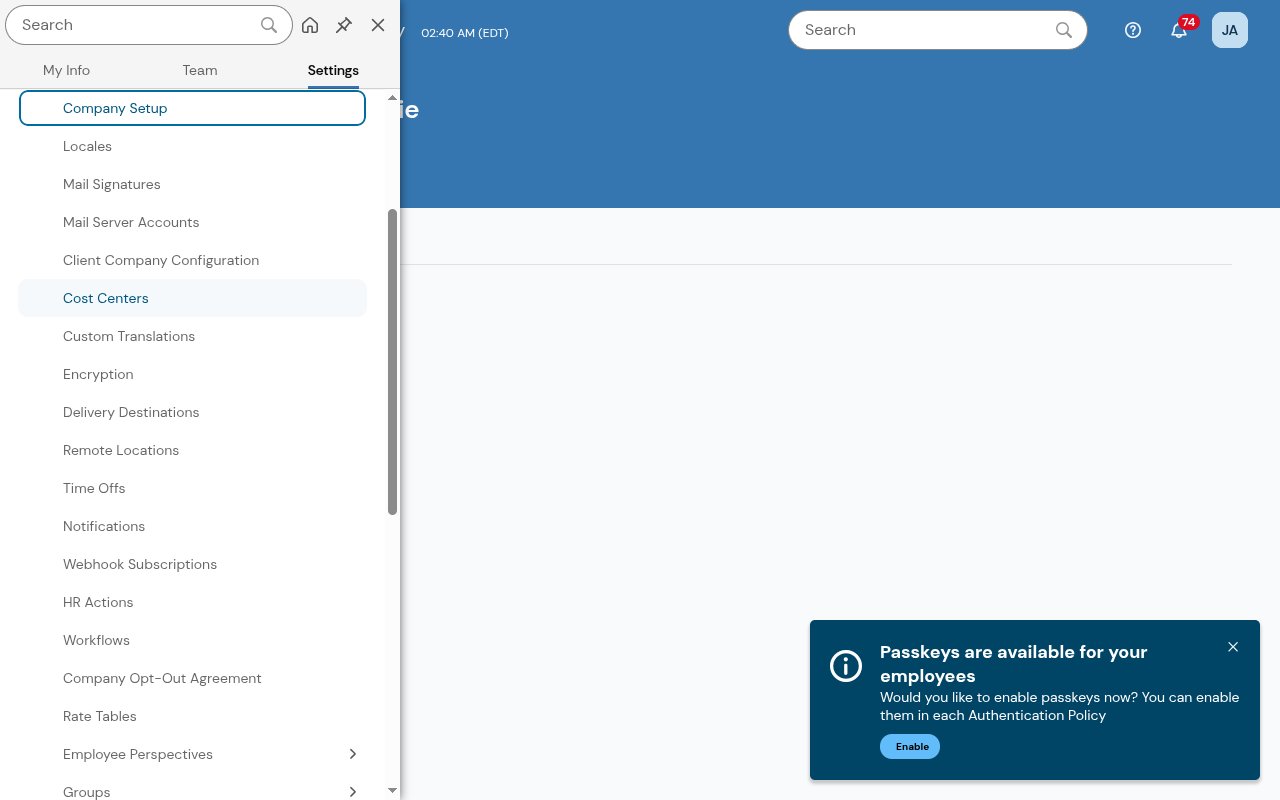
Open Webhook Subscriptions
Click Webhook Subscriptions. The list of existing subscriptions opens. Click New Subscription to add one.
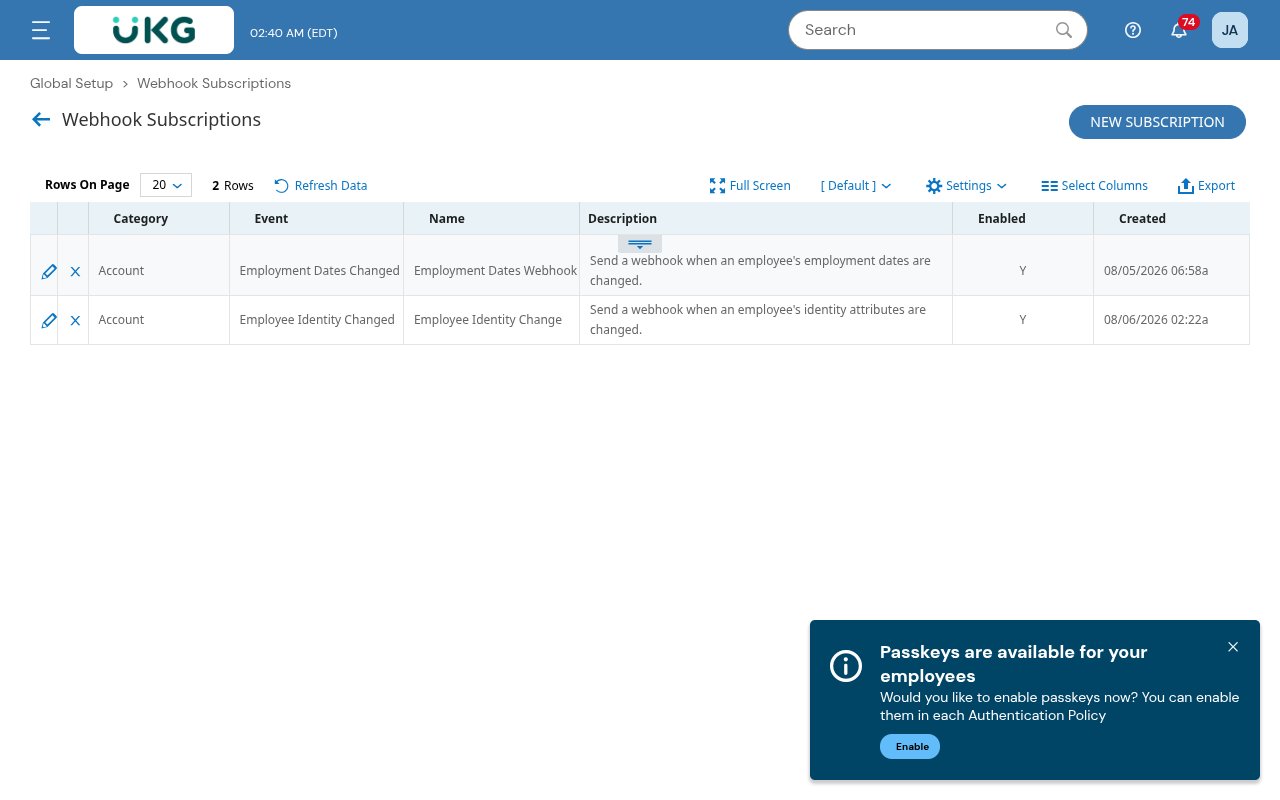
Choose the event and configure the subscription
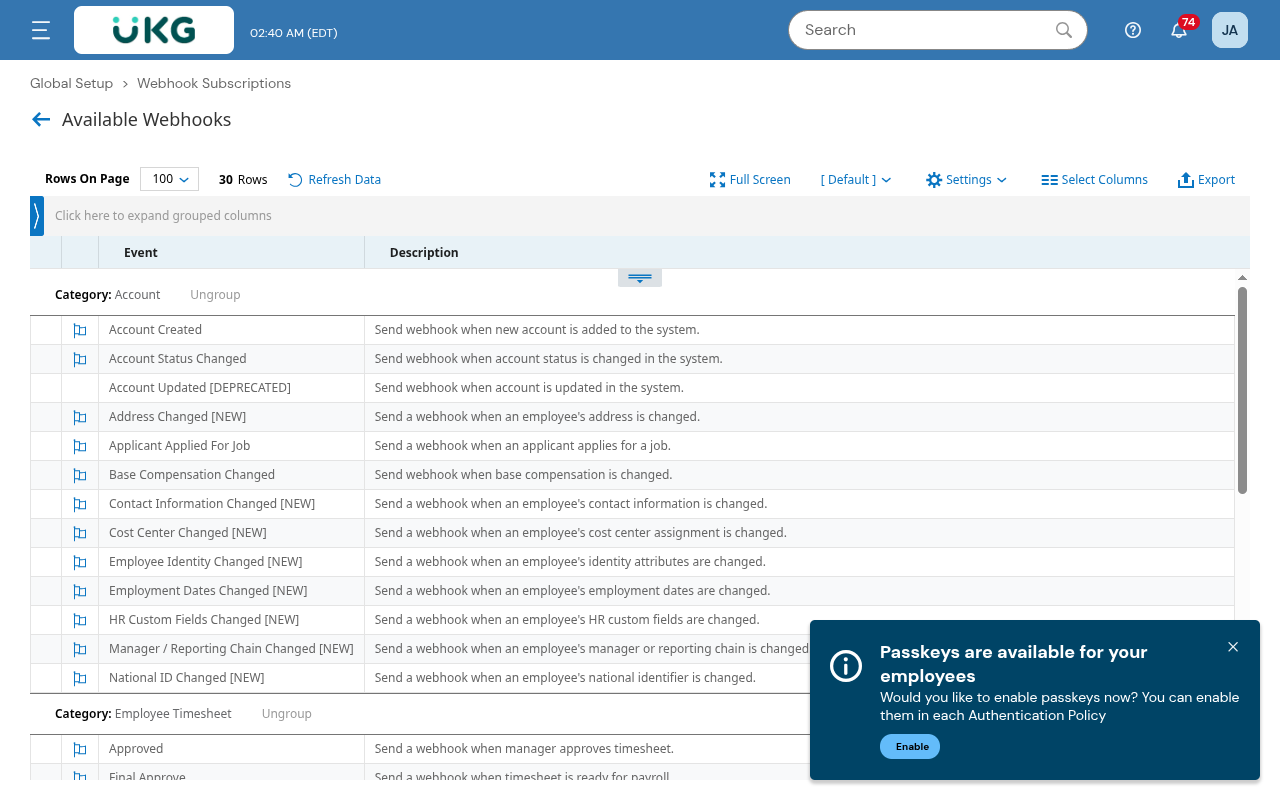
New Subscription opens the Available Webhooks catalog. Pick the event you want, then fill in the subscription form.
Pick an event from Available Webhooks
In Available Webhooks, click the event to subscribe to. Events are grouped by category, and the events StackOne supports are listed under Available webhook events below.
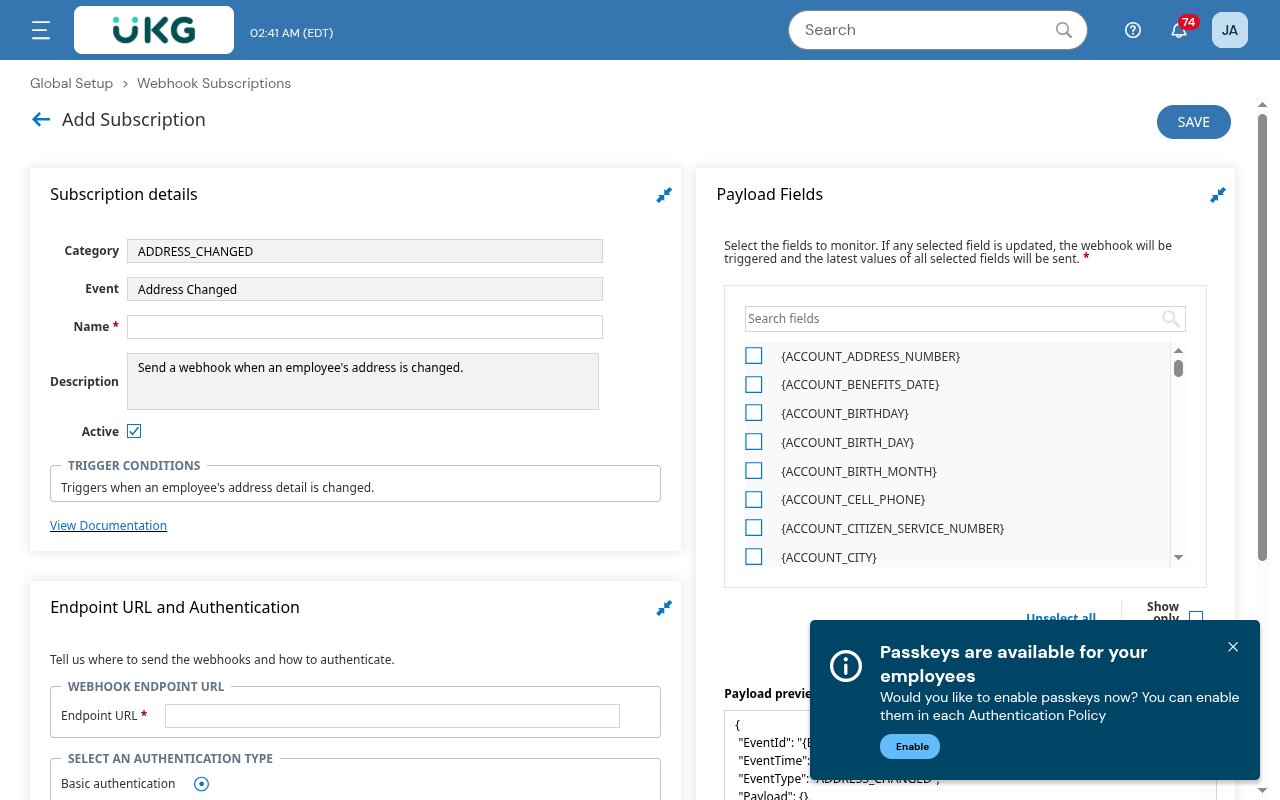
Fill in the subscription details and endpoint
Under Subscription details, enter a Name and check Active. Under Endpoint URL and Authentication, paste the StackOne Native Webhook URL into Endpoint URL.
Set Authentication to Bearer token
Under Select an authentication type, choose Bearer token and paste the Webhook Auth Token into the Token field. Do NOT select No authentication — UKG Ready strips the URL query string, so the token must travel in the Authorization header or the account cannot be identified.
- Authentication type: Bearer token
- Token: the StackOne Webhook Auth Token
Select the payload fields (include the employee identifier)
Under Payload Fields, tick the fields to send. Only selected fields are included, and a change to any selected field triggers the webhook. Where the event offers it, include {EMPLOYEE_IDENTIFIER} so the delivered event carries the employee id. Without it (and for events that don’t offer it, such as timesheet events) the event is identified by its UKG event id instead.
Save
Click Save. The subscription becomes active and UKG Ready will POST matching events to the endpoint. (The Test Connection button only checks connectivity — it does not send a sample event.)
Available webhook events
Only the events you subscribe to are delivered. UKG Ready’s webhook catalog, grouped by category as in Available Webhooks. The code in backticks is the event type StackOne delivers.
Account
Employee record and account-level changes.
- Account Created (
ACCOUNT_CREATED) — fired when a new account is added to the system - Account Status Changed (
ACCOUNT_STATUS_CHANGED) — fired when an account’s status changes - Address Changed (
ADDRESS_CHANGED) — fired when an employee’s address is changed - Applicant Applied For Job (
APPLICANT_APPLIED_FOR_JOB) — fired when an applicant applies for a job - Base Compensation Changed (
ACCOUNT_BASE_COMPENSATION_CHANGED) — fired when base compensation changes - Contact Information Changed (
CONTACT_INFORMATION_CHANGED) — fired when an employee’s contact information changes - Cost Center Changed (
COST_CENTER_CHANGED) — fired when an employee’s cost center assignment changes - Employee Identity Changed (
EMPLOYEE_IDENTITY_CHANGED) — fired when an employee’s identity attributes change - Employment Dates Changed (
EMPLOYMENT_DATES_CHANGED) — fired when an employee’s employment dates change - HR Custom Fields Changed (
HR_CUSTOM_FIELDS_CHANGED) — fired when an employee’s HR custom fields change - Manager / Reporting Chain Changed (
MANAGER_REPORTING_CHAIN_CHANGED) — fired when an employee’s manager or reporting chain changes - National ID Changed (
NATIONAL_ID_CHANGED) — fired when an employee’s national identifier changes - Account Updated (
ACCOUNT_UPDATED) — deprecated in UKG Ready; still delivered for existing subscriptions, but use the specific events above
Employee Timesheet
Timesheet lifecycle.
- Submitted (
TIMESHEET_SUBMITTED) — fired when an employee submits a timesheet - Approved (
TIMESHEET_APPROVED) — fired when a manager approves a timesheet - Final Approve (
TIMESHEET_FINAL_APPROVED) — fired when a timesheet is ready for payroll - Rejected (
TIMESHEET_REJECTED) — fired when a manager rejects a timesheet
Time Off Request
Time off request lifecycle.
- Requested (
TIME_OFF_REQUEST_REQUESTED) — fired when a time off request is created or its status changes - Approved (
TIME_OFF_REQUEST_APPROVED) — fired when a time off request is approved by a manager - Changed (
TIME_OFF_REQUEST_CHANGED) — fired when a time off request is modified - Rejected (
TIME_OFF_REQUEST_REJECTED) — fired when a manager rejects a time off request - Canceled (Employee Deleted) (
TIME_OFF_REQUEST_CANCELED) — fired when an employee cancels (deletes) a time off request
Timesheet Change Request
Timesheet change request lifecycle.
- Requested (
TIMESHEET_CHANGE_REQUEST_REQUESTED) — fired when an employee requests a timesheet change - Approved (
TIMESHEET_CHANGE_REQUEST_APPROVED) — fired when a manager approves a timesheet change request - Rejected (
TIMESHEET_CHANGE_REQUEST_REJECTED) — fired when a manager rejects a timesheet change request
HR
HR announcements and events.
- Announcement Created (
HR_ANNOUNCEMENT_CREATED) — fired when an announcement is created - Event Created (
HR_EVENT_CREATED) — fired when an HR event is created
Schedule
Employee schedules.
- Schedule Changed (
EMPLOYEE_SCHEDULE_UPDATE) — fired when an employee’s schedule is changed or added
Scheduler
Open shifts and shift swaps.
- Open Shifts Posted (
OPEN_SHIFTS_POSTED) — fired when open shifts are posted - Schedule Request Peer Action (
SHIFT_SWAP_ACCEPTED) — fired when a shift swap request is accepted
Delivery format
Every UKG Ready webhook is delivered as a consistent JSON envelope. The event type is carried in EventType, the selected payload fields under Payload, plus EventId, EventTime, and CompanyName. StackOne emits EventType as the event’s record type. The record id is the Employee Identifier when it is in the payload, otherwise the Employee ID, otherwise the UKG EventId.