

Find Your Tenant ID
Your Microsoft Entra tenant ID is required to establish the connection to SharePoint.
1
Locate the Tenant ID
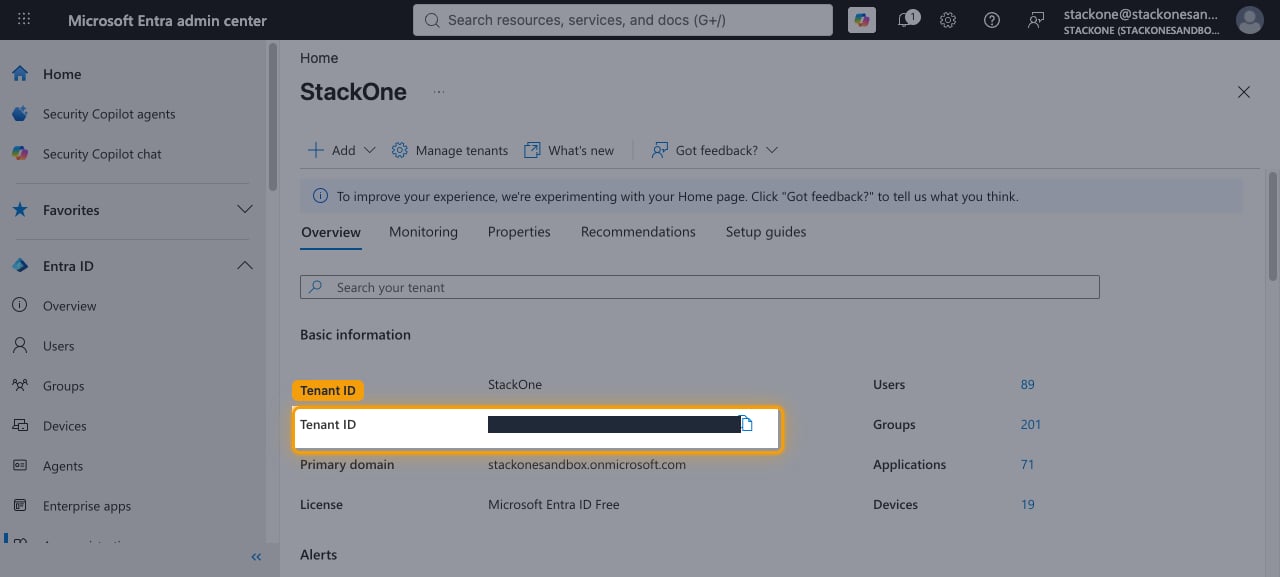
In the Microsoft Entra admin center, in the left sidebar click Entra ID, then select Overview. The Tenant ID is displayed in the Basic information section. Click the copy icon next to it and paste the value into the Tenant ID field in the StackOne connection form.
Linking the Account from the Hub
1
Navigate to the Hub
Use one of the three Linking Account Methods to access the Hub.
2
Fill out the fields
Fill out the following fields using details from your provider:
- Tenant ID
3
Connect
- Click Connect
- If applicable, the provider will redirect you to a sign-in or authorization page. Complete the provider’s authorization flow.
- Once authorization is successful, you will see a confirmation popup
If the account linking is successful, you will see the newly linked account in your Accounts page.