

Prerequisites
The connector should already be set up, with a Connector Profile and a Linked Account. See Getting Started on the Persona connector page.How Persona webhooks are set up
There is nothing to paste into Persona and no URL to copy. When you connect the account, StackOne registers a webhook in Persona pointing at its own receiver, enables it, and subscribes it to exactly the events you turned on in StackOne. Disconnecting the account archives it again.
- No callback URL to configure, and no verification step to complete.
- The webhook covers the environment its API key belongs to, so a sandbox key delivers sandbox events only.
- Only the events you enable in StackOne are registered in Persona and delivered.
Before you connect
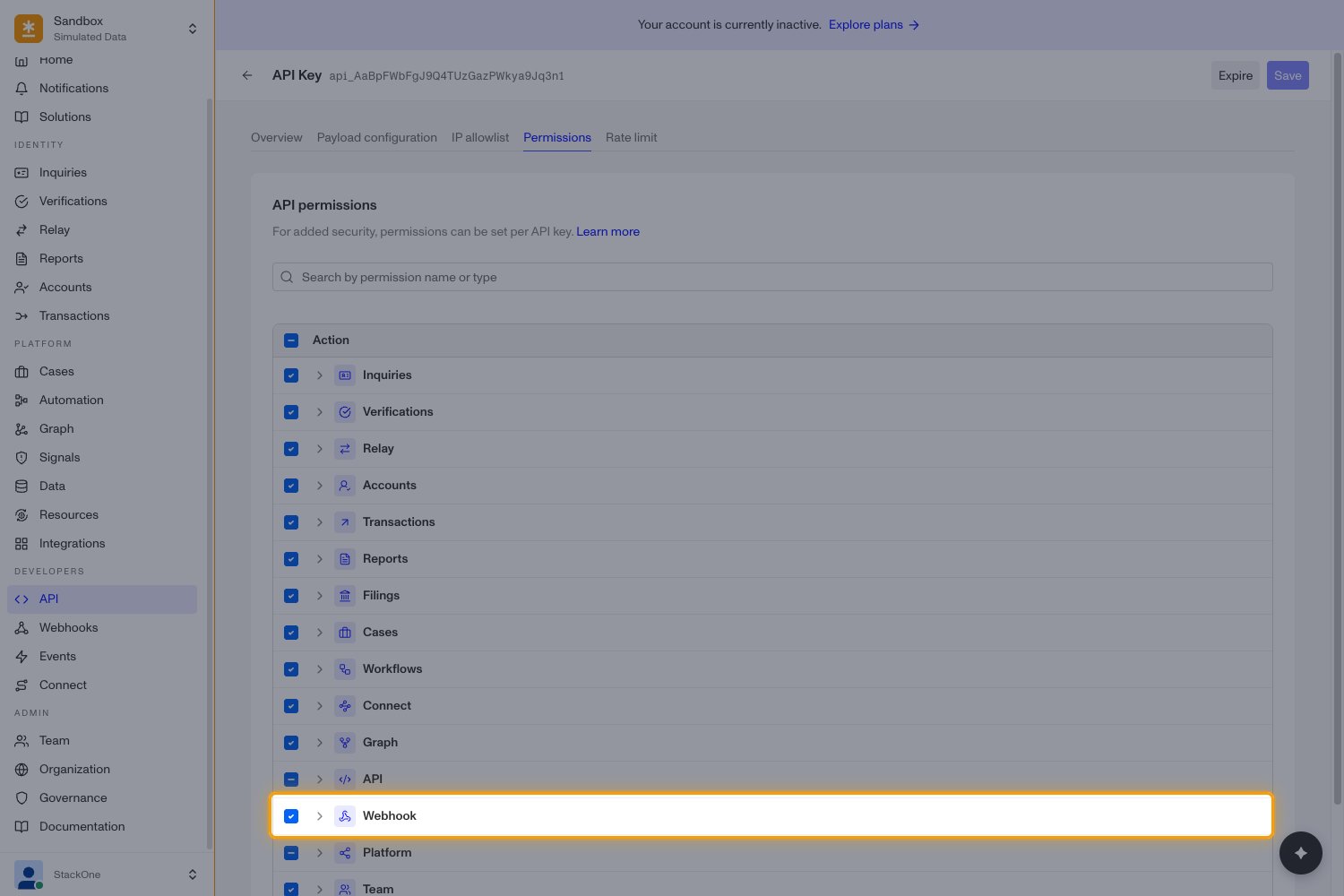
Check the API key carries the Webhook permission, which is what lets StackOne manage the subscription for you.
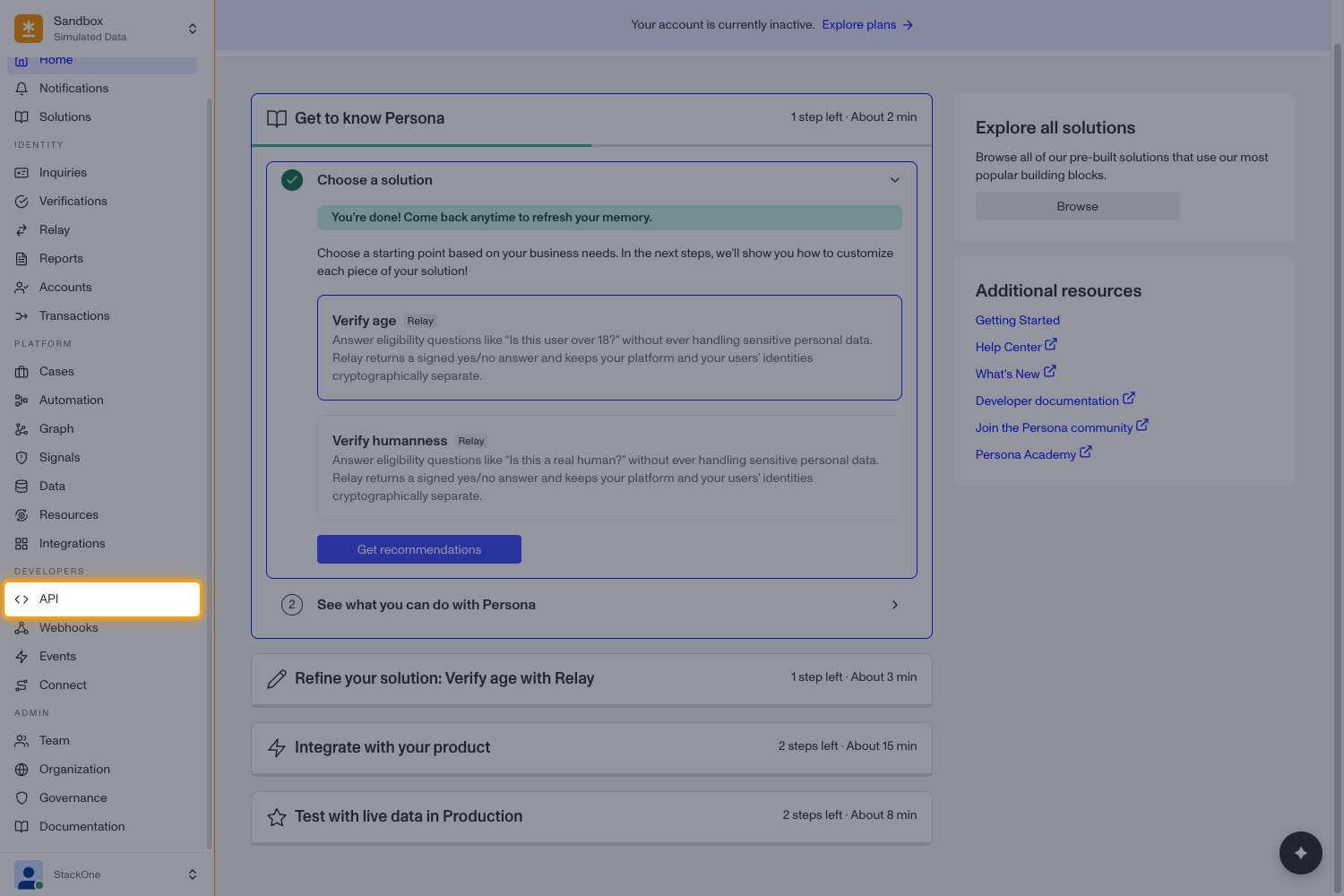
Open the API page
Sign in to the Persona Dashboard, choose the environment you are connecting with the switcher at the top of the sidebar, then select API under DEVELOPERS.
Open the API key
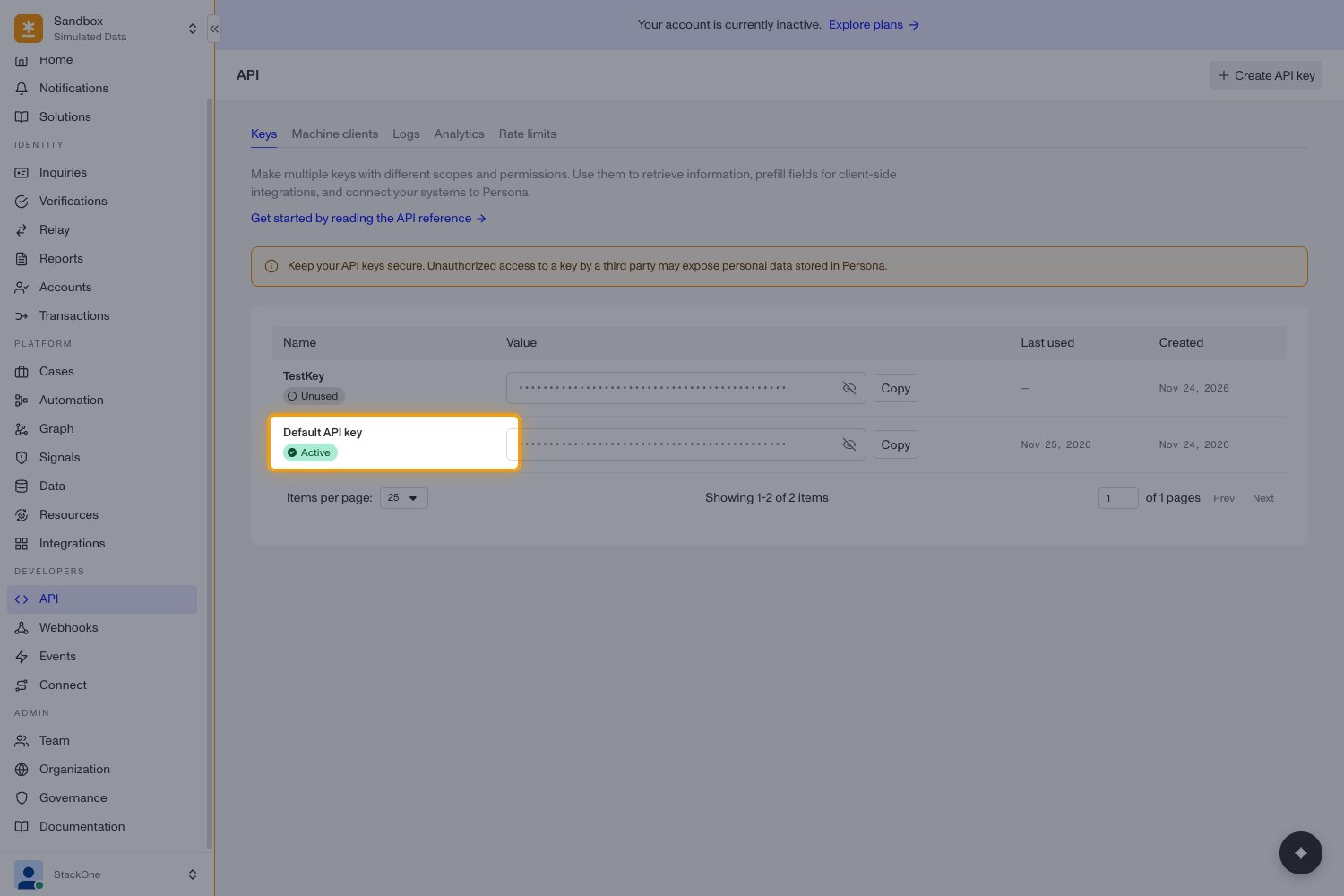
The Keys tab lists the keys for this environment. Select the key this connection uses.
Grant the Webhook permission
Open the Permissions tab and make sure Webhook is checked, then click Save.
- Use Search by permission name or type to find it quickly.
- The permission covers both reading webhooks and creating or updating them, which StackOne needs to register the subscription and enable it.
Check the subscription
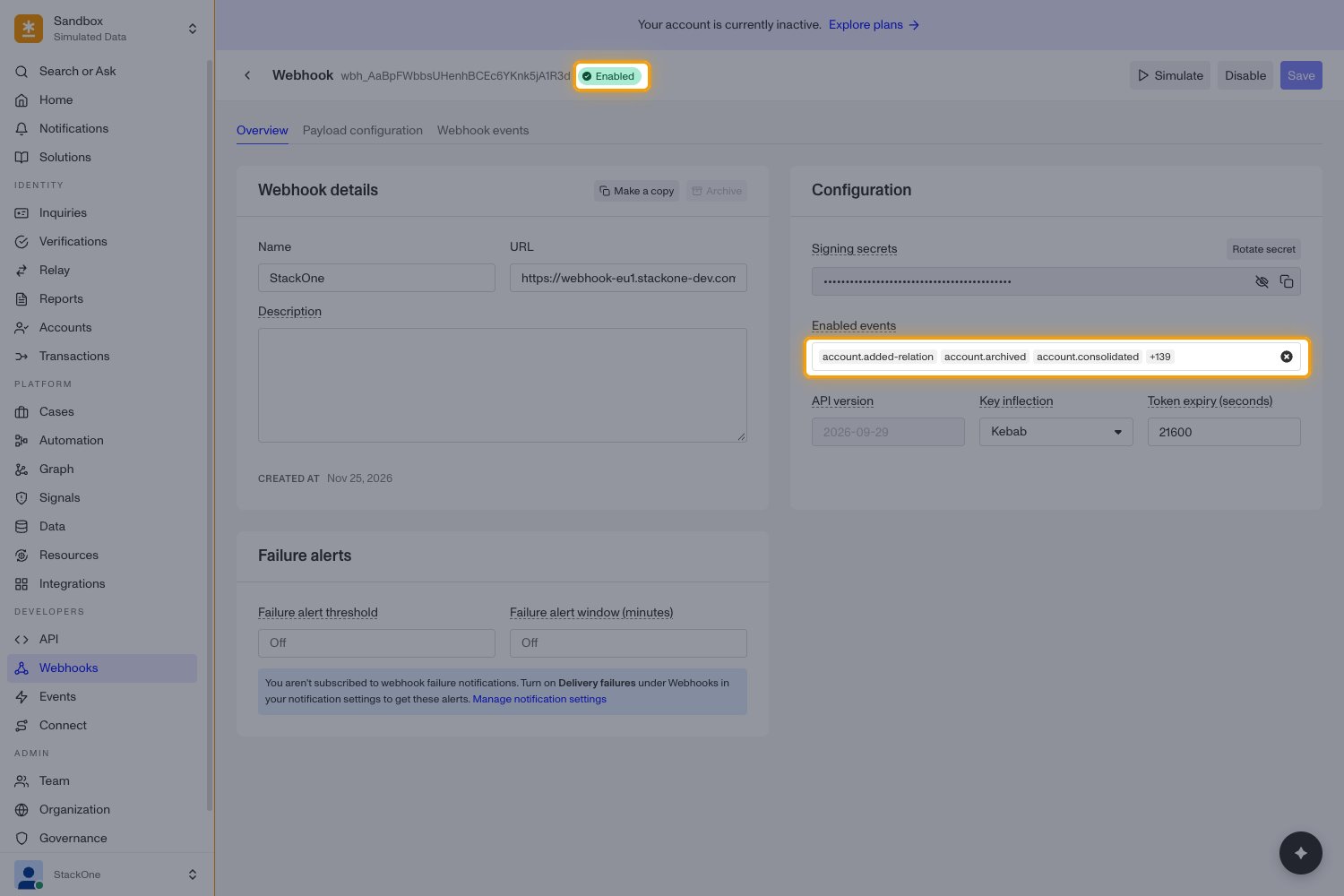
After you connect the account and enable events in StackOne, Persona shows the subscription StackOne created.
Find the webhook in Persona
In the Persona Dashboard, select Webhooks under DEVELOPERS and open the webhook named StackOne.
- Its status should read Enabled. Persona creates every webhook disabled, and StackOne enables it as part of registering it.
- Enabled events lists the events you turned on in StackOne.
- Key inflection is Kebab, so attribute names in the payload are hyphenated, such as
created-at.
Available webhook events
The following Persona events can be enabled. Only events selected in StackOne are registered in Persona - events you do not enable are never delivered. Some families need the matching Persona product on your account.
Account events
Events about the lifecycle of an Account, its tags and its relations.
- Account Created (
account.created) — Account created - Account Redacted (
account.redacted) — Account redacted - Account Archived (
account.archived) — Account archived - Account Restored (
account.restored) — Account restored - Account Consolidated (
account.consolidated) — Account consolidated - Account Consolidated With (
account.consolidated-with) — Account consolidated with - Account Tag Added (
account.tag-added) — Account tag added - Account Tag Removed (
account.tag-removed) — Account tag removed - Account Added Relation (
account.added-relation) — Account added relation - Account Removed Relation (
account.removed-relation) — Account removed relation - Account Status Updated (
account.status-updated) — Account status updated - Account Updated Fields (
account.updated-fields) — Account updated fields - Account Updated Tags (
account.updated-tags) — Account updated tags
Inquiry events
Events about inquiries and the sessions a person runs them in.
- Inquiry Created (
inquiry.created) — Inquiry created - Inquiry Started (
inquiry.started) — Inquiry started - Inquiry Expired (
inquiry.expired) — Inquiry expired - Inquiry Completed (
inquiry.completed) — Inquiry completed - Inquiry Failed (
inquiry.failed) — Inquiry failed - Inquiry Marked For Review (
inquiry.marked-for-review) — Inquiry marked for review - Inquiry Approved (
inquiry.approved) — Inquiry approved - Inquiry Declined (
inquiry.declined) — Inquiry declined - Inquiry Transitioned (
inquiry.transitioned) — Inquiry transitioned - Inquiry Redacted (
inquiry.redacted) — Inquiry redacted - Inquiry Reusable Persona Created (
inquiry.reusable-persona-created) — Inquiry reusable-persona created - Inquiry Reusable Persona Used (
inquiry.reusable-persona-used) — Inquiry reusable-persona used - Inquiry Updated Tags (
inquiry.updated-tags) — Inquiry tags updated - Inquiry Session Started (
inquiry-session.started) — Inquiry session started - Inquiry Session Expired (
inquiry-session.expired) — Inquiry session expired - Inquiry Session Canceled (
inquiry-session.canceled) — Inquiry session canceled
Verification, selfie and document events
Events raised by the individual checks that run inside an inquiry.
- Document Created (
document.created) — Document created - Document Submitted (
document.submitted) — Document submitted - Document Processed (
document.processed) — Document processed - Document Errored (
document.errored) — Document errored - Document Extracted (
document.extracted) — Document extracted - Document Pending (
document.pending) — Document pending - Selfie Created (
selfie.created) — Selfie created - Selfie Submitted (
selfie.submitted) — Selfie submitted - Selfie Processed (
selfie.processed) — Selfie processed - Selfie Errored (
selfie.errored) — Selfie errored - Verification Canceled (
verification.canceled) — Verification canceled - Verification Created (
verification.created) — Verification created - Verification Escalated (
verification.escalated) — Verification escalated - Verification Failed (
verification.failed) — Verification failed - Verification Passed (
verification.passed) — Verification passed - Verification Requires Retry (
verification.requires-retry) — Verification requires retry - Verification Skipped (
verification.skipped) — Verification skipped - Verification Submitted (
verification.submitted) — Verification submitted - Verification Tentatively Failed (
verification.tentatively-failed) — Verification tentatively failed - Verification Tentatively Passed (
verification.tentatively-passed) — Verification tentatively passed - Verification Updated Tags (
verification.updated-tags) — Verification tags updated
Case events
Events about case management - assignment, status, notes and resolution.
- Case Assigned (
case.assigned) — Case assigned - Case Created (
case.created) — Case created - Case Exported (
case.exported) — Case exported - Case Queue Updated (
case.queue-updated) — Case queue updated - Case Redacted (
case.redacted) — Case redacted - Case Reopened (
case.reopened) — Case reopened - Case Resolved (
case.resolved) — Case resolved - Case Sla Expired (
case.sla-expired) — Case SLA expired - Case Status Updated (
case.status-updated) — Case status updated - Case Updated Fields (
case.updated-fields) — Case updated fields - Case Updated Tags (
case.updated-tags) — Case updated tags
Transaction events
Events about transactions and transaction types.
- Transaction Created (
transaction.created) — Transaction created - Transaction Status Updated (
transaction.status-updated) — Transaction status updated - Transaction Updated Fields (
transaction.updated-fields) — Transaction updated fields - Transaction Labeled (
transaction.labeled) — Transaction labeled - Transaction Redacted (
transaction.redacted) — Transaction redacted - Transaction Added Relation (
transaction.added-relation) — Transaction added relation - Transaction Removed Relation (
transaction.removed-relation) — Transaction removed relation - Transaction Sentinel Session Processed (
transaction.sentinel-session-processed) — Transaction sentinel session processed - Transaction Type Deleted Field (
transaction-type.deleted-field) — Transaction type deleted field
Report events
Events raised as each report type runs, matches or fails. Every report family emits the same lifecycle.
- Address Lookup Ready (
report/address-lookup.ready) — Address lookup report ready - Address Lookup Errored (
report/address-lookup.errored) — Address lookup report errored - Address Lookup Submitted (
report/address-lookup.submitted) — Address lookup report submitted - Adverse Media Ready (
report/adverse-media.ready) — Adverse media report ready - Adverse Media Errored (
report/adverse-media.errored) — Adverse media report errored - Adverse Media Matched (
report/adverse-media.matched) — Adverse media report matched - Adverse Media Dismissed (
report/adverse-media.dismissed) — Adverse media report match dismissed - Business Adverse Media Ready (
report/business-adverse-media.ready) — Business adverse media report ready - Business Adverse Media Errored (
report/business-adverse-media.errored) — Business adverse media report errored - Business Adverse Media Matched (
report/business-adverse-media.matched) — Business adverse media report matched - Business Adverse Media Dismissed (
report/business-adverse-media.dismissed) — Business adverse media report match dismissed - Business Associated Persons Ready (
report/business-associated-persons.ready) — Business associated persons report ready - Business Associated Persons Errored (
report/business-associated-persons.errored) — Business associated persons report errored - Business Lookup Ready (
report/business-lookup.ready) — Business lookup report ready - Business Lookup Errored (
report/business-lookup.errored) — Business lookup report errored - Business Registrations Lookup Ready (
report/business-registrations-lookup.ready) — Business registrations lookup report ready - Business Registrations Lookup Errored (
report/business-registrations-lookup.errored) — Business registrations lookup report errored - Business Watchlist Ready (
report/business-watchlist.ready) — Business watchlist report ready - Business Watchlist Errored (
report/business-watchlist.errored) — Business watchlist report errored - Business Watchlist Matched (
report/business-watchlist.matched) — Business watchlist report matched - Business Watchlist Dismissed (
report/business-watchlist.dismissed) — Business watchlist report match dismissed - Crypto Address Watchlist Ready (
report/crypto-address-watchlist.ready) — Crypto address watchlist report ready - Crypto Address Watchlist Errored (
report/crypto-address-watchlist.errored) — Crypto address watchlist report errored - Crypto Address Watchlist Matched (
report/crypto-address-watchlist.matched) — Crypto address watchlist report matched - Email Address Ready (
report/email-address.ready) — Email address report ready - Email Address Errored (
report/email-address.errored) — Email address report errored - Phone Number Ready (
report/phone-number.ready) — Phone number report ready - Phone Number Errored (
report/phone-number.errored) — Phone number report errored - Politically Exposed Person Ready (
report/politically-exposed-person.ready) — Politically exposed person (PEP) report ready - Politically Exposed Person Errored (
report/politically-exposed-person.errored) — Politically exposed person (PEP) report errored - Politically Exposed Person Matched (
report/politically-exposed-person.matched) — Politically exposed person (PEP) report matched - Politically Exposed Person Dismissed (
report/politically-exposed-person.dismissed) — Politically exposed person (PEP) report match dismissed - Profile Ready (
report/profile.ready) — Profile report ready - Profile Errored (
report/profile.errored) — Profile report errored - Profile Non Authoritative Ready (
report/profile-non-authoritative.ready) — Profile (non-authoritative) report ready - Profile Non Authoritative Errored (
report/profile-non-authoritative.errored) — Profile (non-authoritative) report errored - Screening Ready (
report/screening.ready) — Screening report ready - Screening Matched (
report/screening.matched) — Screening report matched - Screening Reviewed (
report/screening.reviewed) — Screening report record reviewed - Screening Errored (
report/screening.errored) — Screening report errored - Sentilink Scores Ready (
report/sentilink-scores.ready) — SentiLink scores report ready - Sentilink Scores Errored (
report/sentilink-scores.errored) — SentiLink scores report errored - Social Media Ready (
report/social-media.ready) — Social media report ready - Social Media Errored (
report/social-media.errored) — Social media report errored - Synthetic Ready (
report/synthetic.ready) — Synthetic report ready - Synthetic Errored (
report/synthetic.errored) — Synthetic report errored - Watchlist Ready (
report/watchlist.ready) — Watchlist report ready - Watchlist Errored (
report/watchlist.errored) — Watchlist report errored - Watchlist Matched (
report/watchlist.matched) — Watchlist report matched - Watchlist Dismissed (
report/watchlist.dismissed) — Watchlist report match dismissed
Workflow, importer and graph events
Events about asynchronous processing - workflow runs, batch jobs, importer pipelines, graph queries and deployments.
- Deployment Completed (
deployment.completed) — Deployment completed - Graph Query Cancelled (
graph-query.cancelled) — Graph Query cancelled - Graph Query Completed (
graph-query.completed) — Graph Query completed - Graph Query Errored (
graph-query.errored) — Graph Query errored - Graph Query Reran (
graph-query.reran) — Graph Query reran - Graph Query Timed Out (
graph-query.timed-out) — Graph Query timed out - Importer Pipeline Run Canceled (
importer-pipeline-run.canceled) — Importer pipeline run canceled - Importer Pipeline Run Completed (
importer-pipeline-run.completed) — Importer pipeline run completed - Importer Pipeline Run Errored (
importer-pipeline-run.errored) — Importer pipeline run errored - Importer Pipeline Run Paused (
importer-pipeline-run.paused) — Importer pipeline run paused - Importer Pipeline Run Resumed (
importer-pipeline-run.resumed) — Importer pipeline run resumed - Importer Pipeline Run Started (
importer-pipeline-run.started) — Importer pipeline run started - Batch Job Canceled (
batch-job.canceled) — Batch job canceled - Batch Job Completed (
batch-job.completed) — Batch job completed - Batch Job Errored (
batch-job.errored) — Batch job errored - Batch Job Paused (
batch-job.paused) — Batch job paused - Batch Job Resumed (
batch-job.resumed) — Batch job resumed - Batch Job Started (
batch-job.started) — Batch job started - Workflow Run Completed (
workflow-run.completed) — Workflow run completed - Workflow Run Created (
workflow-run.created) — Workflow run created - Workflow Run Errored (
workflow-run.errored) — Workflow run errored - Workflow Run Resumed (
workflow-run.resumed) — Workflow run resumed