

Getting Your S3 API Keys
Open Library is a project of the Internet Archive, and you sign in to Open Library with an Internet Archive account. The list write actions (create, update, and delete) authenticate with that account’s S3-like API keys; the read actions do not need them. Because the keys grant access to the entire Internet Archive account, use an account dedicated to this integration rather than a personal one where possible.
Sign in to your Internet Archive account
Go to archive.org and sign in with the account you want StackOne to act as. If you do not have one yet, create a free account first — the same credentials sign you in to Open Library.
Open your API keys page
While signed in, go to the Internet Archive API keys page. It displays two values for your account: Your S3 access key and Your S3 secret key. (If the page says you must be logged in, complete the sign-in step above and reload it.)
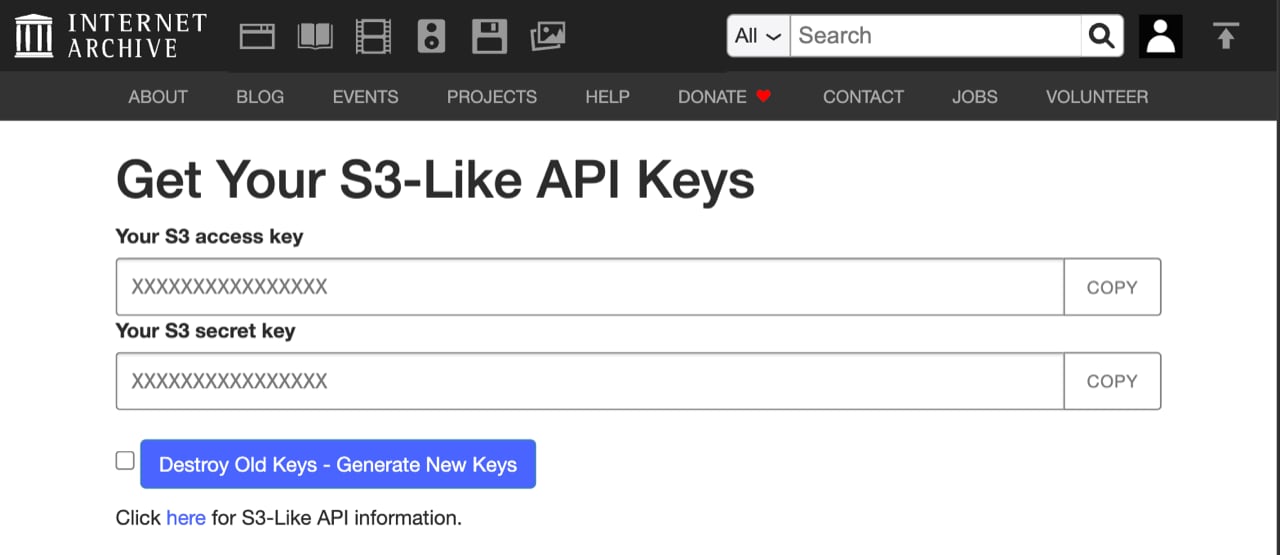
Copy both keys
Copy Your S3 access key and Your S3 secret key, then paste them into the matching fields when you link your account in StackOne.
- These keys grant full access to your Internet Archive account, including archive.org uploads and Open Library catalog edits — treat them like a password and store them securely.
- Regenerating the keys on this page invalidates the previous pair everywhere it is used.
Set a User-Agent
Also provide a User-Agent that identifies your application and a contact email, formatted as AppName (contact@example.com). Open Library requires this on every request and gives identified clients higher rate limits than anonymous ones.
Linking the Account from the Hub
Navigate to the Hub
Fill out the fields
- Access Key
- Secret Key
- User-Agent
Connect
- Click Connect
- If applicable, the provider will redirect you to a sign-in or authorization page. Complete the provider’s authorization flow.
- Once authorization is successful, you will see a confirmation popup
If the account linking is successful, you will see the newly linked account in your Accounts page.