

Find your Account ID
StackOne needs your NetSuite Account ID to build the API URLs for your account.
1
Open your account settings
Sign in to your NetSuite account (or your account-specific URL, e.g. https://<account-id>.app.netsuite.com).
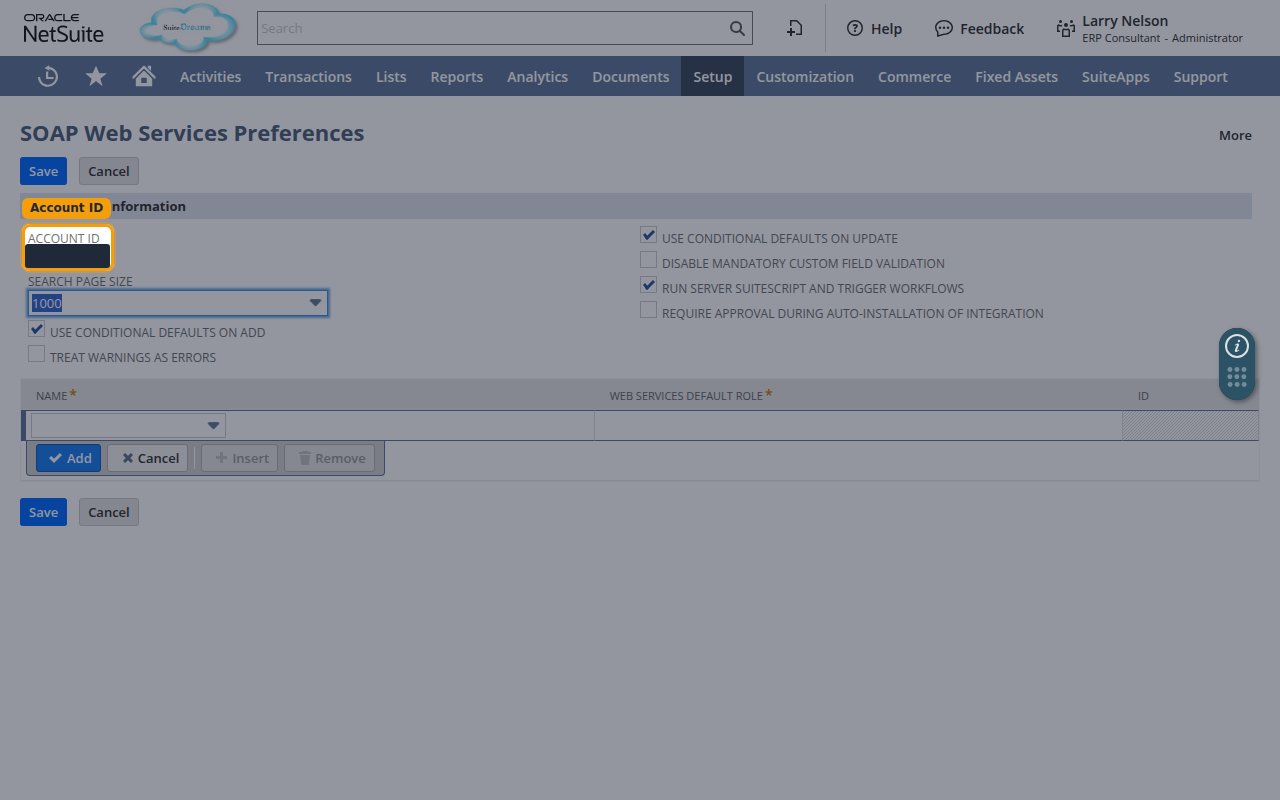
- In the top navigation bar, go to Setup > Integration > SOAP Web Services Preferences.
2
Copy the Account ID
In the Primary Information section, copy the value shown in the ACCOUNT ID field, then paste it into the Account ID field in StackOne Hub.
- Format:
1234567(production) or1234567_SB1(sandbox). - Enter the value in lowercase and replace underscores with hyphens — for example,
1234567_SB1becomes1234567-sb1.
Linking the Account from the Hub
1
Navigate to the Hub
Use one of the three Linking Account Methods to access the Hub.
2
Fill out the fields
Fill out the following fields using details from your provider:
- Account ID
3
Connect
- Click Connect
- If applicable, the provider will redirect you to a sign-in or authorization page. Complete the provider’s authorization flow.
- Once authorization is successful, you will see a confirmation popup
If the account linking is successful, you will see the newly linked account in your Accounts page.