

Find your tenant ID
Your tenant ID identifies your organization’s Microsoft Entra directory.
1
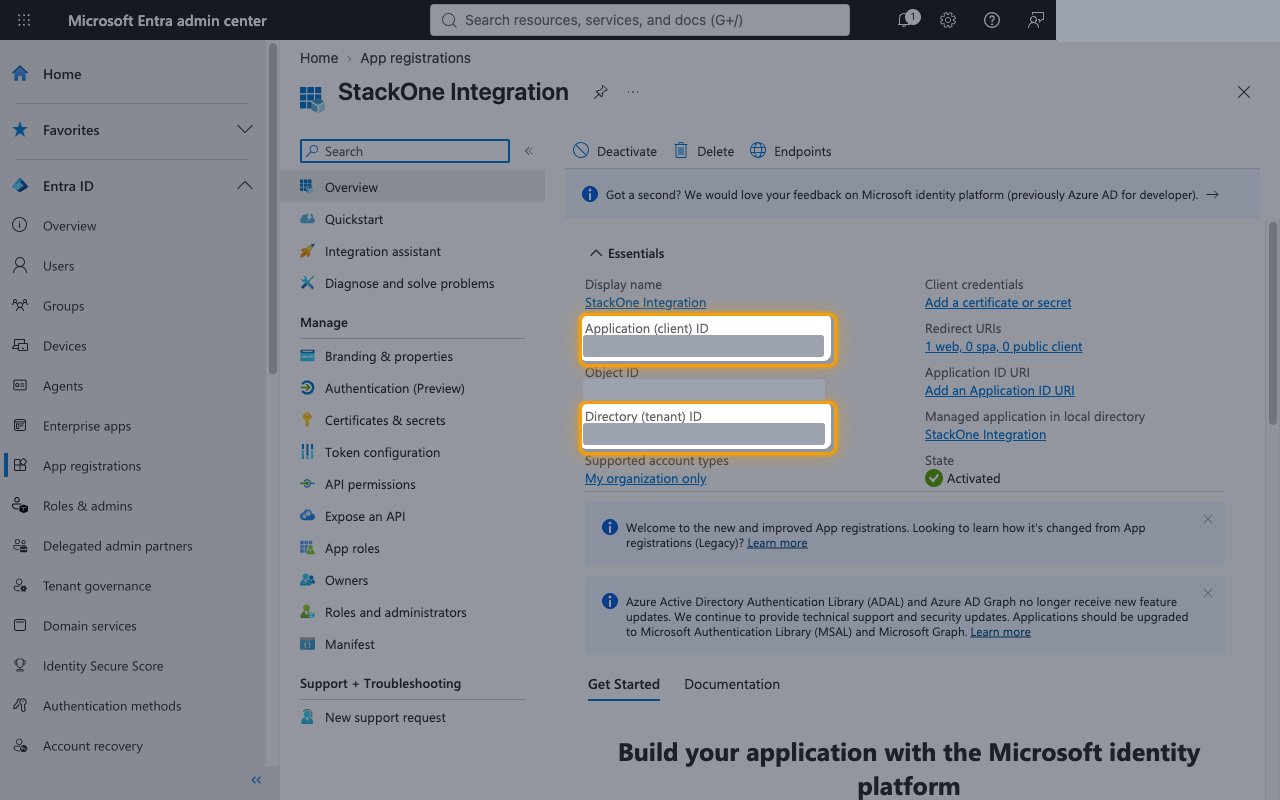
Copy the directory (tenant) ID
Sign in to your Microsoft Entra account and open Entra ID > App registrations, then select the app your administrator registered for StackOne.
- On the Overview page, copy the Directory (tenant) ID.
- Paste it into the Tenant ID field in StackOne Hub.
- Format: a GUID such as
00000000-0000-0000-0000-000000000000
Linking the Account from the Hub
1
Navigate to the Hub
Use one of the three Linking Account Methods to access the Hub.
2
Fill out the fields
Fill out the following fields using details from your provider:
- Tenant ID
3
Connect
- Click Connect
- If applicable, the provider will redirect you to a sign-in or authorization page. Complete the provider’s authorization flow.
- Once authorization is successful, you will see a confirmation popup
If the account linking is successful, you will see the newly linked account on your Accounts page.