

Find your store subdomain
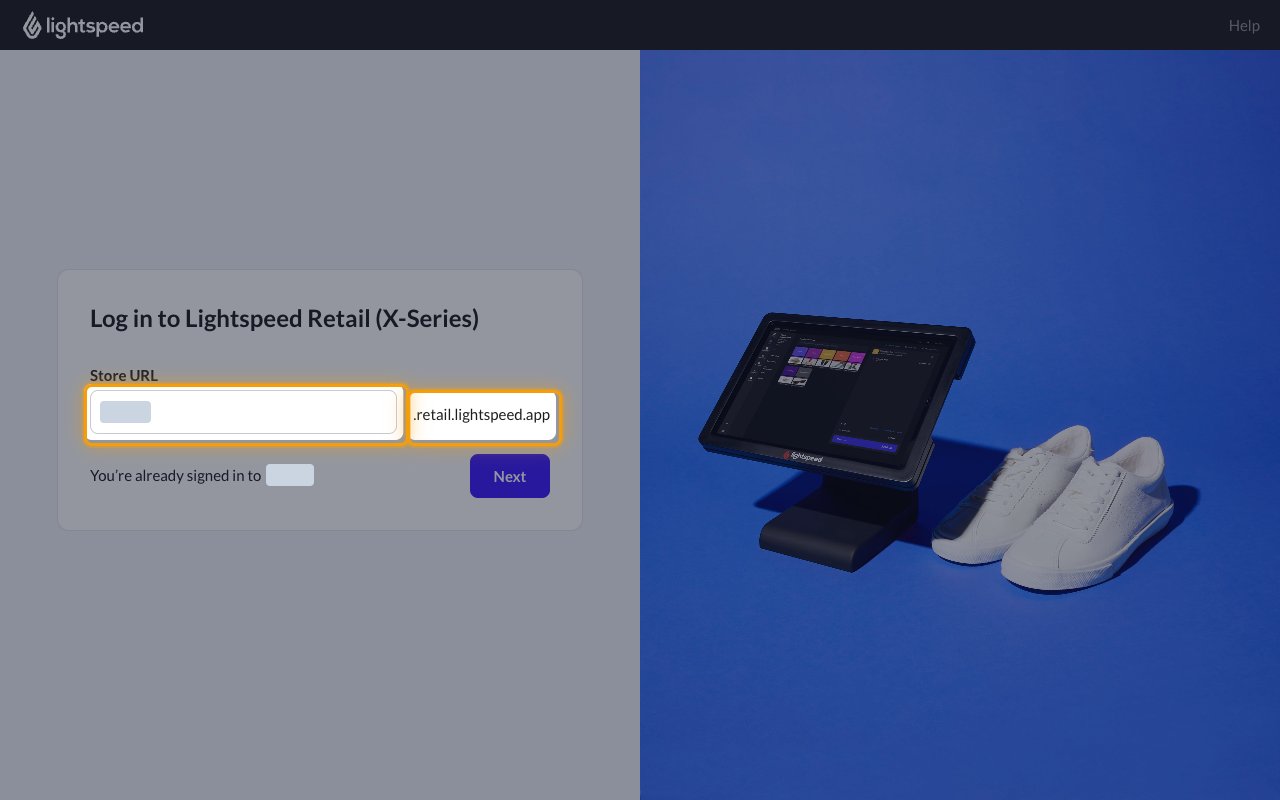
Your store subdomain identifies your Lightspeed Retail (X-Series) store. It is the part of your store URL before .retail.lightspeed.app.
1
Find the store URL
Open the Lightspeed Retail (X-Series) sign-in page. Your subdomain is the value in the Store URL field, shown before .retail.lightspeed.app.
- You can also read it from your browser address bar while signed in to your store.
- Format:
{subdomain}.retail.lightspeed.app - Example: for
https://my-store.retail.lightspeed.app/, the subdomain ismy-store - Enter only the subdomain in the Store Subdomain field in StackOne Hub, without
.retail.lightspeed.app.
Linking the Account from the Hub
1
Navigate to the Hub
Use one of the three Linking Account Methods to access the Hub.
2
Fill out the fields
Fill out the following fields using details from your provider:
- Store Subdomain
3
Connect
- Click Connect
- If applicable, the provider will redirect you to a sign-in or authorization page. Complete the provider’s authorization flow.
- Once authorization is successful, you will see a confirmation popup
If the account linking is successful, you will see the newly linked account on your Accounts page.
Next Steps
Webhooks setup
Configure receiving Events for Lightspeed Retail X-Series into StackOne.