

Find the FHIR server address
IRIS accepts tokens only over https, for the exact FHIR address the token was issued for.
1
Find the FHIR R4 Base URL
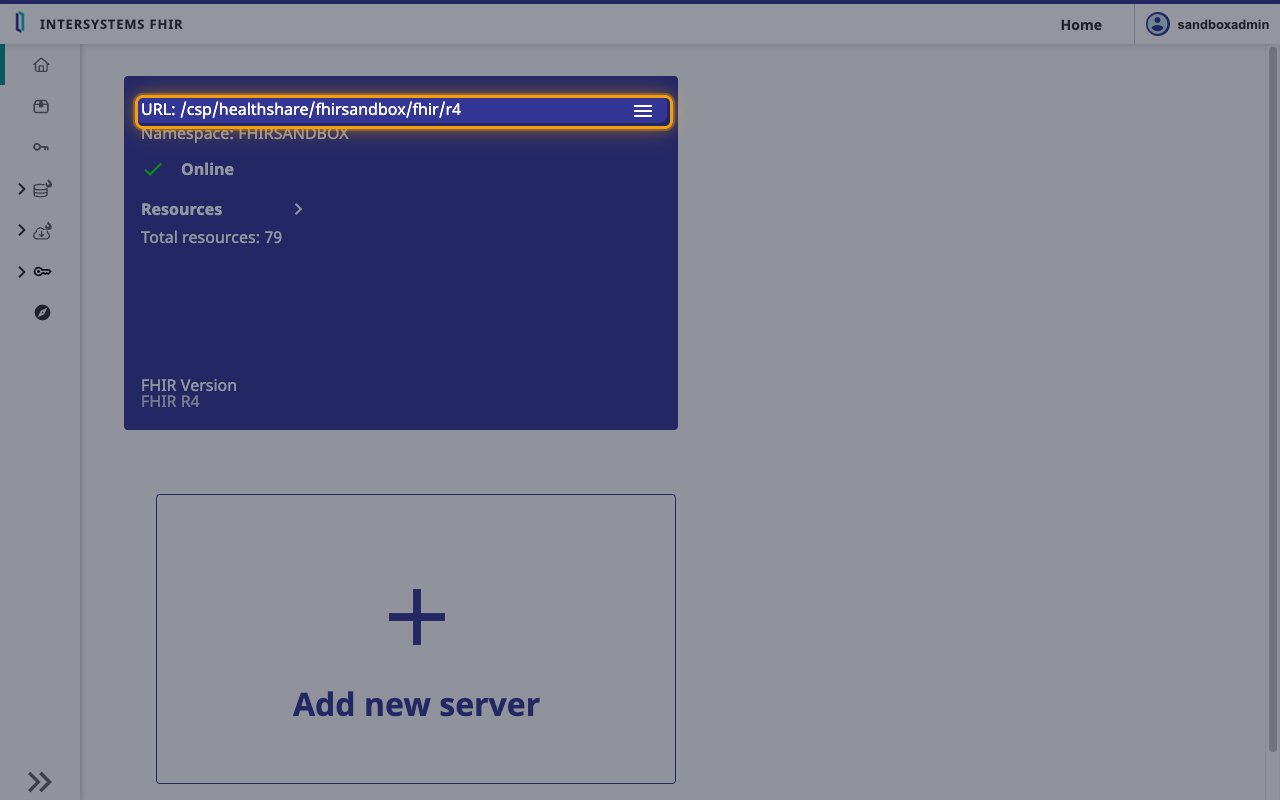
Sign in to your IRIS Management Portal and open Health > your FHIR namespace > FHIR Server Management. The server card shows the endpoint path after URL:.
- Format:
https://{IRIS web server host}{URL path} - Example: if you reach IRIS at
https://iris.example.organd the card showsURL: /csp/healthshare/fhirserver/fhir/r4, your FHIR R4 Base URL ishttps://iris.example.org/csp/healthshare/fhirserver/fhir/r4 - Check it against the
implementation.urlvalue at{FHIR R4 Base URL}/metadata, and use that value exactly, including any port it shows.
Link the Account
1
Connect
- Click Connect.
- If applicable, the provider will redirect you to a sign-in or authorization page. Complete the provider’s authorization flow.
- Once authorization is successful, you will see a confirmation popup.
2
Use Actions
Connect an AI platform to the linked account’s actions. See AI Platforms.Other ways to call actions are listed in Protocols & SDKs.