

Choose the Instagram account to connect
Your Instagram Business Account ID is the numeric ID Meta assigns to your Instagram professional account. It is different from your Instagram username. If you approve access to one Facebook Page with a linked Instagram account when you sign in, leave Instagram Business Account ID blank. If you approve more than one, enter the ID of the account to connect.
1
Sign in to Meta Business Suite
Sign in to your Meta Business Suite account.
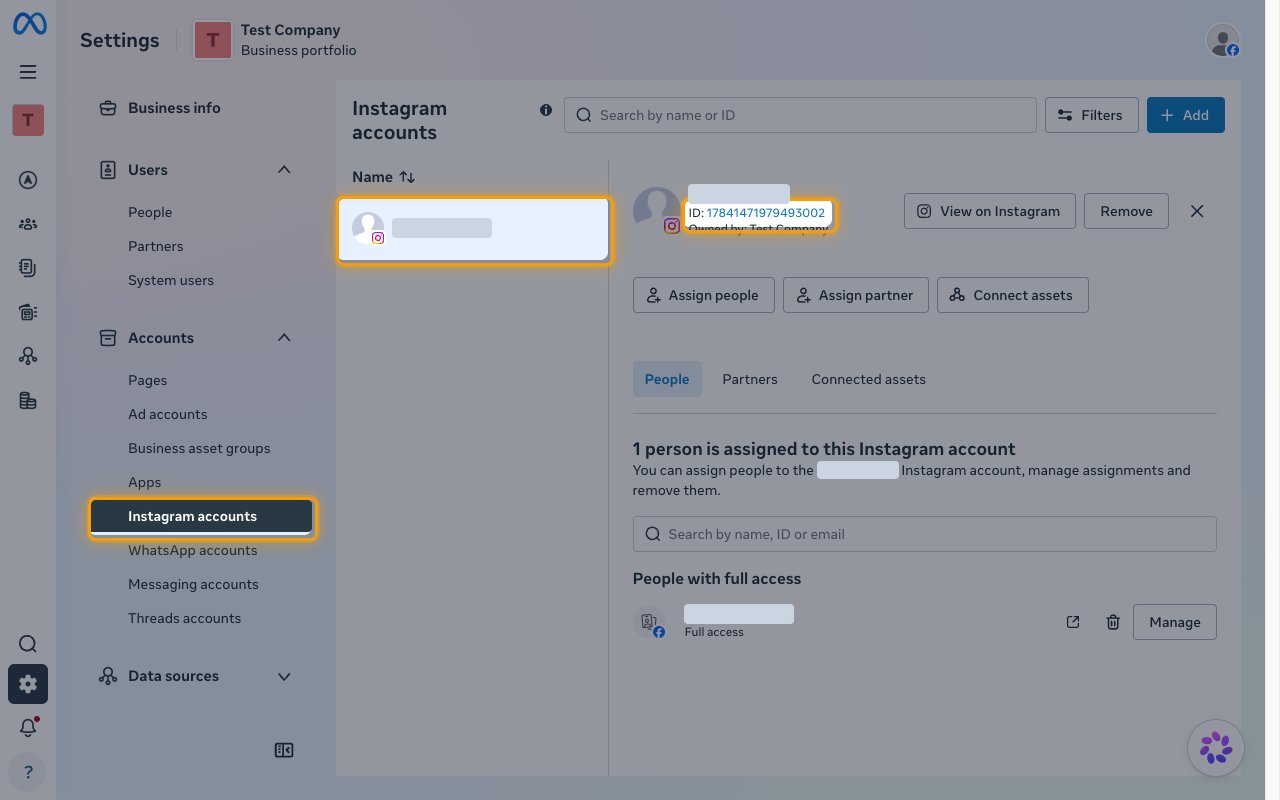
- In Settings, open Accounts > Instagram accounts.
- Select your Instagram account in the list.
- Copy the number after ID: under the account name and paste it into the Instagram Business Account ID field in StackOne Hub.
- Format: a 17-digit number
- Example:
17841400008460056
Link the Account
1
Connect
- Click Connect.
- If applicable, the provider will redirect you to a sign-in or authorization page. Complete the provider’s authorization flow.
- Once authorization is successful, you will see a confirmation popup.
2
Use Actions
Connect an AI platform to the linked account’s actions. See AI Platforms.Other ways to call actions are listed in Protocols & SDKs.