

Find your GCP Project ID and Bucket ID
The GCP Project ID is the Google Cloud project that actions run against by default, and the Bucket ID is the bucket that bucket actions use by default.
1
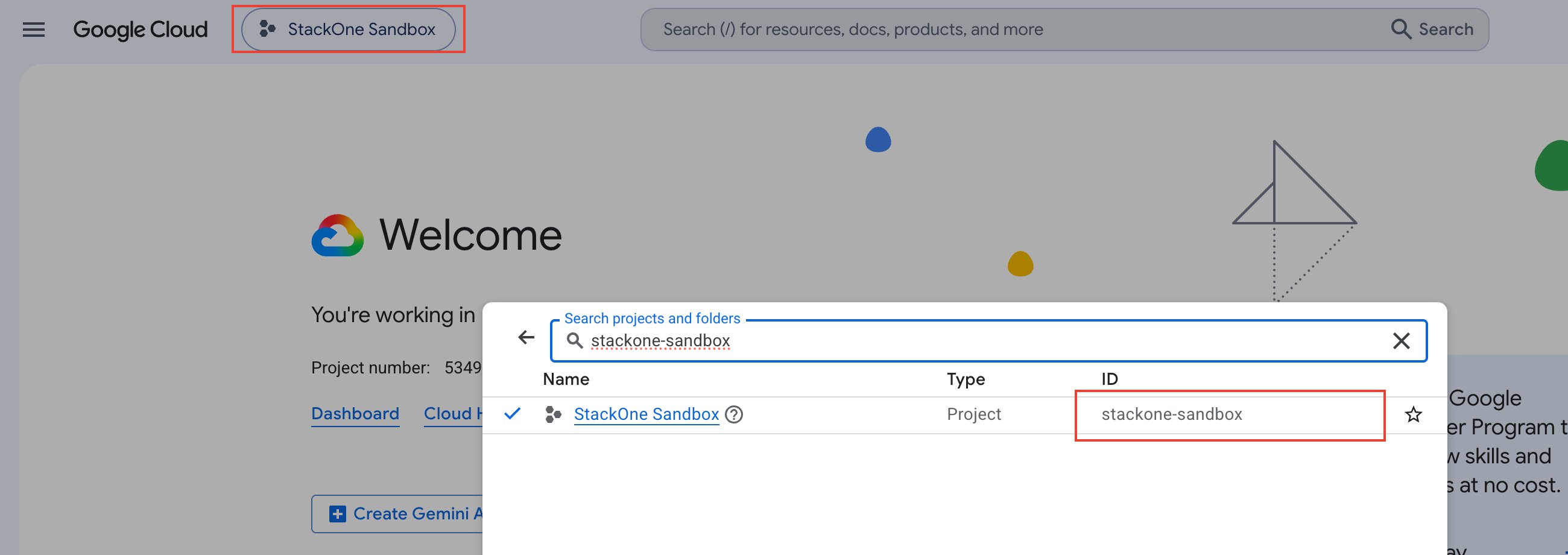
Copy the GCP Project ID
Sign in to the Google Cloud Console, then open the project picker in the top navigation bar. The GCP Project ID is the project ID, not the project name or number.
- Copy the value in the ID column for your project across.
- The Project info card on the Console Dashboard also shows the project ID.
2
Copy the Bucket ID
With the same project selected, open Cloud Storage > Buckets. The Bucket ID is the name of the bucket.
- Copy the value in the Name column for the bucket you want to connect across, without a
gs://prefix.
Link the Account
1
Connect
- Click Connect.
- If applicable, the provider will redirect you to a sign-in or authorization page. Complete the provider’s authorization flow.
- Once authorization is successful, you will see a confirmation popup.
2
Use Actions
Connect an AI platform to the linked account’s actions. See AI Platforms.Other ways to call actions are listed in Protocols & SDKs.