

Find your GCP Project ID
StackOne connects to a single Google Cloud project, identified by its Project ID (not the project name or number).
1
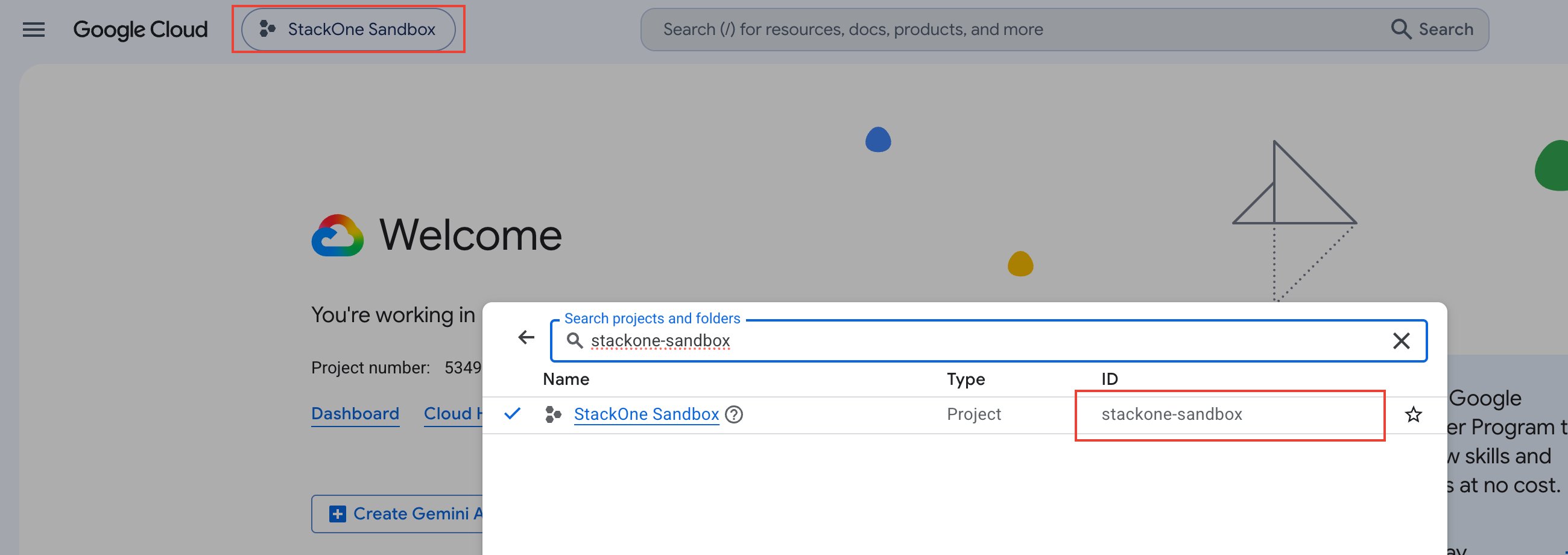
Open the project picker
Sign in to the Google Cloud Console and click the project picker in the top navigation bar.
2
Copy the Project ID
In the project list, copy the value in the ID column for your project (e.g., my-gcp-project-123).
- Alternative — on the Console Dashboard, the Project info card also shows the Project ID.
Linking the Account from the Hub
1
Navigate to the Hub
Use one of the three Linking Account Methods to access the Hub.
2
Fill out the fields
Fill out the following fields using details from your provider:
- GCP Project ID
3
Connect
- Click Connect
- If applicable, the provider will redirect you to a sign-in or authorization page. Complete the provider’s authorization flow.
- Once authorization is successful, you will see a confirmation popup
If the account linking is successful, you will see the newly linked account in your Accounts page.
Next Steps
Webhooks setup
Configure receiving Events for Google Cloud Observability into StackOne.