

Prerequisites
The connector should already be set up, with a Connector Profile and a Linked Account. See Getting Started on the GitHub connector page.Setting Up Webhooks with a GitHub App
Follow these steps if you connected your account with a GitHub App and wish to receive real-time event notifications. Webhooks are registered per repository or per organisation, and each linked StackOne account has its own Native Webhook URL.
If you connected with a Personal Access Token instead, follow the next section.
Access Developer Settings
Sign in to your GitHub account, or to your own instance on GitHub Enterprise Server, and navigate to developer settings.
- Click your profile photo in the upper-right corner
- Select Settings from the dropdown
- In the left sidebar, scroll down and click Developer settings
- Create a GitHub App if you have not already done so (see the previous section), or open your existing app by clicking its name under GitHub Apps in the left sidebar
Copy the Native Webhook URL
After linking your account in StackOne, a Native Webhook URL is generated for that linked account.
- Open Linked Accounts in StackOne and click Edit on your GitHub account
- Copy the Native Webhook URL from the Configuration form
- Note: The URL is unique to this linked account. Do not reuse it for another account.
Add the Webhook URL to Your Repository or Organisation
Add the URL you copied to each GitHub repository or organisation you wish to receive events from.
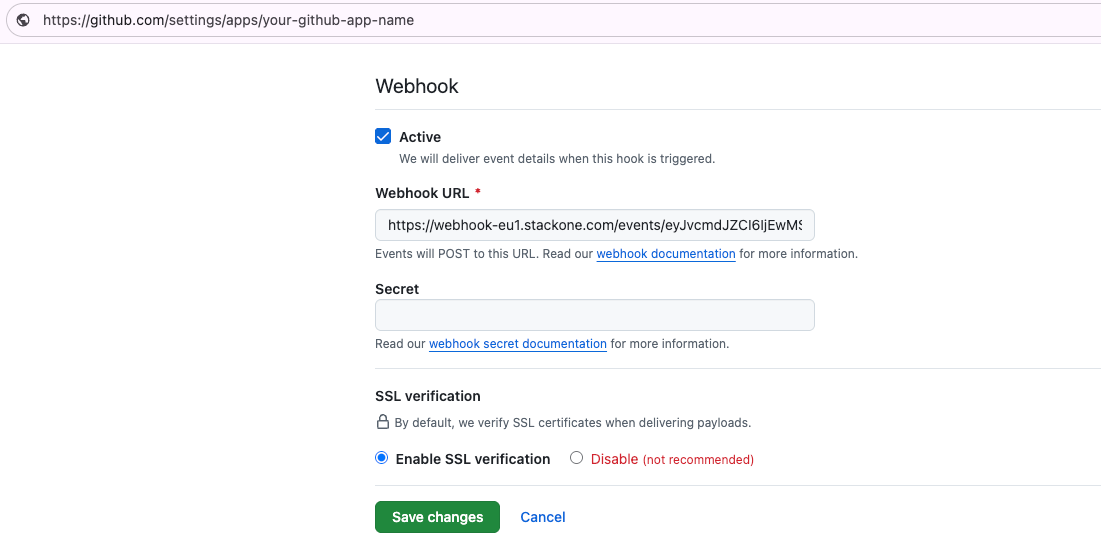
- Scroll to the Webhooks section of your GitHub repository or organisation settings
- Paste the copied Native Webhook URL into the Webhook URL field
- Leave the Secret field empty
- Keep Enable SSL verification selected
- Select Active to enable the webhook
- Click Save Changes to save the webhook
Configure the Permissions & Events Tab
Set the permissions your integration requires. GitHub Apps use fine-grained permissions rather than traditional OAuth scopes.
Important: these permissions are set in the GitHub App configuration and cannot be changed during authorisation. Users see these permissions when they authorise the app, and can choose which repositories to grant access to.
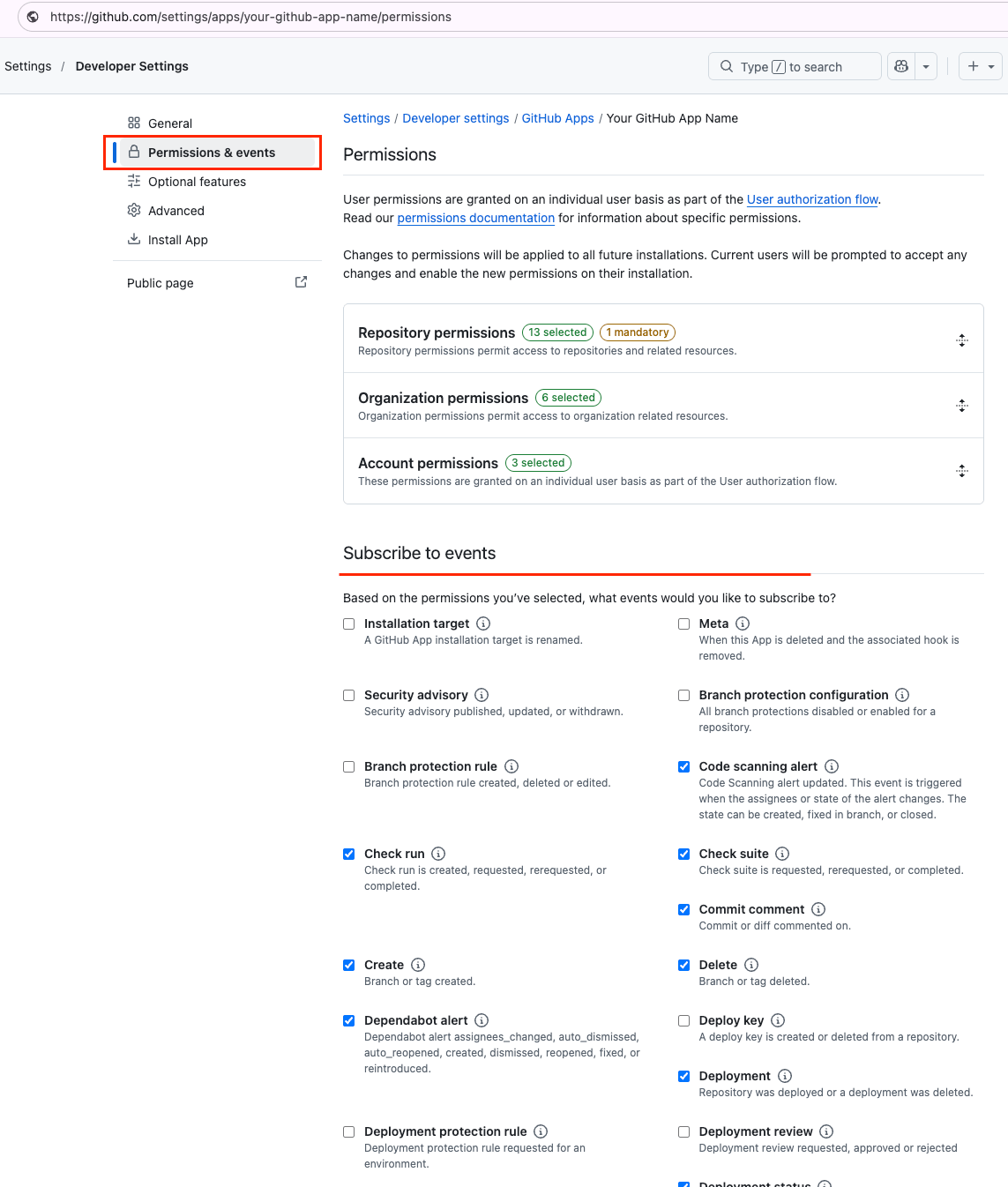
- Select Permissions & events in the left sidebar
- Under Subscribe to events, select the events you wish to receive:
- - Code scanning alert: Code Scanning alert updated. This event is triggered when the assignees or state of the alert changes. The state can be created, fixed in branch, or closed.
- - Check run: Check run is created, requested, rerequested, or completed.
- - Check suite: Check suite is requested, rerequested, or completed.
- - Create: Branch or tag created.
- - Delete: Branch or tag deleted.
- - Dependabot alert: Dependabot alert assignees_changed, auto_dismissed, auto_reopened, created, dismissed, reopened, fixed, or reintroduced.
- - Deployment: Repository was deployed or a deployment was deleted.
- - Deployment status: Deployment status updated from the API.
- - Fork: Repository forked.
- - Issues: Issue opened, edited, deleted, transferred, pinned, unpinned, closed, reopened, assigned, unassigned, labeled, unlabeled, milestoned, demilestoned, locked, unlocked, typed, untyped, field_added, or field_removed.
- - Issue comment: Issue comment created, edited, or deleted.
- - Member: Collaborator added to, removed from, or has changed permissions for a repository.
- - Organization: Organization deleted, renamed, member invited, member added, or member removed.
- - Pull request: Pull request assigned, auto merge disabled, auto merge enabled, closed, converted to draft, demilestoned, dequeued, edited, enqueued, labeled, locked, milestoned, opened, ready for review, reopened, review request removed, review requested, synchronized, unassigned, unlabeled, or unlocked.
- - Pull request review: Pull request review submitted, edited, or dismissed.
- - Pull request review comment: Pull request diff comment created, edited, or deleted.
- - Push: Git push to a repository.
- - Release: Release created, edited, published, unpublished, or deleted.
- - Repository: Repository created, deleted, archived, unarchived, publicized, privatized, edited, renamed, or transferred.
- - Secret scanning alert: Secret scanning alert created, resolved, reopened, validated, publicly leaked, assigned, or unassigned.
- - Star: A star is created or deleted from a repository.
- - Team: Team is created, deleted, edited, or added to/removed from a repository.
- - Workflow job: Workflow job queued, waiting, in progress, or completed on a repository.
- - Workflow run: Workflow run requested or completed on a repository.
- Click Save changes at the bottom of the page
Reinstall the GitHub App and Reauthorise the Account
After updating permissions or events, reinstall the app to apply the new configuration. Existing installations do not pick up changes to permissions or subscribed events automatically.
- Select the Install App tab in the left sidebar
- Click the Configure icon next to your existing installation
- You are taken to the installation page for the account or organisation where the app is installed
- Click Authorize to apply the new permissions and event settings, or accept the updated permissions if you are prompted to review them
- If you are not prompted, uninstall the app and install it again
- After reinstalling, return to StackOne and click Edit on the linked account to reauthorise the connection
Setting Up Webhooks with a Personal Access Token
Follow these steps if you connected your account with a Personal Access Token. The webhook is registered directly on the repository or organisation, and each linked StackOne account has its own Native Webhook URL.
Copy the Native Webhook URL
After linking your account in StackOne, a Native Webhook URL is generated for that linked account.
- Open Linked Accounts in StackOne and click Edit on your GitHub account
- Copy the Native Webhook URL from the Configuration form
- Note: The URL is unique to this linked account. Do not reuse it for another account.
Open the Repository Webhook Settings
Navigate to the webhook settings of the repository or organisation you wish to receive events from.
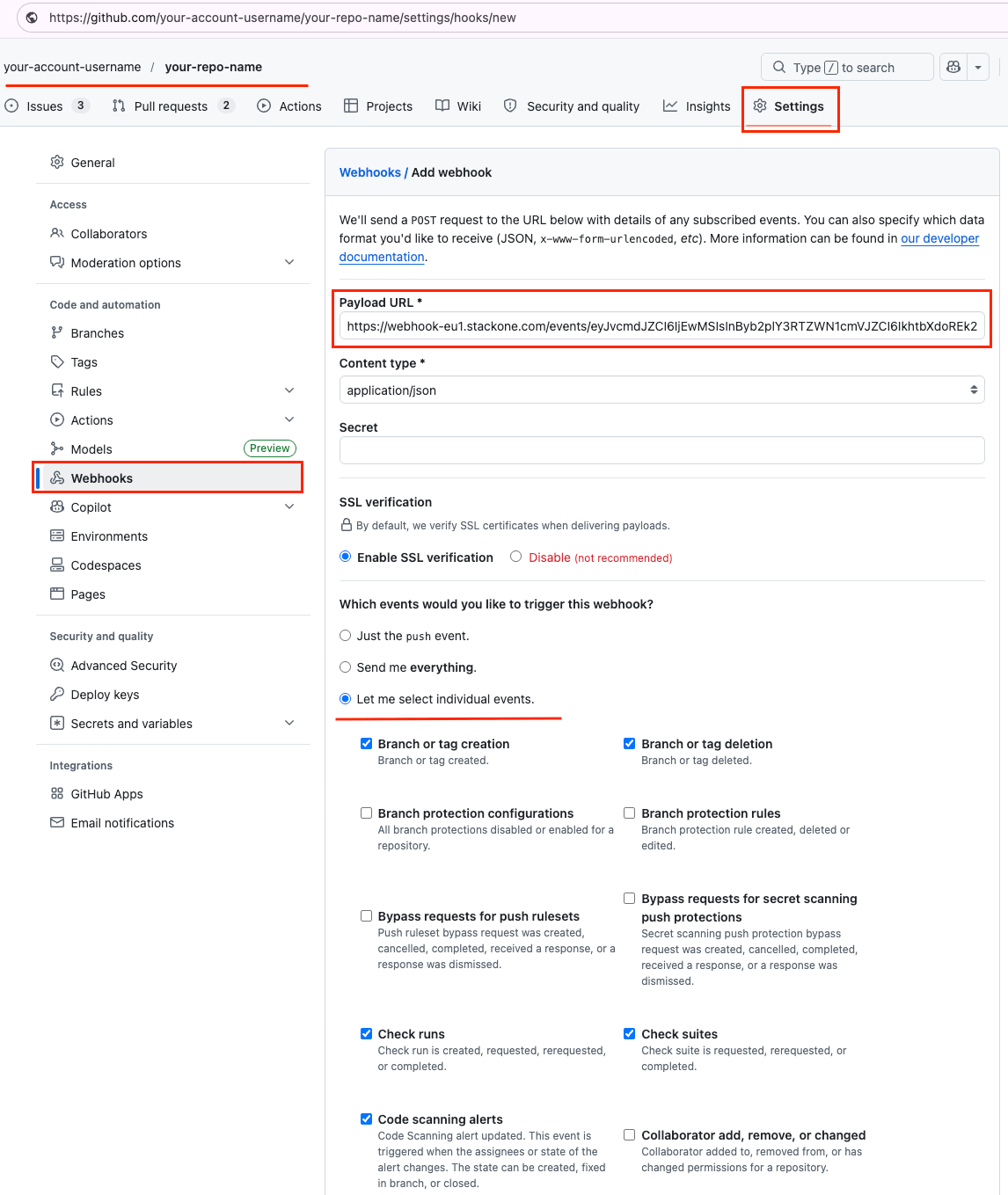
- Open the repository in your organisation on GitHub
- Click the Settings tab
- In the left sidebar, under Code, planning, and automation, click Webhooks
- Click Add webhook
Configure the Payload
Point the webhook at StackOne and send the payload as JSON.
- Paste the copied Native Webhook URL into the Payload URL field
- Set Content type to application/json
- Leave the Secret field empty
- Keep Enable SSL verification selected
Select the Events to Send
Under Which events would you like to trigger this webhook?, choose Let me select individual events, then select the events you wish to receive.
- - Branch or tag creation: Branch or tag created.
- - Branch or tag deletion: Branch or tag deleted.
- - Check runs: Check run is created, requested, rerequested, or completed.
- - Check suites: Check suite is requested, rerequested, or completed.
- - Code scanning alerts: Code scanning alert updated. Triggered when the assignees or state of the alert changes. The state can be created, fixed in branch, or closed.
- - Commit comments: Commit or diff commented on.
- - Dependabot alerts: Dependabot alert assignees changed, auto dismissed, auto reopened, created, dismissed, reopened, fixed, or reintroduced.
- - Deployment statuses: Deployment status updated from the API.
- - Deployments: Repository was deployed or a deployment was deleted.
- - Forks: Repository forked.
- - Issue comments: Issue comment created, edited, or deleted.
- - Issues: Issue opened, edited, deleted, transferred, pinned, unpinned, closed, reopened, assigned, unassigned, labeled, unlabeled, milestoned, demilestoned, locked, unlocked, typed, untyped, field added, or field removed.
- - Pull request review comments: Pull request diff comment created, edited, or deleted.
- - Pull request reviews: Pull request review submitted, edited, or dismissed.
- - Pull requests: Pull request assigned, auto merge disabled, auto merge enabled, closed, converted to draft, demilestoned, dequeued, edited, enqueued, labeled, locked, milestoned, opened, ready for review, reopened, review request removed, review requested, stacked, synchronized, unassigned, unlabeled, or unlocked.
- - Pushes: Git push to a repository.
- - Releases: Release created, edited, published, unpublished, or deleted.
- - Repositories: Repository created, deleted, archived, unarchived, publicized, privatized, edited, renamed, or transferred.
- - Secret scanning alerts: Secret scanning alert created, resolved, reopened, validated, publicly leaked, assigned, or unassigned.
- - Stars: A star is created or deleted from a repository.
- - Statuses: Commit status updated from the API.
- - Team adds: Team added or modified on a repository.
- - Workflow jobs: Workflow job queued, waiting, in progress, or completed on a repository.
- - Workflow runs: Workflow run requested or completed on a repository.
Activate the Webhook
Save the webhook to begin receiving events.
- Select Active to enable the webhook
- Click Add webhook
- Reconnect the account in StackOne so the new configuration is applied