

Prerequisites
The connector should already be set up, with a Connector Profile and a Linked Account. See Getting Started on the Copper connector page.How webhooks are set up
Copper webhooks are API-only and there is no webhook screen to configure inside Copper. StackOne creates one Copper webhook subscription for each event you enable on this connection, and deletes those subscriptions when the events are disabled or the account is disconnected.
Enable the events you need in StackOne
Open the connector profile in StackOne, go to the Events tab and enable the Copper events you want to receive. StackOne subscribes only the enabled events, so Copper never sends anything else.
- Each enabled event becomes its own subscription in Copper.
- Copper allows up to 100 active webhook subscriptions per account, including any created by other tools.
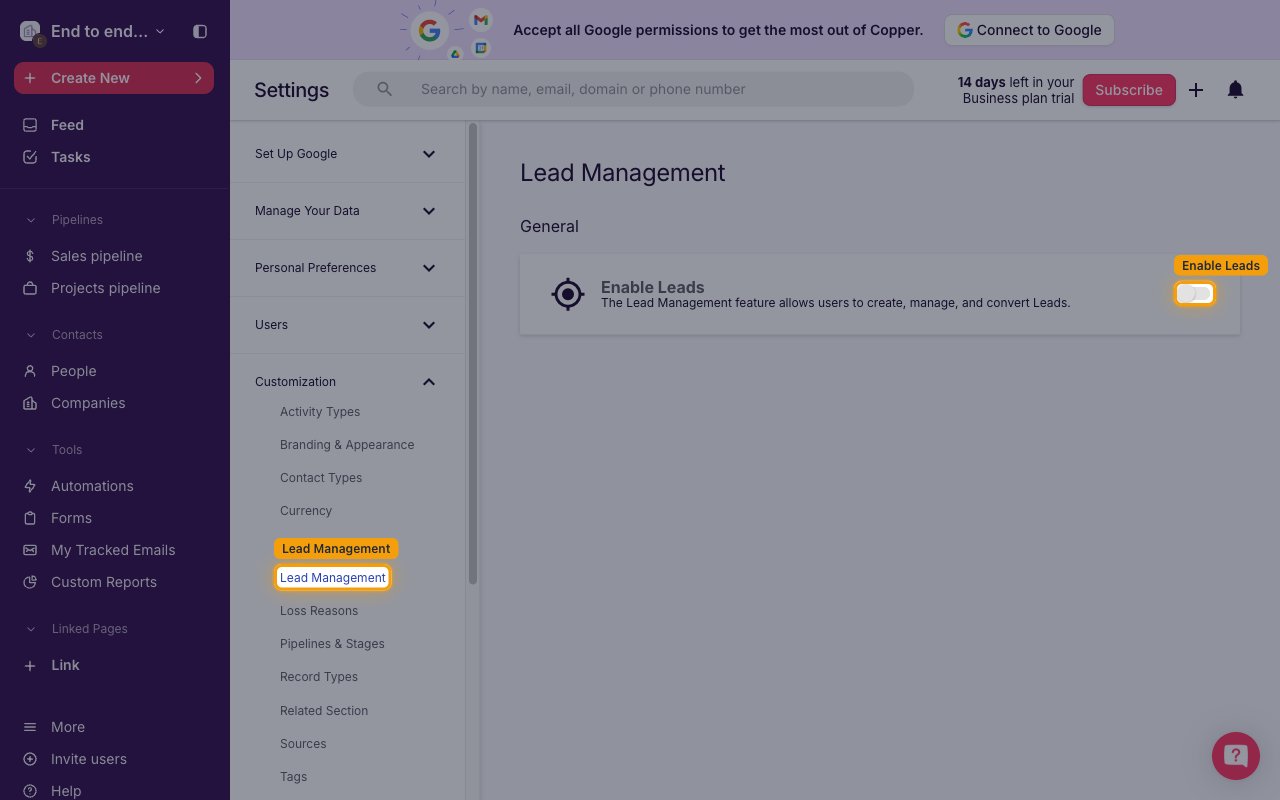
Enable Leads before using lead events
Lead subscriptions only work when Copper’s Leads module is on. In Copper, click your workspace name, choose Customization > Lead Management and turn on Enable Leads before enabling any lead event.
Available webhook events
The following Copper events can be enabled. Only events selected in StackOne are subscribed in Copper and delivered.
Review lead events
Events related to leads. Requires the Leads feature to be enabled in Copper.
- Lead Created (
lead.new) — Fired when one or more leads are created - Lead Updated (
lead.update) — Fired when any field on an existing lead changes - Lead Deleted (
lead.delete) — Fired when one or more leads are deleted
Review person events
Events related to people (contacts).
- Person Created (
person.new) — Fired when one or more people are created - Person Updated (
person.update) — Fired when any field on an existing person changes - Person Deleted (
person.delete) — Fired when one or more people are deleted
Review company events
Events related to companies.
- Company Created (
company.new) — Fired when one or more companies are created - Company Updated (
company.update) — Fired when any field on an existing company changes - Company Deleted (
company.delete) — Fired when one or more companies are deleted
Review opportunity events
Events related to sales opportunities.
- Opportunity Created (
opportunity.new) — Fired when one or more opportunities are created - Opportunity Updated (
opportunity.update) — Fired when any field on an existing opportunity changes - Opportunity Deleted (
opportunity.delete) — Fired when one or more opportunities are deleted
Review project events
Events related to projects.
- Project Created (
project.new) — Fired when one or more projects are created - Project Updated (
project.update) — Fired when any field on an existing project changes - Project Deleted (
project.delete) — Fired when one or more projects are deleted
Review task events
Events related to tasks.
- Task Created (
task.new) — Fired when one or more tasks are created - Task Updated (
task.update) — Fired when any field on an existing task changes - Task Deleted (
task.delete) — Fired when one or more tasks are deleted
Review activity events
Events related to logged activities such as notes, calls and meetings.
- Activity Created (
activity_log.new) — Fired when one or more activities are created - Activity Updated (
activity_log.update) — Fired when any field on an existing activity changes - Activity Deleted (
activity_log.delete) — Fired when one or more activities are deleted
Delivery format
How Copper delivers events to StackOne.
Review event payloads
Copper sends each event as an HTTP POST with a JSON body containing the entity type, the event (new, update or delete), the subscription_id, an ISO 8601 timestamp and an ids array of the affected record IDs. Copper does not include the record itself, so fetch the full record with the matching Copper action when you need it. Update events also include updated_attributes, which holds the old and new value of each changed field.
Review batched deliveries
A single delivery can reference up to 30 records. When more records are affected at once, Copper sends several deliveries of up to 30 IDs each, and StackOne emits one event per delivery.
Review delivery guarantees
Copper sends each notification at most once and does not retry, regardless of the response status. Copper deliveries are not signed.