

Prerequisites
The connector should already be set up, with a Connector Profile and a Linked Account. See Getting Started on the Chargify (Maxio) connector page.Configure the Chargify (Maxio) webhook endpoint
Chargify (Maxio) sends webhooks to endpoints that you add in your site settings. Add the StackOne Native Webhook URL as an endpoint and subscribe it to the events you want to receive.
Retrieve the StackOne Native Webhook URL
You can find the Native Webhook URL in the StackOne Hub or on the Linking Account form during account connection or linking.
- Copy the value from Native Webhook URL.
Enable events in StackOne
Turn on the events you want to receive so StackOne delivers them to your webhook.
- Open the connector profile and select the Events tab.
- Turn on each event you want to receive and select the StackOne webhook it should be sent to.
- Click Save Profile.
Sign in to your Chargify (Maxio) account
Sign in to your Chargify (Maxio) account at https://app.chargify.com/login.html or https://login.maxio.com/u/login with a user that has the Admin role, then open your site, for example https://{your-subdomain}.chargify.com.
Open the webhook settings in Chargify (Maxio)
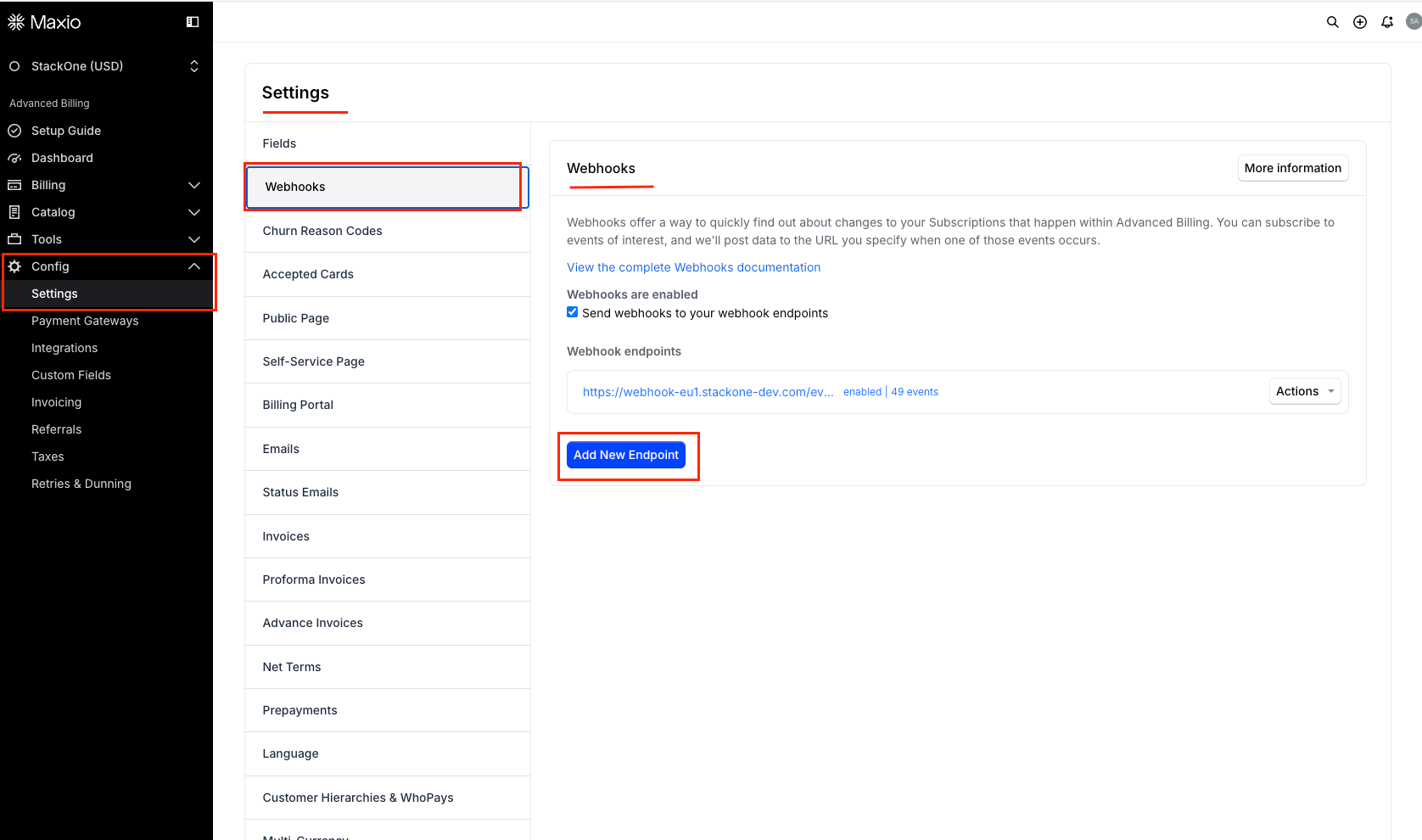
Open the webhook settings for your site.
- Go to Config > Settings, then select Webhooks.
- Select the Send webhooks to your webhook endpoints checkbox.
- Click Add New Endpoint.
Add the StackOne endpoint
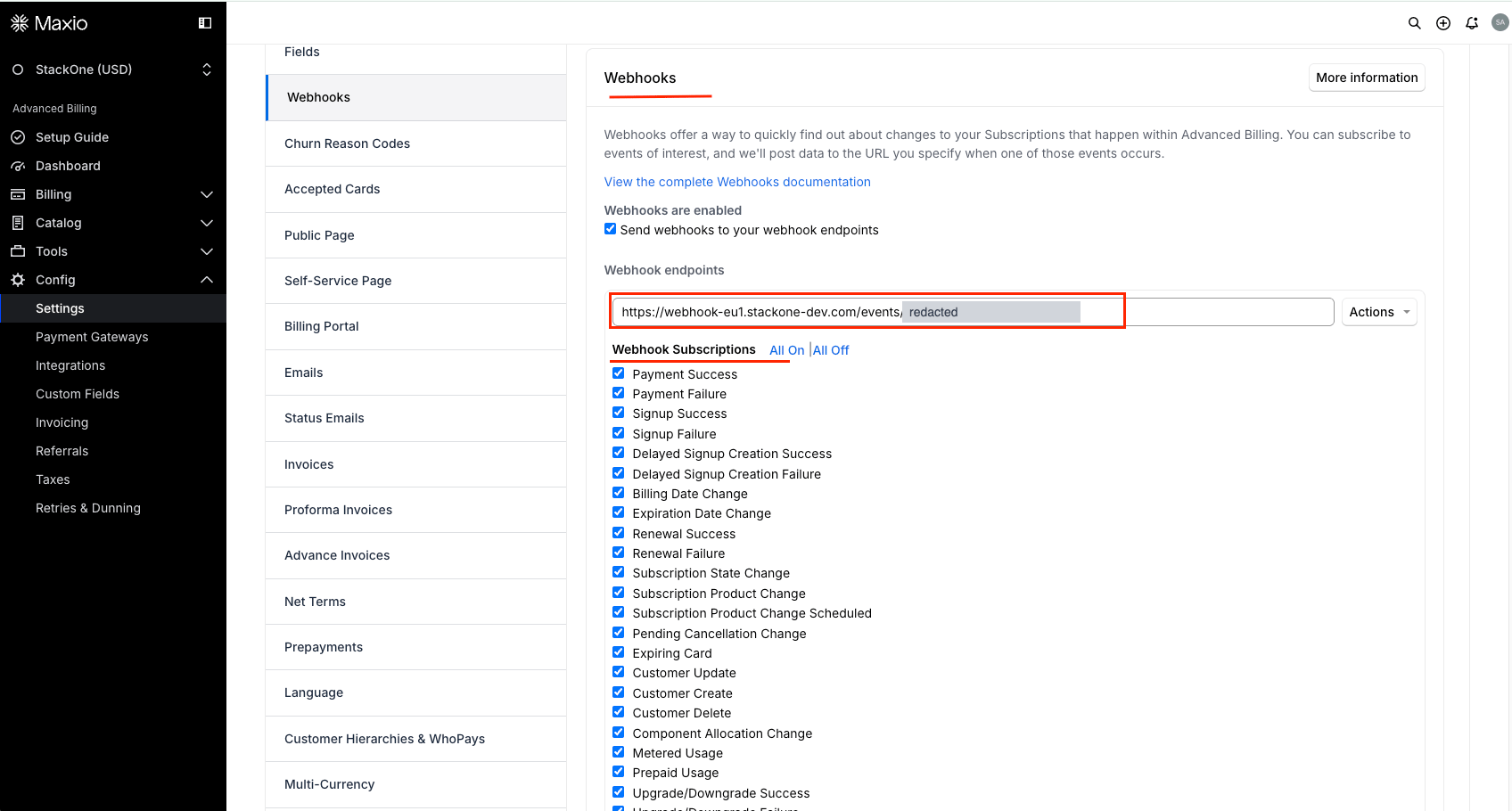
Create an endpoint that posts to StackOne.
- Paste the Native Webhook URL into the URL field.
Select the webhook subscriptions
Under Webhook Subscriptions, tick each of the following events, or click All On to tick them all. Chargify (Maxio) only sends the events that are ticked.
- Payment Success
- Payment Failure
- Signup Success
- Signup Failure
- Delayed Signup Creation Success
- Delayed Signup Creation Failure
- Billing Date Change
- Expiration Date Change
- Renewal Success
- Renewal Failure
- Subscription State Change
- Subscription Product Change
- Subscription Product Change Scheduled
- Pending Cancellation Change
- Expiring Card
- Customer Update
- Customer Create
- Customer Delete
- Component Allocation Change
- Metered Usage
- Prepaid Usage
- Upgrade/Downgrade Success
- Upgrade/Downgrade Failure
- Statement Closed
- Statement Settled
- Subscription Card Update
- Subscription Group Card Update
- Subscription Bank Account Update
- Refund Success
- Refund Failure
- Upcoming Renewal Notice
- Trial End Notice
- Dunning Step Reached
- Invoice Issued
- Invoice Pending
- Subscription Group Signup Success
- Subscription Group Signup Failure
- Direct Debit Payment Paid Out
- Direct Debit Payment Rejected
- Direct Debit Payment Pending
- Proforma Invoice Issued
- Subscription Prepayment Account Balance Changed
- Subscription Service Credit Account Balance Changed
- Custom Field Value Change
- Item Price Point Changed
- Chjs Tokenization Success
- Chjs Tokenization Failure
- 3DS Authentication Failure
- Payment Not Attempted
Save the endpoint
Save the endpoint so Chargify (Maxio) starts sending the ticked events to StackOne.
- Click Save.
- The endpoint appears under Webhook Endpoints with its status, for example
enabled | 49 events. - Do not use the endpoint’s Test action to check the connection. It posts a placeholder
testevent that StackOne does not map, so Chargify (Maxio) reports it as failed. Trigger a real event instead, such as creating a customer.
Available webhook events
The following Chargify (Maxio) events can be received. Chargify (Maxio) only sends the events the endpoint is subscribed to, and StackOne only delivers the events turned on in StackOne. The legacy names allocation_change, subscription_plan_change and subscription_plan_change_scheduled, used on sites with productless subscriptions turned off, are delivered as their current events.
Customer events
Events related to customers and custom field values.
- Customer Created (
customer_create) — Fired when a new customer is created - Customer Updated (
customer_update) — Fired when a customer’s name, organization, email, reference, address, phone, VAT number, parent, CC emails or business type changes - Customer Deleted (
customer_delete) — Fired when a customer is deleted on its own (not when a subscription and its customer are deleted together) - Custom Field Value Changed (
custom_field_value_change) — Fired when a custom field (metafield) value is added or changed on a subscription or customer. The change is inpayload.metafield
Subscription events
Events related to the subscription lifecycle, product changes, renewals and notices.
- Signup Succeeded (
signup_success) — Fired when a subscription is created through the API, the app or Public Pages. Component allocations are not included - Signup Failed (
signup_failure) — Fired when a signup fails to start a subscription, usually at the payment gateway. Not fired for input validation errors - Delayed Signup Created (
delayed_signup_creation_success) — Fired when a delayed subscription is created successfully in an awaiting-signup state - Delayed Signup Failed (
delayed_signup_creation_failure) — Fired when a delayed subscription fails to be created - Subscription State Changed (
subscription_state_change) — Fired on any subscription state change.payload.subscriptioncarries bothprevious_stateandstate - Subscription Product Changed (
subscription_product_change) — Fired when a subscription moves to a new product or product version. Also routed from the legacysubscription_plan_changename; the payload carriesprevious_product - Subscription Product Change Scheduled (
subscription_product_change_scheduled) — Fired when a delayed product change is scheduled for the next renewal. Also routed from the legacysubscription_plan_change_scheduledname; the payload carriescurrent_product,scheduled_productandeffective_at - Upgrade or Downgrade Succeeded (
upgrade_downgrade_success) — Fired when a subscription upgrade or downgrade succeeds. The payload carriesprevious_product - Upgrade or Downgrade Failed (
upgrade_downgrade_failure) — Fired when a subscription upgrade or downgrade fails. The payload carriestarget_product - Billing Date Changed (
billing_date_change) — Fired when a subscription’s billing date is changed explicitly in the app or API, not by a normal renewal. The payload carriesprevious_billing_date - Expiration Date Changed (
expiration_date_change) — Fired when an existing subscription expiration date changes. The payload carriesprevious_expires_at - Pending Cancellation Changed (
pending_cancellation_change) — Fired when a subscription is set to cancel at the end of the period, or that pending cancellation is cleared - Price Point Changed (
item_price_point_changed) — Fired when a subscription’s price point changes for a product or component - Renewal Succeeded (
renewal_success) — Fired once at the end of a recurring interval when the periodic renewal succeeds - Renewal Failed (
renewal_failure) — Fired once at the end of a recurring interval when the periodic renewal fails, for example on a declined card - Upcoming Renewal Notice (
upcoming_renewal_notice) — Fired ahead of a subscription renewal (3 days before by default) - Trial End Notice (
trial_end_notice) — Fired ahead of a subscription’s trial ending - Dunning Step Reached (
dunning_step_reached) — Fired when a subscription reaches a step of the dunning process. The payload carriesdunner,current_stepandnext_step - Subscription Group Signup Succeeded (
subscription_group_signup_success) — Fired when a subscription group signup succeeds through the Subscription Group Signup endpoint - Subscription Group Signup Failed (
subscription_group_signup_failure) — Fired when a subscription group signup fails through the Subscription Group Signup endpoint
Component and usage events
Events related to component allocations, metered and prepaid usage.
- Component Allocation Changed (
component_allocation_change) — Fired when a quantity allocation, on/off state or prepaid allocation changes after signup. Also routed from the legacyallocation_changename; the payload carriesprevious_allocationandnew_allocation - Metered Usage Recorded (
metered_usage) — Fired when usage is reported for a metered component. Not fired when the balance resets at renewal - Prepaid Usage Recorded (
prepaid_usage) — Fired when usage is recorded for a prepaid component - Prepaid Subscription Balance Changed (
prepaid_subscription_balance_changed) — Fired when a prepaid subscription’s usage or prepayment balance changes
Payment and refund events
Events related to payments, refunds, Direct Debit and account balances.
- Payment Succeeded (
payment_success) — Fired for every payment attempt that does not fail immediately (renewals, one-time charges, retries and invoice payments) - Payment Failed (
payment_failure) — Fired for every failed payment attempt - Payment Not Attempted (
payment_not_attempted) — Fired when a collection finds no payment method on the subscription, so no gateway is contacted. Opt-in per endpoint - Refund Succeeded (
refund_success) — Fired when a refund is processed successfully - Refund Failed (
refund_failure) — Fired when a refund fails or a successful refund is later reversed by the bank - Direct Debit Payment Pending (
direct_debit_payment_pending) — Fired when a Direct Debit payment is created in the gateway and awaits processing (Maxio Payments, Stripe, GoCardless) - Direct Debit Payment Paid Out (
direct_debit_payment_paid_out) — Fired when a Direct Debit payment is processed by the gateway (Maxio Payments, Stripe, GoCardless) - Direct Debit Payment Rejected (
direct_debit_payment_rejected) — Fired when a Direct Debit payment is rejected by the gateway (Maxio Payments, Stripe, GoCardless) - Prepayment Balance Changed (
subscription_prepayment_account_balance_changed) — Fired when a subscription’s prepayment account balance changes - Service Credit Balance Changed (
subscription_service_credit_account_balance_changed) — Fired when a subscription’s service credit account balance changes
Payment method events
Events related to cards, bank accounts and Maxio.js tokenization.
- Subscription Card Updated (
subscription_card_update) — Fired when the active credit card payment profile changes, including partial card and billing address updates - Subscription Bank Account Updated (
subscription_bank_account_update) — Fired when a subscription adds or updates a bank account - Subscription Group Card Updated (
subscription_group_card_update) — Fired when the active credit card payment profile on a subscription group changes - Expiring Card (
expiring_card) — Fired on the 1st, the 15th and 7 days before month end for each card that expires this month - Maxio.js Tokenization Succeeded (
chjs_tokenization_success) — Fired when Maxio.js tokenizes a payment method on your own page - Maxio.js Tokenization Failed (
chjs_tokenization_failure) — Fired when a Maxio.js tokenization attempt fails, for example on a declined card - 3D Secure Authentication Failed (
three_ds_authentication_failure) — Fired when a 3D Secure authentication fails during signup on a Public Signup Page
Invoice and statement events
Events related to invoices, proforma invoices and statements.
- Invoice Issued (
invoice_issued) — Fired when an invoice is issued against a subscription on a Relationship Invoicing site - Invoice Pending (
invoice_pending) — Fired when an invoice moves to the pending state (Relationship Invoicing) - Proforma Invoice Issued (
proforma_invoice_issued) — Fired when a proforma invoice is issued for a subscription (Relationship Invoicing) - Statement Closed (
statement_closed) — Fired when a statement closes at period end without a successful payment - Statement Settled (
statement_settled) — Fired when a statement closes at period end with payment received or not required