

Create Store-level API credentials
Generate API credentials from your BigCommerce store admin panel.
1
Create the API account
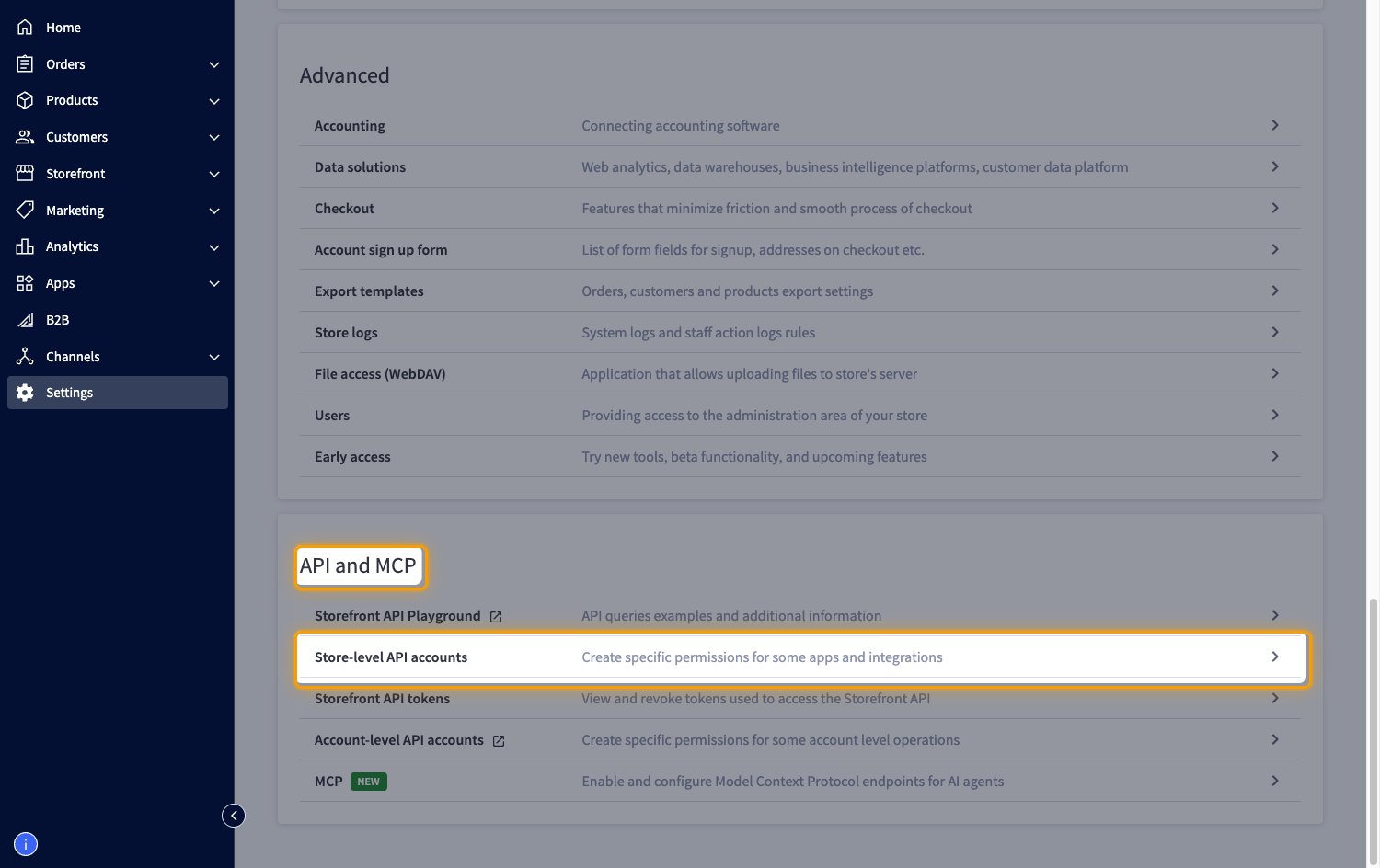
Sign in to your BigCommerce account, then open Settings and scroll down to API and MCP.
- Click Store-level API accounts.
- Click Create API account.
- Token type: V2/V3 API token
- Name:
StackOne Integration
2
Note your Store Hash
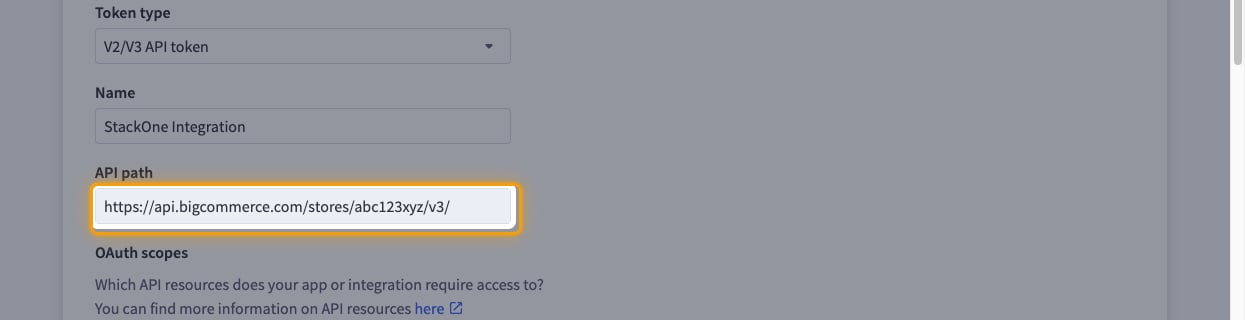
The API path field on the create form contains your Store Hash.
- Format:
https://api.bigcommerce.com/stores/{store_hash}/v3/ - Example: if your API path is
https://api.bigcommerce.com/stores/abc123xyz/v3/, your Store Hash isabc123xyz - Copy the Store Hash into StackOne Hub.
3
Configure OAuth scopes
Enables actions: Absolute Adjustment, Activate A Theme, Add Cart Line Items, Add Checkout Billing Address, Add Checkout Consignment, Add Wishlist Items, Create A Brand, Create A Cart, Create A Channel, Create A Coupon, Create A Currency, Create A Page, Create A Price List, Create A Product, Create A Product Variant, Create A Script, Create A Shipment, Create A Shipping Zone, Create A Site, Create A Subscriber, Create A Webhook, Create A Wishlist, Create An Order, Create Categories, Create Customers, Create Locations, Create Order From Checkout, Delete A Brand, Delete A Cart, Delete A Coupon, Delete A Currency, Delete A Page, Delete A Price List, Delete A Product, Delete A Product Variant, Delete A Script, Delete A Shipping Zone, Delete A Subscriber, Delete A Webhook, Delete A Wishlist, Delete A Wishlist Item, Delete Brands, Delete Cart Line Item, Delete Categories, Delete Category Trees, Delete Checkout Consignment, Delete Customers, Delete Subscribers, Get A Brand, Get A Cart, Get A Category Tree, Get A Channel, Get A Checkout, Get A Count Of All Countries, Get A Count Of Coupons, Get A Country, Get A Coupon, Get A Currency, Get A Customer, Get A Location, Get A Page, Get A Price List, Get A Product, Get A Product Variant, Get A Script, Get A Shipping Method, Get A Shipping Zone, Get A Site, Get A Subscriber, Get A Tax Class, Get A Theme, Get A Webhook, Get A Wishlist, Get All Brands, Get All Categories, Get All Category Trees, Get All Channels, Get All Countries, Get All Country’s States, Get All Coupons, Get All Currencies, Get All Customers, Get All Order Statuses, Get All Orders, Get All Price Lists, Get All Product Variants, Get All Product Variants By Product ID, Get All Products, Get All Scripts, Get All Themes, Get All Wishlists, Get An Order, Get Inventory At Locations, Get Locations, Get Pages, Get Shipping Methods In A Zone, Get Shipping Zones, Get Sites, Get Store Information, Get Subscribers, Get Tax Classes, Get Webhooks, List Order Products, List Order Shipments, Relative Adjustment, Update A Brand, Update A Channel, Update A Coupon, Update A Currency, Update A Page, Update A Price List, Update A Product, Update A Product Variant, Update A Script, Update A Shipping Zone, Update A Webhook, Update A Wishlist, Update An Order, Update Cart Line Item, Update Categories, Update Checkout Billing Address, Update Checkout Consignment, Update Customers, Upsert Category Trees
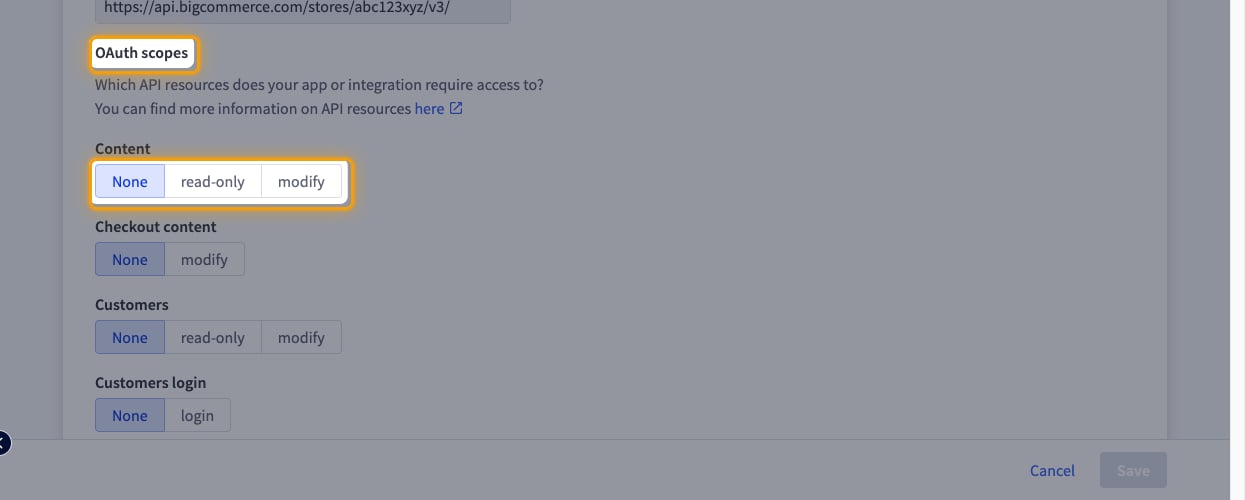
Under OAuth scopes, set the access level each API resource needs. For each resource, click read-only or modify.
4
Save and copy the Access Token
Click Save to generate the credentials.
- Copy the Access Token into StackOne Hub.
- The Access Token is displayed only once and cannot be retrieved later.
Link the Account
1
Connect
- Click Connect.
- If applicable, the provider will redirect you to a sign-in or authorization page. Complete the provider’s authorization flow.
- Once authorization is successful, you will see a confirmation popup.
2
Use Actions
Connect an AI platform to the linked account’s actions. See AI Platforms.Other ways to call actions are listed in Protocols & SDKs.
Next Steps
Webhooks setup
Configure receiving Events for BigCommerce into StackOne.