

Prerequisites
The connector should already be set up, with a Connector Profile and a Linked Account. See Getting Started on the Akeneo connector page.Enable the Event Platform
StackOne creates the Akeneo Event Platform subscription when the account is linked and deletes it when the account is disconnected, so there is no webhook URL to paste into Akeneo. Before linking, allow the connection StackOne uses to send events.
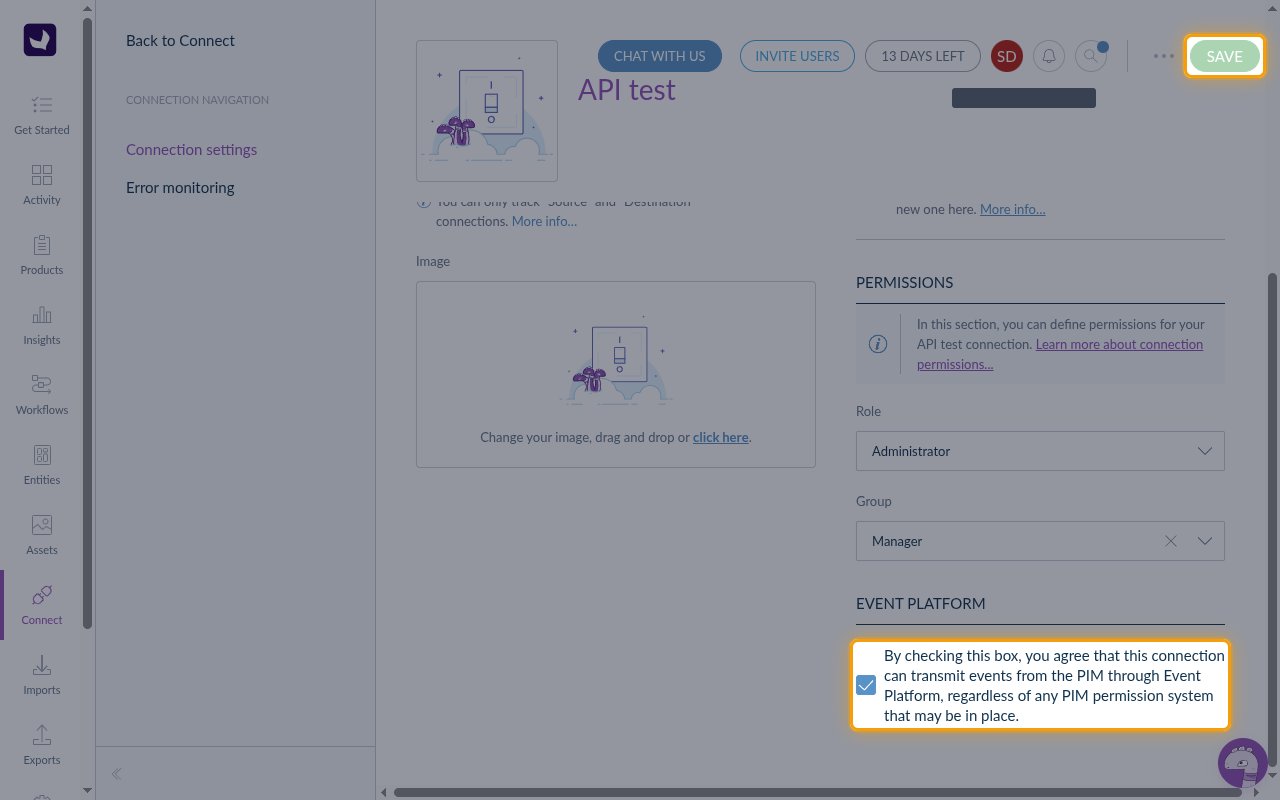
Enable the Event Platform permission
Sign in to your Akeneo PIM and open the connection whose credentials you link in StackOne:
- Open Connect > Connection settings.
- Click the connection.
- In the Event Platform section, tick the checkbox next to “By checking this box, you agree that this connection can transmit events from the PIM through Event Platform”.
- Click Save.
Available webhook events
The following Akeneo events can be enabled. Only events selected in StackOne are included in the subscription, and Akeneo does not deliver events that are not subscribed.
Product events
Events related to products.
- Product Created (
com.akeneo.pim.v1.product.created) — Fired when a new product is created in the PIM - Product Updated (
com.akeneo.pim.v1.product.updated) — Fired when an existing product is modified in the PIM - Product Updated Delta (
com.akeneo.pim.v1.product.updated.delta) — Fired when a product is modified, with only the values that changed - Product Deleted (
com.akeneo.pim.v1.product.deleted) — Fired when a product is deleted from the PIM
Product completeness and readiness events
Events related to product completeness and readiness. The readiness events are in a managed rollout at Akeneo and only reach PIMs given early access.
- Product Became Complete (
com.akeneo.pim.v1.product.became-complete) — Fired when a product became complete on at least one combination of locale and scope - Product Became Incomplete (
com.akeneo.pim.v1.product.became-incomplete) — Fired when a product became incomplete on at least one combination of locale and scope - Product Became Ready (
com.akeneo.pim.v1.product.became-ready) — Fired when a product reaches a 100% readiness score on at least one combination of locale and scope - Product Became Not Ready (
com.akeneo.pim.v1.product.became-not-ready) — Fired when a product readiness score drops below 100% on at least one combination of locale and scope
Product model events
Events related to product models.
- Product Model Created (
com.akeneo.pim.v1.product-model.created) — Fired when a new product model is created in the PIM - Product Model Updated (
com.akeneo.pim.v1.product-model.updated) — Fired when an existing product model is modified in the PIM - Product Model Updated Delta (
com.akeneo.pim.v1.product-model.updated.delta) — Fired when a product model is modified, with only the values that changed - Product Model Deleted (
com.akeneo.pim.v1.product-model.deleted) — Fired when a product model is deleted from the PIM
Product model readiness events
Events related to product model readiness. Akeneo sends them only to PIMs given early access while they are in a managed rollout.
- Product Model Became Ready (
com.akeneo.pim.v1.product-model.became-ready) — Fired when a product model reaches a 100% readiness score on at least one combination of locale and scope - Product Model Became Not Ready (
com.akeneo.pim.v1.product-model.became-not-ready) — Fired when a product model readiness score drops below 100% on at least one combination of locale and scope
Attribute events
Events related to attributes.
- Attribute Created (
com.akeneo.pim.v1.attribute.created) — Fired when a new attribute is created in the PIM - Attribute Updated (
com.akeneo.pim.v1.attribute.updated) — Fired when an existing attribute is modified in the PIM - Attribute Deleted (
com.akeneo.pim.v1.attribute.deleted) — Fired when an attribute is deleted from the PIM
Attribute group events
Events related to attribute groups.
- Attribute Group Created (
com.akeneo.pim.v1.attribute-group.created) — Fired when a new attribute group is created in the PIM - Attribute Group Updated (
com.akeneo.pim.v1.attribute-group.updated) — Fired when an existing attribute group is modified in the PIM - Attribute Group Deleted (
com.akeneo.pim.v1.attribute-group.deleted) — Fired when an attribute group is deleted from the PIM
Attribute option events
Events related to attribute options.
- Attribute Option Created (
com.akeneo.pim.v1.attribute-option.created) — Fired when a new attribute option is created in the PIM - Attribute Option Updated (
com.akeneo.pim.v1.attribute-option.updated) — Fired when an existing attribute option is updated in the PIM - Attribute Option Updated Delta (
com.akeneo.pim.v1.attribute-option.updated.delta) — Fired when an attribute option is modified, with only the values that changed - Attribute Option Deleted (
com.akeneo.pim.v1.attribute-option.deleted) — Fired when an attribute option is deleted from the PIM
Category events
Events related to categories.
- Category Created (
com.akeneo.pim.v1.category.created) — Fired when a new category is created in the PIM - Category Updated (
com.akeneo.pim.v1.category.updated) — Fired when an existing category is modified in the PIM - Category Updated Delta (
com.akeneo.pim.v1.category.updated.delta) — Fired when a category is modified, with only the values that changed - Category Deleted (
com.akeneo.pim.v1.category.deleted) — Fired when a category is deleted from the PIM
Family events
Events related to families.
- Family Created (
com.akeneo.pim.v1.family.created) — Fired when a new family is created in the PIM - Family Updated (
com.akeneo.pim.v1.family.updated) — Fired when an existing family is modified in the PIM - Family Deleted (
com.akeneo.pim.v1.family.deleted) — Fired when a family is deleted from the PIM
Family variant events
Events related to family variants.
- Family Variant Created (
com.akeneo.pim.v1.family-variant.created) — Fired when a new family variant is created in the PIM - Family Variant Updated (
com.akeneo.pim.v1.family-variant.updated) — Fired when a family variant is updated in the PIM - Family Variant Deleted (
com.akeneo.pim.v1.family-variant.deleted) — Fired when a family variant is deleted from the PIM
Asset events
Events related to assets.
- Asset Created (
com.akeneo.pim.v1.asset.created) — Fired when a new asset is created in the PIM - Asset Updated (
com.akeneo.pim.v1.asset.updated) — Fired when an existing asset is modified in the PIM - Asset Updated Delta (
com.akeneo.pim.v1.asset.updated.delta) — Fired when an asset is modified, with only the values that changed - Asset Deleted (
com.akeneo.pim.v1.asset.deleted) — Fired when an asset is deleted from the PIM
Reference entity record events
Events related to reference entity records.
- Reference Entity Record Created (
com.akeneo.pim.v1.reference-entity-record.created) — Fired when a new reference entity record is created in the PIM - Reference Entity Record Updated (
com.akeneo.pim.v1.reference-entity-record.updated) — Fired when an existing reference entity record is modified in the PIM - Reference Entity Record Updated Delta (
com.akeneo.pim.v1.reference-entity-record.updated.delta) — Fired when a reference entity record is modified, with only the values that changed - Reference Entity Record Deleted (
com.akeneo.pim.v1.reference-entity-record.deleted) — Fired when a reference entity record is deleted from the PIM
Job status events
Events related to import, export and mass edit jobs.
- Job Export Status Changed (
com.akeneo.pim.v1.job.export.status-changed) — Fired when a job export is triggered - Job Import Status Changed (
com.akeneo.pim.v1.job.import.status-changed) — Fired when a job import is executed - Job Mass Edit Status Changed (
com.akeneo.pim.v1.job.mass-edit.status-changed) — Fired when a mass edit action is triggered
Workflow events
Events related to workflow executions and tasks.
- Workflow Execution Started (
com.akeneo.pim.v1.workflow.execution.started) — Fired when a new workflow execution is started in the PIM - Workflow Execution Completed (
com.akeneo.pim.v1.workflow.execution.completed) — Fired when a workflow execution is completed in the PIM - Workflow Task Created (
com.akeneo.pim.v1.workflow.task.created) — Fired when a new workflow task is created in the PIM - Workflow Task Completed (
com.akeneo.pim.v1.workflow.task.completed) — Fired when an workflow task is completed in a workflow
Activity events
Audit events. Akeneo sends them only to PIMs on the Akeneo Product Cloud Premium package.
- Activity Data Access (
com.akeneo.pim.v1.activity.data-access) — Fired when a user or connection accesses a resource in the PIM (audit event) - Activity Authentication (
com.akeneo.pim.v1.activity.authentication) — Fired when a user signs in to or out of the PIM (audit event)
App and connection deleted events
Events related to Apps and connections being removed from the PIM.
- App Deleted (
com.akeneo.pim.v1.app.deleted) — Fired when an App is deleted from the PIM - Connection Deleted (
com.akeneo.pim.v1.connection.deleted) — Fired when a connection is deleted from the PIM
Delivery format
Details of how the Akeneo Event Platform delivers events to StackOne.
One event per request
Each request carries one event as a CloudEvents 1.0 JSON body. The event type is in type, its unique ID in id and the time in time, with the changed resource and its author under data.
- Delivery is at least once and unordered, so the same event can arrive more than once.
- Failed deliveries are retried after 5, 10 and 20 minutes, then dropped.
- A new subscription can take a few minutes to start delivering.