

Prerequisites
The connector should already be set up, with a Connector Profile and a Linked Account. See Getting Started on the Adyen connector page.Configure the Standard webhook
Adyen does not let StackOne create webhooks for you. Add a webhook in the Adyen Customer Area that sends to the StackOne Native Webhook URL of the linked account. The Standard webhook carries the payment, modification, dispute and payout events.
Retrieve StackOne Native Webhook URL
The Native Webhook URL is generated once an Adyen account has been linked. Each linked account has its own URL.
- Open the linked account in StackOne.
- Open the … menu, select Reconnect and copy the value from Native Webhook URL.
- Close the form without submitting it.
- The URL contains an access token for the linked account. Store it like a secret and paste it only into Adyen.
Open the webhooks page
Sign in to your Adyen Customer Area (use the live Adyen Customer Area for a Production connection).
- Select the company account in the account switcher, so the webhook covers all of its merchant accounts.
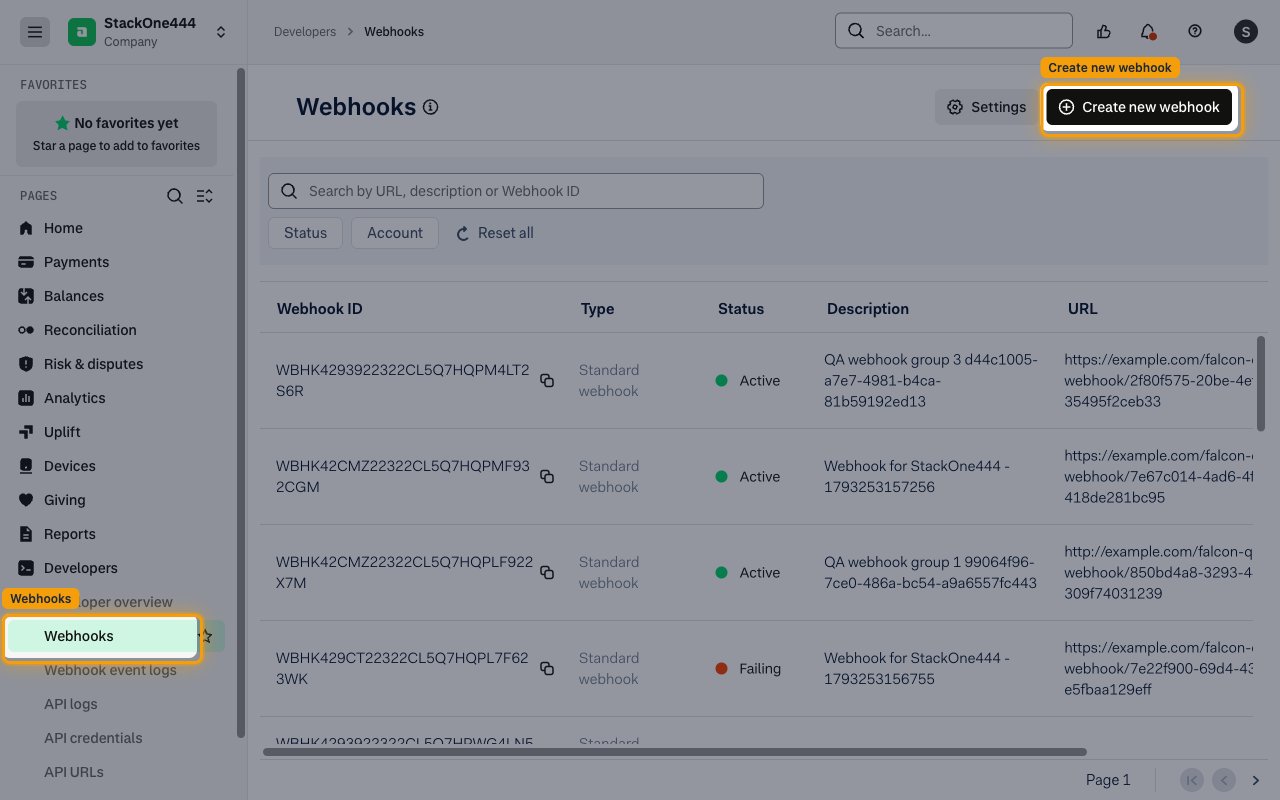
- Navigate to Developers > Webhooks.
- Click Create new webhook.
Choose the Standard webhook
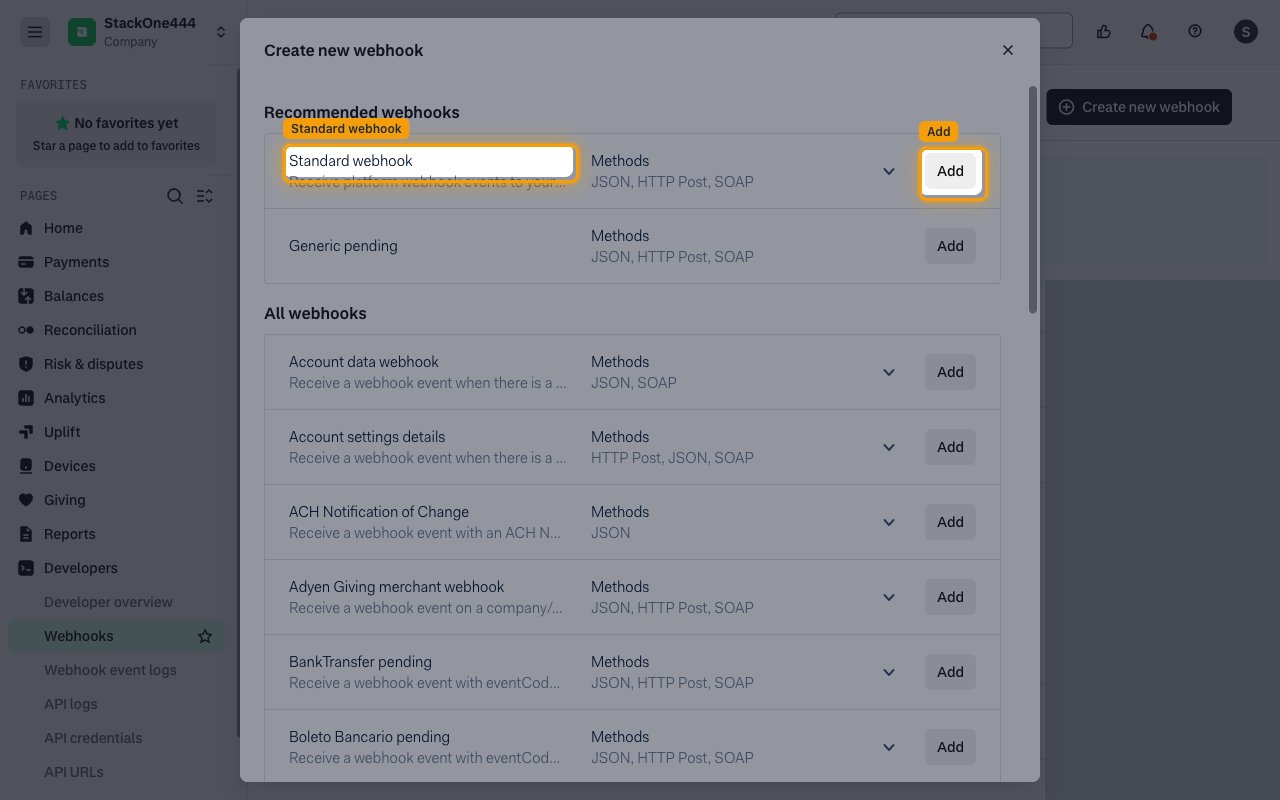
In the Create new webhook dialog, find Standard webhook under Recommended webhooks.
- Click Add next to Standard webhook.
Fill in the general settings
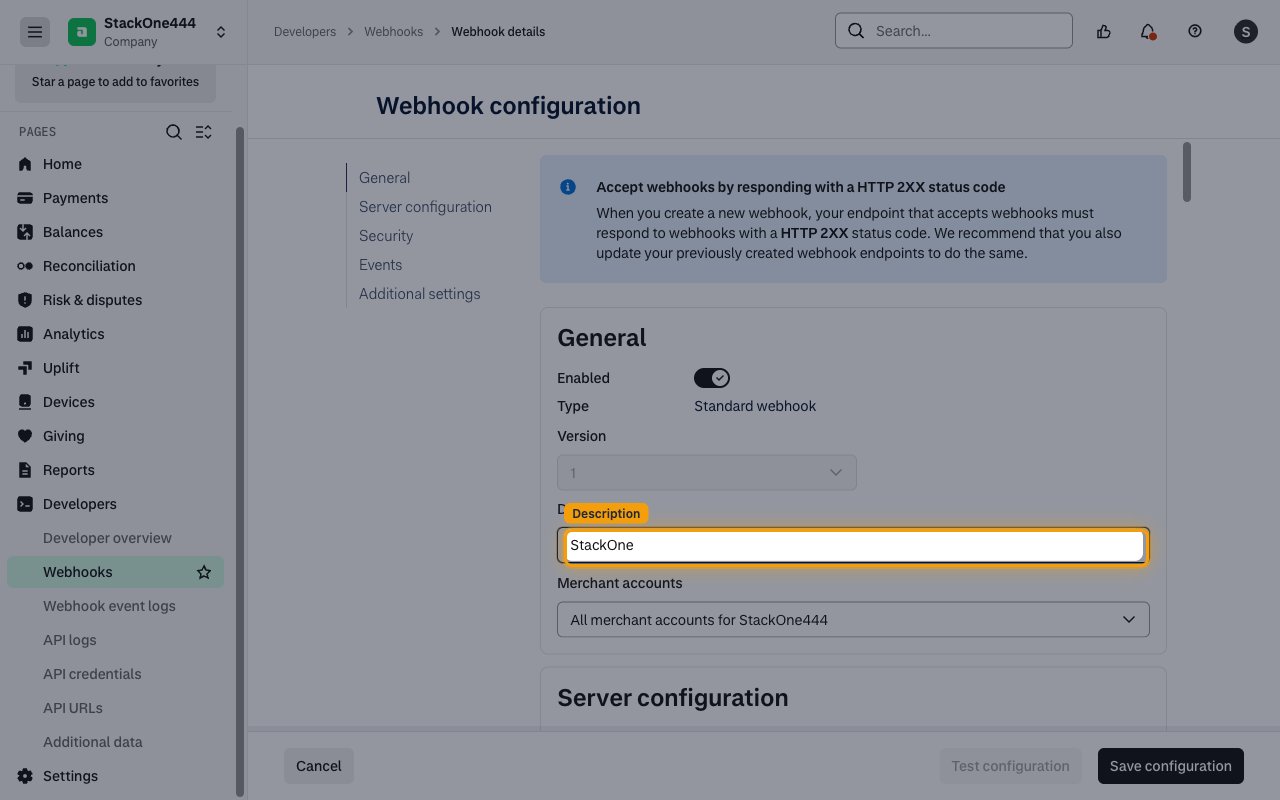
Under General, leave Enabled switched on.
- Enter a Description, for example
StackOne - Leave Merchant accounts set to all merchant accounts, or include only the merchant accounts you want StackOne to receive events for.
Paste the Native Webhook URL
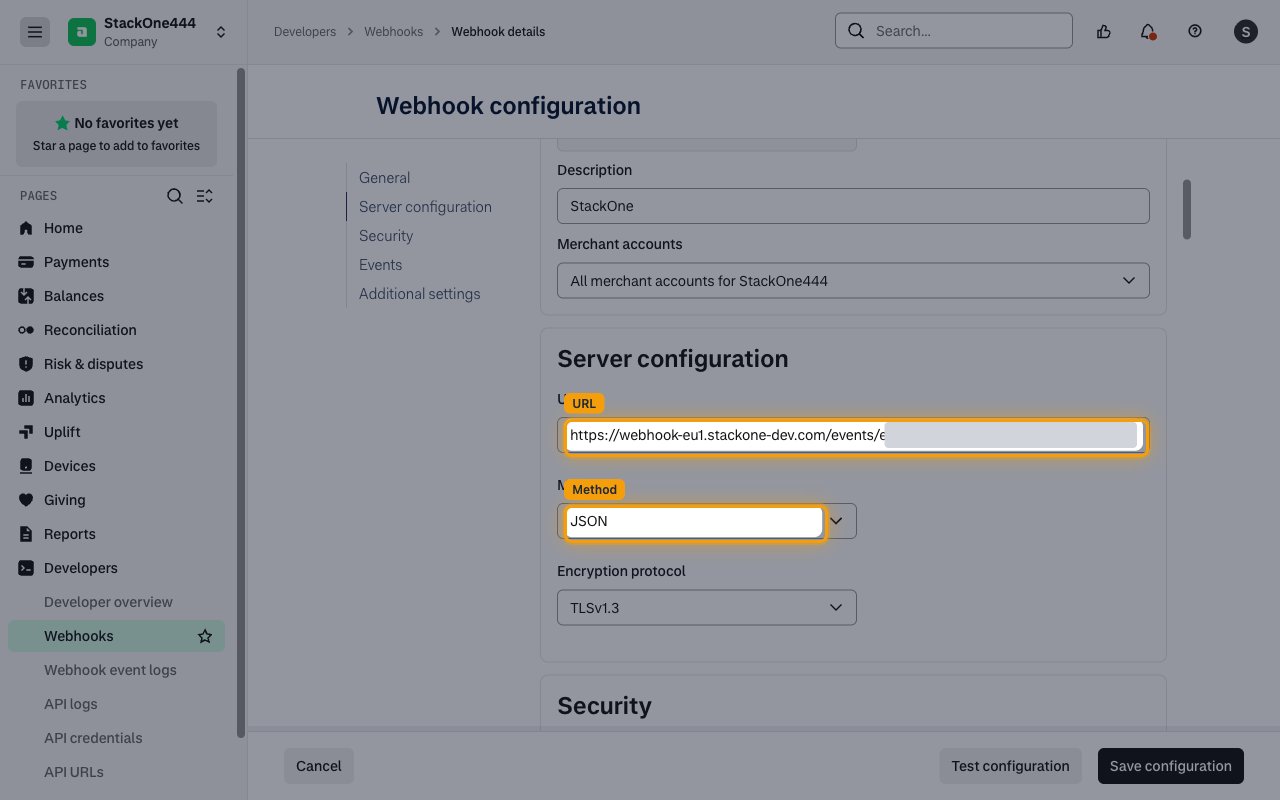
Under Server configuration, paste the StackOne Native Webhook URL into URL.
- Set Method to JSON.
- Leave Encryption protocol at TLSv1.3 or TLSv1.2.
Choose the authentication method
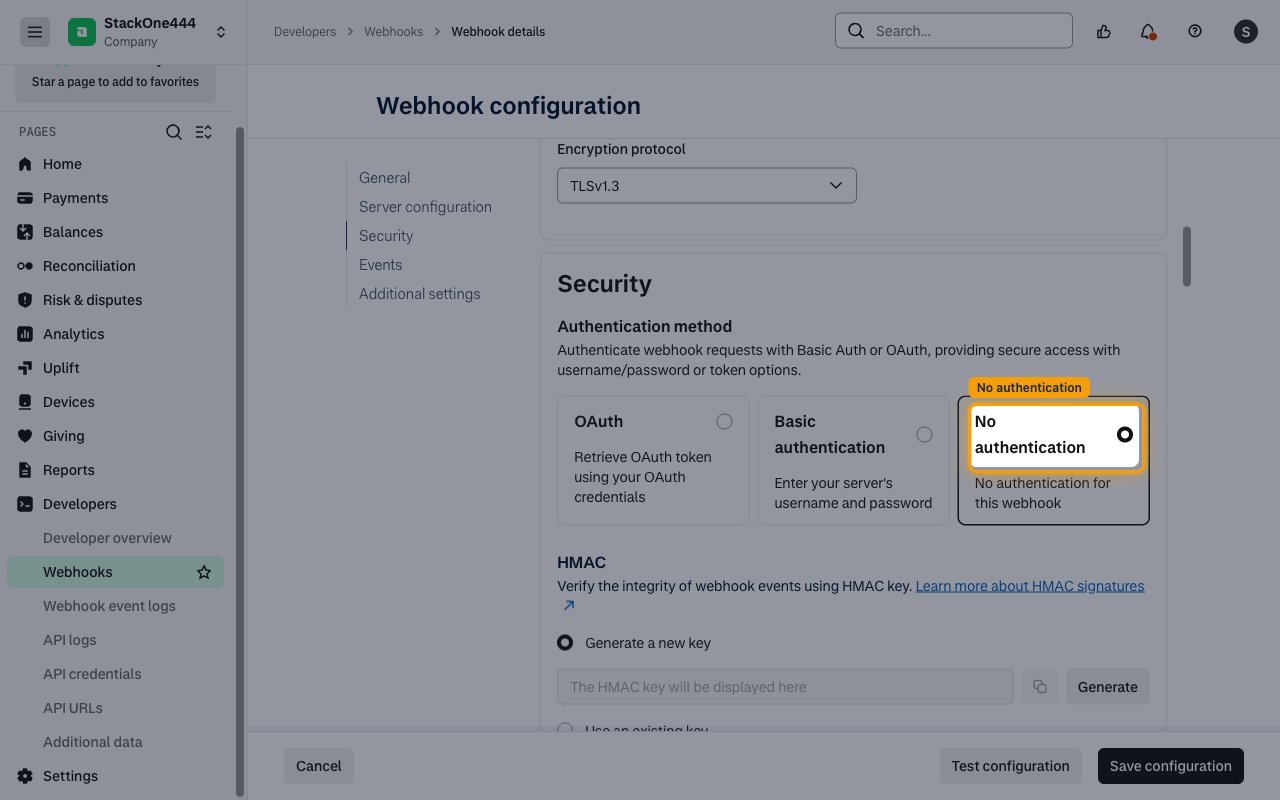
Under Security > Authentication method, select No authentication. The Native Webhook URL already identifies and authenticates the linked account.
- An HMAC key is optional; StackOne does not need it to accept the events.
Select the events
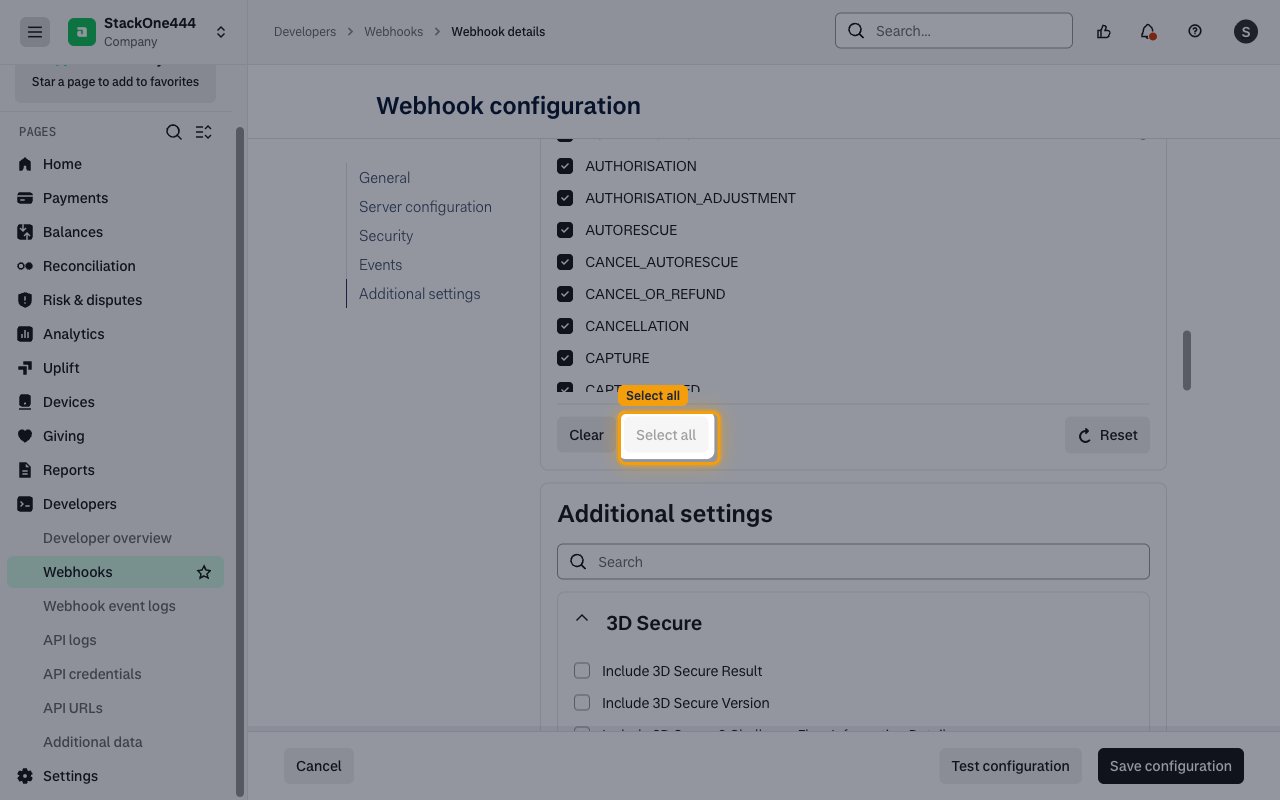
Under Events, click Select all so every event code is sent to StackOne. Only events enabled in StackOne are delivered on to your application.
Save the webhook
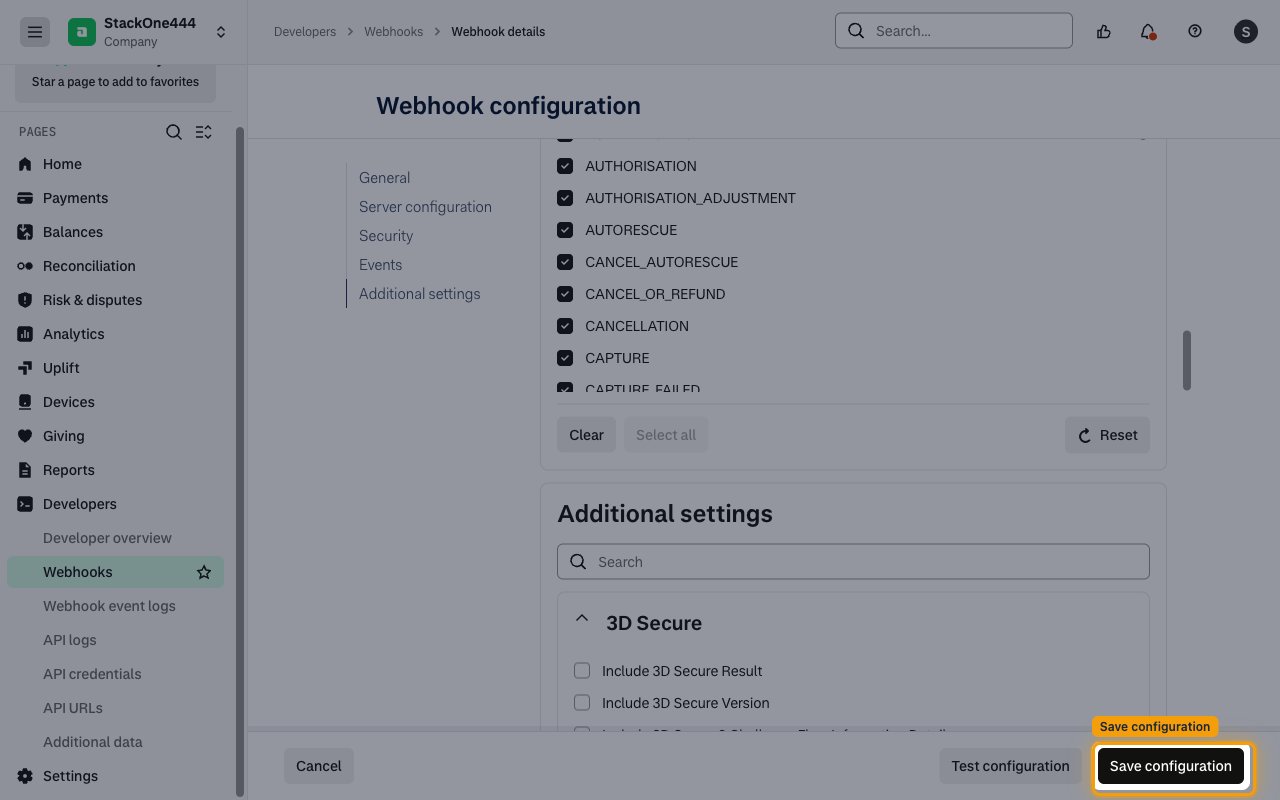
Click Save configuration.
Check the webhook is active
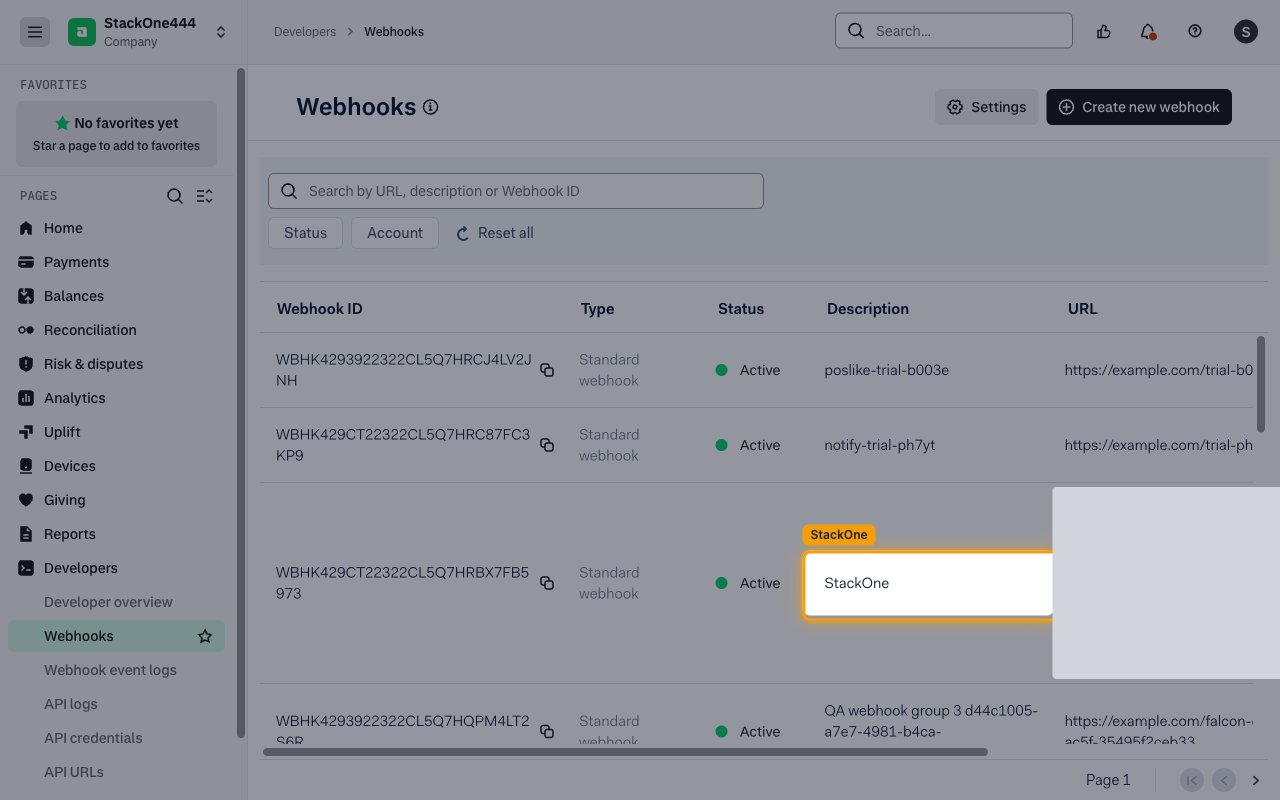
The new webhook appears on the Webhooks page with the Active status and the description you entered.
Add the other webhook types
Each Adyen webhook sends one webhook type. To receive the events below, repeat the steps above for each type you need, using the same Native Webhook URL and JSON method, and pick the type from All webhooks in the Create new webhook dialog.
- Generic pending (or BankTransfer pending, Boleto Bancario pending, Direct-debit pending, Ideal pending) for
PENDINGevents - Adyen Giving merchant webhook for
DONATIONevents - Recurring tokens life cycle events for
recurring.token.*events - Account data webhook, Payment method webhook and the terminal webhooks for the Management events
- The Platforms webhooks (Balance Platform integrations only, company account level) for
balancePlatform.*events
Available webhook events
The following Adyen events can be enabled. Only events selected in StackOne are delivered, and Adyen only sends the events of the webhook types you configured.
Payment events
Events from the Standard, pending and Adyen Giving webhooks: payments, modifications, disputes and payouts.
- Authorization (
AUTHORISATION) — Fired when a payment authorization completed. success tells you whether the payment was authorized - Authorization Adjustment (
AUTHORISATION_ADJUSTMENT) — Fired when a request to adjust the authorized amount completed. originalReference holds the payment pspReference - Cancellation (
CANCELLATION) — Fired when a request to cancel a payment completed. originalReference holds the payment pspReference - Cancel Or Refund (
CANCEL_OR_REFUND) — Fired when a cancel-or-refund request completed. originalReference holds the payment pspReference - Capture (
CAPTURE) — Fired when a request to capture a payment completed. Not sent for automatic captures unless enabled in the Customer Area - Capture Failed (
CAPTURE_FAILED) — Fired when a capture was rejected by the card scheme - Expire (
EXPIRE) — Fired when the authorization of the original payment expired on the Adyen platform - Handled Externally (
HANDLED_EXTERNALLY) — Fired when the payment was handled outside the Adyen platform - Order Opened (
ORDER_OPENED) — Fired when the first partial payment of a payment request created an order - Order Closed (
ORDER_CLOSED) — Fired when a partial-payment order completed (success true) or was not fully paid in time (success false) - Refund (
REFUND) — Fired when a request to refund a payment completed. originalReference holds the payment pspReference - Refund Failed (
REFUND_FAILED) — Fired when a refund was rejected by the card scheme - Refunded Reversed (
REFUNDED_REVERSED) — Fired when a refunded amount was returned to Adyen and is back in the merchant account - Refund With Data (
REFUND_WITH_DATA) — Fired when an unreferenced refund (refund with data) completed - Report Available (
REPORT_AVAILABLE) — Fired when a new report is ready. reason holds the download URL and pspReference the report file name - Void Pending Refund (
VOID_PENDING_REFUND) — Fired when a request to cancel an unreferenced point-of-sale refund completed - Autorescue (
AUTORESCUE) — Fired when the Auto Rescue process ended. success tells you whether the payment was rescued - Cancel Autorescue (
CANCEL_AUTORESCUE) — Fired when the Auto Rescue process was canceled - Technical Cancel (
TECHNICAL_CANCEL) — Fired when a technical cancel request completed. originalReference holds the payment pspReference - Ach Notification Of Change (
ACH_NOTIFICATION_OF_CHANGE) — Fired when adyen received an ACH Notification of Change with updated bank account details for an ACH Direct Debit transaction - Direct Debit Notice Of Change Notification (
DIRECT_DEBIT_NOTICE_OF_CHANGE_NOTIFICATION) — Fired when adyen processed a Notice of Change with updated bank account details (ACH Direct Debit or EFT PAD) - Chargeback (
CHARGEBACK) — Fired when a payment was charged back and the funds were deducted from the merchant account - Chargeback Reversed (
CHARGEBACK_REVERSED) — Fired when a chargeback was defended toward the issuing bank. Not final; the issuer can still present a second chargeback - Notification Of Chargeback (
NOTIFICATION_OF_CHARGEBACK) — Fired when a dispute process opened. Investigate and supply defense documents - Information Supplied (
INFORMATION_SUPPLIED) — Fired when dispute defense documents were uploaded, or Adyen auto-defended the dispute - Notification Of Fraud (
NOTIFICATION_OF_FRAUD) — Fired when an issuer fraud alert (Visa TC40 or Mastercard SAFE) was passed on for a payment - Prearbitration Lost (
PREARBITRATION_LOST) — Fired when the cardholder’s bank declined the pre-arbitration case - Prearbitration Won (
PREARBITRATION_WON) — Fired when the cardholder’s bank accepted the pre-arbitration case - Prearbitration Open (
PREARBITRATION_OPEN) — Fired when the cardholder’s bank opened a pre-arbitration case - Prearbitration Accepted (
PREARBITRATION_ACCEPTED) — Fired when the pre-arbitration case was accepted - Prearbitration Declined (
PREARBITRATION_DECLINED) — Fired when the pre-arbitration case was declined - Prearbitration Issuer Withdrawn (
PREARBITRATION_ISSUER_WITHDRAWN) — Fired when the issuer withdrew the pre-arbitration case - Scheme Arbitration (
SCHEME_ARBITRATION) — Fired when the issuer escalated the pre-arbitration case to scheme arbitration - Scheme Arbitration Lost (
SCHEME_ARBITRATION_LOST) — Fired when the scheme arbitration case was lost - Scheme Arbitration Won (
SCHEME_ARBITRATION_WON) — Fired when the scheme arbitration case was won - Request For Information (
REQUEST_FOR_INFORMATION) — Fired when a shopper opened a Request for Information case with their bank - Second Chargeback (
SECOND_CHARGEBACK) — Fired when the issuing bank declined the chargeback defense and the disputed amount was deducted again - Dispute Defense Period Ended (
DISPUTE_DEFENSE_PERIOD_ENDED) — Fired when the dispute defense period ended without a defense, or liability was accepted - Issuer Response Timeframe Expired (
ISSUER_RESPONSE_TIMEFRAME_EXPIRED) — Fired when the issuer accepted the dispute defense or did not respond in time - Issuer Comments (
ISSUER_COMMENTS) — Fired when the issuer sent free-text comments about a chargeback or pre-arbitration case - Reversal (
REVERSAL) — Fired when a dispute outcome was reversed - Payout Expire (
PAYOUT_EXPIRE) — Fired when a payout expired - Payout Decline (
PAYOUT_DECLINE) — Fired when the user reviewing a payout declined it - Payout Thirdparty (
PAYOUT_THIRDPARTY) — Fired when a payout request completed. success tells you whether it succeeded; reason holds the problem on failure - Paidout Reversed (
PAIDOUT_REVERSED) — Fired when the financial institution rejected a payout and the funds are returned - Offer Closed (
OFFER_CLOSED) — Fired when a payment offer expired, for example because the shopper abandoned the session. Opt-in on the Standard webhook - Refund Not Cleared (
REFUND_NOT_CLEARED) — Fired when with Sales day payout, the acquirer did not process a refund within 30 days. Opt-in on the Standard webhook - Recurring Contract (
RECURRING_CONTRACT) — Fired when a recurring contract was created and the shopper’s payment details were stored. pspReference holds the recurringDetailReference. Opt-in - Settled Reversed (
SETTLED_REVERSED) — Fired when with Sales day payout, Adyen did not receive the captured funds within 30 days and debited the payment. Opt-in - Postponed Refund (
POSTPONED_REFUND) — Fired when a refund will be performed after the payment is captured. Opt-in under Webhooks settings - Authentication (
AUTHENTICATION) — Fired when a standalone 3D Secure authentication was performed. Opt-in under Webhooks settings - Manual Review Accept (
MANUAL_REVIEW_ACCEPT) — Fired when a manual review triggered by risk rules was accepted. Opt-in under Risk settings - Manual Review Reject (
MANUAL_REVIEW_REJECT) — Fired when a manual review triggered by risk rules was rejected. Opt-in under Risk settings - Donation (
DONATION) — Fired when a shopper made a donation through Adyen Giving. Sent by the Adyen Giving merchant webhook - Pending (
PENDING) — Fired when a payment is pending (bank transfer, Boleto, direct debit, iDEAL, OXXO or another redirect method). Sent by the pending webhook types
Recurring token events
Events from the Recurring tokens life cycle events webhook.
- Recurring Token Created (
recurring.token.created) — Fired when a token was created for a shopper’s stored payment details - Recurring Token Updated (
recurring.token.updated) — Fired when a token was updated - Recurring Token Disabled (
recurring.token.disabled) — Fired when a token was disabled - Recurring Token Already Existing (
recurring.token.alreadyExisting) — Fired when a request tried to create a token that matches an existing one
Management events
Events about merchant accounts, payment methods and payment terminals.
- Merchant Created (
merchant.created) — Fired when a merchant account was created - Merchant Updated (
merchant.updated) — Fired when the verification status or capabilities of a merchant account were updated - Payment Method Created (
paymentMethod.created) — Fired when a request to add a payment method completed - Payment Method Request Scheduled For Removal (
paymentMethodRequest.scheduledForRemoval) — Fired when a pending payment method request was scheduled for removal - Payment Method Request Removed (
paymentMethodRequest.removed) — Fired when a payment method request was removed - Terminal Boarding Triggered (
terminalBoarding.triggered) — Fired when the boarding of a payment terminal completed - Terminal Settings Modified (
terminalSettings.modified) — Fired when the settings of a payment terminal were updated - Terminal Assignment Completed (
terminalAssignment.completed) — Fired when a scheduled assignment of a payment terminal completed
Balance Platform events
Events from the Platforms webhooks, for Adyen for Platforms, Issuing and Capital integrations.
- Authentication Created (
balancePlatform.authentication.created) — Fired when cardholder 3D Secure authentication finished (completed, failed or expired) - Authentication Relayed (
balancePlatform.authentication.relayed) — Fired when a cardholder must complete out-of-band authentication - Balance Account Balance Updated (
balancePlatform.balanceAccount.balance.updated) — Fired when a balance account balance reached or dropped below a configured threshold - Balance Account Balance Block Released (
balancePlatform.balanceAccount.balance.block.released) — Fired when previously blocked funds in a balance account were released - Capital Dynamic Offer Created (
balancePlatform.capital.dynamicOffer.created) — Fired when capital dynamic offers were created for an account holder - Balance Account Holder Capital Offer Created (
balancePlatform.balanceAccountHolder.capitalOffer.created) — Fired when a Capital static offer was created for an account holder - Grants Created (
balancePlatform.grants.created) — Fired when a Capital grant was created for an account holder - Grants Updated (
balancePlatform.grants.updated) — Fired when a Capital grant was updated - Cardorder Created (
balancePlatform.cardorder.created) — Fired when a physical card order was created - Cardorder Updated (
balancePlatform.cardorder.updated) — Fired when the status of a physical card order changed - Account Holder Created (
balancePlatform.accountHolder.created) — Fired when an account holder was created - Account Holder Updated (
balancePlatform.accountHolder.updated) — Fired when an account holder was updated, including verification and capability changes - Account Holder Onboarded (
balancePlatform.accountHolder.onboarded) — Fired when an account holder was onboarded through onboarding on invite - Balance Account Created (
balancePlatform.balanceAccount.created) — Fired when a balance account was created - Balance Account Updated (
balancePlatform.balanceAccount.updated) — Fired when a balance account was updated - Balance Account Recurring Top Up Created (
balancePlatform.balanceAccount.recurringTopUp.created) — Fired when a recurring top-up configuration was created on a balance account - Balance Account Recurring Top Up Updated (
balancePlatform.balanceAccount.recurringTopUp.updated) — Fired when a recurring top-up configuration was updated - Balance Account Recurring Top Up Deleted (
balancePlatform.balanceAccount.recurringTopUp.deleted) — Fired when a recurring top-up configuration was deleted - Balance Account Sweep Created (
balancePlatform.balanceAccountSweep.created) — Fired when a sweep was created on a balance account - Balance Account Sweep Updated (
balancePlatform.balanceAccountSweep.updated) — Fired when a sweep was updated - Balance Account Sweep Deleted (
balancePlatform.balanceAccountSweep.deleted) — Fired when a sweep was deleted - Balance Account Sweep Execution Succeeded (
balancePlatform.balanceAccountSweepExecution.succeeded) — Fired when a sweep execution succeeded - Balance Account Sweep Execution Skipped (
balancePlatform.balanceAccountSweepExecution.skipped) — Fired when a sweep execution was skipped - Balance Account Sweep Execution Failed (
balancePlatform.balanceAccountSweepExecution.failed) — Fired when a sweep execution failed - Payment Instrument Created (
balancePlatform.paymentInstrument.created) — Fired when a payment instrument was created - Payment Instrument Updated (
balancePlatform.paymentInstrument.updated) — Fired when a payment instrument was updated - Payment Instrument Expiring (
balancePlatform.paymentInstrument.expiring) — Fired when a payment instrument is about to expire - Balance Account Payout Schedule Created (
balancePlatform.balanceAccountPayoutSchedule.created) — Fired when a managed payout schedule was created on a balance account - Balance Account Payout Schedule Updated (
balancePlatform.balanceAccountPayoutSchedule.updated) — Fired when a managed payout schedule on a balance account was updated - Balance Account Payout Schedule Deleted (
balancePlatform.balanceAccountPayoutSchedule.deleted) — Fired when a managed payout schedule was deleted from a balance account - Balance Account Payout Schedule Auto Application Failed (
balancePlatform.balanceAccountPayoutScheduleAutoApplication.failed) — Fired when a managed payout schedule could not be applied to a balance account automatically - Balance Account Payout Schedule Execution Succeeded (
balancePlatform.balanceAccountPayoutScheduleExecution.succeeded) — Fired when a scheduled payout execution succeeded - Balance Account Payout Schedule Execution Skipped (
balancePlatform.balanceAccountPayoutScheduleExecution.skipped) — Fired when a scheduled payout execution was skipped - Balance Account Payout Schedule Execution Failed (
balancePlatform.balanceAccountPayoutScheduleExecution.failed) — Fired when a scheduled payout execution failed - Balance Platform Payout Schedule Created (
balancePlatform.balancePlatformPayoutSchedule.created) — Fired when a managed payout schedule was created on the balance platform - Balance Platform Payout Schedule Updated (
balancePlatform.balancePlatformPayoutSchedule.updated) — Fired when a managed payout schedule on the balance platform was updated - Balance Platform Payout Schedule Deleted (
balancePlatform.balancePlatformPayoutSchedule.deleted) — Fired when a managed payout schedule was deleted from the balance platform - Mandate Created (
balancePlatform.mandate.created) — Fired when a direct debit mandate was created - Mandate Updated (
balancePlatform.mandate.updated) — Fired when a direct debit mandate was updated - Score Triggered (
balancePlatform.score.triggered) — Fired when a score signal was triggered against an account holder (Score product) - Network Token Created (
balancePlatform.networkToken.created) — Fired when a network token was created, for example when a card is added to a digital wallet - Network Token Updated (
balancePlatform.networkToken.updated) — Fired when a network token was updated - Dispute Created (
balancePlatform.dispute.created) — Fired when an Adyen Issuing dispute was created - Dispute Updated (
balancePlatform.dispute.updated) — Fired when an Adyen Issuing dispute was updated - Managed Risk Balance Block Released (
balancePlatform.managedRisk.balance.block.released) — Fired when funds blocked by Managed Risk were released - Managed Risk Reserve Waiver Applied (
balancePlatform.managedRisk.reserveWaiver.applied) — Fired when a reserve waiver was applied to an account holder - Managed Risk Reserve Waiver Removed (
balancePlatform.managedRisk.reserveWaiver.removed) — Fired when a reserve waiver was removed from an account holder - Managed Risk Rolling Reserve Applied (
balancePlatform.managedRisk.rollingReserve.applied) — Fired when a rolling reserve policy was applied to an account holder’s payouts - Managed Risk Rolling Reserve Lifted (
balancePlatform.managedRisk.rollingReserve.lifted) — Fired when a rolling reserve policy was lifted from an account holder’s payouts - Managed Risk Rolling Reserve Updated (
balancePlatform.managedRisk.rollingReserve.updated) — Fired when a rolling reserve policy on an account holder’s payouts was updated - Managed Risk Settlement Delay Lifted (
balancePlatform.managedRisk.settlementDelay.lifted) — Fired when a settlement delay was lifted from an account holder’s payouts - Managed Risk Settlement Delay Updated (
balancePlatform.managedRisk.settlementDelay.updated) — Fired when the settlement delay for an account holder’s payouts was updated - Negative Balance Compensation Warning Scheduled (
balancePlatform.negativeBalanceCompensationWarning.scheduled) — Fired when a balance account has had a negative balance for 20 or more days and compensation is scheduled - Report Created (
balancePlatform.report.created) — Fired when a Balance Platform report was generated and is ready to download - Transaction Created (
balancePlatform.transaction.created) — Fired when a transfer was booked in a balance account - Transfer Created (
balancePlatform.transfer.created) — Fired when a fund movement (transfer) was created on the platform - Transfer Updated (
balancePlatform.transfer.updated) — Fired when the status of a transfer changed
Delivery format
Details of how Adyen delivers events to StackOne.
One event per payments request
Payments webhooks arrive as {"live": "false", "notificationItems": [...]}. JSON deliveries carry one item; StackOne routes every item in the list to its event handler. Token, Management and Platforms webhooks carry a single event with a top-level type.
Acknowledgement and retries
StackOne answers every delivery with HTTP 200. Adyen retries deliveries that do not get a 2XX response within 10 seconds, so an event can arrive more than once.