

Find your live URL prefix
Your live URL prefix identifies the live Checkout API endpoints of your Adyen company. Leave Live URL Prefix empty for Test connections.
1
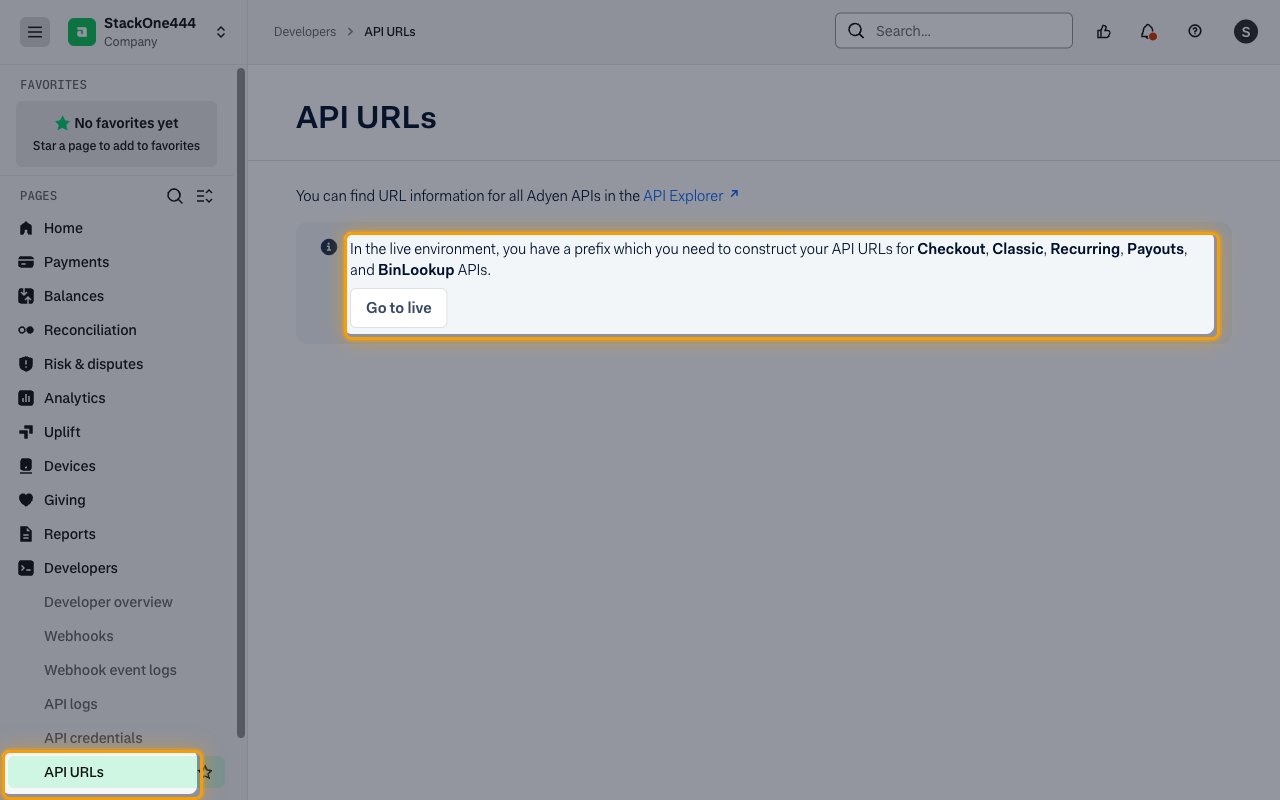
Copy the live URL prefix
In the live Customer Area, expand Developers and click API URLs, then copy the prefix shown on that page.
- Format:
{random}-{CompanyName} - Example:
a1b2c3-AcmeCorp - Paste it into the Live URL Prefix field in StackOne Hub.
Webhooks
The Native Webhook URL field in StackOne Hub is filled in automatically after you connect. You only need it if you also set up Adyen webhooks for this account.
Linking the Account from the Hub
1
Navigate to the Hub
Use one of the three Linking Account Methods to access the Hub.
2
Fill out the fields
Fill out the following fields using details from your provider:
- Live URL Prefix (Optional)
3
Connect
- Click Connect
- If applicable, the provider will redirect you to a sign-in or authorization page. Complete the provider’s authorization flow.
- Once authorization is successful, you will see a confirmation popup
If the account linking is successful, you will see the newly linked account on your Accounts page.
Next Steps
Webhooks setup
Configure receiving Events for Adyen into StackOne.