

major.minor.patch). Each connector profile resolves to a specific connector version when linked accounts make requests. Because each connector profile pins independently, you can test a new version against a staging profile before rolling it out to production, and migrate different customer groups to a new connector version at their own pace.
Version selection
By default, a connector profile resolves to:- The latest custom version of the connector, if one exists in your project.
- Otherwise, the latest StackOne version.
Pinning a version
When creating or editing a connector profile, you can override the default and pin the version to:- Latest StackOne - always resolves to the latest published StackOne version, ignoring custom versions. Use this when you rely on StackOne’s managed updates.
- Latest custom - always resolves to the latest published custom version. Use this when you maintain your own connector and want deploys to roll out automatically.
- A specific version - pin to an exact version number (StackOne or custom). Use this in production when you need full control over when updates apply.
Note: npm-style caret (
^1.2.0) and tilde (~1.2) are not accepted.
In the dashboard, the pin is the profile’s Update strategy: always use the latest, or pin to a major, minor, or exact version. Set it in the Create Profile panel, or later from Edit profile in the menu on the profile’s card. Or set it via the API:
Breaking changes and version updates
This is how StackOne classifies changes when versioning its built-in connectors. Understanding these categories helps you interpret what a version bump means and whether it requires action on your end. Publishing a new connector version does not invalidate existing linked accounts. Accounts continue to work and automatically pick up the new version on the next request, provided the connector profile is on an auto-updating pin (latest, 1.x.x, or 1.2.x). Accounts pinned to a specific version remain on that version until the pin is manually updated.
Any change that is not backwards compatible is released as a new major version. This includes, but is not limited to:
- Authentication changes - switching authentication type, adding required scopes, or changing required credential fields. These require linked accounts to re-authenticate.
- Response shape changes - renaming or removing fields, changing field types, or restructuring nested objects in an action’s response.
- Request shape changes - renaming or removing parameters, making optional parameters required, or changing accepted value types.
- Removed or renamed actions - any action that callers may currently reference.
- Behavioral changes - changes to pagination, filtering, error semantics, or default values that consumers may have relied on.
Versioning strategy
When building custom connectors, you set your own versioning convention. The version number communicates what kind of migration work a change requires for anyone pinned to it. Auth-breaking changes — new OAuth flow, required scopes, or changed credential fields — require end users to reauthenticate. These almost always warrant a major version bump. The migration involves creating a new connector profile and prompting users through a new connect flow. A common approach:
The version level is your contract with yourself. Pick the convention that makes your migration work predictable.
Checking available versions
To see every published version for a connector profile and which one is currently active:pinned: true entry is the version currently serving requests for this connector profile. Note that the response shows the resolved exact version (1.2.0), not the pin format (1.2.x). The pin itself is set on the connector profile, not returned here.
Migrating to a new version
Non-breaking releases
For releases your team has classified as non-breaking (patch fixes, new optional fields, additive changes), connector profiles pinned tolatest, a major wildcard (1.x.x), or a minor wildcard (1.2.x) will pick up the new version automatically on the next request. No action required.
If your connector profile is pinned to an exact version (e.g. 1.2.0), it won’t move until you update the pin manually:
Auth/permissions breaking changes
When a connector introduces a new OAuth flow or required scope, existing accounts stay on their current connector profile until you explicitly migrate them. This is a coordinated rollout rather than a silent upgrade.1
Create a new connector profile pinned to the new major version
The existing connector profile and all accounts on it are untouched. This new profile handles the updated authentication flow.
2
Get the connector_profile_id for the new connector profile
Call
GET /v2/connector_profiles and read the id of the profile you created. Pass that value as connector_profile_id when creating connect sessions. (integration_id is a deprecated alias for the same field in some payloads.)3
Issue connect session tokens for the new connector profile
Pass
connector_profile_id explicitly when creating connect sessions. This routes the session to the new profile. Alternatively, make the new connector profile the project default and omit connector_profile_id.See Target a specific connector profile for the request format.4
Prompt end users to reauthenticate
Send an email, in-app notification, or modal prompting users to reconnect through the Integration Hub. The connect flow uses the new session token, which routes to the new connector profile. You can identify which accounts still need migration by checking which remain associated with the old connector profile.
5
Accounts migrate on successful authentication
When a user completes the new authentication flow, their linked account moves to the new connector profile. Subsequent requests resolve against the new major version.
Immutable versioning
Immutable versioning controls whether published versions can be overwritten. It is enabled by default. The setting can be found in Project Settings → General → Danger Zone.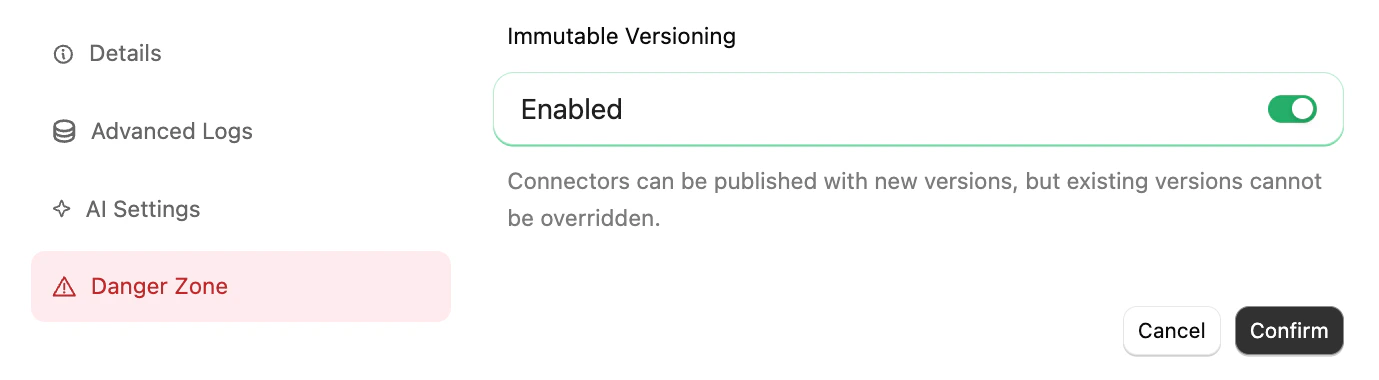
- Enabled (default) - Each version number is locked once published. Subsequent publishes must use a new version number. Use this to guarantee that linked accounts on a pinned version see exactly the connector that was originally published.
- Disabled - Republishing the same version number is allowed when pushing with the CLI’s
--forceflag (stackone push --force). Without--force, the CLI still rejects overwrites. Linked accounts resolving to an overwritten version will pick up the new content on the next request.
When immutable versioning is enabled, the
--force flag has no effect - overwrites are rejected regardless.