

SAML SSO is only available on certain plans. See plans and pricing.
Set up JIT
Before setting up JIT, you need:- A verified SSO connection between the organization and your IdP. See Single Sign-On.
- The Organization Admin role in StackOne.
- (Optional) The IdP set up to send the
stackone_roleattribute with the valueadminfor anyone who should join as an Organization Admin. Everyone else joins as an Organization Member. See Organization Roles.
The IdP’s value only counts when a user first joins. After that, their role can only be changed in StackOne.
1
Open the SSO connection
- In the StackOne dashboard, go to Organization > Security > SSO.
- Open the verified SSO connection.
- Select the Provisioning tab.
2
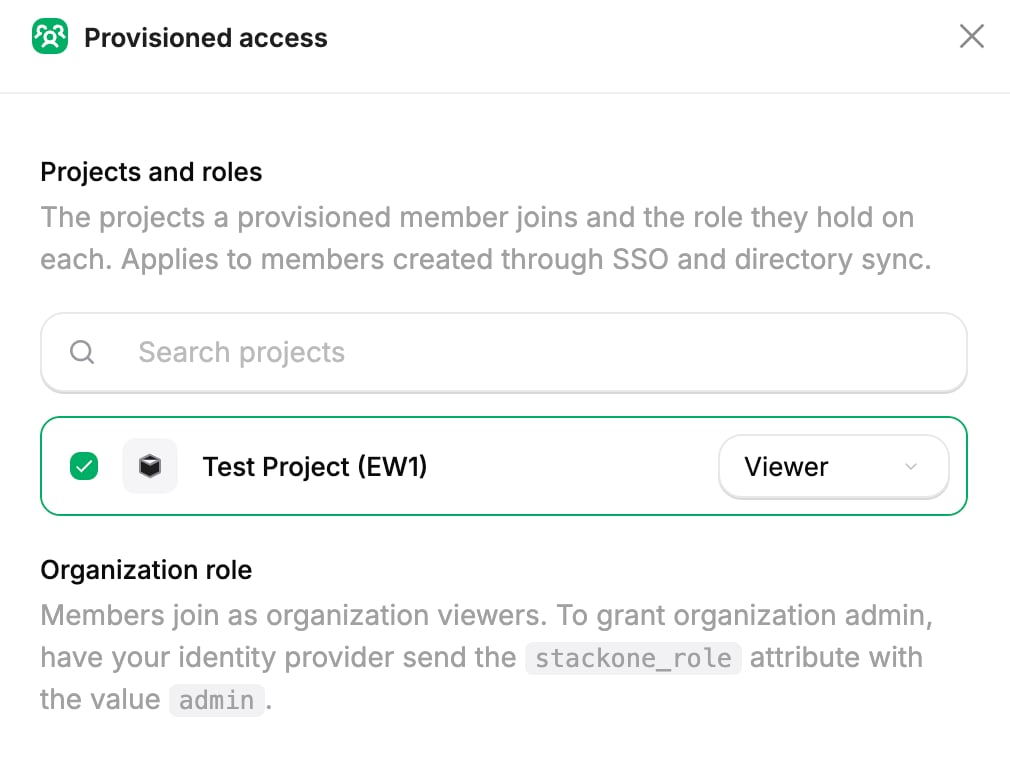
Choose projects and roles
- On the Provisioned access card, select Manage access.
- Pick the projects new users should join.
- Choose a role for each one. See Project Roles.
- Select Save changes.
3
Enable JIT
On the Just-in-time provisioning card, select Enable JIT.
4
Assign users in the IdP
Assign the users to the StackOne application in the IdP. Each one joins the organization the first time they sign in with SSO, with the provisioned access you chose.
Provisioned access only applies when a user first joins, so JIT doesn’t give back access you removed from an existing member.
When a user isn’t added
A user can sign in with SSO and still not be added to the organization if:- Their email address isn’t on the connection’s verified domain. The match is exact, so
@eu.acme.comdoesn’t count foracme.com. - The organization has no seats left.
- The organization’s required sign-in methods don’t include SSO.
- They have a pending invitation. They join when they accept it instead. See Using multiple provisioning methods.
Remove access to the organization
To stop a user accessing the organization:- Go to Organization > Manage Team.
- On the Users tab, find the user.
- Select Disable User.
Next steps
Groups
Grant many users the same project or linked account access at once.
SCIM Provisioning
Add and remove users from the directory instead of at sign-in.