Allow your users to connect to work systems with StackOne.
Make StackOne available to everyone in your Glean organization as a vendor provided tool. Each person then signs in with their own StackOne login and reaches only the systems they’ve been given access to in StackOne.
Before you start
Adding an MCP server takes a Glean Admin or Setup Admin role, and agent support is in beta.You sign in to StackOne yourself during setup, so Glean can discover the tools. In StackOne:
Click Initiate connection. Glean opens StackOne in your browser.Sign in, pick the project and the linked accounts the connector should reach, then Authorize.
Walk through the consent screen
Sign in to StackOne. If you are already signed in to the dashboard you skip straight to the next step.
Check where the connection returns. The line under the client’s logo shows where it goes after you approve. If it names localhost or an app on this device, only continue if you started the connection from that client.
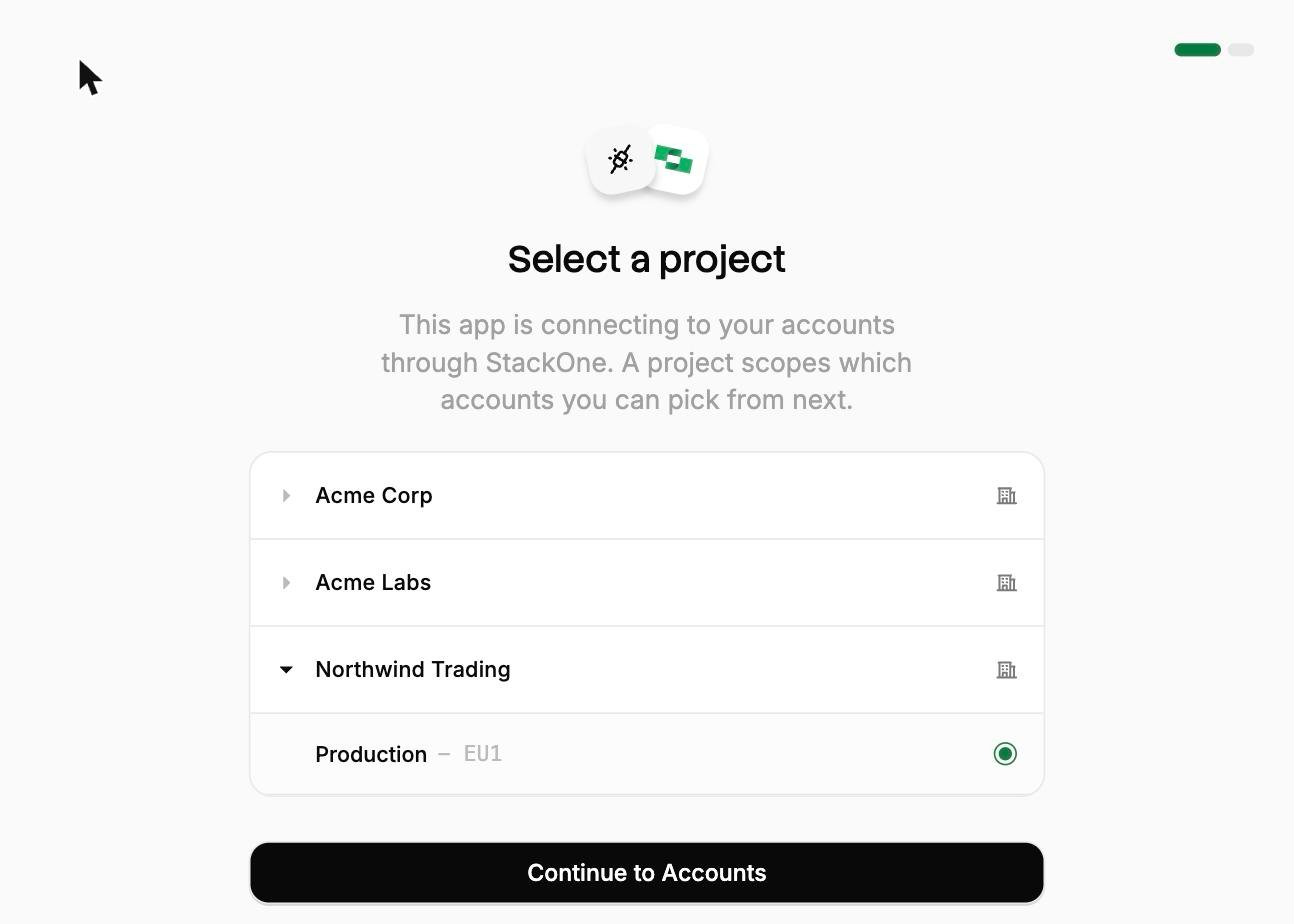
Select a project. Select the project you would like to associate the connection with. If you belong to one project, this step is skipped.
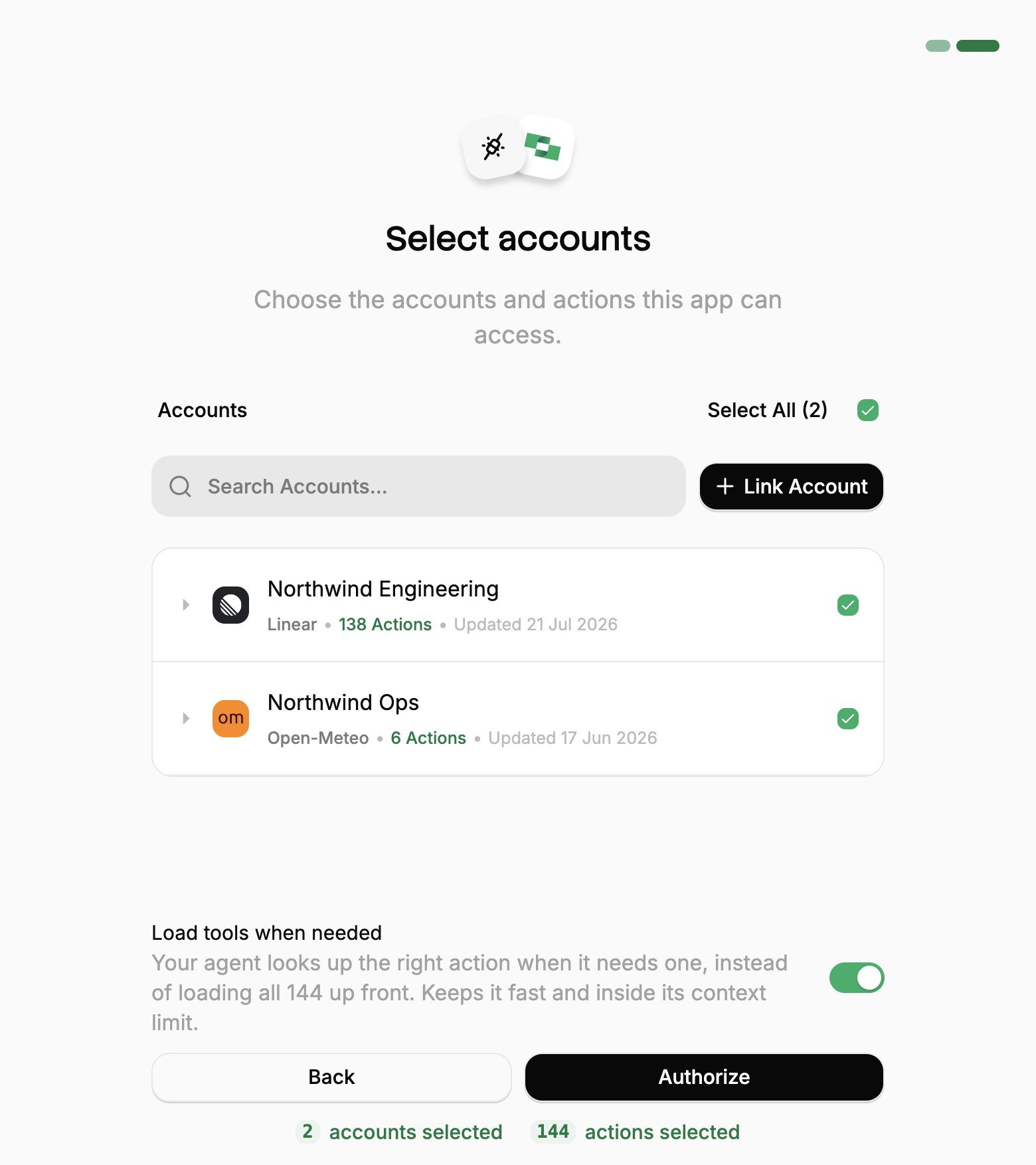
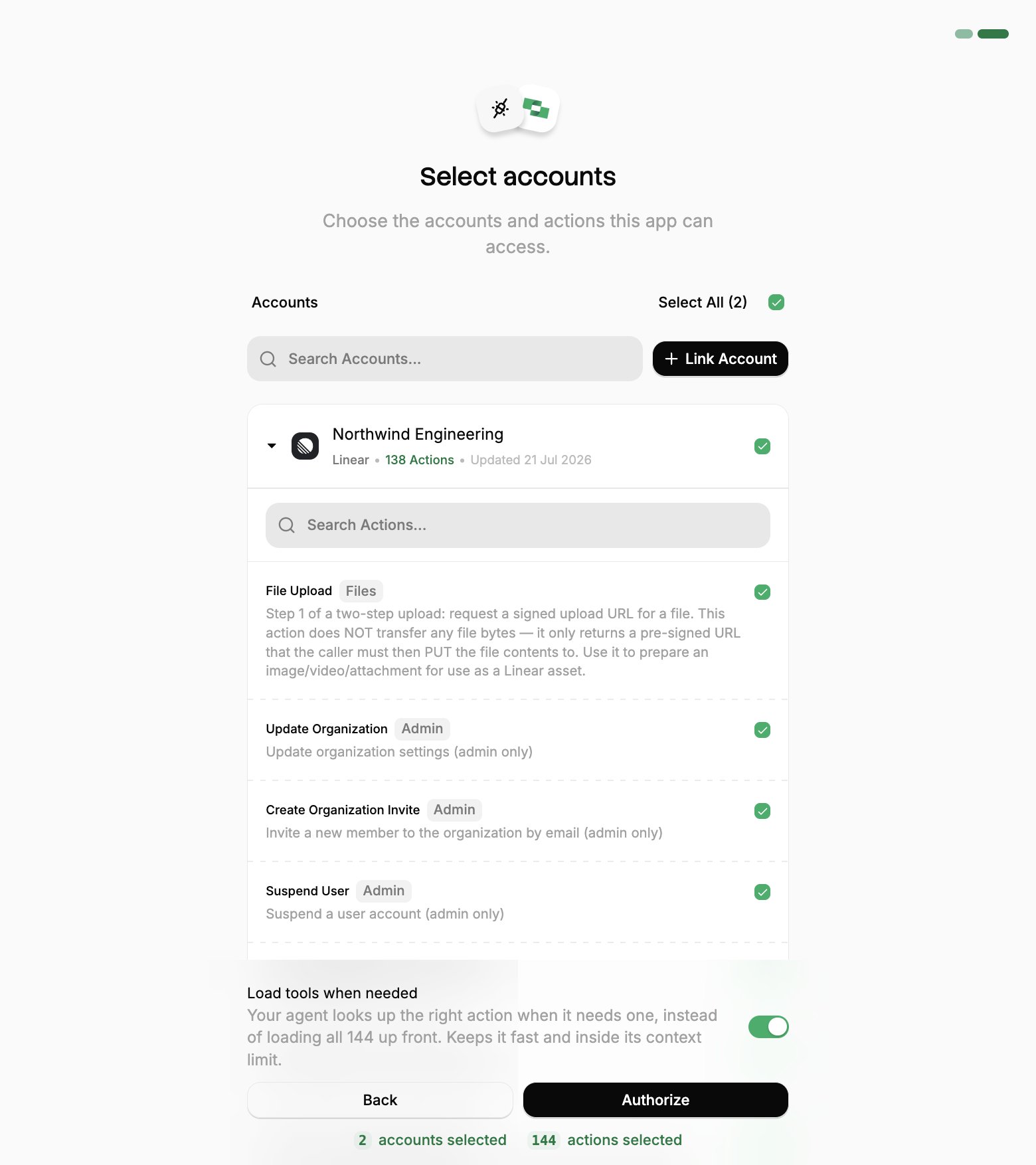
Select accounts and actions. Existing linked accounts are shown. New accounts can be linked by clicking + Link Account. You can either select the whole account (all actions will be granted) or refine by toggling individual actions.
(Optional) Load tools when needed. On by default, and the toggle that puts the connection into Advanced Tool Search. Leave it on for large action sets. Turn it off to hand the agent every selected action up front.
Authorize. Completes the connection; you can return to your client.
Select a project
Select accounts
Toggle actions
If you see a sentence where the Load tools when needed toggle should be, an admin has already settled it for the whole project. See project settings.
Connect to server now shows Connected, and the discovered tools appear on the Tools tab.
Your connection covers tool discovery and configuration only. Glean’s documentation is explicit that it “does not authorize end users”. Each teammate runs this same consent flow with their own StackOne login the first time they use a tool, so they only reach the accounts they have access to.
5
Set tool visibility
On the Configuration tab, under Enable Tools click Edit Settings.
Expand the surface you want the tools on: Chat, Agents, or Glean MCP Server.
For each tool in that surface, set:
Access, the teammates who can use it. Copy to all tools applies one choice to the rest.
Run without user confirmation, whether it runs without asking first.
Repeat for every surface the tools belong on, then click Save.
A tool must be assigned to at least one teammate or team, or Glean disables it everywhere. Run without user confirmation applies to Agents only. See Glean’s tool visibility and run without user confirmation guides.
6
Verify
The server appears under Vendor provided tools (via MCP) with status Enabled.
Connecting with a token app instead
A token app URL carries its own credential, so it covers the cases OAuth can’t: a client without OAuth support, a shared server, a scheduled job, or anywhere nobody is present to approve a consent screen. For a comparison of each connection method, see Choosing a connection method.Create a token app under Connected Apps → Token apps, select the Linked Accounts it covers, and copy its MCP URL:
https://api.stackone.com/mcp?token={token}
One URL covers every account the token app includes, and anyone holding it has that access until it expires, so treat it like a password.To enable Advanced Tool Search, add the tool-mode query parameter to the URL:
StackOne is now available for your users in Glean. Make sure the following is ready before rolling out:
Add users. Invite or provision users via SSO/SCIM. See Manage Team.
Create groups. Organize teams into groups to control which systems each team reaches.
Set up connectors. Define Connector Profiles to scope provider actions for specific functions.
Link accounts. Link shared company accounts, or let users link their own accounts. See Linking Accounts.
Then send users one of the following guides, depending on the product:
Glean Assistant
For people using StackOne in Glean Assistant.
Glean Agents
For people building agents in Glean’s Agent Builder.
Control what Glean can reach
Set tool visibility above decides which surfaces and teammates see each tool. Within StackOne, each teammate can only approve what their Connector Profiles and Linked Accounts already allow.
Was this page helpful?
{"docsConfig":{"theme":"mint","$schema":"https://mintlify.com/docs.json","name":"Stackone","colors":{"primary":"#068F56","light":"#00AF66","dark":"#068F56"},"logo":{"light":"https://mintcdn.com/stackone-60/WsmKpuoeBZmio9QO/images/logo/logo-light-mode.svg?fit=max\u0026auto=format\u0026n=WsmKpuoeBZmio9QO\u0026q=85\u0026s=f08be9c0a142cb1e7fcaa23910c4bf7f","dark":"https://mintcdn.com/stackone-60/WsmKpuoeBZmio9QO/images/logo/logo-dark-mode.svg?fit=max\u0026auto=format\u0026n=WsmKpuoeBZmio9QO\u0026q=85\u0026s=b57d63594c13dee65c06a2d578927466","href":"/introduction"},"favicon":"https://mintcdn.com/stackone-60/EZ7nWzE-JJzhmP-C/images/logo/favicon.png?fit=max\u0026auto=format\u0026n=EZ7nWzE-JJzhmP-C\u0026q=85\u0026s=9012a8ae6ce9a80698406b611be47925","appearance":{"default":"light"},"background":{"image":{"light":"https://mintcdn.com/stackone-60/knwbcGlYFJSeLObv/images/background/light.svg?fit=max\u0026auto=format\u0026n=knwbcGlYFJSeLObv\u0026q=85\u0026s=112166d244e990ebc0146ff96958757c","dark":"https://mintcdn.com/stackone-60/knwbcGlYFJSeLObv/images/background/dark.svg?fit=max\u0026auto=format\u0026n=knwbcGlYFJSeLObv\u0026q=85\u0026s=50ec5e23eeb91f55e78a0da97dcaeb7b"},"color":{"dark":"#1a1a1a"}},"navbar":{"links":[{"icon":"circle-question","href":"/support","label":"Support"},{"href":"https://app.stackone.com","label":"Login"},{"href":"https://www.stackone.com/demo/","label":"Book a demo"}],"primary":{"type":"button","label":"Start Free","href":"https://app.stackone.com/sign_up"}},"footer":{"socials":{"linkedin":"https://www.linkedin.com/company/stackonehq","twitter":"https://twitter.com/StackOneHQ"}},"seo":{"metatags":{"canonical":"https://docs.stackone.com","google-site-verification":"gYj1x4gkdSwpCGVLFVXNVOPQ_wVrePW37ZKJt3HEqys"}},"fonts":{"heading":{"family":"Sf Pro Display","source":"https://fonts.gstatic.com/s/inter/v18/UcC73FwrK3iLTeHuS_nVMrMxCp50SjIa1ZL7W0Q5nw.woff2","format":"woff2"},"body":{"family":"Inter","source":"https://fonts.gstatic.com/s/inter/v18/UcC73FwrK3iLTeHuS_nVMrMxCp50SjIa1ZL7W0Q5nw.woff2","format":"woff2"}},"styling":{"eyebrows":"breadcrumbs","latex":true},"integrations":{"gtm":{"tagId":"GTM-NZNK37TL"}},"contextual":{"options":["copy","view","chatgpt","claude","perplexity"],"display":"header"},"navigation":{"pages":[]}},"deployment":{"deploymentMetadataValue":{"subdomain":"stackone-60","hasAudioNarration":false,"actualSubdomain":"stackone-60","customDomains":["docs.stackone.com"],"gitSource":{"type":"github","owner":"stackonehq","repo":"docs","deployBranch":"main","contentDirectory":"","isPrivate":false,"mountPath":"","label":""},"feedback":{"thumbs":true,"edits":false,"issues":false,"agentFeedback":true},"entitlements":{"AI_CHAT":{"status":"ENABLED"},"WEB_MCP":{"status":"ENABLED"},"NARRATION":{"status":"ENABLED"}},"buildId":"6af75b436a0f9955d4dc6176","clientVersion":"0.0.4131","searchFilterCounts":[{"language":"default","tag":"Connectors","count":6741},{"language":"default","tag":"Connector Catalog","count":3349},{"language":"default","tag":"Embed","count":84},{"language":"default","tag":"Platform API","count":65},{"language":"default","tag":"Features","count":48},{"language":"default","tag":"Connector Building","count":42},{"language":"default","tag":"AI Platforms","count":39},{"language":"default","tag":"Unified Actions","count":39},{"language":"default","tag":"Gateway","count":38},{"language":"default","tag":"Embed StackOne","count":36}],"searchSettings":{"isFiltersEnabled":true}},"assistantConfig":{"enableStarterQuestions":false,"deflection":{"enabled":true,"email":"support@stackone.com"}},"basePath":"","hasChatPermissions":true,"hasWebMcpPermissions":true,"toggles":[{"name":"kill-isr","enabled":true,"variant":{"name":"disabled","enabled":false,"feature_enabled":true},"impressionData":false},{"name":"custom-rbac-roles","enabled":true,"variant":{"name":"disabled","enabled":false,"feature_enabled":true},"impressionData":false},{"name":"agent-mintlify-slack","enabled":true,"variant":{"name":"disabled","enabled":false,"feature_enabled":true},"impressionData":false},{"name":"agent-integrations-settings","enabled":true,"variant":{"name":"disabled","enabled":false,"feature_enabled":true},"impressionData":false},{"name":"rbac-expansion","enabled":true,"variant":{"name":"disabled","enabled":false,"feature_enabled":true},"impressionData":false},{"name":"automations-pr-grouping","enabled":true,"variant":{"name":"disabled","enabled":false,"feature_enabled":true},"impressionData":false},{"name":"custom-prefix","enabled":true,"variant":{"name":"disabled","enabled":false,"feature_enabled":true},"impressionData":false},{"name":"analytics-v7","enabled":true,"variant":{"name":"disabled","enabled":false,"feature_enabled":true},"impressionData":false},{"name":"user-flows-analytics","enabled":true,"variant":{"name":"disabled","enabled":false,"feature_enabled":true},"impressionData":false},{"name":"no-publish-flow","enabled":true,"variant":{"name":"disabled","enabled":false,"feature_enabled":true},"impressionData":false},{"name":"workos-onboarding","enabled":true,"variant":{"name":"disabled","enabled":false,"feature_enabled":true},"impressionData":false},{"name":"snapshot-serving-live","enabled":true,"variant":{"name":"disabled","enabled":false,"feature_enabled":true},"impressionData":false},{"name":"stripTemperatureMiddleware","enabled":true,"variant":{"name":"disabled","enabled":false,"feature_enabled":true},"impressionData":false},{"name":"support-platform-pylon-zendesk","enabled":true,"variant":{"name":"disabled","enabled":false,"feature_enabled":true},"impressionData":false},{"name":"snapshot-serving","enabled":true,"variant":{"name":"disabled","enabled":false,"feature_enabled":true},"impressionData":false},{"name":"instant-rollback","enabled":true,"variant":{"name":"disabled","enabled":false,"feature_enabled":true},"impressionData":false},{"name":"granular-notifications-server","enabled":true,"variant":{"name":"disabled","enabled":false,"feature_enabled":true},"impressionData":false},{"name":"granular-notifications","enabled":true,"variant":{"name":"disabled","enabled":false,"feature_enabled":true},"impressionData":false},{"name":"automations-fable","enabled":true,"variant":{"name":"disabled","enabled":false,"feature_enabled":true},"impressionData":false},{"name":"fixed-ai-action-pricing","enabled":true,"variant":{"name":"disabled","enabled":false,"feature_enabled":true},"impressionData":false},{"name":"automation-resolve-merge-conflict","enabled":true,"variant":{"name":"disabled","enabled":false,"feature_enabled":true},"impressionData":false},{"name":"scoped-publishing","enabled":true,"variant":{"name":"disabled","enabled":false,"feature_enabled":true},"impressionData":false},{"name":"mintql","enabled":true,"variant":{"name":"disabled","enabled":false,"feature_enabled":true},"impressionData":false},{"name":"page-level-analytics","enabled":true,"variant":{"name":"disabled","enabled":false,"feature_enabled":true},"impressionData":false},{"name":"editor-version-history-v2","enabled":true,"variant":{"name":"disabled","enabled":false,"feature_enabled":true},"impressionData":false},{"name":"billing-page-v2","enabled":true,"variant":{"name":"disabled","enabled":false,"feature_enabled":true},"impressionData":false},{"name":"full-page-search","enabled":true,"variant":{"name":"disabled","enabled":false,"feature_enabled":true},"impressionData":false},{"name":"workspace-projects","enabled":true,"variant":{"name":"disabled","enabled":false,"feature_enabled":true},"impressionData":false},{"name":"assistant-v5","enabled":true,"variant":{"name":"disabled","enabled":false,"feature_enabled":true},"impressionData":false},{"name":"fork-pr-previews","enabled":true,"variant":{"name":"disabled","enabled":false,"feature_enabled":true},"impressionData":false},{"name":"revalidation-jwt","enabled":true,"variant":{"name":"disabled","enabled":false,"feature_enabled":true},"impressionData":false},{"name":"workos-sso-scim","enabled":true,"variant":{"name":"disabled","enabled":false,"feature_enabled":true},"impressionData":false},{"name":"hobby-abuse-scan","enabled":true,"variant":{"name":"disabled","enabled":false,"feature_enabled":true},"impressionData":false},{"name":"dashboard-inbox","enabled":true,"variant":{"name":"disabled","enabled":false,"feature_enabled":true},"impressionData":false},{"name":"workos-signup","enabled":true,"variant":{"name":"disabled","enabled":false,"feature_enabled":true},"impressionData":false},{"name":"turbopuffer-dual-write","enabled":true,"variant":{"name":"disabled","enabled":false,"feature_enabled":true},"impressionData":false},{"name":"workos-enabled","enabled":true,"variant":{"name":"disabled","enabled":false,"feature_enabled":true},"impressionData":false},{"name":"approve-review-flow","enabled":true,"variant":{"name":"disabled","enabled":false,"feature_enabled":true},"impressionData":false},{"name":"editor-metadata","enabled":true,"variant":{"name":"disabled","enabled":false,"feature_enabled":true},"impressionData":false},{"name":"sso-setup-deadline-banner","enabled":true,"variant":{"name":"disabled","enabled":false,"feature_enabled":true},"impressionData":false},{"name":"turbopuffer-serve","enabled":true,"variant":{"name":"disabled","enabled":false,"feature_enabled":true},"impressionData":false},{"name":"live-agents","enabled":true,"variant":{"name":"disabled","enabled":false,"feature_enabled":true},"impressionData":false},{"name":"llms-txt-v2","enabled":true,"variant":{"name":"disabled","enabled":false,"feature_enabled":true},"impressionData":false}],"googleFontsInlined":false},"customCss":[{"filePath":"style.css","href":"/_mintlify/custom/stackone-60/1689b391b56fc5fb/style.css"}],"page":{"pagePath":"ai-platforms/glean/organization-admin-setup","slug":"/ai-platforms/glean/organization-admin-setup","pageMetadata":{"title":"Glean - Make StackOne Available","sidebarTitle":"Organization Admin Setup","description":"Allow your users to connect to work systems with StackOne.","keywords":["Glean","vendor provided tools","MCP","Admin console","Dynamic Client Registration","tool visibility"],"href":"/ai-platforms/glean/organization-admin-setup"},"description":{"compiledSource":"\"use strict\";\nconst {jsx: _jsx} = arguments[0];\nconst {useMDXComponents: _provideComponents} = arguments[0];\nfunction _createMdxContent(props) {\n const _components = {\n p: \"p\",\n ..._provideComponents(),\n ...props.components\n };\n return _jsx(_components.p, {\n children: \"Allow your users to connect to work systems with StackOne.\"\n });\n}\nfunction MDXContent(props = {}) {\n const {wrapper: MDXLayout} = {\n ..._provideComponents(),\n ...props.components\n };\n return MDXLayout ? _jsx(MDXLayout, {\n ...props,\n children: _jsx(_createMdxContent, {\n ...props\n })\n }) : _createMdxContent(props);\n}\nreturn {\n default: MDXContent\n};\n","frontmatter":{},"scope":{}},"pageType":"default","mdx":{"mdxSource":{"compiledSource":"\"use strict\";const{Fragment:_Fragment,jsx:_jsx,jsxs:_jsxs}=arguments[0];const{useMDXComponents:_provideComponents}=arguments[0];const platform_0=`Glean`;function _createMdxContent(props){const _components={a:`a`,code:`code`,li:`li`,ol:`ol`,p:`p`,pre:`pre`,span:`span`,strong:`strong`,ul:`ul`,..._provideComponents(),...props.components},{Accordion,Card,CardGroup,CodeBlock,Columns,Frame,Heading,Note,OptimizedImage,Step,Steps}=_components;if(!Accordion)_missingMdxReference(`Accordion`,true);if(!Card)_missingMdxReference(`Card`,true);if(!CardGroup)_missingMdxReference(`CardGroup`,true);if(!CodeBlock)_missingMdxReference(`CodeBlock`,true);if(!Columns)_missingMdxReference(`Columns`,true);if(!Frame)_missingMdxReference(`Frame`,true);if(!Heading)_missingMdxReference(`Heading`,true);if(!Note)_missingMdxReference(`Note`,true);if(!OptimizedImage)_missingMdxReference(`OptimizedImage`,true);if(!Step)_missingMdxReference(`Step`,true);if(!Steps)_missingMdxReference(`Steps`,true);return _jsxs(_Fragment,{children:[_jsx(Frame,{children:_jsx(OptimizedImage,{src:`https://mintcdn.com/stackone-60/RgaE_4ZxFuvAQ6gS/images/ai-platforms/glean/admin-setup.svg?fit=max\u0026auto=format\u0026n=RgaE_4ZxFuvAQ6gS\u0026q=85\u0026s=450f0f79543feff11eac2dd7f970334a`,alt:`An IT admin adds StackOne to the Glean organization, bringing Linked Accounts from many providers. Each user then connects with their own accounts: an HR manager uses Glean Assistant with Workday, Greenhouse and BambooHR, and a support lead builds in Glean Agents with Zendesk, Salesforce and Slack.`,\"data-og-width\":`2404`,width:`2404`,\"data-og-height\":`1168`,height:`1168`,\"data-path\":`images/ai-platforms/glean/admin-setup.svg`,\"data-optimize\":`true`,\"data-opv\":`3`,srcset:`https://mintcdn.com/stackone-60/RgaE_4ZxFuvAQ6gS/images/ai-platforms/glean/admin-setup.svg?w=280\u0026fit=max\u0026auto=format\u0026n=RgaE_4ZxFuvAQ6gS\u0026q=85\u0026s=7ac568eca50c29dbc4643bdcc9d4724d 280w, https://mintcdn.com/stackone-60/RgaE_4ZxFuvAQ6gS/images/ai-platforms/glean/admin-setup.svg?w=560\u0026fit=max\u0026auto=format\u0026n=RgaE_4ZxFuvAQ6gS\u0026q=85\u0026s=fac71c59267e5beaf27c5ff2b398e108 560w, https://mintcdn.com/stackone-60/RgaE_4ZxFuvAQ6gS/images/ai-platforms/glean/admin-setup.svg?w=840\u0026fit=max\u0026auto=format\u0026n=RgaE_4ZxFuvAQ6gS\u0026q=85\u0026s=365f58a3c247e7e7e7f1e334f0bc7d2c 840w, https://mintcdn.com/stackone-60/RgaE_4ZxFuvAQ6gS/images/ai-platforms/glean/admin-setup.svg?w=1100\u0026fit=max\u0026auto=format\u0026n=RgaE_4ZxFuvAQ6gS\u0026q=85\u0026s=e4e05e9cf09db464b7272114c51ffe69 1100w, https://mintcdn.com/stackone-60/RgaE_4ZxFuvAQ6gS/images/ai-platforms/glean/admin-setup.svg?w=1650\u0026fit=max\u0026auto=format\u0026n=RgaE_4ZxFuvAQ6gS\u0026q=85\u0026s=a54b8a86df1365f8233b9bdc29e5e87d 1650w, https://mintcdn.com/stackone-60/RgaE_4ZxFuvAQ6gS/images/ai-platforms/glean/admin-setup.svg?w=2500\u0026fit=max\u0026auto=format\u0026n=RgaE_4ZxFuvAQ6gS\u0026q=85\u0026s=fb78a78686e543b7874c39b84f65025b 2500w`})}),`\n`,_jsxs(_components.p,{children:[`Make StackOne available to everyone in your Glean organization as a `,_jsx(_components.strong,{children:`vendor provided tool`}),`. Each person then signs in with their own StackOne login and reaches only the systems they’ve been given access to in StackOne.`]}),`\n`,_jsx(Heading,{level:`2`,id:`before-you-start`,children:`Before you start`}),`\n`,_jsxs(_components.p,{children:[`Adding an MCP server takes a Glean `,_jsx(_components.strong,{children:`Admin`}),` or `,_jsx(_components.strong,{children:`Setup Admin`}),` role, and agent support is in beta.`]}),`\n`,_jsx(_components.p,{children:`You sign in to StackOne yourself during setup, so Glean can discover the tools. In StackOne:`}),`\n`,_jsxs(_components.ul,{children:[`\n`,_jsxs(_components.li,{children:[`A StackOne `,_jsx(_components.a,{href:`/gateway/concepts/organizations-and-projects`,children:`project`}),` you are a member of.`]}),`\n`,_jsxs(_components.li,{children:[`A `,_jsx(_components.a,{href:`/connect/managing-connectors/connector-profiles`,children:`connector profile`}),` in the project for each provider the client should reach, with the actions you want exposed enabled.`]}),`\n`,_jsxs(_components.li,{children:[`(Optional) A `,_jsx(_components.a,{href:`/connect/managing-connectors/linking-accounts`,children:`linked account`}),` for each provider. Accounts can also be linked during the consent flow.`]}),`\n`]}),`\n`,_jsx(Heading,{level:`2`,id:`add-stackone-to-glean`,children:`Add StackOne to Glean`}),`\n`,_jsxs(Steps,{children:[_jsxs(Step,{title:`Open the Tools page`,children:[_jsxs(_components.ol,{children:[`\n`,_jsxs(_components.li,{children:[`Open the Glean `,_jsx(_components.a,{href:`https://app.glean.com/admin/tools`,children:_jsx(_components.strong,{children:`Admin console`})}),`.`]}),`\n`,_jsxs(_components.li,{children:[`On the `,_jsx(_components.strong,{children:`Tools`}),` page, click `,_jsx(_components.strong,{children:`Add`}),` in the top right.`]}),`\n`]}),_jsx(Frame,{children:_jsx(OptimizedImage,{src:`https://mintcdn.com/stackone-60/RgaE_4ZxFuvAQ6gS/images/ai-platforms/glean/glean-vendor-provided-tools.png?fit=max\u0026auto=format\u0026n=RgaE_4ZxFuvAQ6gS\u0026q=85\u0026s=a8135ba5ce833474dcb1cc8234e3c3ee`,alt:`Glean Admin console Tools page on the Vendor Provided Tools via MCP tab, with an Add button in the top right`,\"data-og-width\":`2000`,width:`2000`,\"data-og-height\":`511`,height:`511`,\"data-path\":`images/ai-platforms/glean/glean-vendor-provided-tools.png`,\"data-optimize\":`true`,\"data-opv\":`3`,srcset:`https://mintcdn.com/stackone-60/RgaE_4ZxFuvAQ6gS/images/ai-platforms/glean/glean-vendor-provided-tools.png?w=280\u0026fit=max\u0026auto=format\u0026n=RgaE_4ZxFuvAQ6gS\u0026q=85\u0026s=0ef88aa7820d54fee22fc858e0dc6fa3 280w, https://mintcdn.com/stackone-60/RgaE_4ZxFuvAQ6gS/images/ai-platforms/glean/glean-vendor-provided-tools.png?w=560\u0026fit=max\u0026auto=format\u0026n=RgaE_4ZxFuvAQ6gS\u0026q=85\u0026s=7aa108ed769892876a9b847508ec2631 560w, https://mintcdn.com/stackone-60/RgaE_4ZxFuvAQ6gS/images/ai-platforms/glean/glean-vendor-provided-tools.png?w=840\u0026fit=max\u0026auto=format\u0026n=RgaE_4ZxFuvAQ6gS\u0026q=85\u0026s=41aa92bdb80c622369c6fed9527ef916 840w, https://mintcdn.com/stackone-60/RgaE_4ZxFuvAQ6gS/images/ai-platforms/glean/glean-vendor-provided-tools.png?w=1100\u0026fit=max\u0026auto=format\u0026n=RgaE_4ZxFuvAQ6gS\u0026q=85\u0026s=93907a7158f7156ecc60d9a722a6f1e0 1100w, https://mintcdn.com/stackone-60/RgaE_4ZxFuvAQ6gS/images/ai-platforms/glean/glean-vendor-provided-tools.png?w=1650\u0026fit=max\u0026auto=format\u0026n=RgaE_4ZxFuvAQ6gS\u0026q=85\u0026s=45b8f5c6f32a66c03cc8c60421ebc8a2 1650w, https://mintcdn.com/stackone-60/RgaE_4ZxFuvAQ6gS/images/ai-platforms/glean/glean-vendor-provided-tools.png?w=2500\u0026fit=max\u0026auto=format\u0026n=RgaE_4ZxFuvAQ6gS\u0026q=85\u0026s=72cea060f21949a7b696642632eda7a7 2500w`})})]}),_jsxs(Step,{title:`Import tools from an MCP server`,children:[_jsxs(_components.ol,{children:[`\n`,_jsxs(_components.li,{children:[`In the `,_jsx(_components.strong,{children:`Add tools`}),` dialog, open the `,_jsx(_components.strong,{children:`Vendor provided tools (via MCP)`}),` tab.`]}),`\n`,_jsxs(_components.li,{children:[`Click `,_jsx(_components.strong,{children:`Import tools from MCP server`}),`.`]}),`\n`]}),_jsx(Frame,{children:_jsx(OptimizedImage,{src:`https://mintcdn.com/stackone-60/RgaE_4ZxFuvAQ6gS/images/ai-platforms/glean/glean-add-tools-import-mcp.png?fit=max\u0026auto=format\u0026n=RgaE_4ZxFuvAQ6gS\u0026q=85\u0026s=aa4e312551d395246155beb0f52399aa`,alt:`Glean Add tools dialog with the Vendor provided tools via MCP tab selected and the Import tools from MCP server option at the top`,\"data-og-width\":`1792`,width:`1792`,\"data-og-height\":`1528`,height:`1528`,\"data-path\":`images/ai-platforms/glean/glean-add-tools-import-mcp.png`,\"data-optimize\":`true`,\"data-opv\":`3`,srcset:`https://mintcdn.com/stackone-60/RgaE_4ZxFuvAQ6gS/images/ai-platforms/glean/glean-add-tools-import-mcp.png?w=280\u0026fit=max\u0026auto=format\u0026n=RgaE_4ZxFuvAQ6gS\u0026q=85\u0026s=cc3364d3310f085512bc7b235c14cf84 280w, https://mintcdn.com/stackone-60/RgaE_4ZxFuvAQ6gS/images/ai-platforms/glean/glean-add-tools-import-mcp.png?w=560\u0026fit=max\u0026auto=format\u0026n=RgaE_4ZxFuvAQ6gS\u0026q=85\u0026s=3d08acb230a337e0e00ddaac09499d38 560w, https://mintcdn.com/stackone-60/RgaE_4ZxFuvAQ6gS/images/ai-platforms/glean/glean-add-tools-import-mcp.png?w=840\u0026fit=max\u0026auto=format\u0026n=RgaE_4ZxFuvAQ6gS\u0026q=85\u0026s=483b1d7da87b45fd3a4de0b30493dd2e 840w, https://mintcdn.com/stackone-60/RgaE_4ZxFuvAQ6gS/images/ai-platforms/glean/glean-add-tools-import-mcp.png?w=1100\u0026fit=max\u0026auto=format\u0026n=RgaE_4ZxFuvAQ6gS\u0026q=85\u0026s=68204c032072f1169a395290b2fa034c 1100w, https://mintcdn.com/stackone-60/RgaE_4ZxFuvAQ6gS/images/ai-platforms/glean/glean-add-tools-import-mcp.png?w=1650\u0026fit=max\u0026auto=format\u0026n=RgaE_4ZxFuvAQ6gS\u0026q=85\u0026s=acc622ceb48eec45072bd10f6a8799a9 1650w, https://mintcdn.com/stackone-60/RgaE_4ZxFuvAQ6gS/images/ai-platforms/glean/glean-add-tools-import-mcp.png?w=2500\u0026fit=max\u0026auto=format\u0026n=RgaE_4ZxFuvAQ6gS\u0026q=85\u0026s=083f6d6b944c200e187fb8963f302230 2500w`})})]}),_jsxs(Step,{title:`Configure the server`,children:[_jsxs(_components.p,{children:[`On the `,_jsx(_components.strong,{children:`Configuration`}),` tab, fill in:`]}),_jsxs(_components.ul,{children:[`\n`,_jsxs(_components.li,{children:[`\n`,_jsxs(_components.p,{children:[_jsx(_components.strong,{children:`MCP server name`}),` (for example, `,_jsx(_components.code,{children:`StackOne`}),`).`]}),`\n`]}),`\n`,_jsxs(_components.li,{children:[`\n`,_jsxs(_components.p,{children:[_jsx(_components.strong,{children:`Description`}),` (for example, `,_jsx(_components.code,{children:`MCPs powered by StackOne`}),`).`]}),`\n`]}),`\n`,_jsxs(_components.li,{children:[`\n`,_jsxs(_components.p,{children:[_jsx(_components.strong,{children:`MCP server URL`}),`:`]}),`\n`,_jsx(CodeBlock,{filename:``,numberOfLines:`2`,language:`text`,children:_jsx(_components.pre,{className:`shiki shiki-themes github-light-default dark-plus`,style:{backgroundColor:`#ffffff`,\"--shiki-dark-bg\":`#0B0C0E`,color:`#1f2328`,\"--shiki-dark\":`#D4D4D4`},language:`text`,children:_jsxs(_components.code,{language:`text`,numberOfLines:`2`,children:[_jsx(_components.span,{className:`line`,children:_jsx(_components.span,{children:`https://mcp.stackone.com/mcp`})}),`\n`,_jsx(_components.span,{className:`line`,children:_jsx(_components.span,{})})]})})}),`\n`]}),`\n`,_jsxs(_components.li,{children:[`\n`,_jsxs(_components.p,{children:[_jsx(_components.strong,{children:`Transport type`}),`: Streaming HTTP.`]}),`\n`]}),`\n`,_jsxs(_components.li,{children:[`\n`,_jsxs(_components.p,{children:[_jsx(_components.strong,{children:`Authentication Method`}),`: Dynamic Client Registration.`]}),`\n`]}),`\n`]}),_jsx(Frame,{children:_jsx(OptimizedImage,{src:`https://mintcdn.com/stackone-60/RgaE_4ZxFuvAQ6gS/images/ai-platforms/glean/glean-mcp-configuration.png?fit=max\u0026auto=format\u0026n=RgaE_4ZxFuvAQ6gS\u0026q=85\u0026s=410387ea884329d5c1380fc5619c3fe9`,alt:`Glean MCP server configuration form with the name StackOne, a description, and the StackOne MCP server URL filled in`,\"data-og-width\":`1652`,width:`1652`,\"data-og-height\":`1128`,height:`1128`,\"data-path\":`images/ai-platforms/glean/glean-mcp-configuration.png`,\"data-optimize\":`true`,\"data-opv\":`3`,srcset:`https://mintcdn.com/stackone-60/RgaE_4ZxFuvAQ6gS/images/ai-platforms/glean/glean-mcp-configuration.png?w=280\u0026fit=max\u0026auto=format\u0026n=RgaE_4ZxFuvAQ6gS\u0026q=85\u0026s=07b11d0e87b1927b223aca8de5a24908 280w, https://mintcdn.com/stackone-60/RgaE_4ZxFuvAQ6gS/images/ai-platforms/glean/glean-mcp-configuration.png?w=560\u0026fit=max\u0026auto=format\u0026n=RgaE_4ZxFuvAQ6gS\u0026q=85\u0026s=91070c74525dc568bef6d1cd3a652cf2 560w, https://mintcdn.com/stackone-60/RgaE_4ZxFuvAQ6gS/images/ai-platforms/glean/glean-mcp-configuration.png?w=840\u0026fit=max\u0026auto=format\u0026n=RgaE_4ZxFuvAQ6gS\u0026q=85\u0026s=c799a83257c187b8394e3f9eabebf5e3 840w, https://mintcdn.com/stackone-60/RgaE_4ZxFuvAQ6gS/images/ai-platforms/glean/glean-mcp-configuration.png?w=1100\u0026fit=max\u0026auto=format\u0026n=RgaE_4ZxFuvAQ6gS\u0026q=85\u0026s=7bbe344c50e19dc813e1bdacce086e21 1100w, https://mintcdn.com/stackone-60/RgaE_4ZxFuvAQ6gS/images/ai-platforms/glean/glean-mcp-configuration.png?w=1650\u0026fit=max\u0026auto=format\u0026n=RgaE_4ZxFuvAQ6gS\u0026q=85\u0026s=ccf850d9c68fc0e4ae5470a31273bd9a 1650w, https://mintcdn.com/stackone-60/RgaE_4ZxFuvAQ6gS/images/ai-platforms/glean/glean-mcp-configuration.png?w=2500\u0026fit=max\u0026auto=format\u0026n=RgaE_4ZxFuvAQ6gS\u0026q=85\u0026s=5313427b6b2c242c7feafa4398736c7b 2500w`})})]}),_jsxs(Step,{title:`Approve the consent screen`,children:[_jsxs(_components.p,{children:[`Click `,_jsx(_components.strong,{children:`Initiate connection`}),`. Glean opens StackOne in your browser.`]}),_jsxs(_components.p,{children:[`Sign in, pick the project and the `,_jsx(_components.a,{href:`/connect/managing-connectors/linking-accounts`,children:`linked accounts`}),` the connector should reach, then `,_jsx(_components.strong,{children:`Authorize`}),`.`]}),_jsxs(Accordion,{title:`Walk through the consent screen`,id:`walk-through-the-consent-screen`,children:[_jsxs(_components.ol,{children:[`\n`,_jsxs(_components.li,{children:[_jsx(_components.strong,{children:`Sign in to StackOne.`}),` If you are already signed in to the dashboard you skip straight to the next step.`]}),`\n`,_jsxs(_components.li,{children:[_jsx(_components.strong,{children:`Check where the connection returns.`}),` The line under the client’s logo shows where it goes after you approve. If it names localhost or an app on this device, only continue if you started the connection from that client.`]}),`\n`,_jsxs(_components.li,{children:[_jsx(_components.strong,{children:`Select a project.`}),` Select the project you would like to associate the connection with. If you belong to one project, this step is skipped.`]}),`\n`,_jsxs(_components.li,{children:[_jsx(_components.strong,{children:`Select accounts and actions.`}),` Existing linked accounts are shown. New accounts can be linked by clicking `,_jsx(_components.strong,{children:`+ Link Account`}),`. You can either select the whole account (all actions will be granted) or refine by toggling individual actions.`]}),`\n`,_jsxs(_components.li,{children:[_jsx(_components.strong,{children:`(Optional) Load tools when needed.`}),` On by default, and the toggle that puts the connection into `,_jsx(_components.a,{href:`/optimize/advanced-tool-search`,children:`Advanced Tool Search`}),`. Leave it on for large action sets. Turn it off to hand the agent every selected action up front.`]}),`\n`,_jsxs(_components.li,{children:[_jsx(_components.strong,{children:`Authorize.`}),` Completes the connection; you can return to your client.`]}),`\n`]}),_jsxs(Columns,{cols:3,children:[_jsx(Frame,{caption:`Select a project`,children:_jsx(OptimizedImage,{src:`https://mintcdn.com/stackone-60/RgaE_4ZxFuvAQ6gS/images/ai-platforms/oauth-consent-select-project.png?fit=max\u0026auto=format\u0026n=RgaE_4ZxFuvAQ6gS\u0026q=85\u0026s=69d4694c8ea854c52ec62fc1bbe0825a`,alt:`StackOne authorization screen listing organizations, with a project selected inside one of them`,style:{width:`100%`,aspectRatio:`780 / 877`,objectFit:`cover`},\"data-og-width\":`1294`,width:`1294`,\"data-og-height\":`924`,height:`924`,\"data-path\":`images/ai-platforms/oauth-consent-select-project.png`,\"data-optimize\":`true`,\"data-opv\":`3`,srcset:`https://mintcdn.com/stackone-60/RgaE_4ZxFuvAQ6gS/images/ai-platforms/oauth-consent-select-project.png?w=280\u0026fit=max\u0026auto=format\u0026n=RgaE_4ZxFuvAQ6gS\u0026q=85\u0026s=53f6f08c5bdac63b52a7677e532c24eb 280w, https://mintcdn.com/stackone-60/RgaE_4ZxFuvAQ6gS/images/ai-platforms/oauth-consent-select-project.png?w=560\u0026fit=max\u0026auto=format\u0026n=RgaE_4ZxFuvAQ6gS\u0026q=85\u0026s=7e43214c74ac14d66f90bd9fba40569e 560w, https://mintcdn.com/stackone-60/RgaE_4ZxFuvAQ6gS/images/ai-platforms/oauth-consent-select-project.png?w=840\u0026fit=max\u0026auto=format\u0026n=RgaE_4ZxFuvAQ6gS\u0026q=85\u0026s=b3cdb8aa6236da251708f4a40ace56ba 840w, https://mintcdn.com/stackone-60/RgaE_4ZxFuvAQ6gS/images/ai-platforms/oauth-consent-select-project.png?w=1100\u0026fit=max\u0026auto=format\u0026n=RgaE_4ZxFuvAQ6gS\u0026q=85\u0026s=ccaf970cdfea31e279eb2155a0bbab5c 1100w, https://mintcdn.com/stackone-60/RgaE_4ZxFuvAQ6gS/images/ai-platforms/oauth-consent-select-project.png?w=1650\u0026fit=max\u0026auto=format\u0026n=RgaE_4ZxFuvAQ6gS\u0026q=85\u0026s=97e0ea42b686dc209aa7212dc05e1ac7 1650w, https://mintcdn.com/stackone-60/RgaE_4ZxFuvAQ6gS/images/ai-platforms/oauth-consent-select-project.png?w=2500\u0026fit=max\u0026auto=format\u0026n=RgaE_4ZxFuvAQ6gS\u0026q=85\u0026s=701fb024fccda033b45b5f879ea255c2 2500w`})}),_jsx(Frame,{caption:`Select accounts`,children:_jsx(OptimizedImage,{src:`https://mintcdn.com/stackone-60/RgaE_4ZxFuvAQ6gS/images/ai-platforms/oauth-consent-select-accounts.png?fit=max\u0026auto=format\u0026n=RgaE_4ZxFuvAQ6gS\u0026q=85\u0026s=66ef4eb4d8bf6e5246e5f01ec959c187`,alt:`StackOne authorization screen showing two linked accounts, Linear and Open-Meteo, both selected, above the Load tools when needed toggle`,\"data-og-width\":`1560`,width:`1560`,\"data-og-height\":`1754`,height:`1754`,\"data-path\":`images/ai-platforms/oauth-consent-select-accounts.png`,\"data-optimize\":`true`,\"data-opv\":`3`,srcset:`https://mintcdn.com/stackone-60/RgaE_4ZxFuvAQ6gS/images/ai-platforms/oauth-consent-select-accounts.png?w=280\u0026fit=max\u0026auto=format\u0026n=RgaE_4ZxFuvAQ6gS\u0026q=85\u0026s=90614d95c215e07f909c8020bcf714bc 280w, https://mintcdn.com/stackone-60/RgaE_4ZxFuvAQ6gS/images/ai-platforms/oauth-consent-select-accounts.png?w=560\u0026fit=max\u0026auto=format\u0026n=RgaE_4ZxFuvAQ6gS\u0026q=85\u0026s=7f33457e6769f7c99f8159a746a9f329 560w, https://mintcdn.com/stackone-60/RgaE_4ZxFuvAQ6gS/images/ai-platforms/oauth-consent-select-accounts.png?w=840\u0026fit=max\u0026auto=format\u0026n=RgaE_4ZxFuvAQ6gS\u0026q=85\u0026s=333b72308a94d893e4de5c653d054234 840w, https://mintcdn.com/stackone-60/RgaE_4ZxFuvAQ6gS/images/ai-platforms/oauth-consent-select-accounts.png?w=1100\u0026fit=max\u0026auto=format\u0026n=RgaE_4ZxFuvAQ6gS\u0026q=85\u0026s=127d30ce81527582bd7a9fe2966f392a 1100w, https://mintcdn.com/stackone-60/RgaE_4ZxFuvAQ6gS/images/ai-platforms/oauth-consent-select-accounts.png?w=1650\u0026fit=max\u0026auto=format\u0026n=RgaE_4ZxFuvAQ6gS\u0026q=85\u0026s=b69637962ca207ffd39aa033abc6499c 1650w, https://mintcdn.com/stackone-60/RgaE_4ZxFuvAQ6gS/images/ai-platforms/oauth-consent-select-accounts.png?w=2500\u0026fit=max\u0026auto=format\u0026n=RgaE_4ZxFuvAQ6gS\u0026q=85\u0026s=84df4eb9bf3e5642276f2e49becb447a 2500w`})}),_jsx(Frame,{caption:`Toggle actions`,children:_jsx(OptimizedImage,{src:`https://mintcdn.com/stackone-60/RgaE_4ZxFuvAQ6gS/images/ai-platforms/oauth-consent-select-actions.png?fit=max\u0026auto=format\u0026n=RgaE_4ZxFuvAQ6gS\u0026q=85\u0026s=c86b615e0f55cd43236e38142c1ebca5`,alt:`An expanded linked account showing individual actions with toggles, descriptions, and category tags`,\"data-og-width\":`1560`,width:`1560`,\"data-og-height\":`1754`,height:`1754`,\"data-path\":`images/ai-platforms/oauth-consent-select-actions.png`,\"data-optimize\":`true`,\"data-opv\":`3`,srcset:`https://mintcdn.com/stackone-60/RgaE_4ZxFuvAQ6gS/images/ai-platforms/oauth-consent-select-actions.png?w=280\u0026fit=max\u0026auto=format\u0026n=RgaE_4ZxFuvAQ6gS\u0026q=85\u0026s=793029c3a0d002c9a1c38dfafd643bd5 280w, https://mintcdn.com/stackone-60/RgaE_4ZxFuvAQ6gS/images/ai-platforms/oauth-consent-select-actions.png?w=560\u0026fit=max\u0026auto=format\u0026n=RgaE_4ZxFuvAQ6gS\u0026q=85\u0026s=530e356eaab6a97203a890b472dee801 560w, https://mintcdn.com/stackone-60/RgaE_4ZxFuvAQ6gS/images/ai-platforms/oauth-consent-select-actions.png?w=840\u0026fit=max\u0026auto=format\u0026n=RgaE_4ZxFuvAQ6gS\u0026q=85\u0026s=0b341781bf99cc4b898e21cc1b32021e 840w, https://mintcdn.com/stackone-60/RgaE_4ZxFuvAQ6gS/images/ai-platforms/oauth-consent-select-actions.png?w=1100\u0026fit=max\u0026auto=format\u0026n=RgaE_4ZxFuvAQ6gS\u0026q=85\u0026s=bdcd838f40d6b4ae659dd3911f5403cf 1100w, https://mintcdn.com/stackone-60/RgaE_4ZxFuvAQ6gS/images/ai-platforms/oauth-consent-select-actions.png?w=1650\u0026fit=max\u0026auto=format\u0026n=RgaE_4ZxFuvAQ6gS\u0026q=85\u0026s=4ca0ad52432ef80511ae57ca44be4fea 1650w, https://mintcdn.com/stackone-60/RgaE_4ZxFuvAQ6gS/images/ai-platforms/oauth-consent-select-actions.png?w=2500\u0026fit=max\u0026auto=format\u0026n=RgaE_4ZxFuvAQ6gS\u0026q=85\u0026s=51527433b979a9f72dad9f654c075b93 2500w`})})]}),_jsx(Note,{children:_jsxs(_components.p,{children:[`If you see a sentence where the `,_jsx(_components.strong,{children:`Load tools when needed`}),` toggle should be, an admin has already settled it for the whole project. See `,_jsx(_components.a,{href:`/optimize/advanced-tool-search#setting-it-for-a-whole-project`,children:`project settings`}),`.`]})})]}),_jsxs(_components.p,{children:[_jsx(_components.strong,{children:`Connect to server`}),` now shows `,_jsx(_components.strong,{children:`Connected`}),`, and the discovered tools appear on the `,_jsx(_components.strong,{children:`Tools`}),` tab.`]}),_jsx(Note,{children:_jsxs(_components.p,{children:[`Your connection covers tool discovery and configuration only. Glean’s `,_jsx(_components.a,{href:`https://docs.glean.com/administration/tools/connect-remote-mcp-servers-to-glean`,children:`documentation`}),` is explicit that it “does not authorize end users”. Each teammate runs this same consent flow with their own StackOne login the first time they use a tool, so they only reach the accounts they have access to.`]})})]}),_jsxs(Step,{title:`Set tool visibility`,children:[_jsxs(_components.ol,{children:[`\n`,_jsxs(_components.li,{children:[`On the `,_jsx(_components.strong,{children:`Configuration`}),` tab, under `,_jsx(_components.strong,{children:`Enable Tools`}),` click `,_jsx(_components.strong,{children:`Edit Settings`}),`.`]}),`\n`,_jsxs(_components.li,{children:[`Expand the surface you want the tools on: `,_jsx(_components.strong,{children:`Chat`}),`, `,_jsx(_components.strong,{children:`Agents`}),`, or `,_jsx(_components.strong,{children:`Glean MCP Server`}),`.`]}),`\n`,_jsxs(_components.li,{children:[`For each tool in that surface, set:`,`\n`,_jsxs(_components.ul,{children:[`\n`,_jsxs(_components.li,{children:[_jsx(_components.strong,{children:`Access`}),`, the teammates who can use it. `,_jsx(_components.strong,{children:`Copy to all tools`}),` applies one choice to the rest.`]}),`\n`,_jsxs(_components.li,{children:[_jsx(_components.strong,{children:`Run without user confirmation`}),`, whether it runs without asking first.`]}),`\n`]}),`\n`]}),`\n`,_jsxs(_components.li,{children:[`Repeat for every surface the tools belong on, then click `,_jsx(_components.strong,{children:`Save`}),`.`]}),`\n`]}),_jsx(Frame,{children:_jsx(OptimizedImage,{src:`https://mintcdn.com/stackone-60/RgaE_4ZxFuvAQ6gS/images/ai-platforms/glean/glean-enable-tools.png?fit=max\u0026auto=format\u0026n=RgaE_4ZxFuvAQ6gS\u0026q=85\u0026s=d343cd3b7ecf851814cc4e048165f2cd`,alt:`Glean Enable tools screen with the Agents section expanded, showing the Stackone Search Actions, Execute Action, Execute S1query Action, and List Accounts tools with access set to all teammates and run without user confirmation set to yes`,\"data-og-width\":`2000`,width:`2000`,\"data-og-height\":`1414`,height:`1414`,\"data-path\":`images/ai-platforms/glean/glean-enable-tools.png`,\"data-optimize\":`true`,\"data-opv\":`3`,srcset:`https://mintcdn.com/stackone-60/RgaE_4ZxFuvAQ6gS/images/ai-platforms/glean/glean-enable-tools.png?w=280\u0026fit=max\u0026auto=format\u0026n=RgaE_4ZxFuvAQ6gS\u0026q=85\u0026s=a35cf1a3a99ac945dd1c3ee180a2d1cd 280w, https://mintcdn.com/stackone-60/RgaE_4ZxFuvAQ6gS/images/ai-platforms/glean/glean-enable-tools.png?w=560\u0026fit=max\u0026auto=format\u0026n=RgaE_4ZxFuvAQ6gS\u0026q=85\u0026s=d103cb345f3cb1a5ac8d2c34b8456a69 560w, https://mintcdn.com/stackone-60/RgaE_4ZxFuvAQ6gS/images/ai-platforms/glean/glean-enable-tools.png?w=840\u0026fit=max\u0026auto=format\u0026n=RgaE_4ZxFuvAQ6gS\u0026q=85\u0026s=61ac0116fcbb3fe6eefd12c43aff04d9 840w, https://mintcdn.com/stackone-60/RgaE_4ZxFuvAQ6gS/images/ai-platforms/glean/glean-enable-tools.png?w=1100\u0026fit=max\u0026auto=format\u0026n=RgaE_4ZxFuvAQ6gS\u0026q=85\u0026s=4a753ae918b90a29fbcb8d5cde276225 1100w, https://mintcdn.com/stackone-60/RgaE_4ZxFuvAQ6gS/images/ai-platforms/glean/glean-enable-tools.png?w=1650\u0026fit=max\u0026auto=format\u0026n=RgaE_4ZxFuvAQ6gS\u0026q=85\u0026s=6a6d4997dd8c470c7ed94bc260629ee5 1650w, https://mintcdn.com/stackone-60/RgaE_4ZxFuvAQ6gS/images/ai-platforms/glean/glean-enable-tools.png?w=2500\u0026fit=max\u0026auto=format\u0026n=RgaE_4ZxFuvAQ6gS\u0026q=85\u0026s=a2b08cfa23f56b6ae475cc040d48e6c4 2500w`})}),_jsx(Note,{children:_jsxs(_components.p,{children:[`A tool must be assigned to at least one teammate or team, or Glean disables it everywhere. `,_jsx(_components.strong,{children:`Run without user confirmation`}),` applies to Agents only. See Glean’s `,_jsx(_components.a,{href:`https://docs.glean.com/administration/tools/managing-tools/tools-chat-vs-agents`,children:`tool visibility`}),` and `,_jsx(_components.a,{href:`https://docs.glean.com/administration/tools/managing-tools/run-without-user-confirmation`,children:`run without user confirmation`}),` guides.`]})})]}),_jsx(Step,{title:`Verify`,children:_jsxs(_components.p,{children:[`The server appears under `,_jsx(_components.strong,{children:`Vendor provided tools (via MCP)`}),` with status `,_jsx(_components.strong,{children:`Enabled`}),`.`]})})]}),`\n`,_jsxs(Accordion,{title:`Connecting with a token app instead`,icon:`key`,id:`connecting-with-a-token-app-instead`,children:[_jsxs(_components.p,{children:[`A token app URL carries its own credential, so it covers the cases OAuth can’t: a client without OAuth support, a shared server, a scheduled job, or anywhere nobody is present to approve a consent screen. For a comparison of each connection method, see `,_jsx(_components.a,{href:`/ai-platforms/mcp-server#choosing-a-connection-method`,children:`Choosing a connection method`}),`.`]}),_jsxs(_components.p,{children:[_jsx(_components.a,{href:`/ai-platforms/mcp-server#create-a-token-app`,children:`Create a token app`}),` under `,_jsx(_components.strong,{children:`Connected Apps → Token apps`}),`, select the Linked Accounts it covers, and copy its `,_jsx(_components.strong,{children:`MCP URL`}),`:`]}),_jsx(CodeBlock,{numberOfLines:`2`,language:`text`,children:_jsx(_components.pre,{className:`shiki shiki-themes github-light-default dark-plus`,style:{backgroundColor:`#ffffff`,\"--shiki-dark-bg\":`#0B0C0E`,color:`#1f2328`,\"--shiki-dark\":`#D4D4D4`},language:`text`,children:_jsxs(_components.code,{language:`text`,numberOfLines:`2`,children:[_jsx(_components.span,{className:`line`,children:_jsx(_components.span,{children:`https://api.stackone.com/mcp?token={token}`})}),`\n`,_jsx(_components.span,{className:`line`,children:_jsx(_components.span,{})})]})})}),_jsx(_components.p,{children:`One URL covers every account the token app includes, and anyone holding it has that access until it expires, so treat it like a password.`}),_jsxs(_components.p,{children:[`To enable `,_jsx(_components.a,{href:`/optimize/advanced-tool-search`,children:`Advanced Tool Search`}),`, add the `,_jsx(_components.code,{children:`tool-mode`}),` query parameter to the URL:`]}),_jsx(CodeBlock,{numberOfLines:`2`,language:`text`,children:_jsx(_components.pre,{className:`shiki shiki-themes github-light-default dark-plus`,style:{backgroundColor:`#ffffff`,\"--shiki-dark-bg\":`#0B0C0E`,color:`#1f2328`,\"--shiki-dark\":`#D4D4D4`},language:`text`,children:_jsxs(_components.code,{language:`text`,numberOfLines:`2`,children:[_jsx(_components.span,{className:`line`,children:_jsx(_components.span,{children:`https://api.stackone.com/mcp?token={token}\u0026tool-mode=search_execute`})}),`\n`,_jsx(_components.span,{className:`line`,children:_jsx(_components.span,{})})]})})}),_jsx(_components.p,{children:`Follow the steps above, with two fields changed:`}),_jsxs(_components.ol,{children:[`\n`,_jsxs(_components.li,{children:[_jsx(_components.strong,{children:`MCP server URL`}),`: Use the token URL.`]}),`\n`,_jsxs(_components.li,{children:[_jsx(_components.strong,{children:`Authentication Method`}),`: `,_jsx(_components.strong,{children:`None`}),`.`]}),`\n`]})]}),`\n`,_jsx(Heading,{level:`2`,id:`roll-it-out`,children:`Roll it out`}),`\n`,_jsxs(_components.p,{children:[`StackOne is now available for your users in `,platform_0,`. Make sure the following is ready before rolling out:`]}),`\n`,_jsxs(_components.ul,{children:[`\n`,_jsxs(_components.li,{children:[_jsx(_components.strong,{children:`Add users.`}),` Invite or provision users via SSO/SCIM. See `,_jsx(_components.a,{href:`/secure/identity-and-access/manage-team/overview`,children:`Manage Team`}),`.`]}),`\n`,_jsxs(_components.li,{children:[_jsx(_components.strong,{children:`Create groups.`}),` Organize teams into `,_jsx(_components.a,{href:`/secure/identity-and-access/roles-and-groups/groups`,children:`groups`}),` to control which systems each team reaches.`]}),`\n`,_jsxs(_components.li,{children:[_jsx(_components.strong,{children:`Set up connectors.`}),` Define `,_jsx(_components.a,{href:`/connect/managing-connectors/connector-profiles`,children:`Connector Profiles`}),` to scope provider actions for specific functions.`]}),`\n`,_jsxs(_components.li,{children:[_jsx(_components.strong,{children:`Link accounts.`}),` Link shared company accounts, or let users link their own accounts. See `,_jsx(_components.a,{href:`/connect/managing-connectors/linking-accounts`,children:`Linking Accounts`}),`.`]}),`\n`]}),`\n`,_jsx(_components.p,{children:`Then send users one of the following guides, depending on the product:`}),`\n`,_jsxs(CardGroup,{cols:2,children:[_jsx(Card,{title:`Glean Assistant`,icon:`message`,href:`/ai-platforms/glean/glean-assistant/organization-user-setup`,children:_jsx(_components.p,{children:`For people using StackOne in Glean Assistant.`})}),_jsx(Card,{title:`Glean Agents`,icon:`robot`,href:`/ai-platforms/glean/glean-agents/agent-builder-setup`,children:_jsx(_components.p,{children:`For people building agents in Glean’s Agent Builder.`})})]}),`\n`,_jsx(Heading,{level:`2`,id:`control-what-glean-can-reach`,children:`Control what Glean can reach`}),`\n`,_jsxs(_components.p,{children:[_jsx(_components.strong,{children:`Set tool visibility`}),` above decides which surfaces and teammates see each tool. Within StackOne, each teammate can only approve what their Connector Profiles and Linked Accounts already allow.`]})]})}function MDXContent(props={}){const{wrapper:MDXLayout}={..._provideComponents(),...props.components};return MDXLayout?_jsx(MDXLayout,{...props,children:_jsx(_createMdxContent,{...props})}):_createMdxContent(props)}return{platform_0,default:MDXContent};function _missingMdxReference(id,component){throw new Error(`Expected `+(component?`component`:`object`)+\" `\"+id+\"` to be defined: you likely forgot to import, pass, or provide it.\")}","frontmatter":{},"scope":{"config":{},"pageMetadata":{"title":"Glean - Make StackOne Available","sidebarTitle":"Organization Admin Setup","description":"Allow your users to connect to work systems with StackOne.","keywords":["Glean","vendor provided tools","MCP","Admin console","Dynamic Client Registration","tool visibility"],"href":"/ai-platforms/glean/organization-admin-setup"}}},"mdxSourceWithNoJs":null,"noJsSplices":[[27369,27392,"`Glean`,`. Make sure"]]},"mdxExtracts":{"tableOfContents":[{"title":"Before you start","slug":"before-you-start","depth":2,"children":[]},{"title":"Add StackOne to Glean","slug":"add-stackone-to-glean","depth":2,"children":[]},{"title":"Roll it out","slug":"roll-it-out","depth":2,"children":[]},{"title":"Control what Glean can reach","slug":"control-what-glean-can-reach","depth":2,"children":[]}],"codeExamples":{}},"jsLinks":["/_mintlify/custom/stackone-60/072d59ca3ea476f6/status-indicator.js","/_mintlify/custom/stackone-60/108e4b0e256a9ba7/connectors.js","/_mintlify/custom/stackone-60/af28b3fbb0435529/hubspot-form.js","/_mintlify/custom/stackone-60/965ecce887247b53/end-users.js"],"subdomain":"stackone-60","siteName":"Stackone","title":"Glean - Make StackOne Available - Stackone","navMaps":{"firstHrefInVersion":{},"firstHrefInLanguage":{}},"lastModified":"2026-11-13T18:47:57.196Z","originalFileLocation":"ai-platforms/glean/organization-admin-setup.mdx"},"headHtml":"\u003cscript data-mint-head>(function(){var d=document.documentElement,p=null;if(!p){try{p=localStorage.getItem(\"isDarkMode\")}catch(e){}if(p==='true')p='dark';else if(p==='false')p='light';if(p!=='light'\u0026\u0026p!=='dark'\u0026\u0026p!=='system')p=\"light\"}var r=p==='system'?(matchMedia(\"(prefers-color-scheme: dark)\").matches?'dark':'light'):p;d.classList.remove(r==='dark'?'light':'dark');d.classList.add(r);d.setAttribute(\"data-theme-preference\",p)})();\u003c/script>\u003cmeta data-mint-head name=\"description\" content=\"Allow your users to connect to work systems with StackOne.\">\u003cmeta data-mint-head name=\"application-name\" content=\"Stackone\">\u003cmeta data-mint-head name=\"generator\" content=\"Mintlify\">\u003clink data-mint-head rel=\"icon\" type=\"image/png\" sizes=\"192x192\" href=\"/mintlify-assets/_mintlify/favicons/stackone-60/vUkZo0TYnLvO23Z1/_generated/favicon/android-chrome-192x192.png\" media=\"(prefers-color-scheme: light)\">\u003clink data-mint-head rel=\"apple-touch-icon\" type=\"image/png\" sizes=\"180x180\" href=\"/mintlify-assets/_mintlify/favicons/stackone-60/vUkZo0TYnLvO23Z1/_generated/favicon/apple-touch-icon.png\">\u003clink data-mint-head rel=\"icon\" type=\"image/png\" sizes=\"16x16\" href=\"/mintlify-assets/_mintlify/favicons/stackone-60/vUkZo0TYnLvO23Z1/_generated/favicon/favicon-16x16.png\" media=\"(prefers-color-scheme: light)\">\u003clink data-mint-head rel=\"icon\" type=\"image/png\" sizes=\"32x32\" href=\"/mintlify-assets/_mintlify/favicons/stackone-60/vUkZo0TYnLvO23Z1/_generated/favicon/favicon-32x32.png\" media=\"(prefers-color-scheme: light)\">\u003clink data-mint-head rel=\"shortcut icon\" type=\"image/x-icon\" href=\"/mintlify-assets/_mintlify/favicons/stackone-60/vUkZo0TYnLvO23Z1/_generated/favicon/favicon.ico\" media=\"(prefers-color-scheme: light)\">\u003clink data-mint-head rel=\"icon\" type=\"image/png\" sizes=\"192x192\" href=\"/mintlify-assets/_mintlify/favicons/stackone-60/vUkZo0TYnLvO23Z1/_generated/favicon-dark/android-chrome-192x192.png\" media=\"(prefers-color-scheme: dark)\">\u003clink data-mint-head rel=\"icon\" type=\"image/png\" sizes=\"16x16\" href=\"/mintlify-assets/_mintlify/favicons/stackone-60/vUkZo0TYnLvO23Z1/_generated/favicon-dark/favicon-16x16.png\" media=\"(prefers-color-scheme: dark)\">\u003clink data-mint-head rel=\"icon\" type=\"image/png\" sizes=\"32x32\" href=\"/mintlify-assets/_mintlify/favicons/stackone-60/vUkZo0TYnLvO23Z1/_generated/favicon-dark/favicon-32x32.png\" media=\"(prefers-color-scheme: dark)\">\u003clink data-mint-head rel=\"shortcut icon\" type=\"image/x-icon\" href=\"/mintlify-assets/_mintlify/favicons/stackone-60/vUkZo0TYnLvO23Z1/_generated/favicon-dark/favicon.ico\" media=\"(prefers-color-scheme: dark)\">\u003cmeta data-mint-head property=\"og:title\" content=\"Glean - Make StackOne Available - Stackone\">\u003cmeta data-mint-head property=\"og:description\" content=\"Allow your users to connect to work systems with StackOne.\">\u003cmeta data-mint-head property=\"og:site_name\" content=\"Stackone\">\u003cmeta data-mint-head property=\"og:url\" content=\"https://docs.stackone.com/ai-platforms/glean/organization-admin-setup\">\u003cmeta data-mint-head property=\"og:type\" content=\"website\">\u003cmeta data-mint-head property=\"og:image\" content=\"https://stackone-60.mintlify.site/_mintlify/api/og/v2?division=Glean\u0026amp;title=Glean+-+Make+StackOne+Available\u0026amp;description=Allow+your+users+to+connect+to+work+systems+with+StackOne.\u0026amp;theme=26a0c4b0d3b33d43a09092cd\u0026amp;signature=6f63d96a27b934c17547b8e9aa5081f61ac3cb3e44e041cedea0d386c67a66f1\">\u003cmeta data-mint-head property=\"og:image:width\" content=\"1200\">\u003cmeta data-mint-head property=\"og:image:height\" content=\"630\">\u003cmeta data-mint-head name=\"twitter:card\" content=\"summary_large_image\">\u003cmeta data-mint-head name=\"twitter:title\" content=\"Glean - Make StackOne Available - Stackone\">\u003cmeta data-mint-head name=\"twitter:description\" content=\"Allow your users to connect to work systems with StackOne.\">\u003cmeta data-mint-head name=\"twitter:image\" content=\"https://stackone-60.mintlify.site/_mintlify/api/og/v2?division=Glean\u0026amp;title=Glean+-+Make+StackOne+Available\u0026amp;description=Allow+your+users+to+connect+to+work+systems+with+StackOne.\u0026amp;theme=26a0c4b0d3b33d43a09092cd\u0026amp;signature=6f63d96a27b934c17547b8e9aa5081f61ac3cb3e44e041cedea0d386c67a66f1\">\u003cmeta data-mint-head name=\"twitter:image:width\" content=\"1200\">\u003cmeta data-mint-head name=\"twitter:image:height\" content=\"630\">\u003cmeta data-mint-head name=\"msapplication-config\" content=\"/mintlify-assets/_mintlify/favicons/stackone-60/vUkZo0TYnLvO23Z1/_generated/favicon/browserconfig.xml\">\u003cmeta data-mint-head name=\"apple-mobile-web-app-title\" content=\"Stackone\">\u003cmeta data-mint-head name=\"msapplication-TileColor\" content=\"#068F56\">\u003cmeta data-mint-head name=\"google-site-verification\" content=\"gYj1x4gkdSwpCGVLFVXNVOPQ_wVrePW37ZKJt3HEqys\">\u003clink data-mint-head rel=\"canonical\" href=\"https://docs.stackone.com/ai-platforms/glean/organization-admin-setup\">\u003clink data-mint-head rel=\"alternate\" type=\"application/xml\" href=\"/sitemap.xml\">\u003clink data-mint-head rel=\"alternate\" type=\"text/markdown\" href=\"/ai-platforms/glean/organization-admin-setup.md\">\u003cscript data-mint-head type=\"application/ld+json\">{\"@context\":\"https://schema.org\",\"@graph\":[{\"@type\":\"Organization\",\"@id\":\"https://docs.stackone.com/#organization\",\"name\":\"Stackone\",\"url\":\"https://docs.stackone.com\",\"logo\":{\"@type\":\"ImageObject\",\"url\":\"https://mintcdn.com/stackone-60/WsmKpuoeBZmio9QO/images/logo/logo-light-mode.svg?fit=max\u0026auto=format\u0026n=WsmKpuoeBZmio9QO\u0026q=85\u0026s=f08be9c0a142cb1e7fcaa23910c4bf7f\"}},{\"@type\":\"WebSite\",\"@id\":\"https://docs.stackone.com#website\",\"name\":\"Stackone\",\"url\":\"https://docs.stackone.com\",\"publisher\":{\"@id\":\"https://docs.stackone.com/#organization\"}},{\"@type\":\"WebPage\",\"@id\":\"https://docs.stackone.com/ai-platforms/glean/organization-admin-setup#webpage\",\"url\":\"https://docs.stackone.com/ai-platforms/glean/organization-admin-setup\",\"name\":\"Glean - Make StackOne Available\",\"description\":\"Allow your users to connect to work systems with StackOne.\",\"dateModified\":\"2026-11-13T18:47:57.196Z\",\"isPartOf\":{\"@id\":\"https://docs.stackone.com#website\"},\"breadcrumb\":{\"@id\":\"https://docs.stackone.com/ai-platforms/glean/organization-admin-setup#breadcrumb\"}},{\"@type\":\"BreadcrumbList\",\"@id\":\"https://docs.stackone.com/ai-platforms/glean/organization-admin-setup#breadcrumb\",\"itemListElement\":[{\"@type\":\"ListItem\",\"position\":1,\"name\":\"Glean\",\"item\":\"https://docs.stackone.com/ai-platforms/glean/overview\"},{\"@type\":\"ListItem\",\"position\":2,\"name\":\"Glean - Make StackOne Available\",\"item\":\"https://docs.stackone.com/ai-platforms/glean/organization-admin-setup\"}]},{\"@type\":[\"Article\",\"TechArticle\"],\"@id\":\"https://docs.stackone.com/ai-platforms/glean/organization-admin-setup#article\",\"headline\":\"Glean - Make StackOne Available\",\"name\":\"Glean - Make StackOne Available\",\"description\":\"Allow your users to connect to work systems with StackOne.\",\"url\":\"https://docs.stackone.com/ai-platforms/glean/organization-admin-setup\",\"mainEntityOfPage\":{\"@id\":\"https://docs.stackone.com/ai-platforms/glean/organization-admin-setup#webpage\"},\"dateModified\":\"2026-11-13T18:47:57.196Z\",\"keywords\":\"Glean, vendor provided tools, MCP, Admin console, Dynamic Client Registration, tool visibility\",\"publisher\":{\"@id\":\"https://docs.stackone.com/#organization\"},\"isPartOf\":{\"@id\":\"https://docs.stackone.com#website\"}}]}\u003c/script>\u003cscript data-mint-head type=\"application/ld+json\">{\"@context\":\"https://schema.org\",\"@type\":\"WebSite\",\"name\":\"Stackone\",\"publisher\":{\"@type\":\"Organization\",\"name\":\"Stackone\"},\"provider\":{\"@type\":\"Organization\",\"name\":\"Mintlify\",\"url\":\"https://mintlify.com\"}}\u003c/script>","agentPointerHref":"/ai-platforms/glean/organization-admin-setup.md","siteName":"Stackone","nav":{"global":null,"tabs":[{"tab":"Gateway","icon":"rocket","pages":[{"title":"Gateway","href":"/introduction"}]},{"tab":"AI Platforms","icon":"robot","dropdowns":[{"dropdown":"All platforms","icon":"server","description":"Connect any MCP client","groups":[{"group":"Get Started","pages":[{"title":"AI Platforms","sidebarTitle":"Overview","href":"/ai-platforms/overview"},{"title":"StackOne MCP Server","sidebarTitle":"How the MCP Server Works","href":"/ai-platforms/mcp-server"}]}]},{"dropdown":"Anthropic (Claude)","icon":"https://mintlify.s3.us-west-1.amazonaws.com/stackone-60/images/mcp/logos/claude.svg","description":"Claude Chat, Cowork and Claude Code","groups":[{"group":"Anthropic (Claude)","pages":[{"title":"Anthropic (Claude)","sidebarTitle":"Overview","href":"/ai-platforms/anthropic/overview"},{"title":"Claude - Make StackOne Available","sidebarTitle":"Organization Admin Setup","href":"/ai-platforms/anthropic/organization-admin-setup"},{"group":"Claude Chat \u0026 Cowork","expanded":true,"pages":[{"title":"Claude Chat \u0026 Cowork - Connect StackOne","sidebarTitle":"Organization User Setup","href":"/ai-platforms/anthropic/claude-chat-cowork/organization-user-setup"},{"title":"Claude Chat \u0026 Cowork - Connect StackOne","sidebarTitle":"Personal Setup","href":"/ai-platforms/anthropic/claude-chat-cowork/personal-setup"}]},{"group":"Claude Code","expanded":true,"pages":[{"title":"Claude Code - Connect StackOne","sidebarTitle":"Organization User Setup","href":"/ai-platforms/anthropic/claude-code/organization-user-setup"},{"title":"Claude Code - Connect StackOne","sidebarTitle":"Personal Setup","href":"/ai-platforms/anthropic/claude-code/personal-setup"}]}]}]},{"dropdown":"AWS","icon":"aws","description":"Amazon Quick","groups":[{"group":"AWS","pages":[{"title":"AWS","sidebarTitle":"Overview","href":"/ai-platforms/aws/overview"}]},{"group":"Amazon Quick","pages":[{"title":"Amazon Quick - Make StackOne Available","sidebarTitle":"Organization Admin Setup","href":"/ai-platforms/aws/amazon-quick/organization-admin-setup"},{"title":"Amazon Quick - Connect StackOne","sidebarTitle":"Organization User Setup","href":"/ai-platforms/aws/amazon-quick/organization-user-setup"},{"title":"Amazon Quick - Connect StackOne","sidebarTitle":"Personal Setup","href":"/ai-platforms/aws/amazon-quick/personal-setup"}]}]},{"dropdown":"Cursor","icon":"arrow-pointer","description":"Cursor editor","groups":[{"group":"Cursor","pages":[{"title":"Cursor","sidebarTitle":"Overview","href":"/ai-platforms/cursor/overview"},{"title":"Cursor - Connect StackOne","sidebarTitle":"Organization User Setup","href":"/ai-platforms/cursor/organization-user-setup"},{"title":"Cursor - Connect StackOne","sidebarTitle":"Personal Setup","href":"/ai-platforms/cursor/personal-setup"}]}]},{"dropdown":"Dust","icon":"https://mintlify.s3.us-west-1.amazonaws.com/stackone-60/images/mcp/logos/dust.png","description":"Dust assistants and agents","groups":[{"group":"Dust","pages":[{"title":"Dust","sidebarTitle":"Overview","href":"/ai-platforms/dust/overview"},{"title":"Dust - Connect StackOne","sidebarTitle":"Organization User Setup","href":"/ai-platforms/dust/connect-stackone"}]}]},{"dropdown":"Glean","icon":"https://mintlify.s3.us-west-1.amazonaws.com/stackone-60/images/mcp/logos/glean.png","description":"Glean Agents and Glean Assistant","groups":[{"group":"Glean","pages":[{"title":"Glean","sidebarTitle":"Overview","description":"Connect your work systems to Glean's ecosystem with StackOne.","href":"/ai-platforms/glean/overview"},{"title":"Glean - Make StackOne Available","sidebarTitle":"Organization Admin Setup","href":"/ai-platforms/glean/organization-admin-setup"},{"group":"Glean Agents","expanded":true,"pages":[{"title":"Glean Agents - Connect StackOne","sidebarTitle":"Agent Builder Setup","description":"Use the StackOne MCP server to connect your work systems to Glean Agents.","href":"/ai-platforms/glean/glean-agents/agent-builder-setup"}]},{"group":"Glean Assistant","expanded":true,"pages":[{"title":"Glean Assistant - Connect StackOne","sidebarTitle":"Organization User Setup","href":"/ai-platforms/glean/glean-assistant/organization-user-setup"}]}]}]},{"dropdown":"Google","icon":"google","description":"Gemini CLI and Gemini Enterprise","groups":[{"group":"Google","pages":[{"title":"Google","sidebarTitle":"Overview","href":"/ai-platforms/google/overview"}]},{"group":"Gemini CLI","pages":[{"title":"Gemini CLI - Connect StackOne","sidebarTitle":"Personal Setup","href":"/ai-platforms/google/gemini-cli/connect-stackone"}]},{"group":"Gemini Enterprise","pages":[{"title":"Gemini Enterprise - Connect StackOne","sidebarTitle":"Organization User Setup","href":"/ai-platforms/google/gemini-enterprise/connect-stackone"}]}]},{"dropdown":"Goose","icon":"https://mintlify.s3.us-west-1.amazonaws.com/stackone-60/images/mcp/logos/goose.png","description":"Goose CLI and Desktop","groups":[{"group":"Goose","pages":[{"title":"Goose","sidebarTitle":"Overview","href":"/ai-platforms/goose/overview"},{"title":"Goose - Connect StackOne","sidebarTitle":"Personal Setup","href":"/ai-platforms/goose/connect-stackone"}]}]},{"dropdown":"LangChain","icon":"https://mintlify.s3.us-west-1.amazonaws.com/stackone-60/images/mcp/logos/langchain.svg","description":"LangSmith Fleet","groups":[{"group":"LangChain","pages":[{"title":"LangChain","sidebarTitle":"Overview","href":"/ai-platforms/langchain/overview"}]},{"group":"LangSmith Fleet","pages":[{"title":"LangSmith Fleet - Connect StackOne","sidebarTitle":"User Setup","href":"/ai-platforms/langchain/langsmith-fleet/user-setup"}]}]},{"dropdown":"Microsoft","icon":"microsoft","description":"GitHub Copilot and Microsoft 365 Copilot","groups":[{"group":"Microsoft","pages":[{"title":"Microsoft","sidebarTitle":"Overview","href":"/ai-platforms/microsoft/overview"}]},{"group":"GitHub Copilot","pages":[{"title":"GitHub Copilot CLI - Connect StackOne","sidebarTitle":"Copilot CLI User Setup","href":"/ai-platforms/microsoft/github-copilot/copilot-cli"},{"title":"GitHub Copilot in VS Code - Connect StackOne","sidebarTitle":"VS Code User Setup","href":"/ai-platforms/microsoft/github-copilot/vs-code"}]},{"group":"Microsoft 365 Copilot","pages":[{"title":"Microsoft 365 Copilot - Connect StackOne","sidebarTitle":"Organization User Setup","href":"/ai-platforms/microsoft/microsoft-365-copilot/connect-stackone"}]}]},{"dropdown":"n8n","icon":"https://mintlify.s3.us-west-1.amazonaws.com/stackone-60/images/mcp/logos/n8n.png","description":"n8n workflows","groups":[{"group":"n8n","pages":[{"title":"n8n","sidebarTitle":"Overview","href":"/ai-platforms/n8n/overview"},{"title":"n8n - Connect StackOne","sidebarTitle":"Personal Setup","href":"/ai-platforms/n8n/connect-stackone"}]}]},{"dropdown":"OpenAI","icon":"https://mintlify.s3.us-west-1.amazonaws.com/stackone-60/images/agents/openai-logo.svg","description":"ChatGPT and Codex","groups":[{"group":"OpenAI","pages":[{"title":"OpenAI","sidebarTitle":"Overview","href":"/ai-platforms/openai/overview"}]},{"group":"ChatGPT","pages":[{"title":"ChatGPT - Make StackOne Available","sidebarTitle":"Organization Admin Setup","href":"/ai-platforms/openai/chatgpt/organization-admin-setup"},{"title":"ChatGPT - Connect StackOne","sidebarTitle":"Organization User Setup","href":"/ai-platforms/openai/chatgpt/organization-user-setup"},{"title":"ChatGPT - Connect StackOne","sidebarTitle":"Personal Setup","href":"/ai-platforms/openai/chatgpt/personal-setup"}]},{"group":"Codex","pages":[{"title":"Codex - Connect StackOne","sidebarTitle":"Personal Setup","href":"/ai-platforms/openai/codex/connect-stackone"}]}]}]},{"tab":"Connectors","icon":"plug","pages":[{"title":"Connectors","href":"/connectors/introduction"}]},{"tab":"Embed","icon":"cube","pages":[{"title":"Embed","href":"/embed/overview"}]},{"tab":"Platform API","icon":"code","pages":[{"title":"Platform API","href":"/platform-api/overview"}]}]},"basePath":"","title":"Glean - Make StackOne Available - Stackone","buildId":"dpl_5joLUXmnJgwqjrHAS4dxZrQTdxgh","deploymentId":"dpl_5joLUXmnJgwqjrHAS4dxZrQTdxgh","dynamics":["07c022d89b","a74be98ba7"],"chunks":["Frame-B_503rGq.js","DynamicMarkdown-BfddVCX7.js","zoom-image-lightbox-B3yYlvdS.js","lightbox-handle-r17bVUz3.js"]}