

Summary
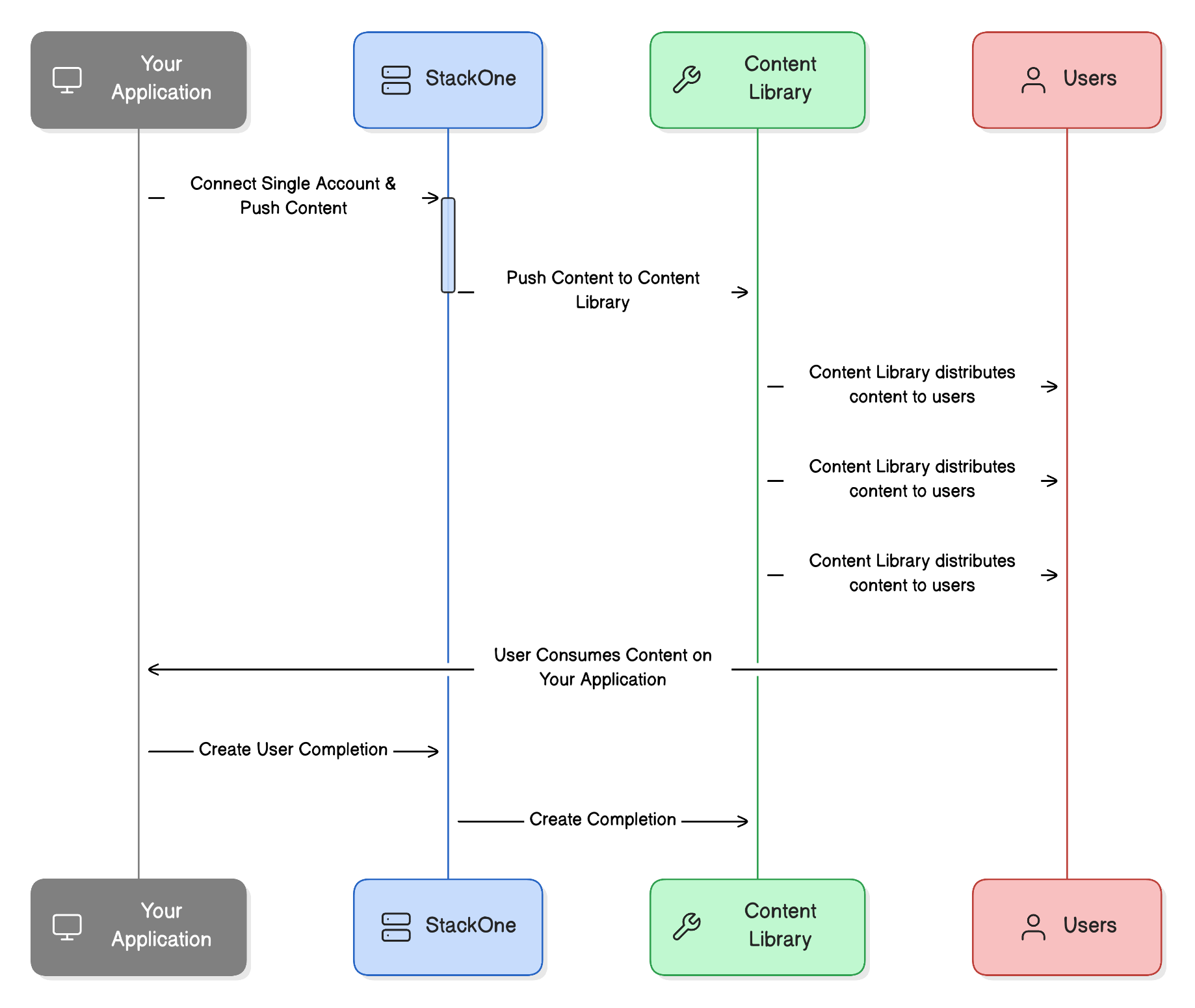
The Cornerstone integration allows you to push content to Cornerstone and track user progress. There are 2 offerings from Cornerstone, both require partnership agreements: Cornerstone offers a tenant-specific integration where you can push content to a specific customer’s instance (Cornerstone). This currently only supports the creation and not the update of content. Cornerstone also offers a distribution network where content is made available to all customers (Cornerstone Library). Additionally, this can be used as:- One-to-many connector: Content is pushed to a single account, and then distribution is handled by Cornerstone.
- One-to-one connector: Content is pushed to a single account for each tenant, an agreement must be in place between the tenant and external content provider.
Key Details
Cornerstone: https://www.cornerstoneondemand.com/legal/content-providers Cornerstone Online Content Connector: https://csod.dev/reference/connectors/#tag/Online-Content-ConnectorRetrieving the External Trigger Token
For the Cornerstone 1:1 connector integration, you’ll need to retrieve the external trigger token (ciid) required by Cornerstone. Follow these steps:- Once a customer has connected their account to StackOne
- Navigate to the accounts screen in your StackOne dashboard
- Click “Edit Account” for the relevant Cornerstone connection
- Copy the external trigger token from the interface