Allow your users to connect to work systems with StackOne.
Register StackOne once in Microsoft Agent 365, so a Microsoft 365 admin approves it for the whole tenant and every Copilot Studio agent can use it. Each person signs in to StackOne with their own login and reaches only the systems they’ve been given access to in StackOne.
Registering your own MCP server in Agent 365 is a Microsoft preview. The steps were tested with Agent 365 CLI 1.1.226. Two steps work around preview gaps: Find your Agent 365 environment ID and Set the refresh URL.
Before you start
In Microsoft 365, you need:
Someone who can create app registrations and grant admin consent in Microsoft Entra ID.
An AI Administrator or Global Administrator to approve the server in the Microsoft 365 admin center.
A Copilot Studio license or the Copilot Studio authors role, to build the agent.
On the machine you register from: .NET 8, the Azure CLI and python3.
In StackOne, you need the Project Admin role to create an MCP OAuth client, plus:
The first time anyone registers a server in your tenant, a Global Administrator adds the Agent 365 Tools service principal. Without it, registration fails with a consent error:
az ad sp create --id ea9ffc3e-8a23-4a7d-836d-234d7c7565c1
2
Create an MCP OAuth client in StackOne
In StackOne, go to Project Settings → MCP OAuth Clients and click Create OAuth Client.
Set the following:
Name: for example Microsoft Agent 365.
Client type: Confidential.
Redirect URIs: pick Microsoft 365 Copilot under Common integrations. The client needs one redirect URI to save, and you replace it after registering.
Click Generate and store the client ID and secret. The secret is shown only once.
3
Describe the server
Save this as stackone-mcp.json, with the client ID and secret from the previous step. The server name must start with ext_ and be at most 20 characters. Agent 365 limits each tool name to 30 characters, and the names must match the ones StackOne serves.
stackone-mcp.json
{ "serverName": "ext_StackOne", "serverUrl": "https://mcp.stackone.com/mcp", "authType": "ExternalOAuth", "description": "Search and run actions across your connected SaaS apps via StackOne.", "publisherName": "StackOne", "tools": [ { "name": "stackone_list_accounts", "description": "Lists the Linked Accounts this connection can reach." }, { "name": "stackone_search_actions", "description": "Finds the actions that match a task across the connected systems." }, { "name": "stackone_execute_action", "description": "Runs an action found with stackone_search_actions." }, { "name": "stackone_submit_feedback", "description": "Records how well the tools served the task." } ], "remoteScopes": "mcp offline_access", "externalOAuth": { "authorizationUrl": "https://idp-api.stackone.com/api/auth/oauth2/authorize", "tokenUrl": "https://idp-api.stackone.com/api/auth/oauth2/token", "scopes": "mcp offline_access", "clientId": "<STACKONE_CLIENT_ID>", "clientSecret": "<STACKONE_CLIENT_SECRET>" }}
Keep remoteScopes. Without it, Agent 365 registers the server with no StackOne sign-in, and every call fails.
The CLI creates the Entra apps, submits the server for approval and prints a Redirect URI for this server, starting https://global.consent.azure-apim.net/redirect/ext-5f.
5
Add the redirect URIs to the StackOne client
In MCP OAuth Clients, click Edit on your client.
Replace the redirect URI with the one the CLI printed.
Add a second line with the same URI and tc- inserted after /redirect/, as in https://global.consent.azure-apim.net/redirect/tc-ext-5f…. Agent 365 uses both.
Click Save.
Find your Agent 365 environment ID
Agent 365 keeps the connectors it creates in a hidden Power Platform environment, and the refresh URL fix in the next section needs its ID. Microsoft shows the ID only once a server is approved, so on a tenant with no approved server, approve a throwaway test server first. You need the ID once per tenant.
1
Register a test server
Save a copy of stackone-mcp.json as stackone-test.json. Change serverName to a new name, such as ext_StackOneTest, set authType to NoAuth, and delete remoteScopes and externalOAuth. Register it:
Review and approve it as in the first two steps of Approve StackOne.
3
Read the ID from the setup link
In Copilot Studio, add the test server to an agent, as in the Use the Agent 365 server tab of Agent Builder Setup, and save the agent. Use only that one server on the agent.
Open Preview, turn on Debug mode and ask the agent anything.
Open the output of the Initialize Server tool. It holds a setup link ending in environmentName=. The value after it is your environment ID.
Remove the test server from the agent. You can then delete it in the admin center under Agents > Tools > Registry.
Set the refresh URL
StackOne access tokens last an hour. The connector Agent 365 creates for StackOne has no refresh URL, so each person’s connection stops working after an hour unless you set one. Do this after registering and before approving, because Agent 365 locks the connector at approval.
1
Fill in the script
Save the script below as set-refresh-url.sh and fill in your environment ID, server name and StackOne client secret.
2
Run it
bash set-refresh-url.sh
It prints Refresh URL set. You can now approve the server.
set-refresh-url.sh
set-refresh-url.sh
#!/usr/bin/env bash# Sets the refresh URL on the connector Agent 365 creates for StackOne.# Run it AFTER registering and BEFORE an admin approves the server.set -euo pipefailENV_ID="<AGENT365_ENVIRONMENT_ID>"SERVER="<SERVER_NAME>" # for example ext_StackOneCLIENT_SECRET="<STACKONE_CLIENT_SECRET>"API="https://api.powerapps.com/providers/Microsoft.PowerApps/apis"QUERY="api-version=2016-11-01&\$filter=environment%20eq%20%27${ENV_ID}%27"TOKEN=$(az account get-access-token --resource https://service.powerapps.com/ \ --query accessToken -o tsv)# 1. Find the editable connector: shared_ext-5f<name>p-...PREFIX="shared_ext-5f$(echo "${SERVER#ext_}" | tr 'A-Z' 'a-z')p-"CONNECTOR=$(curl -s -H "Authorization: Bearer $TOKEN" "$API?$QUERY" | PREFIX="$PREFIX" python3 -c 'import json, os, sysnames = [a["name"] for a in json.load(sys.stdin)["value"] if a["name"].startswith(os.environ["PREFIX"])]print(names[0] if names else "")')[ -n "$CONNECTOR" ] || { echo "Connector not found. Check ENV_ID and SERVER."; exit 1; }echo "Connector: $CONNECTOR"# 2. Copy its token URL into the empty refresh URL, and add the client secretcurl -s -H "Authorization: Bearer $TOKEN" "$API/$CONNECTOR?$QUERY" | CLIENT_SECRET="$CLIENT_SECRET" python3 -c 'import json, os, sysparams = json.load(sys.stdin)["properties"]["connectionParameters"]oauth = params["token"]["oAuthSettings"]custom = {k[0].lower() + k[1:]: v for k, v in oauth["customParameters"].items()}custom["refreshUrl"] = {"value": custom["tokenUrl"]["value"]}oauth["customParameters"] = customoauth["clientSecret"] = os.environ["CLIENT_SECRET"]json.dump({"properties": {"connectionParameters": params}}, open("patch.json", "w"))'# 3. Save it backSTATUS=$(curl -s -o /dev/null -w "%{http_code}" -X PATCH \ -H "Authorization: Bearer $TOKEN" -H "Content-Type: application/json" \ "$API/$CONNECTOR?$QUERY" -d @patch.json)rm -f patch.json[[ "$STATUS" =~ ^20[04]$ ]] && echo "Refresh URL set. You can now approve the server." \ || { echo "Failed (HTTP $STATUS)"; exit 1; }
Open the StackOne server and check the tools it declares on the Tools tab.
2
Approve it
Select Approve, then consent to the Microsoft Entra permissions the server asks for. The server can’t be used until that consent is given.
3
Connect your own StackOne login
Each person, you included, connects StackOne once through a setup link in Power Apps. Follow Connect StackOne in Organization User Setup:Sign in, pick the project and the linked accounts the connector should reach, then Authorize.
Walk through the consent screen
Sign in to StackOne. If you are already signed in to the dashboard you skip straight to the next step.
Check where the connection returns. The line under the client’s logo shows where it goes after you approve. If it names localhost or an app on this device, only continue if you started the connection from that client.
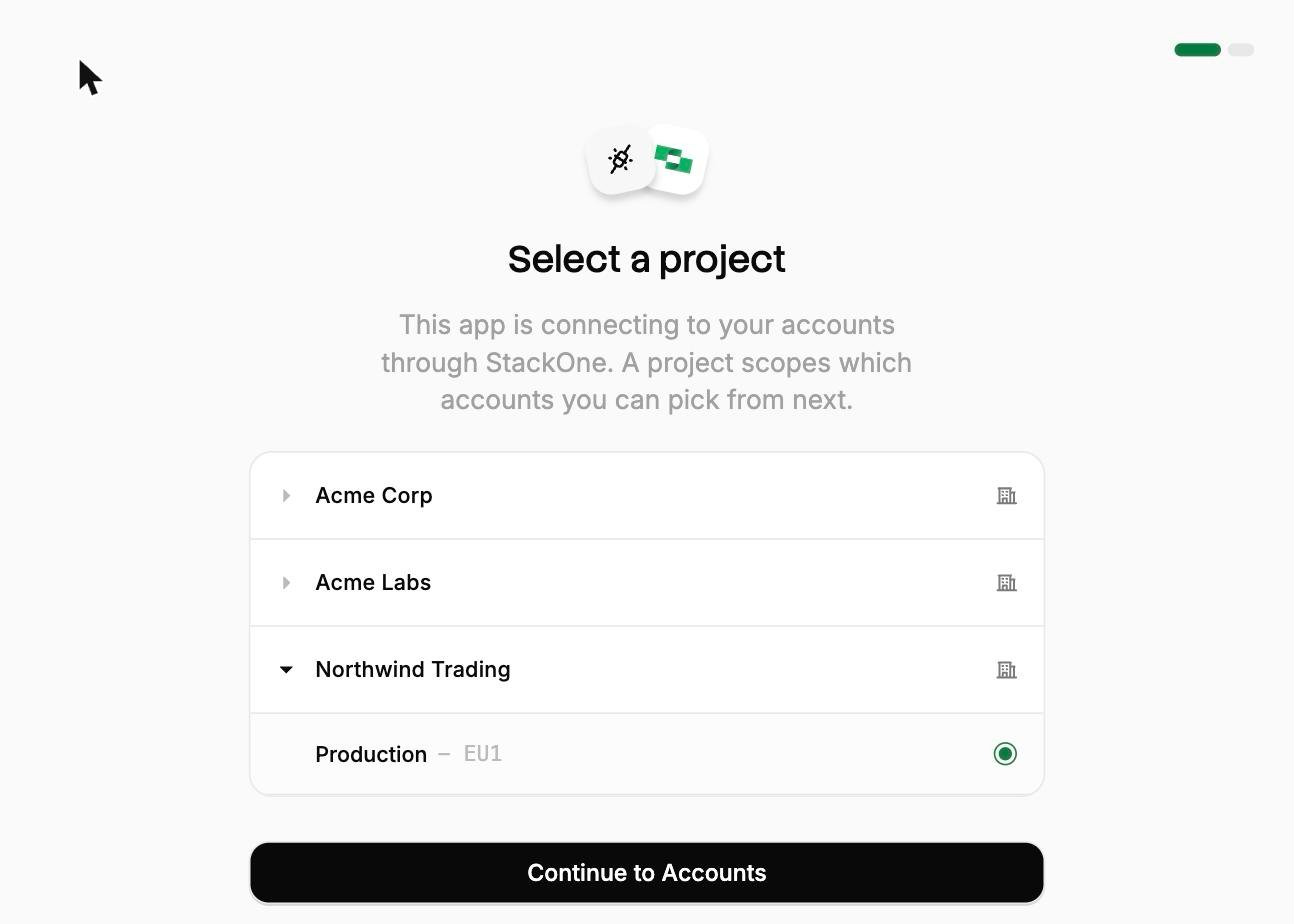
Select a project. Select the project you would like to associate the connection with. If you belong to one project, this step is skipped.
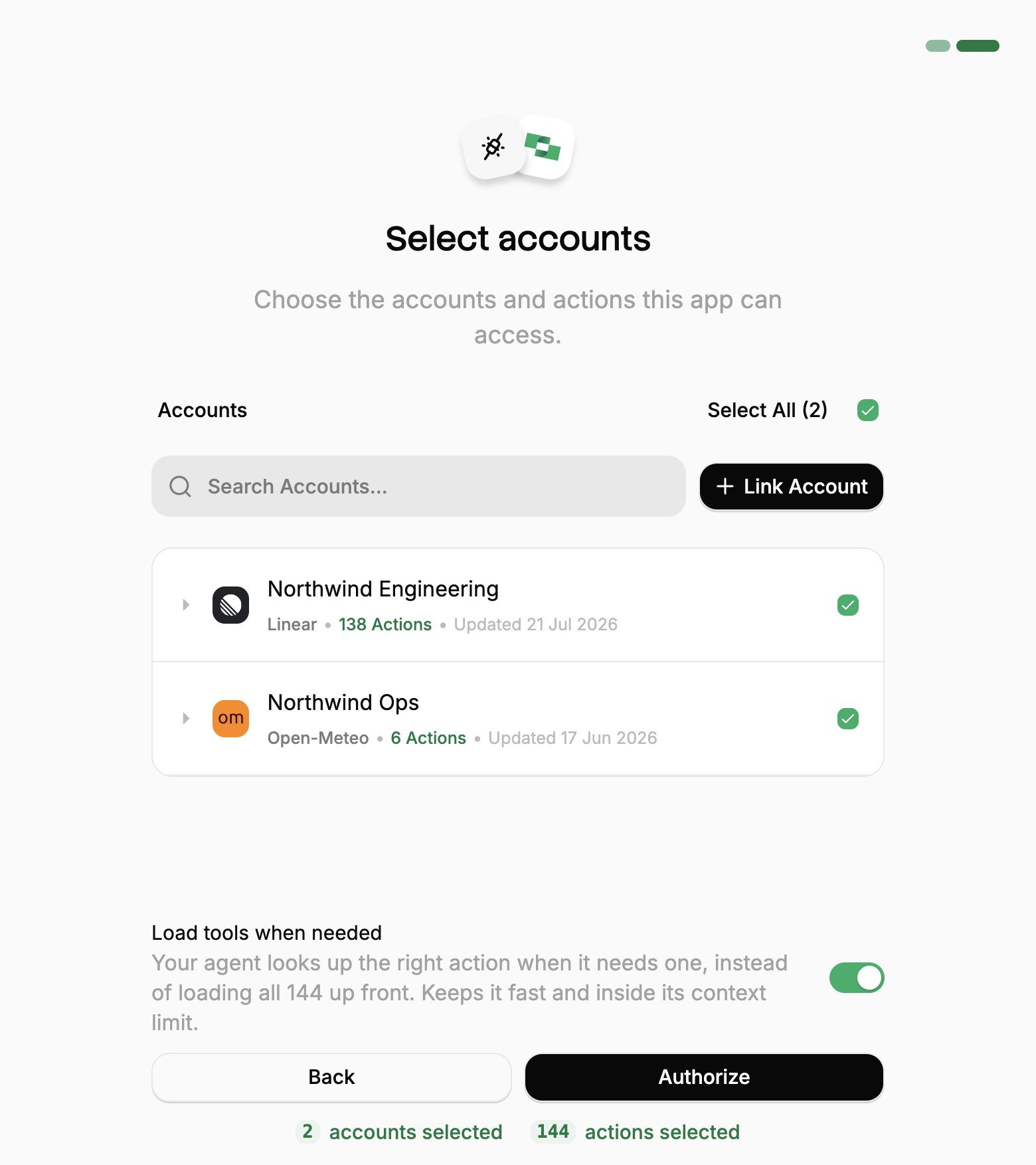
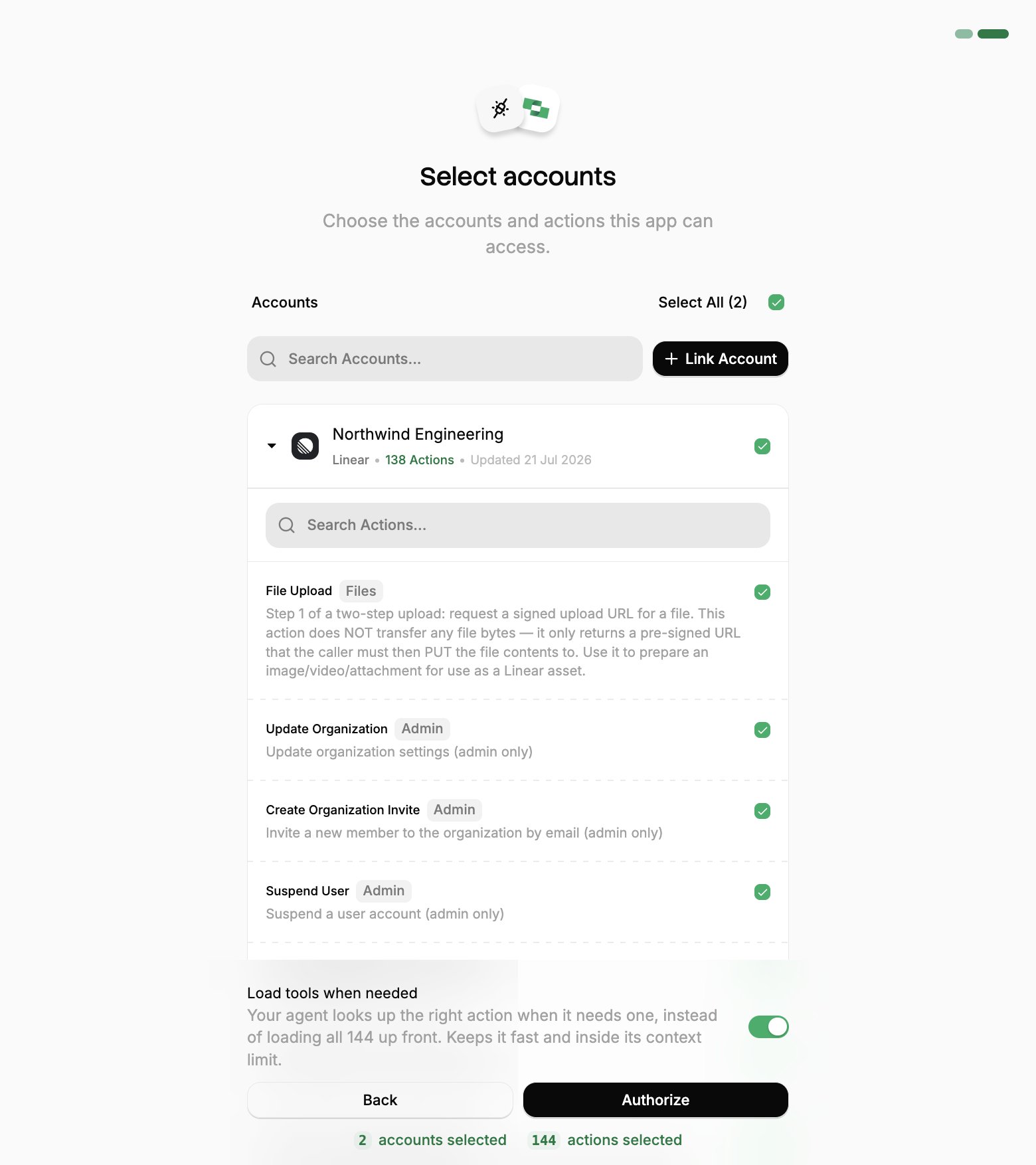
Select accounts and access. Select the linked accounts the client can use, and choose how much it can do in each: read, write, full access, or pick individual actions. To link a new account, click Link account. When the project has MCP Events on, each account also lists its events, and all of them are granted unless you untick some.
(Optional) Load tools when needed. On by default, and the toggle that puts the connection into Advanced Tool Search. Leave it on for large action sets. Turn it off to hand the agent every selected action up front.
Authorize. Completes the connection; you can return to your client.
Select a project
Select accounts
Toggle actions
If you see a sentence where the Load tools when needed toggle should be, an admin has already settled it for the whole project. See project settings.
Within about 30 minutes, the server shows in Copilot Studio in every environment in your tenant. To stop every agent from using it, block it under Agents > Tools > Registry in the admin center.
Registration fails partway. The CLI doesn’t remove the Entra apps it already created. Delete them in the Azure portal, then register again.
Roll it out
StackOne is now available for your users in Microsoft 365 Copilot. Make sure the following is ready before rolling out:
Add users. Invite or provision users via SSO/SCIM. See Manage Team.
Create groups. Organize teams into groups to control which systems each team reaches.
Set up connectors. Define Connector Profiles to scope provider actions for specific functions.
Link accounts. Link shared company accounts, or let users link their own accounts. See Linking Accounts.
Then send users one of the following guides, depending on the product:
Microsoft 365 Copilot
For people in your organization connecting StackOne in Microsoft 365 Copilot.
Copilot Studio
For people building agents in Copilot Studio.
Was this page helpful?
{"docsConfig":{"theme":"mint","$schema":"https://mintlify.com/docs.json","name":"Stackone","colors":{"primary":"#068F56","light":"#00AF66","dark":"#068F56"},"logo":{"light":"https://mintcdn.com/stackone-60/WsmKpuoeBZmio9QO/images/logo/logo-light-mode.svg?fit=max\u0026auto=format\u0026n=WsmKpuoeBZmio9QO\u0026q=85\u0026s=f08be9c0a142cb1e7fcaa23910c4bf7f","dark":"https://mintcdn.com/stackone-60/WsmKpuoeBZmio9QO/images/logo/logo-dark-mode.svg?fit=max\u0026auto=format\u0026n=WsmKpuoeBZmio9QO\u0026q=85\u0026s=b57d63594c13dee65c06a2d578927466","href":"/introduction"},"favicon":"https://mintcdn.com/stackone-60/EZ7nWzE-JJzhmP-C/images/logo/favicon.png?fit=max\u0026auto=format\u0026n=EZ7nWzE-JJzhmP-C\u0026q=85\u0026s=9012a8ae6ce9a80698406b611be47925","appearance":{"default":"light"},"background":{"image":{"light":"https://mintcdn.com/stackone-60/knwbcGlYFJSeLObv/images/background/light.svg?fit=max\u0026auto=format\u0026n=knwbcGlYFJSeLObv\u0026q=85\u0026s=112166d244e990ebc0146ff96958757c","dark":"https://mintcdn.com/stackone-60/knwbcGlYFJSeLObv/images/background/dark.svg?fit=max\u0026auto=format\u0026n=knwbcGlYFJSeLObv\u0026q=85\u0026s=50ec5e23eeb91f55e78a0da97dcaeb7b"},"color":{"dark":"#1a1a1a"}},"navbar":{"links":[{"icon":"circle-question","href":"/support","label":"Support"},{"href":"https://app.stackone.com","label":"Login"},{"href":"https://www.stackone.com/demo/","label":"Book a demo"}],"primary":{"type":"button","label":"Start Free","href":"https://app.stackone.com/sign_up"}},"footer":{"socials":{"linkedin":"https://www.linkedin.com/company/stackonehq","twitter":"https://twitter.com/StackOneHQ"}},"seo":{"metatags":{"canonical":"https://docs.stackone.com","google-site-verification":"gYj1x4gkdSwpCGVLFVXNVOPQ_wVrePW37ZKJt3HEqys"}},"fonts":{"heading":{"family":"Sf Pro Display","source":"https://fonts.gstatic.com/s/inter/v18/UcC73FwrK3iLTeHuS_nVMrMxCp50SjIa1ZL7W0Q5nw.woff2","format":"woff2"},"body":{"family":"Inter","source":"https://fonts.gstatic.com/s/inter/v18/UcC73FwrK3iLTeHuS_nVMrMxCp50SjIa1ZL7W0Q5nw.woff2","format":"woff2"}},"styling":{"eyebrows":"breadcrumbs","latex":true},"integrations":{"gtm":{"tagId":"GTM-NZNK37TL"}},"contextual":{"options":["copy","view","chatgpt","claude","perplexity"],"display":"header"},"navigation":{"pages":[]}},"deployment":{"deploymentMetadataValue":{"subdomain":"stackone-60","hasAudioNarration":false,"actualSubdomain":"stackone-60","customDomains":["docs.stackone.com"],"gitSource":{"type":"github","owner":"stackonehq","repo":"docs","deployBranch":"main","contentDirectory":"","isPrivate":false,"mountPath":"","label":""},"feedback":{"thumbs":true,"edits":false,"issues":false,"agentFeedback":true},"entitlements":{"AI_CHAT":{"status":"ENABLED"},"WEB_MCP":{"status":"ENABLED"},"NARRATION":{"status":"ENABLED"}},"buildId":"6b084491c85466c22650e9bc","clientVersion":"0.0.4336","searchFilterCounts":[{"language":"default","tag":"Connectors","count":8218},{"language":"default","tag":"Connector Catalog","count":4085},{"language":"default","tag":"Embed","count":100},{"language":"default","tag":"Platform API","count":68},{"language":"default","tag":"Gateway","count":55},{"language":"default","tag":"Features","count":54},{"language":"default","tag":"Connector Building","count":47},{"language":"default","tag":"Embed StackOne","count":46},{"language":"default","tag":"Unified Actions","count":43},{"language":"default","tag":"AI Platforms","count":41}],"searchSettings":{"isFiltersEnabled":true}},"assistantConfig":{"enableStarterQuestions":false,"deflection":{"enabled":true,"email":"support@stackone.com"}},"basePath":"","hasChatPermissions":true,"hasWebMcpPermissions":true,"toggles":[{"name":"kill-isr","enabled":true,"variant":{"name":"disabled","enabled":false,"feature_enabled":true},"impressionData":false},{"name":"custom-rbac-roles","enabled":true,"variant":{"name":"disabled","enabled":false,"feature_enabled":true},"impressionData":false},{"name":"agent-mintlify-slack","enabled":true,"variant":{"name":"disabled","enabled":false,"feature_enabled":true},"impressionData":false},{"name":"agent-integrations-settings","enabled":true,"variant":{"name":"disabled","enabled":false,"feature_enabled":true},"impressionData":false},{"name":"rbac-expansion","enabled":true,"variant":{"name":"disabled","enabled":false,"feature_enabled":true},"impressionData":false},{"name":"automations-pr-grouping","enabled":true,"variant":{"name":"disabled","enabled":false,"feature_enabled":true},"impressionData":false},{"name":"custom-prefix","enabled":true,"variant":{"name":"disabled","enabled":false,"feature_enabled":true},"impressionData":false},{"name":"analytics-v7","enabled":true,"variant":{"name":"disabled","enabled":false,"feature_enabled":true},"impressionData":false},{"name":"user-flows-analytics","enabled":true,"variant":{"name":"disabled","enabled":false,"feature_enabled":true},"impressionData":false},{"name":"no-publish-flow","enabled":true,"variant":{"name":"disabled","enabled":false,"feature_enabled":true},"impressionData":false},{"name":"snapshot-serving-live","enabled":true,"variant":{"name":"disabled","enabled":false,"feature_enabled":true},"impressionData":false},{"name":"stripTemperatureMiddleware","enabled":true,"variant":{"name":"disabled","enabled":false,"feature_enabled":true},"impressionData":false},{"name":"support-platform-pylon-zendesk","enabled":true,"variant":{"name":"disabled","enabled":false,"feature_enabled":true},"impressionData":false},{"name":"snapshot-serving","enabled":true,"variant":{"name":"disabled","enabled":false,"feature_enabled":true},"impressionData":false},{"name":"instant-rollback","enabled":true,"variant":{"name":"disabled","enabled":false,"feature_enabled":true},"impressionData":false},{"name":"granular-notifications-server","enabled":true,"variant":{"name":"disabled","enabled":false,"feature_enabled":true},"impressionData":false},{"name":"granular-notifications","enabled":true,"variant":{"name":"disabled","enabled":false,"feature_enabled":true},"impressionData":false},{"name":"automations-fable","enabled":true,"variant":{"name":"disabled","enabled":false,"feature_enabled":true},"impressionData":false},{"name":"fixed-ai-action-pricing","enabled":true,"variant":{"name":"disabled","enabled":false,"feature_enabled":true},"impressionData":false},{"name":"site-roles","enabled":true,"variant":{"name":"disabled","enabled":false,"feature_enabled":true},"impressionData":false},{"name":"automation-resolve-merge-conflict","enabled":true,"variant":{"name":"disabled","enabled":false,"feature_enabled":true},"impressionData":false},{"name":"scoped-publishing","enabled":true,"variant":{"name":"disabled","enabled":false,"feature_enabled":true},"impressionData":false},{"name":"mintql","enabled":true,"variant":{"name":"disabled","enabled":false,"feature_enabled":true},"impressionData":false},{"name":"page-level-analytics","enabled":true,"variant":{"name":"disabled","enabled":false,"feature_enabled":true},"impressionData":false},{"name":"editor-version-history-v2","enabled":true,"variant":{"name":"disabled","enabled":false,"feature_enabled":true},"impressionData":false},{"name":"billing-page-v2","enabled":true,"variant":{"name":"disabled","enabled":false,"feature_enabled":true},"impressionData":false},{"name":"full-page-search","enabled":true,"variant":{"name":"disabled","enabled":false,"feature_enabled":true},"impressionData":false},{"name":"workspace-projects","enabled":true,"variant":{"name":"disabled","enabled":false,"feature_enabled":true},"impressionData":false},{"name":"fork-pr-previews","enabled":true,"variant":{"name":"disabled","enabled":false,"feature_enabled":true},"impressionData":false},{"name":"revalidation-jwt","enabled":true,"variant":{"name":"disabled","enabled":false,"feature_enabled":true},"impressionData":false},{"name":"hobby-abuse-scan","enabled":true,"variant":{"name":"disabled","enabled":false,"feature_enabled":true},"impressionData":false},{"name":"dashboard-inbox","enabled":true,"variant":{"name":"disabled","enabled":false,"feature_enabled":true},"impressionData":false},{"name":"turbopuffer-dual-write","enabled":true,"variant":{"name":"disabled","enabled":false,"feature_enabled":true},"impressionData":false},{"name":"approve-review-flow","enabled":true,"variant":{"name":"disabled","enabled":false,"feature_enabled":true},"impressionData":false},{"name":"editor-metadata","enabled":true,"variant":{"name":"disabled","enabled":false,"feature_enabled":true},"impressionData":false},{"name":"turbopuffer-serve","enabled":true,"variant":{"name":"disabled","enabled":false,"feature_enabled":true},"impressionData":false},{"name":"live-agents","enabled":true,"variant":{"name":"disabled","enabled":false,"feature_enabled":true},"impressionData":false},{"name":"starter-pricing","enabled":true,"variant":{"name":"treatment","enabled":true,"payload":{"type":"string","value":"treatment"},"feature_enabled":true},"impressionData":false},{"name":"llms-txt-v2","enabled":true,"variant":{"name":"disabled","enabled":false,"feature_enabled":true},"impressionData":false},{"name":"wildcard-email-auth","enabled":true,"variant":{"name":"disabled","enabled":false,"feature_enabled":true},"impressionData":false}],"starterQuestions":[],"googleFontsInlined":false},"customCss":[{"filePath":"style.css","href":"/_mintlify/custom/stackone-60/1689b391b56fc5fb/style.css"}]}
{"page":{"pagePath":"ai-platforms/microsoft/microsoft-365-copilot/organization-admin-setup","slug":"/ai-platforms/microsoft/microsoft-365-copilot/organization-admin-setup","pageMetadata":{"title":"Microsoft 365 Copilot - Make StackOne Available","sidebarTitle":"Organization Admin Setup","description":"Allow your users to connect to work systems with StackOne.","keywords":["Microsoft 365 Copilot","Agent 365","Copilot Studio","Model Context Protocol","MCP server","bring your own MCP server","a365 CLI","Microsoft 365 admin center","organization"],"href":"/ai-platforms/microsoft/microsoft-365-copilot/organization-admin-setup"},"description":{"compiledSource":"\"use strict\";\nconst {jsx: _jsx} = arguments[0];\nconst {useMDXComponents: _provideComponents} = arguments[0];\nfunction _createMdxContent(props) {\n const _components = {\n p: \"p\",\n ..._provideComponents(),\n ...props.components\n };\n return _jsx(_components.p, {\n children: \"Allow your users to connect to work systems with StackOne.\"\n });\n}\nfunction MDXContent(props = {}) {\n const {wrapper: MDXLayout} = {\n ..._provideComponents(),\n ...props.components\n };\n return MDXLayout ? _jsx(MDXLayout, {\n ...props,\n children: _jsx(_createMdxContent, {\n ...props\n })\n }) : _createMdxContent(props);\n}\nreturn {\n default: MDXContent\n};\n","frontmatter":{},"scope":{}},"pageType":"default","mdx":{"mdxSource":{"compiledSource":"\"use strict\";const{Fragment:_Fragment,jsx:_jsx,jsxs:_jsxs}=arguments[0];const{useMDXComponents:_provideComponents}=arguments[0];const platform_0=`Microsoft 365 Copilot`;function _createMdxContent(props){const _components={a:`a`,code:`code`,li:`li`,ol:`ol`,p:`p`,pre:`pre`,span:`span`,strong:`strong`,ul:`ul`,..._provideComponents(),...props.components},{Accordion,Card,CardGroup,CodeBlock,Columns,Frame,Heading,Note,OptimizedImage,Step,Steps}=_components;if(!Accordion)_missingMdxReference(`Accordion`,true);if(!Card)_missingMdxReference(`Card`,true);if(!CardGroup)_missingMdxReference(`CardGroup`,true);if(!CodeBlock)_missingMdxReference(`CodeBlock`,true);if(!Columns)_missingMdxReference(`Columns`,true);if(!Frame)_missingMdxReference(`Frame`,true);if(!Heading)_missingMdxReference(`Heading`,true);if(!Note)_missingMdxReference(`Note`,true);if(!OptimizedImage)_missingMdxReference(`OptimizedImage`,true);if(!Step)_missingMdxReference(`Step`,true);if(!Steps)_missingMdxReference(`Steps`,true);return _jsxs(_Fragment,{children:[_jsx(Frame,{children:_jsx(OptimizedImage,{src:`https://mintcdn.com/stackone-60/PxWMQ9IOz3sntjnj/images/ai-platforms/microsoft/microsoft-365-copilot-admin-setup.svg?fit=max\u0026auto=format\u0026n=PxWMQ9IOz3sntjnj\u0026q=85\u0026s=94adc7701dfddac9e2dae3ce8f507496`,alt:`An IT admin adds StackOne to the Microsoft 365 organization, bringing Linked Accounts from many providers. Each user then connects with their own accounts: an HR manager uses Microsoft 365 Copilot with Workday, Greenhouse and BambooHR, and a sales manager uses Microsoft 365 Copilot with Salesforce, HubSpot and Gmail.`,\"data-og-width\":`2562`,width:`2562`,\"data-og-height\":`1168`,height:`1168`,\"data-path\":`images/ai-platforms/microsoft/microsoft-365-copilot-admin-setup.svg`,\"data-optimize\":`true`,\"data-opv\":`3`,srcset:`https://mintcdn.com/stackone-60/PxWMQ9IOz3sntjnj/images/ai-platforms/microsoft/microsoft-365-copilot-admin-setup.svg?w=280\u0026fit=max\u0026auto=format\u0026n=PxWMQ9IOz3sntjnj\u0026q=85\u0026s=944b18ef6ef0492aec9538a06fede745 280w, https://mintcdn.com/stackone-60/PxWMQ9IOz3sntjnj/images/ai-platforms/microsoft/microsoft-365-copilot-admin-setup.svg?w=560\u0026fit=max\u0026auto=format\u0026n=PxWMQ9IOz3sntjnj\u0026q=85\u0026s=94ce39f2576668cfd9ad6a428f131ec0 560w, https://mintcdn.com/stackone-60/PxWMQ9IOz3sntjnj/images/ai-platforms/microsoft/microsoft-365-copilot-admin-setup.svg?w=840\u0026fit=max\u0026auto=format\u0026n=PxWMQ9IOz3sntjnj\u0026q=85\u0026s=7eec7f52e21260ce9c6f7ee6926e5d64 840w, https://mintcdn.com/stackone-60/PxWMQ9IOz3sntjnj/images/ai-platforms/microsoft/microsoft-365-copilot-admin-setup.svg?w=1100\u0026fit=max\u0026auto=format\u0026n=PxWMQ9IOz3sntjnj\u0026q=85\u0026s=4e86adc232ed1124039038f45aa0ad1e 1100w, https://mintcdn.com/stackone-60/PxWMQ9IOz3sntjnj/images/ai-platforms/microsoft/microsoft-365-copilot-admin-setup.svg?w=1650\u0026fit=max\u0026auto=format\u0026n=PxWMQ9IOz3sntjnj\u0026q=85\u0026s=2a365c744bba865c517a68b141d244ed 1650w, https://mintcdn.com/stackone-60/PxWMQ9IOz3sntjnj/images/ai-platforms/microsoft/microsoft-365-copilot-admin-setup.svg?w=2500\u0026fit=max\u0026auto=format\u0026n=PxWMQ9IOz3sntjnj\u0026q=85\u0026s=d2e45d57d00e0b22f4b936e2f2a558f6 2500w`})}),`\n`,_jsx(_components.p,{children:`Register StackOne once in Microsoft Agent 365, so a Microsoft 365 admin approves it for the whole tenant and every Copilot Studio agent can use it. Each person signs in to StackOne with their own login and reaches only the systems they’ve been given access to in StackOne.`}),`\n`,_jsx(Note,{children:_jsxs(_components.p,{children:[`Registering your own MCP server in Agent 365 is a Microsoft preview. The steps were tested with Agent 365 CLI 1.1.226. Two steps work around preview gaps: `,_jsx(_components.a,{href:`#find-your-agent-365-environment-id`,children:`Find your Agent 365 environment ID`}),` and `,_jsx(_components.a,{href:`#set-the-refresh-url`,children:`Set the refresh URL`}),`.`]})}),`\n`,_jsx(Heading,{level:`2`,id:`before-you-start`,children:`Before you start`}),`\n`,_jsx(_components.p,{children:`In Microsoft 365, you need:`}),`\n`,_jsxs(_components.ul,{children:[`\n`,_jsx(_components.li,{children:`Someone who can create app registrations and grant admin consent in Microsoft Entra ID.`}),`\n`,_jsx(_components.li,{children:`An AI Administrator or Global Administrator to approve the server in the Microsoft 365 admin center.`}),`\n`,_jsx(_components.li,{children:`A Copilot Studio license or the Copilot Studio authors role, to build the agent.`}),`\n`,_jsxs(_components.li,{children:[`On the machine you register from: `,_jsx(_components.a,{href:`https://dotnet.microsoft.com/download/dotnet/8.0`,children:`.NET 8`}),`, the `,_jsx(_components.a,{href:`https://learn.microsoft.com/en-us/cli/azure/install-azure-cli`,children:`Azure CLI`}),` and `,_jsx(_components.code,{children:`python3`}),`.`]}),`\n`]}),`\n`,_jsxs(_components.p,{children:[`In StackOne, you need the `,_jsx(_components.strong,{children:`Project Admin`}),` role to create an MCP OAuth client, plus:`]}),`\n`,_jsxs(_components.ul,{children:[`\n`,_jsxs(_components.li,{children:[`A StackOne `,_jsx(_components.a,{href:`/gateway/concepts/organizations-and-projects`,children:`project`}),` you are a member of.`]}),`\n`,_jsxs(_components.li,{children:[`A `,_jsx(_components.a,{href:`/connect/managing-connectors/connector-profiles`,children:`connector profile`}),` in the project for each provider the client should reach, with the actions you want exposed enabled.`]}),`\n`,_jsxs(_components.li,{children:[`(Optional) A `,_jsx(_components.a,{href:`/connect/managing-connectors/linking-accounts`,children:`linked account`}),` for each provider. Accounts can also be linked during the consent flow.`]}),`\n`]}),`\n`,_jsx(Heading,{level:`2`,id:`register-stackone-in-agent-365`,children:`Register StackOne in Agent 365`}),`\n`,_jsxs(Steps,{children:[_jsxs(Step,{title:`Install the Agent 365 CLI and sign in`,children:[_jsx(_components.p,{children:`Install the CLI and sign in to your tenant:`}),_jsx(CodeBlock,{filename:``,numberOfLines:`2`,language:`shellscript`,children:_jsx(_components.pre,{className:`shiki shiki-themes github-light-default dark-plus`,style:{backgroundColor:`#ffffff`,\"--shiki-dark-bg\":`#0B0C0E`,color:`#1f2328`,\"--shiki-dark\":`#D4D4D4`},language:`shellscript`,children:_jsxs(_components.code,{language:`shellscript`,numberOfLines:`2`,children:[_jsxs(_components.span,{className:`line`,children:[_jsx(_components.span,{style:{color:`#953800`,\"--shiki-dark\":`#DCDCAA`},children:`dotnet`}),_jsx(_components.span,{style:{color:`#0A3069`,\"--shiki-dark\":`#CE9178`},children:` tool`}),_jsx(_components.span,{style:{color:`#0A3069`,\"--shiki-dark\":`#CE9178`},children:` install`}),_jsx(_components.span,{style:{color:`#0550AE`,\"--shiki-dark\":`#569CD6`},children:` --global`}),_jsx(_components.span,{style:{color:`#0A3069`,\"--shiki-dark\":`#CE9178`},children:` Microsoft.Agents.A365.DevTools.Cli`})]}),`\n`,_jsxs(_components.span,{className:`line`,children:[_jsx(_components.span,{style:{color:`#953800`,\"--shiki-dark\":`#DCDCAA`},children:`az`}),_jsx(_components.span,{style:{color:`#0A3069`,\"--shiki-dark\":`#CE9178`},children:` login`}),_jsx(_components.span,{style:{color:`#0550AE`,\"--shiki-dark\":`#569CD6`},children:` --tenant`}),_jsx(_components.span,{style:{color:`#CF222E`,\"--shiki-dark\":`#D4D4D4`},children:` \u003c`}),_jsx(_components.span,{style:{color:`#0A3069`,\"--shiki-dark\":`#CE9178`},children:`your-tenant-i`}),_jsx(_components.span,{style:{color:`#0A3069`,\"--shiki-dark\":`#CE9178`},children:`d`}),_jsx(_components.span,{style:{color:`#CF222E`,\"--shiki-dark\":`#D4D4D4`},children:`>`})]}),`\n`]})})}),_jsx(_components.p,{children:`The first time anyone registers a server in your tenant, a Global Administrator adds the Agent 365 Tools service principal. Without it, registration fails with a consent error:`}),_jsx(CodeBlock,{filename:``,numberOfLines:`1`,language:`shellscript`,children:_jsx(_components.pre,{className:`shiki shiki-themes github-light-default dark-plus`,style:{backgroundColor:`#ffffff`,\"--shiki-dark-bg\":`#0B0C0E`,color:`#1f2328`,\"--shiki-dark\":`#D4D4D4`},language:`shellscript`,children:_jsxs(_components.code,{language:`shellscript`,numberOfLines:`1`,children:[_jsxs(_components.span,{className:`line`,children:[_jsx(_components.span,{style:{color:`#953800`,\"--shiki-dark\":`#DCDCAA`},children:`az`}),_jsx(_components.span,{style:{color:`#0A3069`,\"--shiki-dark\":`#CE9178`},children:` ad`}),_jsx(_components.span,{style:{color:`#0A3069`,\"--shiki-dark\":`#CE9178`},children:` sp`}),_jsx(_components.span,{style:{color:`#0A3069`,\"--shiki-dark\":`#CE9178`},children:` create`}),_jsx(_components.span,{style:{color:`#0550AE`,\"--shiki-dark\":`#569CD6`},children:` --id`}),_jsx(_components.span,{style:{color:`#0A3069`,\"--shiki-dark\":`#CE9178`},children:` ea9ffc3e-8a23-4a7d-836d-234d7c7565c1`})]}),`\n`]})})})]}),_jsx(Step,{title:`Create an MCP OAuth client in StackOne`,children:_jsxs(_components.ol,{children:[`\n`,_jsxs(_components.li,{children:[`In StackOne, go to `,_jsx(_components.strong,{children:`Project Settings → MCP OAuth Clients`}),` and click `,_jsx(_components.strong,{children:`Create OAuth Client`}),`.`]}),`\n`,_jsxs(_components.li,{children:[`Set the following:`,`\n`,_jsxs(_components.ul,{children:[`\n`,_jsxs(_components.li,{children:[_jsx(_components.strong,{children:`Name`}),`: for example `,_jsx(_components.code,{children:`Microsoft Agent 365`}),`.`]}),`\n`,_jsxs(_components.li,{children:[_jsx(_components.strong,{children:`Client type`}),`: `,_jsx(_components.code,{children:`Confidential`}),`.`]}),`\n`,_jsxs(_components.li,{children:[_jsx(_components.strong,{children:`Redirect URIs`}),`: pick `,_jsx(_components.strong,{children:`Microsoft 365 Copilot`}),` under `,_jsx(_components.strong,{children:`Common integrations`}),`. The client needs one redirect URI to save, and you replace it after registering.`]}),`\n`]}),`\n`]}),`\n`,_jsxs(_components.li,{children:[`Click `,_jsx(_components.strong,{children:`Generate`}),` and store the client ID and secret. The secret is shown only once.`]}),`\n`]})}),_jsxs(Step,{title:`Describe the server`,children:[_jsxs(_components.p,{children:[`Save this as `,_jsx(_components.code,{children:`stackone-mcp.json`}),`, with the client ID and secret from the previous step. The server name must start with `,_jsx(_components.code,{children:`ext_`}),` and be at most 20 characters. Agent 365 limits each tool name to 30 characters, and the names must match the ones StackOne serves.`]}),_jsx(CodeBlock,{filename:`stackone-mcp.json`,numberOfLines:`21`,language:`json`,children:_jsx(_components.pre,{className:`shiki shiki-themes github-light-default dark-plus`,style:{backgroundColor:`#ffffff`,\"--shiki-dark-bg\":`#0B0C0E`,color:`#1f2328`,\"--shiki-dark\":`#D4D4D4`},language:`json`,children:_jsxs(_components.code,{language:`json`,numberOfLines:`21`,children:[_jsx(_components.span,{className:`line`,children:_jsx(_components.span,{style:{color:`#1F2328`,\"--shiki-dark\":`#D4D4D4`},children:`{`})}),`\n`,_jsxs(_components.span,{className:`line`,children:[_jsx(_components.span,{style:{color:`#116329`,\"--shiki-dark\":`#9CDCFE`},children:` \"serverName\"`}),_jsx(_components.span,{style:{color:`#1F2328`,\"--shiki-dark\":`#D4D4D4`},children:`: `}),_jsx(_components.span,{style:{color:`#0A3069`,\"--shiki-dark\":`#CE9178`},children:`\"ext_StackOne\"`}),_jsx(_components.span,{style:{color:`#1F2328`,\"--shiki-dark\":`#D4D4D4`},children:`,`})]}),`\n`,_jsxs(_components.span,{className:`line`,children:[_jsx(_components.span,{style:{color:`#116329`,\"--shiki-dark\":`#9CDCFE`},children:` \"serverUrl\"`}),_jsx(_components.span,{style:{color:`#1F2328`,\"--shiki-dark\":`#D4D4D4`},children:`: `}),_jsx(_components.span,{style:{color:`#0A3069`,\"--shiki-dark\":`#CE9178`},children:`\"https://mcp.stackone.com/mcp\"`}),_jsx(_components.span,{style:{color:`#1F2328`,\"--shiki-dark\":`#D4D4D4`},children:`,`})]}),`\n`,_jsxs(_components.span,{className:`line`,children:[_jsx(_components.span,{style:{color:`#116329`,\"--shiki-dark\":`#9CDCFE`},children:` \"authType\"`}),_jsx(_components.span,{style:{color:`#1F2328`,\"--shiki-dark\":`#D4D4D4`},children:`: `}),_jsx(_components.span,{style:{color:`#0A3069`,\"--shiki-dark\":`#CE9178`},children:`\"ExternalOAuth\"`}),_jsx(_components.span,{style:{color:`#1F2328`,\"--shiki-dark\":`#D4D4D4`},children:`,`})]}),`\n`,_jsxs(_components.span,{className:`line`,children:[_jsx(_components.span,{style:{color:`#116329`,\"--shiki-dark\":`#9CDCFE`},children:` \"description\"`}),_jsx(_components.span,{style:{color:`#1F2328`,\"--shiki-dark\":`#D4D4D4`},children:`: `}),_jsx(_components.span,{style:{color:`#0A3069`,\"--shiki-dark\":`#CE9178`},children:`\"Search and run actions across your connected SaaS apps via StackOne.\"`}),_jsx(_components.span,{style:{color:`#1F2328`,\"--shiki-dark\":`#D4D4D4`},children:`,`})]}),`\n`,_jsxs(_components.span,{className:`line`,children:[_jsx(_components.span,{style:{color:`#116329`,\"--shiki-dark\":`#9CDCFE`},children:` \"publisherName\"`}),_jsx(_components.span,{style:{color:`#1F2328`,\"--shiki-dark\":`#D4D4D4`},children:`: `}),_jsx(_components.span,{style:{color:`#0A3069`,\"--shiki-dark\":`#CE9178`},children:`\"StackOne\"`}),_jsx(_components.span,{style:{color:`#1F2328`,\"--shiki-dark\":`#D4D4D4`},children:`,`})]}),`\n`,_jsxs(_components.span,{className:`line`,children:[_jsx(_components.span,{style:{color:`#116329`,\"--shiki-dark\":`#9CDCFE`},children:` \"tools\"`}),_jsx(_components.span,{style:{color:`#1F2328`,\"--shiki-dark\":`#D4D4D4`},children:`: [`})]}),`\n`,_jsxs(_components.span,{className:`line`,children:[_jsx(_components.span,{style:{color:`#1F2328`,\"--shiki-dark\":`#D4D4D4`},children:` { `}),_jsx(_components.span,{style:{color:`#116329`,\"--shiki-dark\":`#9CDCFE`},children:`\"name\"`}),_jsx(_components.span,{style:{color:`#1F2328`,\"--shiki-dark\":`#D4D4D4`},children:`: `}),_jsx(_components.span,{style:{color:`#0A3069`,\"--shiki-dark\":`#CE9178`},children:`\"stackone_list_accounts\"`}),_jsx(_components.span,{style:{color:`#1F2328`,\"--shiki-dark\":`#D4D4D4`},children:`, `}),_jsx(_components.span,{style:{color:`#116329`,\"--shiki-dark\":`#9CDCFE`},children:`\"description\"`}),_jsx(_components.span,{style:{color:`#1F2328`,\"--shiki-dark\":`#D4D4D4`},children:`: `}),_jsx(_components.span,{style:{color:`#0A3069`,\"--shiki-dark\":`#CE9178`},children:`\"Lists the Linked Accounts this connection can reach.\"`}),_jsx(_components.span,{style:{color:`#1F2328`,\"--shiki-dark\":`#D4D4D4`},children:` },`})]}),`\n`,_jsxs(_components.span,{className:`line`,children:[_jsx(_components.span,{style:{color:`#1F2328`,\"--shiki-dark\":`#D4D4D4`},children:` { `}),_jsx(_components.span,{style:{color:`#116329`,\"--shiki-dark\":`#9CDCFE`},children:`\"name\"`}),_jsx(_components.span,{style:{color:`#1F2328`,\"--shiki-dark\":`#D4D4D4`},children:`: `}),_jsx(_components.span,{style:{color:`#0A3069`,\"--shiki-dark\":`#CE9178`},children:`\"stackone_search_actions\"`}),_jsx(_components.span,{style:{color:`#1F2328`,\"--shiki-dark\":`#D4D4D4`},children:`, `}),_jsx(_components.span,{style:{color:`#116329`,\"--shiki-dark\":`#9CDCFE`},children:`\"description\"`}),_jsx(_components.span,{style:{color:`#1F2328`,\"--shiki-dark\":`#D4D4D4`},children:`: `}),_jsx(_components.span,{style:{color:`#0A3069`,\"--shiki-dark\":`#CE9178`},children:`\"Finds the actions that match a task across the connected systems.\"`}),_jsx(_components.span,{style:{color:`#1F2328`,\"--shiki-dark\":`#D4D4D4`},children:` },`})]}),`\n`,_jsxs(_components.span,{className:`line`,children:[_jsx(_components.span,{style:{color:`#1F2328`,\"--shiki-dark\":`#D4D4D4`},children:` { `}),_jsx(_components.span,{style:{color:`#116329`,\"--shiki-dark\":`#9CDCFE`},children:`\"name\"`}),_jsx(_components.span,{style:{color:`#1F2328`,\"--shiki-dark\":`#D4D4D4`},children:`: `}),_jsx(_components.span,{style:{color:`#0A3069`,\"--shiki-dark\":`#CE9178`},children:`\"stackone_execute_action\"`}),_jsx(_components.span,{style:{color:`#1F2328`,\"--shiki-dark\":`#D4D4D4`},children:`, `}),_jsx(_components.span,{style:{color:`#116329`,\"--shiki-dark\":`#9CDCFE`},children:`\"description\"`}),_jsx(_components.span,{style:{color:`#1F2328`,\"--shiki-dark\":`#D4D4D4`},children:`: `}),_jsx(_components.span,{style:{color:`#0A3069`,\"--shiki-dark\":`#CE9178`},children:`\"Runs an action found with stackone_search_actions.\"`}),_jsx(_components.span,{style:{color:`#1F2328`,\"--shiki-dark\":`#D4D4D4`},children:` },`})]}),`\n`,_jsxs(_components.span,{className:`line`,children:[_jsx(_components.span,{style:{color:`#1F2328`,\"--shiki-dark\":`#D4D4D4`},children:` { `}),_jsx(_components.span,{style:{color:`#116329`,\"--shiki-dark\":`#9CDCFE`},children:`\"name\"`}),_jsx(_components.span,{style:{color:`#1F2328`,\"--shiki-dark\":`#D4D4D4`},children:`: `}),_jsx(_components.span,{style:{color:`#0A3069`,\"--shiki-dark\":`#CE9178`},children:`\"stackone_submit_feedback\"`}),_jsx(_components.span,{style:{color:`#1F2328`,\"--shiki-dark\":`#D4D4D4`},children:`, `}),_jsx(_components.span,{style:{color:`#116329`,\"--shiki-dark\":`#9CDCFE`},children:`\"description\"`}),_jsx(_components.span,{style:{color:`#1F2328`,\"--shiki-dark\":`#D4D4D4`},children:`: `}),_jsx(_components.span,{style:{color:`#0A3069`,\"--shiki-dark\":`#CE9178`},children:`\"Records how well the tools served the task.\"`}),_jsx(_components.span,{style:{color:`#1F2328`,\"--shiki-dark\":`#D4D4D4`},children:` }`})]}),`\n`,_jsx(_components.span,{className:`line`,children:_jsx(_components.span,{style:{color:`#1F2328`,\"--shiki-dark\":`#D4D4D4`},children:` ],`})}),`\n`,_jsxs(_components.span,{className:`line`,children:[_jsx(_components.span,{style:{color:`#116329`,\"--shiki-dark\":`#9CDCFE`},children:` \"remoteScopes\"`}),_jsx(_components.span,{style:{color:`#1F2328`,\"--shiki-dark\":`#D4D4D4`},children:`: `}),_jsx(_components.span,{style:{color:`#0A3069`,\"--shiki-dark\":`#CE9178`},children:`\"mcp offline_access\"`}),_jsx(_components.span,{style:{color:`#1F2328`,\"--shiki-dark\":`#D4D4D4`},children:`,`})]}),`\n`,_jsxs(_components.span,{className:`line`,children:[_jsx(_components.span,{style:{color:`#116329`,\"--shiki-dark\":`#9CDCFE`},children:` \"externalOAuth\"`}),_jsx(_components.span,{style:{color:`#1F2328`,\"--shiki-dark\":`#D4D4D4`},children:`: {`})]}),`\n`,_jsxs(_components.span,{className:`line`,children:[_jsx(_components.span,{style:{color:`#116329`,\"--shiki-dark\":`#9CDCFE`},children:` \"authorizationUrl\"`}),_jsx(_components.span,{style:{color:`#1F2328`,\"--shiki-dark\":`#D4D4D4`},children:`: `}),_jsx(_components.span,{style:{color:`#0A3069`,\"--shiki-dark\":`#CE9178`},children:`\"https://idp-api.stackone.com/api/auth/oauth2/authorize\"`}),_jsx(_components.span,{style:{color:`#1F2328`,\"--shiki-dark\":`#D4D4D4`},children:`,`})]}),`\n`,_jsxs(_components.span,{className:`line`,children:[_jsx(_components.span,{style:{color:`#116329`,\"--shiki-dark\":`#9CDCFE`},children:` \"tokenUrl\"`}),_jsx(_components.span,{style:{color:`#1F2328`,\"--shiki-dark\":`#D4D4D4`},children:`: `}),_jsx(_components.span,{style:{color:`#0A3069`,\"--shiki-dark\":`#CE9178`},children:`\"https://idp-api.stackone.com/api/auth/oauth2/token\"`}),_jsx(_components.span,{style:{color:`#1F2328`,\"--shiki-dark\":`#D4D4D4`},children:`,`})]}),`\n`,_jsxs(_components.span,{className:`line`,children:[_jsx(_components.span,{style:{color:`#116329`,\"--shiki-dark\":`#9CDCFE`},children:` \"scopes\"`}),_jsx(_components.span,{style:{color:`#1F2328`,\"--shiki-dark\":`#D4D4D4`},children:`: `}),_jsx(_components.span,{style:{color:`#0A3069`,\"--shiki-dark\":`#CE9178`},children:`\"mcp offline_access\"`}),_jsx(_components.span,{style:{color:`#1F2328`,\"--shiki-dark\":`#D4D4D4`},children:`,`})]}),`\n`,_jsxs(_components.span,{className:`line`,children:[_jsx(_components.span,{style:{color:`#116329`,\"--shiki-dark\":`#9CDCFE`},children:` \"clientId\"`}),_jsx(_components.span,{style:{color:`#1F2328`,\"--shiki-dark\":`#D4D4D4`},children:`: `}),_jsx(_components.span,{style:{color:`#0A3069`,\"--shiki-dark\":`#CE9178`},children:`\"\u003cSTACKONE_CLIENT_ID>\"`}),_jsx(_components.span,{style:{color:`#1F2328`,\"--shiki-dark\":`#D4D4D4`},children:`,`})]}),`\n`,_jsxs(_components.span,{className:`line`,children:[_jsx(_components.span,{style:{color:`#116329`,\"--shiki-dark\":`#9CDCFE`},children:` \"clientSecret\"`}),_jsx(_components.span,{style:{color:`#1F2328`,\"--shiki-dark\":`#D4D4D4`},children:`: `}),_jsx(_components.span,{style:{color:`#0A3069`,\"--shiki-dark\":`#CE9178`},children:`\"\u003cSTACKONE_CLIENT_SECRET>\"`})]}),`\n`,_jsx(_components.span,{className:`line`,children:_jsx(_components.span,{style:{color:`#1F2328`,\"--shiki-dark\":`#D4D4D4`},children:` }`})}),`\n`,_jsx(_components.span,{className:`line`,children:_jsx(_components.span,{style:{color:`#1F2328`,\"--shiki-dark\":`#D4D4D4`},children:`}`})}),`\n`]})})}),_jsxs(_components.p,{children:[`Keep `,_jsx(_components.code,{children:`remoteScopes`}),`. Without it, Agent 365 registers the server with no StackOne sign-in, and every call fails.`]})]}),_jsxs(Step,{title:`Register the server`,children:[_jsxs(_components.p,{children:[`Run the command and confirm with `,_jsx(_components.code,{children:`y`}),`:`]}),_jsx(CodeBlock,{filename:``,numberOfLines:`1`,language:`shellscript`,children:_jsx(_components.pre,{className:`shiki shiki-themes github-light-default dark-plus`,style:{backgroundColor:`#ffffff`,\"--shiki-dark-bg\":`#0B0C0E`,color:`#1f2328`,\"--shiki-dark\":`#D4D4D4`},language:`shellscript`,children:_jsxs(_components.code,{language:`shellscript`,numberOfLines:`1`,children:[_jsxs(_components.span,{className:`line`,children:[_jsx(_components.span,{style:{color:`#953800`,\"--shiki-dark\":`#DCDCAA`},children:`a365`}),_jsx(_components.span,{style:{color:`#0A3069`,\"--shiki-dark\":`#CE9178`},children:` develop-mcp`}),_jsx(_components.span,{style:{color:`#0A3069`,\"--shiki-dark\":`#CE9178`},children:` register-external-mcp-server`}),_jsx(_components.span,{style:{color:`#0550AE`,\"--shiki-dark\":`#569CD6`},children:` -f`}),_jsx(_components.span,{style:{color:`#0A3069`,\"--shiki-dark\":`#CE9178`},children:` stackone-mcp.json`})]}),`\n`]})})}),_jsxs(_components.p,{children:[`The CLI creates the Entra apps, submits the server for approval and prints a `,_jsx(_components.strong,{children:`Redirect URI`}),` for this server, starting `,_jsx(_components.code,{children:`https://global.consent.azure-apim.net/redirect/ext-5f`}),`.`]})]}),_jsx(Step,{title:`Add the redirect URIs to the StackOne client`,children:_jsxs(_components.ol,{children:[`\n`,_jsxs(_components.li,{children:[`In `,_jsx(_components.strong,{children:`MCP OAuth Clients`}),`, click `,_jsx(_components.strong,{children:`Edit`}),` on your client.`]}),`\n`,_jsx(_components.li,{children:`Replace the redirect URI with the one the CLI printed.`}),`\n`,_jsxs(_components.li,{children:[`Add a second line with the same URI and `,_jsx(_components.code,{children:`tc-`}),` inserted after `,_jsx(_components.code,{children:`/redirect/`}),`, as in `,_jsx(_components.code,{children:`https://global.consent.azure-apim.net/redirect/tc-ext-5f…`}),`. Agent 365 uses both.`]}),`\n`,_jsxs(_components.li,{children:[`Click `,_jsx(_components.strong,{children:`Save`}),`.`]}),`\n`]})})]}),`\n`,_jsx(Heading,{level:`2`,id:`find-your-agent-365-environment-id`,children:`Find your Agent 365 environment ID`}),`\n`,_jsx(_components.p,{children:`Agent 365 keeps the connectors it creates in a hidden Power Platform environment, and the refresh URL fix in the next section needs its ID. Microsoft shows the ID only once a server is approved, so on a tenant with no approved server, approve a throwaway test server first. You need the ID once per tenant.`}),`\n`,_jsxs(Steps,{children:[_jsxs(Step,{title:`Register a test server`,children:[_jsxs(_components.p,{children:[`Save a copy of `,_jsx(_components.code,{children:`stackone-mcp.json`}),` as `,_jsx(_components.code,{children:`stackone-test.json`}),`. Change `,_jsx(_components.code,{children:`serverName`}),` to a new name, such as `,_jsx(_components.code,{children:`ext_StackOneTest`}),`, set `,_jsx(_components.code,{children:`authType`}),` to `,_jsx(_components.code,{children:`NoAuth`}),`, and delete `,_jsx(_components.code,{children:`remoteScopes`}),` and `,_jsx(_components.code,{children:`externalOAuth`}),`. Register it:`]}),_jsx(CodeBlock,{filename:``,numberOfLines:`1`,language:`shellscript`,children:_jsx(_components.pre,{className:`shiki shiki-themes github-light-default dark-plus`,style:{backgroundColor:`#ffffff`,\"--shiki-dark-bg\":`#0B0C0E`,color:`#1f2328`,\"--shiki-dark\":`#D4D4D4`},language:`shellscript`,children:_jsxs(_components.code,{language:`shellscript`,numberOfLines:`1`,children:[_jsxs(_components.span,{className:`line`,children:[_jsx(_components.span,{style:{color:`#953800`,\"--shiki-dark\":`#DCDCAA`},children:`a365`}),_jsx(_components.span,{style:{color:`#0A3069`,\"--shiki-dark\":`#CE9178`},children:` develop-mcp`}),_jsx(_components.span,{style:{color:`#0A3069`,\"--shiki-dark\":`#CE9178`},children:` register-external-mcp-server`}),_jsx(_components.span,{style:{color:`#0550AE`,\"--shiki-dark\":`#569CD6`},children:` -f`}),_jsx(_components.span,{style:{color:`#0A3069`,\"--shiki-dark\":`#CE9178`},children:` stackone-test.json`})]}),`\n`]})})})]}),_jsx(Step,{title:`Approve the test server`,children:_jsxs(_components.p,{children:[`Review and approve it as in the first two steps of `,_jsx(_components.a,{href:`#approve-stackone`,children:`Approve StackOne`}),`.`]})}),_jsx(Step,{title:`Read the ID from the setup link`,children:_jsxs(_components.ol,{children:[`\n`,_jsxs(_components.li,{children:[`In Copilot Studio, add the test server to an agent, as in the `,_jsx(_components.strong,{children:`Use the Agent 365 server`}),` tab of `,_jsx(_components.a,{href:`/ai-platforms/microsoft/copilot-studio/agent-builder-setup#add-stackone-to-the-agent`,children:`Agent Builder Setup`}),`, and save the agent. Use only that one server on the agent.`]}),`\n`,_jsxs(_components.li,{children:[`Open `,_jsx(_components.strong,{children:`Preview`}),`, turn on `,_jsx(_components.strong,{children:`Debug mode`}),` and ask the agent anything.`]}),`\n`,_jsxs(_components.li,{children:[`Open the output of the `,_jsx(_components.strong,{children:`Initialize Server`}),` tool. It holds a setup link ending in `,_jsx(_components.code,{children:`environmentName=`}),`. The value after it is your environment ID.`]}),`\n`,_jsxs(_components.li,{children:[`Remove the test server from the agent. You can then delete it in the admin center under `,_jsx(_components.strong,{children:`Agents`}),` > `,_jsx(_components.strong,{children:`Tools`}),` > `,_jsx(_components.strong,{children:`Registry`}),`.`]}),`\n`]})})]}),`\n`,_jsx(Heading,{level:`2`,id:`set-the-refresh-url`,children:`Set the refresh URL`}),`\n`,_jsx(_components.p,{children:`StackOne access tokens last an hour. The connector Agent 365 creates for StackOne has no refresh URL, so each person’s connection stops working after an hour unless you set one. Do this after registering and before approving, because Agent 365 locks the connector at approval.`}),`\n`,_jsxs(Steps,{children:[_jsx(Step,{title:`Fill in the script`,children:_jsxs(_components.p,{children:[`Save the script below as `,_jsx(_components.code,{children:`set-refresh-url.sh`}),` and fill in your environment ID, server name and StackOne client secret.`]})}),_jsxs(Step,{title:`Run it`,children:[_jsx(CodeBlock,{filename:``,numberOfLines:`1`,language:`shellscript`,children:_jsx(_components.pre,{className:`shiki shiki-themes github-light-default dark-plus`,style:{backgroundColor:`#ffffff`,\"--shiki-dark-bg\":`#0B0C0E`,color:`#1f2328`,\"--shiki-dark\":`#D4D4D4`},language:`shellscript`,children:_jsxs(_components.code,{language:`shellscript`,numberOfLines:`1`,children:[_jsxs(_components.span,{className:`line`,children:[_jsx(_components.span,{style:{color:`#953800`,\"--shiki-dark\":`#DCDCAA`},children:`bash`}),_jsx(_components.span,{style:{color:`#0A3069`,\"--shiki-dark\":`#CE9178`},children:` set-refresh-url.sh`})]}),`\n`]})})}),_jsxs(_components.p,{children:[`It prints `,_jsx(_components.code,{children:`Refresh URL set. You can now approve the server.`})]})]})]}),`\n`,_jsx(Accordion,{title:`set-refresh-url.sh`,icon:`file-code`,id:`set-refresh-url-sh`,children:_jsx(CodeBlock,{filename:`set-refresh-url.sh`,numberOfLines:`44`,language:`shellscript`,children:_jsx(_components.pre,{className:`shiki shiki-themes github-light-default dark-plus`,style:{backgroundColor:`#ffffff`,\"--shiki-dark-bg\":`#0B0C0E`,color:`#1f2328`,\"--shiki-dark\":`#D4D4D4`},language:`shellscript`,children:_jsxs(_components.code,{language:`shellscript`,numberOfLines:`44`,children:[_jsx(_components.span,{className:`line`,children:_jsx(_components.span,{style:{color:`#6E7781`,\"--shiki-dark\":`#6A9955`},children:`#!/usr/bin/env bash`})}),`\n`,_jsx(_components.span,{className:`line`,children:_jsx(_components.span,{style:{color:`#6E7781`,\"--shiki-dark\":`#6A9955`},children:`# Sets the refresh URL on the connector Agent 365 creates for StackOne.`})}),`\n`,_jsx(_components.span,{className:`line`,children:_jsx(_components.span,{style:{color:`#6E7781`,\"--shiki-dark\":`#6A9955`},children:`# Run it AFTER registering and BEFORE an admin approves the server.`})}),`\n`,_jsxs(_components.span,{className:`line`,children:[_jsx(_components.span,{style:{color:`#0550AE`,\"--shiki-dark\":`#DCDCAA`},children:`set`}),_jsx(_components.span,{style:{color:`#0550AE`,\"--shiki-dark\":`#569CD6`},children:` -euo`}),_jsx(_components.span,{style:{color:`#0A3069`,\"--shiki-dark\":`#CE9178`},children:` pipefail`})]}),`\n`,_jsx(_components.span,{className:`line`}),`\n`,_jsxs(_components.span,{className:`line`,children:[_jsx(_components.span,{style:{color:`#1F2328`,\"--shiki-dark\":`#9CDCFE`},children:`ENV_ID`}),_jsx(_components.span,{style:{color:`#CF222E`,\"--shiki-dark\":`#D4D4D4`},children:`=`}),_jsx(_components.span,{style:{color:`#0A3069`,\"--shiki-dark\":`#CE9178`},children:`\"\u003cAGENT365_ENVIRONMENT_ID>\"`})]}),`\n`,_jsxs(_components.span,{className:`line`,children:[_jsx(_components.span,{style:{color:`#1F2328`,\"--shiki-dark\":`#9CDCFE`},children:`SERVER`}),_jsx(_components.span,{style:{color:`#CF222E`,\"--shiki-dark\":`#D4D4D4`},children:`=`}),_jsx(_components.span,{style:{color:`#0A3069`,\"--shiki-dark\":`#CE9178`},children:`\"\u003cSERVER_NAME>\"`}),_jsx(_components.span,{style:{color:`#6E7781`,\"--shiki-dark\":`#6A9955`},children:` # for example ext_StackOne`})]}),`\n`,_jsxs(_components.span,{className:`line`,children:[_jsx(_components.span,{style:{color:`#1F2328`,\"--shiki-dark\":`#9CDCFE`},children:`CLIENT_SECRET`}),_jsx(_components.span,{style:{color:`#CF222E`,\"--shiki-dark\":`#D4D4D4`},children:`=`}),_jsx(_components.span,{style:{color:`#0A3069`,\"--shiki-dark\":`#CE9178`},children:`\"\u003cSTACKONE_CLIENT_SECRET>\"`})]}),`\n`,_jsx(_components.span,{className:`line`}),`\n`,_jsxs(_components.span,{className:`line`,children:[_jsx(_components.span,{style:{color:`#1F2328`,\"--shiki-dark\":`#9CDCFE`},children:`API`}),_jsx(_components.span,{style:{color:`#CF222E`,\"--shiki-dark\":`#D4D4D4`},children:`=`}),_jsx(_components.span,{style:{color:`#0A3069`,\"--shiki-dark\":`#CE9178`},children:`\"https://api.powerapps.com/providers/Microsoft.PowerApps/apis\"`})]}),`\n`,_jsxs(_components.span,{className:`line`,children:[_jsx(_components.span,{style:{color:`#1F2328`,\"--shiki-dark\":`#9CDCFE`},children:`QUERY`}),_jsx(_components.span,{style:{color:`#CF222E`,\"--shiki-dark\":`#D4D4D4`},children:`=`}),_jsx(_components.span,{style:{color:`#0A3069`,\"--shiki-dark\":`#CE9178`},children:`\"api-version=2016-11-01\u0026`}),_jsx(_components.span,{style:{color:`#CF222E`,\"--shiki-dark\":`#D7BA7D`},children:`\\\\$`}),_jsx(_components.span,{style:{color:`#0A3069`,\"--shiki-dark\":`#CE9178`},children:\"filter=environment%20eq%20%27${\"}),_jsx(_components.span,{style:{color:`#1F2328`,\"--shiki-dark\":`#9CDCFE`},children:`ENV_ID`}),_jsx(_components.span,{style:{color:`#0A3069`,\"--shiki-dark\":`#CE9178`},children:`}%27\"`})]}),`\n`,_jsxs(_components.span,{className:`line`,children:[_jsx(_components.span,{style:{color:`#1F2328`,\"--shiki-dark\":`#9CDCFE`},children:`TOKEN`}),_jsx(_components.span,{style:{color:`#CF222E`,\"--shiki-dark\":`#D4D4D4`},children:`=`}),_jsx(_components.span,{style:{color:`#1F2328`,\"--shiki-dark\":`#D4D4D4`},children:`$(`}),_jsx(_components.span,{style:{color:`#953800`,\"--shiki-dark\":`#DCDCAA`},children:`az`}),_jsx(_components.span,{style:{color:`#0A3069`,\"--shiki-dark\":`#CE9178`},children:` account`}),_jsx(_components.span,{style:{color:`#0A3069`,\"--shiki-dark\":`#CE9178`},children:` get-access-token`}),_jsx(_components.span,{style:{color:`#0550AE`,\"--shiki-dark\":`#569CD6`},children:` --resource`}),_jsx(_components.span,{style:{color:`#0A3069`,\"--shiki-dark\":`#CE9178`},children:` https://service.powerapps.com/`}),_jsx(_components.span,{style:{color:`#CF222E`,\"--shiki-dark\":`#D7BA7D`},children:` \\\\`})]}),`\n`,_jsxs(_components.span,{className:`line`,children:[_jsx(_components.span,{style:{color:`#0550AE`,\"--shiki-dark\":`#569CD6`},children:` --query`}),_jsx(_components.span,{style:{color:`#0A3069`,\"--shiki-dark\":`#CE9178`},children:` accessToken`}),_jsx(_components.span,{style:{color:`#0550AE`,\"--shiki-dark\":`#569CD6`},children:` -o`}),_jsx(_components.span,{style:{color:`#0A3069`,\"--shiki-dark\":`#CE9178`},children:` tsv`}),_jsx(_components.span,{style:{color:`#1F2328`,\"--shiki-dark\":`#D4D4D4`},children:`)`})]}),`\n`,_jsx(_components.span,{className:`line`}),`\n`,_jsx(_components.span,{className:`line`,children:_jsx(_components.span,{style:{color:`#6E7781`,\"--shiki-dark\":`#6A9955`},children:`# 1. Find the editable connector: shared_ext-5f\u003cname>p-...`})}),`\n`,_jsxs(_components.span,{className:`line`,children:[_jsx(_components.span,{style:{color:`#1F2328`,\"--shiki-dark\":`#9CDCFE`},children:`PREFIX`}),_jsx(_components.span,{style:{color:`#CF222E`,\"--shiki-dark\":`#D4D4D4`},children:`=`}),_jsx(_components.span,{style:{color:`#0A3069`,\"--shiki-dark\":`#CE9178`},children:`\"shared_ext-5f$(`}),_jsx(_components.span,{style:{color:`#0550AE`,\"--shiki-dark\":`#DCDCAA`},children:`echo`}),_jsx(_components.span,{style:{color:`#0A3069`,\"--shiki-dark\":`#CE9178`},children:' \"${'}),_jsx(_components.span,{style:{color:`#1F2328`,\"--shiki-dark\":`#9CDCFE`},children:`SERVER`}),_jsx(_components.span,{style:{color:`#CF222E`,\"--shiki-dark\":`#D4D4D4`},children:`#`}),_jsx(_components.span,{style:{color:`#1F2328`,\"--shiki-dark\":`#9CDCFE`},children:`ext_`}),_jsx(_components.span,{style:{color:`#0A3069`,\"--shiki-dark\":`#CE9178`},children:`}\" `}),_jsx(_components.span,{style:{color:`#CF222E`,\"--shiki-dark\":`#D4D4D4`},children:`|`}),_jsx(_components.span,{style:{color:`#953800`,\"--shiki-dark\":`#DCDCAA`},children:` tr`}),_jsx(_components.span,{style:{color:`#0A3069`,\"--shiki-dark\":`#CE9178`},children:` 'A-Z' 'a-z')p-\"`})]}),`\n`,_jsxs(_components.span,{className:`line`,children:[_jsx(_components.span,{style:{color:`#1F2328`,\"--shiki-dark\":`#9CDCFE`},children:`CONNECTOR`}),_jsx(_components.span,{style:{color:`#CF222E`,\"--shiki-dark\":`#D4D4D4`},children:`=`}),_jsx(_components.span,{style:{color:`#1F2328`,\"--shiki-dark\":`#D4D4D4`},children:`$(`}),_jsx(_components.span,{style:{color:`#953800`,\"--shiki-dark\":`#DCDCAA`},children:`curl`}),_jsx(_components.span,{style:{color:`#0550AE`,\"--shiki-dark\":`#569CD6`},children:` -s`}),_jsx(_components.span,{style:{color:`#0550AE`,\"--shiki-dark\":`#569CD6`},children:` -H`}),_jsx(_components.span,{style:{color:`#0A3069`,\"--shiki-dark\":`#CE9178`},children:` \"Authorization: Bearer `}),_jsx(_components.span,{style:{color:`#1F2328`,\"--shiki-dark\":`#9CDCFE`},children:`$TOKEN`}),_jsx(_components.span,{style:{color:`#0A3069`,\"--shiki-dark\":`#CE9178`},children:`\"`}),_jsx(_components.span,{style:{color:`#0A3069`,\"--shiki-dark\":`#CE9178`},children:` \"`}),_jsx(_components.span,{style:{color:`#1F2328`,\"--shiki-dark\":`#9CDCFE`},children:`$API`}),_jsx(_components.span,{style:{color:`#0A3069`,\"--shiki-dark\":`#CE9178`},children:`?`}),_jsx(_components.span,{style:{color:`#1F2328`,\"--shiki-dark\":`#9CDCFE`},children:`$QUERY`}),_jsx(_components.span,{style:{color:`#0A3069`,\"--shiki-dark\":`#CE9178`},children:`\"`}),_jsx(_components.span,{style:{color:`#CF222E`,\"--shiki-dark\":`#D4D4D4`},children:` |`})]}),`\n`,_jsxs(_components.span,{className:`line`,children:[_jsx(_components.span,{style:{color:`#1F2328`,\"--shiki-dark\":`#9CDCFE`},children:` PREFIX`}),_jsx(_components.span,{style:{color:`#CF222E`,\"--shiki-dark\":`#D4D4D4`},children:`=`}),_jsx(_components.span,{style:{color:`#0A3069`,\"--shiki-dark\":`#CE9178`},children:`\"`}),_jsx(_components.span,{style:{color:`#1F2328`,\"--shiki-dark\":`#9CDCFE`},children:`$PREFIX`}),_jsx(_components.span,{style:{color:`#0A3069`,\"--shiki-dark\":`#CE9178`},children:`\"`}),_jsx(_components.span,{style:{color:`#953800`,\"--shiki-dark\":`#DCDCAA`},children:` python3`}),_jsx(_components.span,{style:{color:`#0550AE`,\"--shiki-dark\":`#569CD6`},children:` -c`}),_jsx(_components.span,{style:{color:`#0A3069`,\"--shiki-dark\":`#CE9178`},children:` '`})]}),`\n`,_jsx(_components.span,{className:`line`,children:_jsx(_components.span,{style:{color:`#0A3069`,\"--shiki-dark\":`#CE9178`},children:`import json, os, sys`})}),`\n`,_jsx(_components.span,{className:`line`,children:_jsx(_components.span,{style:{color:`#0A3069`,\"--shiki-dark\":`#CE9178`},children:`names = [a[\"name\"] for a in json.load(sys.stdin)[\"value\"]`})}),`\n`,_jsx(_components.span,{className:`line`,children:_jsx(_components.span,{style:{color:`#0A3069`,\"--shiki-dark\":`#CE9178`},children:` if a[\"name\"].startswith(os.environ[\"PREFIX\"])]`})}),`\n`,_jsxs(_components.span,{className:`line`,children:[_jsx(_components.span,{style:{color:`#0A3069`,\"--shiki-dark\":`#CE9178`},children:`print(names[0] if names else \"\")'`}),_jsx(_components.span,{style:{color:`#1F2328`,\"--shiki-dark\":`#D4D4D4`},children:`)`})]}),`\n`,_jsxs(_components.span,{className:`line`,children:[_jsx(_components.span,{style:{color:`#1F2328`,\"--shiki-dark\":`#D4D4D4`},children:`[ `}),_jsx(_components.span,{style:{color:`#CF222E`,\"--shiki-dark\":`#D4D4D4`},children:`-n`}),_jsx(_components.span,{style:{color:`#0A3069`,\"--shiki-dark\":`#CE9178`},children:` \"`}),_jsx(_components.span,{style:{color:`#1F2328`,\"--shiki-dark\":`#9CDCFE`},children:`$CONNECTOR`}),_jsx(_components.span,{style:{color:`#0A3069`,\"--shiki-dark\":`#CE9178`},children:`\"`}),_jsx(_components.span,{style:{color:`#1F2328`,\"--shiki-dark\":`#D4D4D4`},children:` ] `}),_jsx(_components.span,{style:{color:`#CF222E`,\"--shiki-dark\":`#D4D4D4`},children:`||`}),_jsx(_components.span,{style:{color:`#1F2328`,\"--shiki-dark\":`#D4D4D4`},children:` { `}),_jsx(_components.span,{style:{color:`#0550AE`,\"--shiki-dark\":`#DCDCAA`},children:`echo`}),_jsx(_components.span,{style:{color:`#0A3069`,\"--shiki-dark\":`#CE9178`},children:` \"Connector not found. Check ENV_ID and SERVER.\"`}),_jsx(_components.span,{style:{color:`#1F2328`,\"--shiki-dark\":`#D4D4D4`},children:`; `}),_jsx(_components.span,{style:{color:`#0550AE`,\"--shiki-dark\":`#DCDCAA`},children:`exit`}),_jsx(_components.span,{style:{color:`#0550AE`,\"--shiki-dark\":`#B5CEA8`},children:` 1`}),_jsx(_components.span,{style:{color:`#1F2328`,\"--shiki-dark\":`#D4D4D4`},children:`; }`})]}),`\n`,_jsxs(_components.span,{className:`line`,children:[_jsx(_components.span,{style:{color:`#0550AE`,\"--shiki-dark\":`#DCDCAA`},children:`echo`}),_jsx(_components.span,{style:{color:`#0A3069`,\"--shiki-dark\":`#CE9178`},children:` \"Connector: `}),_jsx(_components.span,{style:{color:`#1F2328`,\"--shiki-dark\":`#9CDCFE`},children:`$CONNECTOR`}),_jsx(_components.span,{style:{color:`#0A3069`,\"--shiki-dark\":`#CE9178`},children:`\"`})]}),`\n`,_jsx(_components.span,{className:`line`}),`\n`,_jsx(_components.span,{className:`line`,children:_jsx(_components.span,{style:{color:`#6E7781`,\"--shiki-dark\":`#6A9955`},children:`# 2. Copy its token URL into the empty refresh URL, and add the client secret`})}),`\n`,_jsxs(_components.span,{className:`line`,children:[_jsx(_components.span,{style:{color:`#953800`,\"--shiki-dark\":`#DCDCAA`},children:`curl`}),_jsx(_components.span,{style:{color:`#0550AE`,\"--shiki-dark\":`#569CD6`},children:` -s`}),_jsx(_components.span,{style:{color:`#0550AE`,\"--shiki-dark\":`#569CD6`},children:` -H`}),_jsx(_components.span,{style:{color:`#0A3069`,\"--shiki-dark\":`#CE9178`},children:` \"Authorization: Bearer `}),_jsx(_components.span,{style:{color:`#1F2328`,\"--shiki-dark\":`#9CDCFE`},children:`$TOKEN`}),_jsx(_components.span,{style:{color:`#0A3069`,\"--shiki-dark\":`#CE9178`},children:`\"`}),_jsx(_components.span,{style:{color:`#0A3069`,\"--shiki-dark\":`#CE9178`},children:` \"`}),_jsx(_components.span,{style:{color:`#1F2328`,\"--shiki-dark\":`#9CDCFE`},children:`$API`}),_jsx(_components.span,{style:{color:`#0A3069`,\"--shiki-dark\":`#CE9178`},children:`/`}),_jsx(_components.span,{style:{color:`#1F2328`,\"--shiki-dark\":`#9CDCFE`},children:`$CONNECTOR`}),_jsx(_components.span,{style:{color:`#0A3069`,\"--shiki-dark\":`#CE9178`},children:`?`}),_jsx(_components.span,{style:{color:`#1F2328`,\"--shiki-dark\":`#9CDCFE`},children:`$QUERY`}),_jsx(_components.span,{style:{color:`#0A3069`,\"--shiki-dark\":`#CE9178`},children:`\"`}),_jsx(_components.span,{style:{color:`#CF222E`,\"--shiki-dark\":`#D4D4D4`},children:` |`})]}),`\n`,_jsxs(_components.span,{className:`line`,children:[_jsx(_components.span,{style:{color:`#1F2328`,\"--shiki-dark\":`#9CDCFE`},children:` CLIENT_SECRET`}),_jsx(_components.span,{style:{color:`#CF222E`,\"--shiki-dark\":`#D4D4D4`},children:`=`}),_jsx(_components.span,{style:{color:`#0A3069`,\"--shiki-dark\":`#CE9178`},children:`\"`}),_jsx(_components.span,{style:{color:`#1F2328`,\"--shiki-dark\":`#9CDCFE`},children:`$CLIENT_SECRET`}),_jsx(_components.span,{style:{color:`#0A3069`,\"--shiki-dark\":`#CE9178`},children:`\"`}),_jsx(_components.span,{style:{color:`#953800`,\"--shiki-dark\":`#DCDCAA`},children:` python3`}),_jsx(_components.span,{style:{color:`#0550AE`,\"--shiki-dark\":`#569CD6`},children:` -c`}),_jsx(_components.span,{style:{color:`#0A3069`,\"--shiki-dark\":`#CE9178`},children:` '`})]}),`\n`,_jsx(_components.span,{className:`line`,children:_jsx(_components.span,{style:{color:`#0A3069`,\"--shiki-dark\":`#CE9178`},children:`import json, os, sys`})}),`\n`,_jsx(_components.span,{className:`line`,children:_jsx(_components.span,{style:{color:`#0A3069`,\"--shiki-dark\":`#CE9178`},children:`params = json.load(sys.stdin)[\"properties\"][\"connectionParameters\"]`})}),`\n`,_jsx(_components.span,{className:`line`,children:_jsx(_components.span,{style:{color:`#0A3069`,\"--shiki-dark\":`#CE9178`},children:`oauth = params[\"token\"][\"oAuthSettings\"]`})}),`\n`,_jsx(_components.span,{className:`line`,children:_jsx(_components.span,{style:{color:`#0A3069`,\"--shiki-dark\":`#CE9178`},children:`custom = {k[0].lower() + k[1:]: v for k, v in oauth[\"customParameters\"].items()}`})}),`\n`,_jsx(_components.span,{className:`line`,children:_jsx(_components.span,{style:{color:`#0A3069`,\"--shiki-dark\":`#CE9178`},children:`custom[\"refreshUrl\"] = {\"value\": custom[\"tokenUrl\"][\"value\"]}`})}),`\n`,_jsx(_components.span,{className:`line`,children:_jsx(_components.span,{style:{color:`#0A3069`,\"--shiki-dark\":`#CE9178`},children:`oauth[\"customParameters\"] = custom`})}),`\n`,_jsx(_components.span,{className:`line`,children:_jsx(_components.span,{style:{color:`#0A3069`,\"--shiki-dark\":`#CE9178`},children:`oauth[\"clientSecret\"] = os.environ[\"CLIENT_SECRET\"]`})}),`\n`,_jsx(_components.span,{className:`line`,children:_jsx(_components.span,{style:{color:`#0A3069`,\"--shiki-dark\":`#CE9178`},children:`json.dump({\"properties\": {\"connectionParameters\": params}}, open(\"patch.json\", \"w\"))'`})}),`\n`,_jsx(_components.span,{className:`line`}),`\n`,_jsx(_components.span,{className:`line`,children:_jsx(_components.span,{style:{color:`#6E7781`,\"--shiki-dark\":`#6A9955`},children:`# 3. Save it back`})}),`\n`,_jsxs(_components.span,{className:`line`,children:[_jsx(_components.span,{style:{color:`#1F2328`,\"--shiki-dark\":`#9CDCFE`},children:`STATUS`}),_jsx(_components.span,{style:{color:`#CF222E`,\"--shiki-dark\":`#D4D4D4`},children:`=`}),_jsx(_components.span,{style:{color:`#1F2328`,\"--shiki-dark\":`#D4D4D4`},children:`$(`}),_jsx(_components.span,{style:{color:`#953800`,\"--shiki-dark\":`#DCDCAA`},children:`curl`}),_jsx(_components.span,{style:{color:`#0550AE`,\"--shiki-dark\":`#569CD6`},children:` -s`}),_jsx(_components.span,{style:{color:`#0550AE`,\"--shiki-dark\":`#569CD6`},children:` -o`}),_jsx(_components.span,{style:{color:`#0A3069`,\"--shiki-dark\":`#CE9178`},children:` /dev/null`}),_jsx(_components.span,{style:{color:`#0550AE`,\"--shiki-dark\":`#569CD6`},children:` -w`}),_jsx(_components.span,{style:{color:`#0A3069`,\"--shiki-dark\":`#CE9178`},children:` \"%{http_code}\"`}),_jsx(_components.span,{style:{color:`#0550AE`,\"--shiki-dark\":`#569CD6`},children:` -X`}),_jsx(_components.span,{style:{color:`#0A3069`,\"--shiki-dark\":`#CE9178`},children:` PATCH`}),_jsx(_components.span,{style:{color:`#CF222E`,\"--shiki-dark\":`#D7BA7D`},children:` \\\\`})]}),`\n`,_jsxs(_components.span,{className:`line`,children:[_jsx(_components.span,{style:{color:`#0550AE`,\"--shiki-dark\":`#569CD6`},children:` -H`}),_jsx(_components.span,{style:{color:`#0A3069`,\"--shiki-dark\":`#CE9178`},children:` \"Authorization: Bearer `}),_jsx(_components.span,{style:{color:`#1F2328`,\"--shiki-dark\":`#9CDCFE`},children:`$TOKEN`}),_jsx(_components.span,{style:{color:`#0A3069`,\"--shiki-dark\":`#CE9178`},children:`\"`}),_jsx(_components.span,{style:{color:`#0550AE`,\"--shiki-dark\":`#569CD6`},children:` -H`}),_jsx(_components.span,{style:{color:`#0A3069`,\"--shiki-dark\":`#CE9178`},children:` \"Content-Type: application/json\"`}),_jsx(_components.span,{style:{color:`#CF222E`,\"--shiki-dark\":`#D7BA7D`},children:` \\\\`})]}),`\n`,_jsxs(_components.span,{className:`line`,children:[_jsx(_components.span,{style:{color:`#0A3069`,\"--shiki-dark\":`#CE9178`},children:` \"`}),_jsx(_components.span,{style:{color:`#1F2328`,\"--shiki-dark\":`#9CDCFE`},children:`$API`}),_jsx(_components.span,{style:{color:`#0A3069`,\"--shiki-dark\":`#CE9178`},children:`/`}),_jsx(_components.span,{style:{color:`#1F2328`,\"--shiki-dark\":`#9CDCFE`},children:`$CONNECTOR`}),_jsx(_components.span,{style:{color:`#0A3069`,\"--shiki-dark\":`#CE9178`},children:`?`}),_jsx(_components.span,{style:{color:`#1F2328`,\"--shiki-dark\":`#9CDCFE`},children:`$QUERY`}),_jsx(_components.span,{style:{color:`#0A3069`,\"--shiki-dark\":`#CE9178`},children:`\"`}),_jsx(_components.span,{style:{color:`#0550AE`,\"--shiki-dark\":`#569CD6`},children:` -d`}),_jsx(_components.span,{style:{color:`#0A3069`,\"--shiki-dark\":`#CE9178`},children:` @patch.json`}),_jsx(_components.span,{style:{color:`#1F2328`,\"--shiki-dark\":`#D4D4D4`},children:`)`})]}),`\n`,_jsxs(_components.span,{className:`line`,children:[_jsx(_components.span,{style:{color:`#953800`,\"--shiki-dark\":`#DCDCAA`},children:`rm`}),_jsx(_components.span,{style:{color:`#0550AE`,\"--shiki-dark\":`#569CD6`},children:` -f`}),_jsx(_components.span,{style:{color:`#0A3069`,\"--shiki-dark\":`#CE9178`},children:` patch.json`})]}),`\n`,_jsxs(_components.span,{className:`line`,children:[_jsx(_components.span,{style:{color:`#1F2328`,\"--shiki-dark\":`#D4D4D4`},children:`[[ `}),_jsx(_components.span,{style:{color:`#0A3069`,\"--shiki-dark\":`#CE9178`},children:`\"`}),_jsx(_components.span,{style:{color:`#1F2328`,\"--shiki-dark\":`#9CDCFE`},children:`$STATUS`}),_jsx(_components.span,{style:{color:`#0A3069`,\"--shiki-dark\":`#CE9178`},children:`\"`}),_jsx(_components.span,{style:{color:`#CF222E`,\"--shiki-dark\":`#D4D4D4`},children:` =~`}),_jsx(_components.span,{style:{color:`#1F2328`,\"--shiki-dark\":`#D4D4D4`},children:` ^20[04]$ ]] \u0026\u0026 `}),_jsx(_components.span,{style:{color:`#0550AE`,\"--shiki-dark\":`#DCDCAA`},children:`echo`}),_jsx(_components.span,{style:{color:`#0A3069`,\"--shiki-dark\":`#CE9178`},children:` \"Refresh URL set. You can now approve the server.\"`}),_jsx(_components.span,{style:{color:`#CF222E`,\"--shiki-dark\":`#D7BA7D`},children:` \\\\`})]}),`\n`,_jsxs(_components.span,{className:`line`,children:[_jsx(_components.span,{style:{color:`#CF222E`,\"--shiki-dark\":`#D4D4D4`},children:` ||`}),_jsx(_components.span,{style:{color:`#1F2328`,\"--shiki-dark\":`#D4D4D4`},children:` { `}),_jsx(_components.span,{style:{color:`#0550AE`,\"--shiki-dark\":`#DCDCAA`},children:`echo`}),_jsx(_components.span,{style:{color:`#0A3069`,\"--shiki-dark\":`#CE9178`},children:` \"Failed (HTTP `}),_jsx(_components.span,{style:{color:`#1F2328`,\"--shiki-dark\":`#9CDCFE`},children:`$STATUS`}),_jsx(_components.span,{style:{color:`#0A3069`,\"--shiki-dark\":`#CE9178`},children:`)\"`}),_jsx(_components.span,{style:{color:`#1F2328`,\"--shiki-dark\":`#D4D4D4`},children:`; `}),_jsx(_components.span,{style:{color:`#0550AE`,\"--shiki-dark\":`#DCDCAA`},children:`exit`}),_jsx(_components.span,{style:{color:`#0550AE`,\"--shiki-dark\":`#B5CEA8`},children:` 1`}),_jsx(_components.span,{style:{color:`#1F2328`,\"--shiki-dark\":`#D4D4D4`},children:`; }`})]}),`\n`]})})})}),`\n`,_jsx(Heading,{level:`2`,id:`approve-stackone`,children:`Approve StackOne`}),`\n`,_jsxs(Steps,{children:[_jsxs(Step,{title:`Review the request`,children:[_jsxs(_components.ol,{children:[`\n`,_jsxs(_components.li,{children:[`In the `,_jsx(_components.a,{href:`https://admin.microsoft.com`,children:`Microsoft 365 admin center`}),`, go to `,_jsx(_components.strong,{children:`Agents`}),` > `,_jsx(_components.strong,{children:`Tools`}),`, then the `,_jsx(_components.strong,{children:`Requests (preview)`}),` tab.`]}),`\n`,_jsxs(_components.li,{children:[`Open the StackOne server and check the tools it declares on the `,_jsx(_components.strong,{children:`Tools`}),` tab.`]}),`\n`]}),_jsx(Frame,{children:_jsx(OptimizedImage,{src:`https://mintcdn.com/stackone-60/PxWMQ9IOz3sntjnj/images/ai-platforms/microsoft/microsoft-365-admin-center-tools-requests.png?fit=max\u0026auto=format\u0026n=PxWMQ9IOz3sntjnj\u0026q=85\u0026s=3545609f78dc97049119a53645f718bd`,alt:`The Tools page in the Microsoft 365 admin center, opened from Agents then Tools, with the Requests (preview) tab listing tool requests and their type, such as MCP Server`,\"data-og-width\":`1300`,width:`1300`,\"data-og-height\":`630`,height:`630`,\"data-path\":`images/ai-platforms/microsoft/microsoft-365-admin-center-tools-requests.png`,\"data-optimize\":`true`,\"data-opv\":`3`,srcset:`https://mintcdn.com/stackone-60/PxWMQ9IOz3sntjnj/images/ai-platforms/microsoft/microsoft-365-admin-center-tools-requests.png?w=280\u0026fit=max\u0026auto=format\u0026n=PxWMQ9IOz3sntjnj\u0026q=85\u0026s=e4b9b4eab38bc391f3803d6ef296cf2b 280w, https://mintcdn.com/stackone-60/PxWMQ9IOz3sntjnj/images/ai-platforms/microsoft/microsoft-365-admin-center-tools-requests.png?w=560\u0026fit=max\u0026auto=format\u0026n=PxWMQ9IOz3sntjnj\u0026q=85\u0026s=783f66a1362f9ce4c8816c7afaba9551 560w, https://mintcdn.com/stackone-60/PxWMQ9IOz3sntjnj/images/ai-platforms/microsoft/microsoft-365-admin-center-tools-requests.png?w=840\u0026fit=max\u0026auto=format\u0026n=PxWMQ9IOz3sntjnj\u0026q=85\u0026s=f65720c9f2fd05cd393a95f16cc0c3ca 840w, https://mintcdn.com/stackone-60/PxWMQ9IOz3sntjnj/images/ai-platforms/microsoft/microsoft-365-admin-center-tools-requests.png?w=1100\u0026fit=max\u0026auto=format\u0026n=PxWMQ9IOz3sntjnj\u0026q=85\u0026s=b3c7dbc95f91634f4fae76968195a234 1100w, https://mintcdn.com/stackone-60/PxWMQ9IOz3sntjnj/images/ai-platforms/microsoft/microsoft-365-admin-center-tools-requests.png?w=1650\u0026fit=max\u0026auto=format\u0026n=PxWMQ9IOz3sntjnj\u0026q=85\u0026s=25ff83b2570e7e68b6369db283cdd28b 1650w, https://mintcdn.com/stackone-60/PxWMQ9IOz3sntjnj/images/ai-platforms/microsoft/microsoft-365-admin-center-tools-requests.png?w=2500\u0026fit=max\u0026auto=format\u0026n=PxWMQ9IOz3sntjnj\u0026q=85\u0026s=aed373834787ee8d727e5abe67517df5 2500w`})})]}),_jsx(Step,{title:`Approve it`,children:_jsxs(_components.p,{children:[`Select `,_jsx(_components.strong,{children:`Approve`}),`, then consent to the Microsoft Entra permissions the server asks for. The server can’t be used until that consent is given.`]})}),_jsxs(Step,{title:`Connect your own StackOne login`,children:[_jsxs(_components.p,{children:[`Each person, you included, connects StackOne once through a setup link in Power Apps. Follow `,_jsx(_components.strong,{children:`Connect StackOne`}),` in `,_jsx(_components.a,{href:`/ai-platforms/microsoft/microsoft-365-copilot/connect-stackone`,children:`Organization User Setup`}),`:`]}),_jsxs(_components.p,{children:[`Sign in, pick the project and the `,_jsx(_components.a,{href:`/connect/managing-connectors/linking-accounts`,children:`linked accounts`}),` the connector should reach, then `,_jsx(_components.strong,{children:`Authorize`}),`.`]}),_jsxs(Accordion,{title:`Walk through the consent screen`,id:`walk-through-the-consent-screen`,children:[_jsxs(_components.ol,{children:[`\n`,_jsxs(_components.li,{children:[_jsx(_components.strong,{children:`Sign in to StackOne.`}),` If you are already signed in to the dashboard you skip straight to the next step.`]}),`\n`,_jsxs(_components.li,{children:[_jsx(_components.strong,{children:`Check where the connection returns.`}),` The line under the client’s logo shows where it goes after you approve. If it names localhost or an app on this device, only continue if you started the connection from that client.`]}),`\n`,_jsxs(_components.li,{children:[_jsx(_components.strong,{children:`Select a project.`}),` Select the project you would like to associate the connection with. If you belong to one project, this step is skipped.`]}),`\n`,_jsxs(_components.li,{children:[_jsx(_components.strong,{children:`Select accounts and access.`}),` Select the linked accounts the client can use, and choose how much it can do in each: read, write, full access, or pick individual actions. To link a new account, click `,_jsx(_components.strong,{children:`Link account`}),`. When the project has `,_jsx(_components.a,{href:`/connect/mcp-events`,children:`MCP Events`}),` on, each account also lists its events, and all of them are granted unless you untick some.`]}),`\n`,_jsxs(_components.li,{children:[_jsx(_components.strong,{children:`(Optional) Load tools when needed.`}),` On by default, and the toggle that puts the connection into `,_jsx(_components.a,{href:`/optimize/advanced-tool-search`,children:`Advanced Tool Search`}),`. Leave it on for large action sets. Turn it off to hand the agent every selected action up front.`]}),`\n`,_jsxs(_components.li,{children:[_jsx(_components.strong,{children:`Authorize.`}),` Completes the connection; you can return to your client.`]}),`\n`]}),_jsxs(Columns,{cols:3,children:[_jsx(Frame,{caption:`Select a project`,children:_jsx(OptimizedImage,{src:`https://mintcdn.com/stackone-60/RgaE_4ZxFuvAQ6gS/images/ai-platforms/oauth-consent-select-project.png?fit=max\u0026auto=format\u0026n=RgaE_4ZxFuvAQ6gS\u0026q=85\u0026s=69d4694c8ea854c52ec62fc1bbe0825a`,alt:`StackOne authorization screen listing organizations, with a project selected inside one of them`,style:{width:`100%`,aspectRatio:`780 / 877`,objectFit:`cover`},\"data-og-width\":`1294`,width:`1294`,\"data-og-height\":`924`,height:`924`,\"data-path\":`images/ai-platforms/oauth-consent-select-project.png`,\"data-optimize\":`true`,\"data-opv\":`3`,srcset:`https://mintcdn.com/stackone-60/RgaE_4ZxFuvAQ6gS/images/ai-platforms/oauth-consent-select-project.png?w=280\u0026fit=max\u0026auto=format\u0026n=RgaE_4ZxFuvAQ6gS\u0026q=85\u0026s=53f6f08c5bdac63b52a7677e532c24eb 280w, https://mintcdn.com/stackone-60/RgaE_4ZxFuvAQ6gS/images/ai-platforms/oauth-consent-select-project.png?w=560\u0026fit=max\u0026auto=format\u0026n=RgaE_4ZxFuvAQ6gS\u0026q=85\u0026s=7e43214c74ac14d66f90bd9fba40569e 560w, https://mintcdn.com/stackone-60/RgaE_4ZxFuvAQ6gS/images/ai-platforms/oauth-consent-select-project.png?w=840\u0026fit=max\u0026auto=format\u0026n=RgaE_4ZxFuvAQ6gS\u0026q=85\u0026s=b3cdb8aa6236da251708f4a40ace56ba 840w, https://mintcdn.com/stackone-60/RgaE_4ZxFuvAQ6gS/images/ai-platforms/oauth-consent-select-project.png?w=1100\u0026fit=max\u0026auto=format\u0026n=RgaE_4ZxFuvAQ6gS\u0026q=85\u0026s=ccaf970cdfea31e279eb2155a0bbab5c 1100w, https://mintcdn.com/stackone-60/RgaE_4ZxFuvAQ6gS/images/ai-platforms/oauth-consent-select-project.png?w=1650\u0026fit=max\u0026auto=format\u0026n=RgaE_4ZxFuvAQ6gS\u0026q=85\u0026s=97e0ea42b686dc209aa7212dc05e1ac7 1650w, https://mintcdn.com/stackone-60/RgaE_4ZxFuvAQ6gS/images/ai-platforms/oauth-consent-select-project.png?w=2500\u0026fit=max\u0026auto=format\u0026n=RgaE_4ZxFuvAQ6gS\u0026q=85\u0026s=701fb024fccda033b45b5f879ea255c2 2500w`})}),_jsx(Frame,{caption:`Select accounts`,children:_jsx(OptimizedImage,{src:`https://mintcdn.com/stackone-60/RgaE_4ZxFuvAQ6gS/images/ai-platforms/oauth-consent-select-accounts.png?fit=max\u0026auto=format\u0026n=RgaE_4ZxFuvAQ6gS\u0026q=85\u0026s=66ef4eb4d8bf6e5246e5f01ec959c187`,alt:`StackOne authorization screen showing two linked accounts, Linear and Open-Meteo, both selected, above the Load tools when needed toggle`,\"data-og-width\":`1560`,width:`1560`,\"data-og-height\":`1754`,height:`1754`,\"data-path\":`images/ai-platforms/oauth-consent-select-accounts.png`,\"data-optimize\":`true`,\"data-opv\":`3`,srcset:`https://mintcdn.com/stackone-60/RgaE_4ZxFuvAQ6gS/images/ai-platforms/oauth-consent-select-accounts.png?w=280\u0026fit=max\u0026auto=format\u0026n=RgaE_4ZxFuvAQ6gS\u0026q=85\u0026s=90614d95c215e07f909c8020bcf714bc 280w, https://mintcdn.com/stackone-60/RgaE_4ZxFuvAQ6gS/images/ai-platforms/oauth-consent-select-accounts.png?w=560\u0026fit=max\u0026auto=format\u0026n=RgaE_4ZxFuvAQ6gS\u0026q=85\u0026s=7f33457e6769f7c99f8159a746a9f329 560w, https://mintcdn.com/stackone-60/RgaE_4ZxFuvAQ6gS/images/ai-platforms/oauth-consent-select-accounts.png?w=840\u0026fit=max\u0026auto=format\u0026n=RgaE_4ZxFuvAQ6gS\u0026q=85\u0026s=333b72308a94d893e4de5c653d054234 840w, https://mintcdn.com/stackone-60/RgaE_4ZxFuvAQ6gS/images/ai-platforms/oauth-consent-select-accounts.png?w=1100\u0026fit=max\u0026auto=format\u0026n=RgaE_4ZxFuvAQ6gS\u0026q=85\u0026s=127d30ce81527582bd7a9fe2966f392a 1100w, https://mintcdn.com/stackone-60/RgaE_4ZxFuvAQ6gS/images/ai-platforms/oauth-consent-select-accounts.png?w=1650\u0026fit=max\u0026auto=format\u0026n=RgaE_4ZxFuvAQ6gS\u0026q=85\u0026s=b69637962ca207ffd39aa033abc6499c 1650w, https://mintcdn.com/stackone-60/RgaE_4ZxFuvAQ6gS/images/ai-platforms/oauth-consent-select-accounts.png?w=2500\u0026fit=max\u0026auto=format\u0026n=RgaE_4ZxFuvAQ6gS\u0026q=85\u0026s=84df4eb9bf3e5642276f2e49becb447a 2500w`})}),_jsx(Frame,{caption:`Toggle actions`,children:_jsx(OptimizedImage,{src:`https://mintcdn.com/stackone-60/RgaE_4ZxFuvAQ6gS/images/ai-platforms/oauth-consent-select-actions.png?fit=max\u0026auto=format\u0026n=RgaE_4ZxFuvAQ6gS\u0026q=85\u0026s=c86b615e0f55cd43236e38142c1ebca5`,alt:`An expanded linked account showing individual actions with toggles, descriptions, and category tags`,\"data-og-width\":`1560`,width:`1560`,\"data-og-height\":`1754`,height:`1754`,\"data-path\":`images/ai-platforms/oauth-consent-select-actions.png`,\"data-optimize\":`true`,\"data-opv\":`3`,srcset:`https://mintcdn.com/stackone-60/RgaE_4ZxFuvAQ6gS/images/ai-platforms/oauth-consent-select-actions.png?w=280\u0026fit=max\u0026auto=format\u0026n=RgaE_4ZxFuvAQ6gS\u0026q=85\u0026s=793029c3a0d002c9a1c38dfafd643bd5 280w, https://mintcdn.com/stackone-60/RgaE_4ZxFuvAQ6gS/images/ai-platforms/oauth-consent-select-actions.png?w=560\u0026fit=max\u0026auto=format\u0026n=RgaE_4ZxFuvAQ6gS\u0026q=85\u0026s=530e356eaab6a97203a890b472dee801 560w, https://mintcdn.com/stackone-60/RgaE_4ZxFuvAQ6gS/images/ai-platforms/oauth-consent-select-actions.png?w=840\u0026fit=max\u0026auto=format\u0026n=RgaE_4ZxFuvAQ6gS\u0026q=85\u0026s=0b341781bf99cc4b898e21cc1b32021e 840w, https://mintcdn.com/stackone-60/RgaE_4ZxFuvAQ6gS/images/ai-platforms/oauth-consent-select-actions.png?w=1100\u0026fit=max\u0026auto=format\u0026n=RgaE_4ZxFuvAQ6gS\u0026q=85\u0026s=bdcd838f40d6b4ae659dd3911f5403cf 1100w, https://mintcdn.com/stackone-60/RgaE_4ZxFuvAQ6gS/images/ai-platforms/oauth-consent-select-actions.png?w=1650\u0026fit=max\u0026auto=format\u0026n=RgaE_4ZxFuvAQ6gS\u0026q=85\u0026s=4ca0ad52432ef80511ae57ca44be4fea 1650w, https://mintcdn.com/stackone-60/RgaE_4ZxFuvAQ6gS/images/ai-platforms/oauth-consent-select-actions.png?w=2500\u0026fit=max\u0026auto=format\u0026n=RgaE_4ZxFuvAQ6gS\u0026q=85\u0026s=51527433b979a9f72dad9f654c075b93 2500w`})})]}),_jsx(Note,{children:_jsxs(_components.p,{children:[`If you see a sentence where the `,_jsx(_components.strong,{children:`Load tools when needed`}),` toggle should be, an admin has already settled it for the whole project. See `,_jsx(_components.a,{href:`/optimize/advanced-tool-search#setting-it-for-a-whole-project`,children:`project settings`}),`.`]})})]})]})]}),`\n`,_jsxs(_components.p,{children:[`Within about 30 minutes, the server shows in Copilot Studio in every environment in your tenant. To stop every agent from using it, block it under `,_jsx(_components.strong,{children:`Agents`}),` > `,_jsx(_components.strong,{children:`Tools`}),` > `,_jsx(_components.strong,{children:`Registry`}),` in the admin center.`]}),`\n`,_jsx(Heading,{level:`2`,id:`add-stackone-to-an-agent`,children:`Add StackOne to an agent`}),`\n`,_jsxs(_components.p,{children:[`Agent makers add the server from the `,_jsx(_components.strong,{children:`Use the Agent 365 server`}),` tab of `,_jsx(_components.a,{href:`/ai-platforms/microsoft/copilot-studio/agent-builder-setup#add-stackone-to-the-agent`,children:`Agent Builder Setup`}),`.`]}),`\n`,_jsxs(_components.p,{children:[`To make an agent available in Microsoft 365 Copilot, publish it as Microsoft describes in `,_jsx(_components.a,{href:`https://learn.microsoft.com/en-us/microsoft-copilot-studio/publication-add-bot-to-microsoft-teams`,children:`Connect and configure an agent for Teams and Microsoft Copilot`}),`.`]}),`\n`,_jsx(Accordion,{title:`If something goes wrong`,icon:`life-ring`,id:`if-something-goes-wrong`,children:_jsxs(_components.p,{children:[_jsx(_components.strong,{children:`Registration fails partway.`}),` The CLI doesn’t remove the Entra apps it already created. Delete them in the Azure portal, then register again.`]})}),`\n`,_jsx(Heading,{level:`2`,id:`roll-it-out`,children:`Roll it out`}),`\n`,_jsxs(_components.p,{children:[`StackOne is now available for your users in `,platform_0,`. Make sure the following is ready before rolling out:`]}),`\n`,_jsxs(_components.ul,{children:[`\n`,_jsxs(_components.li,{children:[_jsx(_components.strong,{children:`Add users.`}),` Invite or provision users via SSO/SCIM. See `,_jsx(_components.a,{href:`/secure/identity-and-access/manage-team/overview`,children:`Manage Team`}),`.`]}),`\n`,_jsxs(_components.li,{children:[_jsx(_components.strong,{children:`Create groups.`}),` Organize teams into `,_jsx(_components.a,{href:`/secure/identity-and-access/roles-and-groups/groups`,children:`groups`}),` to control which systems each team reaches.`]}),`\n`,_jsxs(_components.li,{children:[_jsx(_components.strong,{children:`Set up connectors.`}),` Define `,_jsx(_components.a,{href:`/connect/managing-connectors/connector-profiles`,children:`Connector Profiles`}),` to scope provider actions for specific functions.`]}),`\n`,_jsxs(_components.li,{children:[_jsx(_components.strong,{children:`Link accounts.`}),` Link shared company accounts, or let users link their own accounts. See `,_jsx(_components.a,{href:`/connect/managing-connectors/linking-accounts`,children:`Linking Accounts`}),`.`]}),`\n`]}),`\n`,_jsx(_components.p,{children:`Then send users one of the following guides, depending on the product:`}),`\n`,_jsxs(CardGroup,{cols:2,children:[_jsx(Card,{title:`Microsoft 365 Copilot`,icon:`message`,href:`/ai-platforms/microsoft/microsoft-365-copilot/connect-stackone`,children:_jsx(_components.p,{children:`For people in your organization connecting StackOne in Microsoft 365 Copilot.`})}),_jsx(Card,{title:`Copilot Studio`,icon:`robot`,href:`/ai-platforms/microsoft/copilot-studio/agent-builder-setup`,children:_jsx(_components.p,{children:`For people building agents in Copilot Studio.`})})]})]})}function MDXContent(props={}){const{wrapper:MDXLayout}={..._provideComponents(),...props.components};return MDXLayout?_jsx(MDXLayout,{...props,children:_jsx(_createMdxContent,{...props})}):_createMdxContent(props)}return{platform_0,default:MDXContent};function _missingMdxReference(id,component){throw new Error(`Expected `+(component?`component`:`object`)+\" `\"+id+\"` to be defined: you likely forgot to import, pass, or provide it.\")}","frontmatter":{},"scope":{"config":{},"pageMetadata":{"title":"Microsoft 365 Copilot - Make StackOne Available","sidebarTitle":"Organization Admin Setup","description":"Allow your users to connect to work systems with StackOne.","keywords":["Microsoft 365 Copilot","Agent 365","Copilot Studio","Model Context Protocol","MCP server","bring your own MCP server","a365 CLI","Microsoft 365 admin center","organization"],"href":"/ai-platforms/microsoft/microsoft-365-copilot/organization-admin-setup"}}},"mdxSourceWithNoJs":null,"noJsSplices":[[61032,61059,"`Microsoft 365 Copilot`,`. Make sure the"]]},"mdxExtracts":{"tableOfContents":[{"title":"Before you start","slug":"before-you-start","depth":2,"children":[]},{"title":"Register StackOne in Agent 365","slug":"register-stackone-in-agent-365","depth":2,"children":[]},{"title":"Find your Agent 365 environment ID","slug":"find-your-agent-365-environment-id","depth":2,"children":[]},{"title":"Set the refresh URL","slug":"set-the-refresh-url","depth":2,"children":[]},{"title":"Approve StackOne","slug":"approve-stackone","depth":2,"children":[]},{"title":"Add StackOne to an agent","slug":"add-stackone-to-an-agent","depth":2,"children":[]},{"title":"Roll it out","slug":"roll-it-out","depth":2,"children":[]}],"codeExamples":{}},"jsLinks":["/_mintlify/custom/stackone-60/072d59ca3ea476f6/status-indicator.js","/_mintlify/custom/stackone-60/108e4b0e256a9ba7/connectors.js","/_mintlify/custom/stackone-60/af28b3fbb0435529/hubspot-form.js","/_mintlify/custom/stackone-60/965ecce887247b53/end-users.js"],"subdomain":"stackone-60","siteName":"Stackone","title":"Microsoft 365 Copilot - Make StackOne Available - Stackone","contextualStarterQuestions":[],"navMaps":{"firstHrefInVersion":{},"firstHrefInLanguage":{},"searchTabScopes":[{"tab":"Gateway"},{"tab":"AI Platforms"},{"tab":"Connectors"},{"tab":"Embed"},{"tab":"Platform API"}]},"lastModified":"2026-11-26T14:40:37.842Z","originalFileLocation":"ai-platforms/microsoft/microsoft-365-copilot/organization-admin-setup.mdx"},"headHtml":"\u003cscript data-mint-head>(function(){var d=document.documentElement,p=null;if(!p){try{p=localStorage.getItem(\"isDarkMode\")}catch(e){}if(p==='true')p='dark';else if(p==='false')p='light';if(p!=='light'\u0026\u0026p!=='dark'\u0026\u0026p!=='system')p=\"light\"}var r=p==='system'?(matchMedia(\"(prefers-color-scheme: dark)\").matches?'dark':'light'):p;d.classList.remove(r==='dark'?'light':'dark');d.classList.add(r);d.setAttribute(\"data-theme-preference\",p)})();\u003c/script>\u003cmeta data-mint-head name=\"description\" content=\"Allow your users to connect to work systems with StackOne.\">\u003cmeta data-mint-head name=\"application-name\" content=\"Stackone\">\u003cmeta data-mint-head name=\"generator\" content=\"Mintlify\">\u003clink data-mint-head rel=\"icon\" type=\"image/png\" sizes=\"192x192\" href=\"/mintlify-assets/_mintlify/favicons/stackone-60/vUkZo0TYnLvO23Z1/_generated/favicon/android-chrome-192x192.png\" media=\"(prefers-color-scheme: light)\">\u003clink data-mint-head rel=\"apple-touch-icon\" type=\"image/png\" sizes=\"180x180\" href=\"/mintlify-assets/_mintlify/favicons/stackone-60/vUkZo0TYnLvO23Z1/_generated/favicon/apple-touch-icon.png\">\u003clink data-mint-head rel=\"icon\" type=\"image/png\" sizes=\"16x16\" href=\"/mintlify-assets/_mintlify/favicons/stackone-60/vUkZo0TYnLvO23Z1/_generated/favicon/favicon-16x16.png\" media=\"(prefers-color-scheme: light)\">\u003clink data-mint-head rel=\"icon\" type=\"image/png\" sizes=\"32x32\" href=\"/mintlify-assets/_mintlify/favicons/stackone-60/vUkZo0TYnLvO23Z1/_generated/favicon/favicon-32x32.png\" media=\"(prefers-color-scheme: light)\">\u003clink data-mint-head rel=\"shortcut icon\" type=\"image/x-icon\" href=\"/mintlify-assets/_mintlify/favicons/stackone-60/vUkZo0TYnLvO23Z1/_generated/favicon/favicon.ico\" media=\"(prefers-color-scheme: light)\">\u003clink data-mint-head rel=\"icon\" type=\"image/png\" sizes=\"192x192\" href=\"/mintlify-assets/_mintlify/favicons/stackone-60/vUkZo0TYnLvO23Z1/_generated/favicon-dark/android-chrome-192x192.png\" media=\"(prefers-color-scheme: dark)\">\u003clink data-mint-head rel=\"icon\" type=\"image/png\" sizes=\"16x16\" href=\"/mintlify-assets/_mintlify/favicons/stackone-60/vUkZo0TYnLvO23Z1/_generated/favicon-dark/favicon-16x16.png\" media=\"(prefers-color-scheme: dark)\">\u003clink data-mint-head rel=\"icon\" type=\"image/png\" sizes=\"32x32\" href=\"/mintlify-assets/_mintlify/favicons/stackone-60/vUkZo0TYnLvO23Z1/_generated/favicon-dark/favicon-32x32.png\" media=\"(prefers-color-scheme: dark)\">\u003clink data-mint-head rel=\"shortcut icon\" type=\"image/x-icon\" href=\"/mintlify-assets/_mintlify/favicons/stackone-60/vUkZo0TYnLvO23Z1/_generated/favicon-dark/favicon.ico\" media=\"(prefers-color-scheme: dark)\">\u003cmeta data-mint-head property=\"og:title\" content=\"Microsoft 365 Copilot - Make StackOne Available - Stackone\">\u003cmeta data-mint-head property=\"og:description\" content=\"Allow your users to connect to work systems with StackOne.\">\u003cmeta data-mint-head property=\"og:site_name\" content=\"Stackone\">\u003cmeta data-mint-head property=\"og:url\" content=\"https://docs.stackone.com/ai-platforms/microsoft/microsoft-365-copilot/organization-admin-setup\">\u003cmeta data-mint-head property=\"og:type\" content=\"website\">\u003cmeta data-mint-head property=\"og:image\" content=\"https://stackone-60.mintlify.site/_mintlify/api/og/v2?division=Microsoft+365+Copilot\u0026amp;title=Microsoft+365+Copilot+-+Make+StackOne+Available\u0026amp;description=Allow+your+users+to+connect+to+work+systems+with+StackOne.\u0026amp;theme=26a0c4b0d3b33d43a09092cd\u0026amp;signature=1ebaa72ce26725bf38059d03662afe5d36304cdd09be7d3ad1480399ee7d3923\">\u003cmeta data-mint-head property=\"og:image:width\" content=\"1200\">\u003cmeta data-mint-head property=\"og:image:height\" content=\"630\">\u003cmeta data-mint-head name=\"twitter:card\" content=\"summary_large_image\">\u003cmeta data-mint-head name=\"twitter:title\" content=\"Microsoft 365 Copilot - Make StackOne Available - Stackone\">\u003cmeta data-mint-head name=\"twitter:description\" content=\"Allow your users to connect to work systems with StackOne.\">\u003cmeta data-mint-head name=\"twitter:image\" content=\"https://stackone-60.mintlify.site/_mintlify/api/og/v2?division=Microsoft+365+Copilot\u0026amp;title=Microsoft+365+Copilot+-+Make+StackOne+Available\u0026amp;description=Allow+your+users+to+connect+to+work+systems+with+StackOne.\u0026amp;theme=26a0c4b0d3b33d43a09092cd\u0026amp;signature=1ebaa72ce26725bf38059d03662afe5d36304cdd09be7d3ad1480399ee7d3923\">\u003cmeta data-mint-head name=\"twitter:image:width\" content=\"1200\">\u003cmeta data-mint-head name=\"twitter:image:height\" content=\"630\">\u003cmeta data-mint-head name=\"msapplication-config\" content=\"/mintlify-assets/_mintlify/favicons/stackone-60/vUkZo0TYnLvO23Z1/_generated/favicon/browserconfig.xml\">\u003cmeta data-mint-head name=\"apple-mobile-web-app-title\" content=\"Stackone\">\u003cmeta data-mint-head name=\"msapplication-TileColor\" content=\"#068F56\">\u003cmeta data-mint-head name=\"google-site-verification\" content=\"gYj1x4gkdSwpCGVLFVXNVOPQ_wVrePW37ZKJt3HEqys\">\u003clink data-mint-head rel=\"canonical\" href=\"https://docs.stackone.com/ai-platforms/microsoft/microsoft-365-copilot/organization-admin-setup\">\u003clink data-mint-head rel=\"alternate\" type=\"application/xml\" href=\"/sitemap.xml\">\u003clink data-mint-head rel=\"alternate\" type=\"text/markdown\" href=\"/ai-platforms/microsoft/microsoft-365-copilot/organization-admin-setup.md\">\u003cscript data-mint-head type=\"application/ld+json\">{\"@context\":\"https://schema.org\",\"@graph\":[{\"@type\":\"Organization\",\"@id\":\"https://docs.stackone.com/#organization\",\"name\":\"Stackone\",\"url\":\"https://docs.stackone.com\",\"logo\":{\"@type\":\"ImageObject\",\"url\":\"https://mintcdn.com/stackone-60/WsmKpuoeBZmio9QO/images/logo/logo-light-mode.svg?fit=max\u0026auto=format\u0026n=WsmKpuoeBZmio9QO\u0026q=85\u0026s=f08be9c0a142cb1e7fcaa23910c4bf7f\"}},{\"@type\":\"WebSite\",\"@id\":\"https://docs.stackone.com#website\",\"name\":\"Stackone\",\"url\":\"https://docs.stackone.com\",\"publisher\":{\"@id\":\"https://docs.stackone.com/#organization\"}},{\"@type\":\"WebPage\",\"@id\":\"https://docs.stackone.com/ai-platforms/microsoft/microsoft-365-copilot/organization-admin-setup#webpage\",\"url\":\"https://docs.stackone.com/ai-platforms/microsoft/microsoft-365-copilot/organization-admin-setup\",\"name\":\"Microsoft 365 Copilot - Make StackOne Available\",\"description\":\"Allow your users to connect to work systems with StackOne.\",\"dateModified\":\"2026-11-26T14:40:37.842Z\",\"isPartOf\":{\"@id\":\"https://docs.stackone.com#website\"},\"breadcrumb\":{\"@id\":\"https://docs.stackone.com/ai-platforms/microsoft/microsoft-365-copilot/organization-admin-setup#breadcrumb\"}},{\"@type\":\"BreadcrumbList\",\"@id\":\"https://docs.stackone.com/ai-platforms/microsoft/microsoft-365-copilot/organization-admin-setup#breadcrumb\",\"itemListElement\":[{\"@type\":\"ListItem\",\"position\":1,\"name\":\"Stackone\",\"item\":\"https://docs.stackone.com\"},{\"@type\":\"ListItem\",\"position\":2,\"name\":\"Microsoft 365 Copilot - Make StackOne Available\",\"item\":\"https://docs.stackone.com/ai-platforms/microsoft/microsoft-365-copilot/organization-admin-setup\"}]},{\"@type\":[\"Article\",\"TechArticle\"],\"@id\":\"https://docs.stackone.com/ai-platforms/microsoft/microsoft-365-copilot/organization-admin-setup#article\",\"headline\":\"Microsoft 365 Copilot - Make StackOne Available\",\"name\":\"Microsoft 365 Copilot - Make StackOne Available\",\"description\":\"Allow your users to connect to work systems with StackOne.\",\"url\":\"https://docs.stackone.com/ai-platforms/microsoft/microsoft-365-copilot/organization-admin-setup\",\"mainEntityOfPage\":{\"@id\":\"https://docs.stackone.com/ai-platforms/microsoft/microsoft-365-copilot/organization-admin-setup#webpage\"},\"dateModified\":\"2026-11-26T14:40:37.842Z\",\"keywords\":\"Microsoft 365 Copilot, Agent 365, Copilot Studio, Model Context Protocol, MCP server, bring your own MCP server, a365 CLI, Microsoft 365 admin center, organization\",\"publisher\":{\"@id\":\"https://docs.stackone.com/#organization\"},\"isPartOf\":{\"@id\":\"https://docs.stackone.com#website\"}}]}\u003c/script>\u003cscript data-mint-head type=\"application/ld+json\">{\"@context\":\"https://schema.org\",\"@type\":\"WebSite\",\"name\":\"Stackone\",\"publisher\":{\"@type\":\"Organization\",\"name\":\"Stackone\"},\"provider\":{\"@type\":\"Organization\",\"name\":\"Mintlify\",\"url\":\"https://mintlify.com\"}}\u003c/script>","agentPointerHref":"/ai-platforms/microsoft/microsoft-365-copilot/organization-admin-setup.md","siteName":"Stackone","nav":{"global":null,"tabs":[{"tab":"Gateway","icon":"rocket","pages":[{"title":"Gateway","href":"/introduction"}]},{"tab":"AI Platforms","icon":"robot","dropdowns":[{"dropdown":"All platforms","icon":"server","description":"Connect any MCP client","groups":[{"group":"Get Started","pages":[{"title":"AI Platforms","sidebarTitle":"Overview","href":"/ai-platforms/overview"},{"title":"StackOne MCP Server","sidebarTitle":"StackOne MCP","href":"/ai-platforms/mcp-server"}]}]},{"dropdown":"Anthropic (Claude)","icon":"https://mintlify.s3.us-west-1.amazonaws.com/stackone-60/images/mcp/logos/claude.svg","description":"Claude Chat, Cowork and Claude Code","groups":[{"group":"Anthropic (Claude)","pages":[{"title":"Anthropic (Claude)","sidebarTitle":"Overview","href":"/ai-platforms/anthropic/overview"},{"title":"Claude - Make StackOne Available","sidebarTitle":"Organization Admin Setup","href":"/ai-platforms/anthropic/organization-admin-setup"},{"group":"Claude Chat \u0026 Cowork","expanded":true,"pages":[{"title":"Claude Chat \u0026 Cowork - Connect StackOne","sidebarTitle":"Organization User Setup","href":"/ai-platforms/anthropic/claude-chat-cowork/organization-user-setup"},{"title":"Claude Chat \u0026 Cowork - Connect StackOne","sidebarTitle":"Personal Setup","href":"/ai-platforms/anthropic/claude-chat-cowork/personal-setup"}]},{"group":"Claude Code","expanded":true,"pages":[{"title":"Claude Code - Connect StackOne","sidebarTitle":"Organization User Setup","href":"/ai-platforms/anthropic/claude-code/organization-user-setup"},{"title":"Claude Code - Connect StackOne","sidebarTitle":"Personal Setup","href":"/ai-platforms/anthropic/claude-code/personal-setup"}]}]}]},{"dropdown":"AWS","icon":"aws","description":"Amazon Quick","groups":[{"group":"AWS","pages":[{"title":"AWS","sidebarTitle":"Overview","href":"/ai-platforms/aws/overview"}]},{"group":"Amazon Quick","pages":[{"title":"Amazon Quick - Make StackOne Available","sidebarTitle":"Organization Admin Setup","href":"/ai-platforms/aws/amazon-quick/organization-admin-setup"},{"title":"Amazon Quick - Connect StackOne","sidebarTitle":"Organization User Setup","href":"/ai-platforms/aws/amazon-quick/organization-user-setup"},{"title":"Amazon Quick - Connect StackOne","sidebarTitle":"Personal Setup","href":"/ai-platforms/aws/amazon-quick/personal-setup"}]}]},{"dropdown":"Cursor","icon":"arrow-pointer","description":"Cursor editor","groups":[{"group":"Cursor","pages":[{"title":"Cursor","sidebarTitle":"Overview","href":"/ai-platforms/cursor/overview"},{"title":"Cursor - Connect StackOne","sidebarTitle":"Organization User Setup","href":"/ai-platforms/cursor/organization-user-setup"},{"title":"Cursor - Connect StackOne","sidebarTitle":"Personal Setup","href":"/ai-platforms/cursor/personal-setup"}]}]},{"dropdown":"Dust","icon":"https://mintlify.s3.us-west-1.amazonaws.com/stackone-60/images/mcp/logos/dust.png","description":"Dust assistants and agents","groups":[{"group":"Dust","pages":[{"title":"Dust","sidebarTitle":"Overview","href":"/ai-platforms/dust/overview"},{"title":"Dust - Connect StackOne","sidebarTitle":"Organization User Setup","href":"/ai-platforms/dust/connect-stackone"}]}]},{"dropdown":"Glean","icon":"https://mintlify.s3.us-west-1.amazonaws.com/stackone-60/images/mcp/logos/glean.png","description":"Glean Agents and Glean Assistant","groups":[{"group":"Glean","pages":[{"title":"Glean","sidebarTitle":"Overview","href":"/ai-platforms/glean/overview"},{"title":"Glean - Make StackOne Available","sidebarTitle":"Organization Admin Setup","href":"/ai-platforms/glean/organization-admin-setup"},{"group":"Glean Agents","expanded":true,"pages":[{"title":"Glean Agents - Connect StackOne","sidebarTitle":"Agent Builder Setup","href":"/ai-platforms/glean/glean-agents/agent-builder-setup"}]},{"group":"Glean Assistant","expanded":true,"pages":[{"title":"Glean Assistant - Connect StackOne","sidebarTitle":"Organization User Setup","href":"/ai-platforms/glean/glean-assistant/organization-user-setup"}]}]}]},{"dropdown":"Google","icon":"google","description":"Gemini CLI and Gemini Enterprise","groups":[{"group":"Google","pages":[{"title":"Google","sidebarTitle":"Overview","href":"/ai-platforms/google/overview"}]},{"group":"Gemini CLI","pages":[{"title":"Gemini CLI - Connect StackOne","sidebarTitle":"Personal Setup","href":"/ai-platforms/google/gemini-cli/connect-stackone"}]},{"group":"Gemini Enterprise","pages":[{"title":"Gemini Enterprise - Connect StackOne","sidebarTitle":"Organization User Setup","href":"/ai-platforms/google/gemini-enterprise/connect-stackone"}]}]},{"dropdown":"Goose","icon":"https://mintlify.s3.us-west-1.amazonaws.com/stackone-60/images/mcp/logos/goose.png","description":"Goose CLI and Desktop","groups":[{"group":"Goose","pages":[{"title":"Goose","sidebarTitle":"Overview","href":"/ai-platforms/goose/overview"},{"title":"Goose - Connect StackOne","sidebarTitle":"Personal Setup","href":"/ai-platforms/goose/connect-stackone"}]}]},{"dropdown":"LangChain","icon":"https://mintlify.s3.us-west-1.amazonaws.com/stackone-60/images/mcp/logos/langchain.svg","description":"LangSmith Fleet","groups":[{"group":"LangChain","pages":[{"title":"LangChain","sidebarTitle":"Overview","href":"/ai-platforms/langchain/overview"}]},{"group":"LangSmith Fleet","pages":[{"title":"LangSmith Fleet - Connect StackOne","sidebarTitle":"User Setup","href":"/ai-platforms/langchain/langsmith-fleet/user-setup"}]}]},{"dropdown":"Microsoft","icon":"microsoft","description":"Copilot Studio, GitHub Copilot and Microsoft 365 Copilot","groups":[{"group":"Microsoft","pages":[{"title":"Microsoft","sidebarTitle":"Overview","href":"/ai-platforms/microsoft/overview"}]},{"group":"Copilot Studio","pages":[{"title":"Copilot Studio - Connect StackOne","sidebarTitle":"Agent Builder Setup","href":"/ai-platforms/microsoft/copilot-studio/agent-builder-setup"}]},{"group":"GitHub Copilot","pages":[{"title":"GitHub Copilot CLI - Connect StackOne","sidebarTitle":"Copilot CLI User Setup","href":"/ai-platforms/microsoft/github-copilot/copilot-cli"},{"title":"GitHub Copilot in VS Code - Connect StackOne","sidebarTitle":"VS Code User Setup","description":"Use the StackOne MCP server to connect your work systems to GitHub Copilot in VS Code.","href":"/ai-platforms/microsoft/github-copilot/vs-code"}]},{"group":"Microsoft 365 Copilot","pages":[{"title":"Microsoft 365 Copilot - Make StackOne Available","sidebarTitle":"Organization Admin Setup","href":"/ai-platforms/microsoft/microsoft-365-copilot/organization-admin-setup"},{"title":"Microsoft 365 Copilot - Connect StackOne","sidebarTitle":"Organization User Setup","description":"Use the StackOne agent to connect your work systems to Microsoft 365 Copilot.","href":"/ai-platforms/microsoft/microsoft-365-copilot/connect-stackone"}]}]},{"dropdown":"n8n","icon":"https://mintlify.s3.us-west-1.amazonaws.com/stackone-60/images/mcp/logos/n8n.png","description":"n8n workflows","groups":[{"group":"n8n","pages":[{"title":"n8n","sidebarTitle":"Overview","href":"/ai-platforms/n8n/overview"},{"title":"n8n - Connect StackOne","sidebarTitle":"Personal Setup","href":"/ai-platforms/n8n/connect-stackone"}]}]},{"dropdown":"OpenAI","icon":"https://mintlify.s3.us-west-1.amazonaws.com/stackone-60/images/agents/openai-logo.svg","description":"ChatGPT and Codex","groups":[{"group":"OpenAI","pages":[{"title":"OpenAI","sidebarTitle":"Overview","href":"/ai-platforms/openai/overview"}]},{"group":"ChatGPT","pages":[{"title":"ChatGPT - Make StackOne Available","sidebarTitle":"Organization Admin Setup","href":"/ai-platforms/openai/chatgpt/organization-admin-setup"},{"title":"ChatGPT - Connect StackOne","sidebarTitle":"Organization User Setup","href":"/ai-platforms/openai/chatgpt/organization-user-setup"},{"title":"ChatGPT - Connect StackOne","sidebarTitle":"Personal Setup","href":"/ai-platforms/openai/chatgpt/personal-setup"}]},{"group":"Codex","pages":[{"title":"Codex - Connect StackOne","sidebarTitle":"Personal Setup","href":"/ai-platforms/openai/codex/connect-stackone"}]}]}]},{"tab":"Connectors","icon":"plug","pages":[{"title":"Connectors","href":"/connectors/introduction"}]},{"tab":"Embed","icon":"cube","pages":[{"title":"Embed","href":"/embed/overview"}]},{"tab":"Platform API","icon":"code","pages":[{"title":"Platform API","href":"/platform-api/overview"}]}]},"basePath":"","title":"Microsoft 365 Copilot - Make StackOne Available - Stackone","deploymentId":"dpl_9bQLTw9nc2h9csDGYcKwWenPcQWn","buildId":"dpl_9bQLTw9nc2h9csDGYcKwWenPcQWn","dynamics":["07c022d89b","a74be98ba7"],"chunks":["Frame-D6LgX1ys.js","DynamicMarkdown-CZT_WAnN.js","zoom-image-lightbox-CIIGaZaE.js","lightbox-handle-r17bVUz3.js"]}