Allow your users to connect to work systems with StackOne.
Make StackOne available to everyone in your Amazon Quick account. Each person then signs in with their own StackOne login and reaches only the systems they’ve been given access to in StackOne.
Adding a connector needs an Amazon Quick Enterprise subscription. With a Professional subscription, people can use StackOne only once someone shares it with them.
Add StackOne to your organization
1
Add the MCP connector
In Amazon Quick, choose Connectors, then the Create for your team tab.
Choose Model Context Protocol.
Set the following, then choose Next:
Name: StackOne.
Description: choose + Add Description and enter:
Read and update records in your work systems, like HR, CRM and ticketing, through StackOne
MCP server endpoint:
https://mcp.stackone.com/mcp
Connection type and Auth connection type: leave both on Public network.
If Amazon Quick asks how to authenticate, choose User authentication. StackOne registers Amazon Quick by itself, so there’s no client ID or secret to enter.
Choose Create and continue.
2
Sign in and authorize
Amazon Quick asks you to sign in to StackOne with your own login.Sign in, pick the project and the linked accounts the connector should reach, then Authorize.
Walk through the consent screen
Sign in to StackOne. If you are already signed in to the dashboard you skip straight to the next step.
Check where the connection returns. The line under the client’s logo shows where it goes after you approve. If it names localhost or an app on this device, only continue if you started the connection from that client.
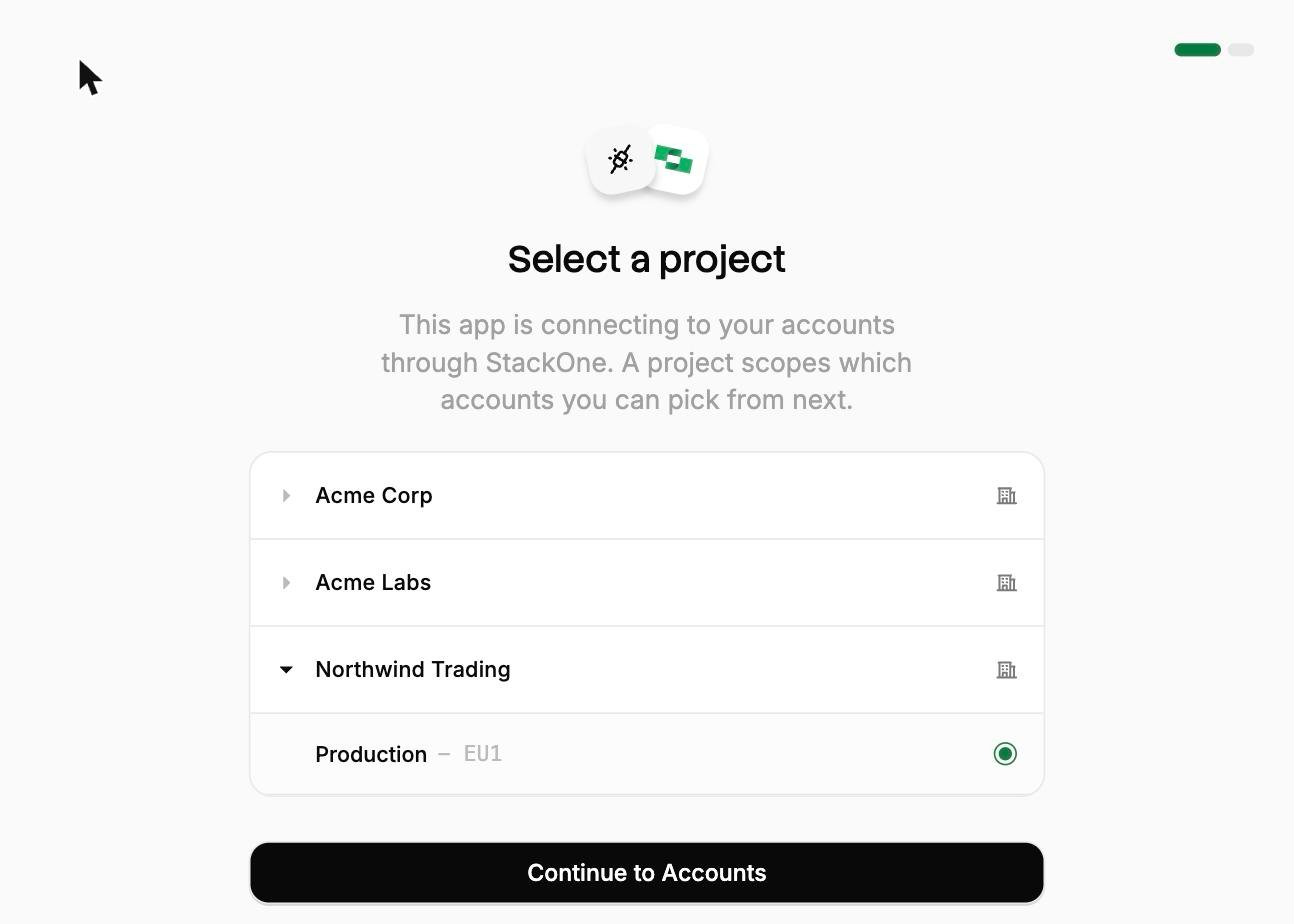
Select a project. Select the project you would like to associate the connection with. If you belong to one project, this step is skipped.
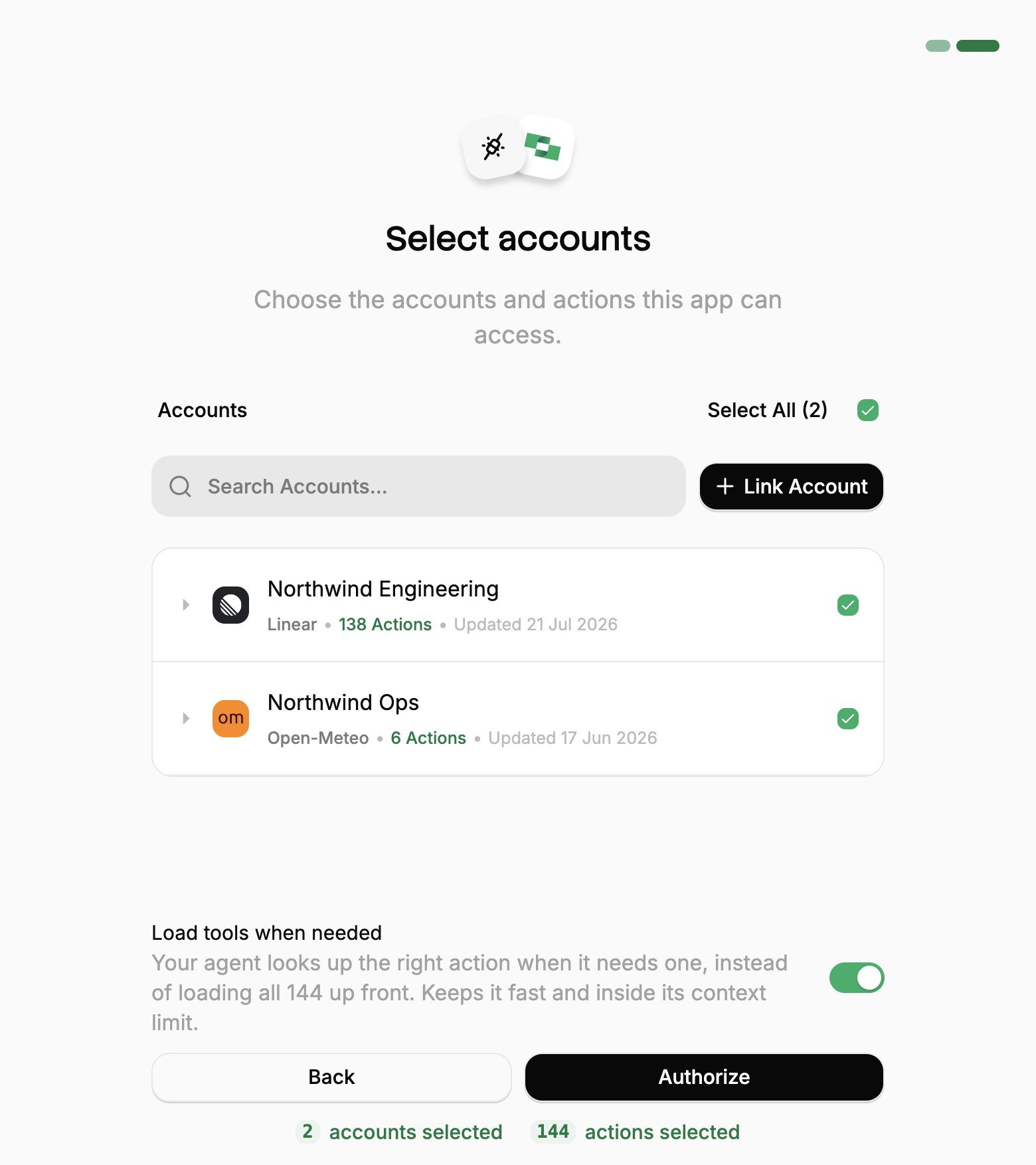
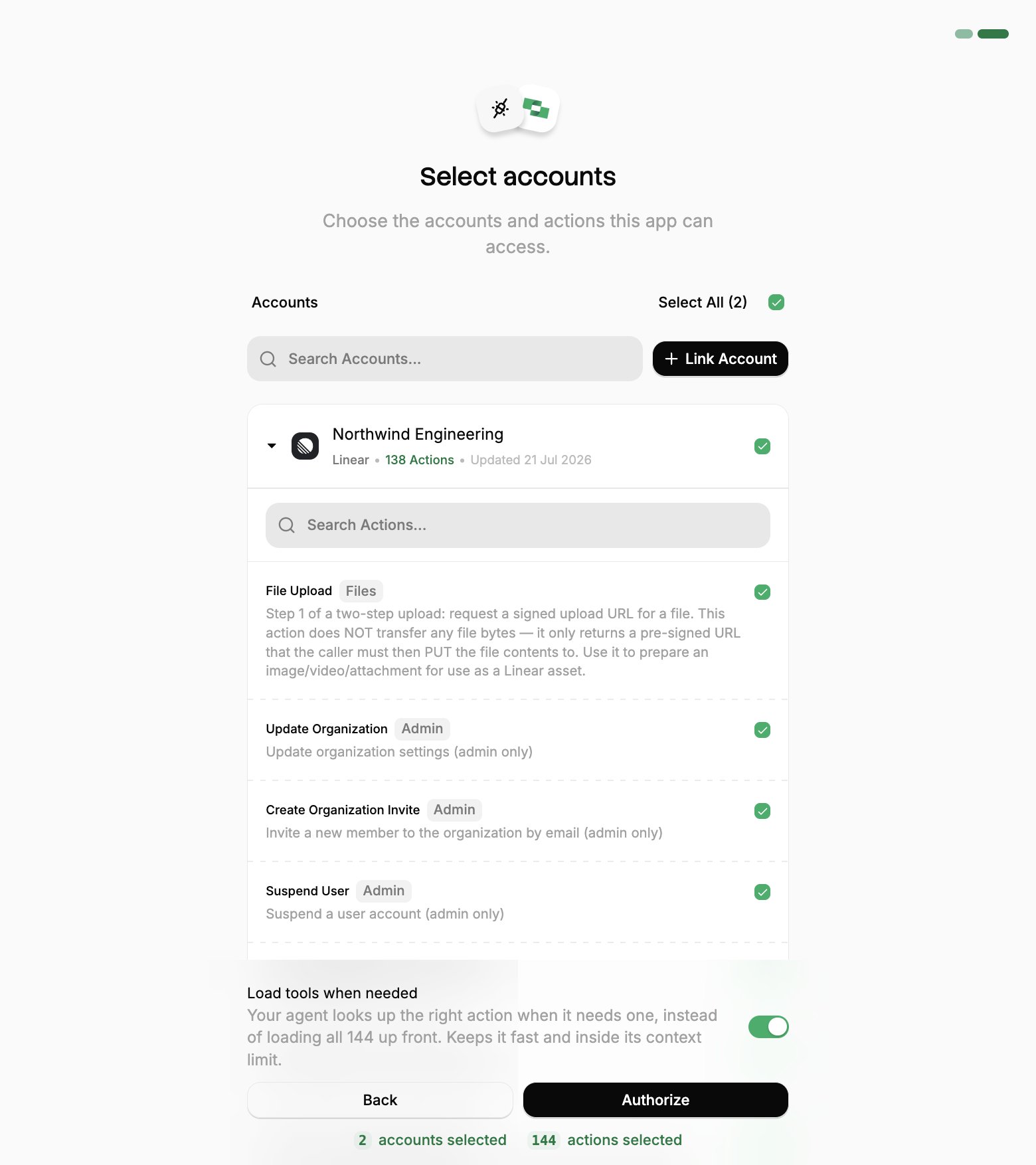
Select accounts and actions. Existing linked accounts are shown. New accounts can be linked by clicking + Link Account. You can either select the whole account (all actions will be granted) or refine by toggling individual actions.
(Optional) Load tools when needed. On by default, and the toggle that puts the connection into Advanced Tool Search. Leave it on for large action sets. Turn it off to hand the agent every selected action up front.
Authorize. Completes the connection; you can return to your client.
Select a project
Select accounts
Toggle actions
If you see a sentence where the Load tools when needed toggle should be, an admin has already settled it for the whole project. See project settings.
3
Share it with your organization
On Manage Write Permissions and Manage Read Permissions, keep the defaults and choose Next. With the defaults, each person decides whether Amazon Quick asks before StackOne changes something.
On Publish, turn on Everyone in your organization, or add teams under Specific groups.
Choose Publish.
Each person signs in with their own StackOne login.
Roll it out
StackOne is now available for your users in Amazon Quick. Make sure the following is ready before rolling out:
Add users. Invite or provision users via SSO/SCIM. See Manage Team.
Create groups. Organize teams into groups to control which systems each team reaches.
Set up connectors. Define Connector Profiles to scope provider actions for specific functions.
Link accounts. Link shared company accounts, or let users link their own accounts. See Linking Accounts.
Then send users this guide:
Amazon Quick Organization User Setup
For people in your organization connecting StackOne in Amazon Quick.
Was this page helpful?
{"docsConfig":{"theme":"mint","$schema":"https://mintlify.com/docs.json","name":"Stackone","colors":{"primary":"#068F56","light":"#00AF66","dark":"#068F56"},"logo":{"light":"https://mintcdn.com/stackone-60/WsmKpuoeBZmio9QO/images/logo/logo-light-mode.svg?fit=max\u0026auto=format\u0026n=WsmKpuoeBZmio9QO\u0026q=85\u0026s=f08be9c0a142cb1e7fcaa23910c4bf7f","dark":"https://mintcdn.com/stackone-60/WsmKpuoeBZmio9QO/images/logo/logo-dark-mode.svg?fit=max\u0026auto=format\u0026n=WsmKpuoeBZmio9QO\u0026q=85\u0026s=b57d63594c13dee65c06a2d578927466","href":"/introduction"},"favicon":"https://mintcdn.com/stackone-60/EZ7nWzE-JJzhmP-C/images/logo/favicon.png?fit=max\u0026auto=format\u0026n=EZ7nWzE-JJzhmP-C\u0026q=85\u0026s=9012a8ae6ce9a80698406b611be47925","appearance":{"default":"light"},"background":{"image":{"light":"https://mintcdn.com/stackone-60/knwbcGlYFJSeLObv/images/background/light.svg?fit=max\u0026auto=format\u0026n=knwbcGlYFJSeLObv\u0026q=85\u0026s=112166d244e990ebc0146ff96958757c","dark":"https://mintcdn.com/stackone-60/knwbcGlYFJSeLObv/images/background/dark.svg?fit=max\u0026auto=format\u0026n=knwbcGlYFJSeLObv\u0026q=85\u0026s=50ec5e23eeb91f55e78a0da97dcaeb7b"},"color":{"dark":"#1a1a1a"}},"navbar":{"links":[{"icon":"circle-question","href":"/support","label":"Support"},{"href":"https://app.stackone.com","label":"Login"},{"href":"https://www.stackone.com/demo/","label":"Book a demo"}],"primary":{"type":"button","label":"Start Free","href":"https://app.stackone.com/sign_up"}},"footer":{"socials":{"linkedin":"https://www.linkedin.com/company/stackonehq","twitter":"https://twitter.com/StackOneHQ"}},"seo":{"metatags":{"canonical":"https://docs.stackone.com","google-site-verification":"gYj1x4gkdSwpCGVLFVXNVOPQ_wVrePW37ZKJt3HEqys"}},"fonts":{"heading":{"family":"Sf Pro Display","source":"https://fonts.gstatic.com/s/inter/v18/UcC73FwrK3iLTeHuS_nVMrMxCp50SjIa1ZL7W0Q5nw.woff2","format":"woff2"},"body":{"family":"Inter","source":"https://fonts.gstatic.com/s/inter/v18/UcC73FwrK3iLTeHuS_nVMrMxCp50SjIa1ZL7W0Q5nw.woff2","format":"woff2"}},"styling":{"eyebrows":"breadcrumbs","latex":true},"integrations":{"gtm":{"tagId":"GTM-NZNK37TL"}},"contextual":{"options":["copy","view","chatgpt","claude","perplexity"],"display":"header"},"navigation":{"pages":[]}},"deployment":{"deploymentMetadataValue":{"subdomain":"stackone-60","hasAudioNarration":false,"actualSubdomain":"stackone-60","customDomains":["docs.stackone.com"],"gitSource":{"type":"github","owner":"stackonehq","repo":"docs","deployBranch":"main","contentDirectory":"","isPrivate":false,"mountPath":"","label":""},"feedback":{"thumbs":true,"edits":false,"issues":false,"agentFeedback":true},"entitlements":{"AI_CHAT":{"status":"ENABLED"},"WEB_MCP":{"status":"ENABLED"},"NARRATION":{"status":"ENABLED"}},"buildId":"6af75b436a0f9955d4dc6176","clientVersion":"0.0.4131","searchFilterCounts":[{"language":"default","tag":"Connectors","count":6741},{"language":"default","tag":"Connector Catalog","count":3349},{"language":"default","tag":"Embed","count":84},{"language":"default","tag":"Platform API","count":65},{"language":"default","tag":"Features","count":48},{"language":"default","tag":"Connector Building","count":42},{"language":"default","tag":"AI Platforms","count":39},{"language":"default","tag":"Unified Actions","count":39},{"language":"default","tag":"Gateway","count":38},{"language":"default","tag":"Embed StackOne","count":36}],"searchSettings":{"isFiltersEnabled":true}},"assistantConfig":{"enableStarterQuestions":false,"deflection":{"enabled":true,"email":"support@stackone.com"}},"basePath":"","hasChatPermissions":true,"hasWebMcpPermissions":true,"toggles":[],"googleFontsInlined":false},"customCss":[{"filePath":"style.css","href":"/_mintlify/custom/stackone-60/1689b391b56fc5fb/style.css"}],"page":{"pagePath":"ai-platforms/aws/amazon-quick/organization-admin-setup","slug":"/ai-platforms/aws/amazon-quick/organization-admin-setup","pageMetadata":{"title":"Amazon Quick - Make StackOne Available","sidebarTitle":"Organization Admin Setup","description":"Allow your users to connect to work systems with StackOne.","keywords":["Amazon Quick","Amazon Quick Suite","Model Context Protocol","MCP connector","Enterprise subscription","publish connector","organization","groups"],"href":"/ai-platforms/aws/amazon-quick/organization-admin-setup"},"description":{"compiledSource":"\"use strict\";\nconst {jsx: _jsx} = arguments[0];\nconst {useMDXComponents: _provideComponents} = arguments[0];\nfunction _createMdxContent(props) {\n const _components = {\n p: \"p\",\n ..._provideComponents(),\n ...props.components\n };\n return _jsx(_components.p, {\n children: \"Allow your users to connect to work systems with StackOne.\"\n });\n}\nfunction MDXContent(props = {}) {\n const {wrapper: MDXLayout} = {\n ..._provideComponents(),\n ...props.components\n };\n return MDXLayout ? _jsx(MDXLayout, {\n ...props,\n children: _jsx(_createMdxContent, {\n ...props\n })\n }) : _createMdxContent(props);\n}\nreturn {\n default: MDXContent\n};\n","frontmatter":{},"scope":{}},"pageType":"default","mdx":{"mdxSource":{"compiledSource":"\"use strict\";const{Fragment:_Fragment,jsx:_jsx,jsxs:_jsxs}=arguments[0];const{useMDXComponents:_provideComponents}=arguments[0];const platform_0=`Amazon Quick`;function _createMdxContent(props){const _components={a:`a`,code:`code`,li:`li`,ol:`ol`,p:`p`,pre:`pre`,span:`span`,strong:`strong`,ul:`ul`,..._provideComponents(),...props.components},{Accordion,Card,CodeBlock,Columns,Frame,Heading,Note,OptimizedImage,Step,Steps,Warning}=_components;if(!Accordion)_missingMdxReference(`Accordion`,true);if(!Card)_missingMdxReference(`Card`,true);if(!CodeBlock)_missingMdxReference(`CodeBlock`,true);if(!Columns)_missingMdxReference(`Columns`,true);if(!Frame)_missingMdxReference(`Frame`,true);if(!Heading)_missingMdxReference(`Heading`,true);if(!Note)_missingMdxReference(`Note`,true);if(!OptimizedImage)_missingMdxReference(`OptimizedImage`,true);if(!Step)_missingMdxReference(`Step`,true);if(!Steps)_missingMdxReference(`Steps`,true);if(!Warning)_missingMdxReference(`Warning`,true);return _jsxs(_Fragment,{children:[_jsx(Frame,{children:_jsx(OptimizedImage,{src:`https://mintcdn.com/stackone-60/RgaE_4ZxFuvAQ6gS/images/ai-platforms/aws/admin-setup.svg?fit=max\u0026auto=format\u0026n=RgaE_4ZxFuvAQ6gS\u0026q=85\u0026s=ca391bb15b1ee88f3abd814374cd87d6`,alt:`An IT admin adds StackOne to the Amazon Quick account, bringing Linked Accounts from many providers. Each user then connects with their own accounts: an HR manager uses Amazon Quick with Workday, Greenhouse and BambooHR, and a sales manager uses Amazon Quick with Salesforce, HubSpot and Gmail.`,\"data-og-width\":`2324`,width:`2324`,\"data-og-height\":`1168`,height:`1168`,\"data-path\":`images/ai-platforms/aws/admin-setup.svg`,\"data-optimize\":`true`,\"data-opv\":`3`,srcset:`https://mintcdn.com/stackone-60/RgaE_4ZxFuvAQ6gS/images/ai-platforms/aws/admin-setup.svg?w=280\u0026fit=max\u0026auto=format\u0026n=RgaE_4ZxFuvAQ6gS\u0026q=85\u0026s=57fec9d81a5d6dffe31250943a833473 280w, https://mintcdn.com/stackone-60/RgaE_4ZxFuvAQ6gS/images/ai-platforms/aws/admin-setup.svg?w=560\u0026fit=max\u0026auto=format\u0026n=RgaE_4ZxFuvAQ6gS\u0026q=85\u0026s=c76b1f7b0d033259f3b57ae43da97595 560w, https://mintcdn.com/stackone-60/RgaE_4ZxFuvAQ6gS/images/ai-platforms/aws/admin-setup.svg?w=840\u0026fit=max\u0026auto=format\u0026n=RgaE_4ZxFuvAQ6gS\u0026q=85\u0026s=c9aa15bc7c96d62cff87b8ce7a3d7001 840w, https://mintcdn.com/stackone-60/RgaE_4ZxFuvAQ6gS/images/ai-platforms/aws/admin-setup.svg?w=1100\u0026fit=max\u0026auto=format\u0026n=RgaE_4ZxFuvAQ6gS\u0026q=85\u0026s=2d1b791bb4c3e4c201351121711db539 1100w, https://mintcdn.com/stackone-60/RgaE_4ZxFuvAQ6gS/images/ai-platforms/aws/admin-setup.svg?w=1650\u0026fit=max\u0026auto=format\u0026n=RgaE_4ZxFuvAQ6gS\u0026q=85\u0026s=f44846c796049312a17905fd40faa6d2 1650w, https://mintcdn.com/stackone-60/RgaE_4ZxFuvAQ6gS/images/ai-platforms/aws/admin-setup.svg?w=2500\u0026fit=max\u0026auto=format\u0026n=RgaE_4ZxFuvAQ6gS\u0026q=85\u0026s=731d78d11a75f647c0aed53d36251c7c 2500w`})}),`\n`,_jsx(_components.p,{children:`Make StackOne available to everyone in your Amazon Quick account. Each person then signs in with their own StackOne login and reaches only the systems they’ve been given access to in StackOne.`}),`\n`,_jsx(Warning,{children:_jsxs(_components.p,{children:[_jsx(_components.strong,{children:`Adding a connector needs an Amazon Quick Enterprise subscription.`}),` With a Professional subscription, people can use StackOne only once someone shares it with them.`]})}),`\n`,_jsx(Heading,{level:`2`,id:`add-stackone-to-your-organization`,children:`Add StackOne to your organization`}),`\n`,_jsxs(Steps,{children:[_jsx(Step,{title:`Add the MCP connector`,children:_jsxs(_components.ol,{children:[`\n`,_jsxs(_components.li,{children:[`\n`,_jsxs(_components.p,{children:[`In Amazon Quick, choose `,_jsx(_components.strong,{children:`Connectors`}),`, then the `,_jsx(_components.strong,{children:`Create for your team`}),` tab.`]}),`\n`]}),`\n`,_jsxs(_components.li,{children:[`\n`,_jsxs(_components.p,{children:[`Choose `,_jsx(_components.strong,{children:`Model Context Protocol`}),`.`]}),`\n`]}),`\n`,_jsxs(_components.li,{children:[`\n`,_jsxs(_components.p,{children:[`Set the following, then choose `,_jsx(_components.strong,{children:`Next`}),`:`]}),`\n`,_jsxs(_components.ul,{children:[`\n`,_jsxs(_components.li,{children:[`\n`,_jsxs(_components.p,{children:[_jsx(_components.strong,{children:`Name`}),`: `,_jsx(_components.code,{children:`StackOne`}),`.`]}),`\n`]}),`\n`,_jsxs(_components.li,{children:[`\n`,_jsxs(_components.p,{children:[_jsx(_components.strong,{children:`Description`}),`: choose `,_jsx(_components.strong,{children:`+ Add Description`}),` and enter:`]}),`\n`,_jsx(CodeBlock,{filename:``,numberOfLines:`2`,language:`text`,children:_jsx(_components.pre,{className:`shiki shiki-themes github-light-default dark-plus`,style:{backgroundColor:`#ffffff`,\"--shiki-dark-bg\":`#0B0C0E`,color:`#1f2328`,\"--shiki-dark\":`#D4D4D4`},language:`text`,children:_jsxs(_components.code,{language:`text`,numberOfLines:`2`,children:[_jsx(_components.span,{className:`line`,children:_jsx(_components.span,{children:`Read and update records in your work systems, like HR, CRM and ticketing, through StackOne`})}),`\n`,_jsx(_components.span,{className:`line`,children:_jsx(_components.span,{})})]})})}),`\n`]}),`\n`,_jsxs(_components.li,{children:[`\n`,_jsxs(_components.p,{children:[_jsx(_components.strong,{children:`MCP server endpoint`}),`:`]}),`\n`,_jsx(CodeBlock,{filename:``,numberOfLines:`2`,language:`text`,children:_jsx(_components.pre,{className:`shiki shiki-themes github-light-default dark-plus`,style:{backgroundColor:`#ffffff`,\"--shiki-dark-bg\":`#0B0C0E`,color:`#1f2328`,\"--shiki-dark\":`#D4D4D4`},language:`text`,children:_jsxs(_components.code,{language:`text`,numberOfLines:`2`,children:[_jsx(_components.span,{className:`line`,children:_jsx(_components.span,{children:`https://mcp.stackone.com/mcp`})}),`\n`,_jsx(_components.span,{className:`line`,children:_jsx(_components.span,{})})]})})}),`\n`]}),`\n`,_jsxs(_components.li,{children:[`\n`,_jsxs(_components.p,{children:[_jsx(_components.strong,{children:`Connection type`}),` and `,_jsx(_components.strong,{children:`Auth connection type`}),`: leave both on `,_jsx(_components.strong,{children:`Public network`}),`.`]}),`\n`]}),`\n`]}),`\n`]}),`\n`,_jsxs(_components.li,{children:[`\n`,_jsxs(_components.p,{children:[`If Amazon Quick asks how to authenticate, choose `,_jsx(_components.strong,{children:`User authentication`}),`. StackOne registers Amazon Quick by itself, so there’s no client ID or secret to enter.`]}),`\n`]}),`\n`,_jsxs(_components.li,{children:[`\n`,_jsxs(_components.p,{children:[`Choose `,_jsx(_components.strong,{children:`Create and continue`}),`.`]}),`\n`]}),`\n`]})}),_jsxs(Step,{title:`Sign in and authorize`,children:[_jsx(_components.p,{children:`Amazon Quick asks you to sign in to StackOne with your own login.`}),_jsxs(_components.p,{children:[`Sign in, pick the project and the `,_jsx(_components.a,{href:`/connect/managing-connectors/linking-accounts`,children:`linked accounts`}),` the connector should reach, then `,_jsx(_components.strong,{children:`Authorize`}),`.`]}),_jsxs(Accordion,{title:`Walk through the consent screen`,id:`walk-through-the-consent-screen`,children:[_jsxs(_components.ol,{children:[`\n`,_jsxs(_components.li,{children:[_jsx(_components.strong,{children:`Sign in to StackOne.`}),` If you are already signed in to the dashboard you skip straight to the next step.`]}),`\n`,_jsxs(_components.li,{children:[_jsx(_components.strong,{children:`Check where the connection returns.`}),` The line under the client’s logo shows where it goes after you approve. If it names localhost or an app on this device, only continue if you started the connection from that client.`]}),`\n`,_jsxs(_components.li,{children:[_jsx(_components.strong,{children:`Select a project.`}),` Select the project you would like to associate the connection with. If you belong to one project, this step is skipped.`]}),`\n`,_jsxs(_components.li,{children:[_jsx(_components.strong,{children:`Select accounts and actions.`}),` Existing linked accounts are shown. New accounts can be linked by clicking `,_jsx(_components.strong,{children:`+ Link Account`}),`. You can either select the whole account (all actions will be granted) or refine by toggling individual actions.`]}),`\n`,_jsxs(_components.li,{children:[_jsx(_components.strong,{children:`(Optional) Load tools when needed.`}),` On by default, and the toggle that puts the connection into `,_jsx(_components.a,{href:`/optimize/advanced-tool-search`,children:`Advanced Tool Search`}),`. Leave it on for large action sets. Turn it off to hand the agent every selected action up front.`]}),`\n`,_jsxs(_components.li,{children:[_jsx(_components.strong,{children:`Authorize.`}),` Completes the connection; you can return to your client.`]}),`\n`]}),_jsxs(Columns,{cols:3,children:[_jsx(Frame,{caption:`Select a project`,children:_jsx(OptimizedImage,{src:`https://mintcdn.com/stackone-60/RgaE_4ZxFuvAQ6gS/images/ai-platforms/oauth-consent-select-project.png?fit=max\u0026auto=format\u0026n=RgaE_4ZxFuvAQ6gS\u0026q=85\u0026s=69d4694c8ea854c52ec62fc1bbe0825a`,alt:`StackOne authorization screen listing organizations, with a project selected inside one of them`,style:{width:`100%`,aspectRatio:`780 / 877`,objectFit:`cover`},\"data-og-width\":`1294`,width:`1294`,\"data-og-height\":`924`,height:`924`,\"data-path\":`images/ai-platforms/oauth-consent-select-project.png`,\"data-optimize\":`true`,\"data-opv\":`3`,srcset:`https://mintcdn.com/stackone-60/RgaE_4ZxFuvAQ6gS/images/ai-platforms/oauth-consent-select-project.png?w=280\u0026fit=max\u0026auto=format\u0026n=RgaE_4ZxFuvAQ6gS\u0026q=85\u0026s=53f6f08c5bdac63b52a7677e532c24eb 280w, https://mintcdn.com/stackone-60/RgaE_4ZxFuvAQ6gS/images/ai-platforms/oauth-consent-select-project.png?w=560\u0026fit=max\u0026auto=format\u0026n=RgaE_4ZxFuvAQ6gS\u0026q=85\u0026s=7e43214c74ac14d66f90bd9fba40569e 560w, https://mintcdn.com/stackone-60/RgaE_4ZxFuvAQ6gS/images/ai-platforms/oauth-consent-select-project.png?w=840\u0026fit=max\u0026auto=format\u0026n=RgaE_4ZxFuvAQ6gS\u0026q=85\u0026s=b3cdb8aa6236da251708f4a40ace56ba 840w, https://mintcdn.com/stackone-60/RgaE_4ZxFuvAQ6gS/images/ai-platforms/oauth-consent-select-project.png?w=1100\u0026fit=max\u0026auto=format\u0026n=RgaE_4ZxFuvAQ6gS\u0026q=85\u0026s=ccaf970cdfea31e279eb2155a0bbab5c 1100w, https://mintcdn.com/stackone-60/RgaE_4ZxFuvAQ6gS/images/ai-platforms/oauth-consent-select-project.png?w=1650\u0026fit=max\u0026auto=format\u0026n=RgaE_4ZxFuvAQ6gS\u0026q=85\u0026s=97e0ea42b686dc209aa7212dc05e1ac7 1650w, https://mintcdn.com/stackone-60/RgaE_4ZxFuvAQ6gS/images/ai-platforms/oauth-consent-select-project.png?w=2500\u0026fit=max\u0026auto=format\u0026n=RgaE_4ZxFuvAQ6gS\u0026q=85\u0026s=701fb024fccda033b45b5f879ea255c2 2500w`})}),_jsx(Frame,{caption:`Select accounts`,children:_jsx(OptimizedImage,{src:`https://mintcdn.com/stackone-60/RgaE_4ZxFuvAQ6gS/images/ai-platforms/oauth-consent-select-accounts.png?fit=max\u0026auto=format\u0026n=RgaE_4ZxFuvAQ6gS\u0026q=85\u0026s=66ef4eb4d8bf6e5246e5f01ec959c187`,alt:`StackOne authorization screen showing two linked accounts, Linear and Open-Meteo, both selected, above the Load tools when needed toggle`,\"data-og-width\":`1560`,width:`1560`,\"data-og-height\":`1754`,height:`1754`,\"data-path\":`images/ai-platforms/oauth-consent-select-accounts.png`,\"data-optimize\":`true`,\"data-opv\":`3`,srcset:`https://mintcdn.com/stackone-60/RgaE_4ZxFuvAQ6gS/images/ai-platforms/oauth-consent-select-accounts.png?w=280\u0026fit=max\u0026auto=format\u0026n=RgaE_4ZxFuvAQ6gS\u0026q=85\u0026s=90614d95c215e07f909c8020bcf714bc 280w, https://mintcdn.com/stackone-60/RgaE_4ZxFuvAQ6gS/images/ai-platforms/oauth-consent-select-accounts.png?w=560\u0026fit=max\u0026auto=format\u0026n=RgaE_4ZxFuvAQ6gS\u0026q=85\u0026s=7f33457e6769f7c99f8159a746a9f329 560w, https://mintcdn.com/stackone-60/RgaE_4ZxFuvAQ6gS/images/ai-platforms/oauth-consent-select-accounts.png?w=840\u0026fit=max\u0026auto=format\u0026n=RgaE_4ZxFuvAQ6gS\u0026q=85\u0026s=333b72308a94d893e4de5c653d054234 840w, https://mintcdn.com/stackone-60/RgaE_4ZxFuvAQ6gS/images/ai-platforms/oauth-consent-select-accounts.png?w=1100\u0026fit=max\u0026auto=format\u0026n=RgaE_4ZxFuvAQ6gS\u0026q=85\u0026s=127d30ce81527582bd7a9fe2966f392a 1100w, https://mintcdn.com/stackone-60/RgaE_4ZxFuvAQ6gS/images/ai-platforms/oauth-consent-select-accounts.png?w=1650\u0026fit=max\u0026auto=format\u0026n=RgaE_4ZxFuvAQ6gS\u0026q=85\u0026s=b69637962ca207ffd39aa033abc6499c 1650w, https://mintcdn.com/stackone-60/RgaE_4ZxFuvAQ6gS/images/ai-platforms/oauth-consent-select-accounts.png?w=2500\u0026fit=max\u0026auto=format\u0026n=RgaE_4ZxFuvAQ6gS\u0026q=85\u0026s=84df4eb9bf3e5642276f2e49becb447a 2500w`})}),_jsx(Frame,{caption:`Toggle actions`,children:_jsx(OptimizedImage,{src:`https://mintcdn.com/stackone-60/RgaE_4ZxFuvAQ6gS/images/ai-platforms/oauth-consent-select-actions.png?fit=max\u0026auto=format\u0026n=RgaE_4ZxFuvAQ6gS\u0026q=85\u0026s=c86b615e0f55cd43236e38142c1ebca5`,alt:`An expanded linked account showing individual actions with toggles, descriptions, and category tags`,\"data-og-width\":`1560`,width:`1560`,\"data-og-height\":`1754`,height:`1754`,\"data-path\":`images/ai-platforms/oauth-consent-select-actions.png`,\"data-optimize\":`true`,\"data-opv\":`3`,srcset:`https://mintcdn.com/stackone-60/RgaE_4ZxFuvAQ6gS/images/ai-platforms/oauth-consent-select-actions.png?w=280\u0026fit=max\u0026auto=format\u0026n=RgaE_4ZxFuvAQ6gS\u0026q=85\u0026s=793029c3a0d002c9a1c38dfafd643bd5 280w, https://mintcdn.com/stackone-60/RgaE_4ZxFuvAQ6gS/images/ai-platforms/oauth-consent-select-actions.png?w=560\u0026fit=max\u0026auto=format\u0026n=RgaE_4ZxFuvAQ6gS\u0026q=85\u0026s=530e356eaab6a97203a890b472dee801 560w, https://mintcdn.com/stackone-60/RgaE_4ZxFuvAQ6gS/images/ai-platforms/oauth-consent-select-actions.png?w=840\u0026fit=max\u0026auto=format\u0026n=RgaE_4ZxFuvAQ6gS\u0026q=85\u0026s=0b341781bf99cc4b898e21cc1b32021e 840w, https://mintcdn.com/stackone-60/RgaE_4ZxFuvAQ6gS/images/ai-platforms/oauth-consent-select-actions.png?w=1100\u0026fit=max\u0026auto=format\u0026n=RgaE_4ZxFuvAQ6gS\u0026q=85\u0026s=bdcd838f40d6b4ae659dd3911f5403cf 1100w, https://mintcdn.com/stackone-60/RgaE_4ZxFuvAQ6gS/images/ai-platforms/oauth-consent-select-actions.png?w=1650\u0026fit=max\u0026auto=format\u0026n=RgaE_4ZxFuvAQ6gS\u0026q=85\u0026s=4ca0ad52432ef80511ae57ca44be4fea 1650w, https://mintcdn.com/stackone-60/RgaE_4ZxFuvAQ6gS/images/ai-platforms/oauth-consent-select-actions.png?w=2500\u0026fit=max\u0026auto=format\u0026n=RgaE_4ZxFuvAQ6gS\u0026q=85\u0026s=51527433b979a9f72dad9f654c075b93 2500w`})})]}),_jsx(Note,{children:_jsxs(_components.p,{children:[`If you see a sentence where the `,_jsx(_components.strong,{children:`Load tools when needed`}),` toggle should be, an admin has already settled it for the whole project. See `,_jsx(_components.a,{href:`/optimize/advanced-tool-search#setting-it-for-a-whole-project`,children:`project settings`}),`.`]})})]})]}),_jsxs(Step,{title:`Share it with your organization`,children:[_jsxs(_components.ol,{children:[`\n`,_jsxs(_components.li,{children:[`On `,_jsx(_components.strong,{children:`Manage Write Permissions`}),` and `,_jsx(_components.strong,{children:`Manage Read Permissions`}),`, keep the defaults and choose `,_jsx(_components.strong,{children:`Next`}),`. With the defaults, each person decides whether Amazon Quick asks before StackOne changes something.`]}),`\n`,_jsxs(_components.li,{children:[`On `,_jsx(_components.strong,{children:`Publish`}),`, turn on `,_jsx(_components.strong,{children:`Everyone in your organization`}),`, or add teams under `,_jsx(_components.strong,{children:`Specific groups`}),`.`]}),`\n`,_jsxs(_components.li,{children:[`Choose `,_jsx(_components.strong,{children:`Publish`}),`.`]}),`\n`]}),_jsx(_components.p,{children:`Each person signs in with their own StackOne login.`})]})]}),`\n`,_jsx(Heading,{level:`2`,id:`roll-it-out`,children:`Roll it out`}),`\n`,_jsxs(_components.p,{children:[`StackOne is now available for your users in `,platform_0,`. Make sure the following is ready before rolling out:`]}),`\n`,_jsxs(_components.ul,{children:[`\n`,_jsxs(_components.li,{children:[_jsx(_components.strong,{children:`Add users.`}),` Invite or provision users via SSO/SCIM. See `,_jsx(_components.a,{href:`/secure/identity-and-access/manage-team/overview`,children:`Manage Team`}),`.`]}),`\n`,_jsxs(_components.li,{children:[_jsx(_components.strong,{children:`Create groups.`}),` Organize teams into `,_jsx(_components.a,{href:`/secure/identity-and-access/roles-and-groups/groups`,children:`groups`}),` to control which systems each team reaches.`]}),`\n`,_jsxs(_components.li,{children:[_jsx(_components.strong,{children:`Set up connectors.`}),` Define `,_jsx(_components.a,{href:`/connect/managing-connectors/connector-profiles`,children:`Connector Profiles`}),` to scope provider actions for specific functions.`]}),`\n`,_jsxs(_components.li,{children:[_jsx(_components.strong,{children:`Link accounts.`}),` Link shared company accounts, or let users link their own accounts. See `,_jsx(_components.a,{href:`/connect/managing-connectors/linking-accounts`,children:`Linking Accounts`}),`.`]}),`\n`]}),`\n`,_jsx(_components.p,{children:`Then send users this guide:`}),`\n`,_jsx(Card,{title:`Amazon Quick Organization User Setup`,icon:`message`,href:`/ai-platforms/aws/amazon-quick/organization-user-setup`,children:_jsx(_components.p,{children:`For people in your organization connecting StackOne in Amazon Quick.`})})]})}function MDXContent(props={}){const{wrapper:MDXLayout}={..._provideComponents(),...props.components};return MDXLayout?_jsx(MDXLayout,{...props,children:_jsx(_createMdxContent,{...props})}):_createMdxContent(props)}return{platform_0,default:MDXContent};function _missingMdxReference(id,component){throw new Error(`Expected `+(component?`component`:`object`)+\" `\"+id+\"` to be defined: you likely forgot to import, pass, or provide it.\")}","frontmatter":{},"scope":{"config":{},"pageMetadata":{"title":"Amazon Quick - Make StackOne Available","sidebarTitle":"Organization Admin Setup","description":"Allow your users to connect to work systems with StackOne.","keywords":["Amazon Quick","Amazon Quick Suite","Model Context Protocol","MCP connector","Enterprise subscription","publish connector","organization","groups"],"href":"/ai-platforms/aws/amazon-quick/organization-admin-setup"}}},"mdxSourceWithNoJs":null,"noJsSplices":[[15378,15394,"`Amazon Quick`,`. Ma"]]},"mdxExtracts":{"tableOfContents":[{"title":"Add StackOne to your organization","slug":"add-stackone-to-your-organization","depth":2,"children":[]},{"title":"Roll it out","slug":"roll-it-out","depth":2,"children":[]}],"codeExamples":{}},"jsLinks":["/_mintlify/custom/stackone-60/072d59ca3ea476f6/status-indicator.js","/_mintlify/custom/stackone-60/108e4b0e256a9ba7/connectors.js","/_mintlify/custom/stackone-60/af28b3fbb0435529/hubspot-form.js","/_mintlify/custom/stackone-60/965ecce887247b53/end-users.js"],"subdomain":"stackone-60","siteName":"Stackone","title":"Amazon Quick - Make StackOne Available - Stackone","navMaps":{"firstHrefInVersion":{},"firstHrefInLanguage":{}},"lastModified":"2026-11-13T18:47:57.196Z","originalFileLocation":"ai-platforms/aws/amazon-quick/organization-admin-setup.mdx"},"headHtml":"\u003cscript data-mint-head>(function(){var d=document.documentElement,p=null;if(!p){try{p=localStorage.getItem(\"isDarkMode\")}catch(e){}if(p==='true')p='dark';else if(p==='false')p='light';if(p!=='light'\u0026\u0026p!=='dark'\u0026\u0026p!=='system')p=\"light\"}var r=p==='system'?(matchMedia(\"(prefers-color-scheme: dark)\").matches?'dark':'light'):p;d.classList.remove(r==='dark'?'light':'dark');d.classList.add(r);d.setAttribute(\"data-theme-preference\",p)})();\u003c/script>\u003cmeta data-mint-head name=\"description\" content=\"Allow your users to connect to work systems with StackOne.\">\u003cmeta data-mint-head name=\"application-name\" content=\"Stackone\">\u003cmeta data-mint-head name=\"generator\" content=\"Mintlify\">\u003clink data-mint-head rel=\"icon\" type=\"image/png\" sizes=\"192x192\" href=\"/mintlify-assets/_mintlify/favicons/stackone-60/vUkZo0TYnLvO23Z1/_generated/favicon/android-chrome-192x192.png\" media=\"(prefers-color-scheme: light)\">\u003clink data-mint-head rel=\"apple-touch-icon\" type=\"image/png\" sizes=\"180x180\" href=\"/mintlify-assets/_mintlify/favicons/stackone-60/vUkZo0TYnLvO23Z1/_generated/favicon/apple-touch-icon.png\">\u003clink data-mint-head rel=\"icon\" type=\"image/png\" sizes=\"16x16\" href=\"/mintlify-assets/_mintlify/favicons/stackone-60/vUkZo0TYnLvO23Z1/_generated/favicon/favicon-16x16.png\" media=\"(prefers-color-scheme: light)\">\u003clink data-mint-head rel=\"icon\" type=\"image/png\" sizes=\"32x32\" href=\"/mintlify-assets/_mintlify/favicons/stackone-60/vUkZo0TYnLvO23Z1/_generated/favicon/favicon-32x32.png\" media=\"(prefers-color-scheme: light)\">\u003clink data-mint-head rel=\"shortcut icon\" type=\"image/x-icon\" href=\"/mintlify-assets/_mintlify/favicons/stackone-60/vUkZo0TYnLvO23Z1/_generated/favicon/favicon.ico\" media=\"(prefers-color-scheme: light)\">\u003clink data-mint-head rel=\"icon\" type=\"image/png\" sizes=\"192x192\" href=\"/mintlify-assets/_mintlify/favicons/stackone-60/vUkZo0TYnLvO23Z1/_generated/favicon-dark/android-chrome-192x192.png\" media=\"(prefers-color-scheme: dark)\">\u003clink data-mint-head rel=\"icon\" type=\"image/png\" sizes=\"16x16\" href=\"/mintlify-assets/_mintlify/favicons/stackone-60/vUkZo0TYnLvO23Z1/_generated/favicon-dark/favicon-16x16.png\" media=\"(prefers-color-scheme: dark)\">\u003clink data-mint-head rel=\"icon\" type=\"image/png\" sizes=\"32x32\" href=\"/mintlify-assets/_mintlify/favicons/stackone-60/vUkZo0TYnLvO23Z1/_generated/favicon-dark/favicon-32x32.png\" media=\"(prefers-color-scheme: dark)\">\u003clink data-mint-head rel=\"shortcut icon\" type=\"image/x-icon\" href=\"/mintlify-assets/_mintlify/favicons/stackone-60/vUkZo0TYnLvO23Z1/_generated/favicon-dark/favicon.ico\" media=\"(prefers-color-scheme: dark)\">\u003cmeta data-mint-head property=\"og:title\" content=\"Amazon Quick - Make StackOne Available - Stackone\">\u003cmeta data-mint-head property=\"og:description\" content=\"Allow your users to connect to work systems with StackOne.\">\u003cmeta data-mint-head property=\"og:site_name\" content=\"Stackone\">\u003cmeta data-mint-head property=\"og:url\" content=\"https://docs.stackone.com/ai-platforms/aws/amazon-quick/organization-admin-setup\">\u003cmeta data-mint-head property=\"og:type\" content=\"website\">\u003cmeta data-mint-head property=\"og:image\" content=\"https://stackone-60.mintlify.site/_mintlify/api/og/v2?division=Amazon+Quick\u0026amp;title=Amazon+Quick+-+Make+StackOne+Available\u0026amp;description=Allow+your+users+to+connect+to+work+systems+with+StackOne.\u0026amp;theme=26a0c4b0d3b33d43a09092cd\u0026amp;signature=2911fa1eb237abc1f54a94fc28d0322d2f22c945b882217243f2025ccbc64d61\">\u003cmeta data-mint-head property=\"og:image:width\" content=\"1200\">\u003cmeta data-mint-head property=\"og:image:height\" content=\"630\">\u003cmeta data-mint-head name=\"twitter:card\" content=\"summary_large_image\">\u003cmeta data-mint-head name=\"twitter:title\" content=\"Amazon Quick - Make StackOne Available - Stackone\">\u003cmeta data-mint-head name=\"twitter:description\" content=\"Allow your users to connect to work systems with StackOne.\">\u003cmeta data-mint-head name=\"twitter:image\" content=\"https://stackone-60.mintlify.site/_mintlify/api/og/v2?division=Amazon+Quick\u0026amp;title=Amazon+Quick+-+Make+StackOne+Available\u0026amp;description=Allow+your+users+to+connect+to+work+systems+with+StackOne.\u0026amp;theme=26a0c4b0d3b33d43a09092cd\u0026amp;signature=2911fa1eb237abc1f54a94fc28d0322d2f22c945b882217243f2025ccbc64d61\">\u003cmeta data-mint-head name=\"twitter:image:width\" content=\"1200\">\u003cmeta data-mint-head name=\"twitter:image:height\" content=\"630\">\u003cmeta data-mint-head name=\"msapplication-config\" content=\"/mintlify-assets/_mintlify/favicons/stackone-60/vUkZo0TYnLvO23Z1/_generated/favicon/browserconfig.xml\">\u003cmeta data-mint-head name=\"apple-mobile-web-app-title\" content=\"Stackone\">\u003cmeta data-mint-head name=\"msapplication-TileColor\" content=\"#068F56\">\u003cmeta data-mint-head name=\"google-site-verification\" content=\"gYj1x4gkdSwpCGVLFVXNVOPQ_wVrePW37ZKJt3HEqys\">\u003clink data-mint-head rel=\"canonical\" href=\"https://docs.stackone.com/ai-platforms/aws/amazon-quick/organization-admin-setup\">\u003clink data-mint-head rel=\"alternate\" type=\"application/xml\" href=\"/sitemap.xml\">\u003clink data-mint-head rel=\"alternate\" type=\"text/markdown\" href=\"/ai-platforms/aws/amazon-quick/organization-admin-setup.md\">\u003cscript data-mint-head type=\"application/ld+json\">{\"@context\":\"https://schema.org\",\"@graph\":[{\"@type\":\"Organization\",\"@id\":\"https://docs.stackone.com/#organization\",\"name\":\"Stackone\",\"url\":\"https://docs.stackone.com\",\"logo\":{\"@type\":\"ImageObject\",\"url\":\"https://mintcdn.com/stackone-60/WsmKpuoeBZmio9QO/images/logo/logo-light-mode.svg?fit=max\u0026auto=format\u0026n=WsmKpuoeBZmio9QO\u0026q=85\u0026s=f08be9c0a142cb1e7fcaa23910c4bf7f\"}},{\"@type\":\"WebSite\",\"@id\":\"https://docs.stackone.com#website\",\"name\":\"Stackone\",\"url\":\"https://docs.stackone.com\",\"publisher\":{\"@id\":\"https://docs.stackone.com/#organization\"}},{\"@type\":\"WebPage\",\"@id\":\"https://docs.stackone.com/ai-platforms/aws/amazon-quick/organization-admin-setup#webpage\",\"url\":\"https://docs.stackone.com/ai-platforms/aws/amazon-quick/organization-admin-setup\",\"name\":\"Amazon Quick - Make StackOne Available\",\"description\":\"Allow your users to connect to work systems with StackOne.\",\"dateModified\":\"2026-11-13T18:47:57.196Z\",\"isPartOf\":{\"@id\":\"https://docs.stackone.com#website\"},\"breadcrumb\":{\"@id\":\"https://docs.stackone.com/ai-platforms/aws/amazon-quick/organization-admin-setup#breadcrumb\"}},{\"@type\":\"BreadcrumbList\",\"@id\":\"https://docs.stackone.com/ai-platforms/aws/amazon-quick/organization-admin-setup#breadcrumb\",\"itemListElement\":[{\"@type\":\"ListItem\",\"position\":1,\"name\":\"Stackone\",\"item\":\"https://docs.stackone.com\"},{\"@type\":\"ListItem\",\"position\":2,\"name\":\"Amazon Quick - Make StackOne Available\",\"item\":\"https://docs.stackone.com/ai-platforms/aws/amazon-quick/organization-admin-setup\"}]},{\"@type\":[\"Article\",\"TechArticle\"],\"@id\":\"https://docs.stackone.com/ai-platforms/aws/amazon-quick/organization-admin-setup#article\",\"headline\":\"Amazon Quick - Make StackOne Available\",\"name\":\"Amazon Quick - Make StackOne Available\",\"description\":\"Allow your users to connect to work systems with StackOne.\",\"url\":\"https://docs.stackone.com/ai-platforms/aws/amazon-quick/organization-admin-setup\",\"mainEntityOfPage\":{\"@id\":\"https://docs.stackone.com/ai-platforms/aws/amazon-quick/organization-admin-setup#webpage\"},\"dateModified\":\"2026-11-13T18:47:57.196Z\",\"keywords\":\"Amazon Quick, Amazon Quick Suite, Model Context Protocol, MCP connector, Enterprise subscription, publish connector, organization, groups\",\"publisher\":{\"@id\":\"https://docs.stackone.com/#organization\"},\"isPartOf\":{\"@id\":\"https://docs.stackone.com#website\"}}]}\u003c/script>\u003cscript data-mint-head type=\"application/ld+json\">{\"@context\":\"https://schema.org\",\"@type\":\"WebSite\",\"name\":\"Stackone\",\"publisher\":{\"@type\":\"Organization\",\"name\":\"Stackone\"},\"provider\":{\"@type\":\"Organization\",\"name\":\"Mintlify\",\"url\":\"https://mintlify.com\"}}\u003c/script>","agentPointerHref":"/ai-platforms/aws/amazon-quick/organization-admin-setup.md","siteName":"Stackone","nav":{"global":null,"tabs":[{"tab":"Gateway","icon":"rocket","pages":[{"title":"Gateway","href":"/introduction"}]},{"tab":"AI Platforms","icon":"robot","dropdowns":[{"dropdown":"All platforms","icon":"server","description":"Connect any MCP client","groups":[{"group":"Get Started","pages":[{"title":"AI Platforms","sidebarTitle":"Overview","href":"/ai-platforms/overview"},{"title":"StackOne MCP Server","sidebarTitle":"How the MCP Server Works","href":"/ai-platforms/mcp-server"}]}]},{"dropdown":"Anthropic (Claude)","icon":"https://mintlify.s3.us-west-1.amazonaws.com/stackone-60/images/mcp/logos/claude.svg","description":"Claude Chat, Cowork and Claude Code","groups":[{"group":"Anthropic (Claude)","pages":[{"title":"Anthropic (Claude)","sidebarTitle":"Overview","href":"/ai-platforms/anthropic/overview"},{"title":"Claude - Make StackOne Available","sidebarTitle":"Organization Admin Setup","href":"/ai-platforms/anthropic/organization-admin-setup"},{"group":"Claude Chat \u0026 Cowork","expanded":true,"pages":[{"title":"Claude Chat \u0026 Cowork - Connect StackOne","sidebarTitle":"Organization User Setup","href":"/ai-platforms/anthropic/claude-chat-cowork/organization-user-setup"},{"title":"Claude Chat \u0026 Cowork - Connect StackOne","sidebarTitle":"Personal Setup","href":"/ai-platforms/anthropic/claude-chat-cowork/personal-setup"}]},{"group":"Claude Code","expanded":true,"pages":[{"title":"Claude Code - Connect StackOne","sidebarTitle":"Organization User Setup","href":"/ai-platforms/anthropic/claude-code/organization-user-setup"},{"title":"Claude Code - Connect StackOne","sidebarTitle":"Personal Setup","href":"/ai-platforms/anthropic/claude-code/personal-setup"}]}]}]},{"dropdown":"AWS","icon":"aws","description":"Amazon Quick","groups":[{"group":"AWS","pages":[{"title":"AWS","sidebarTitle":"Overview","description":"Connect your work systems to Amazon Quick with StackOne.","href":"/ai-platforms/aws/overview"}]},{"group":"Amazon Quick","pages":[{"title":"Amazon Quick - Make StackOne Available","sidebarTitle":"Organization Admin Setup","href":"/ai-platforms/aws/amazon-quick/organization-admin-setup"},{"title":"Amazon Quick - Connect StackOne","sidebarTitle":"Organization User Setup","description":"Use the StackOne connector to connect your work systems to Amazon Quick.","href":"/ai-platforms/aws/amazon-quick/organization-user-setup"},{"title":"Amazon Quick - Connect StackOne","sidebarTitle":"Personal Setup","href":"/ai-platforms/aws/amazon-quick/personal-setup"}]}]},{"dropdown":"Cursor","icon":"arrow-pointer","description":"Cursor editor","groups":[{"group":"Cursor","pages":[{"title":"Cursor","sidebarTitle":"Overview","href":"/ai-platforms/cursor/overview"},{"title":"Cursor - Connect StackOne","sidebarTitle":"Organization User Setup","href":"/ai-platforms/cursor/organization-user-setup"},{"title":"Cursor - Connect StackOne","sidebarTitle":"Personal Setup","href":"/ai-platforms/cursor/personal-setup"}]}]},{"dropdown":"Dust","icon":"https://mintlify.s3.us-west-1.amazonaws.com/stackone-60/images/mcp/logos/dust.png","description":"Dust assistants and agents","groups":[{"group":"Dust","pages":[{"title":"Dust","sidebarTitle":"Overview","href":"/ai-platforms/dust/overview"},{"title":"Dust - Connect StackOne","sidebarTitle":"Organization User Setup","href":"/ai-platforms/dust/connect-stackone"}]}]},{"dropdown":"Glean","icon":"https://mintlify.s3.us-west-1.amazonaws.com/stackone-60/images/mcp/logos/glean.png","description":"Glean Agents and Glean Assistant","groups":[{"group":"Glean","pages":[{"title":"Glean","sidebarTitle":"Overview","href":"/ai-platforms/glean/overview"},{"title":"Glean - Make StackOne Available","sidebarTitle":"Organization Admin Setup","href":"/ai-platforms/glean/organization-admin-setup"},{"group":"Glean Agents","expanded":true,"pages":[{"title":"Glean Agents - Connect StackOne","sidebarTitle":"Agent Builder Setup","href":"/ai-platforms/glean/glean-agents/agent-builder-setup"}]},{"group":"Glean Assistant","expanded":true,"pages":[{"title":"Glean Assistant - Connect StackOne","sidebarTitle":"Organization User Setup","href":"/ai-platforms/glean/glean-assistant/organization-user-setup"}]}]}]},{"dropdown":"Google","icon":"google","description":"Gemini CLI and Gemini Enterprise","groups":[{"group":"Google","pages":[{"title":"Google","sidebarTitle":"Overview","href":"/ai-platforms/google/overview"}]},{"group":"Gemini CLI","pages":[{"title":"Gemini CLI - Connect StackOne","sidebarTitle":"Personal Setup","href":"/ai-platforms/google/gemini-cli/connect-stackone"}]},{"group":"Gemini Enterprise","pages":[{"title":"Gemini Enterprise - Connect StackOne","sidebarTitle":"Organization User Setup","href":"/ai-platforms/google/gemini-enterprise/connect-stackone"}]}]},{"dropdown":"Goose","icon":"https://mintlify.s3.us-west-1.amazonaws.com/stackone-60/images/mcp/logos/goose.png","description":"Goose CLI and Desktop","groups":[{"group":"Goose","pages":[{"title":"Goose","sidebarTitle":"Overview","href":"/ai-platforms/goose/overview"},{"title":"Goose - Connect StackOne","sidebarTitle":"Personal Setup","href":"/ai-platforms/goose/connect-stackone"}]}]},{"dropdown":"LangChain","icon":"https://mintlify.s3.us-west-1.amazonaws.com/stackone-60/images/mcp/logos/langchain.svg","description":"LangSmith Fleet","groups":[{"group":"LangChain","pages":[{"title":"LangChain","sidebarTitle":"Overview","href":"/ai-platforms/langchain/overview"}]},{"group":"LangSmith Fleet","pages":[{"title":"LangSmith Fleet - Connect StackOne","sidebarTitle":"User Setup","href":"/ai-platforms/langchain/langsmith-fleet/user-setup"}]}]},{"dropdown":"Microsoft","icon":"microsoft","description":"GitHub Copilot and Microsoft 365 Copilot","groups":[{"group":"Microsoft","pages":[{"title":"Microsoft","sidebarTitle":"Overview","href":"/ai-platforms/microsoft/overview"}]},{"group":"GitHub Copilot","pages":[{"title":"GitHub Copilot CLI - Connect StackOne","sidebarTitle":"Copilot CLI User Setup","href":"/ai-platforms/microsoft/github-copilot/copilot-cli"},{"title":"GitHub Copilot in VS Code - Connect StackOne","sidebarTitle":"VS Code User Setup","href":"/ai-platforms/microsoft/github-copilot/vs-code"}]},{"group":"Microsoft 365 Copilot","pages":[{"title":"Microsoft 365 Copilot - Connect StackOne","sidebarTitle":"Organization User Setup","href":"/ai-platforms/microsoft/microsoft-365-copilot/connect-stackone"}]}]},{"dropdown":"n8n","icon":"https://mintlify.s3.us-west-1.amazonaws.com/stackone-60/images/mcp/logos/n8n.png","description":"n8n workflows","groups":[{"group":"n8n","pages":[{"title":"n8n","sidebarTitle":"Overview","href":"/ai-platforms/n8n/overview"},{"title":"n8n - Connect StackOne","sidebarTitle":"Personal Setup","href":"/ai-platforms/n8n/connect-stackone"}]}]},{"dropdown":"OpenAI","icon":"https://mintlify.s3.us-west-1.amazonaws.com/stackone-60/images/agents/openai-logo.svg","description":"ChatGPT and Codex","groups":[{"group":"OpenAI","pages":[{"title":"OpenAI","sidebarTitle":"Overview","href":"/ai-platforms/openai/overview"}]},{"group":"ChatGPT","pages":[{"title":"ChatGPT - Make StackOne Available","sidebarTitle":"Organization Admin Setup","href":"/ai-platforms/openai/chatgpt/organization-admin-setup"},{"title":"ChatGPT - Connect StackOne","sidebarTitle":"Organization User Setup","href":"/ai-platforms/openai/chatgpt/organization-user-setup"},{"title":"ChatGPT - Connect StackOne","sidebarTitle":"Personal Setup","href":"/ai-platforms/openai/chatgpt/personal-setup"}]},{"group":"Codex","pages":[{"title":"Codex - Connect StackOne","sidebarTitle":"Personal Setup","href":"/ai-platforms/openai/codex/connect-stackone"}]}]}]},{"tab":"Connectors","icon":"plug","pages":[{"title":"Connectors","href":"/connectors/introduction"}]},{"tab":"Embed","icon":"cube","pages":[{"title":"Embed","href":"/embed/overview"}]},{"tab":"Platform API","icon":"code","pages":[{"title":"Platform API","href":"/platform-api/overview"}]}]},"basePath":"","title":"Amazon Quick - Make StackOne Available - Stackone","buildId":"dpl_5joLUXmnJgwqjrHAS4dxZrQTdxgh","deploymentId":"dpl_5joLUXmnJgwqjrHAS4dxZrQTdxgh","dynamics":["07c022d89b","a74be98ba7"],"chunks":["Frame-B_503rGq.js","DynamicMarkdown-BfddVCX7.js","zoom-image-lightbox-B3yYlvdS.js","lightbox-handle-r17bVUz3.js"]}