

 MCP
MCP A2A
A2AFind your Timesheet Portal account name
The Account Name is your Timesheet Portal login subdomain. It forms your API host
(https://{account-name}.api.timesheetportal.com), so it must match the subdomain you sign in
with. You can read it from your account settings.
1
Find your account name
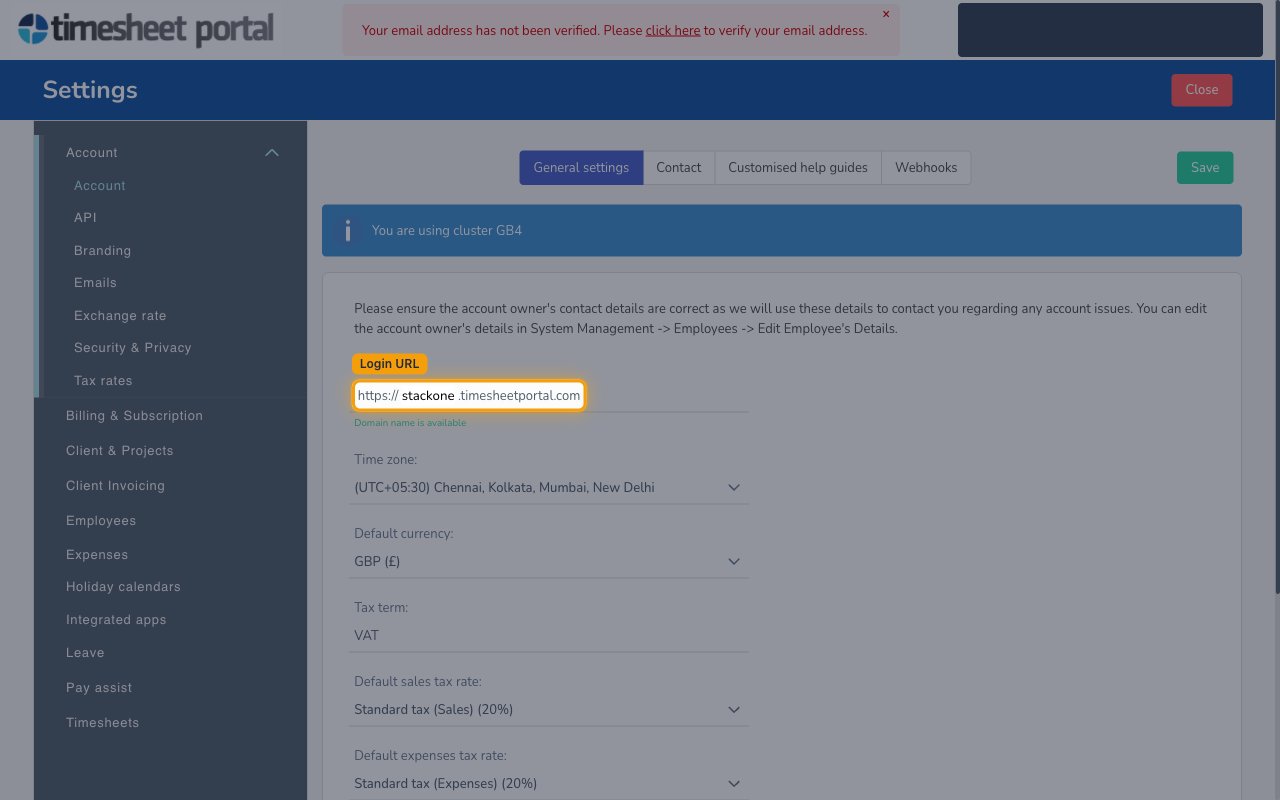
Click the Settings menu, then under the Account section open Account. On the
General settings tab, find the Login URL field. Your Account Name is the
subdomain shown before .timesheetportal.com.
- Format:
https://{account-name}.timesheetportal.com - Example: for
https://acme.timesheetportal.comthe Account Name isacme. - Enter the subdomain only (e.g.
acme) into the Account Name field in StackOne Hub — not the full URL.
Linking the Account from the Hub
1
Navigate to the Hub
Use one of the three Linking Account Methods to access the Hub.
2
Fill out the fields
Fill out the following fields using details from your provider:
- Account Name
3
Connect
- Click Connect
- If applicable, the provider will redirect you to a sign-in or authorization page. Complete the provider’s authorization flow.
- Once authorization is successful, you will see a confirmation popup
If the account linking is successful, you will see the newly linked account in your Accounts page.