> ## Documentation Index
> Fetch the complete documentation index at: https://docs.stackone.com/llms.txt
> Use this file to discover all available pages before exploring further.

# Polymer Webhook Setup Guide

> Configure Polymer to deliver events to StackOne.

## Prerequisites

Before continuing, you should have already completed the following for this connector:

<Steps>
  <Step title="Configure the Connector">
    Enable the connector and set up its connector profile in your project. See <a href="/connect/managing-connectors/overview">Managing Connectors</a>.

    <Columns cols={2}>
      <Card title="Connector Profile" href="/connectors/polymer/guides/connector-profile/api-key" icon="https://stackone-logos.com/api/polymer/filled/svg" horizontal>
        Polymer - API Key
      </Card>
    </Columns>
  </Step>

  <Step title="Link an Account">
    Connect an account using <a href="/embed/account-linking/overview">StackOne Hub</a> or <a href="/embed/account-linking/auth-link">Auth Link</a>.

    <Columns cols={2}>
      <Card title="Link Account" href="/connectors/polymer/guides/link-account/api-key" icon="https://stackone-logos.com/api/polymer/filled/svg" horizontal>
        Polymer - API Key
      </Card>
    </Columns>
  </Step>
</Steps>

<section data-guide-section data-guide-scopes="">
  <h2>Copy your Native Webhook URL</h2>

  <p>Polymer sends events to a URL that is unique to your linked account.</p>

  <ul>
    <li>Open your linked account in StackOne and copy the value of the <strong>Native Webhook URL</strong> field.</li>
    <li>Treat this URL as a secret — anyone holding it can post events to your account.</li>
  </ul>
</section>

<section data-guide-section data-guide-scopes="">
  <h2>Add the webhook URLs in Polymer</h2>

  <p>Polymer stores one webhook URL per event. Paste the same <strong>Native Webhook URL</strong> into both<br />fields so StackOne receives job application and job published events.</p>

  <Steps>
    <Step title="Sign in to Polymer">
      <div data-guide-step data-guide-scopes="" data-guide-display-scopes-list="">
        <p>Sign in to your <a href="https://app.polymer.co" target="_blank" rel="noopener noreferrer">Polymer account</a>.</p>

        <ul>
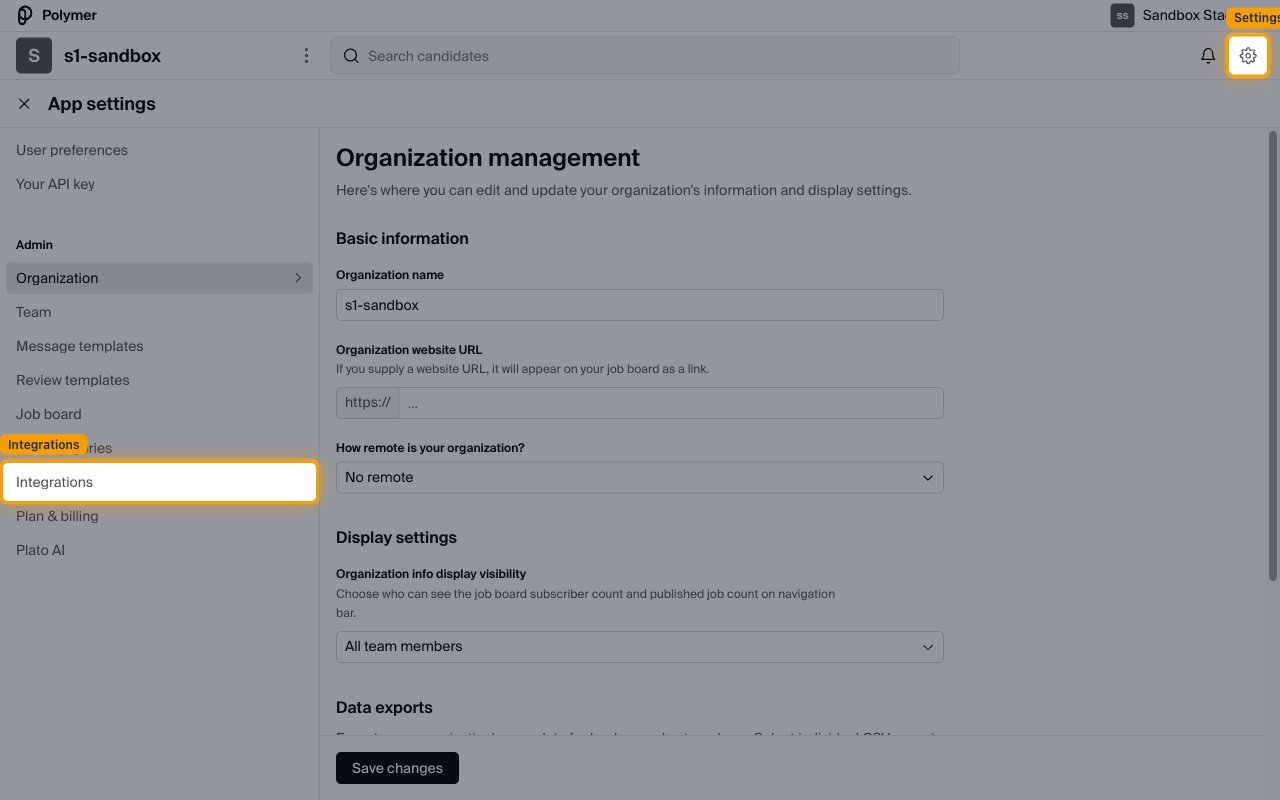
          <li>Click the settings (gear) icon in the top-right of the navigation bar to open <strong>App settings</strong>.</li>
        </ul>

        <img src="https://mintcdn.com/stackone-60/GRi8xv3Oi0A_h1mS/connectors/polymer/images/events-app-settings.png?fit=max&auto=format&n=GRi8xv3Oi0A_h1mS&q=85&s=951c3c4a1909b3522791381e188802ef" alt="Polymer App settings page showing the left menu with User preferences, Your API key and an Admin section." width="1280" height="800" data-path="connectors/polymer/images/events-app-settings.png" />
      </div>
    </Step>

    <Step title="Open the Polymer Webhooks integration">
      <div data-guide-step data-guide-scopes="" data-guide-display-scopes-list="">
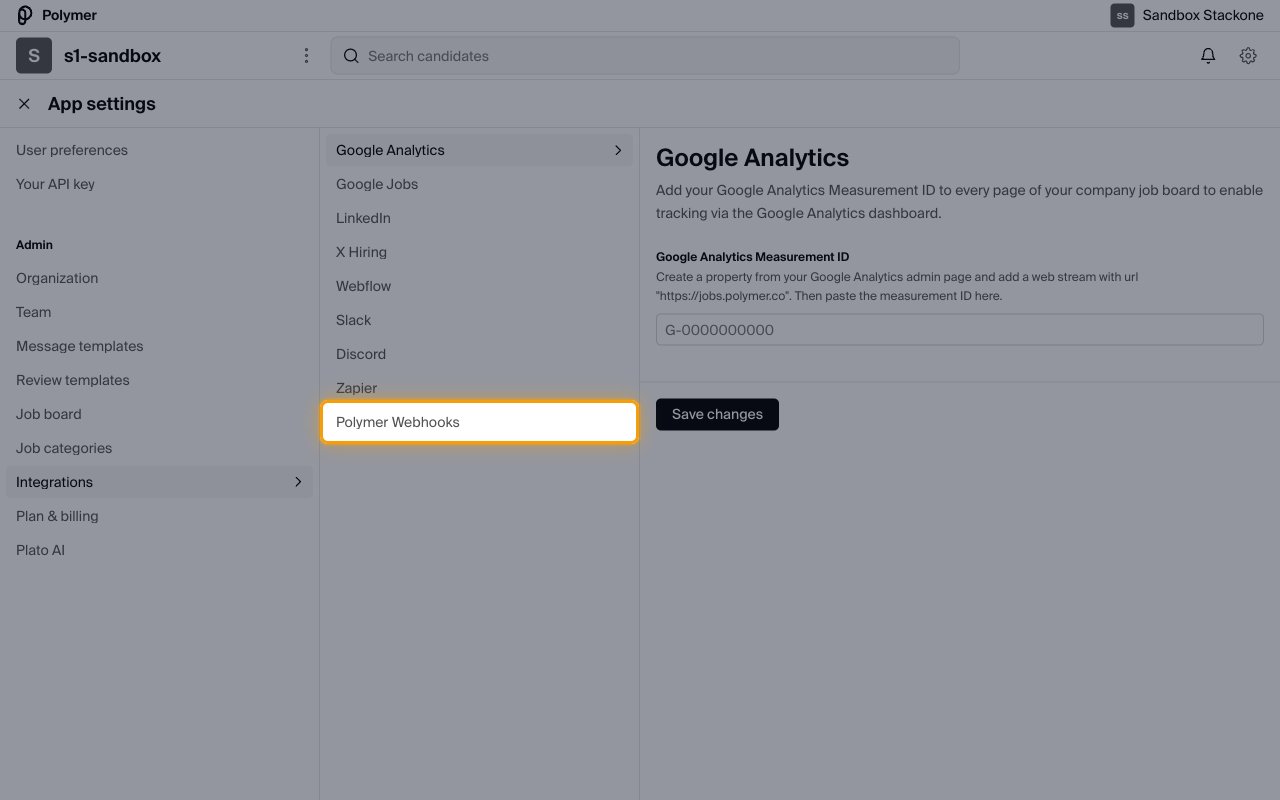
        <p>Select <strong>Integrations</strong> from the <strong>Admin</strong> section of the left menu.</p>

        <ul>
          <li>Choose <strong>Polymer Webhooks</strong> from the integrations list.</li>
        </ul>

        <img src="https://mintcdn.com/stackone-60/GRi8xv3Oi0A_h1mS/connectors/polymer/images/events-integrations.png?fit=max&auto=format&n=GRi8xv3Oi0A_h1mS&q=85&s=e17eeefe61e38b9e5f1ca92747c64f44" alt="Polymer Integrations list showing Google Analytics, Google Jobs, LinkedIn, X Hiring, Webflow, Slack, Discord, Zapier and Polymer Webhooks." width="1280" height="800" data-path="connectors/polymer/images/events-integrations.png" />
      </div>
    </Step>

    <Step title="Add your webhook URLs">
      <div data-guide-step data-guide-scopes="" data-guide-display-scopes-list="">
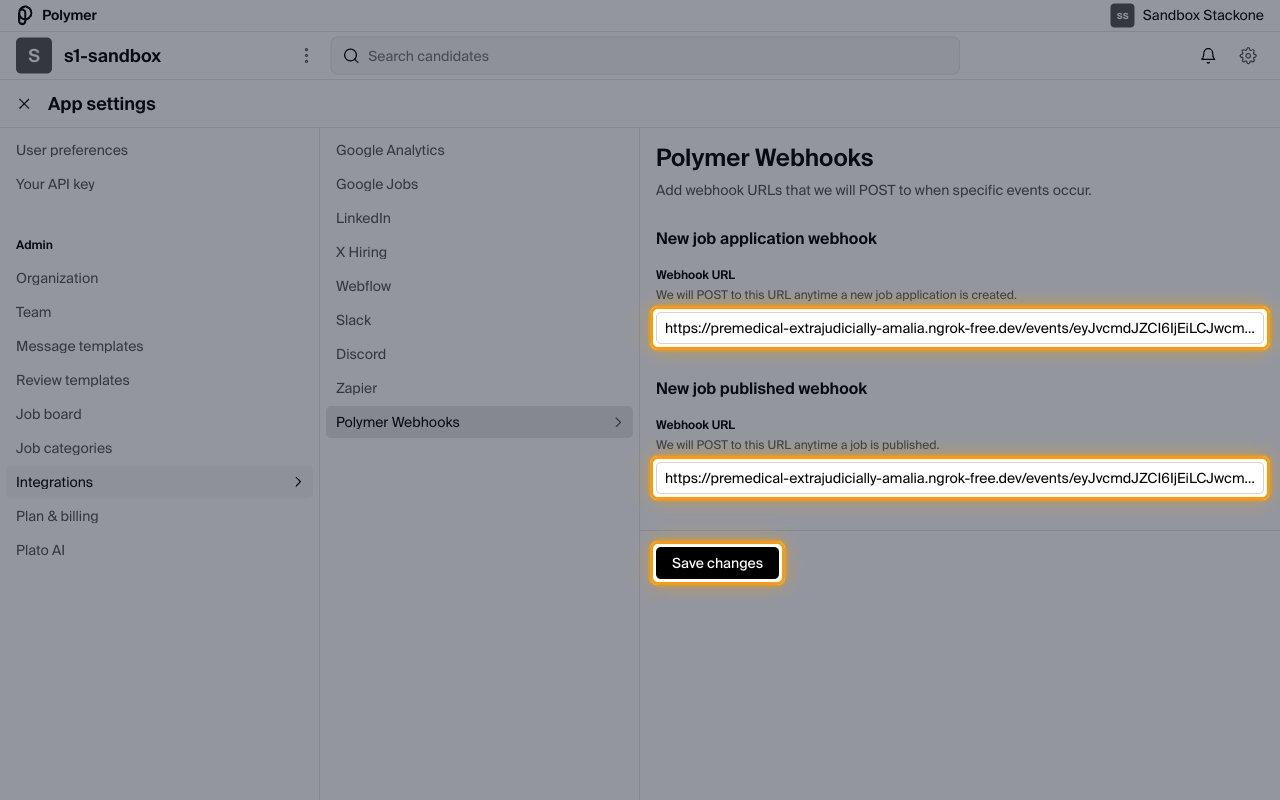
        <p>The <strong>Polymer Webhooks</strong> page reads "Add webhook URLs that we will POST to when specific<br />events occur" and offers one <strong>Webhook URL</strong> field per event.</p>

        <ul>
          <li>Paste the <strong>Native Webhook URL</strong> into the <strong>Webhook URL</strong> field under <strong>New job application webhook</strong>.</li>
          <li>Paste the same URL into the <strong>Webhook URL</strong> field under <strong>New job published webhook</strong>.</li>
          <li>Click <strong>Save changes</strong>.</li>
          <li>Note: Polymer does not send a test or verification request, so a saved URL is not confirmation that events are being received.</li>
        </ul>

        <img src="https://mintcdn.com/stackone-60/GRi8xv3Oi0A_h1mS/connectors/polymer/images/events-webhook-url.png?fit=max&auto=format&n=GRi8xv3Oi0A_h1mS&q=85&s=801a6e484c27eb5d33b4fbdcd2c268bb" alt="Polymer Webhooks page with New job application webhook and New job published webhook sections, each with a Webhook URL field, above a Save changes button." width="1280" height="800" data-path="connectors/polymer/images/events-webhook-url.png" />
      </div>
    </Step>
  </Steps>
</section>

<section data-guide-section data-guide-scopes="">
  <h2>Available webhook events</h2>

  <p>Polymer posts to the URLs you saved above. Only the events listed here are delivered.</p>

  <Steps>
    <Step title="Review job application events">
      <div data-guide-step data-guide-scopes="" data-guide-display-scopes-list="">
        <p>Delivered to the URL saved under <strong>New job application webhook</strong>.</p>

        <ul>
          <li><strong>New job application</strong> (`new_job_application`) — Fired when an application is created against a job, including applications created through the Polymer API.</li>
        </ul>
      </div>
    </Step>

    <Step title="Review job events">
      <div data-guide-step data-guide-scopes="" data-guide-display-scopes-list="">
        <p>Delivered to the URL saved under <strong>New job published webhook</strong>.</p>

        <ul>
          <li><strong>New job published</strong> — Fired when a job is published.</li>
          <li>Note: publishing a job requires a paid Polymer plan.</li>
        </ul>
      </div>
    </Step>
  </Steps>
</section>

<section data-guide-section data-guide-scopes="">
  <h2>Delivery format</h2>

  <p>Polymer posts each event on its own, as a form submission rather than JSON.</p>

  <ul>
    <li>Requests are sent as `POST` with content type `application/x-www-form-urlencoded`.</li>
    <li>Each request carries a single event — Polymer does not batch events.</li>
    <li>Responses to custom application questions marked <strong>Admin only</strong> are excluded from webhook payloads.</li>
  </ul>
</section>

## Verify

Your Connector should now be able to receive and process events. Try triggering an event and you should see an Event appear in the Connector logs.