> ## Documentation Index
> Fetch the complete documentation index at: https://docs.stackone.com/llms.txt
> Use this file to discover all available pages before exploring further.

# Make Webhook Setup Guide

> Configure Make to deliver events to StackOne.

## Prerequisites

Before continuing, you should have already completed the following for this connector:

<Steps>
  <Step title="Configure the Connector">
    Enable the connector and set up its connector profile in your project. See <a href="/connect/managing-connectors/overview">Managing Connectors</a>.

    <Columns cols={2}>
      <Card title="Connector Profile" href="/connectors/make/guides/connector-profile/api-token" icon="https://stackone-logos.com/api/make/filled/svg" horizontal>
        Make - API Token
      </Card>
    </Columns>
  </Step>

  <Step title="Link an Account">
    Connect an account using <a href="/embed/account-linking/overview">StackOne Hub</a> or <a href="/embed/account-linking/auth-link">Auth Link</a>.

    <Columns cols={2}>
      <Card title="Link Account" href="/connectors/make/guides/link-account/api-token" icon="https://stackone-logos.com/api/make/filled/svg" horizontal>
        Make - API Token
      </Card>
    </Columns>
  </Step>
</Steps>

<section data-guide-section data-guide-scopes="">
  <h2>Get your Native Webhook URL</h2>

  <p>StackOne generates a per-connection webhook URL. You will paste it into a Make scenario's HTTP module so the scenario delivers events to StackOne.</p>

  <ul>
    <li>On this connection in StackOne, copy the read-only <strong>Native Webhook URL</strong>. It contains a secure per-connection token that identifies your account, so treat it like a secret. Make's HTTP module sends the full URL (including that token), so no auth header is needed.</li>
  </ul>
</section>

<section data-guide-section data-guide-scopes="">
  <h2>Create a scenario and add the HTTP module</h2>

  <p>Events reach StackOne from a Make scenario that makes an outbound HTTP request. Sign in to Make and build a scenario whose final module POSTs to the Native Webhook URL.</p>

  <Steps>
    <Step title="Create a scenario">
      <div data-guide-step data-guide-scopes="" data-guide-display-scopes-list="">
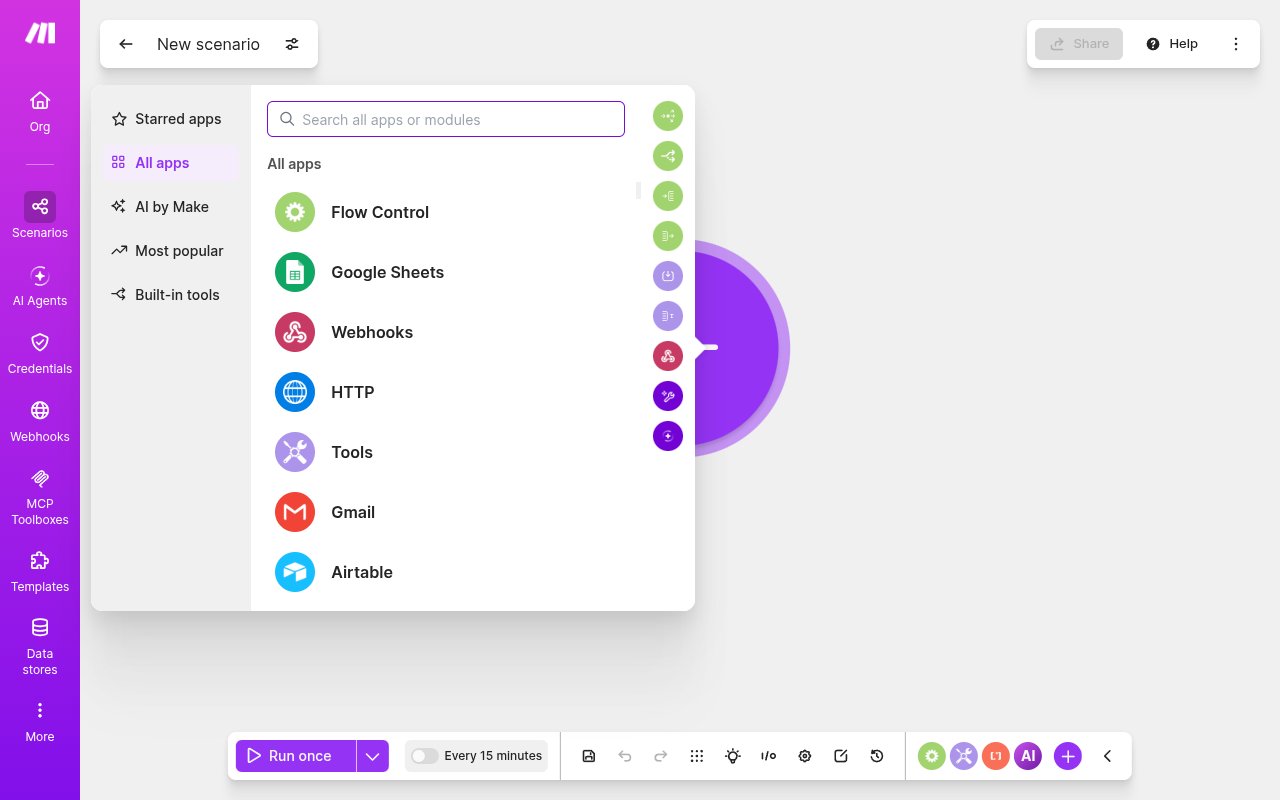
        <p>In Make, click <strong>+ Create scenario</strong> (top-right). Add a first (trigger) module for whatever should start the scenario — a Scheduler, a Custom webhook, or any app event. For a one-off test you can skip the trigger and use <strong>Run once</strong> on the HTTP module alone.</p>

        <img src="https://mintcdn.com/stackone-60/Eim9vvg_dSsx9JZy/connectors/make/images/events-new-scenario.png?fit=max&auto=format&n=Eim9vvg_dSsx9JZy&q=85&s=f36d3a585fd5261aa6d9ca0711b05c7c" alt="Make new scenario canvas" width="1280" height="800" data-path="connectors/make/images/events-new-scenario.png" />
      </div>
    </Step>

    <Step title="Add the HTTP app (not Webhooks)">
      <div data-guide-step data-guide-scopes="" data-guide-display-scopes-list="">
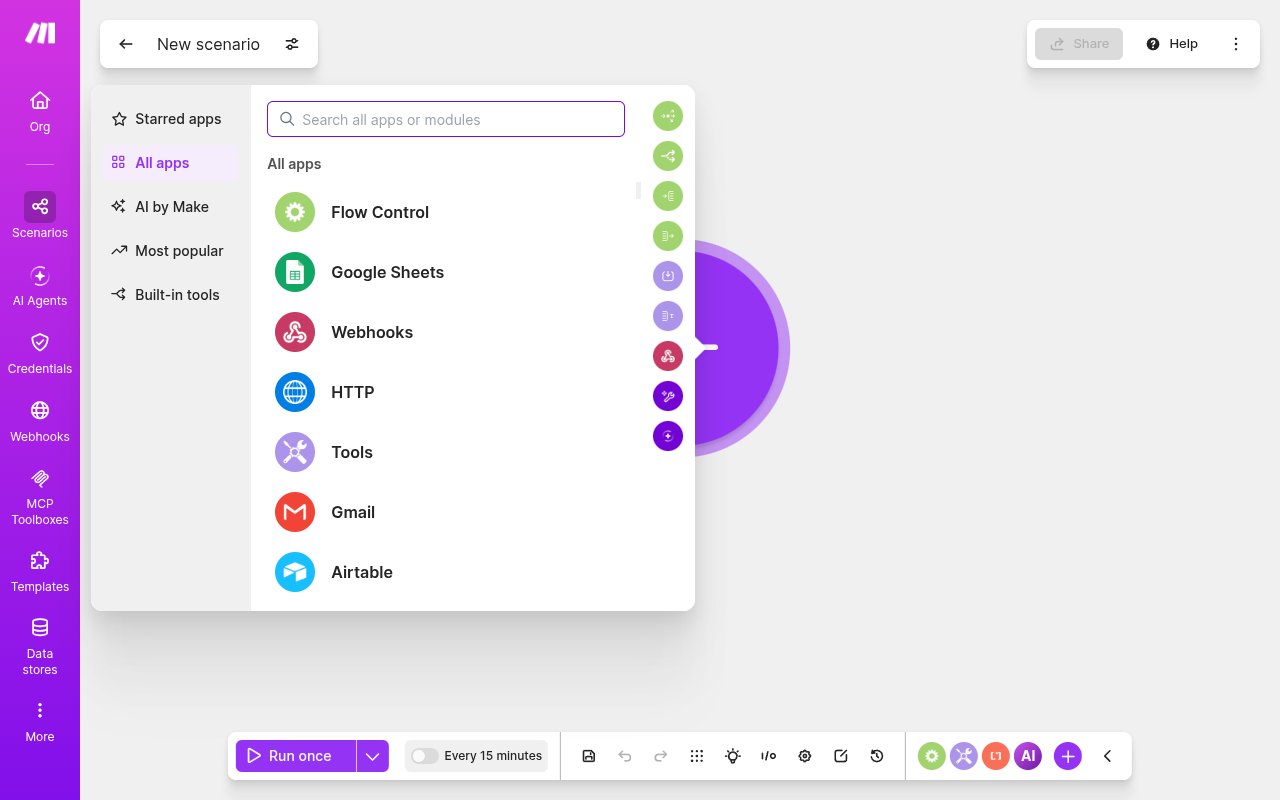
        <p>Click the <strong>+</strong> to add a module and choose the <strong>HTTP</strong> app. Do NOT pick the <strong>Webhooks</strong> app — that one is for Make to *receive* incoming webhooks (a trigger URL Make listens on), not to send events out to StackOne.</p>

        <img src="https://mintcdn.com/stackone-60/Eim9vvg_dSsx9JZy/connectors/make/images/events-app-picker.png?fit=max&auto=format&n=Eim9vvg_dSsx9JZy&q=85&s=db9f3bfe19b4b4967dfa13ae766f1d8d" alt="Make module picker showing the HTTP and Webhooks apps" width="1280" height="800" data-path="connectors/make/images/events-app-picker.png" />
      </div>
    </Step>

    <Step title="Choose &#x22;Make a request&#x22;">
      <div data-guide-step data-guide-scopes="" data-guide-display-scopes-list="">
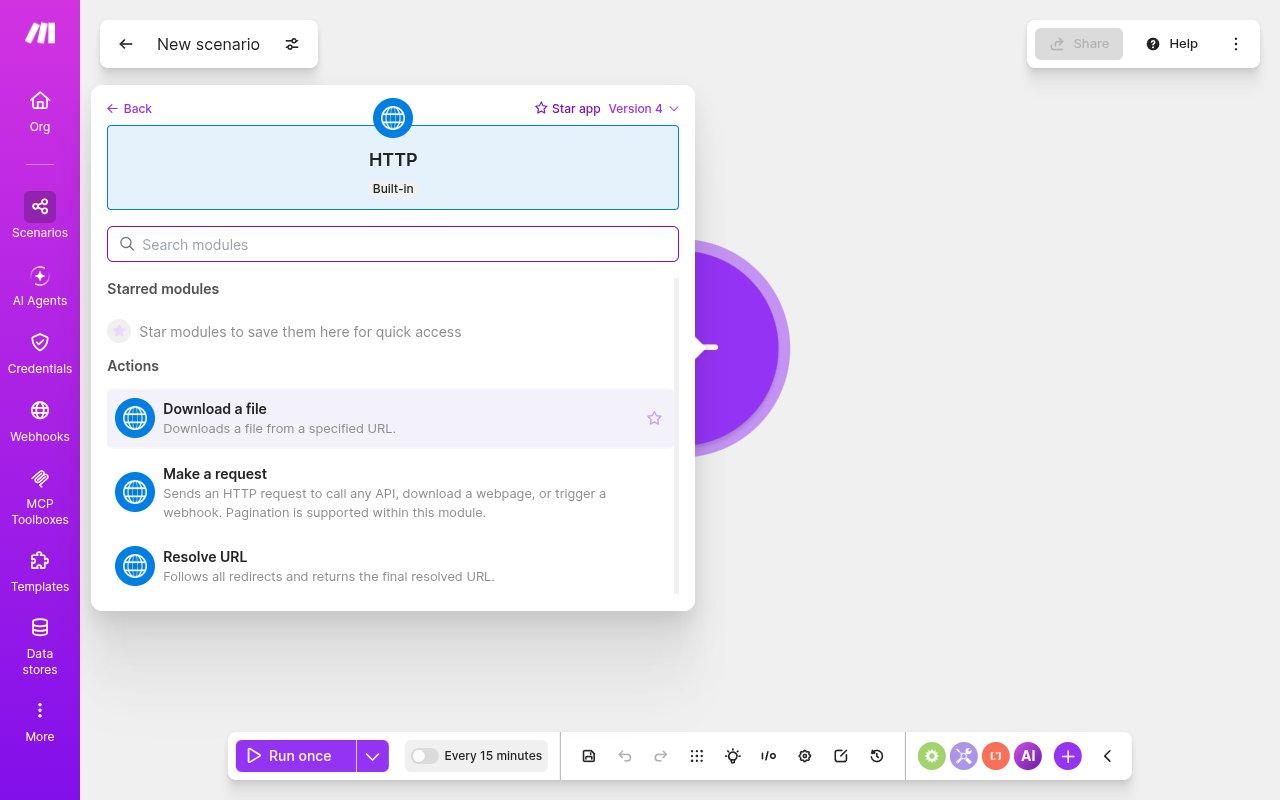
        <p>Under HTTP, select the <strong>Make a request</strong> module ("Sends an HTTP request to call any API, download a webpage, or trigger a webhook").</p>

        <img src="https://mintcdn.com/stackone-60/Eim9vvg_dSsx9JZy/connectors/make/images/events-http-modules.png?fit=max&auto=format&n=Eim9vvg_dSsx9JZy&q=85&s=2b5f75dd3272bfcd5ad470bcd68ea9a6" alt="Make HTTP module list with the Make a request module" width="1280" height="800" data-path="connectors/make/images/events-http-modules.png" />
      </div>
    </Step>
  </Steps>
</section>

<section data-guide-section data-guide-scopes="">
  <h2>Configure the HTTP request</h2>

  <p>Point the module at the Native Webhook URL and send a JSON body describing the event.</p>

  <Steps>
    <Step title="Set the URL and method">
      <div data-guide-step data-guide-scopes="" data-guide-display-scopes-list="">
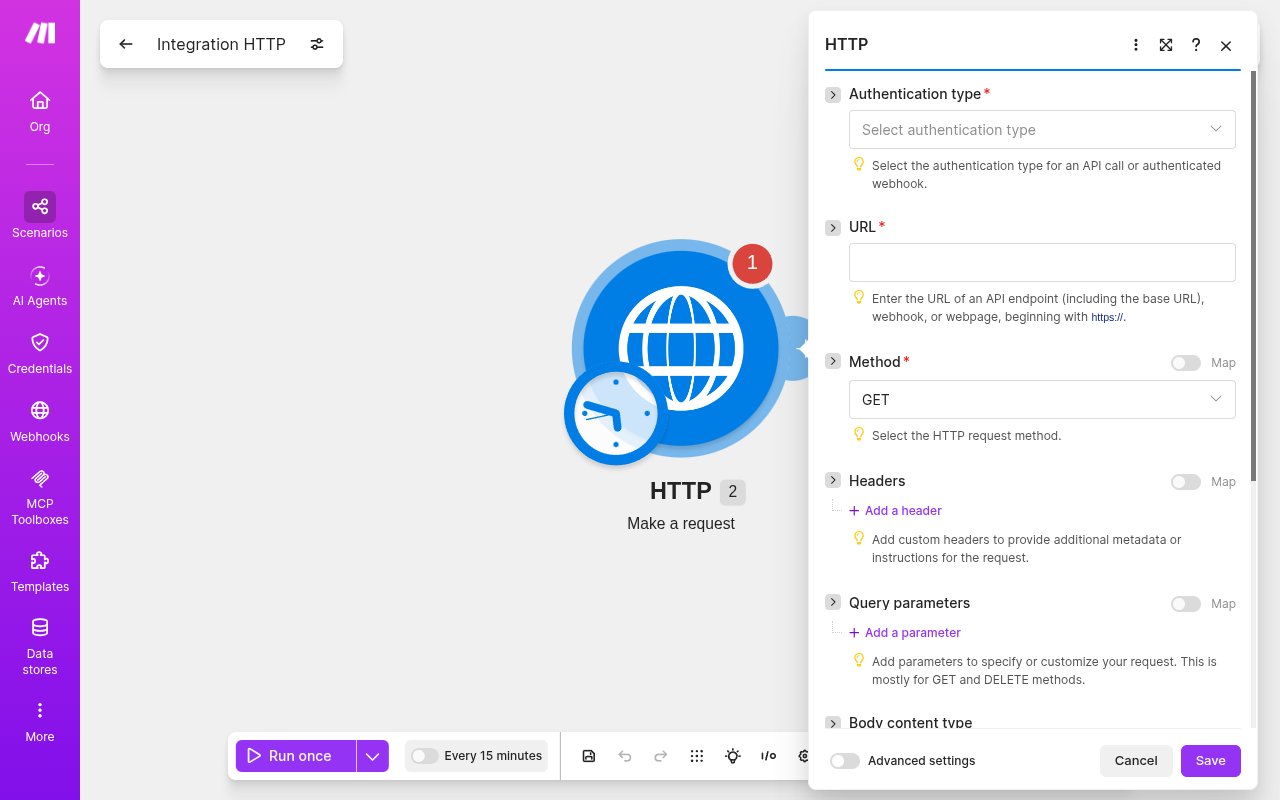
        <p>In the module, set <strong>URL</strong> to the StackOne Native Webhook URL and <strong>Method</strong> to <strong>POST</strong>. Set <strong>Authentication type</strong> to <strong>No authentication</strong> (it is a required field; the `?token=` in the URL identifies the account, so no auth header is needed).</p>

        <img src="https://mintcdn.com/stackone-60/Eim9vvg_dSsx9JZy/connectors/make/images/events-http-config.png?fit=max&auto=format&n=Eim9vvg_dSsx9JZy&q=85&s=ba1fe8442e444ce82424f59b53a1c380" alt="Make HTTP Make a request module fields — Authentication type, URL, Method, Headers, Body content type" width="1280" height="800" data-path="connectors/make/images/events-http-config.png" />
      </div>
    </Step>

    <Step title="Add a JSON body with an id">
      <div data-guide-step data-guide-scopes="" data-guide-display-scopes-list="">
        <p>Set <strong>Body content type</strong> to <strong>JSON (application/json)</strong>, then in <strong>Request content</strong> enter the JSON to deliver. Include an <strong>id</strong> (used as the event's record id) and optionally a <strong>type</strong>; everything you send is passed through to StackOne as the event data. In a real scenario, <strong>map dynamic values from earlier modules</strong> rather than hardcoding — click the field and pick the upstream outputs, which Make inserts as `{{moduleId.field}}` tokens (e.g. `{"id":"{{1.id}}","type":"record.updated","data":{{1}}}`, where `{{1.id}}` is the id from the trigger module). A static example for a quick test — `{"id":"make-test-1","type":"scenario.run","data":{"hello":"world"}}`. Click <strong>Save</strong>.</p>
      </div>
    </Step>

    <Step title="Run the scenario">
      <div data-guide-step data-guide-scopes="" data-guide-display-scopes-list="">
        <p>Click <strong>Run once</strong> to fire it immediately, or turn the scenario <strong>On</strong> so its trigger fires it automatically. Each run POSTs the body to StackOne, which returns HTTP 200.</p>
      </div>
    </Step>
  </Steps>
</section>

<section data-guide-section data-guide-scopes="">
  <h2>Available webhook events</h2>

  <p>The connector maps every scenario delivery to a single event type — the body you send in the HTTP module is what varies.</p>

  <ul>
    <li><strong>Make Event</strong> (`make.event`) — fired whenever a Make scenario POSTs to the Native Webhook URL. The `id` field of your JSON body becomes the event's record id; put a `type` (or any discriminator) in the body to distinguish events downstream.</li>
  </ul>
</section>

<section data-guide-section data-guide-scopes="">
  <h2>Delivery format</h2>

  <p>StackOne emits eventType `make.event`; the record id comes from the body's `id` (falling back to `eventId`/`executionId`/`scenarioId`/`hookId`, then empty), and the full JSON body you posted is passed through as the event data. Outbound delivery to your StackOne webhook endpoint is HMAC-signed (`x-stackone-signature`).</p>
</section>

## Verify

Your Connector should now be able to receive and process events. Try triggering an event and you should see an Event appear in the Connector logs.