> ## Documentation Index
> Fetch the complete documentation index at: https://docs.stackone.com/llms.txt
> Use this file to discover all available pages before exploring further.
# SAP SuccessFactors Integration
> Content & Completion Management
## **Summary**
The SAP SuccessFactors integration allows you to push content to SAP SuccessFactors and track user progress.
Content pushed to SAP SuccessFactors is fully integrated with other content available to the SAP SuccessFactors tenant and discoverable by multiple filtering options.
In order to integrate content via the OCN (Open Content Network) flow, an user admin must periodically import content from the Open Content Network.
**Content and Completions within SAP SuccessFactors**
## **Key Details**
### **Content Upsert Behavior (Open Content Network - OCN Flow)**
* **OCN Approach:** Mimics external content provider flow, allowing customer-controlled import. Content updates and deactivation are possible.
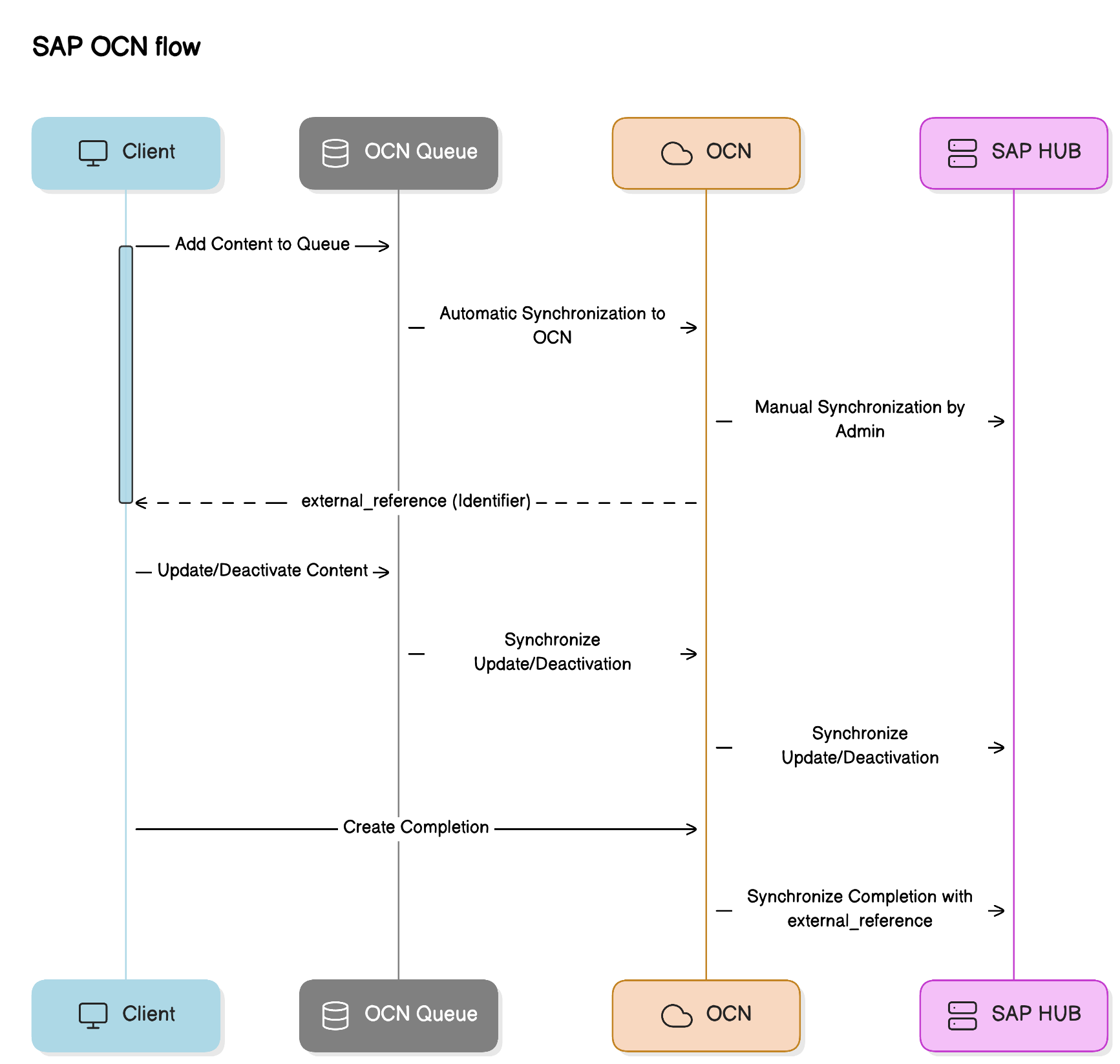 * **Deduplication:** Uses `external_reference` as the unique identifier.
* Existing content with matching `external_reference` will be overwritten.
* **Deduplication:** Uses `external_reference` as the unique identifier.
* Existing content with matching `external_reference` will be overwritten.
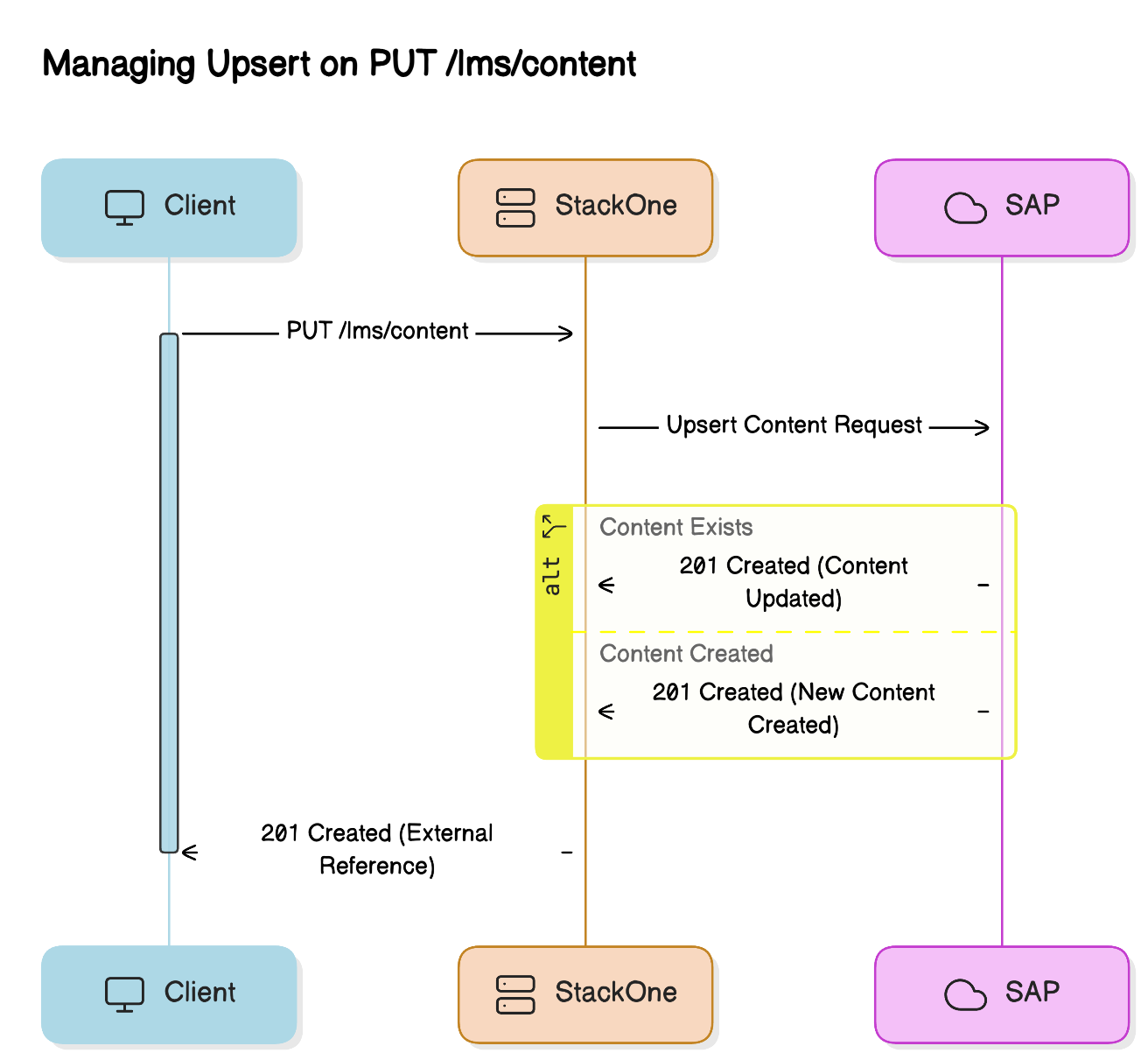 * **Implementation Notes:**
* **Launch Method:** Automatically set to "browser."
* **Languages:** Ensure content titles and descriptions are provided for all relevant locales.
* Accepted Enum Values:
* Languages: Locale names (e.g., "English," "Spanish").
* Result: "pass" or "fail."
* **Course Wrapper:** A course wrapper with matching title, description, and ID is automatically created.
* **Inactive Status:** Content initially created as inactive will not appear in the import menu. If set to inactive after import, it will appear under the "not active" filter.
### **Completion Push**
* Uses `content_external_reference` as the content identifier.
* **Unique Constraints:** Assignments are not supported for OCN content via API.
### **Provider-Specific Quirks**
* **Content Categorization:** OCN content is automatically categorized as MOOC.
### **Limitations**
* **Rate Limits:**
* OCN: 1 request per 5 minutes, 1000 content items per request.
* Use `/batch` operation for large catalogs.
* Read operations: 1 request per 0.5 seconds.
## **SSO Configuration for Completion Creation**
When integrating with SAP SuccessFactors for completion tracking, proper SSO configuration is essential to ensure the integration works as expected. This section outlines the required user identification setup for creating completions.
### **User Identification Configuration**
To properly identify users and create completions, you have three configuration options in order of preference:
##### **1. NameID Configuration (Recommended)**
The customer should ensure that the **NameID** is set to the **UserID/StudentID** field in their SAP SuccessFactors SSO configuration. This is the most straightforward approach and provides direct user mapping.
##### **2. Custom Field Configuration (Alternative)**
If option 1 is not possible, the customer should set a custom field `lms_user_id` to the **UserID/StudentID** field in their SSO configuration. This provides an alternative mapping mechanism while maintaining clear user identification.
##### **3. External Reference Configuration (Fallback)**
If the above configurations are not allowed for any reason, the customer must set an `lms_external_reference_field` to the **personExternalID** field.
When using this approach, you will need to:
1. Fetch the StackOne user ID via the `/users?filter[external_reference]=` filter, replacing `` with the actual value configured for your integration.
2. Use the StackOne ID returned from this request in the user completions request
### **Connector Meta Information**
The `/meta/connectors/sapsuccessfactors_learning?include=connector_meta_field` endpoint provides the `connector_meta_field` information for all the above configuration options. This endpoint contains the metadata needed to understand the available fields and their mapping requirements.
### **Testing and Validation**
* Standard testing procedures apply.
* Verify that the chosen user identification method correctly maps users between systems.
* Test completion creation with the configured SSO setup to ensure proper user attribution.
* **Implementation Notes:**
* **Launch Method:** Automatically set to "browser."
* **Languages:** Ensure content titles and descriptions are provided for all relevant locales.
* Accepted Enum Values:
* Languages: Locale names (e.g., "English," "Spanish").
* Result: "pass" or "fail."
* **Course Wrapper:** A course wrapper with matching title, description, and ID is automatically created.
* **Inactive Status:** Content initially created as inactive will not appear in the import menu. If set to inactive after import, it will appear under the "not active" filter.
### **Completion Push**
* Uses `content_external_reference` as the content identifier.
* **Unique Constraints:** Assignments are not supported for OCN content via API.
### **Provider-Specific Quirks**
* **Content Categorization:** OCN content is automatically categorized as MOOC.
### **Limitations**
* **Rate Limits:**
* OCN: 1 request per 5 minutes, 1000 content items per request.
* Use `/batch` operation for large catalogs.
* Read operations: 1 request per 0.5 seconds.
## **SSO Configuration for Completion Creation**
When integrating with SAP SuccessFactors for completion tracking, proper SSO configuration is essential to ensure the integration works as expected. This section outlines the required user identification setup for creating completions.
### **User Identification Configuration**
To properly identify users and create completions, you have three configuration options in order of preference:
##### **1. NameID Configuration (Recommended)**
The customer should ensure that the **NameID** is set to the **UserID/StudentID** field in their SAP SuccessFactors SSO configuration. This is the most straightforward approach and provides direct user mapping.
##### **2. Custom Field Configuration (Alternative)**
If option 1 is not possible, the customer should set a custom field `lms_user_id` to the **UserID/StudentID** field in their SSO configuration. This provides an alternative mapping mechanism while maintaining clear user identification.
##### **3. External Reference Configuration (Fallback)**
If the above configurations are not allowed for any reason, the customer must set an `lms_external_reference_field` to the **personExternalID** field.
When using this approach, you will need to:
1. Fetch the StackOne user ID via the `/users?filter[external_reference]=` filter, replacing `` with the actual value configured for your integration.
2. Use the StackOne ID returned from this request in the user completions request
### **Connector Meta Information**
The `/meta/connectors/sapsuccessfactors_learning?include=connector_meta_field` endpoint provides the `connector_meta_field` information for all the above configuration options. This endpoint contains the metadata needed to understand the available fields and their mapping requirements.
### **Testing and Validation**
* Standard testing procedures apply.
* Verify that the chosen user identification method correctly maps users between systems.
* Test completion creation with the configured SSO setup to ensure proper user attribution.