> ## Documentation Index
> Fetch the complete documentation index at: https://docs.stackone.com/llms.txt
> Use this file to discover all available pages before exploring further.
# Teamtailor Partner API
> To activate the Teamtailor Partner API or Public + Partner API in StackOne for integrating your Teamtailor Marketplace Integration, please follow the necessary steps.
export const DifferenceBetweenListEndpointAndStaticIdOfPackage = ({providerName, dynamicPackageImageAtProviderUI, staticPackageImageAtProviderUI}) => {
return <>
The Package's List Endpoint URL allows StackOne to fetch a list of available packages from your system, while the Static Package ID is fixed and available for users to select on the provider's side.
When you have a Package's List Endpoint URL
A list of packages will be available to select in {providerName}.

When you have a Static Package ID
A static package ID will be available to select in {providerName}.
 At least one field is necessary for making packages available in the Provider's UI. Preference will be given to the Package's List Endpoint URL, even if both fields are configured.
;
};
export const DifferenceBetweenPublicAndPartnerAPI = ({showPublic = true, showPartner = true, showPublicPartner = true, title = "Difference between Public API & Partner API"}) => {
return <>
At least one field is necessary for making packages available in the Provider's UI. Preference will be given to the Package's List Endpoint URL, even if both fields are configured.
;
};
export const DifferenceBetweenPublicAndPartnerAPI = ({showPublic = true, showPartner = true, showPublicPartner = true, title = "Difference between Public API & Partner API"}) => {
return <>
{showPublic && - Public API: Access to the StackOne Unified APIs, excluding the Assessments and Background Checks Unified API and its features.
}
{showPartner && - Partner API: Access to the Assessments and Background Checks Unified API and its features, but not other StackOne Unified APIs. This allows you to integrate your provider's partner app with StackOne.
}
{showPublicPartner && - Public + Partner API: Access to all StackOne Unified APIs, including the Assessments and Background Checks Unified API and its features.
}
;
};
## Overview
StackOne allows you to integrate your Teamtailor integration app with the Assessment and Background Check categories.
This guide covers how you can set up/configure integration at Teamtailor and integrate with StackOne.
## Partnership Requirements
The partnership with Teamtailor Integration is necessary to proceed with this documentation.
To become a Teamtailor Integration Partner, navigate to [resource partnership](https://www.teamtailor.com/en/resources/partnerships),
then click on `Apply today` which will scroll down to the Integration Partner section that contains a `Find out more` button to
direct you to the [Integrate with Teamtailor](https://teamtailor.notion.site/Integrate-with-Teamtailor-3919690568754aaaa7ffd681afe955f2) page.
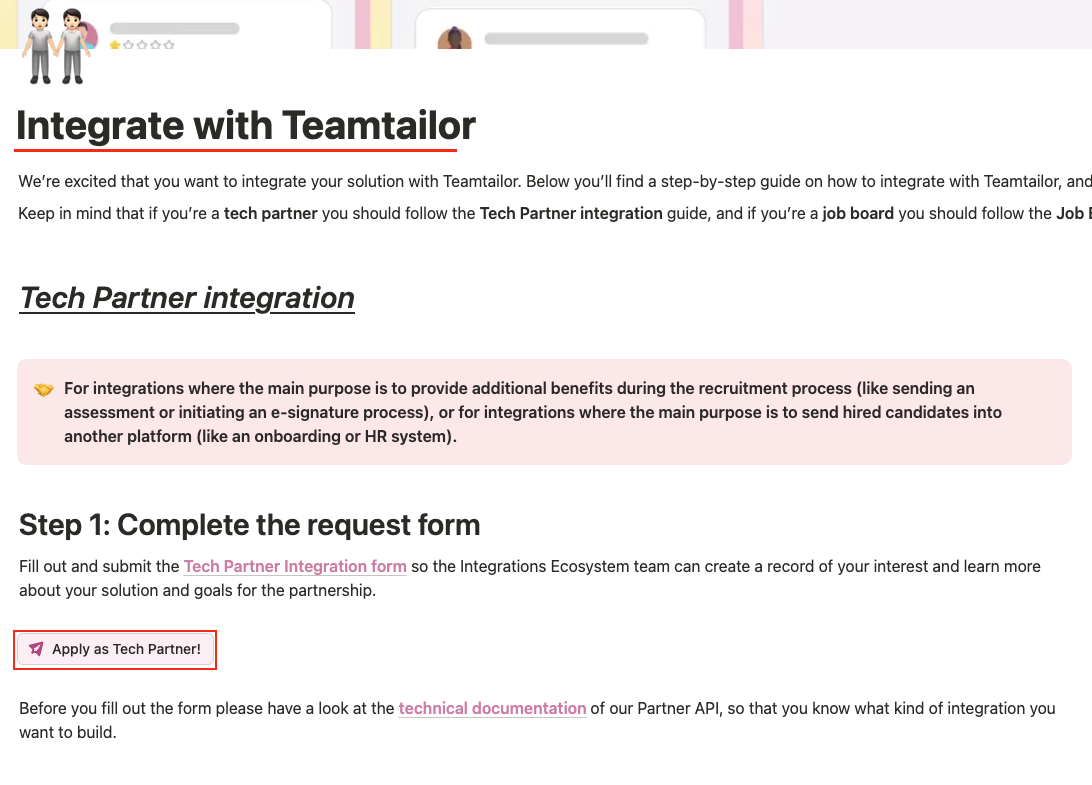 Click on `Apply as Tech Partner!` button to fill out the **Teamtailor - Tech Partner Integration Request Form**.
Once you have obtained the Teamtailor partnership, follow the steps below to create an integration with Teamtailor for the Assessment & Background Check categories.
## StackOne approach for Teamtailor Integration
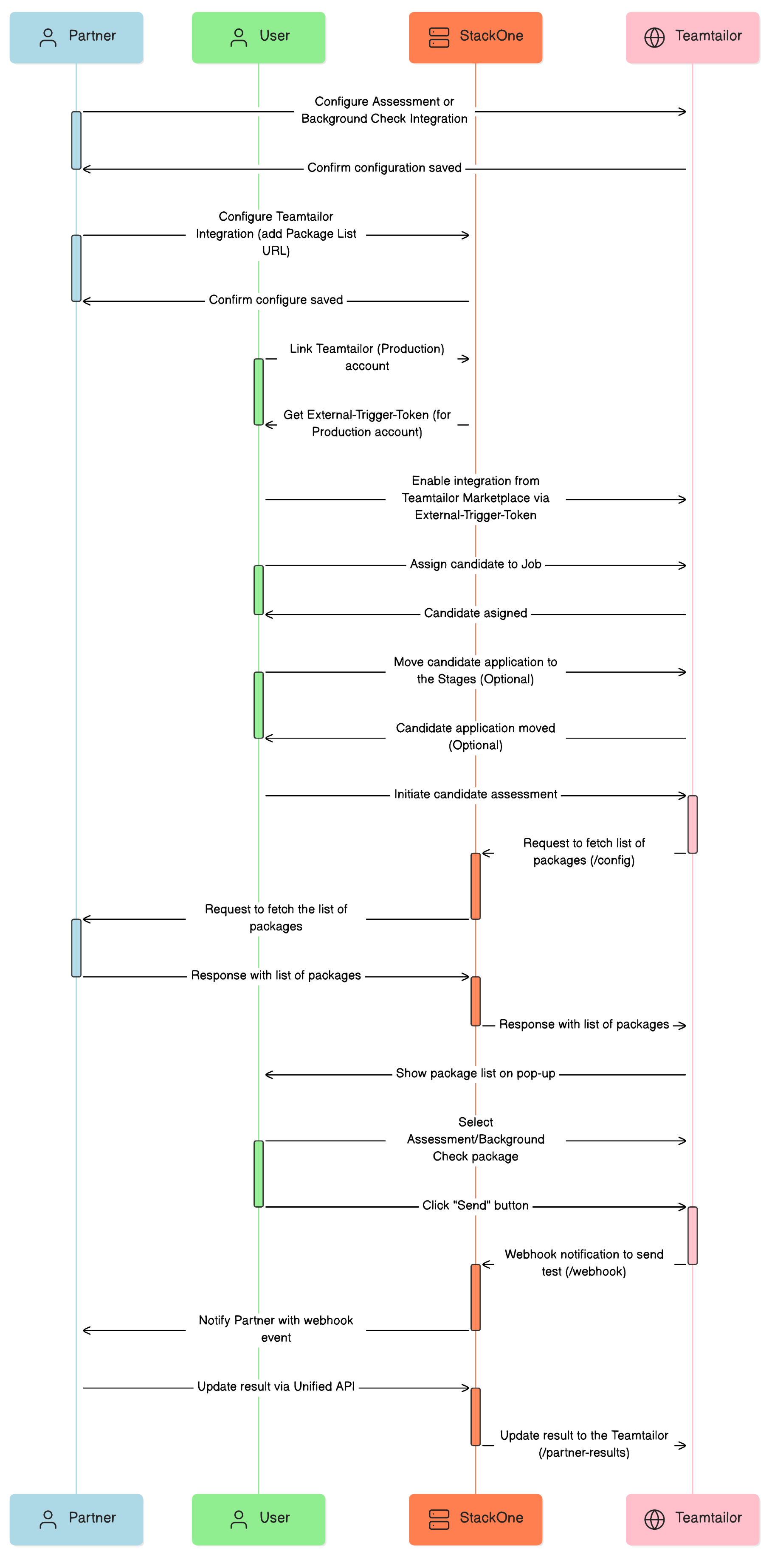
Once you Create an Integration Partner in Teamtailor, the next step is to enable and configure Teamtailor in StackOne. This process will generate an **External Trigger Token** for users, which acts as a key to activate/enable your integration through the Teamtailor Marketplace.
Users will utilise this **External Trigger Token** to integrate the Assessment/Background Check partner application into their job stage workflow.
Click on `Apply as Tech Partner!` button to fill out the **Teamtailor - Tech Partner Integration Request Form**.
Once you have obtained the Teamtailor partnership, follow the steps below to create an integration with Teamtailor for the Assessment & Background Check categories.
## StackOne approach for Teamtailor Integration
Once you Create an Integration Partner in Teamtailor, the next step is to enable and configure Teamtailor in StackOne. This process will generate an **External Trigger Token** for users, which acts as a key to activate/enable your integration through the Teamtailor Marketplace.
Users will utilise this **External Trigger Token** to integrate the Assessment/Background Check partner application into their job stage workflow.
 ## Provider Side Setup
Log into your Teamtailor account. To access the *Integration Hub*, select the **Settings** option in the top-right corner.
## Provider Side Setup
Log into your Teamtailor account. To access the *Integration Hub*, select the **Settings** option in the top-right corner.
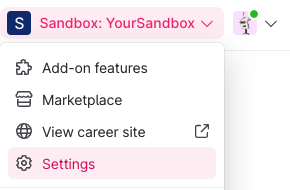 To add a new partner, click on the `CREATE A NEW PARTNER` button.
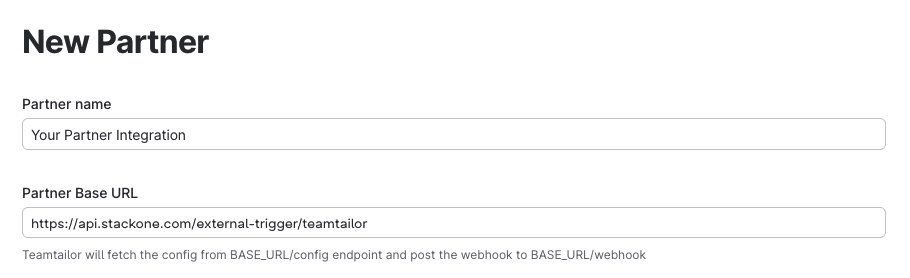
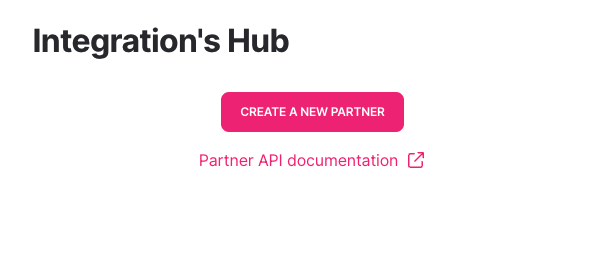 Complete the New Partner's form by filling out all the required fields:
* **Partner's Name** - Enter the name of the integration partner.
* **Partner Base URL** - Enter the endpoint URL provided by StackOne that will be used to fetch the input field configurations with the list of packages and to send candidate test notifications.
```plaintext theme={null}
https://api.stackone.com/external-trigger/teamtailor
```
Complete the New Partner's form by filling out all the required fields:
* **Partner's Name** - Enter the name of the integration partner.
* **Partner Base URL** - Enter the endpoint URL provided by StackOne that will be used to fetch the input field configurations with the list of packages and to send candidate test notifications.
```plaintext theme={null}
https://api.stackone.com/external-trigger/teamtailor
```
 * **Category in marketplace** - The integration will be categorised and displayed under the chosen category, such as Assessments or Background Checks, on Teamtailor's Marketplace.
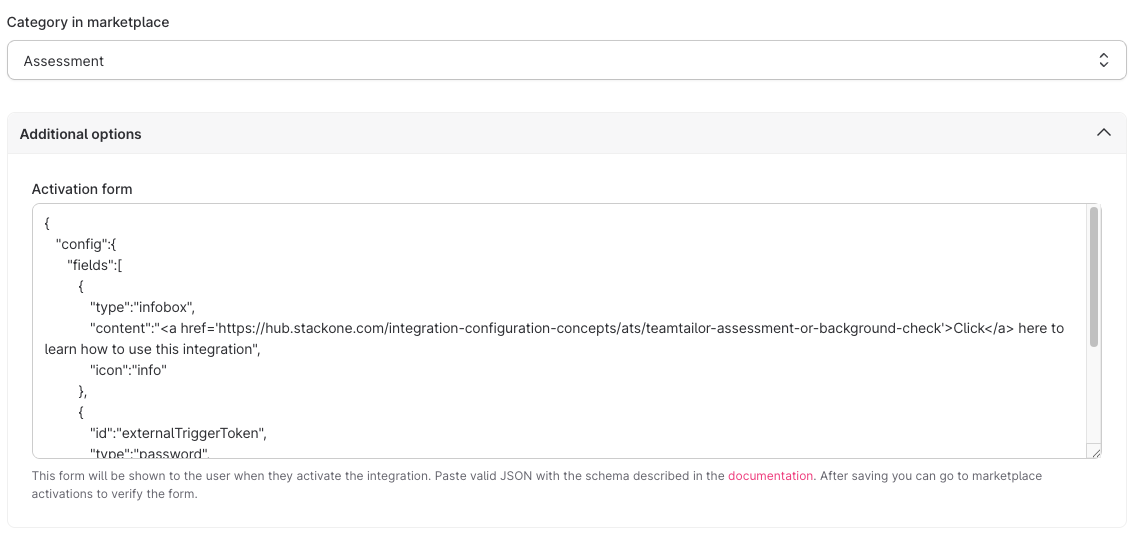
* **Additional options (Activation Form)** - Enter the following JSON into the activation form field:
* **Category in marketplace** - The integration will be categorised and displayed under the chosen category, such as Assessments or Background Checks, on Teamtailor's Marketplace.
* **Additional options (Activation Form)** - Enter the following JSON into the activation form field:
 ```plaintext theme={null}
{
"config":{
"fields":[
{
"type":"infobox",
"content":"Click here to learn how to use this integration",
"icon":"info"
},
{
"id":"externalTriggerToken",
"type":"password",
"label":"External Trigger Token",
"required":true,
"description":"The token to be used to trigger the workflow externally"
}
]
}
}
```
This **External Trigger Token** field will be visible to the user when enabling the integration from the Teamtailor Marketplace.
After saving, the partner integration will be successfully created.
### To obtain the credentials for partner integration
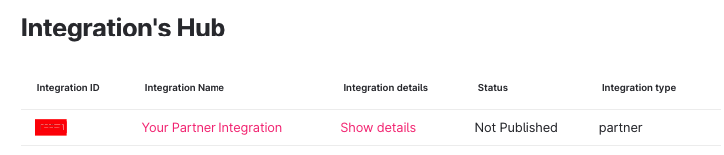
Next to your partner Integration's name on the Grid, you will find the Integration ID.
```plaintext theme={null}
{
"config":{
"fields":[
{
"type":"infobox",
"content":"Click here to learn how to use this integration",
"icon":"info"
},
{
"id":"externalTriggerToken",
"type":"password",
"label":"External Trigger Token",
"required":true,
"description":"The token to be used to trigger the workflow externally"
}
]
}
}
```
This **External Trigger Token** field will be visible to the user when enabling the integration from the Teamtailor Marketplace.
After saving, the partner integration will be successfully created.
### To obtain the credentials for partner integration
Next to your partner Integration's name on the Grid, you will find the Integration ID.
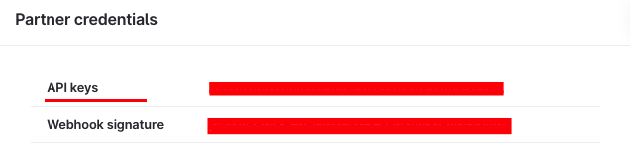
 By clicking on `Show Details`, you will be able to access the **API Key**.
 ## StackOne Configuration
Go to the ATS category on the *Integrations* page and activate Teamtailor
## StackOne Configuration
Go to the ATS category on the *Integrations* page and activate Teamtailor
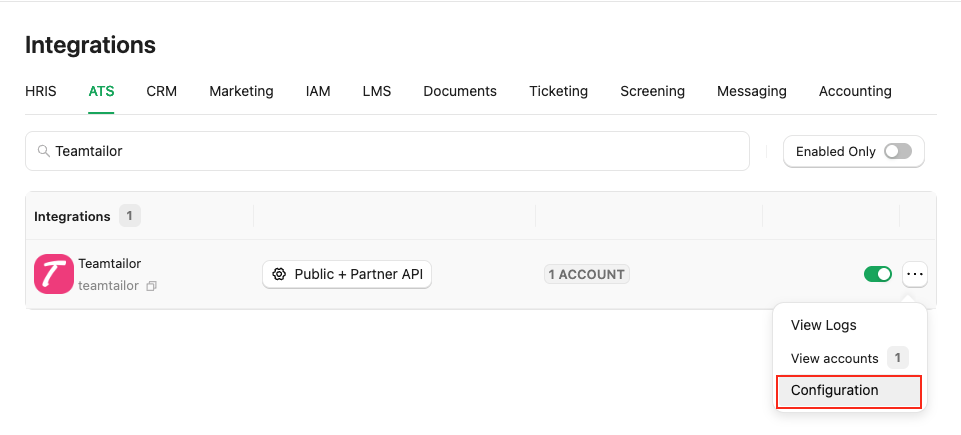 Fill out the necessary fields in the **Teamtailor - Configuration** modal:
* **Authentication Type**: Select either `Public + Partner API` or `Partner API` to integrate with Teamtailor (for Assessment/Background Check integration).
* If you select `Public + Partner API`, the hiring team's data will be included in the webhook notification.
Fill out the necessary fields in the **Teamtailor - Configuration** modal:
* **Authentication Type**: Select either `Public + Partner API` or `Partner API` to integrate with Teamtailor (for Assessment/Background Check integration).
* If you select `Public + Partner API`, the hiring team's data will be included in the webhook notification.
* If you select `Partner API`, the hiring team's data will not be included in the webhook notification.
* **Partner Category**: Select the category that corresponds to your integration on Teamtailor's Marketplace page. For instance, if your integration is listed under the Assessments category, please select **Assessment** from the dropdown menu.
* **Package's List Endpoint URL** - Implement and provide an endpoint to StackOne that StackOne will use to retrieve the list of packages when the recruiter wants to send a test to a candidate.
Implement the following POST endpoint:
```bash theme={null}
curl --location 'https://your-domain.com/' \
--header 'Content-Type: application/json' \
--header 'x-stackone-signature: string' \
--header 'Authorization: Basic ' \
--data '{
"job_id": "49201091",
"account_id": "456551489512493412",
"provider": "teamtailor"
}'
```
The expected response of the POST endpoint (list of packages). Refer to:
* [List Assessments Packages](https://docs.stackone.com/ats/api-reference/assessments/packages/list-assessments-packages)
* [List Background Check Packages](https://docs.stackone.com/ats/api-reference/background-checks/packages/list-background-check-packages)
Enter the endpoint into the designated field:
```plaintext theme={null}
https://your-domain.com/
```
* **Partner Integration ID**: You can find the Integration ID next to the Integration Name under **Settings > Integrations Hub** in Teamtailor.
* **Partner Integration API Key**: The API key can be found in the Integration details under **Settings > Integrations Hub** in Teamtailor.
To get Partner Integration ID & API Key, [check this](#to-obtain-the-credentials-for-partner-integration)
* **Package ID** - If you do not have the Package's List Endpoint URL, you can specify a particular package ID that will be visible to the recruiter when they wish to send the test to the candidate.
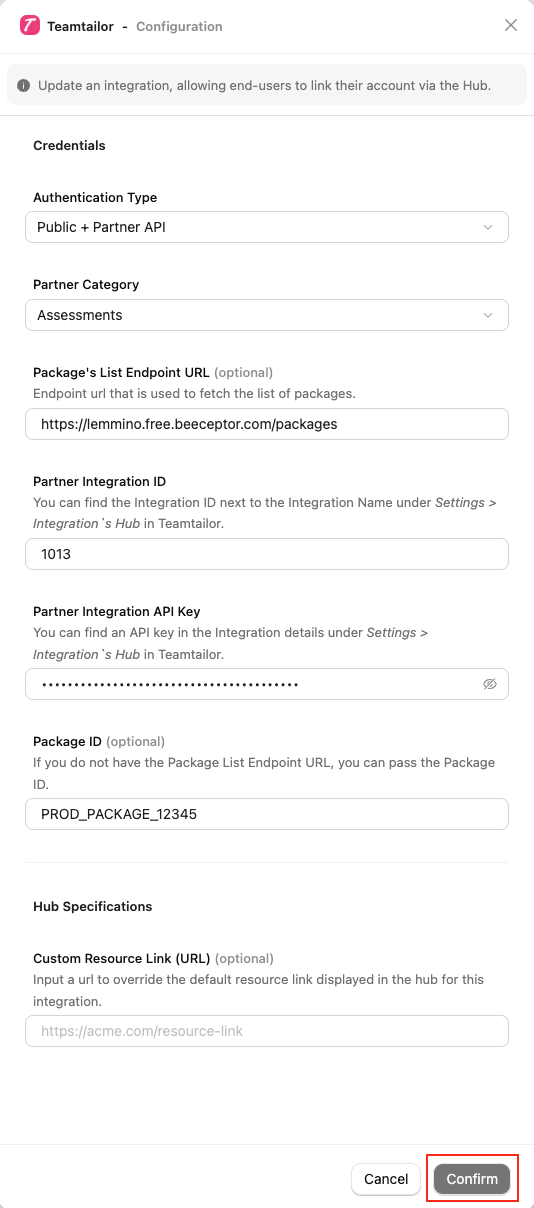 Click on the `Confirm` or `Save Changes` button to enable your Partner APIs, allowing end-users to link their accounts through the Hub.
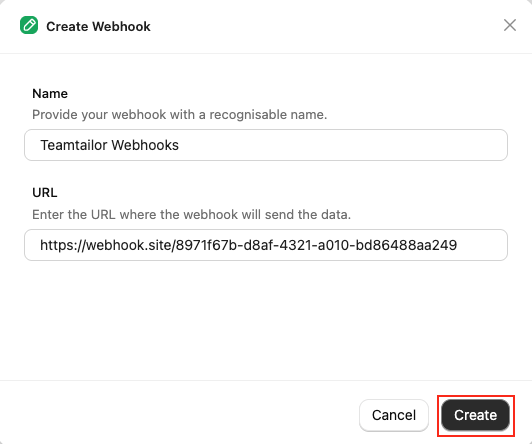
Navigate to the *Webhooks* page, click on `Add webhook` and fill out the form:
* **Name:** Enter your webhook with a recognisable name.
* **URL:** Enter the URL where the webhook will send the notification of the enable events.
Click on the `Confirm` or `Save Changes` button to enable your Partner APIs, allowing end-users to link their accounts through the Hub.
Navigate to the *Webhooks* page, click on `Add webhook` and fill out the form:
* **Name:** Enter your webhook with a recognisable name.
* **URL:** Enter the URL where the webhook will send the notification of the enable events.
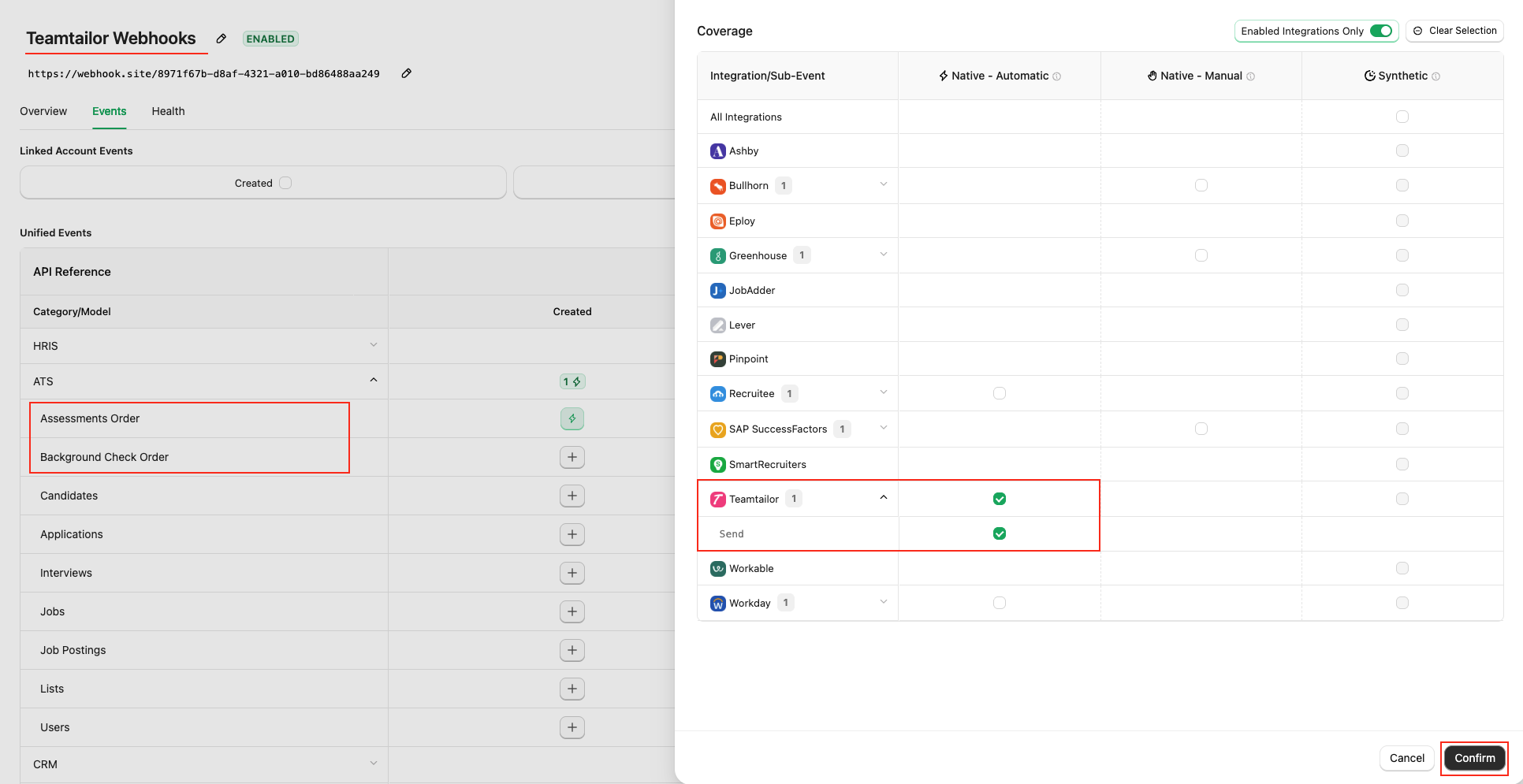
 Enable webhook events from the `Events` tab for Assessment & Background Check, such as `Assessments Order` & `Background Check Order`.
 ## ATS User Enablement
Navigate to the *Accounts* page or the StackOne Connector Hub to link your Teamtailor account with StackOne.
## ATS User Enablement
Navigate to the *Accounts* page or the StackOne Connector Hub to link your Teamtailor account with StackOne.
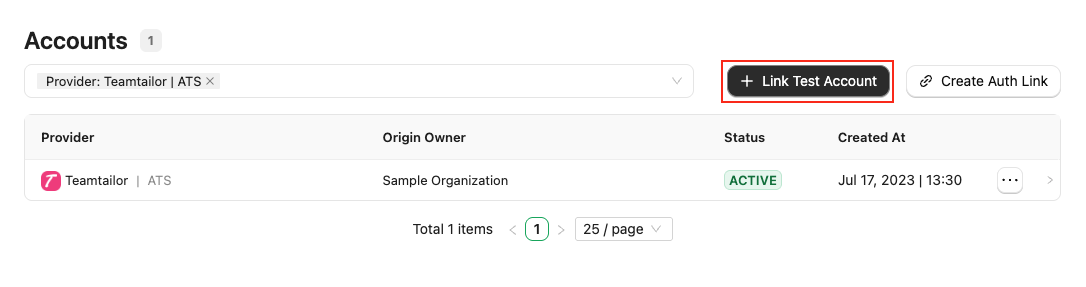 Users will get the **External Trigger Token** that is required to enable the integration from the Teamtailor Marketplace.
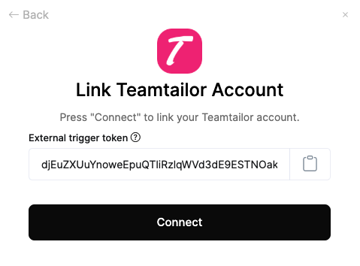 Follow the [Teamtailor Assessment or Background Check](https://hub.stackone.com/integration-configuration-concepts/ats/teamtailor-assessment-or-background-check) guide regarding how to enable the Teamtailor integration from the Marketplace.
## ATS User Experience
### Send the test to the Candidate from Teamtailor
Follow the [Teamtailor Assessment or Background Check](https://hub.stackone.com/integration-configuration-concepts/ats/teamtailor-assessment-or-background-check) guide regarding how to send the test from Teamtailor.
### User will see after test has been sent
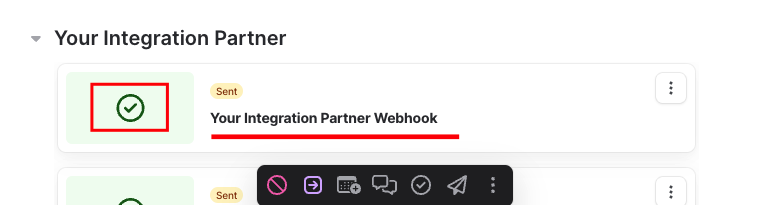
When a user sends an assessment or background check to a candidate, they will see a success message in the candidate application pop-up.
Follow the [Teamtailor Assessment or Background Check](https://hub.stackone.com/integration-configuration-concepts/ats/teamtailor-assessment-or-background-check) guide regarding how to enable the Teamtailor integration from the Marketplace.
## ATS User Experience
### Send the test to the Candidate from Teamtailor
Follow the [Teamtailor Assessment or Background Check](https://hub.stackone.com/integration-configuration-concepts/ats/teamtailor-assessment-or-background-check) guide regarding how to send the test from Teamtailor.
### User will see after test has been sent
When a user sends an assessment or background check to a candidate, they will see a success message in the candidate application pop-up.
 ## ATS User Experience Customisation
Utilise the following endpoints to update the results:
* [Assessment Update Result](https://docs.stackone.com/ats/api-reference/assessments/results/update-assessments-result)
* [Background Check Update Result](https://docs.stackone.com/ats/api-reference/background-checks/results/update-background-check-result)
Utilise the following endpoint to get metadata to update the result of the assessment or background check:
* [Connector Meta Information](https://docs.stackone.com/platform/api-reference/connectors/get-connector-meta-information) with the provider key `teamtailor` for model `assessments/results.update` or `background_checks/results.update`
#### User sees the updated results with different conditions of the assessment/background check in Teamtailor
| |
| -------------------------------------------------------------------------------------------------------------------------------------------------------------------------------------------------------------------------------------------------------------------------------------------------------------------------------------------------------------------------------------------------------------------------------------------------------------------------------------------------------------------------------------------------------------------------------------------------------------------------------------------------------------------------------------------------------------------------------------------------------------------------------------------------------------------------------------------------------------------------------------------------------------------------------------------------------------------------------------------------------------------------------------------------------------------------------------------------------------------------------------------------------------------------------------------------------------------------------------------------------------------------------------------------------------------------------------------------------------------------------------------------------------------------------------------------------------------------------------------------------------------------------------------------------------------------------------------------------------------------------------------------------------------------------------------------------------------------------------------------------------------------------------------------------------------------------------------------------------------------------------------------------------------------------------------------------------------------------------------------------------------------------------------------------------------------------------------------------------------------------------------------------------------------------------------------------- |
| When the result status `completed` without any other details
## ATS User Experience Customisation
Utilise the following endpoints to update the results:
* [Assessment Update Result](https://docs.stackone.com/ats/api-reference/assessments/results/update-assessments-result)
* [Background Check Update Result](https://docs.stackone.com/ats/api-reference/background-checks/results/update-background-check-result)
Utilise the following endpoint to get metadata to update the result of the assessment or background check:
* [Connector Meta Information](https://docs.stackone.com/platform/api-reference/connectors/get-connector-meta-information) with the provider key `teamtailor` for model `assessments/results.update` or `background_checks/results.update`
#### User sees the updated results with different conditions of the assessment/background check in Teamtailor
| |
| -------------------------------------------------------------------------------------------------------------------------------------------------------------------------------------------------------------------------------------------------------------------------------------------------------------------------------------------------------------------------------------------------------------------------------------------------------------------------------------------------------------------------------------------------------------------------------------------------------------------------------------------------------------------------------------------------------------------------------------------------------------------------------------------------------------------------------------------------------------------------------------------------------------------------------------------------------------------------------------------------------------------------------------------------------------------------------------------------------------------------------------------------------------------------------------------------------------------------------------------------------------------------------------------------------------------------------------------------------------------------------------------------------------------------------------------------------------------------------------------------------------------------------------------------------------------------------------------------------------------------------------------------------------------------------------------------------------------------------------------------------------------------------------------------------------------------------------------------------------------------------------------------------------------------------------------------------------------------------------------------------------------------------------------------------------------------------------------------------------------------------------------------------------------------------------------------------- |
| When the result status `completed` without any other details
 |
| When the result status `failed` without any other details
|
| When the result status `failed` without any other details
 |
| When the result `completed` with all data except Score
|
| When the result `completed` with all data except Score
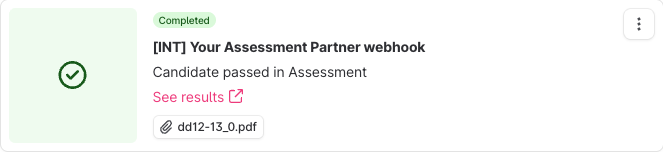 |
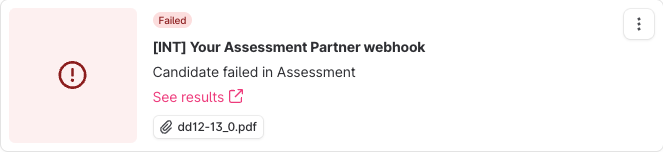
| When the result `failed` with all data except Score
|
| When the result `failed` with all data except Score
 |
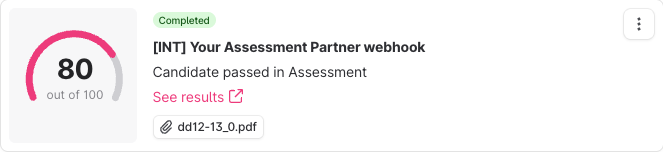
| When the result `completed` with all details
|
| When the result `completed` with all details
 |
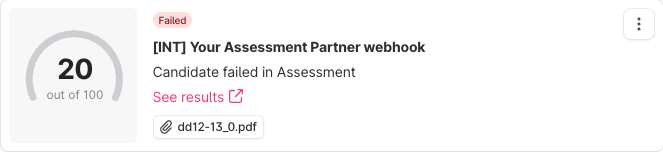
| When the result `failed` with all details
|
| When the result `failed` with all details
 |
| When the result not included Result URL
|
| When the result not included Result URL
 |
| When the result not included Attachments URL
|
| When the result not included Attachments URL
 |
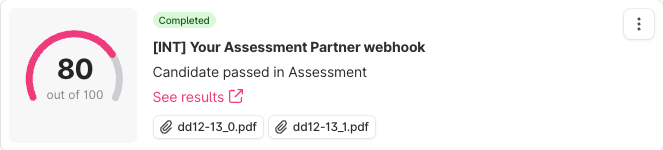
| When the result included multiple Attachments URL
|
| When the result included multiple Attachments URL
 |
## Testing Checklist
✅ **Provider Setup:**
* Logged-in with Admin account.
* Valid StackOne URL.
* Integration partner app is published to the Teamtailor's marketplace under your selected category.
* Teamtailor's marketplace activation form of your integration app having an input field to enter `External Trigger Token`.
✅ **StackOne Configuration:**
* Selected `Public + Partner API` or `Partner API` as Authentication Type.
* Package's List Endpoint URL is correct.
* Enable Teamtailor in StackOne Configuration model with the List Packages endpoint.
* Package's List Endpoint response is expected according to the following endpoint's response:
* [List Assessments Packages](https://docs.stackone.com/ats/api-reference/assessments/packages/list-assessments-packages)
* [List Background Check Packages](https://docs.stackone.com/ats/api-reference/background-checks/packages/list-background-check-packages)
✅ **ATS User Activation:**
* Enter `External Trigger Token` to the marketplace app to enable the integration partner app.
* Once the app is enabled from the marketplace, the app should be visible in the Integration list under the Candidate's application; navigate to `More` (the three-dot menu).
✅ **Create a Webhook:**
* Added a webhook for Teamtailor and enabled it with the events such as: `Assessment Order` or `Background Check Order`
* Valid webhook URL to receive assessment/background check notifications.
✅ **ATS User Experience:**
* The integration app is visible in the Integration list under the candidate’s application; navigate to `More` (the three-dot menu).
* A list of packages is visible in the dropdown field on the prompt when you click the integration from the list.
* Select a package and send the webhook. A green check will appear if the notification has been sent, or an error will appear if not.
✅ **Update Result:**
* Success response from the update result endpoint.
* Updated result details to Teamtailor's UI.
## Troubleshooting
|
## Testing Checklist
✅ **Provider Setup:**
* Logged-in with Admin account.
* Valid StackOne URL.
* Integration partner app is published to the Teamtailor's marketplace under your selected category.
* Teamtailor's marketplace activation form of your integration app having an input field to enter `External Trigger Token`.
✅ **StackOne Configuration:**
* Selected `Public + Partner API` or `Partner API` as Authentication Type.
* Package's List Endpoint URL is correct.
* Enable Teamtailor in StackOne Configuration model with the List Packages endpoint.
* Package's List Endpoint response is expected according to the following endpoint's response:
* [List Assessments Packages](https://docs.stackone.com/ats/api-reference/assessments/packages/list-assessments-packages)
* [List Background Check Packages](https://docs.stackone.com/ats/api-reference/background-checks/packages/list-background-check-packages)
✅ **ATS User Activation:**
* Enter `External Trigger Token` to the marketplace app to enable the integration partner app.
* Once the app is enabled from the marketplace, the app should be visible in the Integration list under the Candidate's application; navigate to `More` (the three-dot menu).
✅ **Create a Webhook:**
* Added a webhook for Teamtailor and enabled it with the events such as: `Assessment Order` or `Background Check Order`
* Valid webhook URL to receive assessment/background check notifications.
✅ **ATS User Experience:**
* The integration app is visible in the Integration list under the candidate’s application; navigate to `More` (the three-dot menu).
* A list of packages is visible in the dropdown field on the prompt when you click the integration from the list.
* Select a package and send the webhook. A green check will appear if the notification has been sent, or an error will appear if not.
✅ **Update Result:**
* Success response from the update result endpoint.
* Updated result details to Teamtailor's UI.
## Troubleshooting
| Symptom | Likely cause | Fix |
| ------------------------------------------------------------------------------------------------------ | ---------------------------------------------------------------------------------------------------------------------------------------------------------------------------------------------------------------------------------------- | ------------------------------------------------------------------------------------------------------------------------------------------------------------------------------------------------------------------------------------------------------------------------------------------------------------------------ |
| Unable to add new Integration partner app. | **•** Teamtailor Partnership is not active.
**•** Logged-in account is not an Admin account. | **•** Contact Teamtailor support for partnership status.
**•** Log in with an Admin account. |
| Integration partner app not visible in Teamtailor Marketplace. | Partnership app might be published but not approved | Contact Teamtailor support for partnership status. |
| Getting `Failed to fetch config from partner: Unable to fetch the partner config` error on the pop-up. | **•** Package's List Endpoint URL or Static Package ID is missing from StackOne Configuration.
**•** Invalid response getting from the Package's List Endpoint URL.
**•** Invalid Package's List Endpoint URL. | **•** Add Static Package ID if you don't have Package's List Endpoint URL.
**•** Response format should be expected as mentioned in the [StackOne Configuration](#stackone-configuration).
**•** Check Package's List Endpoint URL implementation at your end.
**•** Verify CORS. |
| External Trigger Token field is not visible at StackOne Connector Hub. | **•** Selected Authentication Type is incorrect. | Select Authentication Type `Public + Partner API` or `Partner API` instead. |
| User unable to activate integration app. | Invalid External Trigger Token. | Ensure to copy & add valid External Trigger Token |
| Test notification is not received. | **•** Invalid webhook URL.
**•** Incorrect webhook events are enabled. | **•** Verify webhook URL.
**•** Enable expected events as mentioned in the [StackOne Configuration](#stackone-configuration). |
| Test notification not included the job's hiring team. | Different Authentication Type instead of `Public + Partner API`. | Select Authentication Type `Public + Partner API` instead. |
| Unable to update result. | Invalid payload format. | Check [Connector Meta API](https://docs.stackone.com/platform/api-reference/connectors/get-connector-meta-information) endpoint for payload format. |
| Result URL or Attachment's URL showing error when opened. | Added result URL can be expired or is private. | Ensure to add public or signed URLs; verify CORS and expiry. |
For persistent issues, contact StackOne support with detailed error logs and configuration information.