> ## Documentation Index
> Fetch the complete documentation index at: https://docs.stackone.com/llms.txt
> Use this file to discover all available pages before exploring further.
# Bullhorn Recruitment Cloud - Salesforce Integration
> Technical guide for integrating with Bullhorn Recruitment Cloud using Salesforce REST API and SOQL queries
## Overview
The StackOne Salesforce-Bullhorn integration uses Salesforce's REST API and SOQL queries to provide unified access to Bullhorn data. This guide covers the technical implementation details for integration partners.
## API Architecture
The integration uses **Salesforce's REST API** and [**SOQL queries**](https://developer.salesforce.com/docs/atlas.en-us.soql_sosl.meta/soql_sosl/sforce_api_calls_soql.htm) to retrieve and manipulate data from Bullhorn instances running on Salesforce.
## Custom Fields
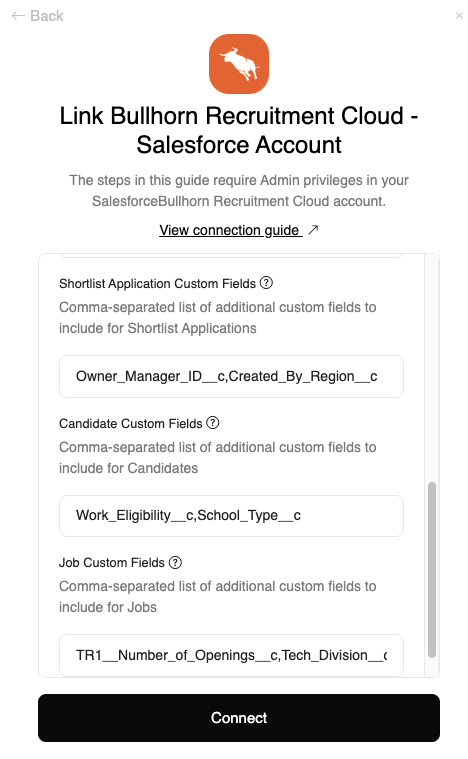
Custom fields are supported for the **Application**, **Candidate**, and **Job** models.
### Account-Specific Custom Fields
When connecting a Bullhorn account, customers can specify which model fields they wish to include as custom fields in their Account connection screen.
 ### Unified Custom Fields
Request additional fields for unified custom fields (not account-specific) using the `proxy[fields]` query parameter:
```bash theme={null}
curl "https://api.stackone.com/unified/ats/candidates?proxy[fields]=TR1__Reject_Action__c,TR1__Submit_And_Email_Action__c" \
-u "$STACKONE_API_KEY:" \
-H "x-account-id: YOUR_ACCOUNT_ID"
```
Example fields:
* `TR1__Reject_Action__c`
* `TR1__Submit_And_Email_Action__c`
## Custom Filtering
Apply additional SOQL filters using the `proxy[filter]` query parameter:
```bash theme={null}
curl "https://api.stackone.com/unified/ats/applications?proxy[filter]=ai_Job_Match_Score__c%20%3E%3D%203" \
-u "$STACKONE_API_KEY:" \
-H "x-account-id: YOUR_ACCOUNT_ID"
```
This enables filtering on custom fields and additional data points beyond the standard unified API capabilities.
## Applications
The integration supports two application types:
### Application Types
1. **TR1\_\_Application\_\_c** - Shortlist Application
2. **TR1\_\_Job\_Board\_Application\_\_c** - Job Board Application
Applications queries will include both TR1\_\_Application\_\_c and TR1\_\_Job\_Board\_Application\_\_c models by default.
To only include Applications of the TR1\_\_Job\_Board\_Application\_\_c type, set the filter\[stage] parameter to "null".
### Moving Applications
Convert a **Job Board Application** to a **Shortlist Application** using the move endpoint:
**Endpoint:** `PATCH /ats/applications/:id/move`
**Request:**
```json theme={null}
{
"interview_stage_id": "Application"
}
```
This operation:
* Creates a new `TR1__Application__c` record
* Returns the new record's ID
* Updates the `TR1__ATS_Stage__c` field
Only Job Board Applications (**TR1\_\_Job\_Board\_Application\_\_c**) can be moved to Shortlist Applications. The **interview\_stage\_id** value must be set to **"Application"**. Other **TR1\_\_Application\_\_c** records can also be moved using this endpoint, but the behavior is restricted.
### Passthrough Support
The `passthrough` property is supported for:
* **Application Move endpoint** (`PATCH /ats/applications/:id/move`)
* **Application Update endpoint** (`PATCH /ats/applications/:id`)
Use the passthrough parameter to update additional Salesforce properties not covered by the unified API:
```json theme={null}
{
"interview_stage_id": "Application",
"passthrough": {
"Custom_Field__c": "value",
"Another_Field__c": 123
}
}
```
## Best Practices
1. **Test custom fields** before implementing in production to ensure the field names are correct
2. **Validate SOQL filter syntax** using the `proxy[filter]` parameter against Salesforce documentation
3. **Handle errors gracefully** when moving applications - not all application types support this operation
## Related Resources
* [ATS API Reference](/ats/api-reference)
* [Using Passthrough Query Parameters](/guides/using-the-passthrough-query-parameters)
* [Unified API Error Codes and Troubleshooting](/guides/unified-api-error-codes-and-troubleshooting-guide)
### Unified Custom Fields
Request additional fields for unified custom fields (not account-specific) using the `proxy[fields]` query parameter:
```bash theme={null}
curl "https://api.stackone.com/unified/ats/candidates?proxy[fields]=TR1__Reject_Action__c,TR1__Submit_And_Email_Action__c" \
-u "$STACKONE_API_KEY:" \
-H "x-account-id: YOUR_ACCOUNT_ID"
```
Example fields:
* `TR1__Reject_Action__c`
* `TR1__Submit_And_Email_Action__c`
## Custom Filtering
Apply additional SOQL filters using the `proxy[filter]` query parameter:
```bash theme={null}
curl "https://api.stackone.com/unified/ats/applications?proxy[filter]=ai_Job_Match_Score__c%20%3E%3D%203" \
-u "$STACKONE_API_KEY:" \
-H "x-account-id: YOUR_ACCOUNT_ID"
```
This enables filtering on custom fields and additional data points beyond the standard unified API capabilities.
## Applications
The integration supports two application types:
### Application Types
1. **TR1\_\_Application\_\_c** - Shortlist Application
2. **TR1\_\_Job\_Board\_Application\_\_c** - Job Board Application
Applications queries will include both TR1\_\_Application\_\_c and TR1\_\_Job\_Board\_Application\_\_c models by default.
To only include Applications of the TR1\_\_Job\_Board\_Application\_\_c type, set the filter\[stage] parameter to "null".
### Moving Applications
Convert a **Job Board Application** to a **Shortlist Application** using the move endpoint:
**Endpoint:** `PATCH /ats/applications/:id/move`
**Request:**
```json theme={null}
{
"interview_stage_id": "Application"
}
```
This operation:
* Creates a new `TR1__Application__c` record
* Returns the new record's ID
* Updates the `TR1__ATS_Stage__c` field
Only Job Board Applications (**TR1\_\_Job\_Board\_Application\_\_c**) can be moved to Shortlist Applications. The **interview\_stage\_id** value must be set to **"Application"**. Other **TR1\_\_Application\_\_c** records can also be moved using this endpoint, but the behavior is restricted.
### Passthrough Support
The `passthrough` property is supported for:
* **Application Move endpoint** (`PATCH /ats/applications/:id/move`)
* **Application Update endpoint** (`PATCH /ats/applications/:id`)
Use the passthrough parameter to update additional Salesforce properties not covered by the unified API:
```json theme={null}
{
"interview_stage_id": "Application",
"passthrough": {
"Custom_Field__c": "value",
"Another_Field__c": 123
}
}
```
## Best Practices
1. **Test custom fields** before implementing in production to ensure the field names are correct
2. **Validate SOQL filter syntax** using the `proxy[filter]` parameter against Salesforce documentation
3. **Handle errors gracefully** when moving applications - not all application types support this operation
## Related Resources
* [ATS API Reference](/ats/api-reference)
* [Using Passthrough Query Parameters](/guides/using-the-passthrough-query-parameters)
* [Unified API Error Codes and Troubleshooting](/guides/unified-api-error-codes-and-troubleshooting-guide)