> ## Documentation Index
> Fetch the complete documentation index at: https://docs.stackone.com/llms.txt
> Use this file to discover all available pages before exploring further.
# Webhooks
> Subscribe to events from your connectors and from StackOne, delivered to your endpoint in real time.
A **webhook** is the HTTPS endpoint StackOne delivers to. An **event** is what gets delivered. You enable events on a connector profile, create a webhook, and subscribe it to the events you care about.
## Event categories
**Connector events** fire from a connector - a new Notion page, a file dropped into SharePoint, a Salesforce record change. They're configured on the [connector profile](/guides/connector-profiles) for that connector.
* **Programmatic** - StackOne registers the subscription with the connector for every linked account, automatically. New accounts get subscribed the moment they're linked.
* **Manual** - when a connector doesn't expose a subscription API, StackOne shows a Native Webhook URL on the profile that you register inside the connector's own app config.
**Platform events** fire from StackOne itself. Right now this means account lifecycle: `account.created`, `account.updated`, `account.deleted`. These let you (or your platform team) react when a customer connects or disconnects a tool, without polling.
**Legacy unified events** fire from the legacy unified API connectors and have their own catalog and payload shape. See [Webhooks (Legacy Unified APIs)](/legacy-unified-apis/common-guide/webhooks).
## Where you configure events
There are two places, and they own different things. **The outbound webhook has to exist first** - that's what you bind events to on the connector profile.
1. **Webhooks page** - *the outbound endpoint*: URL, signing secrets, delivery health, and recent volume. Create the webhook here before you try to route any events to it.
2. **Connector profile** - *which events fire* from this connector in this project, and which webhook(s) each event is routed to. For programmatic events, toggling here provisions (or unprovisions) the underlying subscription with the connector for every linked account on the profile. For manual events, the **Native Webhook URL** to paste into the connector's app config appears on the profile after it's saved - see [Events on a connector profile](/guides/connector-profiles#events).
Enabling an event on the connector profile without routing it to a webhook means StackOne can receive the event from the connector but nothing leaves your project. Routing an event to a webhook without enabling it on a profile means nothing arrives. You need both.
## Quickstart
On the [Webhooks](https://app.stackone.com/webhooks) page, click **Add Webhook** and provide a name and an HTTPS URL. The URL must be publicly reachable and return `200` quickly.
Open [Connector Profiles](https://app.stackone.com/connector_profiles), pick the profile for the connector you want events from, and on the **Events** tab toggle the events you want and select the webhook you just created from the dropdown. Programmatic events are provisioned with the connector automatically for every linked account on that profile.
The **Signing secrets** tab on the Webhooks page has the current secret. Copy it into your endpoint's config if you plan to verify signatures.
On each request to your endpoint, verify the `x-stackone-signature` header (see below) and return `200`. The response body is ignored.
Link an account in the [Accounts](https://app.stackone.com/accounts) section or via the Hub. If the connector uses a Native Webhook URL, copy that URL from the connector profile and paste it into the connector's own app config to start receiving events.
## Verifying webhook signatures
Every delivery is signed with HMAC-SHA256 over the raw request body, using your signing secret as the key, base64url-encoded, and sent in the `x-stackone-signature` header.
```javascript theme={null}
import { createHmac, timingSafeEqual } from 'crypto';
function isSignatureValid(signature, rawBody, signingSecret) {
if (!signature) return false;
const expected = createHmac('sha256', signingSecret)
.update(rawBody)
.digest('base64url');
const a = Buffer.from(expected);
const b = Buffer.from(signature);
return a.length === b.length && timingSafeEqual(a, b);
}
```
Two things matter:
* **Hash the raw request bytes**, not a re-serialised JSON string - `JSON.stringify` doesn't guarantee byte-for-byte equality with what we sent.
* **Compare in constant time** with `timingSafeEqual`, not `===`, so an attacker can't infer the signature byte-by-byte from response latency.
**Simpler alternative.** If you don't need cryptographic verification, you can append a secret query parameter to your webhook URL (e.g. `?token=...`) and check for its presence on every request. It's less secure but adequate for non-sensitive event types.
## Rotating signing secrets
You can run two active secrets in parallel to rotate without dropping events.
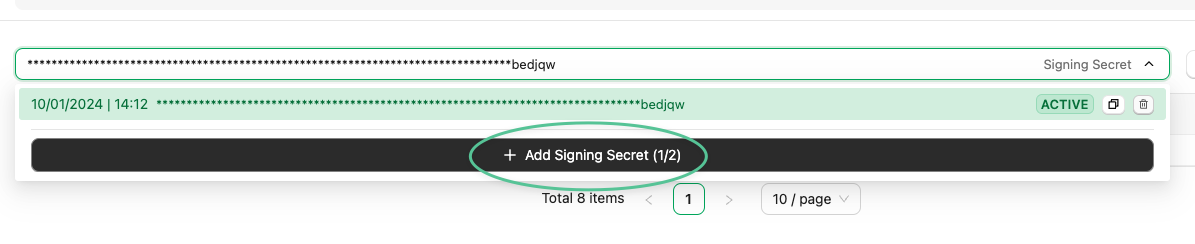
1. On the **Signing secrets** tab, click **Add Signing Secret**. The new secret starts inactive - deliveries continue to use the active secret.
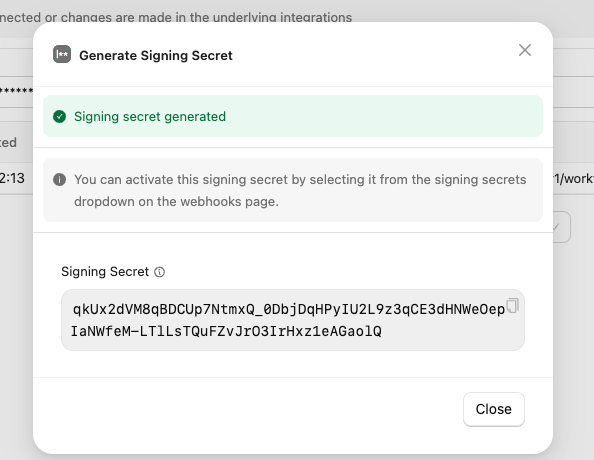
 2. Copy the new (inactive) secret.
 3. In your endpoint, accept signatures matching **either** the current secret or the new one.
4. Back in StackOne, activate the new secret. Deliveries now sign with the new secret.
3. In your endpoint, accept signatures matching **either** the current secret or the new one.
4. Back in StackOne, activate the new secret. Deliveries now sign with the new secret.
 5. Once you've confirmed everything's still verifying, delete the old secret. You can't retrieve or reactivate a deleted secret.
6. Remove the old secret from your verification code.
## Managing a webhook
* **Disable** - stops delivery to your URL. Subscriptions with the connector stay active, so events keep flowing into StackOne and resume on enable.
* **Enable** - resumes delivery using the existing subscriptions.
* **Delete** - removes the webhook and cleans up the programmatic subscriptions with the connector for events that no other webhook is using.
Deleting a webhook is irreversible.
## Troubleshooting
* **Events aren't arriving.** Check that the event is *enabled on the connector profile* **and** *subscribed by the webhook*. Both are required.
* **Signature mismatches.** Verify against the raw body, not a re-serialised JSON string. Confirm you're using the currently-active secret.
* **Some accounts deliver, others don't.** Open the connector profile and confirm the linked account is active. A disabled connector profile pauses delivery for every account on it.
* **5xx loops.** Your endpoint is returning an error and StackOne is retrying. Check your application logs and the webhook's recent deliveries on the Webhooks page.
* **Behind a firewall.** Allowlist StackOne's egress IPs - see the IP table on the [Connector Profiles](/guides/connector-profiles#troubleshooting) page.
5. Once you've confirmed everything's still verifying, delete the old secret. You can't retrieve or reactivate a deleted secret.
6. Remove the old secret from your verification code.
## Managing a webhook
* **Disable** - stops delivery to your URL. Subscriptions with the connector stay active, so events keep flowing into StackOne and resume on enable.
* **Enable** - resumes delivery using the existing subscriptions.
* **Delete** - removes the webhook and cleans up the programmatic subscriptions with the connector for events that no other webhook is using.
Deleting a webhook is irreversible.
## Troubleshooting
* **Events aren't arriving.** Check that the event is *enabled on the connector profile* **and** *subscribed by the webhook*. Both are required.
* **Signature mismatches.** Verify against the raw body, not a re-serialised JSON string. Confirm you're using the currently-active secret.
* **Some accounts deliver, others don't.** Open the connector profile and confirm the linked account is active. A disabled connector profile pauses delivery for every account on it.
* **5xx loops.** Your endpoint is returning an error and StackOne is retrying. Check your application logs and the webhook's recent deliveries on the Webhooks page.
* **Behind a firewall.** Allowlist StackOne's egress IPs - see the IP table on the [Connector Profiles](/guides/connector-profiles#troubleshooting) page.