> ## Documentation Index
> Fetch the complete documentation index at: https://docs.stackone.com/llms.txt
> Use this file to discover all available pages before exploring further.
# Managing Projects
> Understand StackOne projects: isolated workspaces for organizing API keys, connectors, and linked accounts by region or environment.
## What is a Project?
A StackOne Project is an isolated workspace that organizes your API keys, connectors, and linked accounts. Projects let you separate data and access based on your needs.
Common use cases:
* **Regional data isolation**: EU project for GDPR compliance, US project for North American customers
* **Environment separation**: dev, staging, and production projects
* **Team isolation**: temporary projects for individual engineers or QA testing
## Creating a Project
1. Click the project selector in the top-left of the sidebar
2. Select **Create New Project**
Or go directly to [app.stackone.com/project/new](https://app.stackone.com/project/new).
Only Organization Admins can create new projects
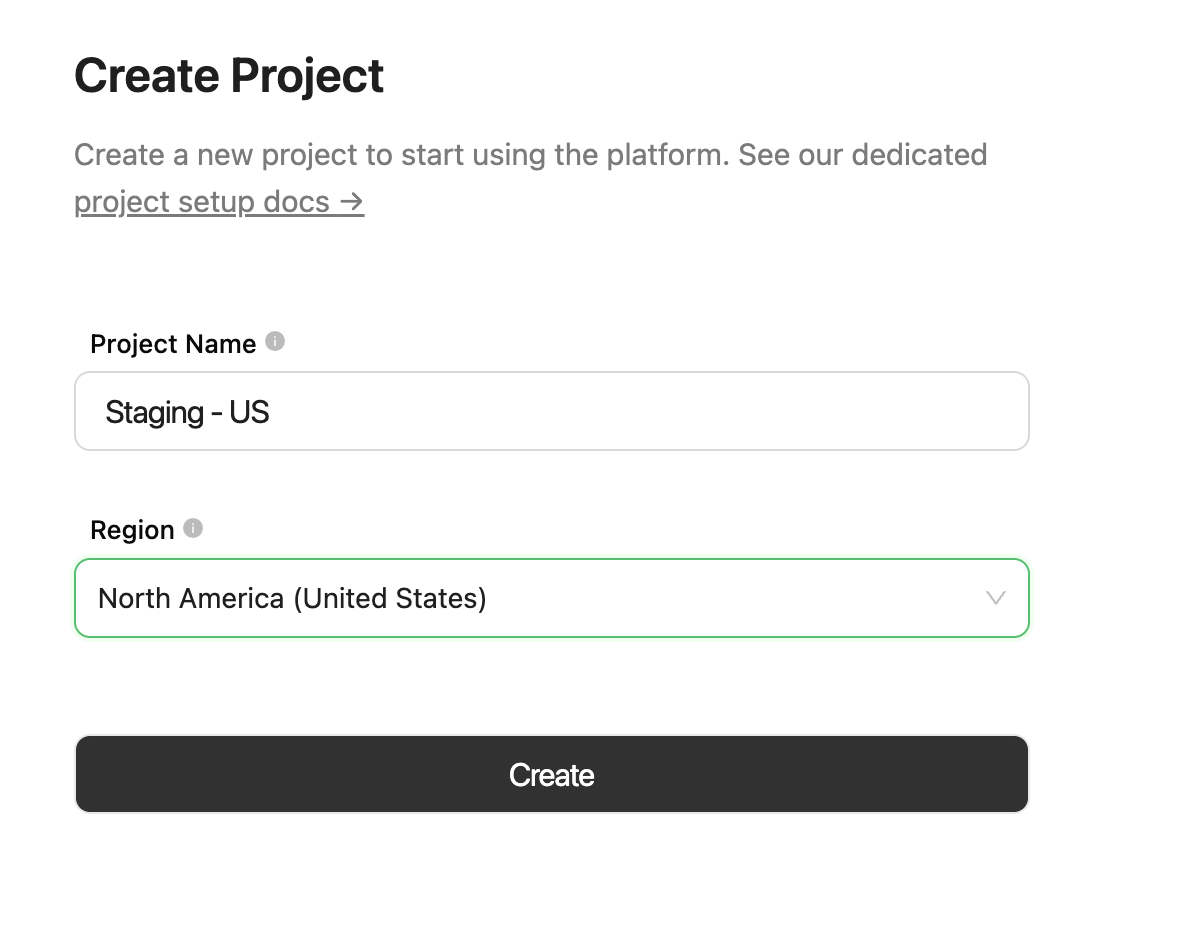 ### Choosing a Region
The region determines where your data is stored and processed. This ensures data locality compliance for your customers.
| Area | Region | Data Center | Availability |
| :------------ | :------------------------------- | :----------------- | :------------ |
| Europe | 🇮🇪 Ireland (Dublin) | AWS EU-WEST-1 | ✔️ Available |
| Europe | 🇬🇧 United Kingdom (London) | AWS EU-WEST-2 | ➕ Add-on |
| North America | 🇺🇸 United States (N. Virginia) | AWS US-EAST-1 | ✔️ Available |
| APAC | 🇦🇺 Australia (Sydney) | AWS AP-SOUTHEAST-2 | ⏳ Coming soon |
Need a custom region? Contact your StackOne account manager.
## Switching Projects
Click the project selector in the top-left to see all projects you have access to. The region code appears next to each project name (e.g., `EU1` or `US1`).
### Choosing a Region
The region determines where your data is stored and processed. This ensures data locality compliance for your customers.
| Area | Region | Data Center | Availability |
| :------------ | :------------------------------- | :----------------- | :------------ |
| Europe | 🇮🇪 Ireland (Dublin) | AWS EU-WEST-1 | ✔️ Available |
| Europe | 🇬🇧 United Kingdom (London) | AWS EU-WEST-2 | ➕ Add-on |
| North America | 🇺🇸 United States (N. Virginia) | AWS US-EAST-1 | ✔️ Available |
| APAC | 🇦🇺 Australia (Sydney) | AWS AP-SOUTHEAST-2 | ⏳ Coming soon |
Need a custom region? Contact your StackOne account manager.
## Switching Projects
Click the project selector in the top-left to see all projects you have access to. The region code appears next to each project name (e.g., `EU1` or `US1`).
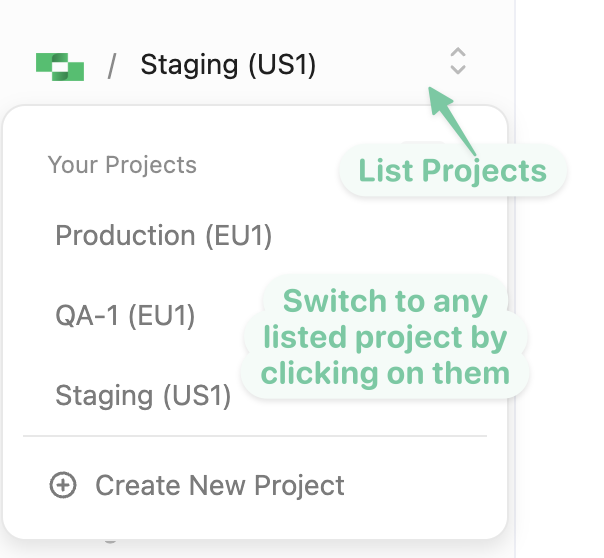 Organization Admins see all projects. Users with `basic` role only see projects they've been added to.
***
Configure members, logs, IP restrictions, and AI features
Organization Admins see all projects. Users with `basic` role only see projects they've been added to.
***
Configure members, logs, IP restrictions, and AI features