> ## Documentation Index
> Fetch the complete documentation index at: https://docs.stackone.com/llms.txt
> Use this file to discover all available pages before exploring further.

# StackOne Hub UI

> Embed the StackOne Hub in your application to let end-users authenticate and connect their accounts

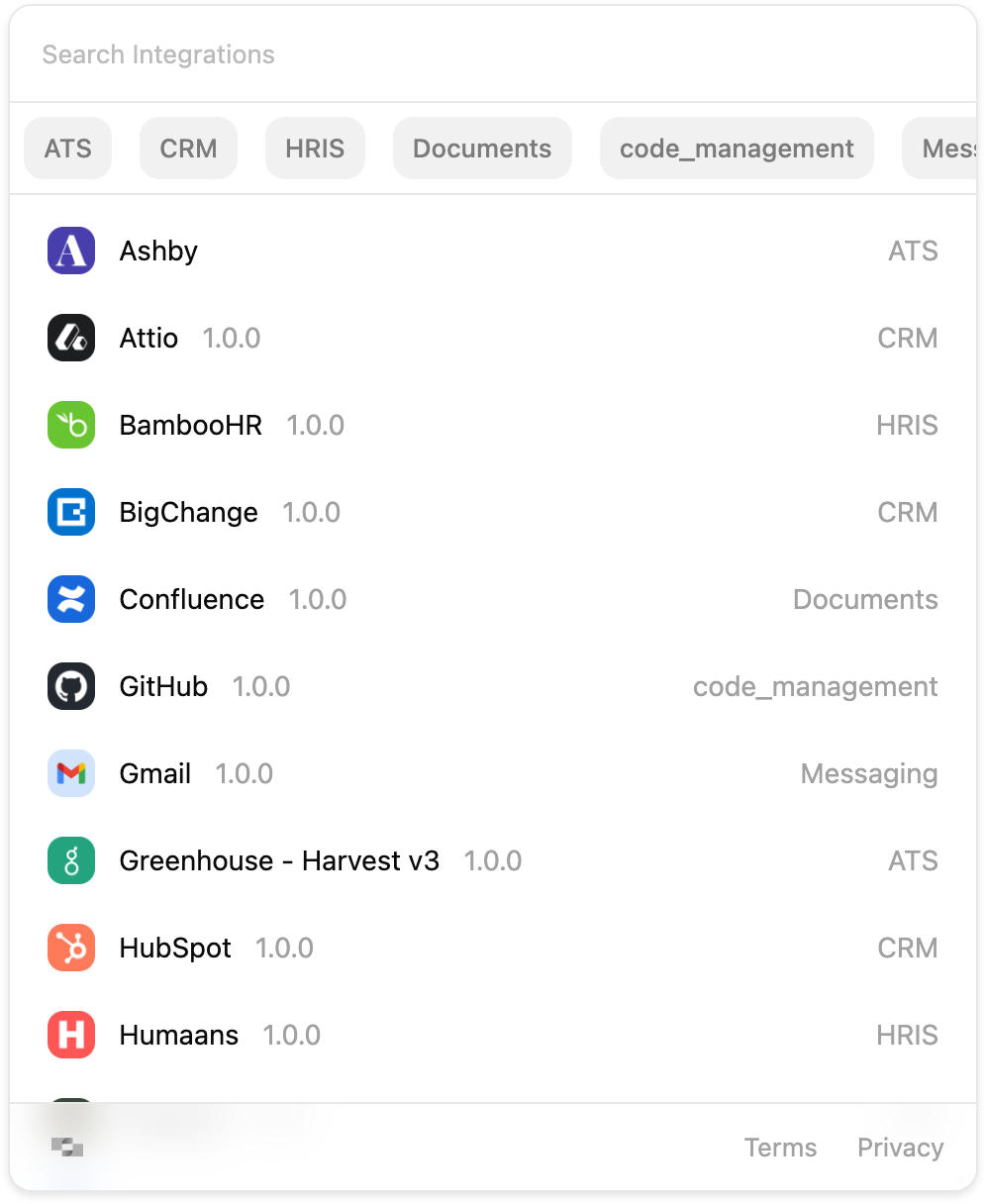
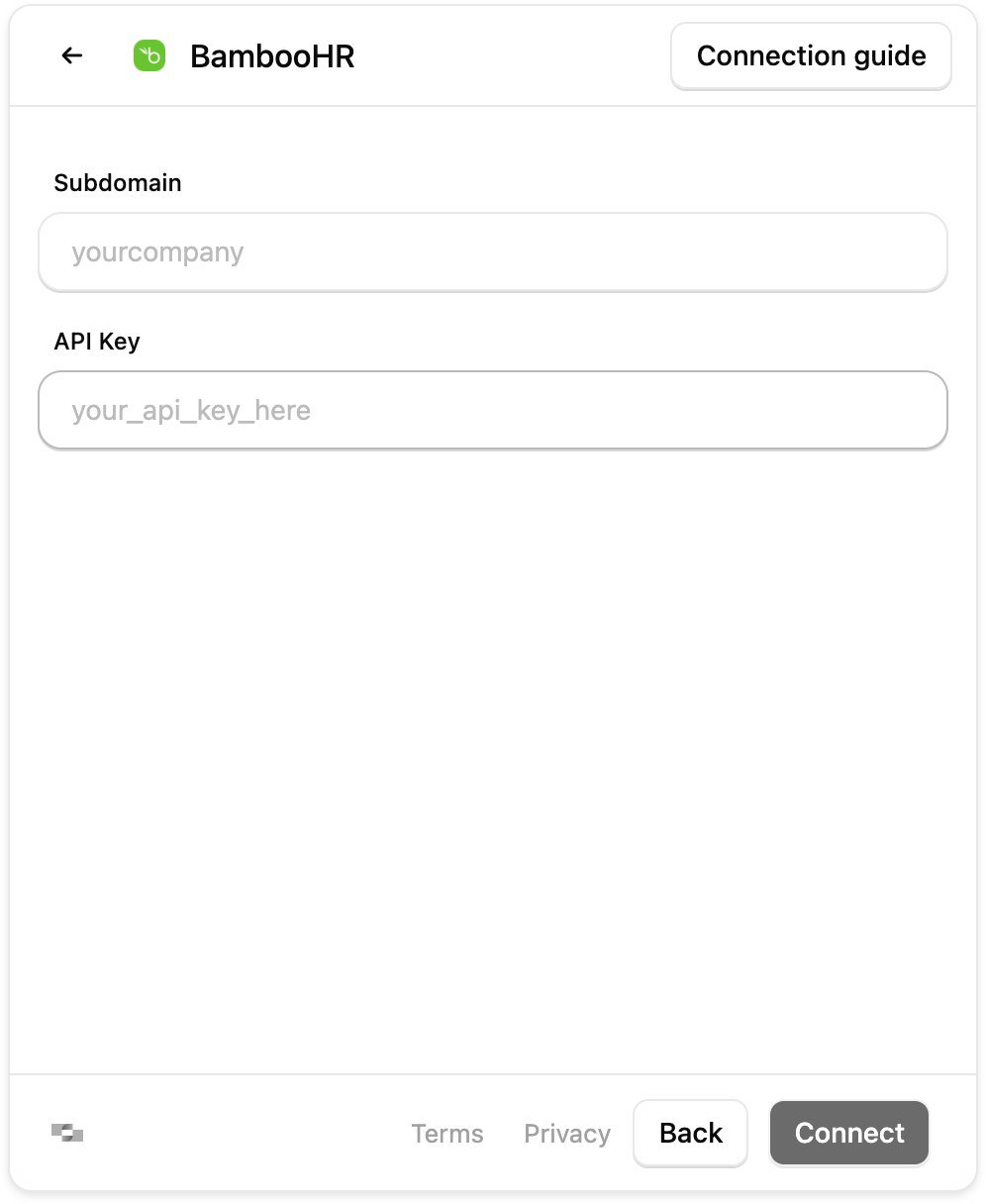
The StackOne Hub lets end-users authenticate and configure [connectors enabled](/guides/managing-integrations) in your StackOne projects.

<div class="flex justify-center gap-4">
  <Frame>
    <img alt="StackOne Hub - Connector Selection" src="https://mintcdn.com/stackone-60/zwNwud3MEpkn5Lar/images/hub-connector-listing.png?fit=max&auto=format&n=zwNwud3MEpkn5Lar&q=85&s=c59d43c73d5b7e6699a76ce519ab53b9" class="border border-gray-300" width="996" height="1216" data-path="images/hub-connector-listing.png" />
  </Frame>

  <Frame>
    <img alt="StackOne Hub - Credential Entry" src="https://mintcdn.com/stackone-60/zwNwud3MEpkn5Lar/images/hub-credential-entry.png?fit=max&auto=format&n=zwNwud3MEpkn5Lar&q=85&s=49463d5617abd44d38fe52c565c76a52" class="border border-gray-300" width="996" height="1216" data-path="images/hub-credential-entry.png" />
  </Frame>
</div>

***

## Choosing a Hub Version

StackOne offers two Hub versions. We recommend the **Hub** for new projects. The **Legacy Hub** remains available for existing implementations.

|                        | Hub                            | Legacy Hub                           |
| ---------------------- | ------------------------------ | ------------------------------------ |
| **Package**            | `@stackone/hub`                | `@stackone/react-hub` / `connect.js` |
| **Architecture**       | Native React component         | Iframe-based (loads external script) |
| **React Support**      | Yes                            | Yes                                  |
| **Non-React Support**  | Yes (web component)            | Yes (`connect.js`)                   |
| **Filtering & Search** | Yes                            | No                                   |
| **Error Messages**     | Detailed with resolution steps | Basic                                |
| **Theming**            | Full theming via design system | Limited styling options              |
| **Performance**        | Fast (direct API calls)        | Average (iframe network hops)        |
| **Status**             | Recommended                    | Legacy                               |

### Why the Hub?

The Hub is a ground-up rebuild with a fundamentally different architecture:

* **Native React Component**: The Hub renders directly in your React tree. The Legacy Hub loads an external script (`connect.js`) that injects an iframe. This means the Hub shares your app's React context, supports proper component composition, and eliminates iframe-related overhead.

* **Direct API Communication**: The Hub makes API calls directly from your app. The Legacy Hub routes requests through an iframe hosted on StackOne's domain, adding latency from cross-origin communication and extra network hops.

* **Full Theming Support**: The Hub uses our Malachite design system, giving you complete control over colors, typography, and styling. You can match your app's design without CSS hacks or iframe styling limitations.

* **Better Event Handling**: The Hub uses native React callbacks. The Legacy Hub relies on `postMessage` to communicate events across the iframe boundary, which can be less reliable and harder to debug.

***

## Quick Start

<Tabs>
  <Tab title="Hub - React">
    The Hub (`@stackone/hub`) offers filtering, search, detailed error messages, and full theming support.

    <Steps>
      <Step title="Install the package">
        <CodeGroup>
          ```bash npm theme={null}
          npm install @stackone/hub
          ```

          ```bash yarn theme={null}
          yarn add @stackone/hub
          ```

          ```bash pnpm theme={null}
          pnpm add @stackone/hub
          ```
        </CodeGroup>
      </Step>

      <Step title="Get a session token from your backend">
        The Hub needs a [connect session token](/platform/using-session-tokens) to securely communicate with StackOne. This token must be generated server-side to keep your API key secure.

        ```typescript theme={null}
        async function retrieveConnectSessionToken() {
          const response = await fetch('/api/stackone/connect-session', {
            method: 'POST',
            headers: { 'Content-Type': 'application/json' },
            body: JSON.stringify({ username: 'jane@example.com' }),
          });
          const { token } = await response.json();
          return token;
        }
        ```

        See [Connect your Backend with StackOne](/platform/connect-your-backend-with-stackone) for backend implementation.
      </Step>

      <Step title="Add the component">
        ```tsx theme={null}
        import { StackOneHub } from "@stackone/hub";
        import { useEffect, useState } from "react";

        function ConnectorPage() {
          const [token, setToken] = useState<string>();

          useEffect(() => {
            retrieveConnectSessionToken().then(setToken);
          }, []);

          if (!token) return <div>Loading...</div>;

          return (
            <StackOneHub
              token={token}
              onSuccess={(account) => {
                console.log('Connected:', account.id, account.provider);
              }}
              onCancel={() => console.log('Cancelled')}
              onClose={() => console.log('Closed')}
            />
          );
        }
        ```
      </Step>
    </Steps>
  </Tab>

  <Tab title="Legacy Hub - React">
    <Note>
      The Legacy Hub. For new projects, use the **Hub** above.
    </Note>

    The Legacy Hub (`@stackone/react-hub`) provides a hook-based API.

    <Steps>
      <Step title="Install the package">
        <CodeGroup>
          ```bash npm theme={null}
          npm install @stackone/react-hub
          ```

          ```bash yarn theme={null}
          yarn add @stackone/react-hub
          ```

          ```bash pnpm theme={null}
          pnpm add @stackone/react-hub
          ```
        </CodeGroup>
      </Step>

      <Step title="Create a function to retrieve the session token">
        The Hub needs a connect session token to securely communicate with StackOne. This token must be generated server-side to keep your API key secure.

        ```typescript theme={null}
        export const retrieveConnectSessionToken = async ({ username, provider }) => {
          const response = await fetch('/api/stackone/connect-session', {
            method: 'POST',
            headers: { 'Content-Type': 'application/json' },
            body: JSON.stringify({
              originUsername: username,
              provider, // optional - skip connector listing
            }),
          });

          const { token } = await response.json();
          return { token };
        };
        ```

        See [Connect your Backend with StackOne](/platform/connect-your-backend-with-stackone) for backend implementation.
      </Step>

      <Step title="Create a Link Account Button">
        ```tsx theme={null}
        import { useCallback } from 'react';
        import { useStackOneHub } from '@stackone/react-hub';

        const LinkAccountButton = () => {
          const { startConnect } = useStackOneHub();

          const startFlow = useCallback(async () => {
            const { token } = await retrieveConnectSessionToken({
              username: 'jane@example.com'
            });
            startConnect({
              sessionToken: token,
              onSuccess: (account) => {
                console.log('Account linked:', account);
              },
              onCancel: () => console.log('Cancelled'),
              onClose: () => console.log('Closed'),
            });
          }, [startConnect]);

          return <button onClick={startFlow}>Connect Account</button>;
        };
        ```
      </Step>
    </Steps>
  </Tab>

  <Tab title="Legacy Hub - Vanilla JS">
    <Note>
      The Legacy Hub. The Hub doesn't yet support vanilla JS. For non-React apps, use `connect.js` below or generate [Auth Links](/guides/auth-link) from the dashboard.
    </Note>

    The Legacy Hub provides `connect.js`, a standalone JavaScript library for non-React applications.

    <Steps>
      <Step title="Install the connect script">
        <CodeGroup>
          ```html HTML Script Tag theme={null}
          <script src="https://app.stackone.com/stackone/connect.js"></script>
          ```

          ```javascript Dynamic JavaScript theme={null}
          const script = document.createElement('script');
          script.src = 'https://app.stackone.com/stackone/connect.js';
          script.onload = () => {
            // Connect is now available globally
            console.log('Connect.js loaded');
          };
          document.body.appendChild(script);
          ```
        </CodeGroup>
      </Step>

      <Step title="Create a function to retrieve the session token">
        ```javascript theme={null}
        async function retrieveConnectSessionToken() {
          const response = await fetch('/api/stackone/connect-session', {
            method: 'POST',
            headers: { 'Content-Type': 'application/json' },
            body: JSON.stringify({ username: 'jane@example.com' }),
          });
          return response.json();
        }
        ```

        See [Connect your Backend with StackOne](/platform/connect-your-backend-with-stackone) for backend implementation.
      </Step>

      <Step title="Start the connect flow">
        ```javascript theme={null}
        const { token } = await retrieveConnectSessionToken();

        Connect.start({
          sessionToken: token,
          onSuccess: (account) => {
            console.log('Account linked:', account);
          },
          onCancel: () => {
            console.log('User cancelled');
          },
          onClose: () => {
            console.log('Hub closed');
          },
        });
        ```
      </Step>
    </Steps>
  </Tab>

  <Tab title="Web Component">
    `@stackone/hub` also ships a framework-agnostic custom element (`<stackone-hub>`) for non-React apps. React + ReactDOM are bundled into the web-component build, so consumers don't need React installed.

    Pick the framework guide that matches your stack:

    <CardGroup cols={2}>
      <Card title="Vanilla HTML" icon="html5" href="/guides/web-component-vanilla">
        Drop a `<script>` tag into any HTML page.
      </Card>

      <Card title="Vue 3" icon="vuejs" href="/guides/web-component-vue">
        Configure `isCustomElement` and use the tag in templates.
      </Card>

      <Card title="Svelte 5" icon="square-s" href="/guides/web-component-svelte">
        No extra config — Svelte treats unknown tags as custom elements.
      </Card>

      <Card title="Angular" icon="angular" href="/guides/web-component-angular">
        Use `CUSTOM_ELEMENTS_SCHEMA` and bind attributes with `[attr.name]`.
      </Card>

      <Card title="React" icon="react" href="/guides/web-component-react">
        Mount `<stackone-hub>` from JSX when you need the framework-agnostic build.
      </Card>
    </CardGroup>
  </Tab>
</Tabs>

***

## API Reference

<Tabs>
  <Tab title="Hub - @stackone/hub">
    The `StackOneHub` component accepts these props:

    | Prop              | Type                                                  | Default                      | Description                                             |
    | ----------------- | ----------------------------------------------------- | ---------------------------- | ------------------------------------------------------- |
    | `token`           | `string`                                              | —                            | Connect session token from your backend                 |
    | `mode`            | `'integration-picker'`                                | `'integration-picker'`       | Hub mode                                                |
    | `accountId`       | `string`                                              | —                            | Pre-select a specific account to edit                   |
    | `baseUrl`         | `string`                                              | `'https://api.stackone.com'` | StackOne API base URL                                   |
    | `appUrl`          | `string`                                              | `'https://app.stackone.com'` | StackOne App URL                                        |
    | `height`          | `string`                                              | `'500px'`                    | Component height                                        |
    | `theme`           | `'light' \| 'dark' \| PartialMalachiteTheme`          | `'light'`                    | Theme configuration                                     |
    | `showFooterLinks` | `boolean`                                             | `true`                       | Show footer links                                       |
    | `onSuccess`       | `(account: { id: string; provider: string }) => void` | —                            | Called when account is connected                        |
    | `onCancel`        | `() => void`                                          | —                            | Called when user cancels                                |
    | `onClose`         | `() => void`                                          | —                            | Called when hub closes                                  |
    | `onCloseLabel`    | `string`                                              | `'Close'`                    | Custom label for the close button on the success screen |

    ```tsx theme={null}
    import { StackOneHub } from "@stackone/hub";

    <StackOneHub
      token={sessionToken}
      mode="integration-picker"
      height="600px"
      theme="dark"
      showFooterLinks={false}
      onSuccess={(account) => {
        console.log(`Connected ${account.provider} with ID ${account.id}`);
      }}
      onCancel={() => console.log('User cancelled')}
      onClose={() => console.log('Hub closed')}
      onCloseLabel="Done"
    />
    ```
  </Tab>

  <Tab title="Legacy Hub - @stackone/react-hub">
    The `useStackOneHub` hook returns a `startConnect` function:

    ```typescript theme={null}
    const { startConnect } = useStackOneHub({ connectUrl?: string });
    ```

    **StartOptions**

    | Option         | Type                         | Required | Description                             |
    | -------------- | ---------------------------- | -------- | --------------------------------------- |
    | `sessionToken` | `string`                     | Yes      | Connect session token from your backend |
    | `apiUrl`       | `string`                     | No       | Custom API URL                          |
    | `styles`       | `HubStyles`                  | No       | Style customization                     |
    | `onSuccess`    | `(account: Account) => void` | No       | Called when account is connected        |
    | `onCancel`     | `() => void`                 | No       | Called when user cancels                |
    | `onClose`      | `() => void`                 | No       | Called when hub closes                  |

    ```tsx theme={null}
    import { useStackOneHub } from '@stackone/react-hub';

    const { startConnect } = useStackOneHub();

    startConnect({
      sessionToken: token,
      onSuccess: (account) => {
        console.log('Connected account:', account.id);
      },
      onCancel: () => console.log('Cancelled'),
      onClose: () => console.log('Closed'),
    });
    ```
  </Tab>

  <Tab title="Legacy Hub - connect.js">
    After loading the script, use the global `Connect` object:

    ```javascript theme={null}
    Connect.start({
      sessionToken: string,     // Required - from your backend
      apiUrl?: string,          // Optional - custom API URL
      styles?: HubStyles,       // Optional - style customization
      onSuccess?: (account) => void,
      onCancel?: () => void,
      onClose?: () => void,
    });
    ```

    Full example:

    ```javascript theme={null}
    Connect.start({
      sessionToken: token,
      styles: {
        inline: { containerId: 'hub-container', width: '100%', height: '600px' },
        options: { back: true, close: true, bgColor: '#f5f5f5' },
      },
      onSuccess: (account) => {
        console.log('Account linked:', account);
        // account has: id, provider, status, etc.
      },
      onCancel: () => {
        console.log('User cancelled the flow');
      },
      onClose: () => {
        console.log('Hub modal was closed');
      },
    });
    ```
  </Tab>
</Tabs>

***

## Style Customization

<Tabs>
  <Tab title="Hub">
    The Hub supports full theming with the `theme` prop:

    ```tsx theme={null}
    <StackOneHub
      token={token}
      theme="dark"  // or "light"
    />
    ```

    For custom theming, pass a `PartialMalachiteTheme` object:

    ```tsx theme={null}
    <StackOneHub
      token={token}
      theme={{
        colors: {
          primary: {
            background: '#6366f1',
            foreground: '#ffffff',
          },
          card: {
            background: '#fafafa',
          },
        },
      }}
    />
    ```

    See the [@stackone/hub repository](https://github.com/StackOneHQ/hub) for full theme options.
  </Tab>

  <Tab title="Legacy Hub">
    The Legacy Hub uses a `styles` object with two sections:

    ### HubStyles Interface

    ```typescript theme={null}
    interface HubStyles {
      inline?: {
        containerId: string;  // Required - DOM element ID to embed the hub
        width?: string;       // e.g., '400px', '100%'
        height?: string;      // e.g., '500px', '100%'
      };
      options?: {
        back?: boolean;       // Show/hide back arrow (default: true)
        close?: boolean;      // Show/hide close button (default: true)
        bgColor?: string;     // Background color (e.g., 'white', '#f0f0f0')
      };
    }
    ```

    ### Default (Modal) vs Inline

    **Default (Modal)** - Hub opens in a centered modal overlay:

    ```javascript theme={null}
    startConnect({ sessionToken: token });
    ```

    <Frame>
      <img src="https://mintcdn.com/stackone-60/SJYqWv54Bsiau7aR/images/b3d5dc92935d8c19d75075054e15452c7eba8553238ad3946689086481146982-image.png?fit=max&auto=format&n=SJYqWv54Bsiau7aR&q=85&s=61e57573a49274be5e7e004dc50d1987" alt="Default modal style" width="842" height="1101" data-path="images/b3d5dc92935d8c19d75075054e15452c7eba8553238ad3946689086481146982-image.png" />
    </Frame>

    **Inline** - Hub embeds in a specific container:

    ```javascript theme={null}
    startConnect({
      sessionToken: token,
      styles: {
        inline: {
          containerId: 'my-hub-container',
          width: '400px',
          height: '600px',
        },
        options: {
          back: false,
          close: false,
          bgColor: 'transparent',
        },
      },
    });
    ```

    <Frame>
      <img src="https://mintcdn.com/stackone-60/SJYqWv54Bsiau7aR/images/8d379164573ef8fd8909faee369d500342f105ce04a1c4bcb4ff986d033ee10d-image.png?fit=max&auto=format&n=SJYqWv54Bsiau7aR&q=85&s=2c7b545cec24ddc1eb25a6ccfb55a10c" alt="Inline embedded style" width="750" height="810" data-path="images/8d379164573ef8fd8909faee369d500342f105ce04a1c4bcb4ff986d033ee10d-image.png" />
    </Frame>
  </Tab>
</Tabs>

***

## Hub Behavior Customization

Control which connectors appear in the Hub by configuring the connect session on your backend.

### Filtering Connectors

You can specify a `provider` or `categories` property when creating the connect session to control which connectors appear in the Hub:

* **`provider`**: Opens the Hub directly at the credential entry screen for a specific connector, bypassing the connector listing
* **`categories`**: Filters the Hub to show only connectors from specified categories (e.g., `hris`, `ats`)

If neither is specified, the Hub displays all connectors enabled for the project.

<Warning>
  The connector specified in `provider` must be enabled in the [Connector Profiles page](https://app.stackone.com/connector_profiles) of the associated project.
</Warning>

Find valid `provider` keys in the [Supported Connectors](https://app.stackone.com/field_coverage) list under the `Provider Key` column.

### Backend Examples

<CodeGroup>
  ```javascript JavaScript theme={null}
  // Skip connector list, go directly to BambooHR
  const result = await stackOne.connectSessions.createConnectSession({
    originOwnerId: "customer-123",
    originOwnerName: "Acme Inc",
    provider: "bamboohr",  // Go directly to this connector
  });
  ```

  ```javascript JavaScript (Categories) theme={null}
  // Show only HRIS connectors
  const result = await stackOne.connectSessions.createConnectSession({
    originOwnerId: "customer-123",
    originOwnerName: "Acme Inc",
    categories: ["hris"],  // Filter to HRIS category
  });
  ```
</CodeGroup>

***

## Event Callbacks

All Hub versions support these callbacks:

| Callback    | When it fires                                                                            |
| ----------- | ---------------------------------------------------------------------------------------- |
| `onSuccess` | User successfully connects an account. Receives account object with `id` and `provider`. |
| `onCancel`  | User explicitly cancels the flow (clicks cancel/back).                                   |
| `onClose`   | Hub closes for any reason (success, cancel, or clicking outside modal).                  |

<Tip>
  Use `onSuccess` to update your UI or trigger backend syncs. Use `onClose` as a cleanup handler that always runs.
</Tip>

```typescript theme={null}
startConnect({
  sessionToken: token,
  onSuccess: (account) => {
    // Refresh your linked accounts
    fetchLinkedAccounts();
    showNotification(`Connected to ${account.provider}`);
  },
  onCancel: () => {
    // User backed out - maybe show a prompt
    console.log('Connection cancelled');
  },
  onClose: () => {
    // Always runs - cleanup
    setIsConnecting(false);
  },
});
```

***

## Dashboard Access

You can also use the Hub directly from the StackOne dashboard without embedding:

### Connection Links

Generate connection links from your dashboard to share with end-users.

<div class="flex justify-center gap-4 my-4">
  <Frame caption="Dashboard Connection Link Generation">
    <video controls className="w-full aspect-video rounded-xl" src="https://mintcdn.com/stackone-60/5eSj_yFjXdePvCoH/videos/hub/hub-link-generation.mov?fit=max&auto=format&n=5eSj_yFjXdePvCoH&q=85&s=6974bf5b79a1b5273143091d25c03d87" data-path="videos/hub/hub-link-generation.mov" />
  </Frame>
</div>

### Direct Account Linking

Link accounts directly from the dashboard interface.

<div class="flex justify-center gap-4 my-4">
  <Frame caption="Dashboard Account Linking">
    <video controls className="w-full aspect-video rounded-xl" src="https://mintcdn.com/stackone-60/5eSj_yFjXdePvCoH/videos/hub/in-dashboard-hub.mov?fit=max&auto=format&n=5eSj_yFjXdePvCoH&q=85&s=0619e58095706f4fa7de8ea26e5c7739" data-path="videos/hub/in-dashboard-hub.mov" />
  </Frame>
</div>

***

## Backend Setup

Both hub versions require a connect session token generated from your backend. This keeps your API key secure.

<CardGroup cols={2}>
  <Card title="Backend Implementation" icon="server" href="/platform/connect-your-backend-with-stackone">
    Generate session tokens securely from your backend
  </Card>

  <Card title="API Reference" icon="code" href="/platform/api-reference/connect-sessions/">
    Connect Sessions endpoint documentation
  </Card>
</CardGroup>