> ## Documentation Index
> Fetch the complete documentation index at: https://docs.stackone.com/llms.txt
> Use this file to discover all available pages before exploring further.
# Organizations & Projects
> Projects are isolated workspaces inside your organization, each with its own region, API keys, and linked accounts.
Your StackOne account is structured as an **organization** containing **projects**. Members and security are managed at the organization level; everything you build with lives in a project.
## Organization
Your organization is the top level, holding your projects, organization members, and org-wide security (roles, MFA, SSO).
Organization members hold one of two organization roles:
* **Org Admin** — manages who has access and creates projects.
* **Basic** — only sees the projects they're added to.
Org and project roles are independent, so a **Basic** member can be **Project Admin** on a specific project: full control of that project without org-wide access.
Invite members and assign org and project roles.
Single sign-on for your organization.
## Projects
An isolated workspace inside the organization. Each project has its own:
* **Name** — can be changed at any time without affecting linked accounts or other settings.
* **Region** — set at creation and fixed afterward; it decides where data is stored and appears in the API key as `v1.{region}.xxxxx`.
* **API keys** — scoped to one project, so a production key can't reach dev data.
* **Project members** — project-level roles, so someone can be Project Admin here without org-wide access.
* **Connector profiles and linked accounts** — its own [connector profiles](/gateway/concepts/connector-profiles) and [linked accounts](/gateway/concepts/linked-accounts).
Use separate projects to keep environments or regions apart — for example dev vs production, EU vs US, or temporary projects for individual engineers and QA.
### Create a project
Click the project selector in the top-left of the sidebar and select [**Create New Project**](https://app.stackone.com/project/new).
Only Organization Admins can create new projects.
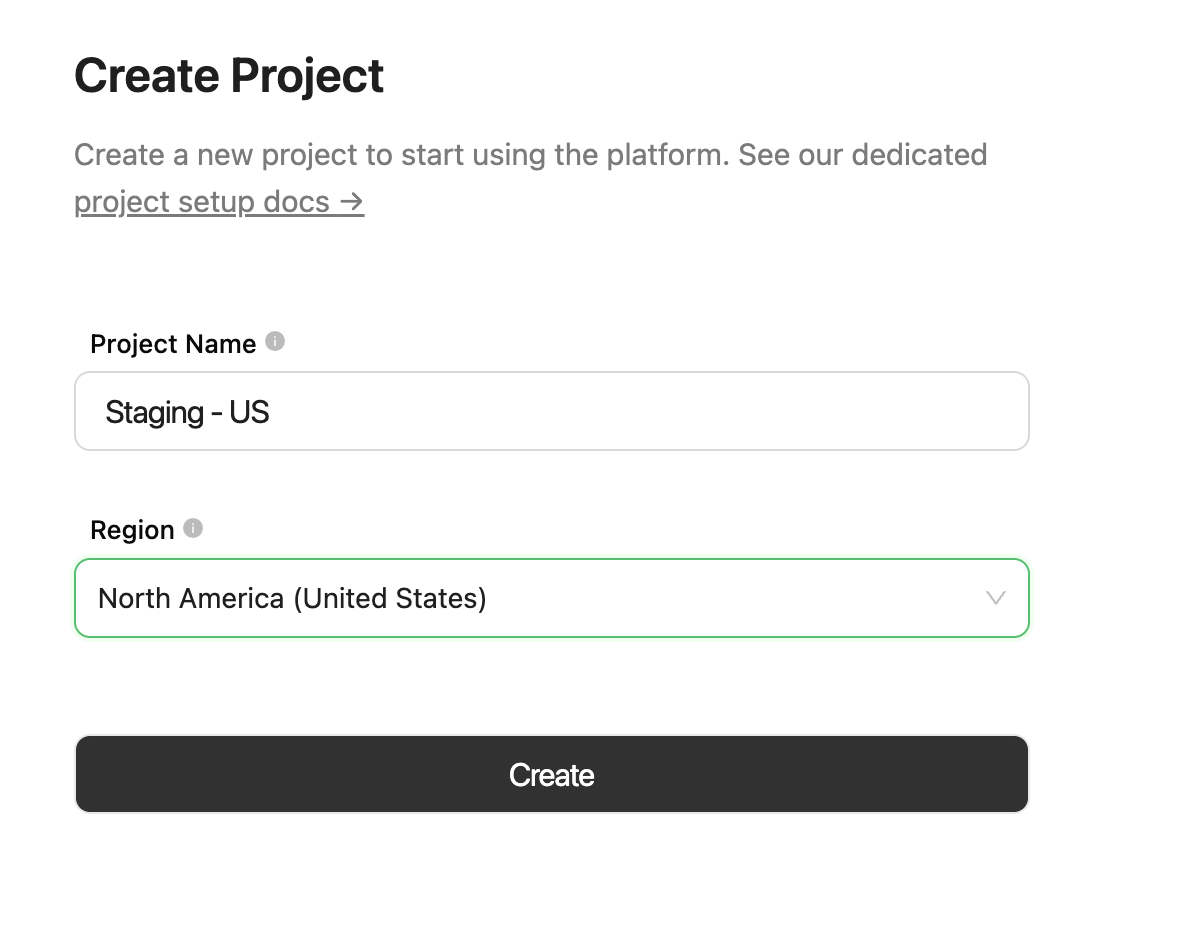 | Area | Region | Data Center | Availability |
| :------------ | :------------------------------- | :----------------- | :----------- |
| Europe | 🇮🇪 Ireland (Dublin) | AWS EU-WEST-1 | Available |
| Europe | 🇬🇧 United Kingdom (London) | AWS EU-WEST-2 | Add-on |
| North America | 🇺🇸 United States (N. Virginia) | AWS US-EAST-1 | Available |
| APAC | 🇦🇺 Australia (Sydney) | AWS AP-SOUTHEAST-2 | Coming soon |
Need a custom region? Contact your StackOne account manager.
### Switch projects
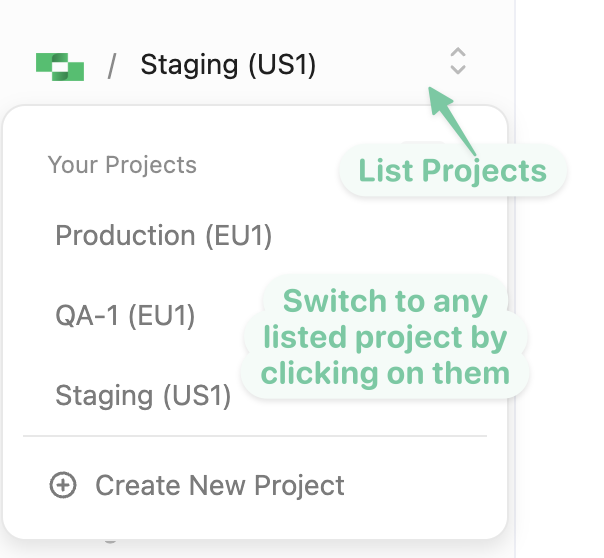
The project selector in the top-left of the sidebar lists the projects you have access to — the region code appears next to each project name (e.g. `EU1` or `US1`).
| Area | Region | Data Center | Availability |
| :------------ | :------------------------------- | :----------------- | :----------- |
| Europe | 🇮🇪 Ireland (Dublin) | AWS EU-WEST-1 | Available |
| Europe | 🇬🇧 United Kingdom (London) | AWS EU-WEST-2 | Add-on |
| North America | 🇺🇸 United States (N. Virginia) | AWS US-EAST-1 | Available |
| APAC | 🇦🇺 Australia (Sydney) | AWS AP-SOUTHEAST-2 | Coming soon |
Need a custom region? Contact your StackOne account manager.
### Switch projects
The project selector in the top-left of the sidebar lists the projects you have access to — the region code appears next to each project name (e.g. `EU1` or `US1`).
 ### Project settings
Deleting a project (under **Danger Zone**) is immediate and irreversible — it removes everything inside it: linked accounts, API keys, webhooks, and all associated data.
Configure a project from **Project Settings** in the dashboard sidebar. Each setting is covered where it's used:
Create keys and set their scopes.
Project-level roles — Viewer or Project Admin.
Request-log retention and error-only mode.
Prompt-injection scanning and blocking thresholds.
Whether published connector versions can be overwritten.
### Project settings
Deleting a project (under **Danger Zone**) is immediate and irreversible — it removes everything inside it: linked accounts, API keys, webhooks, and all associated data.
Configure a project from **Project Settings** in the dashboard sidebar. Each setting is covered where it's used:
Create keys and set their scopes.
Project-level roles — Viewer or Project Admin.
Request-log retention and error-only mode.
Prompt-injection scanning and blocking thresholds.
Whether published connector versions can be overwritten.