> ## Documentation Index
> Fetch the complete documentation index at: https://docs.stackone.com/llms.txt
> Use this file to discover all available pages before exploring further.
# API Keys
> Generate and manage a StackOne API key from the dashboard.
An API key authenticates every call your backend makes to StackOne. Keys are scoped to a single [project](/gateway/concepts/organizations-and-projects#projects) — a key can only reach the connector profiles and linked accounts in the project it was created in.
## Generate an API key
Log in to the [StackOne dashboard](https://app.stackone.com) and go to **Project Settings → API Keys** in the left navigation.
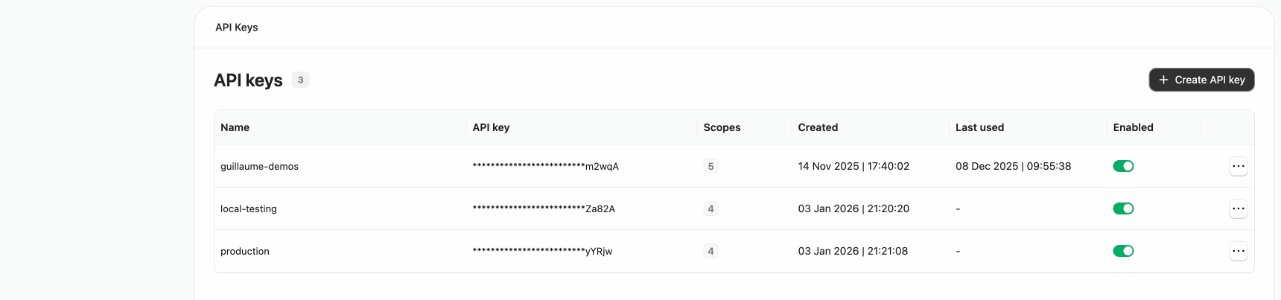 Click **Create API key** and enter a name (e.g. `my-agent-key` or `production-hris-sync`). This label can't be changed later.
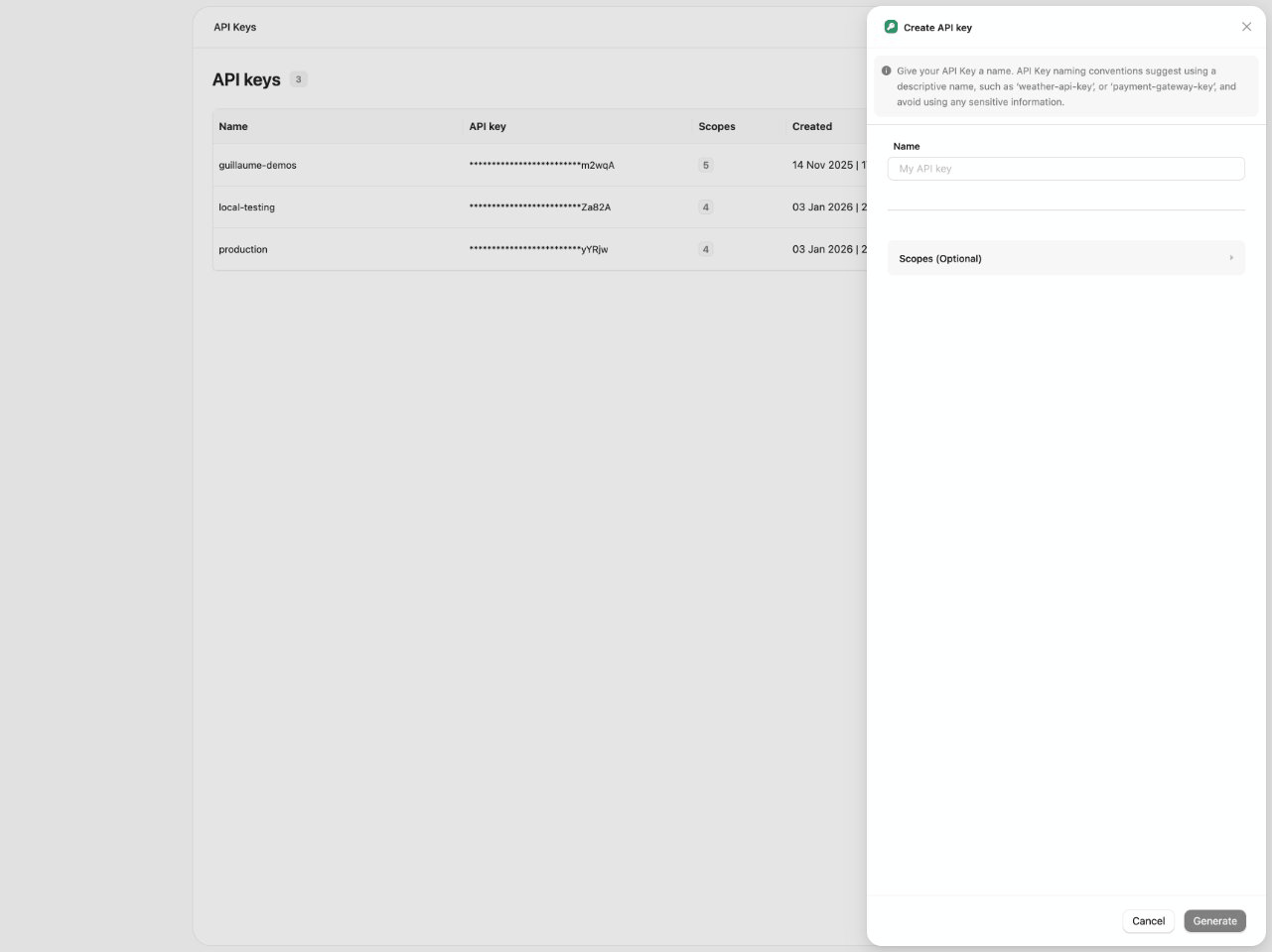 New keys come with a default set of scopes. Expand the **Scopes** section to enable or restrict access for your use case. The [scopes reference](#scopes) below lists what each scope allows.
After clicking **Generate**, the key is shown **once**. Copy it immediately and store it securely.
Store the key in a password manager or secrets vault. Never commit API keys to source control.
## Scopes
An API key's scopes control what it can access. Set them when creating the key; new keys start with the defaults below.
| Scope | Default | Grants |
| ---------------- | ------------ | ------------------------------------------------------------------------------------------------------------------------------------------------------------------------------------------------------------------------------------- |
| **Platform API** | Read + Write | Account management, [connect sessions](/embed/connect-session), and connector profiles. Required for [Platform API](/platform-api/overview) operations such as StackOne Connect and account management. |
| **Actions** | Execute | Interact with actions via RPC and MCP. |
| **Connectors** | Read | Custom connector management. **Read** (`connectors:read`) downloads connectors from the registry; **Write** (`connectors:write`) pushes and deletes them. Required for [connector building](/connector-building/overview) operations. |
| **Credentials** | Off | Retrieve stored credentials for direct provider access (read-only). Required for the StackOne CLI and running actions outside the platform. |
| **Unified API** | Read + Write | All legacy (unified) endpoints (HRIS, ATS, CRM, LMS, etc.) for reading and writing data across connected providers. |
For AI agents, you typically need: **Platform API Read** (list connected accounts), **Actions Execute** (RPC and MCP), **Connectors Read** (download connectors), and **Credentials Read** (direct provider access).
## Key management
Your key appears in the **API Keys** table, where you can enable, disable, view scopes for, and delete keys at any time. Usage is tracked — the **Last used** column helps you spot stale keys to revoke. Review the list regularly.
## Next steps
Use your key to create a session token and open the account-linking flow for a user.
Return to the end-to-end embedding journey.
New keys come with a default set of scopes. Expand the **Scopes** section to enable or restrict access for your use case. The [scopes reference](#scopes) below lists what each scope allows.
After clicking **Generate**, the key is shown **once**. Copy it immediately and store it securely.
Store the key in a password manager or secrets vault. Never commit API keys to source control.
## Scopes
An API key's scopes control what it can access. Set them when creating the key; new keys start with the defaults below.
| Scope | Default | Grants |
| ---------------- | ------------ | ------------------------------------------------------------------------------------------------------------------------------------------------------------------------------------------------------------------------------------- |
| **Platform API** | Read + Write | Account management, [connect sessions](/embed/connect-session), and connector profiles. Required for [Platform API](/platform-api/overview) operations such as StackOne Connect and account management. |
| **Actions** | Execute | Interact with actions via RPC and MCP. |
| **Connectors** | Read | Custom connector management. **Read** (`connectors:read`) downloads connectors from the registry; **Write** (`connectors:write`) pushes and deletes them. Required for [connector building](/connector-building/overview) operations. |
| **Credentials** | Off | Retrieve stored credentials for direct provider access (read-only). Required for the StackOne CLI and running actions outside the platform. |
| **Unified API** | Read + Write | All legacy (unified) endpoints (HRIS, ATS, CRM, LMS, etc.) for reading and writing data across connected providers. |
For AI agents, you typically need: **Platform API Read** (list connected accounts), **Actions Execute** (RPC and MCP), **Connectors Read** (download connectors), and **Credentials Read** (direct provider access).
## Key management
Your key appears in the **API Keys** table, where you can enable, disable, view scopes for, and delete keys at any time. Usage is tracked — the **Last used** column helps you spot stale keys to revoke. Review the list regularly.
## Next steps
Use your key to create a session token and open the account-linking flow for a user.
Return to the end-to-end embedding journey.