> ## Documentation Index
> Fetch the complete documentation index at: https://docs.stackone.com/llms.txt
> Use this file to discover all available pages before exploring further.

# Wikipedia OAuth 2.0 connector profile – StackOne setup guide

> Set up the OAuth 2.0 connector profile for Wikipedia in StackOne. One-time admin setup required before your users can link Wikipedia accounts via Hub.

<Warning>Request <strong>only Basic rights</strong> — it is all this connector needs to read Wikipedia, and a client that requests just Basic rights is <strong>approved automatically</strong> and is usable right away. Avoid grants the form marks as risky (vandalism or security risk) or <strong>internal</strong>; these require Wikimedia OAuth-administrator review (typically a day or two), and internal grants are almost never approved. Grants only expose rights your own account already holds, so requesting extra grants adds no new capability and is unnecessary here. A <strong>Proposed</strong> client that requests reviewable grants may not be usable by other users until it is <strong>Approved</strong>; if a review is pending, request approval at <a href="https://meta.wikimedia.org/wiki/Steward_requests/Miscellaneous" target="_blank" rel="noopener noreferrer">Steward requests/Miscellaneous</a> using the `{{oauthapprequest}}` template, or use the Personal API Token / OAuth 2.0 Client Credentials authentication (owner-only, approved automatically) if you only need your own account.</Warning>

<section data-guide-section data-guide-scopes="">
  <h2>Register an OAuth 2.0 client on Meta-Wiki</h2>

  <p>Register an OAuth 2.0 client on Meta-Wiki to obtain the Client ID and Client Secret. Requesting only Basic rights gets the client approved automatically; requesting extra write or administrative grants requires OAuth-administrator review (usually a day or two).</p>

  <Steps>
    <Step title="Sign in to Meta-Wiki">
      <div data-guide-step data-guide-scopes="" data-guide-display-scopes-list="">
        <p>Sign in to your <a href="https://meta.wikimedia.org" target="_blank" rel="noopener noreferrer">Meta-Wiki account</a> with your Wikimedia credentials, then open the <a href="https://meta.wikimedia.org/wiki/Special:OAuthConsumerRegistration/propose/oauth2" target="_blank" rel="noopener noreferrer">OAuth 2.0 client registration form</a>.</p>

        <ul>
          <li>Under <strong>Navigation</strong>, confirm the form is on <strong>Propose new OAuth 2.0 client</strong>.</li>
        </ul>
      </div>
    </Step>

    <Step title="Enter the application details">
      <div data-guide-step data-guide-scopes="" data-guide-display-scopes-list="">
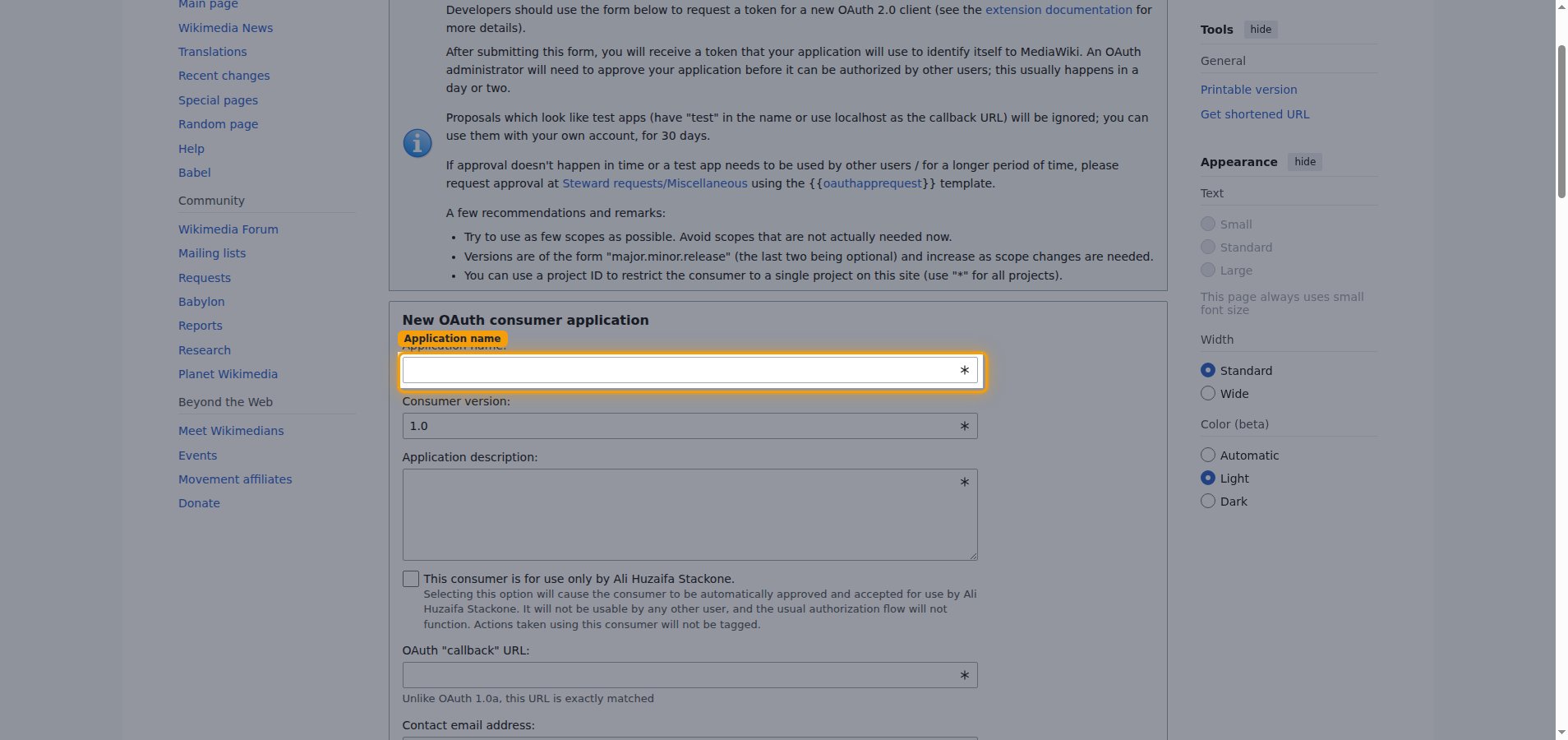
        <p>In the <strong>New OAuth consumer application</strong> form, describe your client.</p>

        <ul>
          <li><strong>Application name:</strong> enter a descriptive name — e.g., `StackOne`.</li>
          <li><strong>Consumer version:</strong> leave as `1.0`.</li>
          <li><strong>Application description:</strong> briefly describe how the client is used.</li>
          <li>Leave <strong>This consumer is for use only by \[your username].</strong> unchecked so other users can authorize it.</li>
        </ul>

        <img src="https://mintcdn.com/stackone-60/P1EEsB4-Ut35fmCr/connectors/wikipedia/images/oauth2-setup-application-details.png?fit=max&auto=format&n=P1EEsB4-Ut35fmCr&q=85&s=b261fea44325e3118f0fb71e11337172" alt="OAuth consumer registration form with the Application name field highlighted" width="1908" height="900" data-path="connectors/wikipedia/images/oauth2-setup-application-details.png" />
      </div>
    </Step>

    <Step title="Set the callback URL">
      <div data-guide-step data-guide-scopes="" data-guide-display-scopes-list="">
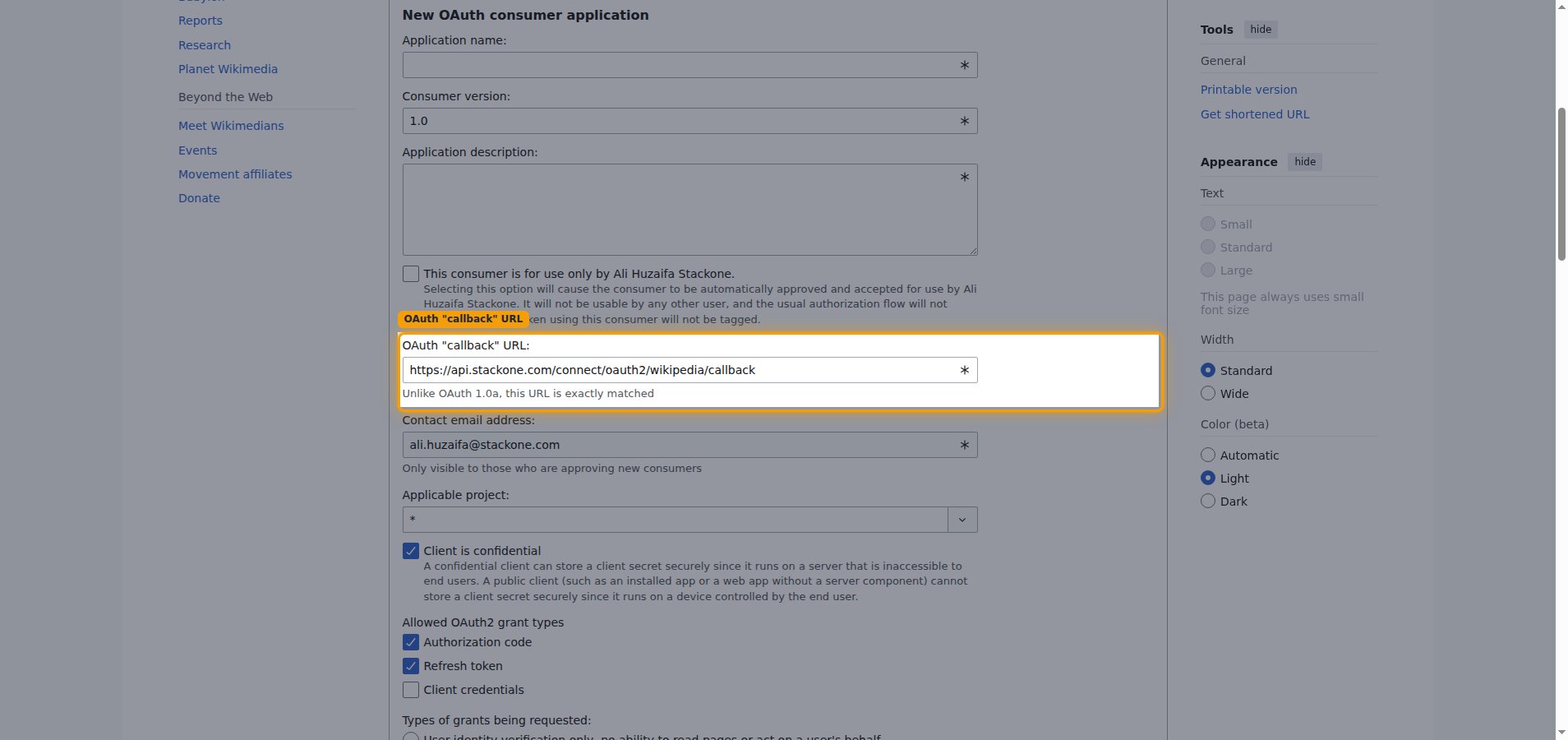
        <p>In the <strong>OAuth "callback" URL</strong> field, enter the StackOne callback URL exactly — this URL is matched exactly.</p>

        <ul>
          <li><strong>OAuth "callback" URL:</strong> `https://api.stackone.com/connect/oauth2/wikipedia/callback`</li>
          <li>Keep <strong>Client is confidential</strong> checked.</li>
        </ul>

        <img src="https://mintcdn.com/stackone-60/P1EEsB4-Ut35fmCr/connectors/wikipedia/images/oauth2-setup-callback-url.png?fit=max&auto=format&n=P1EEsB4-Ut35fmCr&q=85&s=bb157b7c8308104374dede668561f94d" alt="OAuth consumer registration form with the OAuth callback URL field highlighted" width="1908" height="900" data-path="connectors/wikipedia/images/oauth2-setup-callback-url.png" />
      </div>
    </Step>

    <Step title="Select the grant types and permissions">
      <div data-guide-step data-guide-scopes="" data-guide-display-scopes-list="">
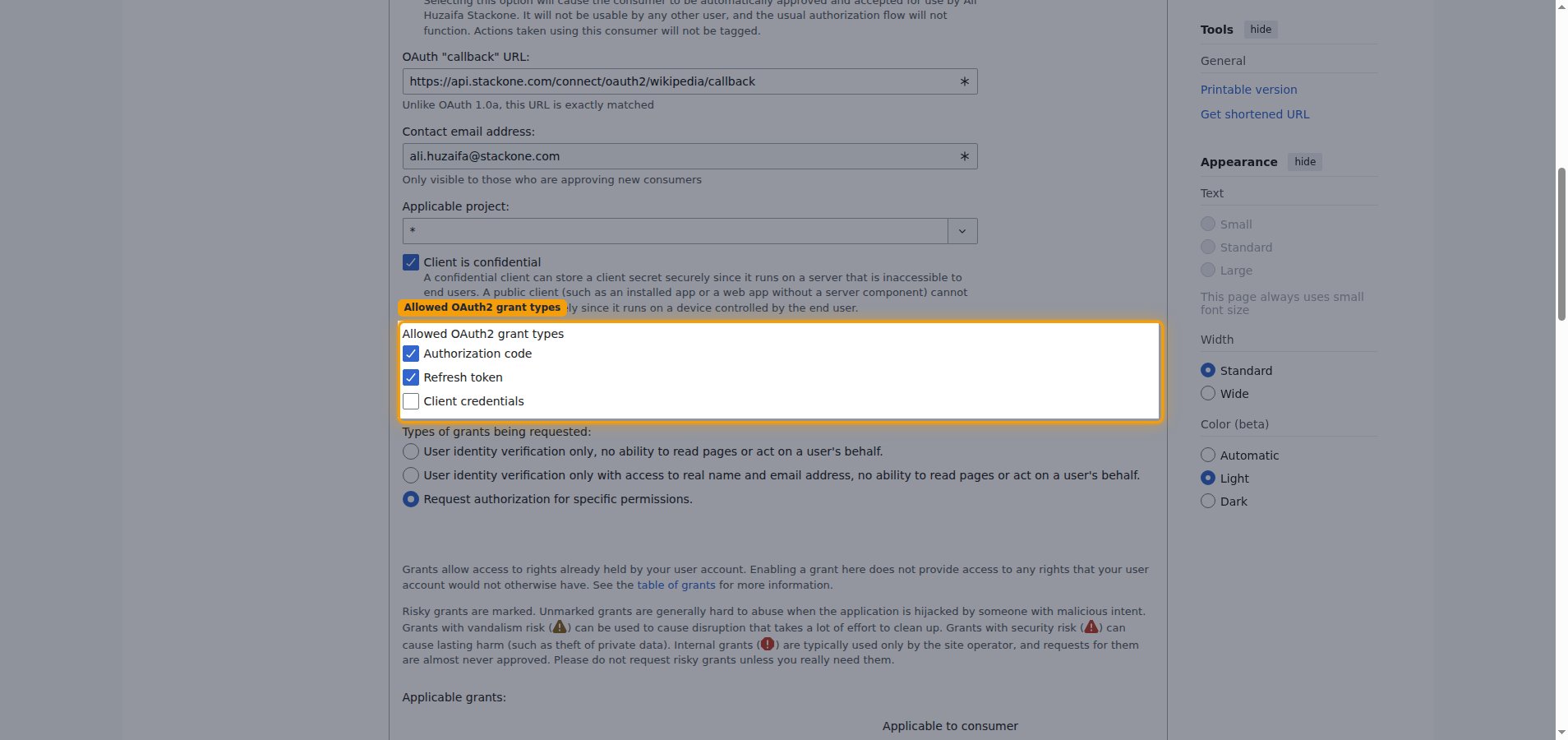
        <p>Under <strong>Allowed OAuth2 grant types</strong>, choose how tokens are issued, then choose the permissions the client requests.</p>

        <ul>
          <li>Keep <strong>Authorization code</strong> and <strong>Refresh token</strong> checked.</li>
          <li>Under <strong>Types of grants being requested:</strong>, keep <strong>Request authorization for specific permissions.</strong> selected.</li>
          <li>Under <strong>Applicable grants:</strong>, keep <strong>Basic rights</strong> selected — this alone covers reading Wikipedia and gets the client approved automatically.</li>
          <li>Only add write grants such as <strong>Edit existing pages</strong> or <strong>Create, edit, and move pages</strong> if you genuinely need the create or update page actions — these require OAuth-administrator review before the client can be used, so leave them unchecked for a read-only connection.</li>
        </ul>

        <img src="https://mintcdn.com/stackone-60/P1EEsB4-Ut35fmCr/connectors/wikipedia/images/oauth2-setup-grant-types.png?fit=max&auto=format&n=P1EEsB4-Ut35fmCr&q=85&s=c0726dac73d1c5ad90e964e5307d8a29" alt="OAuth consumer registration form with the Allowed OAuth2 grant types section highlighted" width="1908" height="900" data-path="connectors/wikipedia/images/oauth2-setup-grant-types.png" />
      </div>
    </Step>

    <Step title="Accept the policy and submit">
      <div data-guide-step data-guide-scopes="" data-guide-display-scopes-list="">
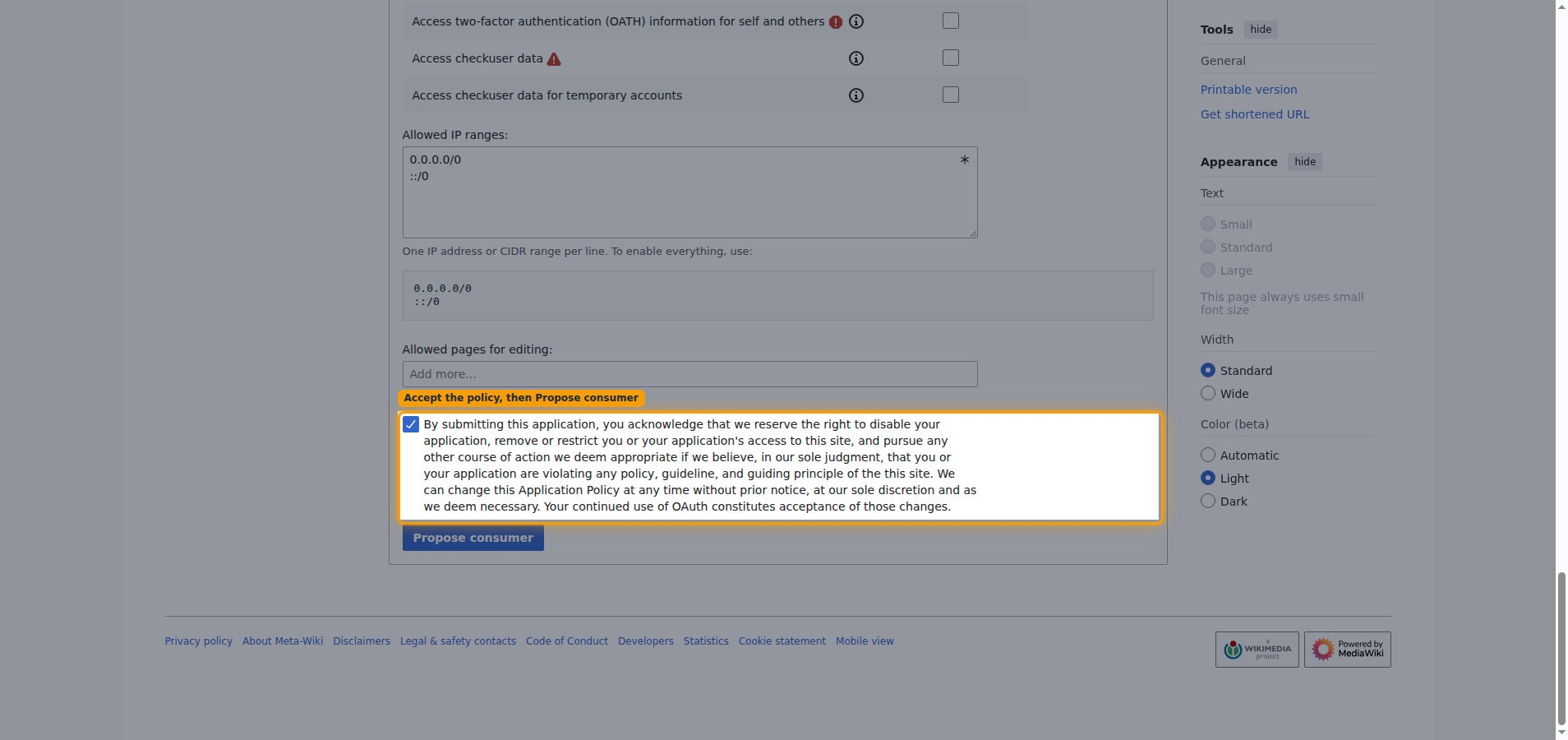
        <p>Check the application policy acknowledgement — the <strong>By submitting this application, you acknowledge...</strong> statement — then click <strong>Propose consumer</strong>. This checkbox is required; the form will not submit until it is ticked.</p>

        <img src="https://mintcdn.com/stackone-60/P1EEsB4-Ut35fmCr/connectors/wikipedia/images/oauth2-setup-accept-policy.png?fit=max&auto=format&n=P1EEsB4-Ut35fmCr&q=85&s=128d964af610339468f5b2de5672cd6a" alt="Policy acknowledgement checkbox ticked with the Propose consumer button below it" width="1908" height="900" data-path="connectors/wikipedia/images/oauth2-setup-accept-policy.png" />
      </div>
    </Step>

    <Step title="Copy your credentials">
      <div data-guide-step data-guide-scopes="" data-guide-display-scopes-list="">
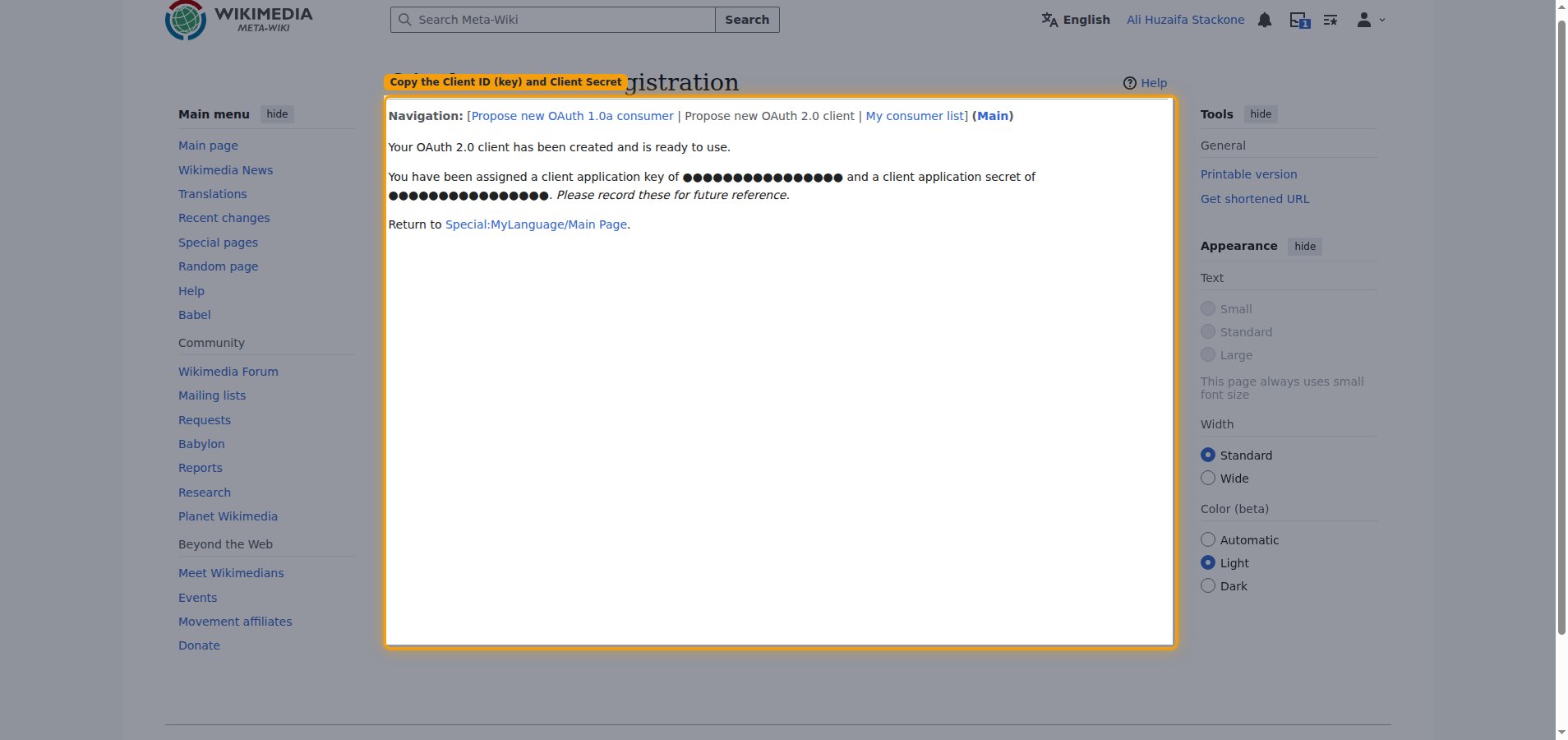
        <p>Meta-Wiki shows <strong>Your OAuth 2.0 client has been created and is ready to use.</strong> and assigns you a <strong>client application key</strong> and a <strong>client application secret</strong>.</p>

        <ul>
          <li>Copy the <strong>client application key</strong> into the <strong>Client ID</strong> field in the StackOne Connector profile.</li>
          <li>Copy the <strong>client application secret</strong> into the <strong>Client Secret</strong> field in the StackOne Connector profile.</li>
          <li>These values are only displayed once — record them for future reference before leaving the page.</li>
          <li>Note: the new client is created with status <strong>Proposed</strong>. A multi-user client must be approved by an OAuth administrator (usually within a day or two) before it can be authorized. Check its status on <a href="https://meta.wikimedia.org/wiki/Special:OAuthConsumerRegistration/list" target="_blank" rel="noopener noreferrer">your OAuth consumer list</a> and connect only once it shows <strong>Approved</strong> — connecting while it is still Proposed fails with "Could not validate credentials".</li>
        </ul>

        <img src="https://mintcdn.com/stackone-60/P1EEsB4-Ut35fmCr/connectors/wikipedia/images/oauth2-setup-credentials.png?fit=max&auto=format&n=P1EEsB4-Ut35fmCr&q=85&s=299cff56dde0459dedd8db160b5ac688" alt="Client creation result screen showing the assigned client application key and client application secret, both redacted" width="1908" height="900" data-path="connectors/wikipedia/images/oauth2-setup-credentials.png" />
      </div>
    </Step>
  </Steps>
</section>

## Creating the StackOne Connector Profile

To create the Connector Profile in StackOne for <strong>Wikipedia</strong>:

<Steps>
  <Step title="Navigate to Connector Profiles">
    Login to StackOne and navigate to [Connector Profiles](https://app.stackone.com/connector_profiles)
  </Step>

  <Step title="Create New Connector Profile">
    <ul>
      <li>Click <strong>+ Connector Profile</strong></li>
      <li>Search for and select <strong>Wikipedia</strong></li>
      <li>Select <strong>Type</strong> as <strong>OAuth 2.0</strong></li>

      <li>
        Fill out the fields using details retrieved from your provider:

        <ul style={{ marginLeft: '20px' }}>
          <li><strong>Client ID</strong></li>
          <li><strong>Client Secret</strong></li>
        </ul>
      </li>

      <li>(Optional) Select <strong>Actions</strong> to be enabled for this Connector Profile</li>
      <li>Click <strong>Create profile</strong></li>
    </ul>
  </Step>
</Steps>

Congratulations! The new Connector Profile will now show up in your project ready to be used. You can now continue to <a href="/guides/accounts-section#linking-accounts">Link Accounts</a> for <strong>Wikipedia</strong>.