> ## Documentation Index
> Fetch the complete documentation index at: https://docs.stackone.com/llms.txt
> Use this file to discover all available pages before exploring further.

# Webex Webhook Setup Guide

> Configure Webex to deliver events to StackOne.

## Prerequisites

The connector should already be set up, with a Connector Profile and a Linked Account. See [Getting Started](/connectors/webex#getting-started) on the Webex connector page.

<section data-guide-section data-guide-scopes="">
  <h2>Automatic webhook subscription</h2>

  <p>StackOne creates and manages the Webex webhooks automatically when the account is connected, and deletes them when the account is disconnected. You don't need to create any webhook at developer.webex.com. Webex accepts one subscription per resource and event pair, so StackOne creates one Webex webhook for each event you enable.</p>

  <Steps>
    <Step title="Enable the webhook scopes on the integration">
      <div data-guide-step data-guide-scopes="" data-guide-display-scopes-list="">
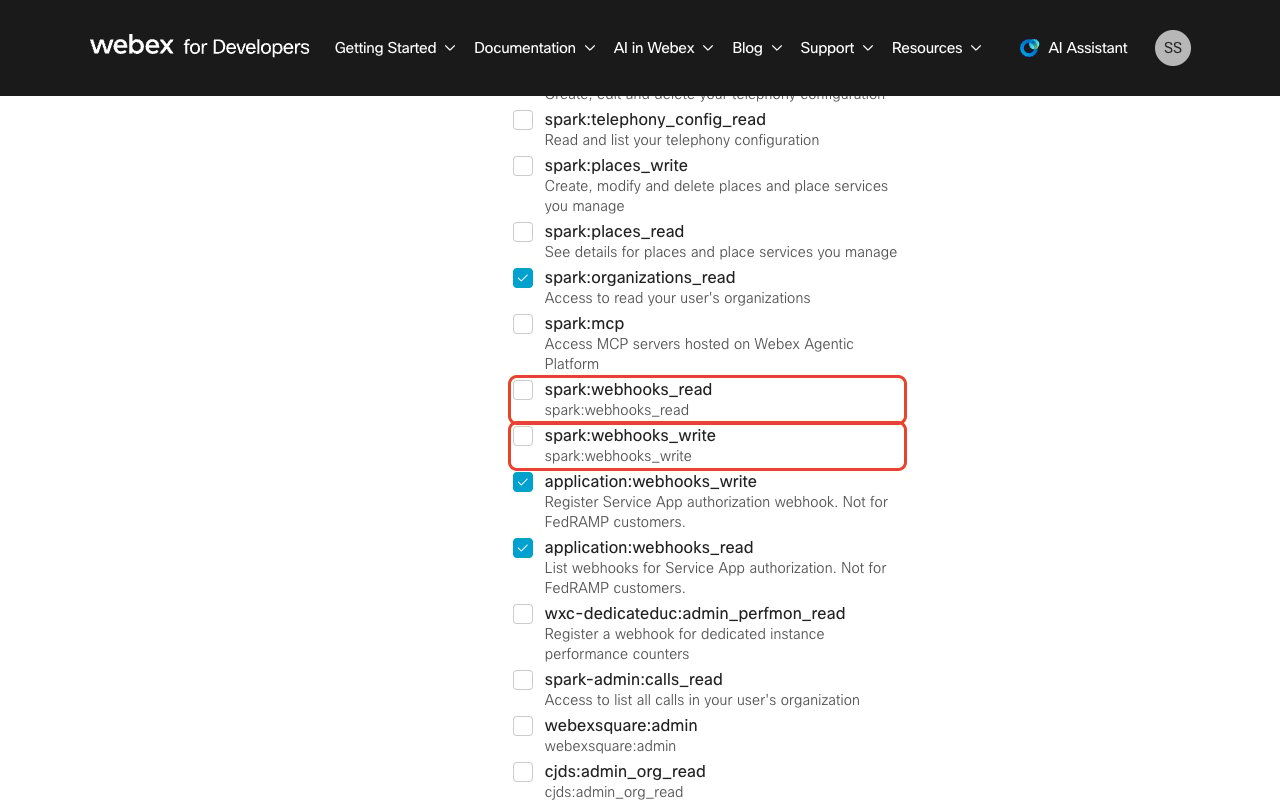
        <p>Open your integration at <a href="https://developer.webex.com/my-apps" target="_blank" rel="noopener noreferrer">developer.webex.com/my-apps</a>, scroll to <strong>Scopes</strong>, and tick <strong>spark:webhooks\_read</strong> and <strong>spark:webhooks\_write</strong>. These two scopes let StackOne create and delete the subscriptions. <strong>application:webhooks\_read</strong> and <strong>application:webhooks\_write</strong> are a different pair that only covers Service App authorization webhooks — they do not grant access to the Webhooks API, so selecting them instead leaves webhook creation failing.</p>

        <img src="https://mintcdn.com/stackone-60/ddNqpQgQz0mnDP-R/connectors/webex/images/events-scopes-webhooks.png?fit=max&auto=format&n=ddNqpQgQz0mnDP-R&q=85&s=5c3e75675de3b16745aa6b9a965a19f0" alt="The Scopes list of a Webex integration" width="1280" height="800" data-path="connectors/webex/images/events-scopes-webhooks.png" />
      </div>
    </Step>

    <Step title="Enable the read scope of every event you want">
      <div data-guide-step data-guide-scopes="" data-guide-display-scopes-list="">
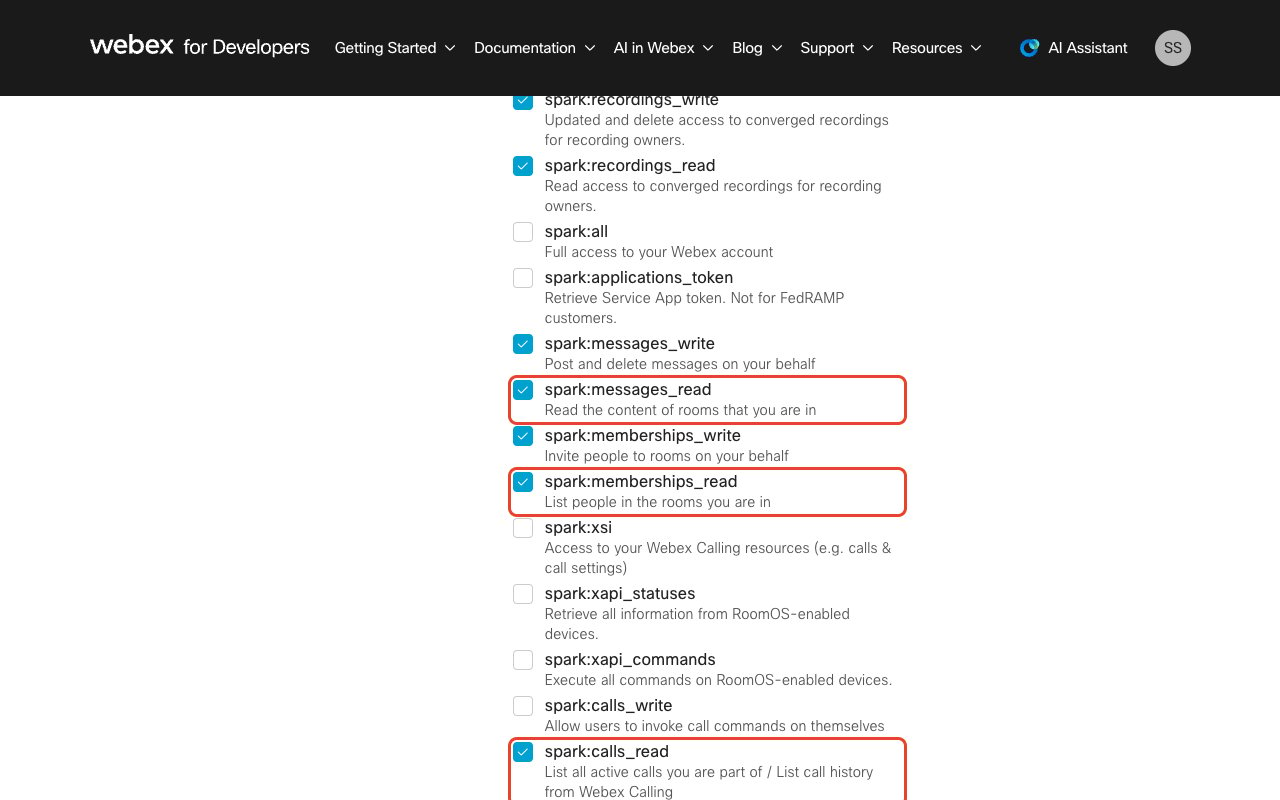
        <p>Webex delivers an event only if the connection can read the underlying resource, so tick the read scope for each resource you plan to subscribe to. Webhook creation fails for any event whose read scope is missing.</p>

        <ul>
          <li>Messaging events need `spark:messages_read`, `spark:rooms_read` and `spark:memberships_read`.</li>
          <li>Meeting events need `meeting:schedules_read`, `meeting:participants_read`, `meeting:transcripts_read` and `meeting:recordings_read`.</li>
          <li>Converged (call) recording events need `spark-admin:recordings_read`, and call events need `spark:calls_read`.</li>
        </ul>

        <img src="https://mintcdn.com/stackone-60/ddNqpQgQz0mnDP-R/connectors/webex/images/events-scopes-messaging.png?fit=max&auto=format&n=ddNqpQgQz0mnDP-R&q=85&s=e7ef8e3e459812d195cc997509e4066b" alt="The Scopes list of a Webex integration with the messaging read scopes highlighted" width="1280" height="800" data-path="connectors/webex/images/events-scopes-messaging.png" />
      </div>
    </Step>

    <Step title="Save and reconnect the account">
      <div data-guide-step data-guide-scopes="" data-guide-display-scopes-list="">
        <p>Click <strong>Save</strong> at the bottom of the integration page. Scope changes only take effect on new tokens, so reconnect the Webex account in StackOne afterwards — otherwise the existing token still carries the old scopes and webhook creation keeps failing.</p>
      </div>
    </Step>

    <Step title="Know whose activity these events cover">
      <div data-guide-step data-guide-scopes="" data-guide-display-scopes-list="">
        <p>StackOne creates every subscription as <strong>ownedBy: creator</strong>, so Webex notifies only on activity the authorizing user takes part in — spaces they are a member of, meetings they host or attend, calls they make or receive. Activity elsewhere in the organization does not produce an event.</p>

        <ul>
          <li>Connect the account with a user who is already in the spaces and meetings you need events for. A user who is not a member of a space receives no events from it.</li>
          <li>Organization-wide delivery (Webex's `ownedBy: org`) is <strong>not supported by this connector</strong>. Webex restricts it to Control Hub Full admins and Compliance Officers, and rejects it for the user-level OAuth connections StackOne creates.</li>
        </ul>
      </div>
    </Step>

    <Step title="Select events in StackOne">
      <div data-guide-step data-guide-scopes="" data-guide-display-scopes-list="">
        <p>Enable the webhook events you want on the Webex connector in StackOne. Only the events you select are subscribed, and Webex does not deliver events that are not subscribed.</p>
      </div>
    </Step>

    <Step title="Keep the authorizing user active">
      <div data-guide-step data-guide-scopes="" data-guide-display-scopes-list="">
        <p>Webex automatically disables a webhook if the user who created it is deleted from the organization. If the user who authorized the connection leaves, reconnect the account with another user so StackOne recreates the subscriptions.</p>
      </div>
    </Step>
  </Steps>
</section>

<section data-guide-section data-guide-scopes="">
  <h2>Available webhook events</h2>

  <p>The following Webex events can be enabled. Webex identifies each one by a resource and an event name, shown here in the combined form the connector emits. Only events selected in StackOne are subscribed.</p>

  <Steps>
    <Step title="Message events">
      <div data-guide-step data-guide-scopes="" data-guide-display-scopes-list="">
        <p>Events on messages posted in rooms the connection can see.</p>

        <ul>
          <li><strong>Message Created</strong> (`messages.created`) — Fired when a new message is posted into a room the authorizing user or bot is in. The message text is only included for bot-created webhooks or unencrypted rooms</li>
          <li><strong>Message Deleted</strong> (`messages.deleted`) — Fired when a message is deleted from a room the authorizing user or bot is in</li>
        </ul>
      </div>
    </Step>

    <Step title="Room events">
      <div data-guide-step data-guide-scopes="" data-guide-display-scopes-list="">
        <p>Events on rooms, also called spaces.</p>

        <ul>
          <li><strong>Room Created</strong> (`rooms.created`) — Fired when a new room is created by the authorizing user or one of their integrations</li>
          <li><strong>Room Updated</strong> (`rooms.updated`) — Fired when a room is updated, most often when it is locked or unlocked</li>
          <li><strong>Room Migrated</strong> (`rooms.migrated`) — Fired when a room is migrated to a different geography during a change of data residency. The room ID changes as part of the migration</li>
        </ul>
      </div>
    </Step>

    <Step title="Membership events">
      <div data-guide-step data-guide-scopes="" data-guide-display-scopes-list="">
        <p>Events on who belongs to a room.</p>

        <ul>
          <li><strong>Membership Created</strong> (`memberships.created`) — Fired when someone joins a room the authorizing user is in, or the authorizing user is added to a new room</li>
          <li><strong>Membership Updated</strong> (`memberships.updated`) — Fired when a membership changes, primarily to signal moderator changes</li>
          <li><strong>Membership Deleted</strong> (`memberships.deleted`) — Fired when someone leaves or is removed from a group room. Webex does not fire this for 1-to-1 rooms</li>
        </ul>
      </div>
    </Step>

    <Step title="Card events">
      <div data-guide-step data-guide-scopes="" data-guide-display-scopes-list="">
        <p>Events on adaptive cards posted by the connection.</p>

        <ul>
          <li><strong>Card Action Submitted</strong> (`attachmentActions.created`) — Fired when a user submits an adaptive card. The submitted values are not in the event and must be fetched separately</li>
        </ul>
      </div>
    </Step>

    <Step title="Meeting events">
      <div data-guide-step data-guide-scopes="" data-guide-display-scopes-list="">
        <p>Events on the meeting lifecycle, from scheduling through to the live session.</p>

        <ul>
          <li><strong>Meeting Created</strong> (`meetings.created`) — Fired when a new meeting is scheduled</li>
          <li><strong>Meeting Updated</strong> (`meetings.updated`) — Fired when a scheduled meeting is modified, such as a change of title, time, password or host</li>
          <li><strong>Meeting Deleted</strong> (`meetings.deleted`) — Fired when a scheduled meeting is cancelled or deleted</li>
          <li><strong>Meeting Started</strong> (`meetings.started`) — Fired when the host joins and the meeting goes live</li>
          <li><strong>Meeting Ended</strong> (`meetings.ended`) — Fired when the last participant leaves or the host ends the session</li>
        </ul>
      </div>
    </Step>

    <Step title="Participant events">
      <div data-guide-step data-guide-scopes="" data-guide-display-scopes-list="">
        <p>Events on who is in a live meeting.</p>

        <ul>
          <li><strong>Meeting Participant Joined</strong> (`meetingParticipants.joined`) — Fired when a participant joins a meeting</li>
          <li><strong>Meeting Participant Left</strong> (`meetingParticipants.left`) — Fired when a participant leaves a meeting</li>
        </ul>
      </div>
    </Step>

    <Step title="Transcript events">
      <div data-guide-step data-guide-scopes="" data-guide-display-scopes-list="">
        <p>Events on meeting transcripts, which Webex produces after post-processing.</p>

        <ul>
          <li><strong>Meeting Transcript Created</strong> (`meetingTranscripts.created`) — Fired when a transcript becomes available for a recorded meeting, minutes after the recording itself</li>
        </ul>
      </div>
    </Step>

    <Step title="Recording events">
      <div data-guide-step data-guide-scopes="" data-guide-display-scopes-list="">
        <p>Events on meeting recordings and on converged recordings, which currently cover Webex Calling<br />call recordings.</p>

        <ul>
          <li><strong>Recording Created</strong> (`recordings.created`) — Fired when a new meeting recording finishes processing and becomes available</li>
          <li><strong>Recording Updated</strong> (`recordings.updated`) — Fired when an existing recording is modified, such as a change of topic, password or sharing settings</li>
          <li><strong>Recording Deleted</strong> (`recordings.deleted`) — Fired when a recording is permanently deleted. Moving a recording to the trash bin produces no event</li>
          <li><strong>Converged Recording Created</strong> (`convergedRecordings.created`) — Fired when a new call recording becomes available</li>
          <li><strong>Converged Recording Updated</strong> (`convergedRecordings.updated`) — Fired when an existing call recording is modified</li>
          <li><strong>Converged Recording Deleted</strong> (`convergedRecordings.deleted`) — Fired when a call recording is deleted</li>
        </ul>
      </div>
    </Step>

    <Step title="Call events">
      <div data-guide-step data-guide-scopes="" data-guide-display-scopes-list="">
        <p>Events on calls the authorizing user makes or receives. Organization-wide call monitoring uses the Webex Calling scopes, which this connector does not request.</p>

        <ul>
          <li><strong>Call Started</strong> (`telephony_calls.created`) — Fired when the authorizing user originates or receives a call</li>
          <li><strong>Call Updated</strong> (`telephony_calls.updated`) — Fired when a call changes state, such as answered, held, resumed or transferred</li>
          <li><strong>Call Ended</strong> (`telephony_calls.deleted`) — Fired when a call is disconnected</li>
        </ul>
      </div>
    </Step>
  </Steps>
</section>

## Verify

Your Connector should now be able to receive and process events. Try triggering an event and you should see an Event appear in the Connector logs.


This documentation is built and hosted on [Mintlify](https://mintlify.com), a developer documentation platform.