> ## Documentation Index
> Fetch the complete documentation index at: https://docs.stackone.com/llms.txt
> Use this file to discover all available pages before exploring further.

# Connect Tomba with API Key – StackOne Hub

> Link a Tomba account in the StackOne Hub using API Key. End-user guide to authorize the integration and start using Tomba actions.

<Warning>Your account has a single account secret shared by every API key. Rotating it from Settings breaks every integration that uses it.</Warning>

<section data-guide-section data-guide-scopes="">
  <h2>Create a Tomba API key</h2>

  <p>Tomba authenticates every request with an API key and your account secret. Both are listed on the <strong>API Keys</strong> page of the Tomba dashboard.</p>

  <Steps>
    <Step title="Sign in to Tomba">
      <div data-guide-step data-guide-scopes="" data-guide-display-scopes-list="">
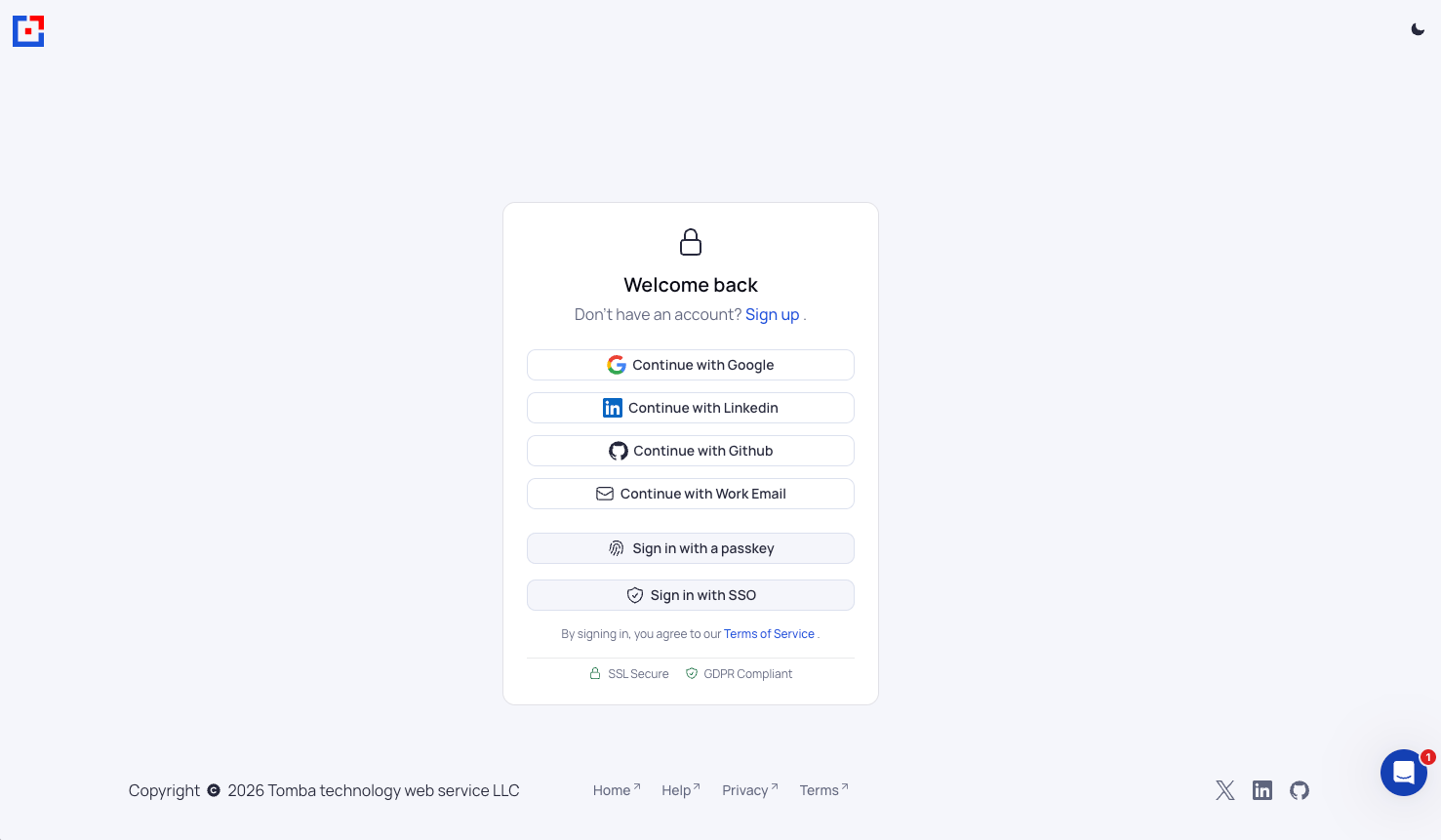
        <p>Sign in to your <a href="https://app.tomba.io/" target="_blank" rel="noopener noreferrer">Tomba account</a>.</p>

        <ul>
          <li>Choose <strong>Continue with Google</strong>, <strong>Continue with Linkedin</strong>, <strong>Continue with Github</strong>, or <strong>Continue with Work Email</strong>.</li>
          <li><strong>Sign in with a passkey</strong> and <strong>Sign in with SSO</strong> are also available.</li>
        </ul>

        <img src="https://mintcdn.com/stackone-60/IVW6ARyY96Pxb765/connectors/tomba/images/custom-config-sign-in.png?fit=max&auto=format&n=IVW6ARyY96Pxb765&q=85&s=13742d1cc5a1f6f67008c36c645f16c7" alt="Tomba sign-in page" width="1477" height="861" data-path="connectors/tomba/images/custom-config-sign-in.png" />
      </div>
    </Step>

    <Step title="Open the API page">
      <div data-guide-step data-guide-scopes="" data-guide-display-scopes-list="">
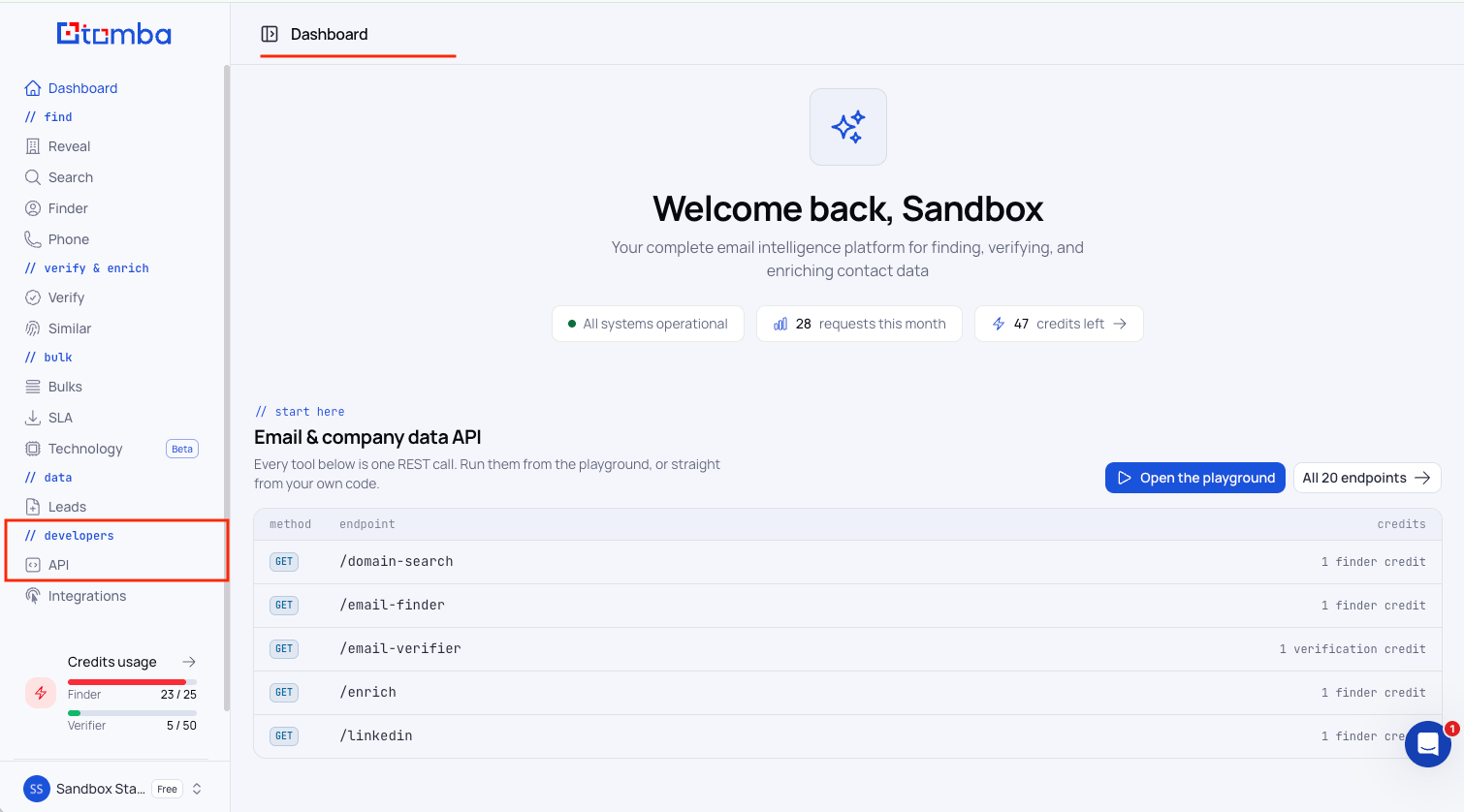
        <p>In the sidebar, under <strong>// developers</strong>, click <strong>API</strong>.</p>

        <ul>
          <li>The page opens on <strong>API Keys</strong>, which you can also reach directly at `https://app.tomba.io/api`.</li>
        </ul>

        <img src="https://mintcdn.com/stackone-60/IVW6ARyY96Pxb765/connectors/tomba/images/custom-config-api-sidebar.png?fit=max&auto=format&n=IVW6ARyY96Pxb765&q=85&s=969c8bd08b672a616db0e0375cc6d6cd" alt="API link in the sidebar" width="1510" height="838" data-path="connectors/tomba/images/custom-config-api-sidebar.png" />
      </div>
    </Step>

    <Step title="Create a key">
      <div data-guide-step data-guide-scopes="" data-guide-display-scopes-list="">
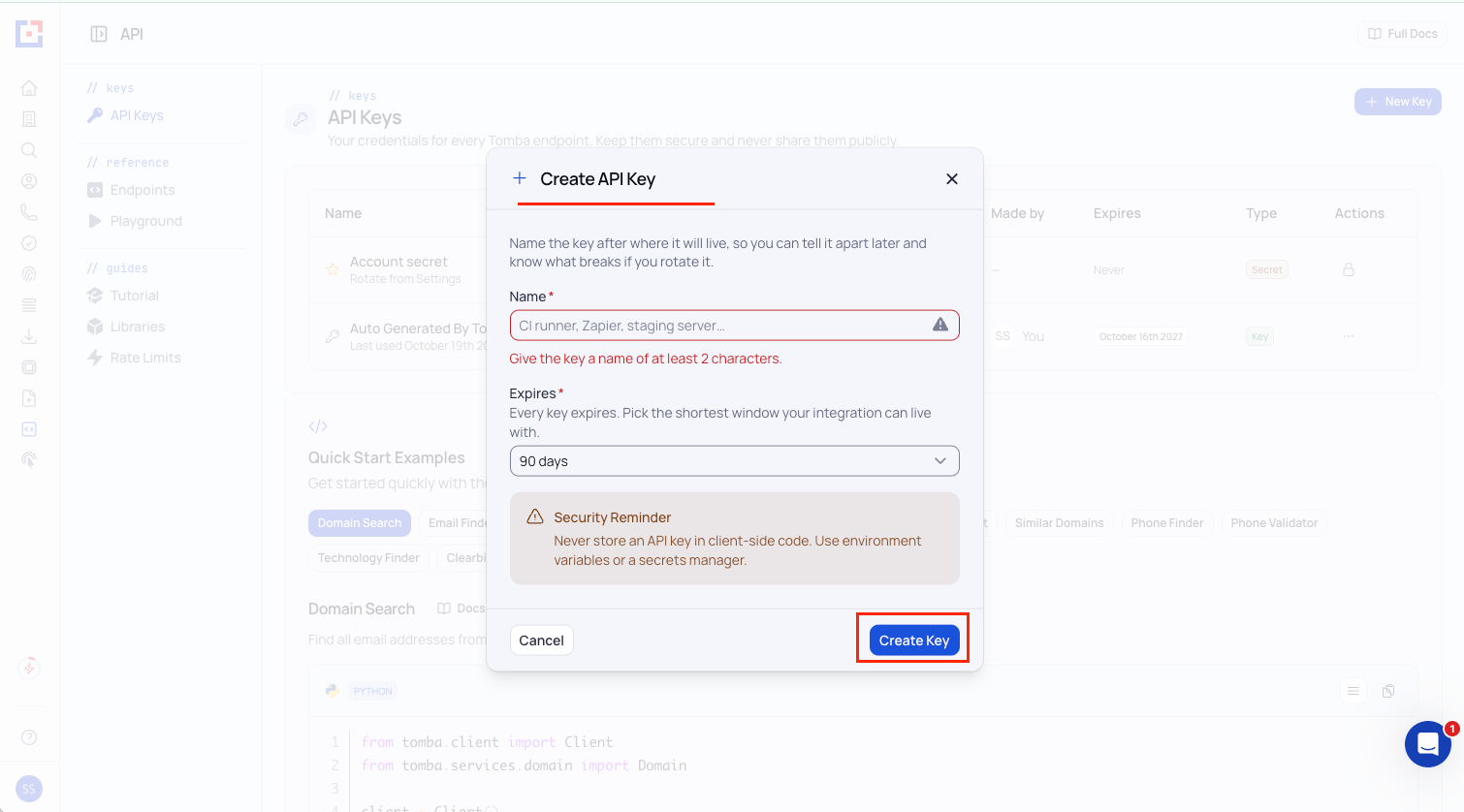
        <p>On the <strong>API Keys</strong> page, click <strong>+ New Key</strong>.</p>

        <ul>
          <li>In the <strong>Create API Key</strong> dialog, enter a <strong>Name</strong> of at least 2 characters that identifies this integration.</li>
          <li>Name: `StackOne Integration`</li>
          <li>Pick an <strong>Expires</strong> window. The dialog defaults to <strong>90 days</strong> and the longest available lifetime is 365 days.</li>
          <li>Click <strong>Create Key</strong>.</li>
          <li>Tomba emails you 30 days, 7 days, and 1 day before a key expires, so you can replace it before it lapses.</li>
        </ul>

        <img src="https://mintcdn.com/stackone-60/IVW6ARyY96Pxb765/connectors/tomba/images/custom-config-create-api-key.png?fit=max&auto=format&n=IVW6ARyY96Pxb765&q=85&s=7de9a8f0e5c1da6924e6d199c9f5685e" alt="Create API Key dialog" width="1510" height="838" data-path="connectors/tomba/images/custom-config-create-api-key.png" />
      </div>
    </Step>

    <Step title="Copy the key and the account secret">
      <div data-guide-step data-guide-scopes="" data-guide-display-scopes-list="">
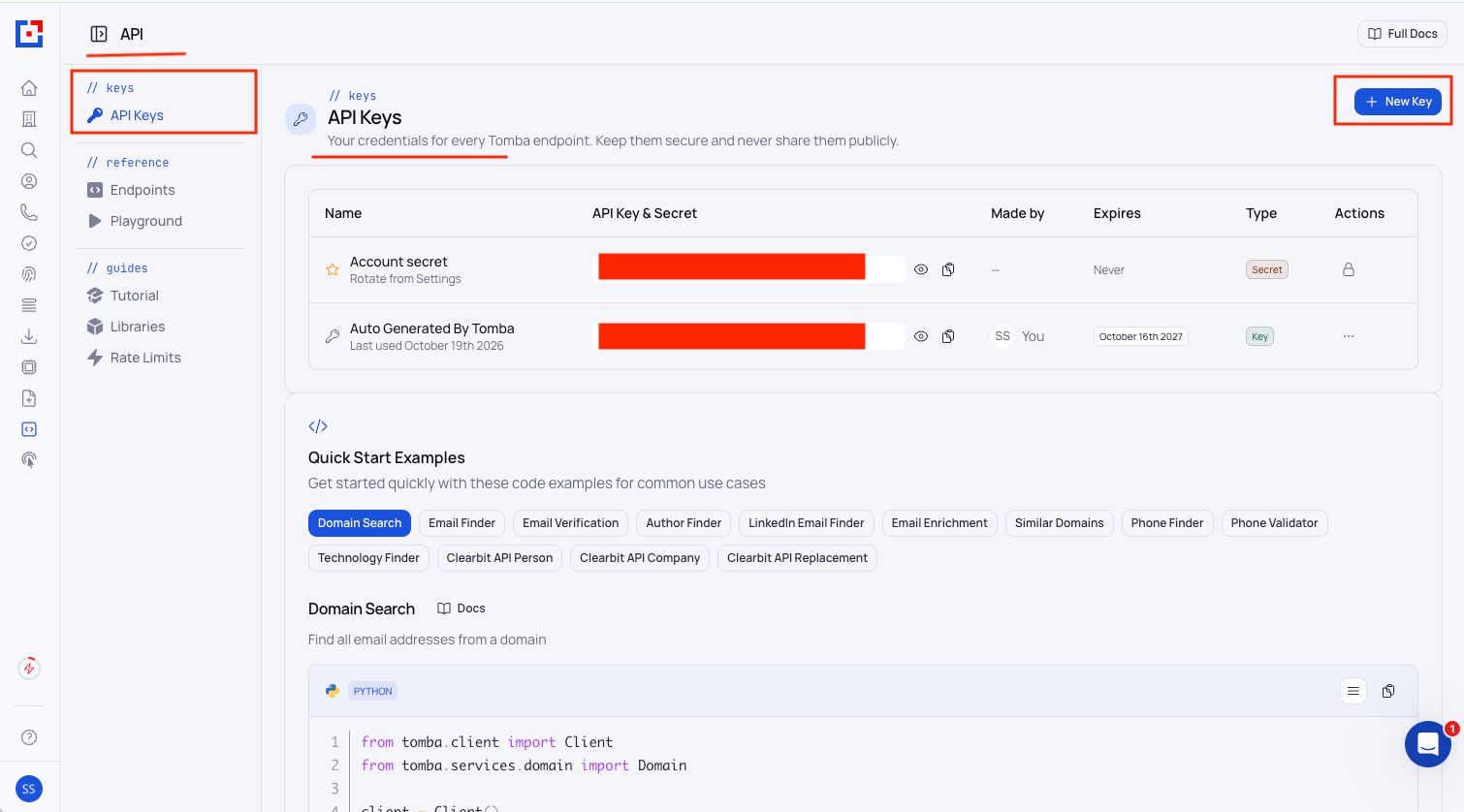
        <p>Both values sit in the <strong>API Key & Secret</strong> column of the <strong>API Keys</strong> table. Click the eye icon to reveal a value and the copy icon to copy it.</p>

        <ul>
          <li>Copy the value on the row of the key you just created, and paste it into the <strong>API Key</strong> or <strong>Auto Generated By Tomba</strong> (default or in sandbox account) field in StackOne Hub.</li>
          <li>Copy the value on the <strong>Account secret</strong> row, and paste it into the <strong>API Secret</strong> field in StackOne Hub.</li>
          <li>Format: `ta_` followed by 37 characters for the key, and `ts_` followed by a UUID for the account secret</li>
          <li>The <strong>Account secret</strong> row shows <strong>Expires</strong> as <strong>Never</strong> and is rotated from <strong>Settings</strong>.</li>
          <li>Keep both values on a server and store them securely for use later. Anyone who obtains them can spend your credits.</li>
        </ul>

        <img src="https://mintcdn.com/stackone-60/IVW6ARyY96Pxb765/connectors/tomba/images/custom-config-api-keys.png?fit=max&auto=format&n=IVW6ARyY96Pxb765&q=85&s=3a7b01b37b35081e126e28b9a13994f8" alt="API Keys table with New Key" width="1510" height="838" data-path="connectors/tomba/images/custom-config-api-keys.png" />
      </div>
    </Step>
  </Steps>
</section>

<div data-whitelabel-hide>
  <h2>Linking the Account from the Hub</h2>

  <Steps>
    <Step title="Navigate to the Hub">
      Use one of the three <a href="/connect/managing-connectors/linking-accounts">Linking Account Methods</a> to access the Hub.
    </Step>

    <Step title="Fill out the fields">
      Fill out the following fields using details from your provider:

      <ul>
        <li><strong>API Key</strong></li>
        <li><strong>API Secret</strong></li>
      </ul>
    </Step>

    <Step title="Connect">
      <ul>
        <li>Click <strong>Connect</strong></li>
        <li>If applicable, the provider will redirect you to a sign-in or authorization page. Complete the provider's authorization flow.</li>
        <li>Once authorization is successful, you will see a confirmation popup</li>
      </ul>
    </Step>
  </Steps>

  <p>If the account linking is successful, you will see the newly linked account in your <a href="/gateway/concepts/linked-accounts">Accounts</a> page.</p>
</div>


This documentation is built and hosted on [Mintlify](https://mintlify.com), a developer documentation platform.