> ## Documentation Index
> Fetch the complete documentation index at: https://docs.stackone.com/llms.txt
> Use this file to discover all available pages before exploring further.

# Teamtailor Webhook Setup Guide

> Configure Teamtailor to deliver events to StackOne.

## Prerequisites

The connector should already be set up, with a Connector Profile and a Linked Account. See [Getting Started](/connectors/teamtailor#getting-started) on the Teamtailor connector page.

<section data-guide-section data-guide-scopes="">
  <h2>Copy your Native Webhook URL</h2>

  <p>The <strong>Native Webhook URL</strong> is generated once a Teamtailor account has been linked in StackOne. Teamtailor sends every webhook event to this URL.</p>

  <ul>
    <li>Open the linked account in StackOne.</li>
    <li>Copy the value from <strong>Native Webhook URL</strong>.</li>
    <li>Treat this URL as a secret. Anyone holding it can post events to your account.</li>
  </ul>
</section>

<section data-guide-section data-guide-scopes="">
  <h2>Creating the webhook in Teamtailor</h2>

  <p>Teamtailor webhooks are created in the Teamtailor settings. One webhook covers every event you tick, across the whole company.</p>

  <Steps>
    <Step title="Activate the Webhooks add-on">
      <div data-guide-step data-guide-scopes="" data-guide-display-scopes-list="">
        <p>Sign in to your <a href="https://app.teamtailor.com/" target="_blank" rel="noopener noreferrer">Teamtailor account</a>. If <strong>Webhooks</strong> does not appear under <strong>Integrations</strong> in the settings menu, activate the add-on first.</p>

        <ul>
          <li>Open <strong>Settings</strong> and go to <strong>Add-ons</strong> > <strong>Activated add-ons</strong>.</li>
          <li>Click <strong>Activate add-ons</strong> and find <strong>Webhooks</strong> (category <strong>Enterprise</strong>, type <strong>Free</strong>).</li>
          <li>Activate the add-on.</li>
        </ul>
      </div>
    </Step>

    <Step title="Open the Webhooks settings">
      <div data-guide-step data-guide-scopes="" data-guide-display-scopes-list="">
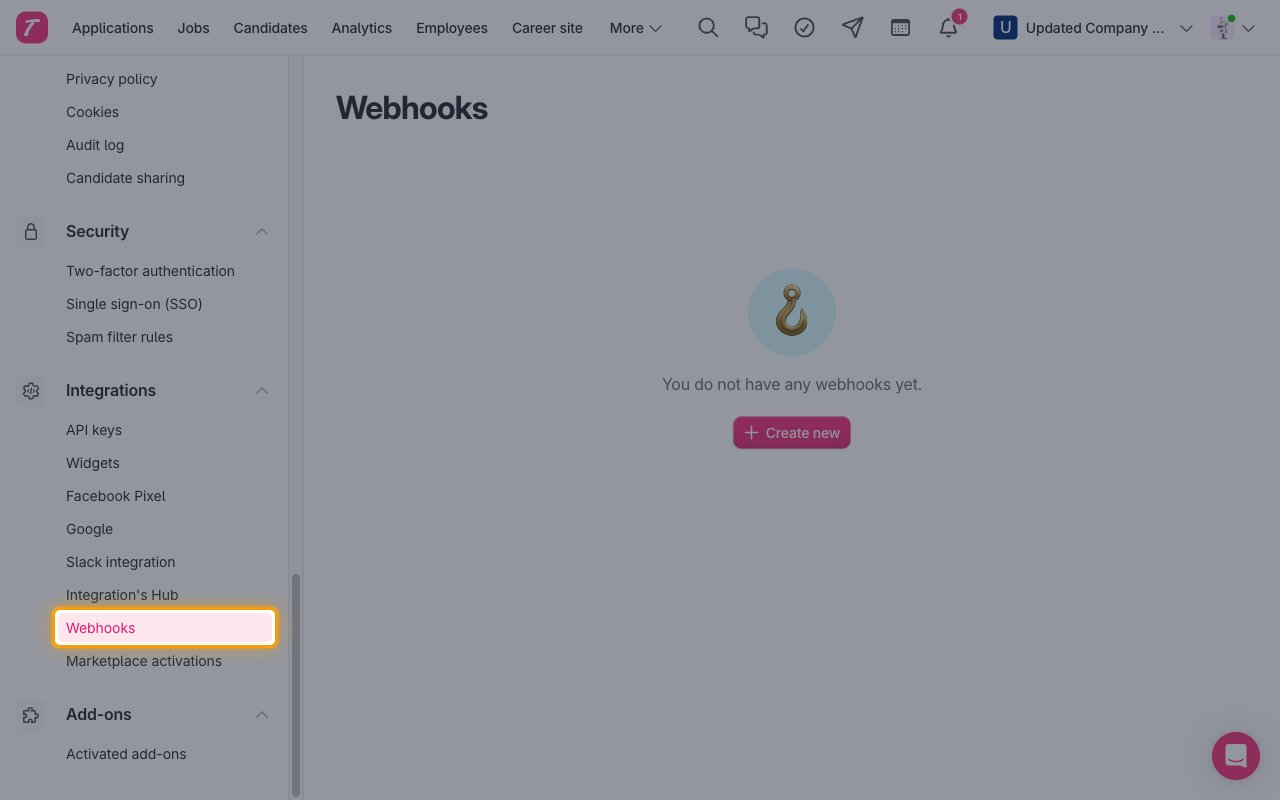
        <p>In <strong>Settings</strong>, scroll to <strong>Integrations</strong> and click <strong>Webhooks</strong>.</p>

        <img src="https://mintcdn.com/stackone-60/YBnpj5NvpMH8PRGp/connectors/teamtailor/images/events-open-webhooks.png?fit=max&auto=format&n=YBnpj5NvpMH8PRGp&q=85&s=fb306d0ac9089643511e766e949a2ca0" alt="Teamtailor settings menu with Webhooks highlighted under Integrations." width="1280" height="800" data-path="connectors/teamtailor/images/events-open-webhooks.png" />
      </div>
    </Step>

    <Step title="Create a new webhook">
      <div data-guide-step data-guide-scopes="" data-guide-display-scopes-list="">
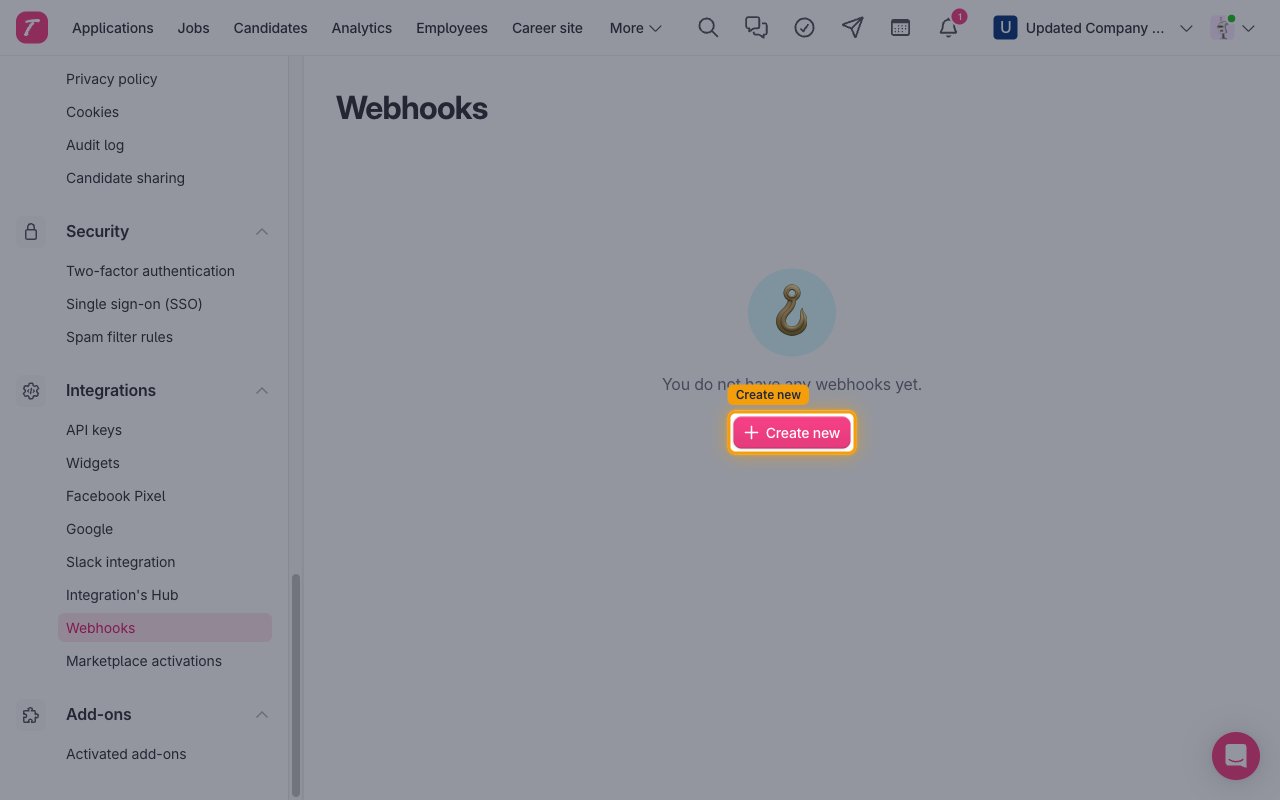
        <p>Click <strong>Create new</strong> (or <strong>Create new webhook</strong> when webhooks already exist).</p>

        <img src="https://mintcdn.com/stackone-60/vsVM8R8x5WJyfF9u/connectors/teamtailor/images/events-create-new.png?fit=max&auto=format&n=vsVM8R8x5WJyfF9u&q=85&s=f9c60ff4eab98a33c8590fede5b264db" alt="Empty Teamtailor Webhooks page with the Create new button highlighted." width="1280" height="800" data-path="connectors/teamtailor/images/events-create-new.png" />
      </div>
    </Step>

    <Step title="Enter the label and Webhook URL">
      <div data-guide-step data-guide-scopes="" data-guide-display-scopes-list="">
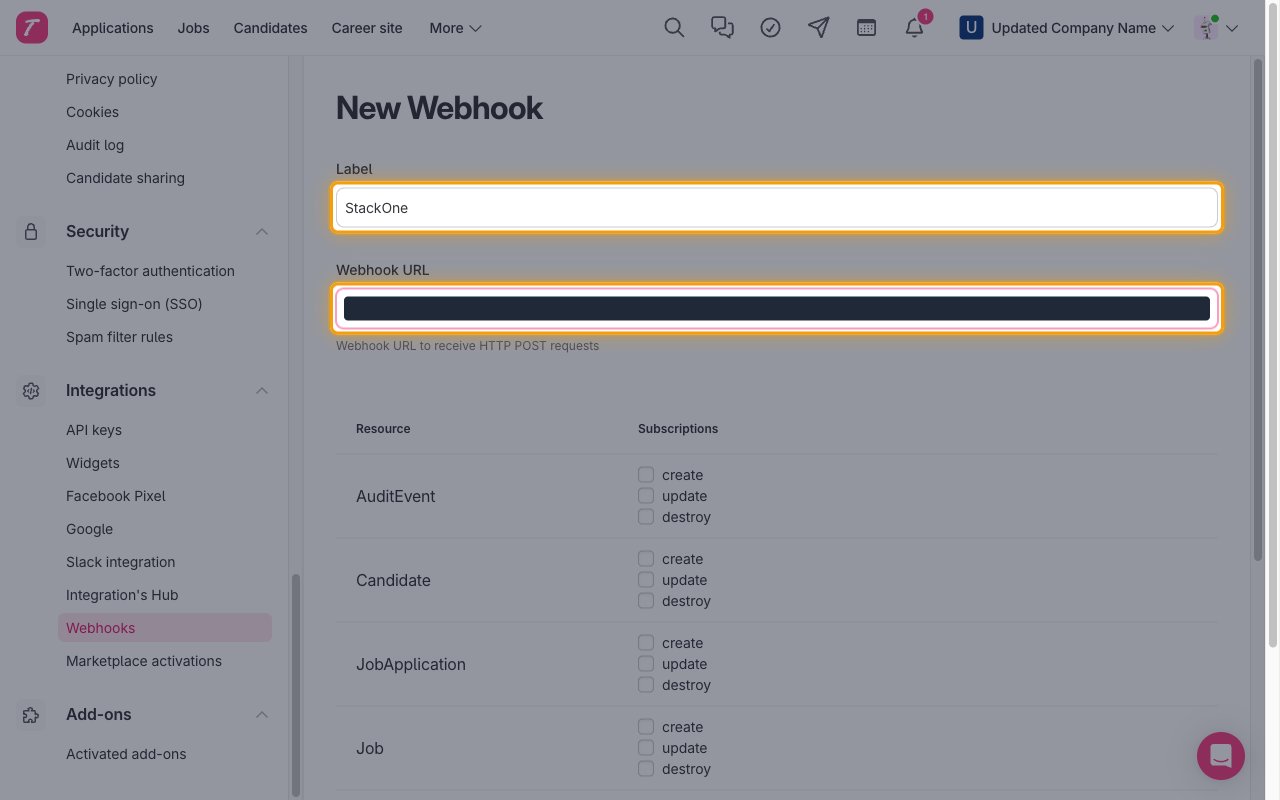
        <p>Fill in the top of the <strong>New Webhook</strong> form.</p>

        <ul>
          <li><strong>Label</strong>: a name you will recognize, such as `StackOne`.</li>
          <li><strong>Webhook URL</strong>: paste the Native Webhook URL you copied from StackOne.</li>
        </ul>

        <img src="https://mintcdn.com/stackone-60/vsVM8R8x5WJyfF9u/connectors/teamtailor/images/events-label-and-url.png?fit=max&auto=format&n=vsVM8R8x5WJyfF9u&q=85&s=89e663ccafa5d1e52c91abf0ceef9cd0" alt="New Webhook form with the Label and Webhook URL fields highlighted and the URL value hidden." width="1280" height="800" data-path="connectors/teamtailor/images/events-label-and-url.png" />
      </div>
    </Step>

    <Step title="Select the events">
      <div data-guide-step data-guide-scopes="" data-guide-display-scopes-list="">
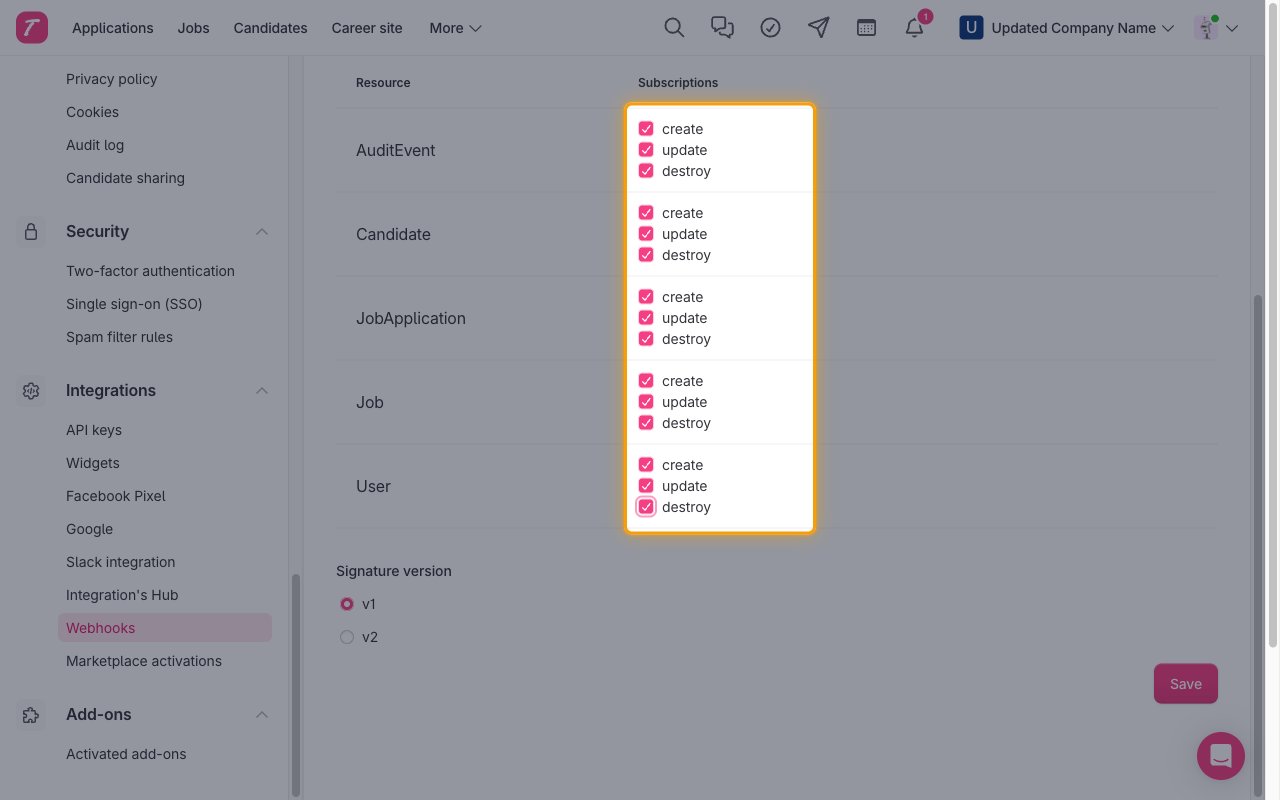
        <p>Under <strong>Subscriptions</strong>, tick <strong>create</strong>, <strong>update</strong> and <strong>destroy</strong> for each resource whose events you enabled in StackOne (<strong>AuditEvent</strong>, <strong>Candidate</strong>, <strong>JobApplication</strong>, <strong>Job</strong>, <strong>User</strong>).</p>

        <img src="https://mintcdn.com/stackone-60/YBnpj5NvpMH8PRGp/connectors/teamtailor/images/events-subscriptions.png?fit=max&auto=format&n=YBnpj5NvpMH8PRGp&q=85&s=b219712cac8ef86e53d41ae860e409fb" alt="Subscriptions column of the New Webhook form with create, update and destroy ticked for every resource." width="1280" height="800" data-path="connectors/teamtailor/images/events-subscriptions.png" />
      </div>
    </Step>

    <Step title="Choose the signature version and save">
      <div data-guide-step data-guide-scopes="" data-guide-display-scopes-list="">
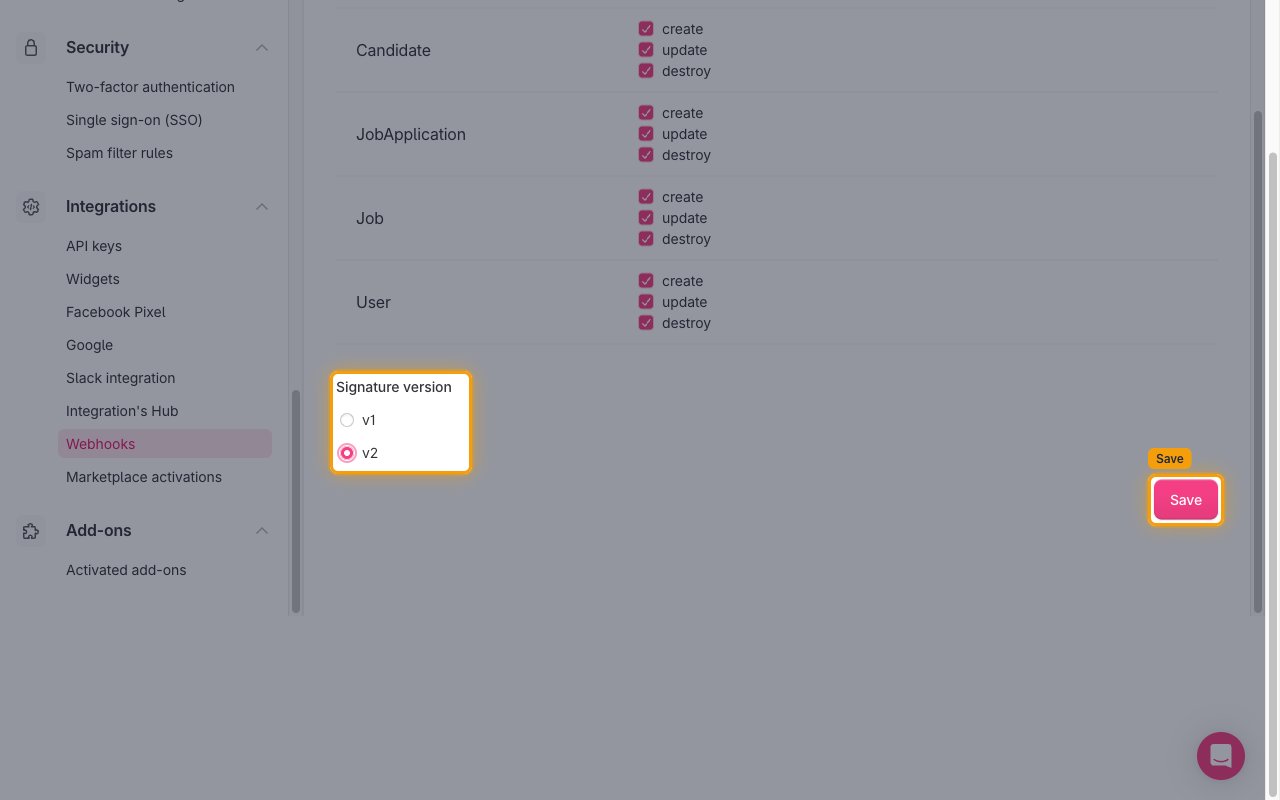
        <p>Under <strong>Signature version</strong>, select <strong>v2</strong> (Teamtailor recommends v2 over the deprecated v1), then click <strong>Save</strong>.</p>

        <img src="https://mintcdn.com/stackone-60/YBnpj5NvpMH8PRGp/connectors/teamtailor/images/events-signature-and-save.png?fit=max&auto=format&n=YBnpj5NvpMH8PRGp&q=85&s=9b6a5a1b40a36a8c3c519382f8944f78" alt="Signature version options with v2 selected and the Save button highlighted." width="1280" height="800" data-path="connectors/teamtailor/images/events-signature-and-save.png" />
      </div>
    </Step>

    <Step title="Confirm the webhook was created">
      <div data-guide-step data-guide-scopes="" data-guide-display-scopes-list="">
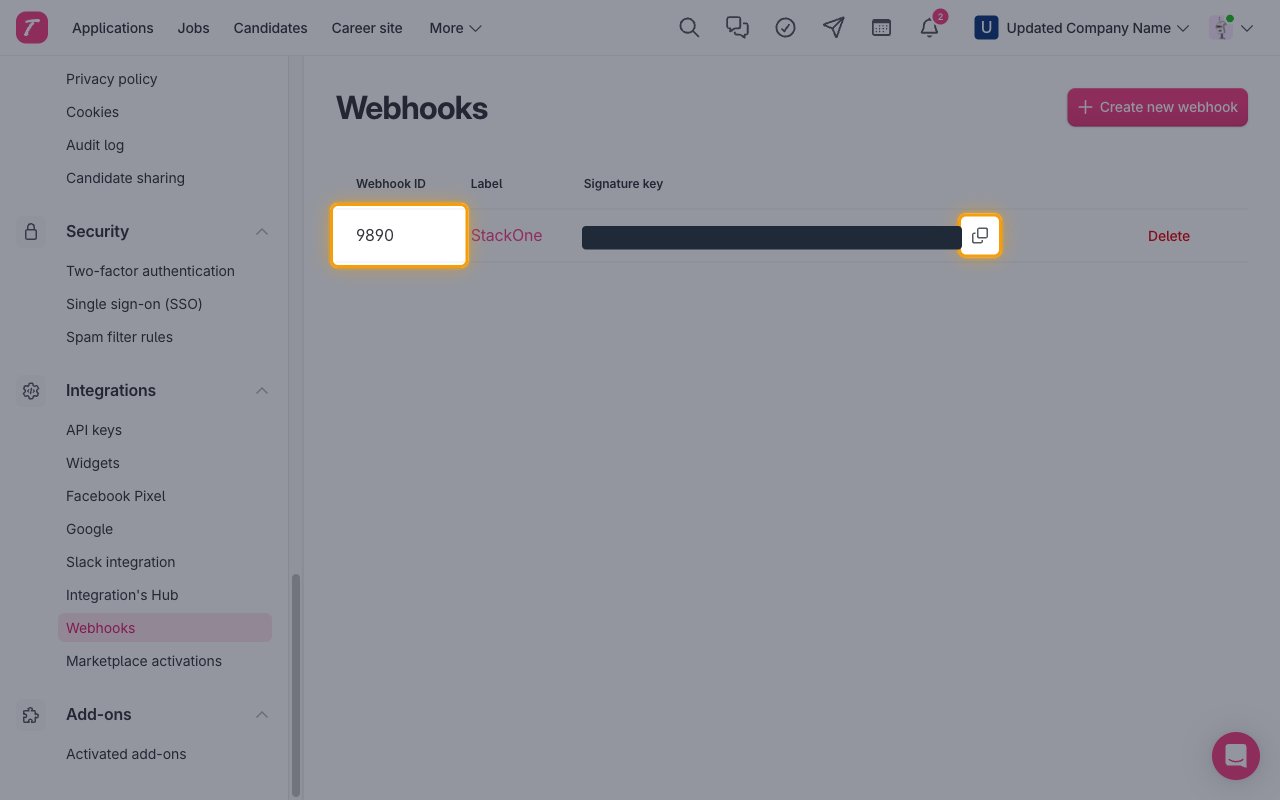
        <p>The webhook now appears in the list with its <strong>Webhook ID</strong>, <strong>Label</strong> and <strong>Signature key</strong>. Click <strong>Copy signature key</strong> if you want to verify the `TT-Signature` header on your side. StackOne does not verify the signature.</p>

        <img src="https://mintcdn.com/stackone-60/YBnpj5NvpMH8PRGp/connectors/teamtailor/images/events-webhook-created.png?fit=max&auto=format&n=YBnpj5NvpMH8PRGp&q=85&s=c420575b513f7bc7be3ecfaacce49045" alt="Teamtailor Webhooks list showing the new webhook with the Webhook ID and Copy signature key button highlighted and the key hidden." width="1280" height="800" data-path="connectors/teamtailor/images/events-webhook-created.png" />
      </div>
    </Step>
  </Steps>
</section>

<section data-guide-section data-guide-scopes="">
  <h2>Available webhook events</h2>

  <p>The following Teamtailor events can be handled. Only events ticked in the Teamtailor webhook and enabled in StackOne are delivered.</p>

  <Steps>
    <Step title="Candidate events">
      <div data-guide-step data-guide-scopes="" data-guide-display-scopes-list="">
        <p>Events related to candidates.</p>

        <ul>
          <li><strong>Candidate Created</strong> (`candidate.create`) — Fired when a new candidate is created</li>
          <li><strong>Candidate Updated</strong> (`candidate.update`) — Fired when a candidate's email, name, phone, pitch, LinkedIn URL, picture, referring site or URL, internal flag, restriction, custom fields or locations change</li>
          <li><strong>Candidate Deleted</strong> (`candidate.destroy`) — Fired when a candidate is deleted</li>
        </ul>
      </div>
    </Step>

    <Step title="Job events">
      <div data-guide-step data-guide-scopes="" data-guide-display-scopes-list="">
        <p>Events related to jobs.</p>

        <ul>
          <li><strong>Job Created</strong> (`job.create`) — Fired when a new job is created</li>
          <li><strong>Job Updated</strong> (`job.update`) — Fired when a job's title, body, pitch, status, employment details, salary, dates, recruiter, owner, department, role, tags, custom fields, locations or team memberships change</li>
          <li><strong>Job Deleted</strong> (`job.destroy`) — Fired when a job is deleted</li>
        </ul>
      </div>
    </Step>

    <Step title="Job application events">
      <div data-guide-step data-guide-scopes="" data-guide-display-scopes-list="">
        <p>Events related to job applications.</p>

        <ul>
          <li><strong>Job Application Created</strong> (`job_application.create`) — Fired when a new application is submitted</li>
          <li><strong>Job Application Updated</strong> (`job_application.update`) — Fired when an application's stage, rejection, cover letter, job title or promotion changes</li>
          <li><strong>Job Application Deleted</strong> (`job_application.destroy`) — Fired when an application is deleted</li>
        </ul>
      </div>
    </Step>

    <Step title="User events">
      <div data-guide-step data-guide-scopes="" data-guide-display-scopes-list="">
        <p>Events related to Teamtailor users (recruiters, hiring managers and admins).</p>

        <ul>
          <li><strong>User Created</strong> (`user.create`) — Fired when a new user is added to the company</li>
          <li><strong>User Updated</strong> (`user.update`) — Fired when a user is updated</li>
          <li><strong>User Deleted</strong> (`user.destroy`) — Fired when a user is deleted</li>
        </ul>
      </div>
    </Step>

    <Step title="Audit events">
      <div data-guide-step data-guide-scopes="" data-guide-display-scopes-list="">
        <p>Events related to the company audit log.</p>

        <ul>
          <li><strong>Audit Event Created</strong> (`audit_event.create`) — Fired when a new audit log entry is recorded</li>
          <li><strong>Audit Event Updated</strong> (`audit_event.update`) — Fired when an audit log entry is updated</li>
          <li><strong>Audit Event Deleted</strong> (`audit_event.destroy`) — Fired when an audit log entry is deleted</li>
        </ul>
      </div>
    </Step>
  </Steps>
</section>

<section data-guide-section data-guide-scopes="">
  <h2>Delivery format</h2>

  <p>Details of how Teamtailor delivers events to StackOne.</p>

  <Steps>
    <Step title="One event per request">
      <div data-guide-step data-guide-scopes="" data-guide-display-scopes-list="">
        <p>Each request carries a single event as a flat JSON object: `event_name`, the resource `id`, `company_uuid` and the resource fields in snake\_case (for example `updated_at`). The signature is sent in the `TT-Signature` header. The event ID is the Teamtailor ID of the affected record (candidate, job, application, user or audit event).</p>
      </div>
    </Step>

    <Step title="No retries">
      <div data-guide-step data-guide-scopes="" data-guide-display-scopes-list="">
        <p>Teamtailor does not retry a delivery that fails. Events sent while the webhook URL is unreachable are lost.</p>
      </div>
    </Step>
  </Steps>
</section>

## Verify

Your Connector should now be able to receive and process events. Try triggering an event and you should see an Event appear in the Connector logs.


This documentation is built and hosted on [Mintlify](https://mintlify.com), a developer documentation platform.