> ## Documentation Index
> Fetch the complete documentation index at: https://docs.stackone.com/llms.txt
> Use this file to discover all available pages before exploring further.
# Square Webhook Setup Guide
> Configure Square to deliver events to StackOne.
## Prerequisites
The connector should already be set up, with a Connector Profile and a Linked Account. See [Getting Started](/connectors/square#getting-started) on the Square connector page.
Retrieve the StackOne Native Webhook URL
The Native Webhook URL is generated once a Square account has been linked. Each linked account has its own URL.
- Open the linked account in StackOne.
- Copy the value from Native Webhook URL.
Create the webhook subscription in Square
Add a webhook subscription to the Square app used by the StackOne Connector profile, so Square posts events to StackOne.
Sign in to your Square Developer account.
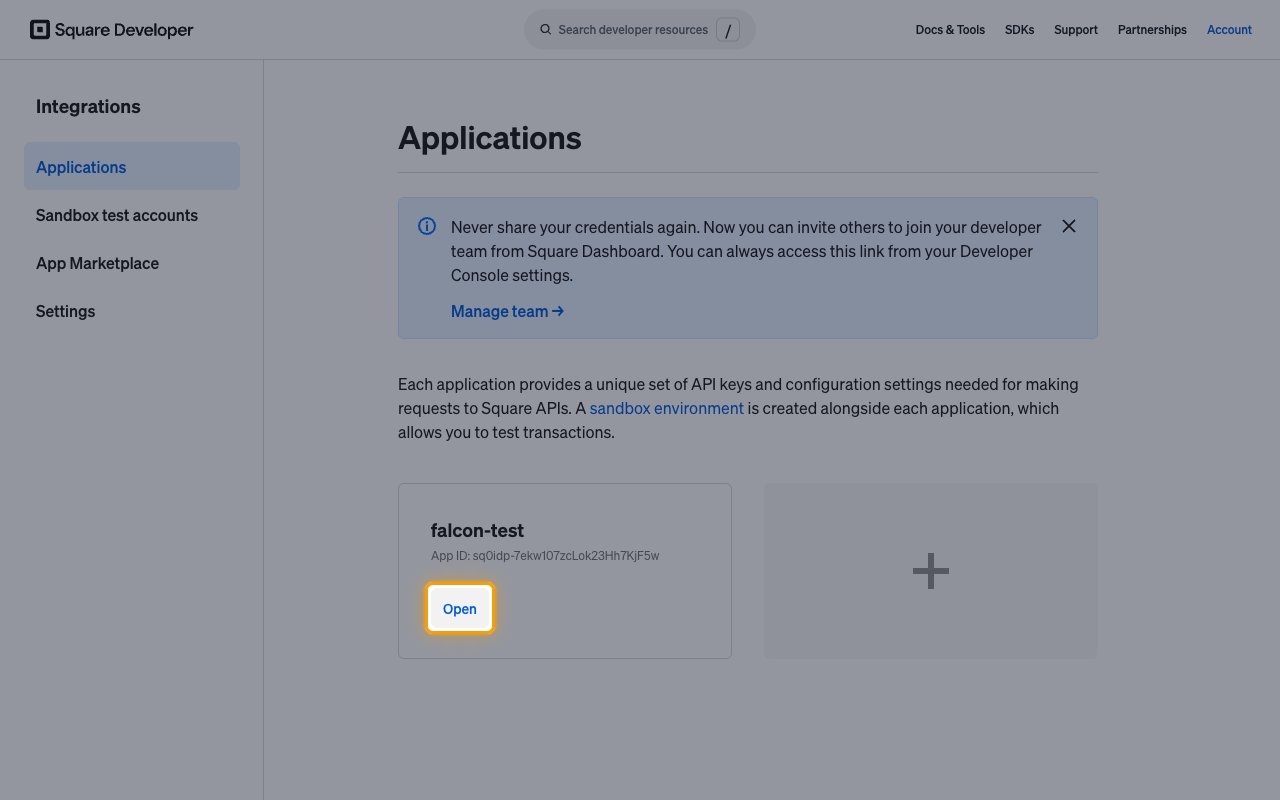
- Under Applications, find the app whose Application ID is set on the StackOne Connector profile.
- Click Open.
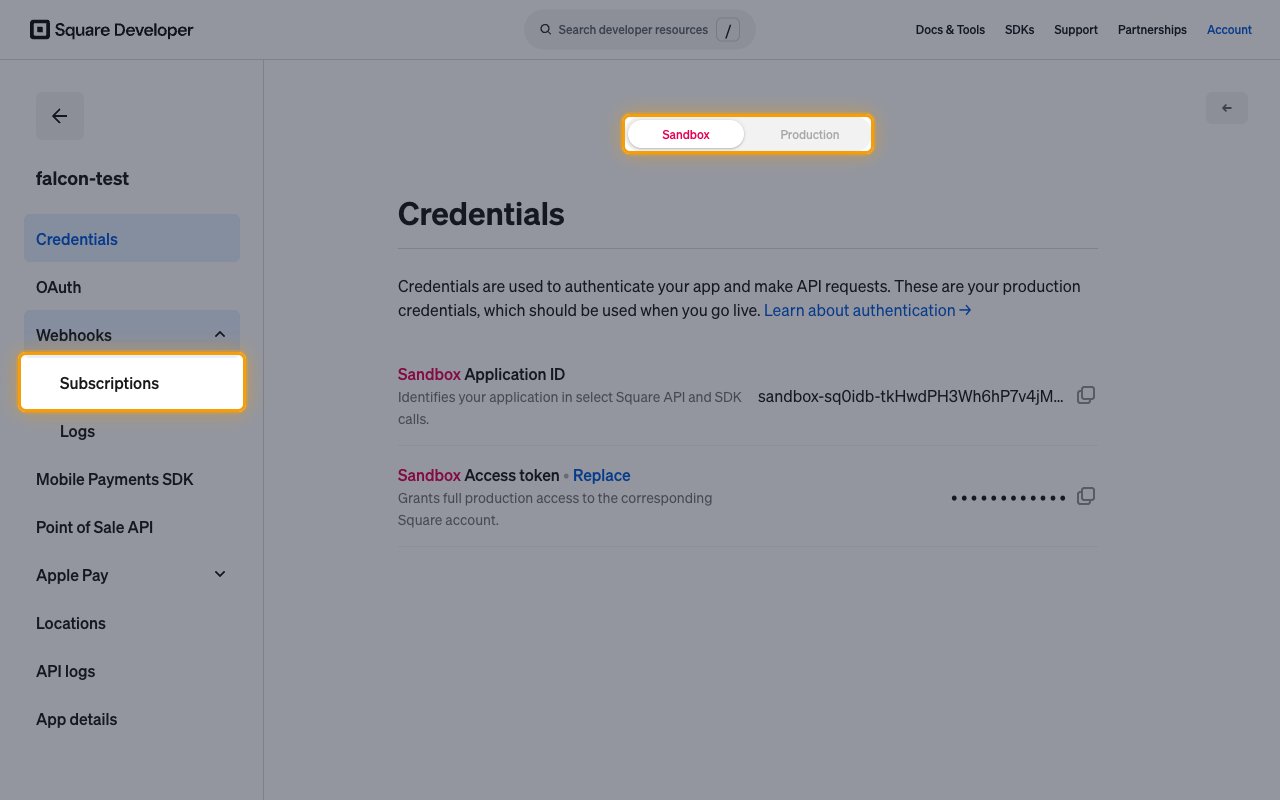
Select the environment of the linked account, then open the app's webhook subscriptions.
- At the top of the page, select Sandbox or Production.
- In the left menu, click Webhooks, then Subscriptions.
- On the Webhook subscriptions page, click Add subscription.
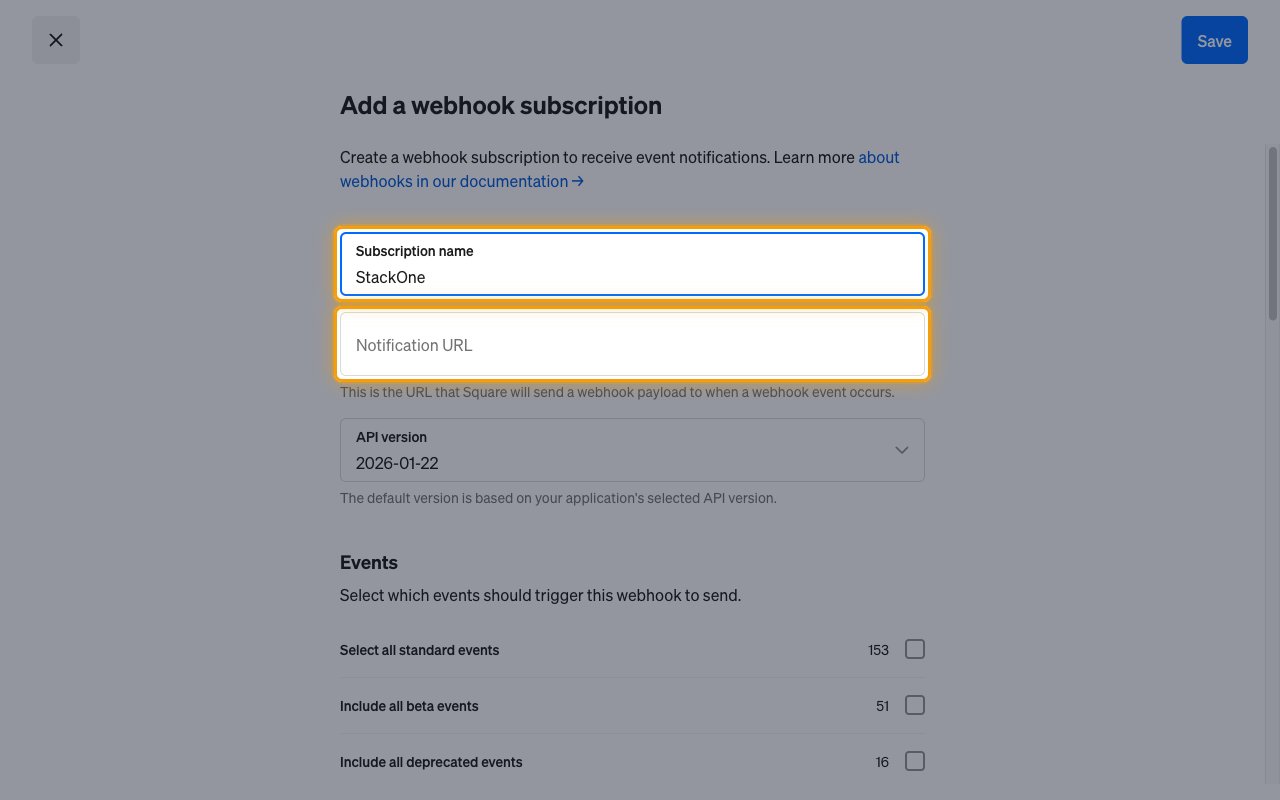
In the Add a webhook subscription dialog, point the subscription at StackOne.
- Subscription name: `StackOne`
- Paste the Native Webhook URL into Notification URL.
- Leave API version at its default value.
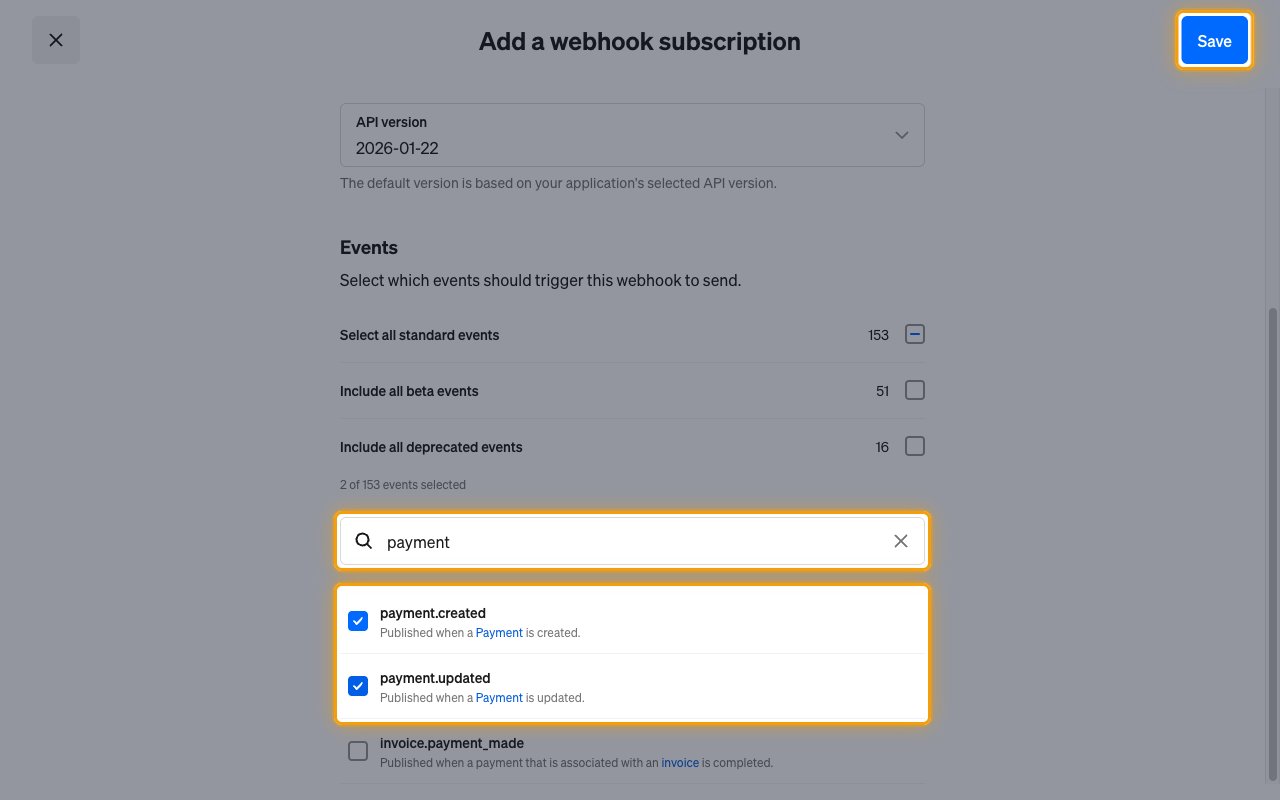
Under Events, choose which events Square sends to StackOne.
- Use Search to find each event you want, for example `payment.created`, and tick its checkbox.
- Tick only events listed in Available webhook events below. Other events are acknowledged and dropped.
- Click Save.
Available webhook events
The following Square events can be received. Each event's record ID is the Square ID of the affected record (data.id), or Square's event ID when the event has no record. The event data holds the full Square event, including the affected object.
Events for payments.
- Payment Created (`payment.created`) — Fired when a payment is created.
- Payment Updated (`payment.updated`) — Fired when a payment field changes, such as status or card\_details.status.
Events for refunds.
- Refund Created (`refund.created`) — Fired when a refund is created.
- Refund Updated (`refund.updated`) — Fired when a refund is updated, typically when its status changes on completion.
Events for cards.
- Card Created (`card.created`) — Fired when a card on file is created or imported.
- Card Automatically Updated (`card.automatically_updated`) — Fired when Square automatically updates a card expiration date or PAN, or adds or removes an issuer alert.
- Card Updated (`card.updated`) — Fired when the seller updates a card in the Square Dashboard.
- Card Disabled (`card.disabled`) — Fired when a card on file is disabled.
- Card Forgotten (`card.forgotten`) — Fired when a card is GDPR forgotten or vaulted.
Events for disputes.
- Dispute Created (`dispute.created`) — Fired when a dispute is created.
- Dispute State Updated (`dispute.state.updated`) — Fired when the state of a dispute changes, including the WON or LOST resolution reported by the bank.
- Dispute Evidence Created (`dispute.evidence.created`) — Fired when evidence is added to a dispute.
- Dispute Evidence Deleted (`dispute.evidence.deleted`) — Fired when evidence is removed from a dispute.
Events for payouts.
- Payout Sent (`payout.sent`) — Fired when a payout is sent.
- Payout Paid (`payout.paid`) — Fired when a payout is completed.
- Payout Failed (`payout.failed`) — Fired when a payout fails.
Events for bank accounts.
- Bank Account Created (`bank_account.created`) — Fired when a bank account is linked to the Square account.
- Bank Account Verified (`bank_account.verified`) — Fired when Square sets the status of a bank account to VERIFIED.
- Bank Account Disabled (`bank_account.disabled`) — Fired when Square sets the status of a bank account to DISABLED.
Events for gift cards.
- Gift Card Created (`gift_card.created`) — Fired when a digital gift card is created or a physical gift card is registered.
- Gift Card Updated (`gift_card.updated`) — Fired when the balance, state or linked customers of a gift card change.
- Gift Card Customer Linked (`gift_card.customer_linked`) — Fired when a customer is linked to a gift card.
- Gift Card Customer Unlinked (`gift_card.customer_unlinked`) — Fired when a customer is unlinked from a gift card.
- Gift Card Activity Created (`gift_card.activity.created`) — Fired when a gift card activity is created.
- Gift Card Activity Updated (`gift_card.activity.updated`) — Fired when a REDEEM or IMPORT gift card activity is updated.
Events for orders.
- Order Created (`order.created`) — Fired when an order is created by a Square product or an application.
- Order Updated (`order.updated`) — Fired when an order is updated through UpdateOrder or by the seller.
- Order Fulfillment Updated (`order.fulfillment.updated`) — Fired when an order fulfillment is created or updated.
Events for invoices.
- Invoice Created (`invoice.created`) — Fired when a draft invoice is created.
- Invoice Updated (`invoice.updated`) — Fired when an invoice changes, including after it is published or canceled.
- Invoice Published (`invoice.published`) — Fired when an invoice is published, including invoices scheduled for later processing.
- Invoice Payment Made (`invoice.payment_made`) — Fired when a payment is made for an invoice.
- Invoice Scheduled Charge Failed (`invoice.scheduled_charge_failed`) — Fired when a scheduled automatic invoice payment fails.
- Invoice Canceled (`invoice.canceled`) — Fired when an invoice is canceled.
- Invoice Refunded (`invoice.refunded`) — Fired when a refund is processed for an invoice.
- Invoice Deleted (`invoice.deleted`) — Fired when a draft invoice is deleted.
Events for subscriptions.
- Subscription Created (`subscription.created`) — Fired when a subscription is created.
- Subscription Updated (`subscription.updated`) — Fired when a subscription is updated.
Events for catalog.
- Catalog Version Updated (`catalog.version.updated`) — Fired when the catalog is updated.
Events for inventory.
- Inventory Count Updated (`inventory.count.updated`) — Fired when the quantity of a catalog item variation changes.
Events for customers.
- Customer Created (`customer.created`) — Fired when a customer profile is created, including when profiles are merged.
- Customer Updated (`customer.updated`) — Fired when an attribute on a customer profile changes, except segment\_ids.
- Customer Deleted (`customer.deleted`) — Fired when a customer profile is deleted, including when profiles are merged.
Events for locations.
- Location Created (`location.created`) — Fired when a location is created.
- Location Updated (`location.updated`) — Fired when a location is updated.
Events for checkout.
- Online Checkout Location Settings Updated (`online_checkout.location_settings.updated`) — Fired when online checkout location settings are updated.
- Online Checkout Merchant Settings Updated (`online_checkout.merchant_settings.updated`) — Fired when online checkout merchant settings are updated.
Events for team members.
- Team Member Created (`team_member.created`) — Fired when a team member is created.
- Team Member Updated (`team_member.updated`) — Fired when a team member is updated.
- Team Member Wage Setting Updated (`team_member.wage_setting.updated`) — Fired when the wage setting of a team member is updated.
Events for jobs.
- Job Created (`job.created`) — Fired when a job is created.
- Job Updated (`job.updated`) — Fired when a job is updated.
Events for timecards.
- Timecard Created (`labor.timecard.created`) — Fired when a timecard is created at the start of a shift.
- Timecard Updated (`labor.timecard.updated`) — Fired when a timecard is updated.
- Timecard Deleted (`labor.timecard.deleted`) — Fired when a timecard is deleted.
Events for scheduled shifts.
- Scheduled Shift Created (`labor.scheduled_shift.created`) — Fired when a scheduled shift is created.
- Scheduled Shift Updated (`labor.scheduled_shift.updated`) — Fired when a scheduled shift is updated.
- Scheduled Shift Published (`labor.scheduled_shift.published`) — Fired when a scheduled shift is published.
- Scheduled Shift Deleted (`labor.scheduled_shift.deleted`) — Fired when a scheduled shift is permanently deleted.
Events for authorization.
- OAuth Authorization Revoked (`oauth.authorization.revoked`) — Fired when the seller revokes all access and refresh tokens granted to the application.
Events for custom attributes.
- Customer Custom Attribute Definition Owned Created (`customer.custom_attribute_definition.owned.created`) — Fired when a customer custom attribute definition owned by the application is created.
- Customer Custom Attribute Definition Owned Updated (`customer.custom_attribute_definition.owned.updated`) — Fired when a customer custom attribute definition owned by the application is updated.
- Customer Custom Attribute Definition Owned Deleted (`customer.custom_attribute_definition.owned.deleted`) — Fired when a customer custom attribute definition owned by the application is deleted.
- Customer Custom Attribute Owned Updated (`customer.custom_attribute.owned.updated`) — Fired when a customer custom attribute owned by the application is created or updated.
- Customer Custom Attribute Owned Deleted (`customer.custom_attribute.owned.deleted`) — Fired when a customer custom attribute owned by the application is deleted.
- Customer Custom Attribute Definition Visible Created (`customer.custom_attribute_definition.visible.created`) — Fired when a customer custom attribute definition visible to the application is created.
- Customer Custom Attribute Definition Visible Updated (`customer.custom_attribute_definition.visible.updated`) — Fired when a customer custom attribute definition visible to the application is updated.
- Customer Custom Attribute Definition Visible Deleted (`customer.custom_attribute_definition.visible.deleted`) — Fired when a customer custom attribute definition visible to the application is deleted.
- Customer Custom Attribute Visible Updated (`customer.custom_attribute.visible.updated`) — Fired when a customer custom attribute visible to the application is created or updated.
- Customer Custom Attribute Visible Deleted (`customer.custom_attribute.visible.deleted`) — Fired when a customer custom attribute visible to the application is deleted.
- Booking Custom Attribute Definition Owned Created (`booking.custom_attribute_definition.owned.created`) — Fired when a booking custom attribute definition owned by the application is created.
- Booking Custom Attribute Definition Owned Updated (`booking.custom_attribute_definition.owned.updated`) — Fired when a booking custom attribute definition owned by the application is updated.
- Booking Custom Attribute Definition Owned Deleted (`booking.custom_attribute_definition.owned.deleted`) — Fired when a booking custom attribute definition owned by the application is deleted.
- Booking Custom Attribute Owned Updated (`booking.custom_attribute.owned.updated`) — Fired when a booking custom attribute owned by the application is created or updated.
- Booking Custom Attribute Owned Deleted (`booking.custom_attribute.owned.deleted`) — Fired when a booking custom attribute owned by the application is deleted.
- Booking Custom Attribute Definition Visible Created (`booking.custom_attribute_definition.visible.created`) — Fired when a booking custom attribute definition visible to the application is created.
- Booking Custom Attribute Definition Visible Updated (`booking.custom_attribute_definition.visible.updated`) — Fired when a booking custom attribute definition visible to the application is updated.
- Booking Custom Attribute Definition Visible Deleted (`booking.custom_attribute_definition.visible.deleted`) — Fired when a booking custom attribute definition visible to the application is deleted.
- Booking Custom Attribute Visible Updated (`booking.custom_attribute.visible.updated`) — Fired when a booking custom attribute visible to the application is created or updated.
- Booking Custom Attribute Visible Deleted (`booking.custom_attribute.visible.deleted`) — Fired when a booking custom attribute visible to the application is deleted.
Events for bookings.
- Booking Created (`booking.created`) — Fired when a booking is created.
- Booking Updated (`booking.updated`) — Fired when a booking is updated or canceled, through the API, the Square Dashboard or the seller booking site.
Events for loyalty.
- Loyalty Account Created (`loyalty.account.created`) — Fired when a loyalty account is created for a buyer.
- Loyalty Account Updated (`loyalty.account.updated`) — Fired when a loyalty account is updated, for example its phone number or point balance.
- Loyalty Account Deleted (`loyalty.account.deleted`) — Fired when a loyalty account is deleted.
- Loyalty Event Created (`loyalty.event.created`) — Fired when a balance-changing loyalty event occurs, such as points accumulated or a reward redeemed.
- Loyalty Program Created (`loyalty.program.created`) — Fired when a loyalty program is created in the Square Dashboard.
- Loyalty Program Updated (`loyalty.program.updated`) — Fired when a loyalty program is updated in the Square Dashboard.
- Loyalty Promotion Created (`loyalty.promotion.created`) — Fired when a loyalty promotion is created.
- Loyalty Promotion Updated (`loyalty.promotion.updated`) — Fired when a loyalty promotion is updated, for example canceled.
Events for terminal.
- Terminal Checkout Created (`terminal.checkout.created`) — Fired when a Terminal checkout request is created.
- Terminal Checkout Updated (`terminal.checkout.updated`) — Fired when the status of a Terminal checkout changes.
- Terminal Refund Created (`terminal.refund.created`) — Fired when a Terminal refund request is created.
- Terminal Refund Updated (`terminal.refund.updated`) — Fired when the status of a Terminal refund changes.
Events for devices.
- Device Code Paired (`device.code.paired`) — Fired when a Square Terminal is paired with a Terminal API device code.
Delivery format
Details of how Square delivers events to StackOne.
Square sends one event per request. If StackOne does not answer with a 2xx status, Square retries the event with exponential backoff for up to 24 hours, so the same event (same event ID) can arrive more than once.
## Verify
Your Connector should now be able to receive and process events. Try triggering an event and you should see an Event appear in the Connector logs.
This documentation is built and hosted on [Mintlify](https://mintlify.com), a developer documentation platform.