> ## Documentation Index
> Fetch the complete documentation index at: https://docs.stackone.com/llms.txt
> Use this file to discover all available pages before exploring further.

# Slack OAuth 2.0 (User) connector profile – StackOne setup guide

> Set up the OAuth 2.0 (User) connector profile for Slack in StackOne. One-time admin setup required before your users can link Slack accounts via Hub.

<Panel>
  <div className="not-prose guides-scope-selector" data-guides-scope-selector data-guide-actions-json="[{&#x22;id&#x22;:&#x22;slack_list_conversations&#x22;,&#x22;label&#x22;:&#x22;List Conversations&#x22;,&#x22;scopes&#x22;:[&#x22;channels:read&#x22;,&#x22;groups:read&#x22;,&#x22;mpim:read&#x22;,&#x22;im:read&#x22;]},{&#x22;id&#x22;:&#x22;slack_get_conversation&#x22;,&#x22;label&#x22;:&#x22;Get Conversation&#x22;,&#x22;scopes&#x22;:[&#x22;channels:read&#x22;,&#x22;groups:read&#x22;,&#x22;mpim:read&#x22;,&#x22;im:read&#x22;]},{&#x22;id&#x22;:&#x22;slack_create_conversation&#x22;,&#x22;label&#x22;:&#x22;Create Conversation&#x22;,&#x22;scopes&#x22;:[&#x22;channels:write&#x22;,&#x22;groups:write&#x22;]},{&#x22;id&#x22;:&#x22;slack_join_conversation&#x22;,&#x22;label&#x22;:&#x22;Join Conversation&#x22;,&#x22;scopes&#x22;:[&#x22;channels:join&#x22;]},{&#x22;id&#x22;:&#x22;slack_leave_conversation&#x22;,&#x22;label&#x22;:&#x22;Leave Conversation&#x22;,&#x22;scopes&#x22;:[&#x22;channels:write&#x22;,&#x22;groups:write&#x22;]},{&#x22;id&#x22;:&#x22;slack_rename_conversation&#x22;,&#x22;label&#x22;:&#x22;Rename Conversation&#x22;,&#x22;scopes&#x22;:[&#x22;channels:write&#x22;,&#x22;groups:write&#x22;]},{&#x22;id&#x22;:&#x22;slack_invite_users_to_conversation&#x22;,&#x22;label&#x22;:&#x22;Invite Users To Conversation&#x22;,&#x22;scopes&#x22;:[&#x22;channels:write.invites&#x22;,&#x22;groups:write.invites&#x22;]},{&#x22;id&#x22;:&#x22;slack_kick_user_from_conversation&#x22;,&#x22;label&#x22;:&#x22;Remove User From Conversation&#x22;,&#x22;scopes&#x22;:[&#x22;channels:write&#x22;,&#x22;groups:write&#x22;]},{&#x22;id&#x22;:&#x22;slack_list_conversation_members&#x22;,&#x22;label&#x22;:&#x22;List Conversation Members&#x22;,&#x22;scopes&#x22;:[&#x22;channels:read&#x22;,&#x22;groups:read&#x22;,&#x22;mpim:read&#x22;,&#x22;im:read&#x22;]},{&#x22;id&#x22;:&#x22;slack_open_conversation&#x22;,&#x22;label&#x22;:&#x22;Open Conversation&#x22;,&#x22;scopes&#x22;:[&#x22;im:write&#x22;,&#x22;mpim:write&#x22;]},{&#x22;id&#x22;:&#x22;slack_list_thread_replies&#x22;,&#x22;label&#x22;:&#x22;List Thread Replies&#x22;,&#x22;scopes&#x22;:[&#x22;channels:history&#x22;,&#x22;groups:history&#x22;,&#x22;mpim:history&#x22;,&#x22;im:history&#x22;]},{&#x22;id&#x22;:&#x22;slack_list_files&#x22;,&#x22;label&#x22;:&#x22;List Files&#x22;,&#x22;scopes&#x22;:[&#x22;files:read&#x22;]},{&#x22;id&#x22;:&#x22;slack_get_file&#x22;,&#x22;label&#x22;:&#x22;Get File&#x22;,&#x22;scopes&#x22;:[&#x22;files:read&#x22;]},{&#x22;id&#x22;:&#x22;slack_delete_file&#x22;,&#x22;label&#x22;:&#x22;Delete File&#x22;,&#x22;scopes&#x22;:[&#x22;files:write&#x22;]},{&#x22;id&#x22;:&#x22;slack_get_upload_url&#x22;,&#x22;label&#x22;:&#x22;Get File Upload URL&#x22;,&#x22;scopes&#x22;:[&#x22;files:write&#x22;]},{&#x22;id&#x22;:&#x22;slack_complete_file_upload&#x22;,&#x22;label&#x22;:&#x22;Complete File Upload&#x22;,&#x22;scopes&#x22;:[&#x22;files:write&#x22;]},{&#x22;id&#x22;:&#x22;slack_share_file_public_url&#x22;,&#x22;label&#x22;:&#x22;Share File Public URL&#x22;,&#x22;scopes&#x22;:[&#x22;files:write&#x22;]},{&#x22;id&#x22;:&#x22;slack_revoke_file_public_url&#x22;,&#x22;label&#x22;:&#x22;Revoke File Public URL&#x22;,&#x22;scopes&#x22;:[&#x22;files:write&#x22;]},{&#x22;id&#x22;:&#x22;slack_unified_list_groups&#x22;,&#x22;label&#x22;:&#x22;List Unified Groups&#x22;,&#x22;scopes&#x22;:[&#x22;usergroups:read&#x22;]},{&#x22;id&#x22;:&#x22;slack_unified_get_group&#x22;,&#x22;label&#x22;:&#x22;Get Unified Group&#x22;,&#x22;scopes&#x22;:[&#x22;usergroups:read&#x22;]},{&#x22;id&#x22;:&#x22;slack_unified_list_organizations&#x22;,&#x22;label&#x22;:&#x22;List Unified Organizations&#x22;,&#x22;scopes&#x22;:[&#x22;team:read&#x22;]},{&#x22;id&#x22;:&#x22;slack_unified_get_organization&#x22;,&#x22;label&#x22;:&#x22;Get Unified Organization&#x22;,&#x22;scopes&#x22;:[&#x22;team:read&#x22;]},{&#x22;id&#x22;:&#x22;slack_unified_list_users&#x22;,&#x22;label&#x22;:&#x22;List Unified Users&#x22;,&#x22;scopes&#x22;:[&#x22;users:read&#x22;]},{&#x22;id&#x22;:&#x22;slack_unified_get_user&#x22;,&#x22;label&#x22;:&#x22;Get Unified User&#x22;,&#x22;scopes&#x22;:[&#x22;users:read&#x22;]},{&#x22;id&#x22;:&#x22;slack_list_messages&#x22;,&#x22;label&#x22;:&#x22;List Messages&#x22;,&#x22;scopes&#x22;:[&#x22;channels:history&#x22;,&#x22;groups:history&#x22;,&#x22;mpim:history&#x22;,&#x22;im:history&#x22;]},{&#x22;id&#x22;:&#x22;slack_send_message&#x22;,&#x22;label&#x22;:&#x22;Send Message&#x22;,&#x22;scopes&#x22;:[&#x22;chat:write&#x22;]},{&#x22;id&#x22;:&#x22;slack_update_message&#x22;,&#x22;label&#x22;:&#x22;Update Message&#x22;,&#x22;scopes&#x22;:[&#x22;chat:write&#x22;]},{&#x22;id&#x22;:&#x22;slack_delete_message&#x22;,&#x22;label&#x22;:&#x22;Delete Message&#x22;,&#x22;scopes&#x22;:[&#x22;chat:write&#x22;]},{&#x22;id&#x22;:&#x22;slack_send_ephemeral_message&#x22;,&#x22;label&#x22;:&#x22;Send Ephemeral Message&#x22;,&#x22;scopes&#x22;:[&#x22;chat:write&#x22;]},{&#x22;id&#x22;:&#x22;slack_schedule_message&#x22;,&#x22;label&#x22;:&#x22;Schedule Message&#x22;,&#x22;scopes&#x22;:[&#x22;chat:write&#x22;]},{&#x22;id&#x22;:&#x22;slack_list_scheduled_messages&#x22;,&#x22;label&#x22;:&#x22;List Scheduled Messages&#x22;,&#x22;scopes&#x22;:[&#x22;chat:write&#x22;]},{&#x22;id&#x22;:&#x22;slack_delete_scheduled_message&#x22;,&#x22;label&#x22;:&#x22;Delete Scheduled Message&#x22;,&#x22;scopes&#x22;:[&#x22;chat:write&#x22;]},{&#x22;id&#x22;:&#x22;slack_get_message_permalink&#x22;,&#x22;label&#x22;:&#x22;Get Message Permalink&#x22;,&#x22;scopes&#x22;:[&#x22;channels:history&#x22;,&#x22;groups:history&#x22;,&#x22;mpim:history&#x22;,&#x22;im:history&#x22;]},{&#x22;id&#x22;:&#x22;slack_search_messages&#x22;,&#x22;label&#x22;:&#x22;Search Messages&#x22;,&#x22;scopes&#x22;:[&#x22;search:read&#x22;]},{&#x22;id&#x22;:&#x22;slack_list_users&#x22;,&#x22;label&#x22;:&#x22;List Users&#x22;,&#x22;scopes&#x22;:[&#x22;users:read&#x22;]},{&#x22;id&#x22;:&#x22;slack_list_user_conversations&#x22;,&#x22;label&#x22;:&#x22;List User Conversations&#x22;,&#x22;scopes&#x22;:[&#x22;users:read&#x22;,&#x22;channels:read&#x22;,&#x22;groups:read&#x22;,&#x22;mpim:read&#x22;,&#x22;im:read&#x22;]},{&#x22;id&#x22;:&#x22;slack_get_user&#x22;,&#x22;label&#x22;:&#x22;Get User&#x22;,&#x22;scopes&#x22;:[&#x22;users:read&#x22;]},{&#x22;id&#x22;:&#x22;slack_get_user_by_email&#x22;,&#x22;label&#x22;:&#x22;Get User By Email&#x22;,&#x22;scopes&#x22;:[&#x22;users:read.email&#x22;]},{&#x22;id&#x22;:&#x22;slack_get_user_profile&#x22;,&#x22;label&#x22;:&#x22;Get User Profile&#x22;,&#x22;scopes&#x22;:[&#x22;users.profile:read&#x22;]},{&#x22;id&#x22;:&#x22;slack_set_user_profile&#x22;,&#x22;label&#x22;:&#x22;Set User Profile&#x22;,&#x22;scopes&#x22;:[&#x22;users.profile:write&#x22;]},{&#x22;id&#x22;:&#x22;slack_get_user_presence&#x22;,&#x22;label&#x22;:&#x22;Get User Presence&#x22;,&#x22;scopes&#x22;:[&#x22;users:read&#x22;]},{&#x22;id&#x22;:&#x22;slack_set_user_presence&#x22;,&#x22;label&#x22;:&#x22;Set User Presence&#x22;,&#x22;scopes&#x22;:[&#x22;users:write&#x22;]}]">
    <div className="guides-scope-selector__title">Select Actions to adjust the guide</div>
    <div className="guides-scope-selector__muted guides-scope-selector__subtitle">Some actions may require additional configuration in the provider to be accessible. Choose the actions you need and the guide will be updated.</div>

    <div className="guides-scope-selector__toolbar">
      <input type="text" placeholder="Search actions..." className="guides-scope-selector__input guides-scope-selector__search" data-guide-action-search />

      <button type="button" className="guides-scope-selector__quick-btn" data-guide-select-all>Select all</button>
      <button type="button" className="guides-scope-selector__quick-btn" data-guide-clear>Clear</button>
    </div>

    <div className="guides-scope-selector__list">
      <div className="guides-scope-selector__list-header">
        <div className="guides-scope-selector__list-header-spacer" />

        <div className="guides-scope-selector__list-header-action">Action</div>
        <div className="guides-scope-selector__list-header-scopes">Scope(s)</div>
      </div>

      <div className="guides-scope-selector__muted guides-scope-selector__status" data-guide-loading>Loading actions...</div>
      <div className="guides-scope-selector__muted guides-scope-selector__status" data-guide-no-results hidden>No actions match your search.</div>
    </div>

    <div className="guides-scope-selector__url-section">
      <div className="guides-scope-selector__muted guides-scope-selector__label">Dynamic Guide URL</div>

      <div className="guides-scope-selector__url-row">
        <input type="text" readOnly className="guides-scope-selector__input guides-scope-selector__url-input" data-guide-url />

        <button type="button" className="guides-scope-selector__copy-btn guides-scope-selector__copy-btn--end" data-guide-copy-url>Copy URL</button>
      </div>

      <div className="guides-scope-selector__scopes-section">
        <div className="guides-scope-selector__muted guides-scope-selector__label">Scopes Selected</div>

        <div className="guides-scope-selector__scopes-row">
          <pre className="guides-scope-selector__input guides-scope-selector__scopes-output" role="textbox" aria-readonly="true" tabIndex={0} data-guide-scopes-output />

          <div className="guides-scope-selector__muted guides-scope-selector__side-controls">
            <div className="guides-scope-selector__side-label">Separator</div>

            <select className="guides-scope-selector__input guides-scope-selector__delimiter" data-guide-scope-delimiter>
              <option value="space">Space</option>
              <option value="comma">Comma</option>
              <option value="semicolon">Semicolon</option>
              <option value="pipe">Pipe</option>
              <option value="newline">Newline</option>
            </select>

            <button type="button" className="guides-scope-selector__copy-btn" data-guide-copy-scopes>Copy scopes</button>
          </div>
        </div>
      </div>
    </div>
  </div>
</Panel>

<section data-guide-section data-guide-scopes="">
  <h2>Create a Slack app</h2>

  <p>Create a Slack app in the workspace you want to connect.</p>

  <Steps>
    <Step title="Sign in to Slack">
      <div data-guide-step data-guide-scopes="" data-guide-display-scopes-list="">
        <p>Sign in to your <a href="https://api.slack.com/apps" target="_blank" rel="noopener noreferrer">Slack account</a>.</p>

        <ul>
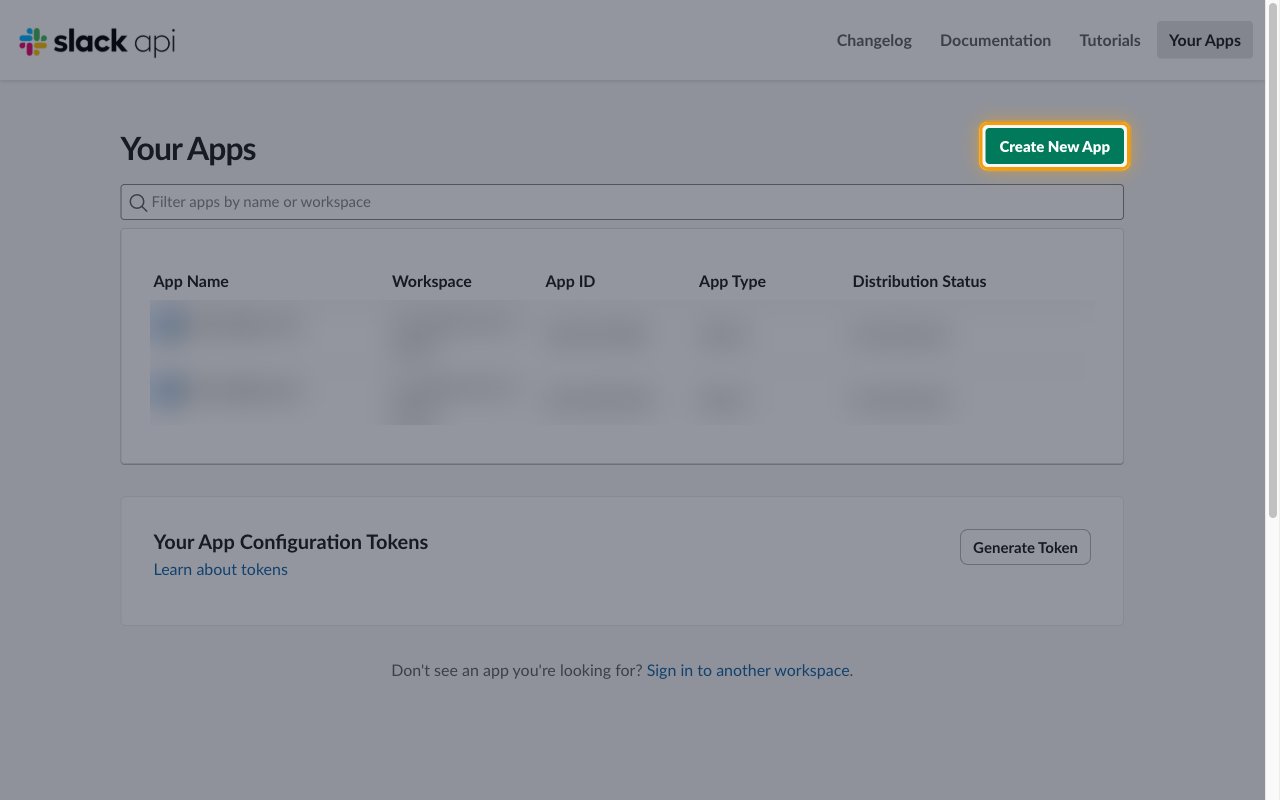
          <li>On the <strong>Your Apps</strong> page, click <strong>Create New App</strong>.</li>
        </ul>

        <img src="https://mintcdn.com/stackone-60/QHdZxqlnLcg6D5AC/connectors/slack/images/oauth2_user-setup-create-new-app.png?fit=max&auto=format&n=QHdZxqlnLcg6D5AC&q=85&s=8411f282242d5195b109ea0059693af0" alt="The Your Apps page with the Create New App button highlighted" width="1280" height="800" data-path="connectors/slack/images/oauth2_user-setup-create-new-app.png" />
      </div>
    </Step>

    <Step title="Choose a blank app">
      <div data-guide-step data-guide-scopes="" data-guide-display-scopes-list="">
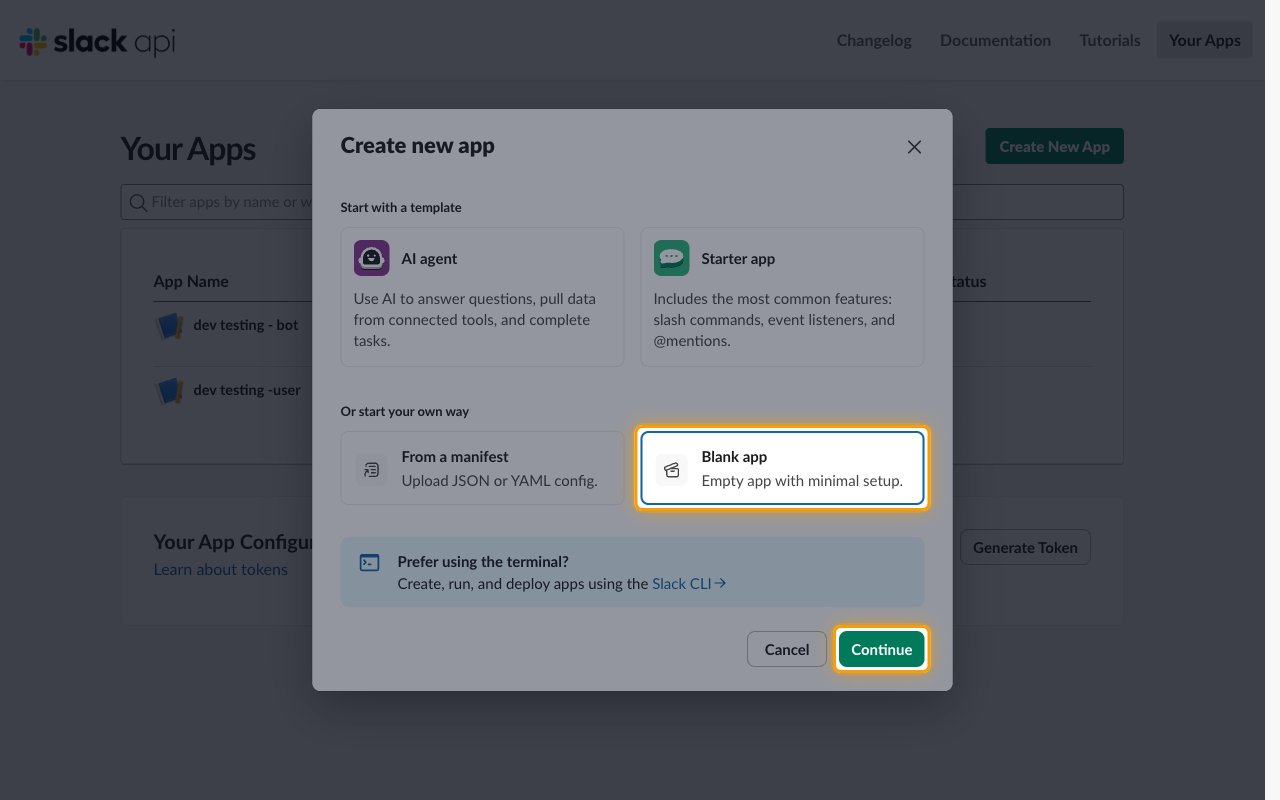
        <p>In the <strong>Create new app</strong> dialog, under <strong>Or start your own way</strong>, select <strong>Blank app</strong>.</p>

        <ul>
          <li>Click <strong>Continue</strong>.</li>
        </ul>

        <img src="https://mintcdn.com/stackone-60/QHdZxqlnLcg6D5AC/connectors/slack/images/oauth2_user-setup-blank-app.png?fit=max&auto=format&n=QHdZxqlnLcg6D5AC&q=85&s=2cefe704073464b22bb99a05e9e3def1" alt="The Create new app dialog with Blank app and Continue highlighted" width="1280" height="800" data-path="connectors/slack/images/oauth2_user-setup-blank-app.png" />
      </div>
    </Step>

    <Step title="Name the app and pick a workspace">
      <div data-guide-step data-guide-scopes="" data-guide-display-scopes-list="">
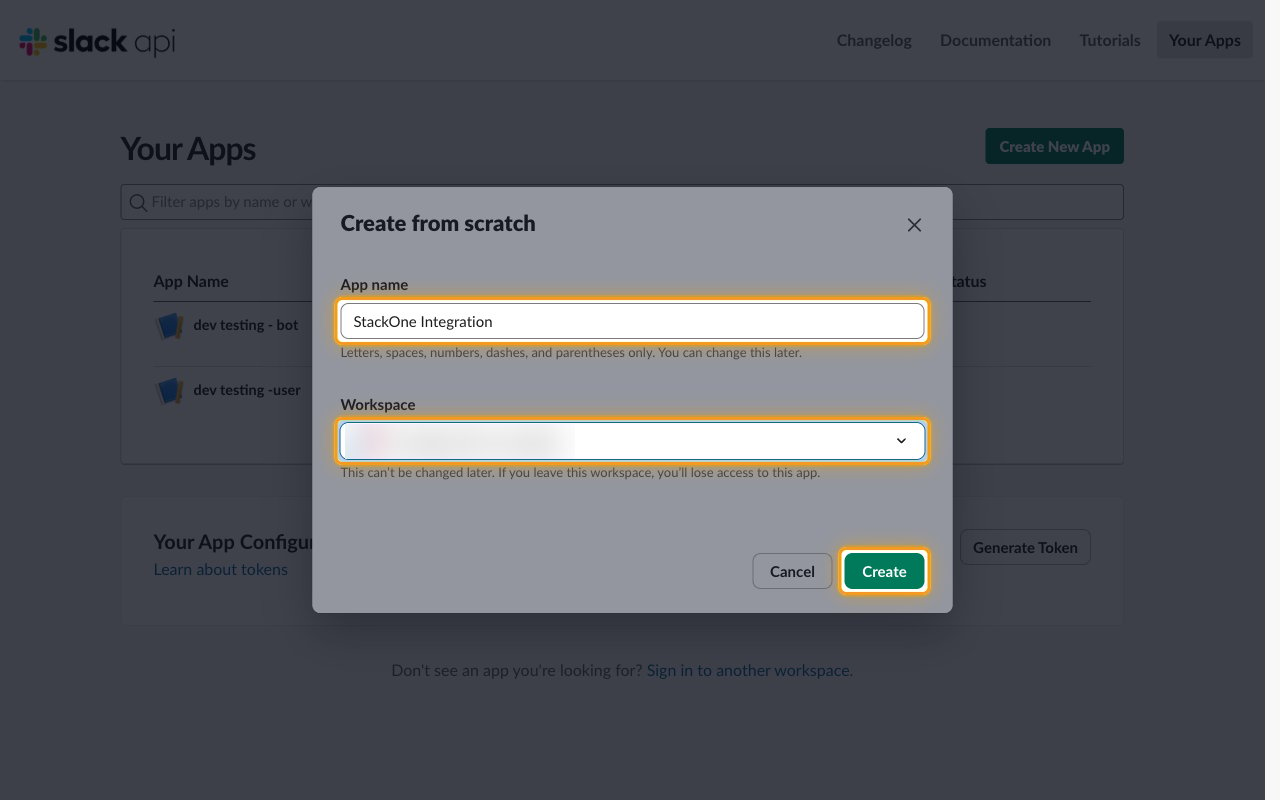
        <p>In the <strong>Create from scratch</strong> dialog, enter the app details.</p>

        <ul>
          <li>App name: `StackOne Integration`</li>
          <li>Select your workspace from the <strong>Workspace</strong> dropdown.</li>
          <li>Click <strong>Create</strong>. Slack opens the <strong>OAuth & Permissions</strong> page of your new app.</li>
        </ul>

        <img src="https://mintcdn.com/stackone-60/QHdZxqlnLcg6D5AC/connectors/slack/images/oauth2_user-setup-name-workspace.png?fit=max&auto=format&n=QHdZxqlnLcg6D5AC&q=85&s=d0d4a21b3954ff02c64ef4c9835db21f" alt="The Create from scratch dialog with the App name, Workspace and Create controls highlighted" width="1280" height="800" data-path="connectors/slack/images/oauth2_user-setup-name-workspace.png" />
      </div>
    </Step>
  </Steps>
</section>

<section data-guide-section data-guide-scopes="">
  <h2>Copy the app credentials</h2>

  <p>The Client ID and Client Secret identify your Slack app to StackOne.</p>

  <Steps>
    <Step title="Copy the Client ID and Client Secret">
      <div data-guide-step data-guide-scopes="" data-guide-display-scopes-list="">
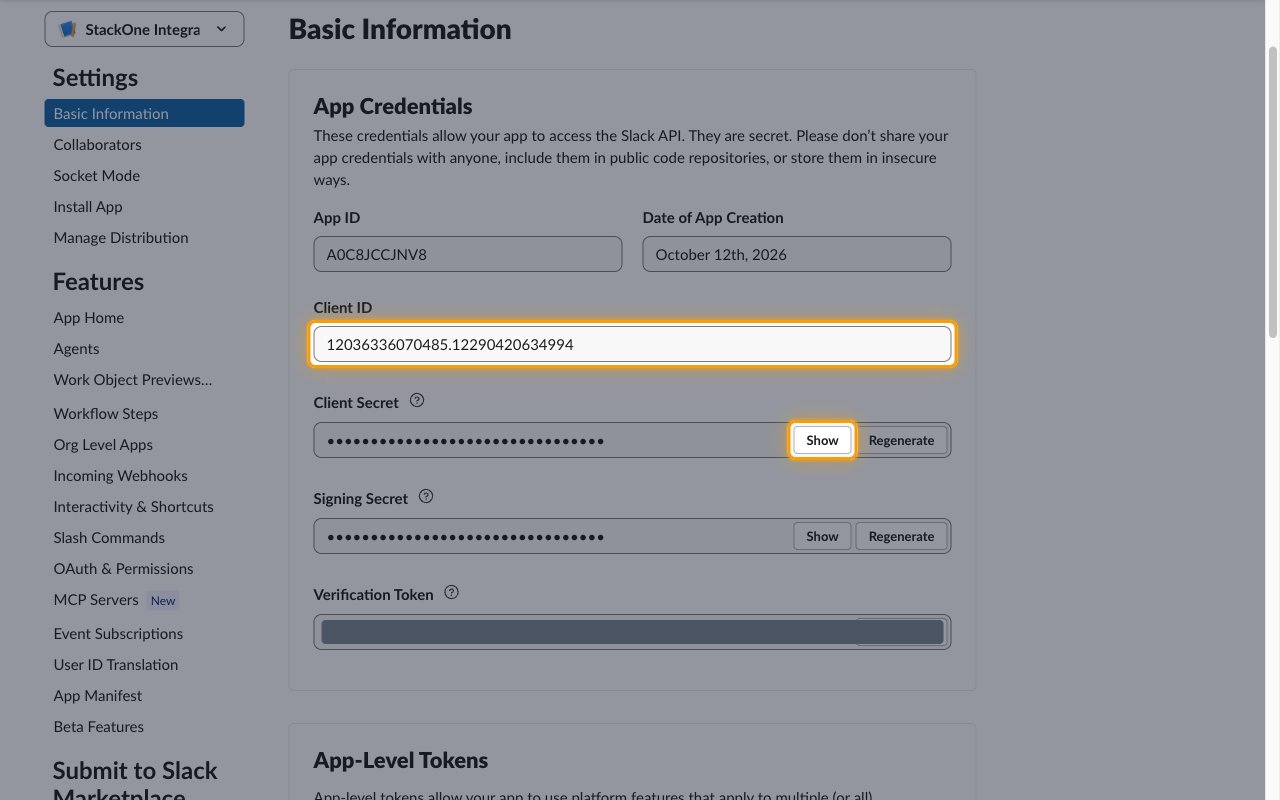
        <p>In the sidebar under <strong>Settings</strong>, click <strong>Basic Information</strong>. The <strong>App Credentials</strong> section is at the top of the page.</p>

        <ul>
          <li>Copy the <strong>Client ID</strong> value and paste it into the <strong>Client ID</strong> field in the StackOne Connector profile.</li>
          <li>Click <strong>Show</strong> next to <strong>Client Secret</strong>, copy the value, and paste it into the <strong>Client Secret</strong> field in the StackOne Connector profile.</li>
          <li>Store both values securely for use later.</li>
          <li>Note: Clicking <strong>Regenerate</strong> next to <strong>Client Secret</strong> invalidates the current secret, and every connected account that uses this app must be reconnected.</li>
        </ul>

        <img src="https://mintcdn.com/stackone-60/QHdZxqlnLcg6D5AC/connectors/slack/images/oauth2_user-setup-app-credentials.png?fit=max&auto=format&n=QHdZxqlnLcg6D5AC&q=85&s=2cef4c1dbc202df6bc301c9206537a83" alt="The App Credentials section with the Client ID field and the Client Secret Show button highlighted" width="1280" height="800" data-path="connectors/slack/images/oauth2_user-setup-app-credentials.png" />
      </div>
    </Step>
  </Steps>
</section>

<section data-guide-section data-guide-scopes="">
  <h2>Configure OAuth</h2>

  <p>Register the StackOne redirect URL, turn on token rotation, and grant the scopes StackOne needs.</p>

  <Steps>
    <Step title="Add the redirect URL">
      <div data-guide-step data-guide-scopes="" data-guide-display-scopes-list="">
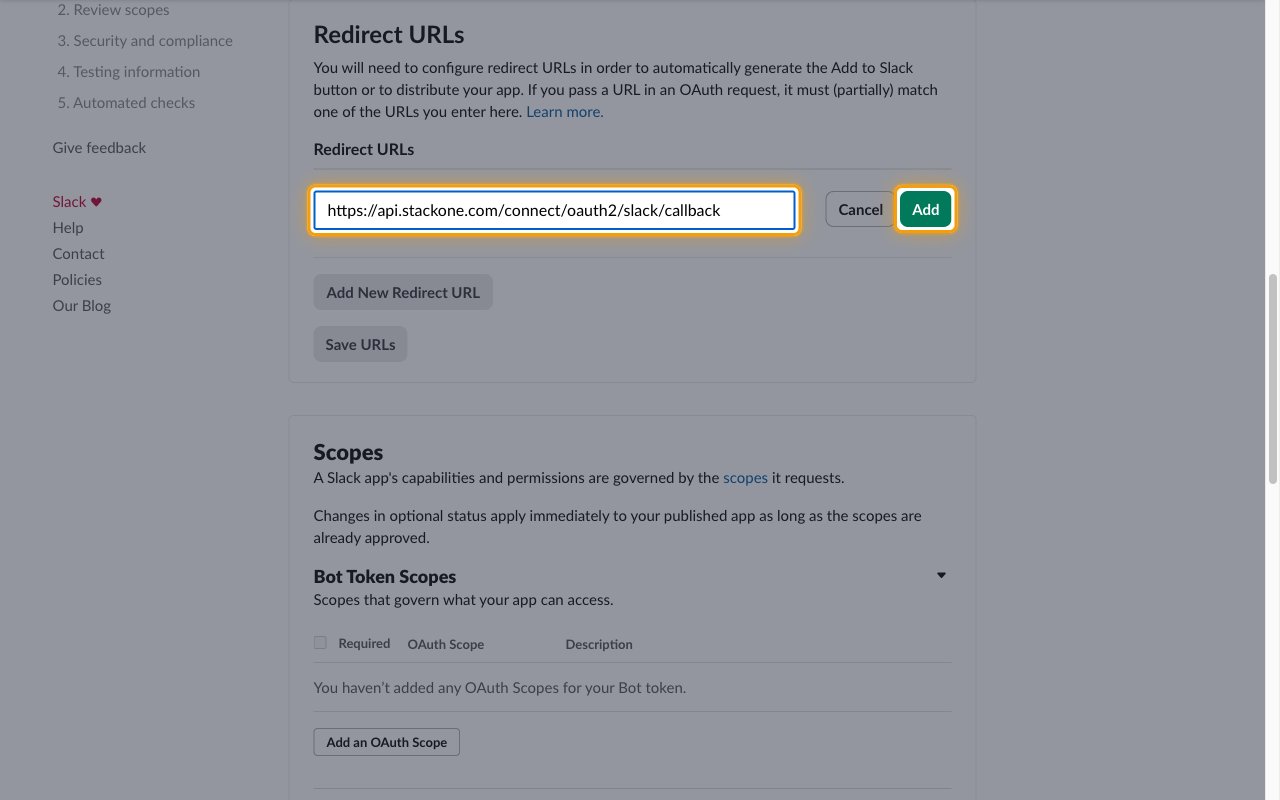
        <p>In the sidebar under <strong>Features</strong>, click <strong>OAuth & Permissions</strong> and scroll to <strong>Redirect URLs</strong>.</p>

        <ul>
          <li>Click <strong>Add New Redirect URL</strong>.</li>
          <li>Redirect URL: `https://api.stackone.com/connect/oauth2/slack/callback`</li>
          <li>Click <strong>Add</strong>, then click <strong>Save URLs</strong>.</li>
        </ul>

        <img src="https://mintcdn.com/stackone-60/QHdZxqlnLcg6D5AC/connectors/slack/images/oauth2_user-setup-redirect-url.png?fit=max&auto=format&n=QHdZxqlnLcg6D5AC&q=85&s=3e94dc611698212d97ca1134be6db389" alt="The Redirect URLs section with the StackOne callback URL entered and the Add button highlighted" width="1280" height="800" data-path="connectors/slack/images/oauth2_user-setup-redirect-url.png" />
      </div>
    </Step>

    <Step title="Turn on token rotation">
      <div data-guide-step data-guide-scopes="" data-guide-display-scopes-list="">
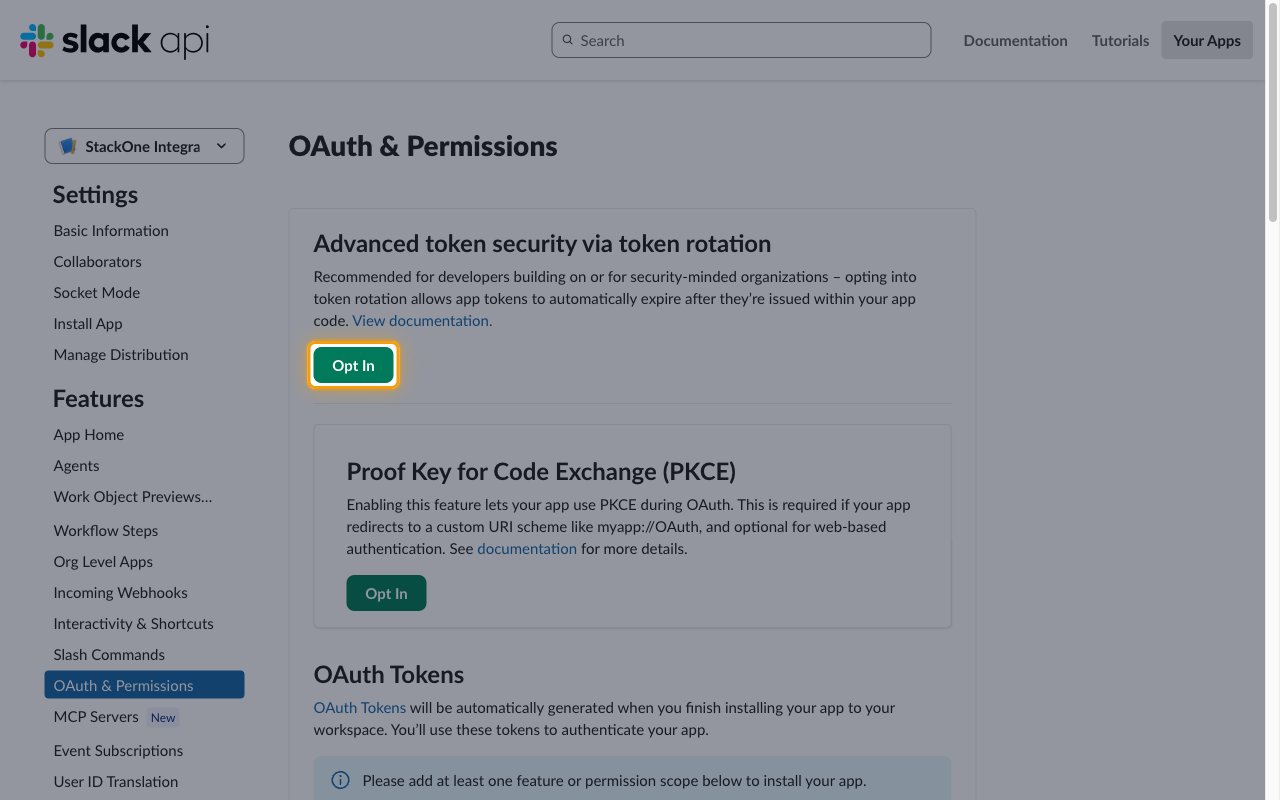
        <p>Scroll to the top of the <strong>OAuth & Permissions</strong> page. Under <strong>Advanced token security via token rotation</strong>, click <strong>Opt In</strong> and confirm.</p>

        <ul>
          <li>The <strong>Opt In</strong> button stays disabled until at least one redirect URL is saved.</li>
          <li>Token rotation is required, because Slack issues refresh tokens only to apps that use it. Once turned on, it cannot be turned off.</li>
          <li>You don't need to install the app manually. Slack installs it into each workspace when a user completes the OAuth flow from StackOne.</li>
        </ul>

        <img src="https://mintcdn.com/stackone-60/QHdZxqlnLcg6D5AC/connectors/slack/images/oauth2_user-setup-token-rotation.png?fit=max&auto=format&n=QHdZxqlnLcg6D5AC&q=85&s=0ffdfcf0a3496e331659ebe98acfae4a" alt="The Advanced token security via token rotation section with the Opt In button highlighted" width="1280" height="800" data-path="connectors/slack/images/oauth2_user-setup-token-rotation.png" />
      </div>
    </Step>

    <Step title="Add user token scopes">
      <div data-guide-step data-guide-scopes="channels:history,channels:read,channels:write,channels:write.invites,chat:write,files:read,files:write,groups:history,groups:read,groups:write,groups:write.invites,im:history,im:read,im:write,mpim:history,mpim:read,mpim:write,search:read,team:read,usergroups:read,users.profile:read,users.profile:write,users:read,users:read.email,users:write" data-guide-display-scopes-list="channels:history,channels:read,channels:write,channels:write.invites,chat:write,files:read,files:write,groups:history,groups:read,groups:write,groups:write.invites,im:history,im:read,im:write,mpim:history,mpim:read,mpim:write,search:read,team:read,usergroups:read,users.profile:read,users.profile:write,users:read,users:read.email,users:write">
        <div className="connector-guide-actions-badge" data-guide-actions-badge data-guide-actions-badge-scopes="channels:history,channels:read,channels:write,channels:write.invites,chat:write,files:read,files:write,groups:history,groups:read,groups:write,groups:write.invites,im:history,im:read,im:write,mpim:history,mpim:read,mpim:write,search:read,team:read,usergroups:read,users.profile:read,users.profile:write,users:read,users:read.email,users:write">
          <span>Enables actions: </span><span data-guide-actions-badge-labels>Complete File Upload, Create Conversation, Delete File, Delete Message, Delete Scheduled Message, Get Conversation, Get File, Get File Upload URL, Get Message Permalink, Get Unified Group, Get Unified Organization, Get Unified User, Get User, Get User By Email, Get User Presence, Get User Profile, Invite Users To Conversation, Leave Conversation, List Conversation Members, List Conversations, List Files, List Messages, List Scheduled Messages, List Thread Replies, List Unified Groups, List Unified Organizations, List Unified Users, List User Conversations, List Users, Open Conversation, Remove User From Conversation, Rename Conversation, Revoke File Public URL, Schedule Message, Search Messages, Send Ephemeral Message, Send Message, Set User Presence, Set User Profile, Share File Public URL, Update Message</span>
        </div>

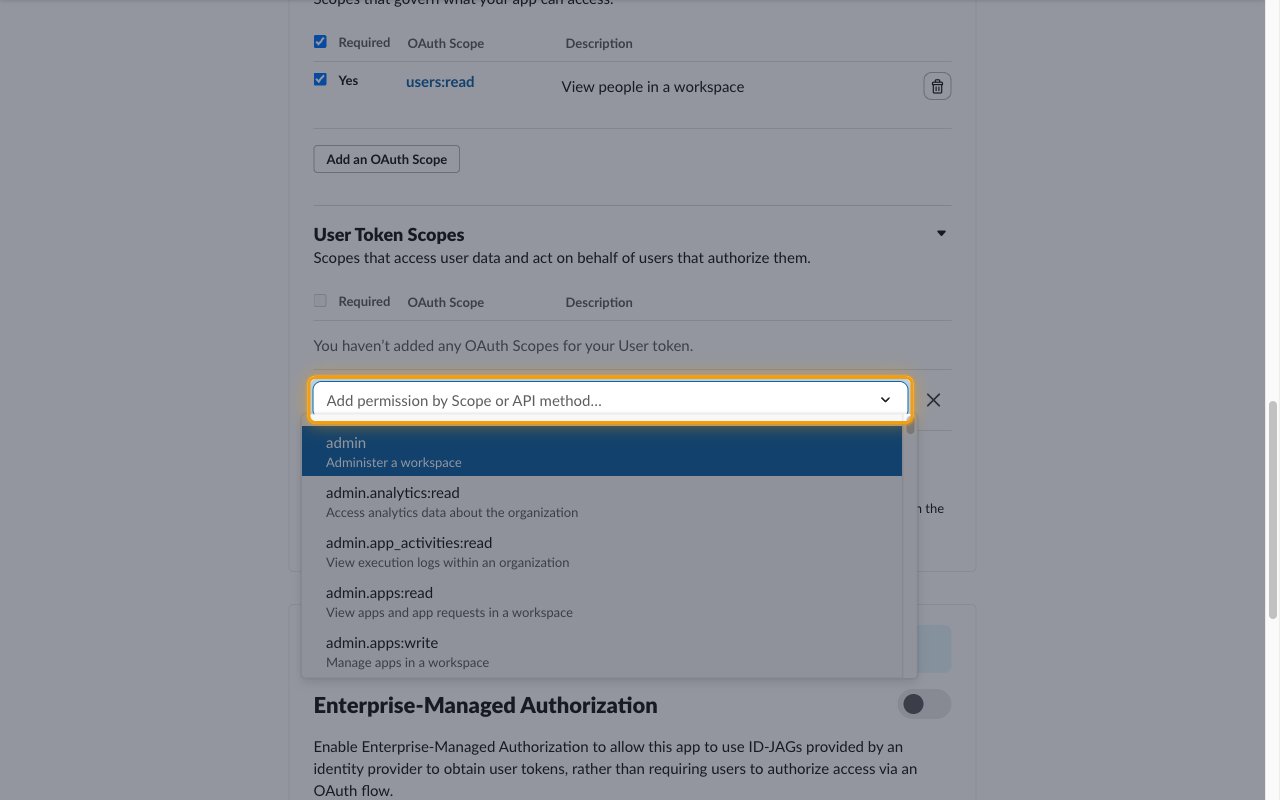
        <p>Scroll to <strong>Scopes</strong>. Under <strong>User Token Scopes</strong>, click <strong>Add an OAuth Scope</strong> and add each scope StackOne needs, one at a time:</p>

        <img src="https://mintcdn.com/stackone-60/QHdZxqlnLcg6D5AC/connectors/slack/images/oauth2_user-setup-user-scopes.png?fit=max&auto=format&n=QHdZxqlnLcg6D5AC&q=85&s=a2d91792ff3de80c5a213ade939d8c87" alt="The User Token Scopes section with the Add an OAuth Scope picker highlighted" width="1280" height="800" data-path="connectors/slack/images/oauth2_user-setup-user-scopes.png" />

        <div className="connector-guide-display-scopes" data-guide-display-scopes>
          <div className="connector-guide-scopes-container connector-guide-scopes-container--scrollable">
            <ul className="not-prose connector-guide-scopes-list">
              <li data-guide-display-scope="channels:history">
                <button type="button" className="connector-guide-scope-copy" aria-label="Copy channels:history" title="Copy scope" data-copy="channels:history">
                  <span className="connector-guide-scope-copy__label">channels:history</span>
                  <span className="connector-guide-scope-copy__icon" aria-hidden="true">⧉</span>
                </button>
              </li>

              <li data-guide-display-scope="channels:read">
                <button type="button" className="connector-guide-scope-copy" aria-label="Copy channels:read" title="Copy scope" data-copy="channels:read">
                  <span className="connector-guide-scope-copy__label">channels:read</span>
                  <span className="connector-guide-scope-copy__icon" aria-hidden="true">⧉</span>
                </button>
              </li>

              <li data-guide-display-scope="channels:write">
                <button type="button" className="connector-guide-scope-copy" aria-label="Copy channels:write" title="Copy scope" data-copy="channels:write">
                  <span className="connector-guide-scope-copy__label">channels:write</span>
                  <span className="connector-guide-scope-copy__icon" aria-hidden="true">⧉</span>
                </button>
              </li>

              <li data-guide-display-scope="channels:write.invites">
                <button type="button" className="connector-guide-scope-copy" aria-label="Copy channels:write.invites" title="Copy scope" data-copy="channels:write.invites">
                  <span className="connector-guide-scope-copy__label">channels:write.invites</span>
                  <span className="connector-guide-scope-copy__icon" aria-hidden="true">⧉</span>
                </button>
              </li>

              <li data-guide-display-scope="chat:write">
                <button type="button" className="connector-guide-scope-copy" aria-label="Copy chat:write" title="Copy scope" data-copy="chat:write">
                  <span className="connector-guide-scope-copy__label">chat:write</span>
                  <span className="connector-guide-scope-copy__icon" aria-hidden="true">⧉</span>
                </button>
              </li>

              <li data-guide-display-scope="files:read">
                <button type="button" className="connector-guide-scope-copy" aria-label="Copy files:read" title="Copy scope" data-copy="files:read">
                  <span className="connector-guide-scope-copy__label">files:read</span>
                  <span className="connector-guide-scope-copy__icon" aria-hidden="true">⧉</span>
                </button>
              </li>

              <li data-guide-display-scope="files:write">
                <button type="button" className="connector-guide-scope-copy" aria-label="Copy files:write" title="Copy scope" data-copy="files:write">
                  <span className="connector-guide-scope-copy__label">files:write</span>
                  <span className="connector-guide-scope-copy__icon" aria-hidden="true">⧉</span>
                </button>
              </li>

              <li data-guide-display-scope="groups:history">
                <button type="button" className="connector-guide-scope-copy" aria-label="Copy groups:history" title="Copy scope" data-copy="groups:history">
                  <span className="connector-guide-scope-copy__label">groups:history</span>
                  <span className="connector-guide-scope-copy__icon" aria-hidden="true">⧉</span>
                </button>
              </li>

              <li data-guide-display-scope="groups:read">
                <button type="button" className="connector-guide-scope-copy" aria-label="Copy groups:read" title="Copy scope" data-copy="groups:read">
                  <span className="connector-guide-scope-copy__label">groups:read</span>
                  <span className="connector-guide-scope-copy__icon" aria-hidden="true">⧉</span>
                </button>
              </li>

              <li data-guide-display-scope="groups:write">
                <button type="button" className="connector-guide-scope-copy" aria-label="Copy groups:write" title="Copy scope" data-copy="groups:write">
                  <span className="connector-guide-scope-copy__label">groups:write</span>
                  <span className="connector-guide-scope-copy__icon" aria-hidden="true">⧉</span>
                </button>
              </li>

              <li data-guide-display-scope="groups:write.invites">
                <button type="button" className="connector-guide-scope-copy" aria-label="Copy groups:write.invites" title="Copy scope" data-copy="groups:write.invites">
                  <span className="connector-guide-scope-copy__label">groups:write.invites</span>
                  <span className="connector-guide-scope-copy__icon" aria-hidden="true">⧉</span>
                </button>
              </li>

              <li data-guide-display-scope="im:history">
                <button type="button" className="connector-guide-scope-copy" aria-label="Copy im:history" title="Copy scope" data-copy="im:history">
                  <span className="connector-guide-scope-copy__label">im:history</span>
                  <span className="connector-guide-scope-copy__icon" aria-hidden="true">⧉</span>
                </button>
              </li>

              <li data-guide-display-scope="im:read">
                <button type="button" className="connector-guide-scope-copy" aria-label="Copy im:read" title="Copy scope" data-copy="im:read">
                  <span className="connector-guide-scope-copy__label">im:read</span>
                  <span className="connector-guide-scope-copy__icon" aria-hidden="true">⧉</span>
                </button>
              </li>

              <li data-guide-display-scope="im:write">
                <button type="button" className="connector-guide-scope-copy" aria-label="Copy im:write" title="Copy scope" data-copy="im:write">
                  <span className="connector-guide-scope-copy__label">im:write</span>
                  <span className="connector-guide-scope-copy__icon" aria-hidden="true">⧉</span>
                </button>
              </li>

              <li data-guide-display-scope="mpim:history">
                <button type="button" className="connector-guide-scope-copy" aria-label="Copy mpim:history" title="Copy scope" data-copy="mpim:history">
                  <span className="connector-guide-scope-copy__label">mpim:history</span>
                  <span className="connector-guide-scope-copy__icon" aria-hidden="true">⧉</span>
                </button>
              </li>

              <li data-guide-display-scope="mpim:read">
                <button type="button" className="connector-guide-scope-copy" aria-label="Copy mpim:read" title="Copy scope" data-copy="mpim:read">
                  <span className="connector-guide-scope-copy__label">mpim:read</span>
                  <span className="connector-guide-scope-copy__icon" aria-hidden="true">⧉</span>
                </button>
              </li>

              <li data-guide-display-scope="mpim:write">
                <button type="button" className="connector-guide-scope-copy" aria-label="Copy mpim:write" title="Copy scope" data-copy="mpim:write">
                  <span className="connector-guide-scope-copy__label">mpim:write</span>
                  <span className="connector-guide-scope-copy__icon" aria-hidden="true">⧉</span>
                </button>
              </li>

              <li data-guide-display-scope="search:read">
                <button type="button" className="connector-guide-scope-copy" aria-label="Copy search:read" title="Copy scope" data-copy="search:read">
                  <span className="connector-guide-scope-copy__label">search:read</span>
                  <span className="connector-guide-scope-copy__icon" aria-hidden="true">⧉</span>
                </button>
              </li>

              <li data-guide-display-scope="team:read">
                <button type="button" className="connector-guide-scope-copy" aria-label="Copy team:read" title="Copy scope" data-copy="team:read">
                  <span className="connector-guide-scope-copy__label">team:read</span>
                  <span className="connector-guide-scope-copy__icon" aria-hidden="true">⧉</span>
                </button>
              </li>

              <li data-guide-display-scope="usergroups:read">
                <button type="button" className="connector-guide-scope-copy" aria-label="Copy usergroups:read" title="Copy scope" data-copy="usergroups:read">
                  <span className="connector-guide-scope-copy__label">usergroups:read</span>
                  <span className="connector-guide-scope-copy__icon" aria-hidden="true">⧉</span>
                </button>
              </li>

              <li data-guide-display-scope="users.profile:read">
                <button type="button" className="connector-guide-scope-copy" aria-label="Copy users.profile:read" title="Copy scope" data-copy="users.profile:read">
                  <span className="connector-guide-scope-copy__label">users.profile:read</span>
                  <span className="connector-guide-scope-copy__icon" aria-hidden="true">⧉</span>
                </button>
              </li>

              <li data-guide-display-scope="users.profile:write">
                <button type="button" className="connector-guide-scope-copy" aria-label="Copy users.profile:write" title="Copy scope" data-copy="users.profile:write">
                  <span className="connector-guide-scope-copy__label">users.profile:write</span>
                  <span className="connector-guide-scope-copy__icon" aria-hidden="true">⧉</span>
                </button>
              </li>

              <li data-guide-display-scope="users:read">
                <button type="button" className="connector-guide-scope-copy" aria-label="Copy users:read" title="Copy scope" data-copy="users:read">
                  <span className="connector-guide-scope-copy__label">users:read</span>
                  <span className="connector-guide-scope-copy__icon" aria-hidden="true">⧉</span>
                </button>
              </li>

              <li data-guide-display-scope="users:read.email">
                <button type="button" className="connector-guide-scope-copy" aria-label="Copy users:read.email" title="Copy scope" data-copy="users:read.email">
                  <span className="connector-guide-scope-copy__label">users:read.email</span>
                  <span className="connector-guide-scope-copy__icon" aria-hidden="true">⧉</span>
                </button>
              </li>

              <li data-guide-display-scope="users:write">
                <button type="button" className="connector-guide-scope-copy" aria-label="Copy users:write" title="Copy scope" data-copy="users:write">
                  <span className="connector-guide-scope-copy__label">users:write</span>
                  <span className="connector-guide-scope-copy__icon" aria-hidden="true">⧉</span>
                </button>
              </li>
            </ul>
          </div>
        </div>
      </div>
    </Step>

    <Step title="Enter the scopes in StackOne">
      <div data-guide-step data-guide-scopes="" data-guide-display-scopes-list="">
        <p>The <strong>User Scopes</strong> field in the StackOne Connector profile tells StackOne which scopes to request.</p>

        <ul>
          <li>Leave it empty if you added every scope listed in the previous step.</li>
          <li>If you added only some of them, enter the same scopes separated by commas.</li>
          <li>Example: `channels:read,chat:write,users:read`</li>
        </ul>
      </div>
    </Step>
  </Steps>
</section>

## Creating the StackOne Connector Profile

To create the Connector Profile in StackOne for <strong>Slack</strong>:

<Steps>
  <Step title="Navigate to Connector Profiles">
    Login to StackOne and navigate to [Connector Profiles](https://app.stackone.com/connector_profiles)
  </Step>

  <Step title="Create New Connector Profile">
    <ul>
      <li>Click <strong>+ Connector Profile</strong></li>
      <li>Search for and select <strong>Slack</strong></li>
      <li>Select <strong>Type</strong> as <strong>OAuth 2.0 (User)</strong></li>

      <li>
        Fill out the fields using details retrieved from your provider:

        <ul className="connector-guide-field-list">
          <li><strong>Client ID</strong></li>
          <li><strong>Client Secret</strong></li>
          <li><strong>User Scopes</strong> (Optional)</li>
        </ul>
      </li>

      <li>(Optional) Select <strong>Actions</strong> to be enabled for this Connector Profile</li>
      <li>Click <strong>Create profile</strong></li>
    </ul>
  </Step>
</Steps>

Congratulations! The new Connector Profile will now show up in your project ready to be used. You can now continue to <a href="/connect/managing-connectors/linking-accounts">Link Accounts</a> for <strong>Slack</strong>.


This documentation is built and hosted on [Mintlify](https://mintlify.com), a developer documentation platform.