> ## Documentation Index
> Fetch the complete documentation index at: https://docs.stackone.com/llms.txt
> Use this file to discover all available pages before exploring further.

# Retool Webhook Setup Guide

> Configure Retool to deliver events to StackOne.

## Prerequisites

The connector should already be set up, with a Connector Profile and a Linked Account. See [Getting Started](/connectors/retool#getting-started) on the Retool connector page.

<section data-guide-section data-guide-scopes="">
  <h2>Get your Native Webhook URL</h2>

  <p>StackOne generates a per-connection webhook URL. You will paste it into a Retool workflow's HTTP block so the workflow delivers events to StackOne.</p>

  <ul>
    <li>On this connection in StackOne, copy the read-only <strong>Native Webhook URL</strong>. It contains a secure per-connection token (the `?token=` at the end) that identifies your account, so treat it like a secret.</li>
    <li>The Retool HTTP block sends the full URL, including that token, so no additional authentication header is required.</li>
  </ul>
</section>

<section data-guide-section data-guide-scopes="">
  <h2>Create a workflow in Retool</h2>

  <p>Events reach StackOne from a Retool workflow that makes an outbound HTTP request. Sign in to Retool and create a workflow to hold that request.</p>

  <Steps>
    <Step title="Open Workflows and click Create new">
      <div data-guide-step data-guide-scopes="" data-guide-display-scopes-list="">
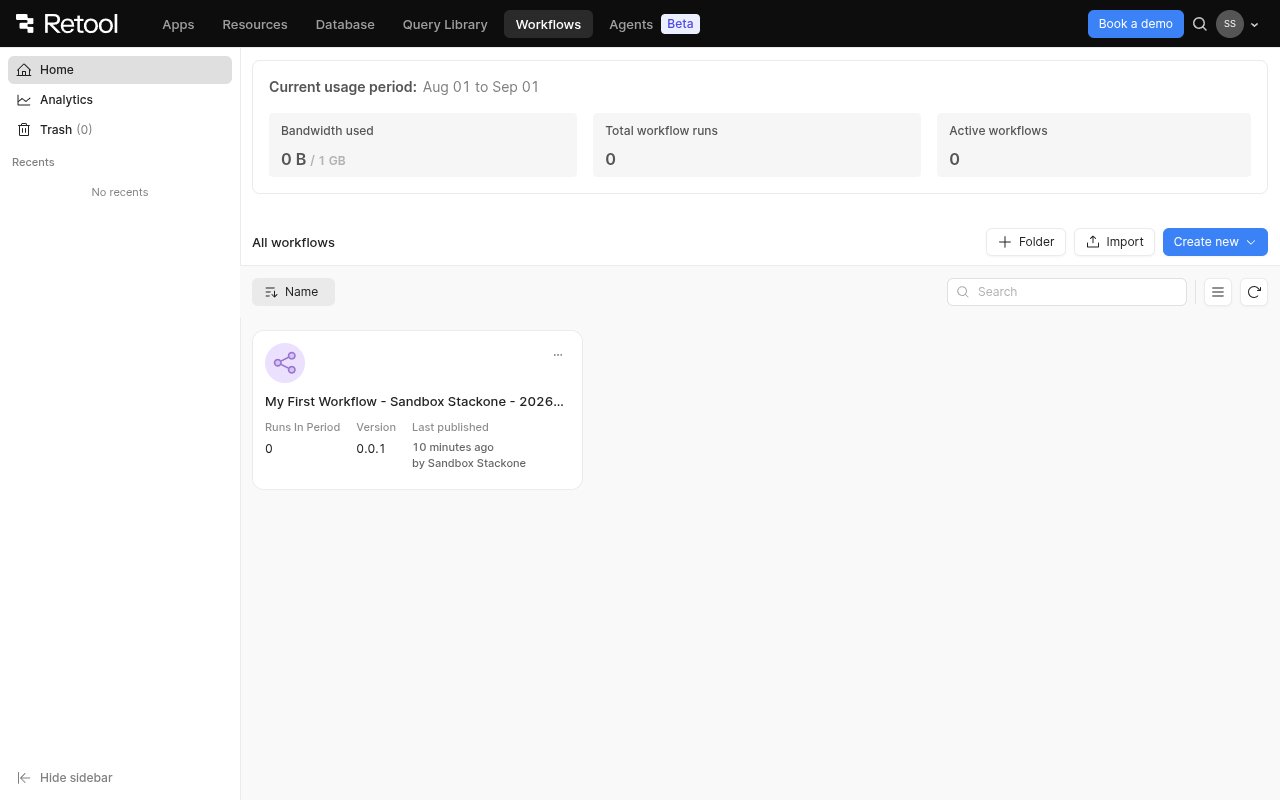
        <p>In the top navigation click <strong>Workflows</strong>, then on the Workflows home click <strong>Create new</strong> (top-right).</p>

        <img src="https://mintcdn.com/stackone-60/Ze4J0bLGwLS6yso1/connectors/retool/images/events-workflows-list.png?fit=max&auto=format&n=Ze4J0bLGwLS6yso1&q=85&s=a63892f1109ba5c27fb900bf46671e31" alt="Retool Workflows home with the Create new button" width="1280" height="800" data-path="connectors/retool/images/events-workflows-list.png" />
      </div>
    </Step>

    <Step title="Choose Workflow">
      <div data-guide-step data-guide-scopes="" data-guide-display-scopes-list="">
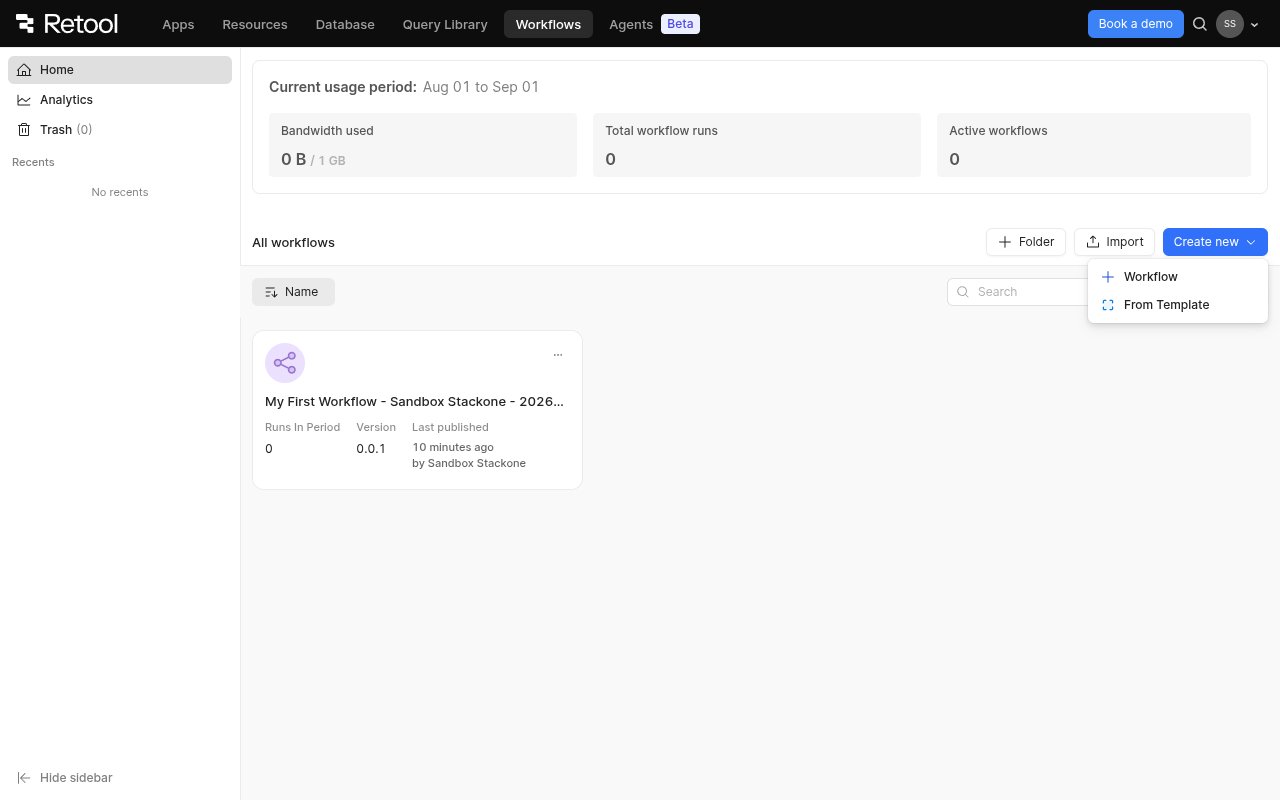
        <p>In the <strong>Create new</strong> menu, select <strong>Workflow</strong> (not <strong>From Template</strong>). Retool opens a new, empty workflow in the editor.</p>

        <img src="https://mintcdn.com/stackone-60/-eE9AiaVMnw1pqT_/connectors/retool/images/events-create-workflow.png?fit=max&auto=format&n=-eE9AiaVMnw1pqT_&q=85&s=736626eea7b58f64071278c4f36b602e" alt="Create new menu showing Workflow and From Template options" width="1280" height="800" data-path="connectors/retool/images/events-create-workflow.png" />
      </div>
    </Step>

    <Step title="Review the workflow canvas">
      <div data-guide-step data-guide-scopes="" data-guide-display-scopes-list="">
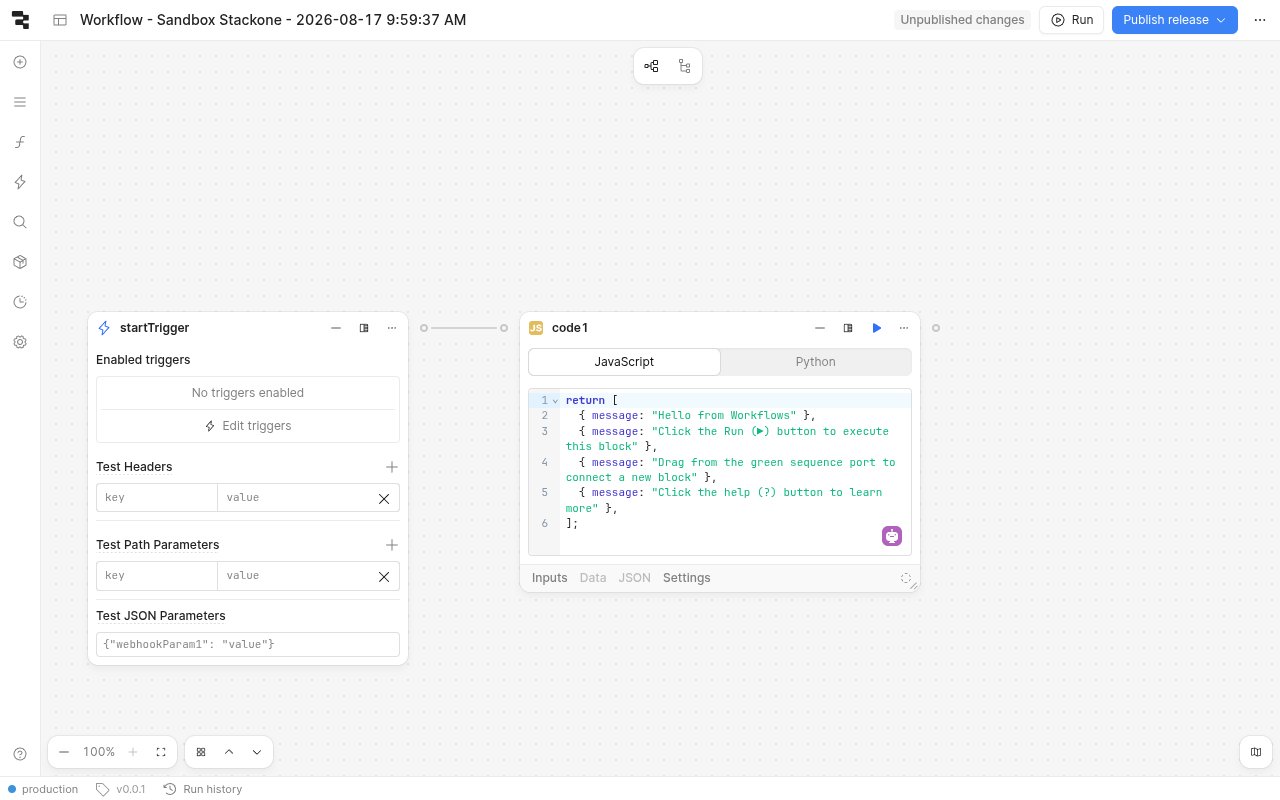
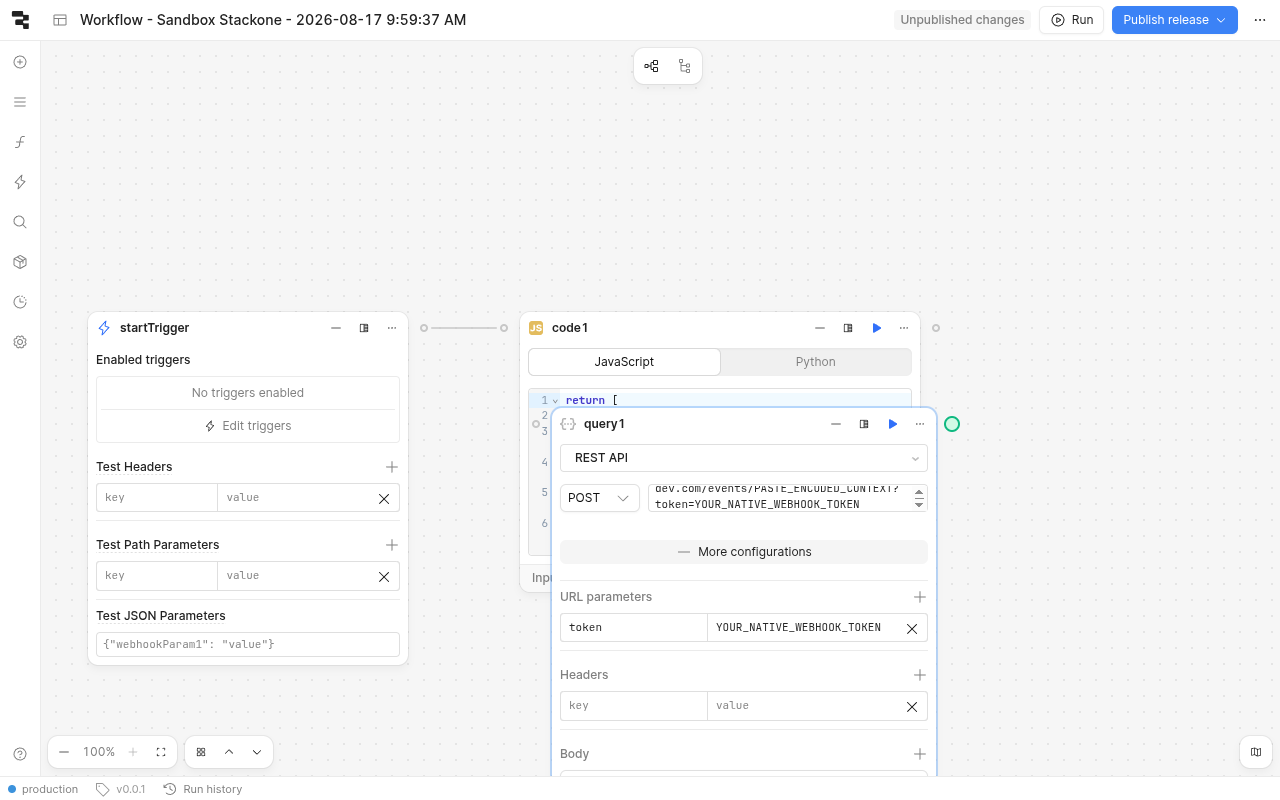
        <p>The editor opens with a <strong>startTrigger</strong> block (the entry point — it cannot be deleted) and a default <strong>code1</strong> block. You will add an HTTP request block and connect it after the trigger.</p>

        <img src="https://mintcdn.com/stackone-60/-eE9AiaVMnw1pqT_/connectors/retool/images/events-workflow-canvas.png?fit=max&auto=format&n=-eE9AiaVMnw1pqT_&q=85&s=cc44012e6210f33e2077af030da56c37" alt="Retool workflow editor with the startTrigger block and a default code block" width="1280" height="800" data-path="connectors/retool/images/events-workflow-canvas.png" />
      </div>
    </Step>
  </Steps>
</section>

<section data-guide-section data-guide-scopes="">
  <h2>Add and configure the HTTP request block</h2>

  <p>Retool has no dedicated "HTTP request" block — an outbound HTTP call is made with a <strong>Resource query</strong> block backed by a <strong>REST API</strong> resource.</p>

  <Steps>
    <Step title="Open the Blocks panel and add a Resource query">
      <div data-guide-step data-guide-scopes="" data-guide-display-scopes-list="">
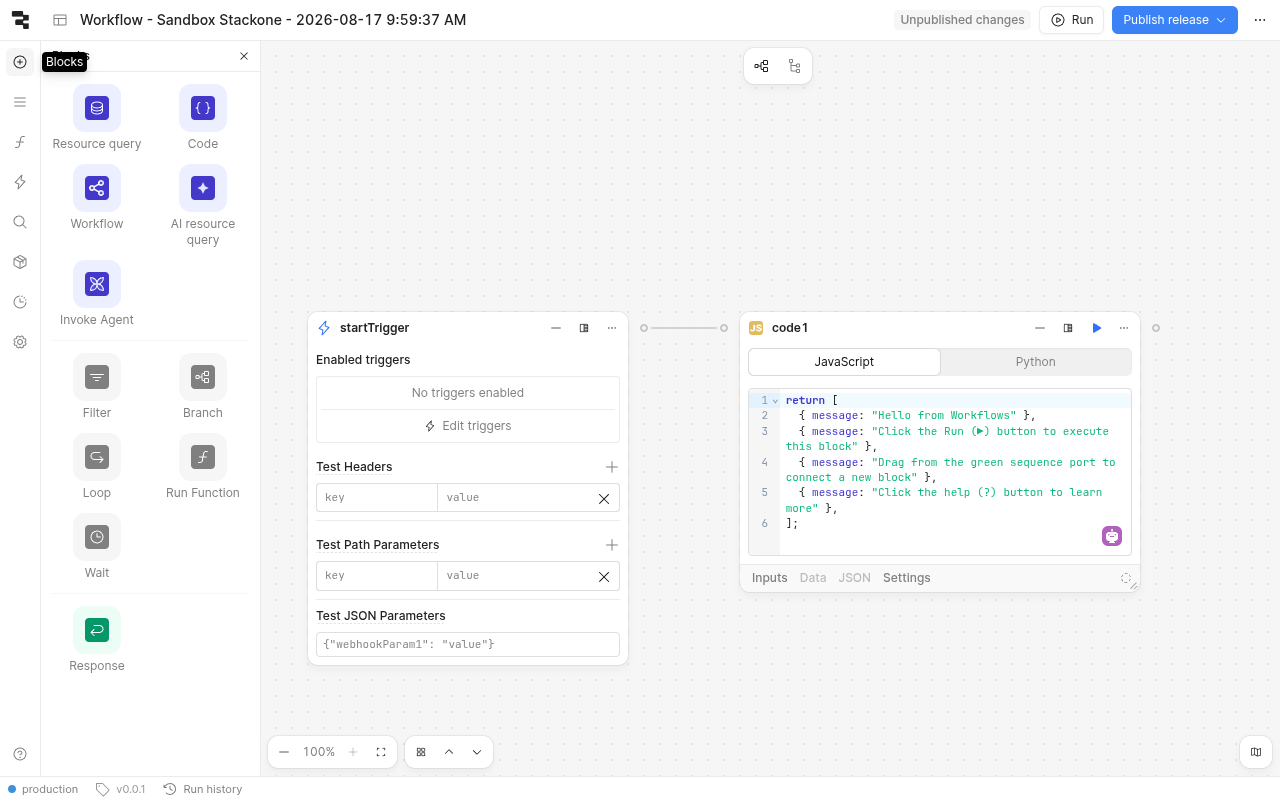
        <p>Open the <strong>Blocks</strong> panel from the left toolbar and drag a <strong>Resource query</strong> block onto the canvas, then connect it after the <strong>startTrigger</strong> block.</p>

        <img src="https://mintcdn.com/stackone-60/-eE9AiaVMnw1pqT_/connectors/retool/images/events-blocks-palette.png?fit=max&auto=format&n=-eE9AiaVMnw1pqT_&q=85&s=81e822a4e7dd3c87e6c54fca21b27e32" alt="Retool Blocks panel showing Resource query, Code, Workflow and other block types" width="1280" height="800" data-path="connectors/retool/images/events-blocks-palette.png" />
      </div>
    </Step>

    <Step title="Set the resource, method and URL">
      <div data-guide-step data-guide-scopes="" data-guide-display-scopes-list="">
        <p>In the block, select a <strong>REST API</strong> resource, set the method to <strong>POST</strong>, and paste your StackOne <strong>Native Webhook URL</strong> (including its `?token=`) as the request URL. Click <strong>More configurations</strong> to expand <strong>URL parameters</strong>, <strong>Headers</strong> and <strong>Body</strong>. Add a header <strong>Content-Type: application/json</strong>, and set the <strong>Body</strong> to the JSON you want delivered — include an `id` (and optionally a `type`) field so downstream consumers can identify and route the event. Save the workflow and run it (or let its trigger fire); the block should return <strong>200</strong> from StackOne.</p>

        <img src="https://mintcdn.com/stackone-60/-eE9AiaVMnw1pqT_/connectors/retool/images/events-resource-query-post.png?fit=max&auto=format&n=-eE9AiaVMnw1pqT_&q=85&s=8ac2602c048ed051b1d35f619c3a542c" alt="Retool Resource query block set to REST API, POST, with the Native Webhook URL and More configurations expanded" width="1280" height="800" data-path="connectors/retool/images/events-resource-query-post.png" />
      </div>
    </Step>
  </Steps>
</section>

<section data-guide-section data-guide-scopes="">
  <h2>Available webhook events</h2>

  <p>Because the workflow's HTTP body is fully defined by you, StackOne maps every delivery through a single generic event handler rather than a fixed provider catalog. Put an `id` (and optionally a `type`) in your JSON body so consumers can identify and route each event.</p>

  <Steps>
    <Step title="Generic Retool event">
      <div data-guide-step data-guide-scopes="" data-guide-display-scopes-list="">
        <p>The one event type emitted for every workflow delivery.</p>

        <ul>
          <li><strong>Retool Webhook Event</strong> (`retool.event`) — emitted for every JSON body your Retool workflow POSTs to the Native Webhook URL. StackOne uses the body's `id` (falling back through `eventId`, `workflowId`, `appId`, `userId`) as the event's record id and passes your full body through as the event data.</li>
        </ul>
      </div>
    </Step>
  </Steps>
</section>

<section data-guide-section data-guide-scopes="">
  <h2>Delivery format</h2>

  <p>StackOne emits a stable event type of `retool.event` for every delivery and passes your posted JSON body through untouched as the event data. The record id is taken from your body's `id` field (with fallbacks), and the event date is assigned by StackOne. There is no verification handshake and no inbound signature — the `?token=` in the Native Webhook URL is the security gate that identifies and authorizes your account, so keep the URL secret. If the token is missing or wrong the delivery is accepted with a 200 but the event is silently dropped.</p>
</section>

## Verify

Your Connector should now be able to receive and process events. Try triggering an event and you should see an Event appear in the Connector logs.