> ## Documentation Index
> Fetch the complete documentation index at: https://docs.stackone.com/llms.txt
> Use this file to discover all available pages before exploring further.

# RECRU Webhook Setup Guide

> Configure RECRU to deliver events to StackOne.

## Prerequisites

The connector should already be set up, with a Connector Profile and a Linked Account. See [Getting Started](/connectors/recru#getting-started) on the RECRU connector page.

<section data-guide-section data-guide-scopes="">
  <h2>Send RECRU job offer events to StackOne</h2>

  <p>RECRU delivers job offer events to a single tenant-wide endpoint called the <strong>Site API Listener</strong>. There is no event picker in RECRU — once the URL is set, RECRU sends every job offer event to it, and StackOne routes each one to its handler.</p>

  <Steps>
    <Step title="Retrieve StackOne Native Webhook URL">
      <div data-guide-step data-guide-scopes="" data-guide-display-scopes-list="">
        <p>The <strong>Native Webhook URL</strong> is generated once an account has been linked.</p>

        <ul>
          <li>Open the linked account in StackOne.</li>
          <li>Copy the value from <strong>Native Webhook URL</strong>.</li>
        </ul>
      </div>
    </Step>

    <Step title="Open Settings in RECRU">
      <div data-guide-step data-guide-scopes="" data-guide-display-scopes-list="">
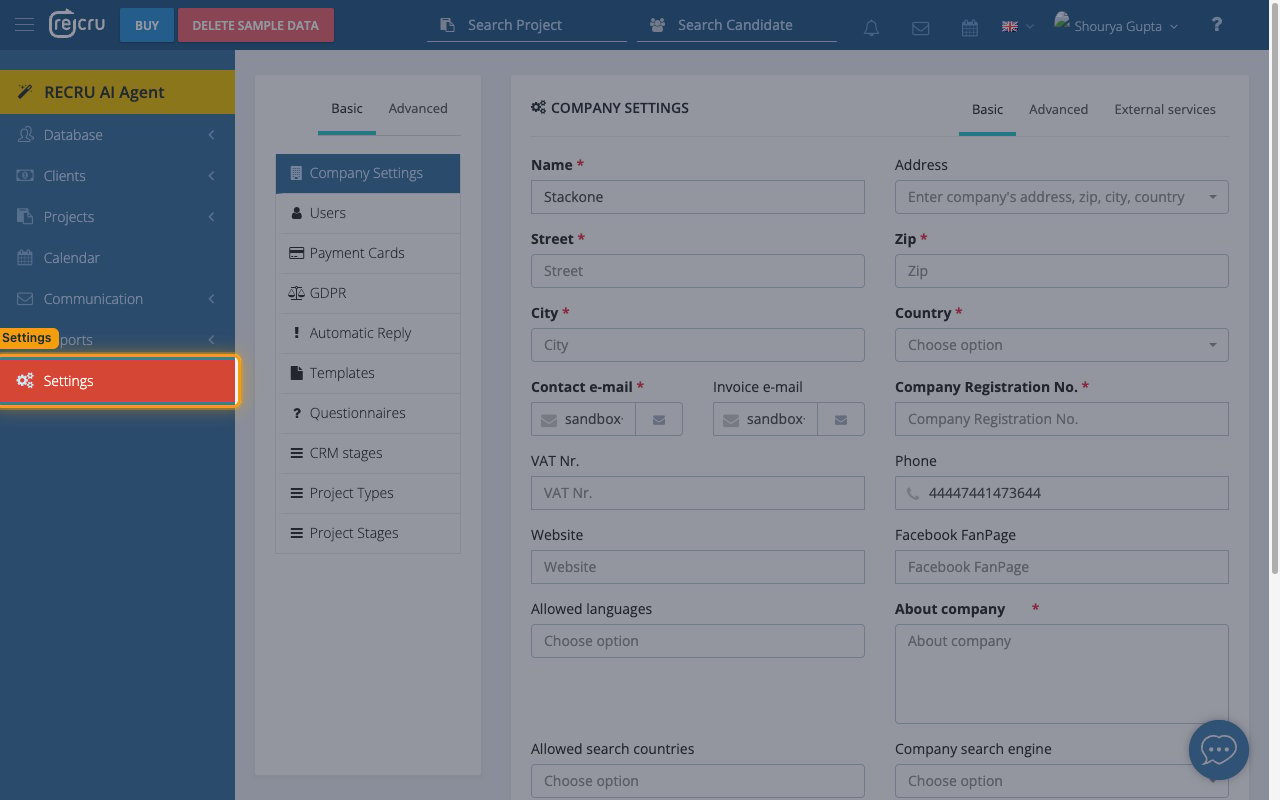
        <p>Sign in to your RECRU backoffice at `https://{tenant}.recru.eu` and open the settings area.</p>

        <ul>
          <li>In the left navigation, click <strong>Settings</strong>.</li>
          <li>The <strong>COMPANY SETTINGS</strong> panel opens on the <strong>Basic</strong> tab.</li>
        </ul>

        <img src="https://mintcdn.com/stackone-60/2EGXss_KDHsQx6BK/connectors/recru/images/events-open-settings.png?fit=max&auto=format&n=2EGXss_KDHsQx6BK&q=85&s=9ef7ce166ad7603e4a17cb212e35b509" alt="The RECRU backoffice with Settings highlighted in the left navigation." width="1280" height="800" data-path="connectors/recru/images/events-open-settings.png" />
      </div>
    </Step>

    <Step title="Open the External services tab">
      <div data-guide-step data-guide-scopes="" data-guide-display-scopes-list="">
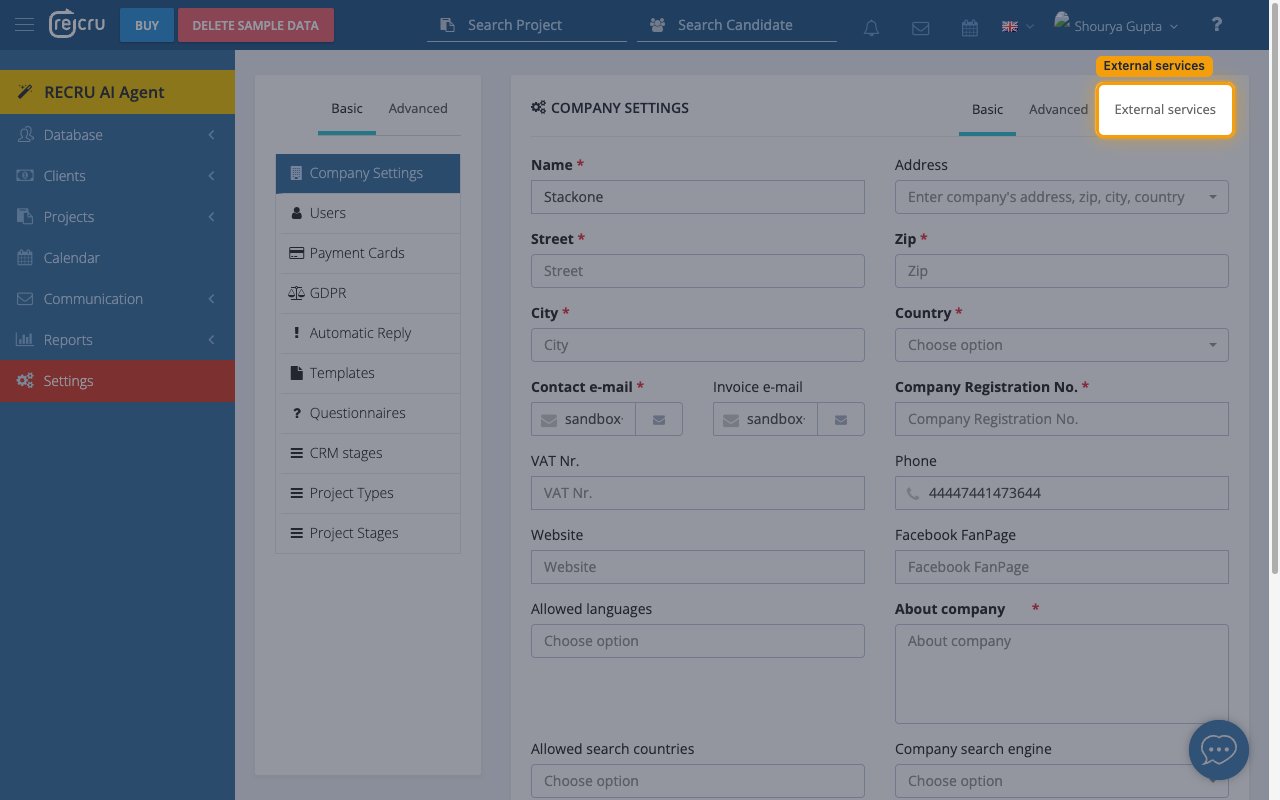
        <p>The webhook endpoint lives on the <strong>External services</strong> tab of the company settings panel.</p>

        <ul>
          <li>At the top right of the <strong>COMPANY SETTINGS</strong> panel, click <strong>External services</strong>.</li>
          <li>In the services list on the left, select <strong>Company web page</strong>.</li>
        </ul>

        <img src="https://mintcdn.com/stackone-60/2EGXss_KDHsQx6BK/connectors/recru/images/events-external-services.png?fit=max&auto=format&n=2EGXss_KDHsQx6BK&q=85&s=4d603f89a3f7c8e7098721b75b550abe" alt="The COMPANY SETTINGS panel with the External services tab highlighted." width="1280" height="800" data-path="connectors/recru/images/events-external-services.png" />
      </div>
    </Step>

    <Step title="Paste the Native Webhook URL and save">
      <div data-guide-step data-guide-scopes="" data-guide-display-scopes-list="">
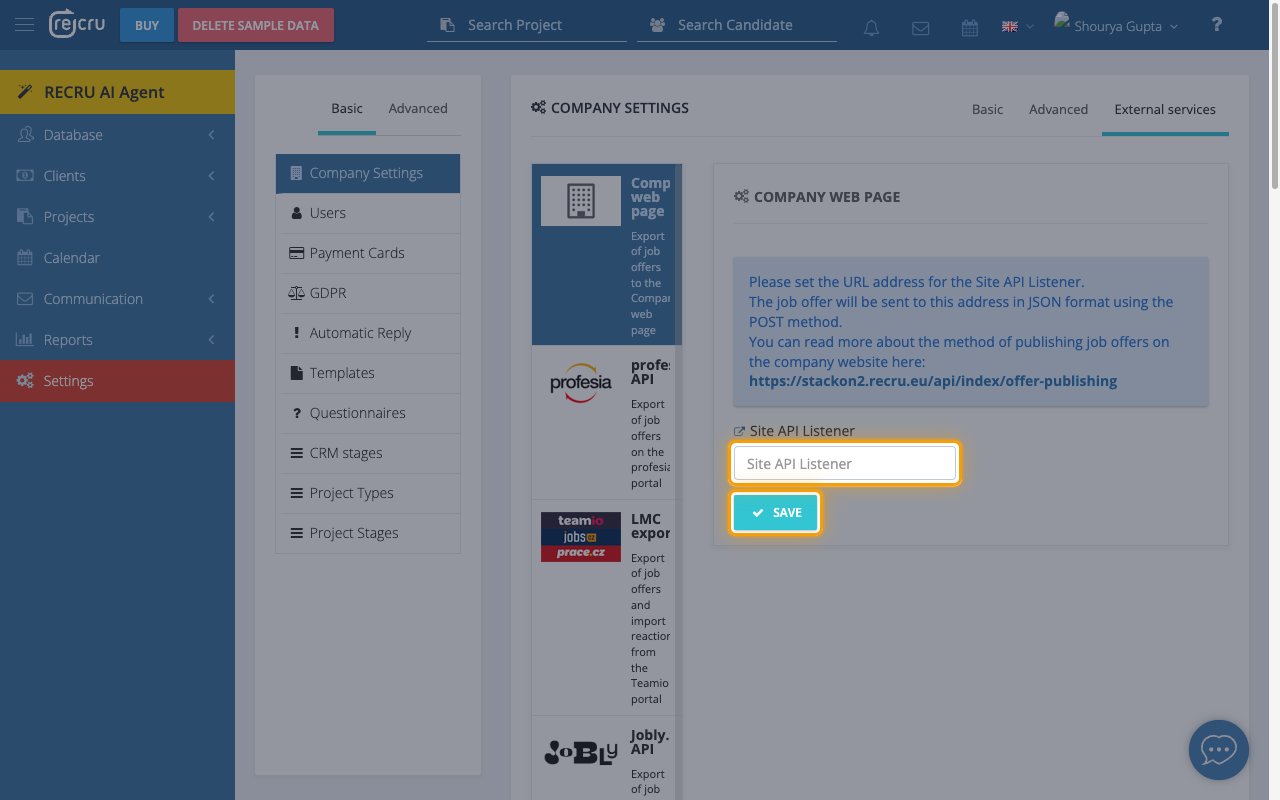
        <p>The <strong>COMPANY WEB PAGE</strong> panel holds a single URL field that RECRU posts every job offer event to.</p>

        <ul>
          <li>Paste the <strong>Native Webhook URL</strong> you copied from StackOne into <strong>Site API Listener</strong>.</li>
          <li>Click <strong>SAVE</strong>.</li>
          <li>Note: the value must be pasted complete, including everything after the question mark — StackOne uses that part to match events to this account.</li>
        </ul>

        <img src="https://mintcdn.com/stackone-60/2EGXss_KDHsQx6BK/connectors/recru/images/events-site-api-listener.png?fit=max&auto=format&n=2EGXss_KDHsQx6BK&q=85&s=decae1dd3370c5906980aa3271ad5cad" alt="The COMPANY WEB PAGE panel with the Site API Listener field and the SAVE button highlighted." width="1280" height="800" data-path="connectors/recru/images/events-site-api-listener.png" />
      </div>
    </Step>

    <Step title="Confirm your tenant on this connection">
      <div data-guide-step data-guide-scopes="" data-guide-display-scopes-list="">
        <p>Inbound events are matched to this account using the <strong>Tenant</strong> value on the connection. It is set when the account is linked — confirm it matches the RECRU subdomain you signed in to.</p>
      </div>
    </Step>
  </Steps>
</section>

<section data-guide-section data-guide-scopes="">
  <h2>Available webhook events</h2>

  <p>RECRU sends both of the following events to the <strong>Site API Listener</strong>. RECRU itself has no subscription picker, so the endpoint always receives both — only the events you enable in StackOne are forwarded on to you.</p>

  <Steps>
    <Step title="Job offer events">
      <div data-guide-step data-guide-scopes="" data-guide-display-scopes-list="">
        <p>Events covering job offers published to your company website. RECRU has no candidate, application, or interview webhooks.</p>

        <ul>
          <li><strong>Job Offer Published</strong> (`offer.published`) — Fired when a job offer is published to the company website, and again each time a published offer is edited. RECRU sends this as `action=offer`.</li>
          <li><strong>Job Offer Unpublished</strong> (`offer.unpublished`) — Fired when a published job offer is withdrawn, and also when a published job offer is deleted. RECRU sends this as `action=offer-unpublish`.</li>
        </ul>
      </div>
    </Step>
  </Steps>
</section>

<section data-guide-section data-guide-scopes="">
  <h2>Delivery format</h2>

  <p>How RECRU delivers job offer events, and the behavior worth knowing when you build on them.</p>

  <Steps>
    <Step title="One event per request">
      <div data-guide-step data-guide-scopes="" data-guide-display-scopes-list="">
        <p>RECRU posts each event on its own — there is no batching. The request body is form-encoded rather than JSON, with arrays and nested objects in bracket notation such as `project[id]`. StackOne parses this for you and delivers the event with its payload already structured.</p>
      </div>
    </Step>

    <Step title="Publication depends on the response">
      <div data-guide-step data-guide-scopes="" data-guide-display-scopes-list="">
        <p>RECRU reads the response to every delivery and marks a job offer as published only when it receives a valid acknowledgement. StackOne returns the acknowledgement RECRU expects, so offers continue to publish normally once the <strong>Native Webhook URL</strong> is in place.</p>
      </div>
    </Step>

    <Step title="Withdrawing and deleting look the same">
      <div data-guide-step data-guide-scopes="" data-guide-display-scopes-list="">
        <p>RECRU sends the same unpublish event whether a job offer is withdrawn or deleted, and that payload carries only the job offer identifier. Use the <strong>Get Job Offer</strong> action if you need to tell the two apart.</p>
      </div>
    </Step>
  </Steps>
</section>

## Verify

Your Connector should now be able to receive and process events. Try triggering an event and you should see an Event appear in the Connector logs.


This documentation is built and hosted on [Mintlify](https://mintlify.com), a developer documentation platform.