> ## Documentation Index
> Fetch the complete documentation index at: https://docs.stackone.com/llms.txt
> Use this file to discover all available pages before exploring further.

# Ramp OAuth 2.0 connector profile – StackOne setup guide

> Set up the OAuth 2.0 connector profile for Ramp in StackOne. One-time admin setup required before your users can link Ramp accounts via Hub.

<Warning>Creating a Ramp developer app requires a Ramp Admin or Business Owner. Create the app in your sandbox business for sandbox testing and a separate app in production — the steps and UI are identical; only the environment differs.</Warning>

<Panel>
  <div className="not-prose guides-scope-selector" data-guides-scope-selector data-guide-actions-json="[{&#x22;id&#x22;:&#x22;ramp_list_transactions&#x22;,&#x22;label&#x22;:&#x22;List Transactions&#x22;,&#x22;scopes&#x22;:[&#x22;transactions:read&#x22;]},{&#x22;id&#x22;:&#x22;ramp_get_transaction&#x22;,&#x22;label&#x22;:&#x22;Fetch A Transaction&#x22;,&#x22;scopes&#x22;:[&#x22;transactions:read&#x22;]},{&#x22;id&#x22;:&#x22;ramp_update_transaction&#x22;,&#x22;label&#x22;:&#x22;Update A Transaction&#x22;,&#x22;scopes&#x22;:[&#x22;transactions:write&#x22;]},{&#x22;id&#x22;:&#x22;ramp_list_receipts&#x22;,&#x22;label&#x22;:&#x22;List Receipts&#x22;,&#x22;scopes&#x22;:[&#x22;receipts:read&#x22;]},{&#x22;id&#x22;:&#x22;ramp_get_receipt&#x22;,&#x22;label&#x22;:&#x22;Fetch A Receipt&#x22;,&#x22;scopes&#x22;:[&#x22;receipts:read&#x22;]},{&#x22;id&#x22;:&#x22;ramp_create_receipts&#x22;,&#x22;label&#x22;:&#x22;Upload A Receipt&#x22;,&#x22;scopes&#x22;:[&#x22;receipts:write&#x22;]},{&#x22;id&#x22;:&#x22;ramp_list_memos&#x22;,&#x22;label&#x22;:&#x22;List Memos&#x22;,&#x22;scopes&#x22;:[&#x22;memos:read&#x22;]},{&#x22;id&#x22;:&#x22;ramp_get_memo&#x22;,&#x22;label&#x22;:&#x22;Fetch A Transaction Memo&#x22;,&#x22;scopes&#x22;:[&#x22;memos:read&#x22;]},{&#x22;id&#x22;:&#x22;ramp_create_memos&#x22;,&#x22;label&#x22;:&#x22;Upload A New Memo For A Transaction&#x22;,&#x22;scopes&#x22;:[&#x22;memos:write&#x22;]},{&#x22;id&#x22;:&#x22;ramp_list_merchants&#x22;,&#x22;label&#x22;:&#x22;List Merchants&#x22;,&#x22;scopes&#x22;:[&#x22;merchants:read&#x22;]},{&#x22;id&#x22;:&#x22;ramp_list_physical_cards&#x22;,&#x22;label&#x22;:&#x22;List Physical Cards&#x22;,&#x22;scopes&#x22;:[&#x22;cards:read&#x22;]},{&#x22;id&#x22;:&#x22;ramp_get_physical_card&#x22;,&#x22;label&#x22;:&#x22;Fetch A Physical Card&#x22;,&#x22;scopes&#x22;:[&#x22;cards:read&#x22;]},{&#x22;id&#x22;:&#x22;ramp_create_physical_card&#x22;,&#x22;label&#x22;:&#x22;Create A Physical Card&#x22;,&#x22;scopes&#x22;:[&#x22;cards:write&#x22;]},{&#x22;id&#x22;:&#x22;ramp_update_physical_card&#x22;,&#x22;label&#x22;:&#x22;Update A Physical Card&#x22;,&#x22;scopes&#x22;:[&#x22;cards:write&#x22;]},{&#x22;id&#x22;:&#x22;ramp_list_virtual_cards&#x22;,&#x22;label&#x22;:&#x22;List Virtual Cards&#x22;,&#x22;scopes&#x22;:[&#x22;cards:read&#x22;]},{&#x22;id&#x22;:&#x22;ramp_get_virtual_card&#x22;,&#x22;label&#x22;:&#x22;Fetch A Virtual Card&#x22;,&#x22;scopes&#x22;:[&#x22;cards:read&#x22;]},{&#x22;id&#x22;:&#x22;ramp_list_users&#x22;,&#x22;label&#x22;:&#x22;List Users&#x22;,&#x22;scopes&#x22;:[&#x22;users:read&#x22;]},{&#x22;id&#x22;:&#x22;ramp_get_user&#x22;,&#x22;label&#x22;:&#x22;Fetch A User&#x22;,&#x22;scopes&#x22;:[&#x22;users:read&#x22;]},{&#x22;id&#x22;:&#x22;ramp_manage_user_invite&#x22;,&#x22;label&#x22;:&#x22;Manage A User's Invite Lifecycle&#x22;,&#x22;scopes&#x22;:[&#x22;users:write&#x22;]},{&#x22;id&#x22;:&#x22;ramp_update_user&#x22;,&#x22;label&#x22;:&#x22;Update A User&#x22;,&#x22;scopes&#x22;:[&#x22;users:write&#x22;]},{&#x22;id&#x22;:&#x22;ramp_create_user&#x22;,&#x22;label&#x22;:&#x22;Create A User&#x22;,&#x22;scopes&#x22;:[&#x22;users:write&#x22;]},{&#x22;id&#x22;:&#x22;ramp_get_user_deferred_status&#x22;,&#x22;label&#x22;:&#x22;Fetch User Creation Task Status&#x22;,&#x22;scopes&#x22;:[&#x22;users:read&#x22;]},{&#x22;id&#x22;:&#x22;ramp_list_reimbursements&#x22;,&#x22;label&#x22;:&#x22;List Reimbursements&#x22;,&#x22;scopes&#x22;:[&#x22;reimbursements:read&#x22;]},{&#x22;id&#x22;:&#x22;ramp_get_reimbursement&#x22;,&#x22;label&#x22;:&#x22;Fetch A Reimbursement&#x22;,&#x22;scopes&#x22;:[&#x22;reimbursements:read&#x22;]},{&#x22;id&#x22;:&#x22;ramp_list_bills&#x22;,&#x22;label&#x22;:&#x22;List Bills&#x22;,&#x22;scopes&#x22;:[&#x22;bills:read&#x22;]},{&#x22;id&#x22;:&#x22;ramp_get_bill&#x22;,&#x22;label&#x22;:&#x22;Fetch A Bill&#x22;,&#x22;scopes&#x22;:[&#x22;bills:read&#x22;]},{&#x22;id&#x22;:&#x22;ramp_list_vendors&#x22;,&#x22;label&#x22;:&#x22;List Vendors&#x22;,&#x22;scopes&#x22;:[&#x22;vendors:read&#x22;]},{&#x22;id&#x22;:&#x22;ramp_get_vendor&#x22;,&#x22;label&#x22;:&#x22;Fetch A Vendor&#x22;,&#x22;scopes&#x22;:[&#x22;vendors:read&#x22;]},{&#x22;id&#x22;:&#x22;ramp_create_vendors&#x22;,&#x22;label&#x22;:&#x22;Create A New Vendor&#x22;,&#x22;scopes&#x22;:[&#x22;vendors:write&#x22;]},{&#x22;id&#x22;:&#x22;ramp_update_vendor&#x22;,&#x22;label&#x22;:&#x22;Update A Vendor&#x22;,&#x22;scopes&#x22;:[&#x22;vendors:write&#x22;]},{&#x22;id&#x22;:&#x22;ramp_delete_vendor&#x22;,&#x22;label&#x22;:&#x22;Delete A Vendor&#x22;,&#x22;scopes&#x22;:[&#x22;vendors:write&#x22;]},{&#x22;id&#x22;:&#x22;ramp_list_spend_programs&#x22;,&#x22;label&#x22;:&#x22;List Spend Programs&#x22;,&#x22;scopes&#x22;:[&#x22;spend_programs:read&#x22;]},{&#x22;id&#x22;:&#x22;ramp_get_spend_program&#x22;,&#x22;label&#x22;:&#x22;Fetch A Spend Program&#x22;,&#x22;scopes&#x22;:[&#x22;spend_programs:read&#x22;]},{&#x22;id&#x22;:&#x22;ramp_create_spend_programs&#x22;,&#x22;label&#x22;:&#x22;Create A Spend Program&#x22;,&#x22;scopes&#x22;:[&#x22;spend_programs:write&#x22;]},{&#x22;id&#x22;:&#x22;ramp_list_departments&#x22;,&#x22;label&#x22;:&#x22;List Departments&#x22;,&#x22;scopes&#x22;:[&#x22;departments:read&#x22;]},{&#x22;id&#x22;:&#x22;ramp_get_department&#x22;,&#x22;label&#x22;:&#x22;Fetch A Department&#x22;,&#x22;scopes&#x22;:[&#x22;departments:read&#x22;]},{&#x22;id&#x22;:&#x22;ramp_create_departments&#x22;,&#x22;label&#x22;:&#x22;Create A Department&#x22;,&#x22;scopes&#x22;:[&#x22;departments:write&#x22;]},{&#x22;id&#x22;:&#x22;ramp_update_department&#x22;,&#x22;label&#x22;:&#x22;Update A Department&#x22;,&#x22;scopes&#x22;:[&#x22;departments:write&#x22;]},{&#x22;id&#x22;:&#x22;ramp_list_locations&#x22;,&#x22;label&#x22;:&#x22;List Locations&#x22;,&#x22;scopes&#x22;:[&#x22;locations:read&#x22;]},{&#x22;id&#x22;:&#x22;ramp_get_location&#x22;,&#x22;label&#x22;:&#x22;Fetch A Location&#x22;,&#x22;scopes&#x22;:[&#x22;locations:read&#x22;]},{&#x22;id&#x22;:&#x22;ramp_create_locations&#x22;,&#x22;label&#x22;:&#x22;Create A Location&#x22;,&#x22;scopes&#x22;:[&#x22;locations:write&#x22;]},{&#x22;id&#x22;:&#x22;ramp_update_location&#x22;,&#x22;label&#x22;:&#x22;Update A Location&#x22;,&#x22;scopes&#x22;:[&#x22;locations:write&#x22;]},{&#x22;id&#x22;:&#x22;ramp_list_accounting_accounts&#x22;,&#x22;label&#x22;:&#x22;List General Ledger Accounts&#x22;,&#x22;scopes&#x22;:[&#x22;accounting:read&#x22;]},{&#x22;id&#x22;:&#x22;ramp_list_accounting_connections&#x22;,&#x22;label&#x22;:&#x22;List Accounting Connections&#x22;,&#x22;scopes&#x22;:[&#x22;accounting:read&#x22;]},{&#x22;id&#x22;:&#x22;ramp_list_accounting_field_options&#x22;,&#x22;label&#x22;:&#x22;List Options For A Given Custom Accounting Field&#x22;,&#x22;scopes&#x22;:[&#x22;accounting:read&#x22;]},{&#x22;id&#x22;:&#x22;ramp_list_accounting_fields&#x22;,&#x22;label&#x22;:&#x22;List Custom Accounting Fields&#x22;,&#x22;scopes&#x22;:[&#x22;accounting:read&#x22;]},{&#x22;id&#x22;:&#x22;ramp_list_accounting_vendors&#x22;,&#x22;label&#x22;:&#x22;List Vendors&#x22;,&#x22;scopes&#x22;:[&#x22;accounting:read&#x22;]},{&#x22;id&#x22;:&#x22;ramp_get_accounting_account&#x22;,&#x22;label&#x22;:&#x22;Fetch A General Ledger Account&#x22;,&#x22;scopes&#x22;:[&#x22;accounting:read&#x22;]},{&#x22;id&#x22;:&#x22;ramp_get_accounting_connection&#x22;,&#x22;label&#x22;:&#x22;Fetch An Accounting Connection By ID&#x22;,&#x22;scopes&#x22;:[&#x22;accounting:read&#x22;]},{&#x22;id&#x22;:&#x22;ramp_get_accounting_field&#x22;,&#x22;label&#x22;:&#x22;Fetch A Custom Accounting Field&#x22;,&#x22;scopes&#x22;:[&#x22;accounting:read&#x22;]},{&#x22;id&#x22;:&#x22;ramp_get_accounting_vendor&#x22;,&#x22;label&#x22;:&#x22;Fetch A Vendor&#x22;,&#x22;scopes&#x22;:[&#x22;accounting:read&#x22;]},{&#x22;id&#x22;:&#x22;ramp_create_accounting_accounts&#x22;,&#x22;label&#x22;:&#x22;Upload General Ledger Accounts&#x22;,&#x22;scopes&#x22;:[&#x22;accounting:write&#x22;]},{&#x22;id&#x22;:&#x22;ramp_create_accounting_codings&#x22;,&#x22;label&#x22;:&#x22;Post Accounting Coding Selections To An Object&#x22;,&#x22;scopes&#x22;:[&#x22;accounting:write&#x22;]},{&#x22;id&#x22;:&#x22;ramp_create_accounting_connection&#x22;,&#x22;label&#x22;:&#x22;Register A New API Based Accounting Connection&#x22;,&#x22;scopes&#x22;:[&#x22;accounting:write&#x22;]},{&#x22;id&#x22;:&#x22;ramp_create_accounting_field_options&#x22;,&#x22;label&#x22;:&#x22;Upload New Options&#x22;,&#x22;scopes&#x22;:[&#x22;accounting:write&#x22;]},{&#x22;id&#x22;:&#x22;ramp_create_accounting_fields&#x22;,&#x22;label&#x22;:&#x22;Create A New Custom Accounting Field&#x22;,&#x22;scopes&#x22;:[&#x22;accounting:write&#x22;]},{&#x22;id&#x22;:&#x22;ramp_create_accounting_ready_to_sync&#x22;,&#x22;label&#x22;:&#x22;Post Ready To Sync Status&#x22;,&#x22;scopes&#x22;:[&#x22;accounting:write&#x22;]},{&#x22;id&#x22;:&#x22;ramp_create_accounting_syncs&#x22;,&#x22;label&#x22;:&#x22;Post Sync Status&#x22;,&#x22;scopes&#x22;:[&#x22;accounting:write&#x22;]},{&#x22;id&#x22;:&#x22;ramp_create_accounting_vendors&#x22;,&#x22;label&#x22;:&#x22;Upload Vendors&#x22;,&#x22;scopes&#x22;:[&#x22;accounting:write&#x22;]},{&#x22;id&#x22;:&#x22;ramp_update_accounting_account&#x22;,&#x22;label&#x22;:&#x22;Update A General Ledger Account&#x22;,&#x22;scopes&#x22;:[&#x22;accounting:write&#x22;]},{&#x22;id&#x22;:&#x22;ramp_delete_accounting_account&#x22;,&#x22;label&#x22;:&#x22;Delete A General Ledger Account&#x22;,&#x22;scopes&#x22;:[&#x22;accounting:write&#x22;]},{&#x22;id&#x22;:&#x22;ramp_get_business&#x22;,&#x22;label&#x22;:&#x22;Fetch The Company Information&#x22;,&#x22;scopes&#x22;:[&#x22;business:read&#x22;]},{&#x22;id&#x22;:&#x22;ramp_get_business_balance&#x22;,&#x22;label&#x22;:&#x22;Fetch The Company Balance Information&#x22;,&#x22;scopes&#x22;:[&#x22;business:read&#x22;]},{&#x22;id&#x22;:&#x22;ramp_list_entities&#x22;,&#x22;label&#x22;:&#x22;List Business Entities&#x22;,&#x22;scopes&#x22;:[&#x22;entities:read&#x22;]},{&#x22;id&#x22;:&#x22;ramp_get_entity&#x22;,&#x22;label&#x22;:&#x22;Get A Business Entity&#x22;,&#x22;scopes&#x22;:[&#x22;entities:read&#x22;]},{&#x22;id&#x22;:&#x22;ramp_list_funds&#x22;,&#x22;label&#x22;:&#x22;List Funds&#x22;,&#x22;scopes&#x22;:[&#x22;funds:read&#x22;]},{&#x22;id&#x22;:&#x22;ramp_get_fund&#x22;,&#x22;label&#x22;:&#x22;Fetch A Fund&#x22;,&#x22;scopes&#x22;:[&#x22;funds:read&#x22;]},{&#x22;id&#x22;:&#x22;ramp_list_trips&#x22;,&#x22;label&#x22;:&#x22;List All Trips For The Business&#x22;,&#x22;scopes&#x22;:[&#x22;trips:read&#x22;]},{&#x22;id&#x22;:&#x22;ramp_get_trip&#x22;,&#x22;label&#x22;:&#x22;Fetch A Trip&#x22;,&#x22;scopes&#x22;:[&#x22;trips:read&#x22;]},{&#x22;id&#x22;:&#x22;ramp_list_purchase_orders&#x22;,&#x22;label&#x22;:&#x22;List Purchase Orders&#x22;,&#x22;scopes&#x22;:[&#x22;purchase_orders:read&#x22;]},{&#x22;id&#x22;:&#x22;ramp_list_transfers&#x22;,&#x22;label&#x22;:&#x22;List Transfer Payments&#x22;,&#x22;scopes&#x22;:[&#x22;transfers:read&#x22;]},{&#x22;id&#x22;:&#x22;ramp_get_transfer&#x22;,&#x22;label&#x22;:&#x22;Fetch A Transfer Payment&#x22;,&#x22;scopes&#x22;:[&#x22;transfers:read&#x22;]},{&#x22;id&#x22;:&#x22;ramp_list_repayments&#x22;,&#x22;label&#x22;:&#x22;List Repayments&#x22;,&#x22;scopes&#x22;:[&#x22;repayments:read&#x22;]}]" style={{ borderRadius: '8px', padding: '16px', marginBottom: '24px' }}>
    <div className="guides-scope-selector__title" style={{ fontSize: '16px', fontWeight: '600', marginBottom: '12px' }}>Select Actions to adjust the guide</div>
    <div className="guides-scope-selector__muted" style={{ fontSize: '13px', marginBottom: '12px' }}>Some actions may require additional configuration in the provider to be accessible. Choose the actions you need and the guide will be updated.</div>

    <div style={{ display: 'flex', gap: '8px', marginBottom: '12px', flexWrap: 'wrap' }}>
      <input type="text" placeholder="Search actions..." className="guides-scope-selector__input" data-guide-action-search style={{ padding: '8px 12px', borderRadius: '6px', fontSize: '13px', flex: 1, minWidth: '160px' }} />

      <button type="button" className="guides-scope-selector__quick-btn" data-guide-select-all style={{ padding: '6px 10px', borderRadius: '6px', fontSize: '12px', cursor: 'pointer' }}>Select all</button>
      <button type="button" className="guides-scope-selector__quick-btn" data-guide-clear style={{ padding: '6px 10px', borderRadius: '6px', fontSize: '12px', cursor: 'pointer' }}>Clear</button>
    </div>

    <div className="guides-scope-selector__list" style={{ maxHeight: '240px', overflowY: 'auto', borderRadius: '6px', marginBottom: '12px' }}>
      <div className="guides-scope-selector__list-header" style={{ display: 'flex', alignItems: 'center', gap: '10px', padding: '8px 12px', fontSize: '12px', fontWeight: '600', position: 'sticky', top: 0, zIndex: 1 }}>
        <div style={{ width: '16px', flexShrink: 0 }} />

        <div style={{ flex: 1, textAlign: 'left' }}>Action</div>
        <div style={{ minWidth: '120px', marginLeft: 'auto', textAlign: 'right' }}>Scope(s)</div>
      </div>

      <div className="guides-scope-selector__muted" data-guide-loading style={{ padding: '16px', textAlign: 'center', fontSize: '13px' }}>Loading actions...</div>
      <div className="guides-scope-selector__muted" data-guide-no-results hidden style={{ padding: '16px', textAlign: 'center', fontSize: '13px' }}>No actions match your search.</div>
    </div>

    <div className="guides-scope-selector__url-section" style={{ marginTop: '12px', paddingTop: '12px' }}>
      <div className="guides-scope-selector__muted" style={{ fontSize: '12px', fontWeight: '500', marginBottom: '6px' }}>Dynamic Guide URL</div>

      <div style={{ display: 'flex', alignItems: 'center', gap: '8px', flexWrap: 'wrap' }}>
        <input type="text" readOnly className="guides-scope-selector__input" data-guide-url style={{ flex: 1, minWidth: '200px', padding: '8px 10px', borderRadius: '6px', fontSize: '12px', fontFamily: 'monospace' }} />

        <button type="button" className="guides-scope-selector__copy-btn" data-guide-copy-url style={{ width: '120px', padding: '8px 14px', borderRadius: '6px', fontSize: '13px', fontWeight: '500', cursor: 'pointer', whiteSpace: 'nowrap', marginLeft: 'auto' }}>Copy URL</button>
      </div>

      <div style={{ marginTop: '12px' }}>
        <div className="guides-scope-selector__muted" style={{ fontSize: '12px', fontWeight: '500', marginBottom: '6px' }}>Scopes Selected</div>

        <div style={{ display: 'flex', alignItems: 'stretch', gap: '8px', flexWrap: 'wrap' }}>
          <pre className="guides-scope-selector__input" role="textbox" aria-readonly="true" tabIndex={0} data-guide-scopes-output style={{ flex: 1, minWidth: '200px', minHeight: '88px', maxHeight: '120px', overflowY: 'auto', margin: 0, padding: '8px 10px', borderRadius: '6px', fontSize: '12px', fontFamily: 'monospace', whiteSpace: 'pre-wrap' }} />

          <div className="guides-scope-selector__muted" style={{ display: 'flex', flexDirection: 'column', gap: '8px', fontSize: '12px', fontWeight: '500', flexShrink: 0, alignItems: 'flex-start' }}>
            <div style={{ whiteSpace: 'nowrap' }}>Separator</div>

            <select className="guides-scope-selector__input" data-guide-scope-delimiter style={{ width: '100%', padding: '6px 10px', borderRadius: '6px', fontSize: '12px' }}>
              <option value="space">Space</option>
              <option value="comma">Comma</option>
              <option value="semicolon">Semicolon</option>
              <option value="pipe">Pipe</option>
              <option value="newline">Newline</option>
            </select>

            <button type="button" className="guides-scope-selector__copy-btn" data-guide-copy-scopes style={{ width: '120px', padding: '8px 14px', borderRadius: '6px', fontSize: '13px', fontWeight: '500', cursor: 'pointer', whiteSpace: 'nowrap' }}>Copy scopes</button>
          </div>
        </div>
      </div>
    </div>
  </div>
</Panel>

<section data-guide-section data-guide-scopes="">
  <h2>Create a Ramp developer app</h2>

  <p>Ramp uses OAuth 2.0 (Authorization Code). Register a developer app in the Ramp dashboard, add the StackOne redirect URI, enable the Authorization code grant, enable the scopes your integration needs, then copy the Client ID and Client secret.</p>

  <Steps>
    <Step title="Sign in to Ramp">
      <div data-guide-step data-guide-scopes="" data-guide-display-scopes-list="">
        <p>Sign in to the Ramp dashboard for the environment you are connecting, as an <strong>Admin</strong> or <strong>Business Owner</strong>:</p>

        <ul>
          <li><strong>Production</strong> — <a href="https://app.ramp.com/sign-in" target="_blank" rel="noopener noreferrer">[https://app.ramp.com/sign-in](https://app.ramp.com/sign-in)</a></li>
          <li><strong>Sandbox</strong> — <a href="https://demo.ramp.com/sign-in" target="_blank" rel="noopener noreferrer">[https://demo.ramp.com/sign-in](https://demo.ramp.com/sign-in)</a></li>
          <li>Only an Admin or Business Owner can create a developer app. Create the app in the same environment you will select in StackOne.</li>
        </ul>
      </div>
    </Step>

    <Step title="Open the Developer Apps page">
      <div data-guide-step data-guide-scopes="" data-guide-display-scopes-list="">
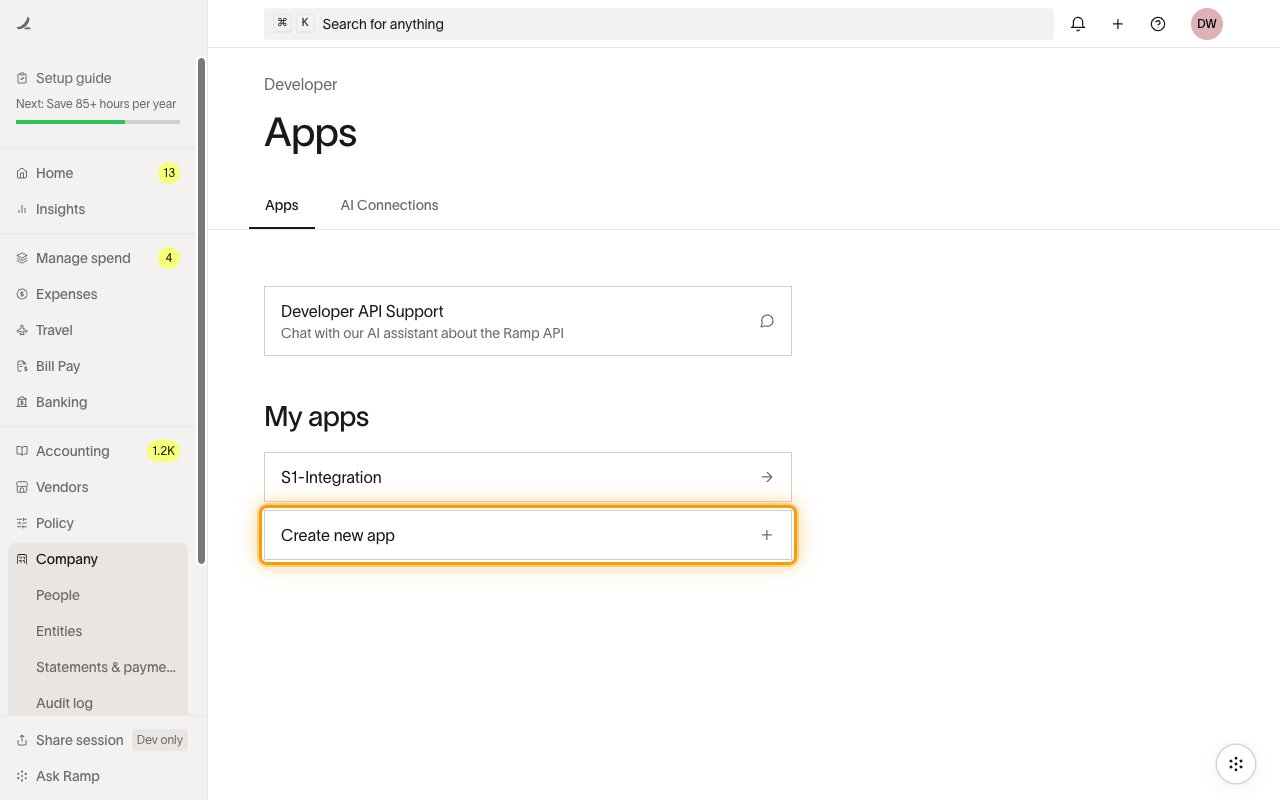
        <p>In the left sidebar, open <strong>Company</strong> and select <strong>Developer</strong>, then open the <strong>Apps</strong> tab and click <strong>Create new app</strong>.</p>

        <ul>
          <li>Tip: press <strong>⌘ K</strong> (Search for anything) and search for <strong>Developer</strong> to jump straight to this page.</li>
        </ul>

        <img src="https://mintcdn.com/stackone-60/GT3bUSfAa-8-wcJp/connectors/ramp/images/oauth2-setup-developer-apps.png?fit=max&auto=format&n=GT3bUSfAa-8-wcJp&q=85&s=b0c6ca058389b207d64c20a535944758" alt="Ramp Developer Apps page with the Create new app button" width="1280" height="800" data-path="connectors/ramp/images/oauth2-setup-developer-apps.png" />
      </div>
    </Step>

    <Step title="Create a new app">
      <div data-guide-step data-guide-scopes="" data-guide-display-scopes-list="">
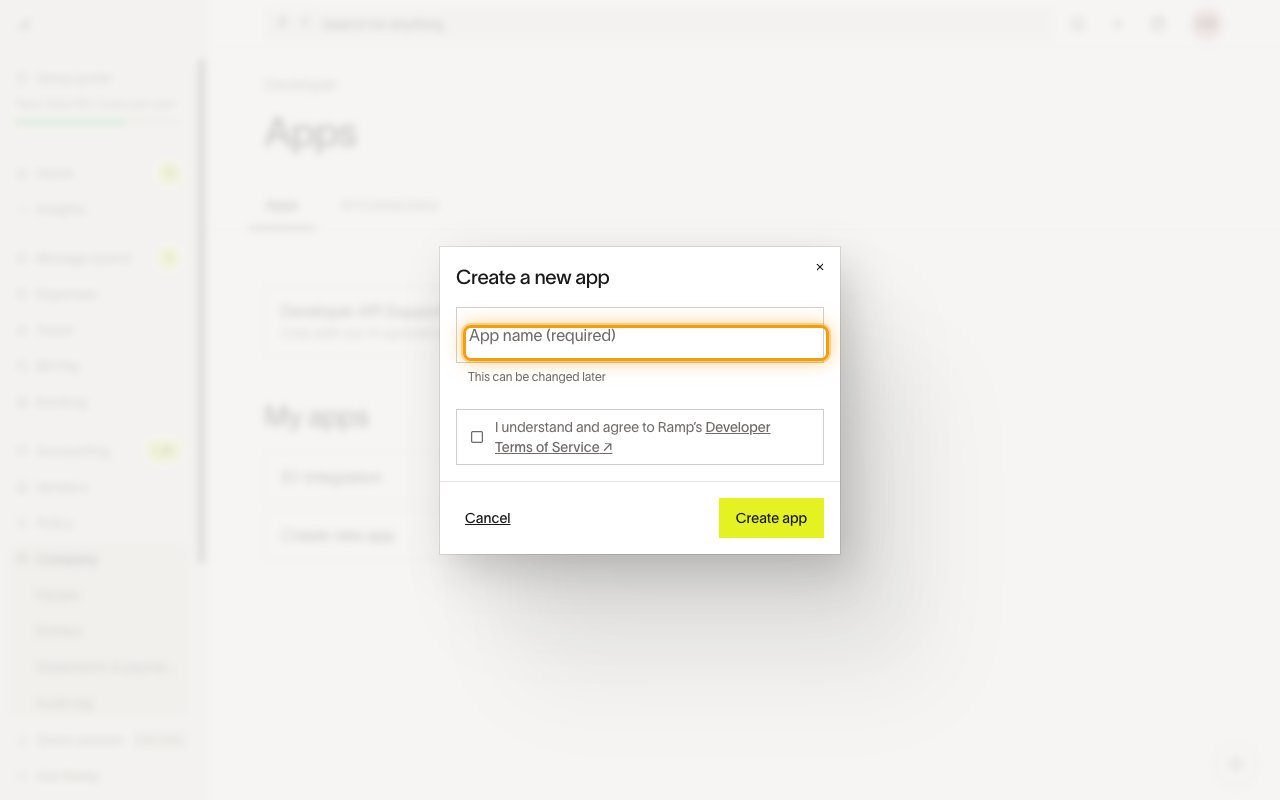
        <p>In the <strong>Create a new app</strong> dialog, enter an <strong>App name</strong>, check <strong>I understand and agree to Ramp's Developer Terms of Service</strong>, then click <strong>Create app</strong>.</p>

        <ul>
          <li>Ramp may ask you to verify it's you with a code emailed to your account — enter the code to continue.</li>
        </ul>

        <img src="https://mintcdn.com/stackone-60/GT3bUSfAa-8-wcJp/connectors/ramp/images/oauth2-setup-create-app.png?fit=max&auto=format&n=GT3bUSfAa-8-wcJp&q=85&s=a8d2ba89b3af75b050851f889ac4f1e9" alt="Create a new app dialog with App name field and terms checkbox" width="1280" height="800" data-path="connectors/ramp/images/oauth2-setup-create-app.png" />
      </div>
    </Step>

    <Step title="Add the redirect URI">
      <div data-guide-step data-guide-scopes="" data-guide-display-scopes-list="">
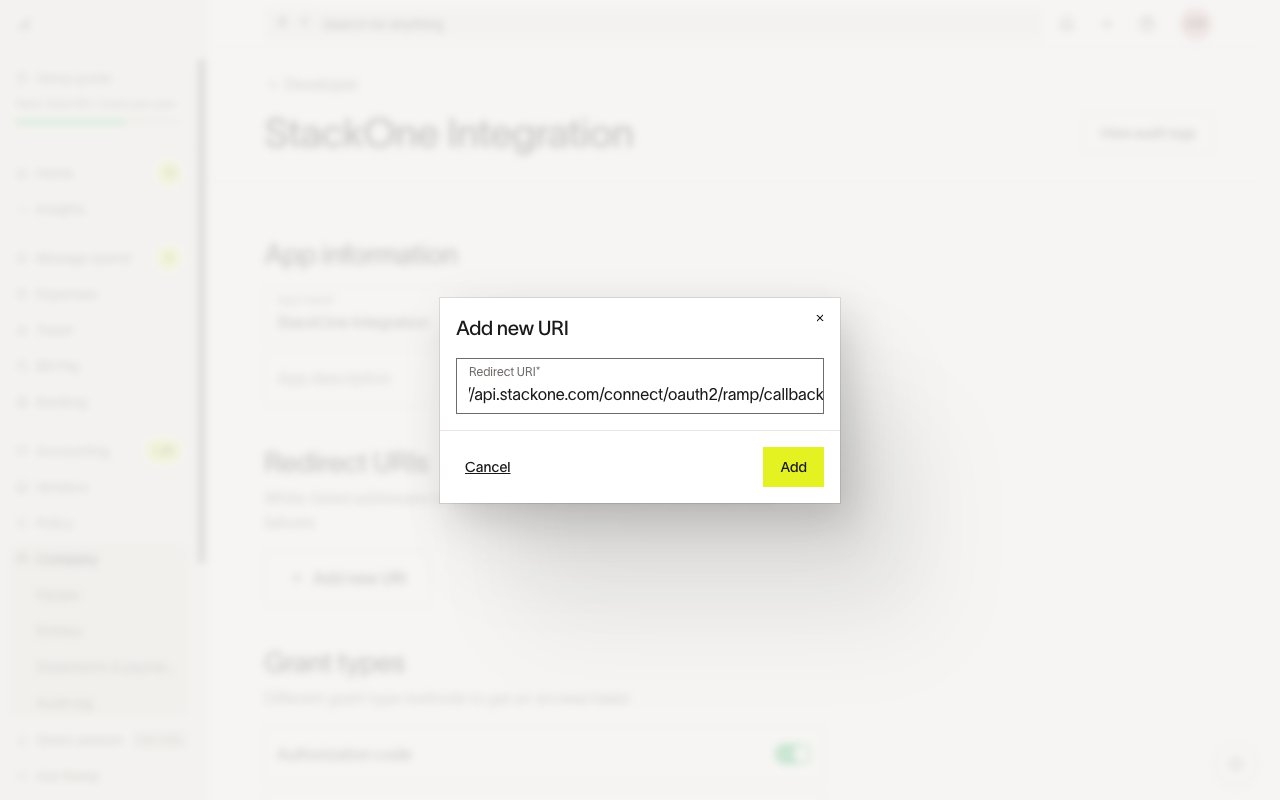
        <p>On the app page, under <strong>Redirect URIs</strong>, click <strong>Add new URI</strong>, paste the StackOne callback URL below, then click <strong>Add</strong>.</p>

        <ul>
          <li>`https://api.stackone.com/connect/oauth2/ramp/callback`</li>
        </ul>

        <img src="https://mintcdn.com/stackone-60/GT3bUSfAa-8-wcJp/connectors/ramp/images/oauth2-setup-redirect-uri.png?fit=max&auto=format&n=GT3bUSfAa-8-wcJp&q=85&s=b2c7a4e25927a22df7ba5ecb72605d30" alt="Add new URI dialog with the StackOne callback URL entered" width="1280" height="800" data-path="connectors/ramp/images/oauth2-setup-redirect-uri.png" />
      </div>
    </Step>

    <Step title="Enable the Authorization code grant">
      <div data-guide-step data-guide-scopes="" data-guide-display-scopes-list="">
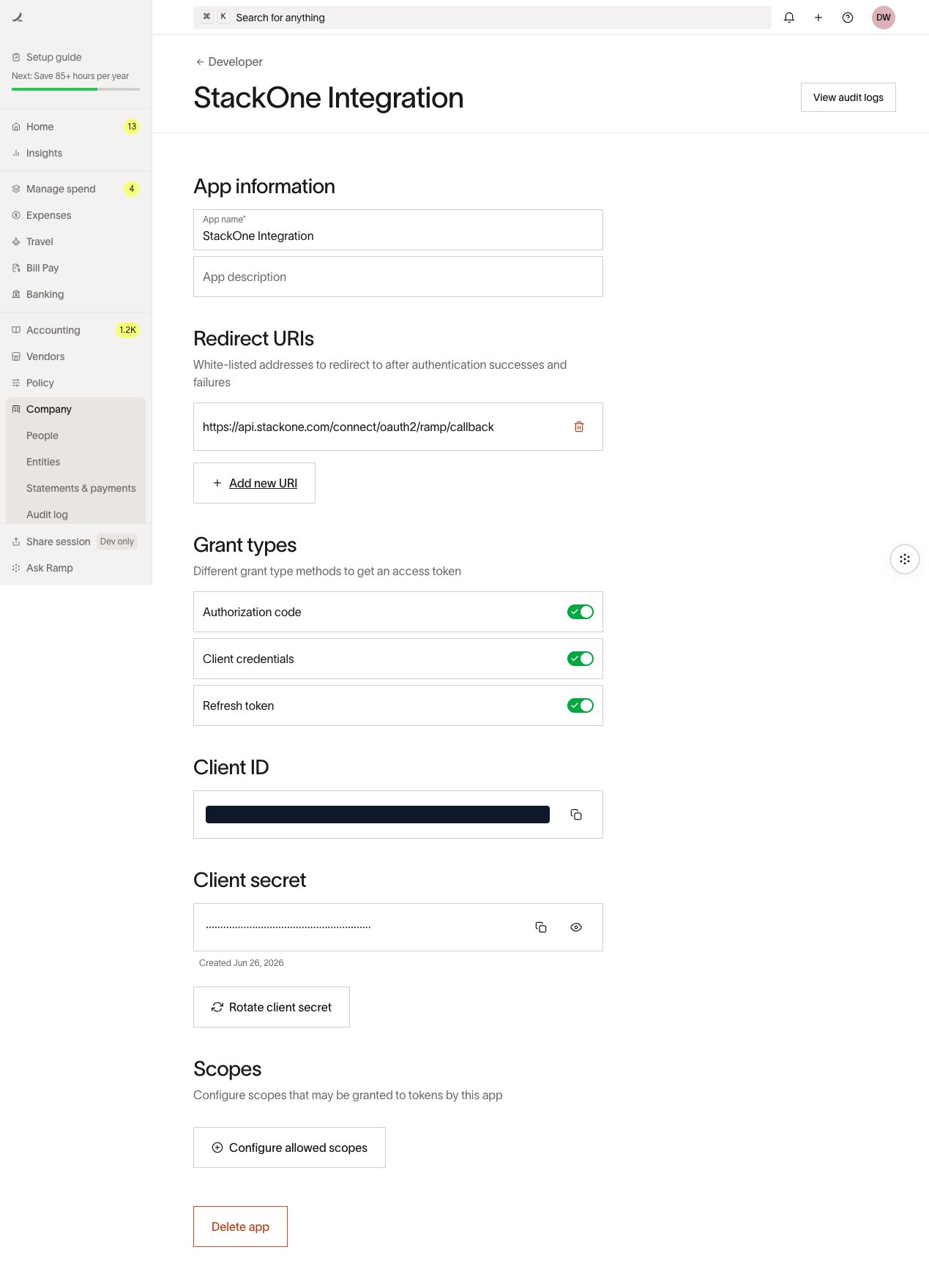
        <p>Under <strong>Grant types</strong>, make sure <strong>Authorization code</strong> is enabled, and keep <strong>Refresh token</strong> enabled so StackOne can refresh the access token automatically.</p>

        <img src="https://mintcdn.com/stackone-60/GT3bUSfAa-8-wcJp/connectors/ramp/images/oauth2-setup-app-credentials.png?fit=max&auto=format&n=GT3bUSfAa-8-wcJp&q=85&s=3a27c6b1a898514368d1ce4a18fb0489" alt="App settings showing Grant types with Authorization code enabled" width="1269" height="1760" data-path="connectors/ramp/images/oauth2-setup-app-credentials.png" />
      </div>
    </Step>

    <Step title="Configure allowed scopes">
      <div data-guide-step data-guide-scopes="accounting:read,accounting:write,bills:read,business:read,cards:read,cards:write,departments:read,departments:write,entities:read,funds:read,locations:read,locations:write,memos:read,memos:write,merchants:read,purchase_orders:read,receipts:read,receipts:write,reimbursements:read,repayments:read,spend_programs:read,spend_programs:write,transactions:read,transactions:write,transfers:read,trips:read,users:read,users:write,vendors:read,vendors:write" data-guide-display-scopes-list="accounting:read,accounting:write,bills:read,business:read,cards:read,cards:write,departments:read,departments:write,entities:read,funds:read,locations:read,locations:write,memos:read,memos:write,merchants:read,purchase_orders:read,receipts:read,receipts:write,reimbursements:read,repayments:read,spend_programs:read,spend_programs:write,transactions:read,transactions:write,transfers:read,trips:read,users:read,users:write,vendors:read,vendors:write">
        <div className="connector-guide-actions-badge" data-guide-actions-badge data-guide-actions-badge-scopes="accounting:read,accounting:write,bills:read,business:read,cards:read,cards:write,departments:read,departments:write,entities:read,funds:read,locations:read,locations:write,memos:read,memos:write,merchants:read,purchase_orders:read,receipts:read,receipts:write,reimbursements:read,repayments:read,spend_programs:read,spend_programs:write,transactions:read,transactions:write,transfers:read,trips:read,users:read,users:write,vendors:read,vendors:write" style={{ display: 'block', width: 'fit-content', maxWidth: '100%', padding: '2px 8px', borderRadius: '8px', fontSize: '12px', marginBottom: '8px', marginTop: '-10px', whiteSpace: 'nowrap', overflowX: 'auto', overflowY: 'hidden', msOverflowStyle: 'none', scrollbarWidth: 'none' }}>
          <span>Enables actions: </span><span data-guide-actions-badge-labels>Create A Department, Create A Location, Create A New Custom Accounting Field, Create A New Vendor, Create A Physical Card, Create A Spend Program, Create A User, Delete A General Ledger Account, Delete A Vendor, Fetch A Bill, Fetch A Custom Accounting Field, Fetch A Department, Fetch A Fund, Fetch A General Ledger Account, Fetch A Location, Fetch A Physical Card, Fetch A Receipt, Fetch A Reimbursement, Fetch A Spend Program, Fetch A Transaction, Fetch A Transaction Memo, Fetch A Transfer Payment, Fetch A Trip, Fetch A User, Fetch A Vendor, Fetch A Virtual Card, Fetch An Accounting Connection By ID, Fetch The Company Balance Information, Fetch The Company Information, Fetch User Creation Task Status, Get A Business Entity, List Accounting Connections, List All Trips For The Business, List Bills, List Business Entities, List Custom Accounting Fields, List Departments, List Funds, List General Ledger Accounts, List Locations, List Memos, List Merchants, List Options For A Given Custom Accounting Field, List Physical Cards, List Purchase Orders, List Receipts, List Reimbursements, List Repayments, List Spend Programs, List Transactions, List Transfer Payments, List Users, List Vendors, List Virtual Cards, Manage A User's Invite Lifecycle, Post Accounting Coding Selections To An Object, Post Ready To Sync Status, Post Sync Status, Register A New API Based Accounting Connection, Update A Department, Update A General Ledger Account, Update A Location, Update A Physical Card, Update A Transaction, Update A User, Update A Vendor, Upload A New Memo For A Transaction, Upload A Receipt, Upload General Ledger Accounts, Upload New Options, Upload Vendors</span>
        </div>

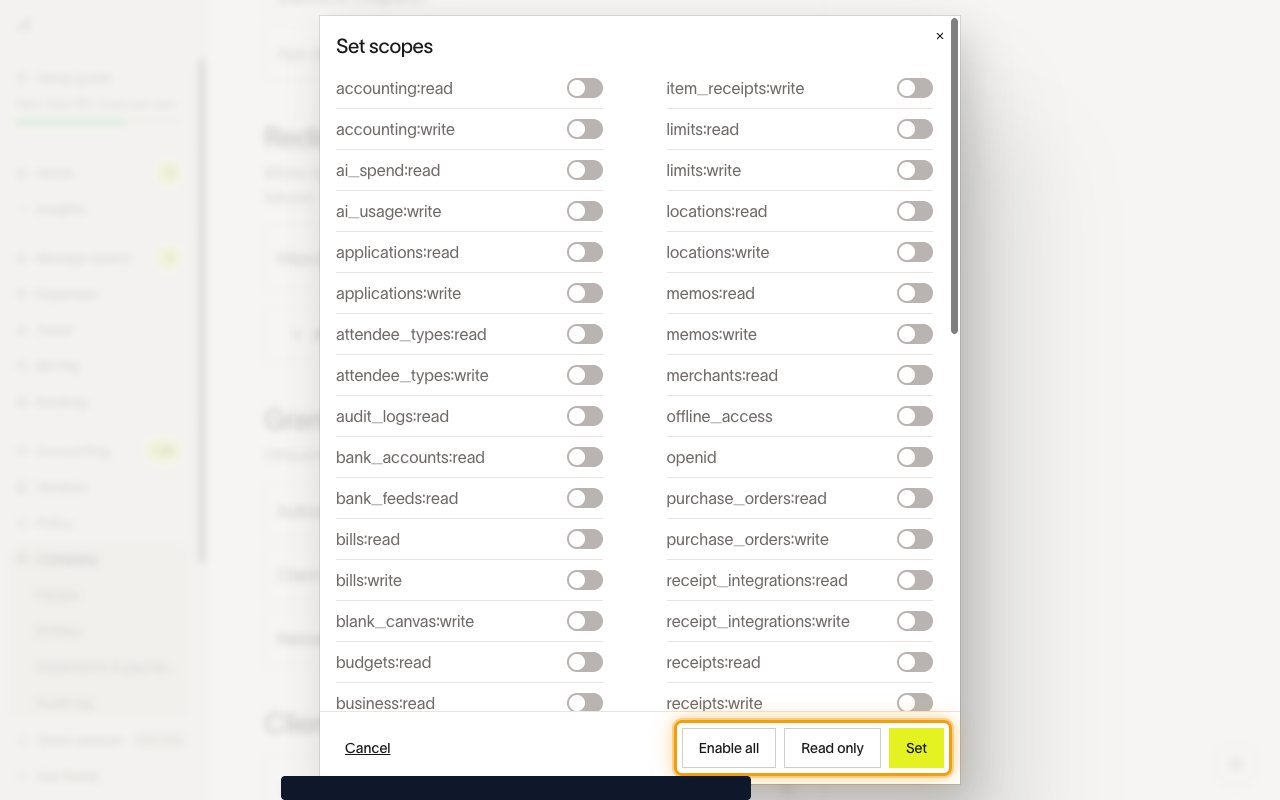
        <p>Under <strong>Scopes</strong>, click <strong>Configure allowed scopes</strong>. In the <strong>Set scopes</strong> dialog, enable the scopes your integration needs — click <strong>Read only</strong> to grant every read scope at once, or enable individual scopes — then click <strong>Set</strong>.</p>

        <ul>
          <li>Enable at least the scopes required by the StackOne actions you plan to use. The connector requests the scopes shown in the StackOne scope selector below.</li>
        </ul>

        <img src="https://mintcdn.com/stackone-60/GT3bUSfAa-8-wcJp/connectors/ramp/images/oauth2-setup-scopes.png?fit=max&auto=format&n=GT3bUSfAa-8-wcJp&q=85&s=41f8203cbe7dcb8e1671a71897e95e0f" alt="Set scopes dialog with Enable all, Read only and Set actions" width="1280" height="800" data-path="connectors/ramp/images/oauth2-setup-scopes.png" />

        <div style={{ marginTop: '8px' }} data-guide-display-scopes>
          <div className="connector-guide-scopes-container connector-guide-scopes-container--scrollable">
            <ul className="not-prose" style={{ listStyleType: "'- '", paddingLeft: '1em', margin: 0 }}>
              <li style={{ overflowWrap: 'anywhere', wordBreak: 'break-word' }} data-guide-display-scope="accounting:read">
                <button type="button" className="connector-guide-scope-copy" aria-label="Copy accounting:read" title="Copy scope" data-copy="accounting:read">
                  <span className="connector-guide-scope-copy__label">accounting:read</span>
                  <span className="connector-guide-scope-copy__icon" aria-hidden="true">⧉</span>
                </button>
              </li>

              <li style={{ overflowWrap: 'anywhere', wordBreak: 'break-word' }} data-guide-display-scope="accounting:write">
                <button type="button" className="connector-guide-scope-copy" aria-label="Copy accounting:write" title="Copy scope" data-copy="accounting:write">
                  <span className="connector-guide-scope-copy__label">accounting:write</span>
                  <span className="connector-guide-scope-copy__icon" aria-hidden="true">⧉</span>
                </button>
              </li>

              <li style={{ overflowWrap: 'anywhere', wordBreak: 'break-word' }} data-guide-display-scope="bills:read">
                <button type="button" className="connector-guide-scope-copy" aria-label="Copy bills:read" title="Copy scope" data-copy="bills:read">
                  <span className="connector-guide-scope-copy__label">bills:read</span>
                  <span className="connector-guide-scope-copy__icon" aria-hidden="true">⧉</span>
                </button>
              </li>

              <li style={{ overflowWrap: 'anywhere', wordBreak: 'break-word' }} data-guide-display-scope="business:read">
                <button type="button" className="connector-guide-scope-copy" aria-label="Copy business:read" title="Copy scope" data-copy="business:read">
                  <span className="connector-guide-scope-copy__label">business:read</span>
                  <span className="connector-guide-scope-copy__icon" aria-hidden="true">⧉</span>
                </button>
              </li>

              <li style={{ overflowWrap: 'anywhere', wordBreak: 'break-word' }} data-guide-display-scope="cards:read">
                <button type="button" className="connector-guide-scope-copy" aria-label="Copy cards:read" title="Copy scope" data-copy="cards:read">
                  <span className="connector-guide-scope-copy__label">cards:read</span>
                  <span className="connector-guide-scope-copy__icon" aria-hidden="true">⧉</span>
                </button>
              </li>

              <li style={{ overflowWrap: 'anywhere', wordBreak: 'break-word' }} data-guide-display-scope="cards:write">
                <button type="button" className="connector-guide-scope-copy" aria-label="Copy cards:write" title="Copy scope" data-copy="cards:write">
                  <span className="connector-guide-scope-copy__label">cards:write</span>
                  <span className="connector-guide-scope-copy__icon" aria-hidden="true">⧉</span>
                </button>
              </li>

              <li style={{ overflowWrap: 'anywhere', wordBreak: 'break-word' }} data-guide-display-scope="departments:read">
                <button type="button" className="connector-guide-scope-copy" aria-label="Copy departments:read" title="Copy scope" data-copy="departments:read">
                  <span className="connector-guide-scope-copy__label">departments:read</span>
                  <span className="connector-guide-scope-copy__icon" aria-hidden="true">⧉</span>
                </button>
              </li>

              <li style={{ overflowWrap: 'anywhere', wordBreak: 'break-word' }} data-guide-display-scope="departments:write">
                <button type="button" className="connector-guide-scope-copy" aria-label="Copy departments:write" title="Copy scope" data-copy="departments:write">
                  <span className="connector-guide-scope-copy__label">departments:write</span>
                  <span className="connector-guide-scope-copy__icon" aria-hidden="true">⧉</span>
                </button>
              </li>

              <li style={{ overflowWrap: 'anywhere', wordBreak: 'break-word' }} data-guide-display-scope="entities:read">
                <button type="button" className="connector-guide-scope-copy" aria-label="Copy entities:read" title="Copy scope" data-copy="entities:read">
                  <span className="connector-guide-scope-copy__label">entities:read</span>
                  <span className="connector-guide-scope-copy__icon" aria-hidden="true">⧉</span>
                </button>
              </li>

              <li style={{ overflowWrap: 'anywhere', wordBreak: 'break-word' }} data-guide-display-scope="funds:read">
                <button type="button" className="connector-guide-scope-copy" aria-label="Copy funds:read" title="Copy scope" data-copy="funds:read">
                  <span className="connector-guide-scope-copy__label">funds:read</span>
                  <span className="connector-guide-scope-copy__icon" aria-hidden="true">⧉</span>
                </button>
              </li>

              <li style={{ overflowWrap: 'anywhere', wordBreak: 'break-word' }} data-guide-display-scope="locations:read">
                <button type="button" className="connector-guide-scope-copy" aria-label="Copy locations:read" title="Copy scope" data-copy="locations:read">
                  <span className="connector-guide-scope-copy__label">locations:read</span>
                  <span className="connector-guide-scope-copy__icon" aria-hidden="true">⧉</span>
                </button>
              </li>

              <li style={{ overflowWrap: 'anywhere', wordBreak: 'break-word' }} data-guide-display-scope="locations:write">
                <button type="button" className="connector-guide-scope-copy" aria-label="Copy locations:write" title="Copy scope" data-copy="locations:write">
                  <span className="connector-guide-scope-copy__label">locations:write</span>
                  <span className="connector-guide-scope-copy__icon" aria-hidden="true">⧉</span>
                </button>
              </li>

              <li style={{ overflowWrap: 'anywhere', wordBreak: 'break-word' }} data-guide-display-scope="memos:read">
                <button type="button" className="connector-guide-scope-copy" aria-label="Copy memos:read" title="Copy scope" data-copy="memos:read">
                  <span className="connector-guide-scope-copy__label">memos:read</span>
                  <span className="connector-guide-scope-copy__icon" aria-hidden="true">⧉</span>
                </button>
              </li>

              <li style={{ overflowWrap: 'anywhere', wordBreak: 'break-word' }} data-guide-display-scope="memos:write">
                <button type="button" className="connector-guide-scope-copy" aria-label="Copy memos:write" title="Copy scope" data-copy="memos:write">
                  <span className="connector-guide-scope-copy__label">memos:write</span>
                  <span className="connector-guide-scope-copy__icon" aria-hidden="true">⧉</span>
                </button>
              </li>

              <li style={{ overflowWrap: 'anywhere', wordBreak: 'break-word' }} data-guide-display-scope="merchants:read">
                <button type="button" className="connector-guide-scope-copy" aria-label="Copy merchants:read" title="Copy scope" data-copy="merchants:read">
                  <span className="connector-guide-scope-copy__label">merchants:read</span>
                  <span className="connector-guide-scope-copy__icon" aria-hidden="true">⧉</span>
                </button>
              </li>

              <li style={{ overflowWrap: 'anywhere', wordBreak: 'break-word' }} data-guide-display-scope="purchase_orders:read">
                <button type="button" className="connector-guide-scope-copy" aria-label="Copy purchase_orders:read" title="Copy scope" data-copy="purchase_orders:read">
                  <span className="connector-guide-scope-copy__label">purchase\_orders:read</span>
                  <span className="connector-guide-scope-copy__icon" aria-hidden="true">⧉</span>
                </button>
              </li>

              <li style={{ overflowWrap: 'anywhere', wordBreak: 'break-word' }} data-guide-display-scope="receipts:read">
                <button type="button" className="connector-guide-scope-copy" aria-label="Copy receipts:read" title="Copy scope" data-copy="receipts:read">
                  <span className="connector-guide-scope-copy__label">receipts:read</span>
                  <span className="connector-guide-scope-copy__icon" aria-hidden="true">⧉</span>
                </button>
              </li>

              <li style={{ overflowWrap: 'anywhere', wordBreak: 'break-word' }} data-guide-display-scope="receipts:write">
                <button type="button" className="connector-guide-scope-copy" aria-label="Copy receipts:write" title="Copy scope" data-copy="receipts:write">
                  <span className="connector-guide-scope-copy__label">receipts:write</span>
                  <span className="connector-guide-scope-copy__icon" aria-hidden="true">⧉</span>
                </button>
              </li>

              <li style={{ overflowWrap: 'anywhere', wordBreak: 'break-word' }} data-guide-display-scope="reimbursements:read">
                <button type="button" className="connector-guide-scope-copy" aria-label="Copy reimbursements:read" title="Copy scope" data-copy="reimbursements:read">
                  <span className="connector-guide-scope-copy__label">reimbursements:read</span>
                  <span className="connector-guide-scope-copy__icon" aria-hidden="true">⧉</span>
                </button>
              </li>

              <li style={{ overflowWrap: 'anywhere', wordBreak: 'break-word' }} data-guide-display-scope="repayments:read">
                <button type="button" className="connector-guide-scope-copy" aria-label="Copy repayments:read" title="Copy scope" data-copy="repayments:read">
                  <span className="connector-guide-scope-copy__label">repayments:read</span>
                  <span className="connector-guide-scope-copy__icon" aria-hidden="true">⧉</span>
                </button>
              </li>

              <li style={{ overflowWrap: 'anywhere', wordBreak: 'break-word' }} data-guide-display-scope="spend_programs:read">
                <button type="button" className="connector-guide-scope-copy" aria-label="Copy spend_programs:read" title="Copy scope" data-copy="spend_programs:read">
                  <span className="connector-guide-scope-copy__label">spend\_programs:read</span>
                  <span className="connector-guide-scope-copy__icon" aria-hidden="true">⧉</span>
                </button>
              </li>

              <li style={{ overflowWrap: 'anywhere', wordBreak: 'break-word' }} data-guide-display-scope="spend_programs:write">
                <button type="button" className="connector-guide-scope-copy" aria-label="Copy spend_programs:write" title="Copy scope" data-copy="spend_programs:write">
                  <span className="connector-guide-scope-copy__label">spend\_programs:write</span>
                  <span className="connector-guide-scope-copy__icon" aria-hidden="true">⧉</span>
                </button>
              </li>

              <li style={{ overflowWrap: 'anywhere', wordBreak: 'break-word' }} data-guide-display-scope="transactions:read">
                <button type="button" className="connector-guide-scope-copy" aria-label="Copy transactions:read" title="Copy scope" data-copy="transactions:read">
                  <span className="connector-guide-scope-copy__label">transactions:read</span>
                  <span className="connector-guide-scope-copy__icon" aria-hidden="true">⧉</span>
                </button>
              </li>

              <li style={{ overflowWrap: 'anywhere', wordBreak: 'break-word' }} data-guide-display-scope="transactions:write">
                <button type="button" className="connector-guide-scope-copy" aria-label="Copy transactions:write" title="Copy scope" data-copy="transactions:write">
                  <span className="connector-guide-scope-copy__label">transactions:write</span>
                  <span className="connector-guide-scope-copy__icon" aria-hidden="true">⧉</span>
                </button>
              </li>

              <li style={{ overflowWrap: 'anywhere', wordBreak: 'break-word' }} data-guide-display-scope="transfers:read">
                <button type="button" className="connector-guide-scope-copy" aria-label="Copy transfers:read" title="Copy scope" data-copy="transfers:read">
                  <span className="connector-guide-scope-copy__label">transfers:read</span>
                  <span className="connector-guide-scope-copy__icon" aria-hidden="true">⧉</span>
                </button>
              </li>

              <li style={{ overflowWrap: 'anywhere', wordBreak: 'break-word' }} data-guide-display-scope="trips:read">
                <button type="button" className="connector-guide-scope-copy" aria-label="Copy trips:read" title="Copy scope" data-copy="trips:read">
                  <span className="connector-guide-scope-copy__label">trips:read</span>
                  <span className="connector-guide-scope-copy__icon" aria-hidden="true">⧉</span>
                </button>
              </li>

              <li style={{ overflowWrap: 'anywhere', wordBreak: 'break-word' }} data-guide-display-scope="users:read">
                <button type="button" className="connector-guide-scope-copy" aria-label="Copy users:read" title="Copy scope" data-copy="users:read">
                  <span className="connector-guide-scope-copy__label">users:read</span>
                  <span className="connector-guide-scope-copy__icon" aria-hidden="true">⧉</span>
                </button>
              </li>

              <li style={{ overflowWrap: 'anywhere', wordBreak: 'break-word' }} data-guide-display-scope="users:write">
                <button type="button" className="connector-guide-scope-copy" aria-label="Copy users:write" title="Copy scope" data-copy="users:write">
                  <span className="connector-guide-scope-copy__label">users:write</span>
                  <span className="connector-guide-scope-copy__icon" aria-hidden="true">⧉</span>
                </button>
              </li>

              <li style={{ overflowWrap: 'anywhere', wordBreak: 'break-word' }} data-guide-display-scope="vendors:read">
                <button type="button" className="connector-guide-scope-copy" aria-label="Copy vendors:read" title="Copy scope" data-copy="vendors:read">
                  <span className="connector-guide-scope-copy__label">vendors:read</span>
                  <span className="connector-guide-scope-copy__icon" aria-hidden="true">⧉</span>
                </button>
              </li>

              <li style={{ overflowWrap: 'anywhere', wordBreak: 'break-word' }} data-guide-display-scope="vendors:write">
                <button type="button" className="connector-guide-scope-copy" aria-label="Copy vendors:write" title="Copy scope" data-copy="vendors:write">
                  <span className="connector-guide-scope-copy__label">vendors:write</span>
                  <span className="connector-guide-scope-copy__icon" aria-hidden="true">⧉</span>
                </button>
              </li>
            </ul>
          </div>
        </div>
      </div>
    </Step>

    <Step title="Copy your credentials into StackOne">
      <div data-guide-step data-guide-scopes="" data-guide-display-scopes-list="">
        <p>Back on the app page, copy these values and paste them into the matching StackOne fields:</p>

        <ul>
          <li><strong>Client ID</strong> — the public identifier of your Ramp app. Under <strong>Client ID</strong>, click <strong>Copy</strong>.</li>
          <li><strong>Client Secret</strong> — under <strong>Client secret</strong>, click <strong>Show secret</strong> and <strong>Copy</strong> (or <strong>Rotate client secret</strong> to generate a new one). It is shown in full only when the app is created or rotated, so copy it immediately.</li>
          <li><strong>Scopes</strong> (optional) — a space-separated list of scopes to request. Leave it blank to request the connector's full scope set, or enter a subset of the scopes you enabled above.</li>
        </ul>

        <img src="https://mintcdn.com/stackone-60/GT3bUSfAa-8-wcJp/connectors/ramp/images/oauth2-setup-app-credentials.png?fit=max&auto=format&n=GT3bUSfAa-8-wcJp&q=85&s=3a27c6b1a898514368d1ce4a18fb0489" alt="App settings showing the Client ID and Client secret to copy" width="1269" height="1760" data-path="connectors/ramp/images/oauth2-setup-app-credentials.png" />
      </div>
    </Step>
  </Steps>
</section>

## Creating the StackOne Connector Profile

To create the Connector Profile in StackOne for <strong>Ramp</strong>:

<Steps>
  <Step title="Navigate to Connector Profiles">
    Login to StackOne and navigate to [Connector Profiles](https://app.stackone.com/connector_profiles)
  </Step>

  <Step title="Create New Connector Profile">
    <ul>
      <li>Click <strong>+ Connector Profile</strong></li>
      <li>Search for and select <strong>Ramp</strong></li>
      <li>Select <strong>Type</strong> as <strong>OAuth 2.0</strong></li>

      <li>
        Fill out the fields using details retrieved from your provider:

        <ul style={{ marginLeft: '20px' }}>
          <li><strong>Client ID</strong></li>
          <li><strong>Client Secret</strong></li>
          <li><strong>Scopes</strong> (Optional)</li>
        </ul>
      </li>

      <li>(Optional) Select <strong>Actions</strong> to be enabled for this Connector Profile</li>
      <li>Click <strong>Save</strong></li>
    </ul>
  </Step>
</Steps>

Congratulations! The new Connector Profile will now show up in your project ready to be used. You can now continue to <a href="/guides/accounts-section#linking-accounts">Link Accounts</a> for <strong>Ramp</strong>.