> ## Documentation Index
> Fetch the complete documentation index at: https://docs.stackone.com/llms.txt
> Use this file to discover all available pages before exploring further.

# OpenStreetMap OAuth 2.0 connector profile – StackOne setup guide

> Set up the OAuth 2.0 connector profile for OpenStreetMap in StackOne. One-time admin setup required before your users can link OpenStreetMap accounts via Hub.

<Warning>You must be signed in to an OpenStreetMap account to register an OAuth 2 application. Register the application in the same environment (Production or Sandbox) you intend to connect — the two have separate accounts and separate app registrations.</Warning>

<Panel>
  <div className="not-prose guides-scope-selector" data-guides-scope-selector data-guide-actions-json="[{&#x22;id&#x22;:&#x22;openstreetmap_create_changeset&#x22;,&#x22;label&#x22;:&#x22;Create Changeset&#x22;,&#x22;scopes&#x22;:[&#x22;write_api&#x22;]},{&#x22;id&#x22;:&#x22;openstreetmap_update_changeset&#x22;,&#x22;label&#x22;:&#x22;Update Changeset&#x22;,&#x22;scopes&#x22;:[&#x22;write_api&#x22;]},{&#x22;id&#x22;:&#x22;openstreetmap_close_changeset&#x22;,&#x22;label&#x22;:&#x22;Close Changeset&#x22;,&#x22;scopes&#x22;:[&#x22;write_api&#x22;]},{&#x22;id&#x22;:&#x22;openstreetmap_upload_changeset&#x22;,&#x22;label&#x22;:&#x22;Upload Changeset&#x22;,&#x22;scopes&#x22;:[&#x22;write_api&#x22;]},{&#x22;id&#x22;:&#x22;openstreetmap_comment_changeset&#x22;,&#x22;label&#x22;:&#x22;Comment Changeset&#x22;,&#x22;scopes&#x22;:[&#x22;write_changeset_comments&#x22;]},{&#x22;id&#x22;:&#x22;openstreetmap_subscribe_changeset&#x22;,&#x22;label&#x22;:&#x22;Subscribe Changeset&#x22;,&#x22;scopes&#x22;:[&#x22;write_api&#x22;]},{&#x22;id&#x22;:&#x22;openstreetmap_unsubscribe_changeset&#x22;,&#x22;label&#x22;:&#x22;Unsubscribe Changeset&#x22;,&#x22;scopes&#x22;:[&#x22;write_api&#x22;]},{&#x22;id&#x22;:&#x22;openstreetmap_unhide_changeset_comment&#x22;,&#x22;label&#x22;:&#x22;Unhide Changeset Comment&#x22;,&#x22;scopes&#x22;:[&#x22;write_changeset_comments&#x22;]},{&#x22;id&#x22;:&#x22;openstreetmap_hide_changeset_comment&#x22;,&#x22;label&#x22;:&#x22;Hide Changeset Comment&#x22;,&#x22;scopes&#x22;:[&#x22;write_changeset_comments&#x22;]},{&#x22;id&#x22;:&#x22;openstreetmap_create_node&#x22;,&#x22;label&#x22;:&#x22;Create Node&#x22;,&#x22;scopes&#x22;:[&#x22;write_api&#x22;]},{&#x22;id&#x22;:&#x22;openstreetmap_update_node&#x22;,&#x22;label&#x22;:&#x22;Update Node&#x22;,&#x22;scopes&#x22;:[&#x22;write_api&#x22;]},{&#x22;id&#x22;:&#x22;openstreetmap_delete_node&#x22;,&#x22;label&#x22;:&#x22;Delete Node&#x22;,&#x22;scopes&#x22;:[&#x22;write_api&#x22;]},{&#x22;id&#x22;:&#x22;openstreetmap_redact_node_version&#x22;,&#x22;label&#x22;:&#x22;Redact Node Version&#x22;,&#x22;scopes&#x22;:[&#x22;write_redactions&#x22;]},{&#x22;id&#x22;:&#x22;openstreetmap_create_way&#x22;,&#x22;label&#x22;:&#x22;Create Way&#x22;,&#x22;scopes&#x22;:[&#x22;write_api&#x22;]},{&#x22;id&#x22;:&#x22;openstreetmap_update_way&#x22;,&#x22;label&#x22;:&#x22;Update Way&#x22;,&#x22;scopes&#x22;:[&#x22;write_api&#x22;]},{&#x22;id&#x22;:&#x22;openstreetmap_delete_way&#x22;,&#x22;label&#x22;:&#x22;Delete Way&#x22;,&#x22;scopes&#x22;:[&#x22;write_api&#x22;]},{&#x22;id&#x22;:&#x22;openstreetmap_redact_way_version&#x22;,&#x22;label&#x22;:&#x22;Redact Way Version&#x22;,&#x22;scopes&#x22;:[&#x22;write_redactions&#x22;]},{&#x22;id&#x22;:&#x22;openstreetmap_create_relation&#x22;,&#x22;label&#x22;:&#x22;Create Relation&#x22;,&#x22;scopes&#x22;:[&#x22;write_api&#x22;]},{&#x22;id&#x22;:&#x22;openstreetmap_update_relation&#x22;,&#x22;label&#x22;:&#x22;Update Relation&#x22;,&#x22;scopes&#x22;:[&#x22;write_api&#x22;]},{&#x22;id&#x22;:&#x22;openstreetmap_delete_relation&#x22;,&#x22;label&#x22;:&#x22;Delete Relation&#x22;,&#x22;scopes&#x22;:[&#x22;write_api&#x22;]},{&#x22;id&#x22;:&#x22;openstreetmap_redact_relation_version&#x22;,&#x22;label&#x22;:&#x22;Redact Relation Version&#x22;,&#x22;scopes&#x22;:[&#x22;write_redactions&#x22;]},{&#x22;id&#x22;:&#x22;openstreetmap_create_gpx_trace&#x22;,&#x22;label&#x22;:&#x22;Create Gpx Trace&#x22;,&#x22;scopes&#x22;:[&#x22;write_gpx&#x22;]},{&#x22;id&#x22;:&#x22;openstreetmap_get_gpx_trace_details&#x22;,&#x22;label&#x22;:&#x22;Get Gpx Trace Details&#x22;,&#x22;scopes&#x22;:[&#x22;read_gpx&#x22;]},{&#x22;id&#x22;:&#x22;openstreetmap_get_gpx_trace_data&#x22;,&#x22;label&#x22;:&#x22;Get Gpx Trace Data&#x22;,&#x22;scopes&#x22;:[&#x22;read_gpx&#x22;]},{&#x22;id&#x22;:&#x22;openstreetmap_update_gpx_trace&#x22;,&#x22;label&#x22;:&#x22;Update Gpx Trace&#x22;,&#x22;scopes&#x22;:[&#x22;write_gpx&#x22;]},{&#x22;id&#x22;:&#x22;openstreetmap_delete_gpx_trace&#x22;,&#x22;label&#x22;:&#x22;Delete Gpx Trace&#x22;,&#x22;scopes&#x22;:[&#x22;write_gpx&#x22;]},{&#x22;id&#x22;:&#x22;openstreetmap_list_own_gpx_traces&#x22;,&#x22;label&#x22;:&#x22;List Own Gpx Traces&#x22;,&#x22;scopes&#x22;:[&#x22;read_gpx&#x22;]},{&#x22;id&#x22;:&#x22;openstreetmap_get_current_user&#x22;,&#x22;label&#x22;:&#x22;Get Current User&#x22;,&#x22;scopes&#x22;:[&#x22;read_prefs&#x22;]},{&#x22;id&#x22;:&#x22;openstreetmap_get_user_preferences&#x22;,&#x22;label&#x22;:&#x22;Get User Preferences&#x22;,&#x22;scopes&#x22;:[&#x22;read_prefs&#x22;]},{&#x22;id&#x22;:&#x22;openstreetmap_replace_user_preferences&#x22;,&#x22;label&#x22;:&#x22;Replace User Preferences&#x22;,&#x22;scopes&#x22;:[&#x22;write_prefs&#x22;]},{&#x22;id&#x22;:&#x22;openstreetmap_get_user_preference&#x22;,&#x22;label&#x22;:&#x22;Get User Preference&#x22;,&#x22;scopes&#x22;:[&#x22;read_prefs&#x22;]},{&#x22;id&#x22;:&#x22;openstreetmap_delete_user_preference&#x22;,&#x22;label&#x22;:&#x22;Delete User Preference&#x22;,&#x22;scopes&#x22;:[&#x22;write_prefs&#x22;]},{&#x22;id&#x22;:&#x22;openstreetmap_create_note&#x22;,&#x22;label&#x22;:&#x22;Create Note&#x22;,&#x22;scopes&#x22;:[&#x22;write_notes&#x22;]},{&#x22;id&#x22;:&#x22;openstreetmap_comment_note&#x22;,&#x22;label&#x22;:&#x22;Comment Note&#x22;,&#x22;scopes&#x22;:[&#x22;write_notes&#x22;]},{&#x22;id&#x22;:&#x22;openstreetmap_close_note&#x22;,&#x22;label&#x22;:&#x22;Close Note&#x22;,&#x22;scopes&#x22;:[&#x22;write_notes&#x22;]},{&#x22;id&#x22;:&#x22;openstreetmap_reopen_note&#x22;,&#x22;label&#x22;:&#x22;Reopen Note&#x22;,&#x22;scopes&#x22;:[&#x22;write_notes&#x22;]},{&#x22;id&#x22;:&#x22;openstreetmap_subscribe_note&#x22;,&#x22;label&#x22;:&#x22;Subscribe Note&#x22;,&#x22;scopes&#x22;:[&#x22;write_notes&#x22;]},{&#x22;id&#x22;:&#x22;openstreetmap_unsubscribe_note&#x22;,&#x22;label&#x22;:&#x22;Unsubscribe Note&#x22;,&#x22;scopes&#x22;:[&#x22;write_notes&#x22;]},{&#x22;id&#x22;:&#x22;openstreetmap_hide_note&#x22;,&#x22;label&#x22;:&#x22;Hide Note&#x22;,&#x22;scopes&#x22;:[&#x22;write_notes&#x22;]},{&#x22;id&#x22;:&#x22;openstreetmap_list_inbox_messages&#x22;,&#x22;label&#x22;:&#x22;List Inbox Messages&#x22;,&#x22;scopes&#x22;:[&#x22;consume_messages&#x22;]},{&#x22;id&#x22;:&#x22;openstreetmap_list_outbox_messages&#x22;,&#x22;label&#x22;:&#x22;List Outbox Messages&#x22;,&#x22;scopes&#x22;:[&#x22;consume_messages&#x22;]},{&#x22;id&#x22;:&#x22;openstreetmap_send_message&#x22;,&#x22;label&#x22;:&#x22;Send Message&#x22;,&#x22;scopes&#x22;:[&#x22;send_messages&#x22;]},{&#x22;id&#x22;:&#x22;openstreetmap_get_message&#x22;,&#x22;label&#x22;:&#x22;Get Message&#x22;,&#x22;scopes&#x22;:[&#x22;consume_messages&#x22;]},{&#x22;id&#x22;:&#x22;openstreetmap_update_message_status&#x22;,&#x22;label&#x22;:&#x22;Update Message Status&#x22;,&#x22;scopes&#x22;:[&#x22;consume_messages&#x22;]},{&#x22;id&#x22;:&#x22;openstreetmap_delete_message&#x22;,&#x22;label&#x22;:&#x22;Delete Message&#x22;,&#x22;scopes&#x22;:[&#x22;consume_messages&#x22;]}]" style={{ borderRadius: '8px', padding: '16px', marginBottom: '24px' }}>
    <div className="guides-scope-selector__title" style={{ fontSize: '16px', fontWeight: '600', marginBottom: '12px' }}>Select Actions to adjust the guide</div>
    <div className="guides-scope-selector__muted" style={{ fontSize: '13px', marginBottom: '12px' }}>Some actions may require additional configuration in the provider to be accessible. Choose the actions you need and the guide will be updated.</div>

    <div style={{ display: 'flex', gap: '8px', marginBottom: '12px', flexWrap: 'wrap' }}>
      <input type="text" placeholder="Search actions..." className="guides-scope-selector__input" data-guide-action-search style={{ padding: '8px 12px', borderRadius: '6px', fontSize: '13px', flex: 1, minWidth: '160px' }} />

      <button type="button" className="guides-scope-selector__quick-btn" data-guide-select-all style={{ padding: '6px 10px', borderRadius: '6px', fontSize: '12px', cursor: 'pointer' }}>Select all</button>
      <button type="button" className="guides-scope-selector__quick-btn" data-guide-clear style={{ padding: '6px 10px', borderRadius: '6px', fontSize: '12px', cursor: 'pointer' }}>Clear</button>
    </div>

    <div className="guides-scope-selector__list" style={{ maxHeight: '240px', overflowY: 'auto', borderRadius: '6px', marginBottom: '12px' }}>
      <div className="guides-scope-selector__list-header" style={{ display: 'flex', alignItems: 'center', gap: '10px', padding: '8px 12px', fontSize: '12px', fontWeight: '600', position: 'sticky', top: 0, zIndex: 1 }}>
        <div style={{ width: '16px', flexShrink: 0 }} />

        <div style={{ flex: 1, textAlign: 'left' }}>Action</div>
        <div style={{ minWidth: '120px', marginLeft: 'auto', textAlign: 'right' }}>Scope(s)</div>
      </div>

      <div className="guides-scope-selector__muted" data-guide-loading style={{ padding: '16px', textAlign: 'center', fontSize: '13px' }}>Loading actions...</div>
      <div className="guides-scope-selector__muted" data-guide-no-results hidden style={{ padding: '16px', textAlign: 'center', fontSize: '13px' }}>No actions match your search.</div>
    </div>

    <div className="guides-scope-selector__url-section" style={{ marginTop: '12px', paddingTop: '12px' }}>
      <div className="guides-scope-selector__muted" style={{ fontSize: '12px', fontWeight: '500', marginBottom: '6px' }}>Dynamic Guide URL</div>

      <div style={{ display: 'flex', alignItems: 'center', gap: '8px', flexWrap: 'wrap' }}>
        <input type="text" readOnly className="guides-scope-selector__input" data-guide-url style={{ flex: 1, minWidth: '200px', padding: '8px 10px', borderRadius: '6px', fontSize: '12px', fontFamily: 'monospace' }} />

        <button type="button" className="guides-scope-selector__copy-btn" data-guide-copy-url style={{ width: '120px', padding: '8px 14px', borderRadius: '6px', fontSize: '13px', fontWeight: '500', cursor: 'pointer', whiteSpace: 'nowrap', marginLeft: 'auto' }}>Copy URL</button>
      </div>

      <div style={{ marginTop: '12px' }}>
        <div className="guides-scope-selector__muted" style={{ fontSize: '12px', fontWeight: '500', marginBottom: '6px' }}>Scopes Selected</div>

        <div style={{ display: 'flex', alignItems: 'stretch', gap: '8px', flexWrap: 'wrap' }}>
          <pre className="guides-scope-selector__input" role="textbox" aria-readonly="true" tabIndex={0} data-guide-scopes-output style={{ flex: 1, minWidth: '200px', minHeight: '88px', maxHeight: '120px', overflowY: 'auto', margin: 0, padding: '8px 10px', borderRadius: '6px', fontSize: '12px', fontFamily: 'monospace', whiteSpace: 'pre-wrap' }} />

          <div className="guides-scope-selector__muted" style={{ display: 'flex', flexDirection: 'column', gap: '8px', fontSize: '12px', fontWeight: '500', flexShrink: 0, alignItems: 'flex-start' }}>
            <div style={{ whiteSpace: 'nowrap' }}>Separator</div>

            <select className="guides-scope-selector__input" data-guide-scope-delimiter style={{ width: '100%', padding: '6px 10px', borderRadius: '6px', fontSize: '12px' }}>
              <option value="space">Space</option>
              <option value="comma">Comma</option>
              <option value="semicolon">Semicolon</option>
              <option value="pipe">Pipe</option>
              <option value="newline">Newline</option>
            </select>

            <button type="button" className="guides-scope-selector__copy-btn" data-guide-copy-scopes style={{ width: '120px', padding: '8px 14px', borderRadius: '6px', fontSize: '13px', fontWeight: '500', cursor: 'pointer', whiteSpace: 'nowrap' }}>Copy scopes</button>
          </div>
        </div>
      </div>
    </div>
  </div>
</Panel>

<section data-guide-section data-guide-scopes="">
  <h2>Register an OAuth 2 application</h2>

  <p>OpenStreetMap uses OAuth 2.0 for all editing and private-data operations. Create an OAuth 2 application in your OpenStreetMap account, select the permissions your integration needs, and copy the generated Client ID and Client Secret into StackOne.</p>

  <Steps>
    <Step title="Sign in to OpenStreetMap">
      <div data-guide-step data-guide-scopes="" data-guide-display-scopes-list="">
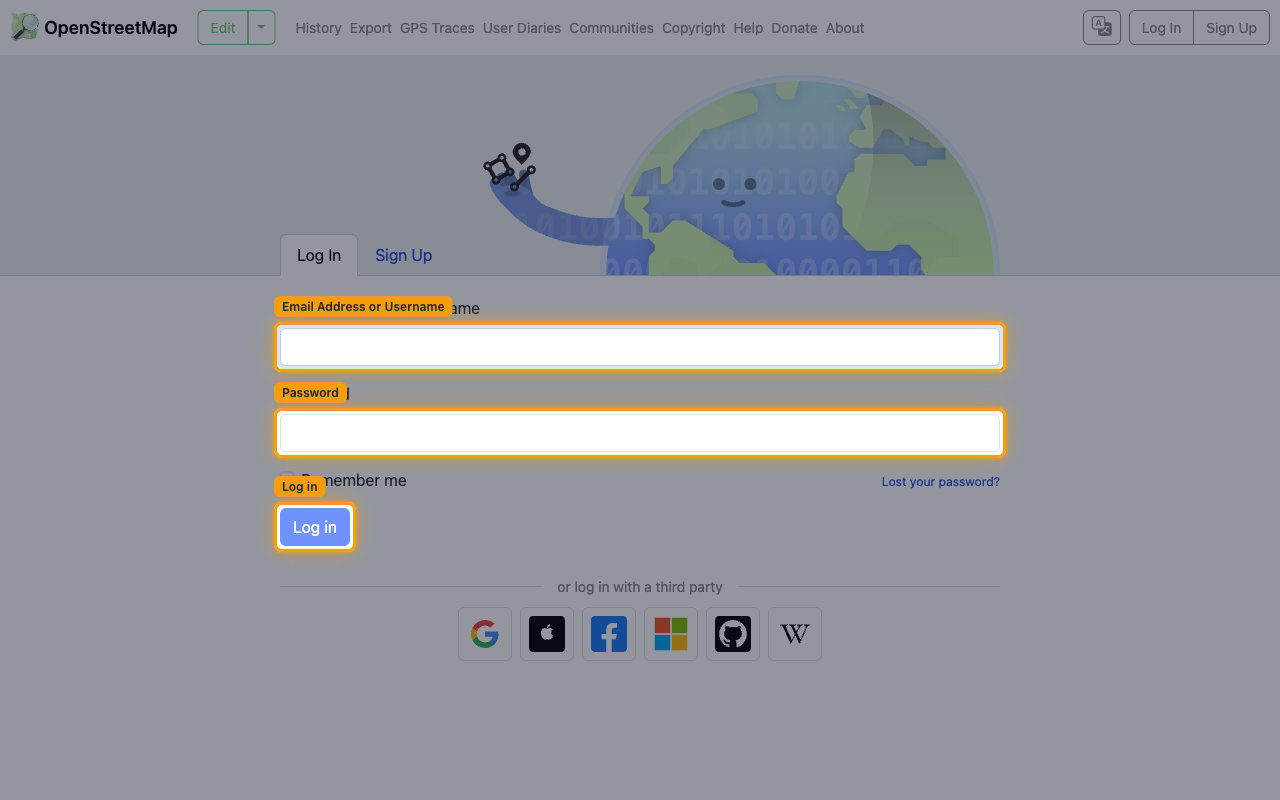
        <p>Sign in to the OpenStreetMap site for the environment you are connecting. Enter your <strong>Email Address or Username</strong> and <strong>Password</strong> and click <strong>Log in</strong> (or use one of the third-party sign-in providers).</p>

        <ul>
          <li><strong>Production</strong> — <a href="https://www.openstreetmap.org/login" target="_blank" rel="noopener noreferrer">OpenStreetMap sign-in</a></li>
          <li><strong>Sandbox</strong> — <a href="https://master.apis.dev.openstreetmap.org/login" target="_blank" rel="noopener noreferrer">OpenStreetMap dev sandbox sign-in</a></li>
          <li>Create the application in the same environment you will connect — the Sandbox has its own accounts and its own app registrations, separate from Production.</li>
        </ul>

        <img src="https://mintcdn.com/stackone-60/0Z7twXoDaxQkZOhL/connectors/openstreetmap/images/oauth2-setup-sign-in.png?fit=max&auto=format&n=0Z7twXoDaxQkZOhL&q=85&s=3ce7cead2c63304750f952e0231b472b" alt="OpenStreetMap Log In page with the Email Address or Username field, Password field, and Log in button." width="1280" height="800" data-path="connectors/openstreetmap/images/oauth2-setup-sign-in.png" />
      </div>
    </Step>

    <Step title="Open the OAuth 2 Applications page">
      <div data-guide-step data-guide-scopes="" data-guide-display-scopes-list="">
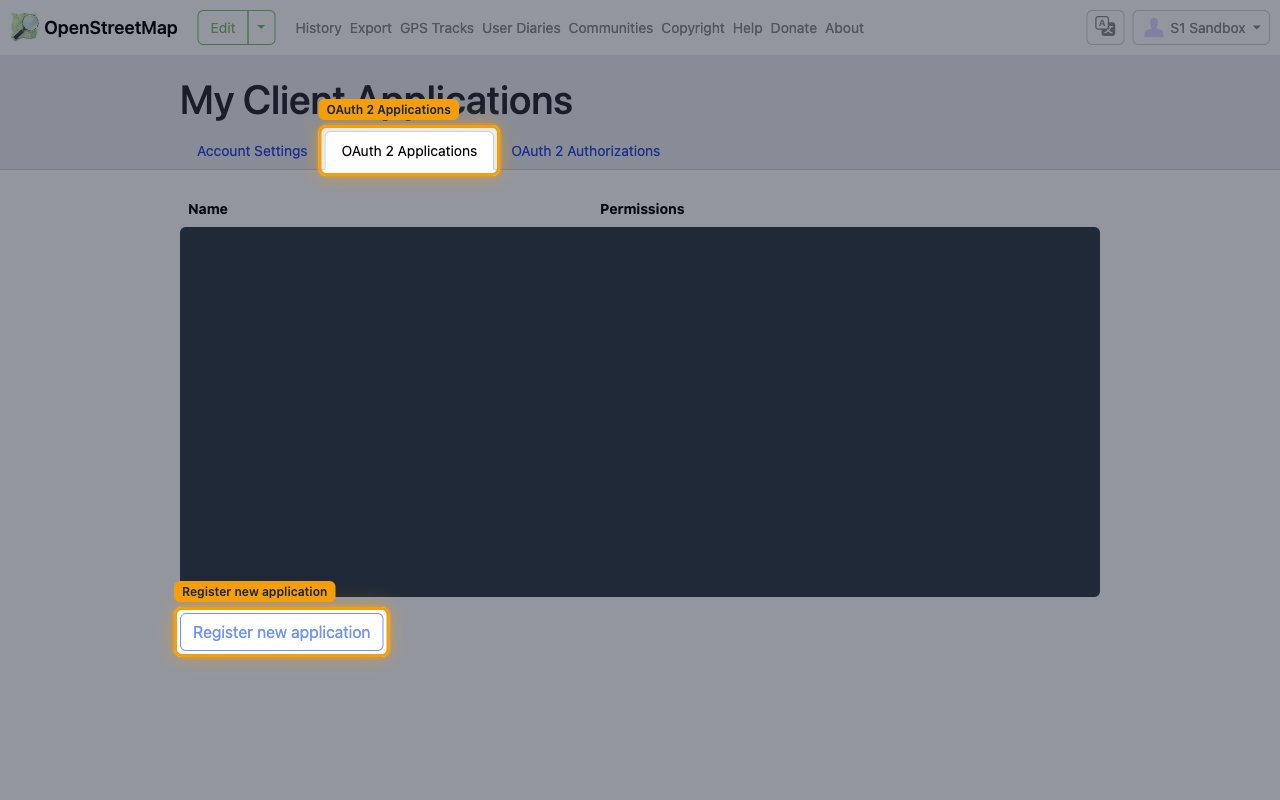
        <p>Open your account's <strong>OAuth 2 Applications</strong> page and start a new registration. Click your user icon in the top-right corner, choose your account, then open the <strong>OAuth 2 Applications</strong> tab and click <strong>Register new application</strong>.</p>

        <ul>
          <li><strong>Production</strong> — <a href="https://www.openstreetmap.org/oauth2/applications" target="_blank" rel="noopener noreferrer">OpenStreetMap OAuth 2 applications</a></li>
          <li><strong>Sandbox</strong> — <a href="https://master.apis.dev.openstreetmap.org/oauth2/applications" target="_blank" rel="noopener noreferrer">OpenStreetMap dev sandbox OAuth 2 applications</a></li>
        </ul>

        <img src="https://mintcdn.com/stackone-60/0Z7twXoDaxQkZOhL/connectors/openstreetmap/images/oauth2-setup-applications.png?fit=max&auto=format&n=0Z7twXoDaxQkZOhL&q=85&s=e94aa4e5dc2f8412b4d5abf0c0698bd5" alt="My Client Applications page with the OAuth 2 Applications tab and the Register new application link highlighted." width="1280" height="800" data-path="connectors/openstreetmap/images/oauth2-setup-applications.png" />
      </div>
    </Step>

    <Step title="Configure the application">
      <div data-guide-step data-guide-scopes="" data-guide-display-scopes-list="">
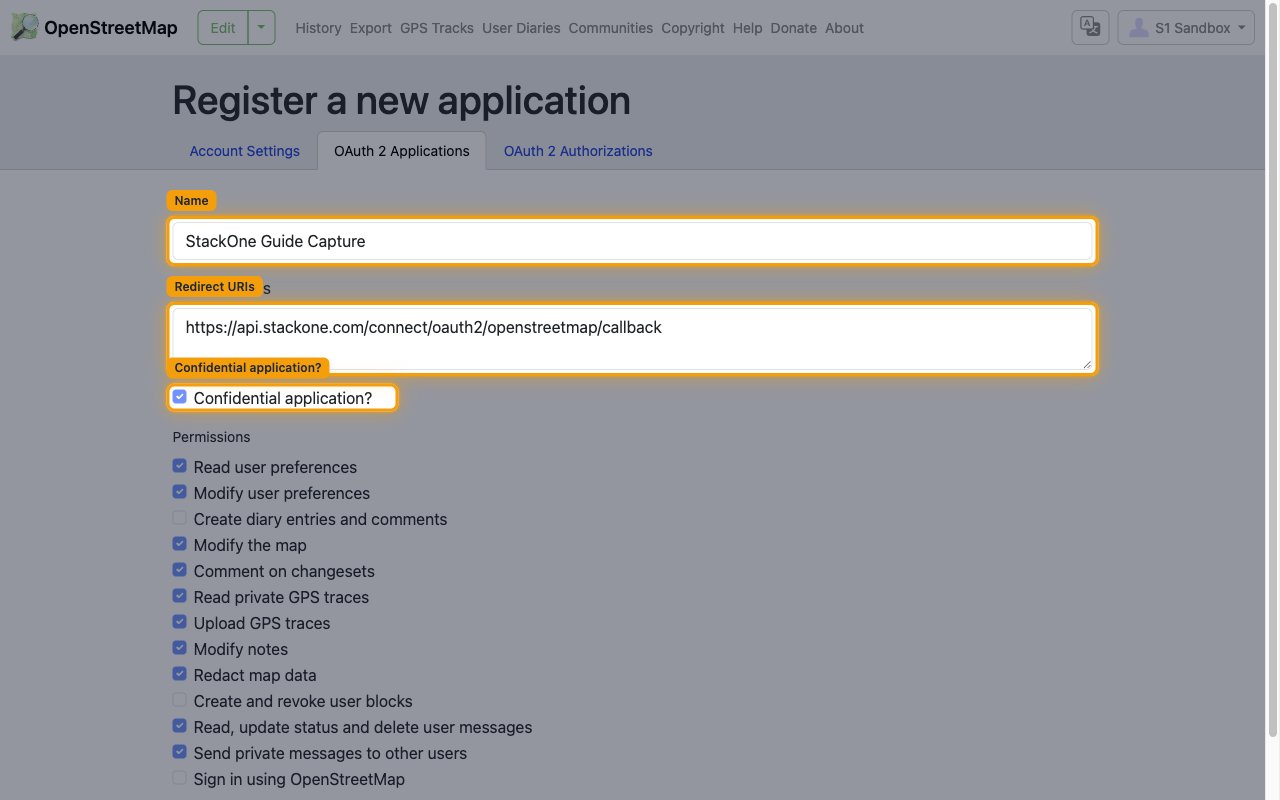
        <p>On the <strong>Register a new application</strong> page, fill in the application details:</p>

        <ul>
          <li><strong>Name</strong> — a name for your application, for example `StackOne`.</li>
          <li>In <strong>Redirect URIs</strong>, enter StackOne's callback URL exactly: `https://api.stackone.com/connect/oauth2/openstreetmap/callback`</li>
          <li>Leave <strong>Confidential application?</strong> ticked — StackOne is a confidential (server-side) client.</li>
        </ul>

        <img src="https://mintcdn.com/stackone-60/0Z7twXoDaxQkZOhL/connectors/openstreetmap/images/oauth2-setup-register.png?fit=max&auto=format&n=0Z7twXoDaxQkZOhL&q=85&s=a62b873d1b65733bd5995e946e713fee" alt="Register a new application form showing the Name field, Redirect URIs field with the StackOne callback URL, and the Confidential application checkbox." width="1280" height="800" data-path="connectors/openstreetmap/images/oauth2-setup-register.png" />
      </div>
    </Step>

    <Step title="Select permissions and create the application">
      <div data-guide-step data-guide-scopes="read_prefs,write_prefs,write_api,write_changeset_comments,read_gpx,write_gpx,write_notes,write_redactions,consume_messages,send_messages" data-guide-display-scopes-list="read_prefs,write_prefs,write_api,write_changeset_comments,read_gpx,write_gpx,write_notes,write_redactions,consume_messages,send_messages">
        <div className="connector-guide-actions-badge" data-guide-actions-badge data-guide-actions-badge-scopes="read_prefs,write_prefs,write_api,write_changeset_comments,read_gpx,write_gpx,write_notes,write_redactions,consume_messages,send_messages" style={{ display: 'block', width: 'fit-content', maxWidth: '100%', padding: '2px 8px', borderRadius: '8px', fontSize: '12px', marginBottom: '8px', marginTop: '-10px', whiteSpace: 'nowrap', overflowX: 'auto', overflowY: 'hidden', msOverflowStyle: 'none', scrollbarWidth: 'none' }}>
          <span>Enables actions: </span><span data-guide-actions-badge-labels>Close Changeset, Close Note, Comment Changeset, Comment Note, Create Changeset, Create Gpx Trace, Create Node, Create Note, Create Relation, Create Way, Delete Gpx Trace, Delete Message, Delete Node, Delete Relation, Delete User Preference, Delete Way, Get Current User, Get Gpx Trace Data, Get Gpx Trace Details, Get Message, Get User Preference, Get User Preferences, Hide Changeset Comment, Hide Note, List Inbox Messages, List Outbox Messages, List Own Gpx Traces, Redact Node Version, Redact Relation Version, Redact Way Version, Reopen Note, Replace User Preferences, Send Message, Subscribe Changeset, Subscribe Note, Unhide Changeset Comment, Unsubscribe Changeset, Unsubscribe Note, Update Changeset, Update Gpx Trace, Update Message Status, Update Node, Update Relation, Update Way, Upload Changeset</span>
        </div>

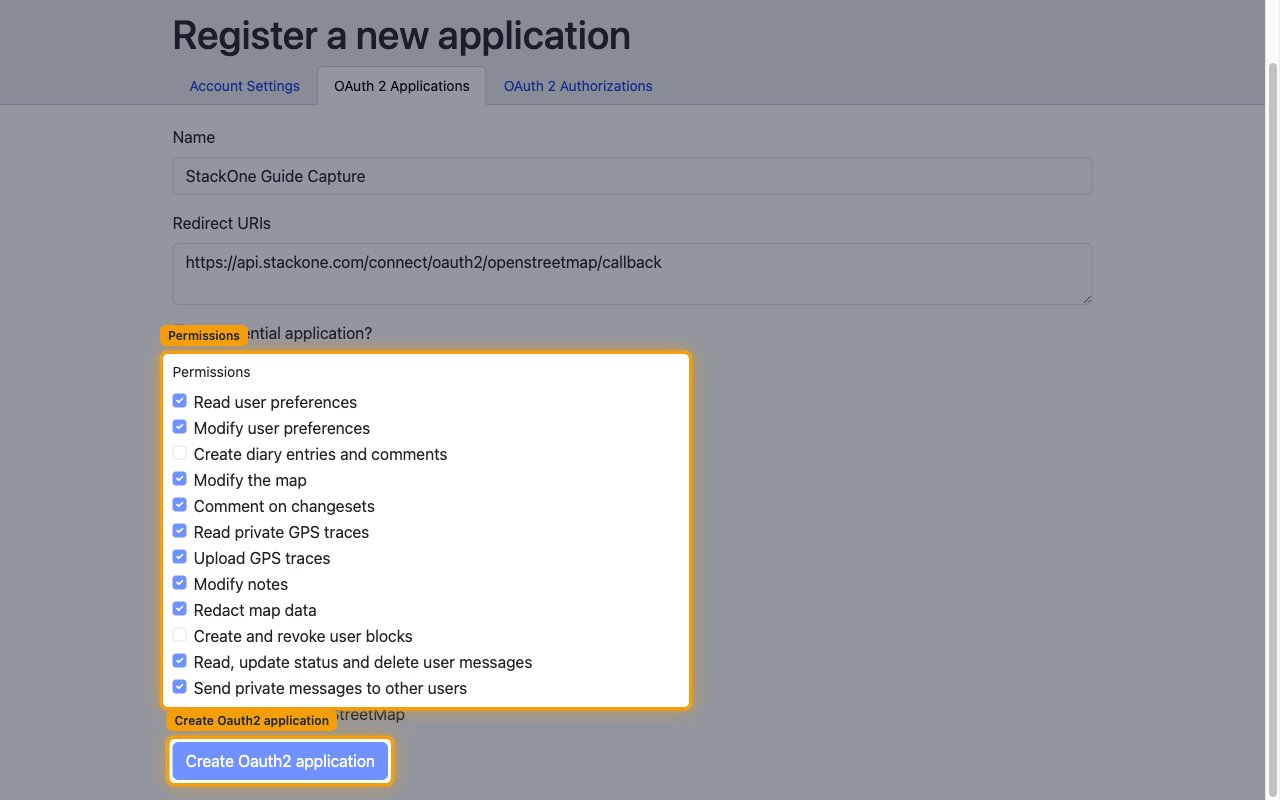
        <p>In the <strong>Permissions</strong> section, tick the permissions this integration needs, then click <strong>Create Oauth2 application</strong>. Grant the following permissions so every StackOne action can run:</p>

        <ul>
          <li><strong>Read user preferences</strong> (`read_prefs`) and <strong>Modify user preferences</strong> (`write_prefs`)</li>
          <li><strong>Modify the map</strong> (`write_api`) and <strong>Comment on changesets</strong> (`write_changeset_comments`)</li>
          <li><strong>Read private GPS traces</strong> (`read_gpx`) and <strong>Upload GPS traces</strong> (`write_gpx`)</li>
          <li><strong>Modify notes</strong> (`write_notes`) and <strong>Redact map data</strong> (`write_redactions`)</li>
          <li><strong>Read, update status and delete user messages</strong> (`consume_messages`) and <strong>Send private messages to other users</strong> (`send_messages`)</li>
        </ul>

        <img src="https://mintcdn.com/stackone-60/0Z7twXoDaxQkZOhL/connectors/openstreetmap/images/oauth2-setup-permissions.png?fit=max&auto=format&n=0Z7twXoDaxQkZOhL&q=85&s=1ae6e2c16fa386809a9a5b2ff15f5d4d" alt="Permissions checklist with the required permissions ticked and the Create Oauth2 application button highlighted." width="1280" height="800" data-path="connectors/openstreetmap/images/oauth2-setup-permissions.png" />

        <div style={{ marginTop: '8px' }} data-guide-display-scopes>
          <div className="connector-guide-scopes-container">
            <ul className="not-prose" style={{ listStyleType: "'- '", paddingLeft: '1em', margin: 0 }}>
              <li style={{ overflowWrap: 'anywhere', wordBreak: 'break-word' }} data-guide-display-scope="read_prefs">
                <button type="button" className="connector-guide-scope-copy" aria-label="Copy read_prefs" title="Copy scope" data-copy="read_prefs">
                  <span className="connector-guide-scope-copy__label">read\_prefs</span>
                  <span className="connector-guide-scope-copy__icon" aria-hidden="true">⧉</span>
                </button>
              </li>

              <li style={{ overflowWrap: 'anywhere', wordBreak: 'break-word' }} data-guide-display-scope="write_prefs">
                <button type="button" className="connector-guide-scope-copy" aria-label="Copy write_prefs" title="Copy scope" data-copy="write_prefs">
                  <span className="connector-guide-scope-copy__label">write\_prefs</span>
                  <span className="connector-guide-scope-copy__icon" aria-hidden="true">⧉</span>
                </button>
              </li>

              <li style={{ overflowWrap: 'anywhere', wordBreak: 'break-word' }} data-guide-display-scope="write_api">
                <button type="button" className="connector-guide-scope-copy" aria-label="Copy write_api" title="Copy scope" data-copy="write_api">
                  <span className="connector-guide-scope-copy__label">write\_api</span>
                  <span className="connector-guide-scope-copy__icon" aria-hidden="true">⧉</span>
                </button>
              </li>

              <li style={{ overflowWrap: 'anywhere', wordBreak: 'break-word' }} data-guide-display-scope="write_changeset_comments">
                <button type="button" className="connector-guide-scope-copy" aria-label="Copy write_changeset_comments" title="Copy scope" data-copy="write_changeset_comments">
                  <span className="connector-guide-scope-copy__label">write\_changeset\_comments</span>
                  <span className="connector-guide-scope-copy__icon" aria-hidden="true">⧉</span>
                </button>
              </li>

              <li style={{ overflowWrap: 'anywhere', wordBreak: 'break-word' }} data-guide-display-scope="read_gpx">
                <button type="button" className="connector-guide-scope-copy" aria-label="Copy read_gpx" title="Copy scope" data-copy="read_gpx">
                  <span className="connector-guide-scope-copy__label">read\_gpx</span>
                  <span className="connector-guide-scope-copy__icon" aria-hidden="true">⧉</span>
                </button>
              </li>

              <li style={{ overflowWrap: 'anywhere', wordBreak: 'break-word' }} data-guide-display-scope="write_gpx">
                <button type="button" className="connector-guide-scope-copy" aria-label="Copy write_gpx" title="Copy scope" data-copy="write_gpx">
                  <span className="connector-guide-scope-copy__label">write\_gpx</span>
                  <span className="connector-guide-scope-copy__icon" aria-hidden="true">⧉</span>
                </button>
              </li>

              <li style={{ overflowWrap: 'anywhere', wordBreak: 'break-word' }} data-guide-display-scope="write_notes">
                <button type="button" className="connector-guide-scope-copy" aria-label="Copy write_notes" title="Copy scope" data-copy="write_notes">
                  <span className="connector-guide-scope-copy__label">write\_notes</span>
                  <span className="connector-guide-scope-copy__icon" aria-hidden="true">⧉</span>
                </button>
              </li>

              <li style={{ overflowWrap: 'anywhere', wordBreak: 'break-word' }} data-guide-display-scope="write_redactions">
                <button type="button" className="connector-guide-scope-copy" aria-label="Copy write_redactions" title="Copy scope" data-copy="write_redactions">
                  <span className="connector-guide-scope-copy__label">write\_redactions</span>
                  <span className="connector-guide-scope-copy__icon" aria-hidden="true">⧉</span>
                </button>
              </li>

              <li style={{ overflowWrap: 'anywhere', wordBreak: 'break-word' }} data-guide-display-scope="consume_messages">
                <button type="button" className="connector-guide-scope-copy" aria-label="Copy consume_messages" title="Copy scope" data-copy="consume_messages">
                  <span className="connector-guide-scope-copy__label">consume\_messages</span>
                  <span className="connector-guide-scope-copy__icon" aria-hidden="true">⧉</span>
                </button>
              </li>

              <li style={{ overflowWrap: 'anywhere', wordBreak: 'break-word' }} data-guide-display-scope="send_messages">
                <button type="button" className="connector-guide-scope-copy" aria-label="Copy send_messages" title="Copy scope" data-copy="send_messages">
                  <span className="connector-guide-scope-copy__label">send\_messages</span>
                  <span className="connector-guide-scope-copy__icon" aria-hidden="true">⧉</span>
                </button>
              </li>
            </ul>
          </div>
        </div>
      </div>
    </Step>

    <Step title="Save and copy your credentials">
      <div data-guide-step data-guide-scopes="" data-guide-display-scopes-list="">
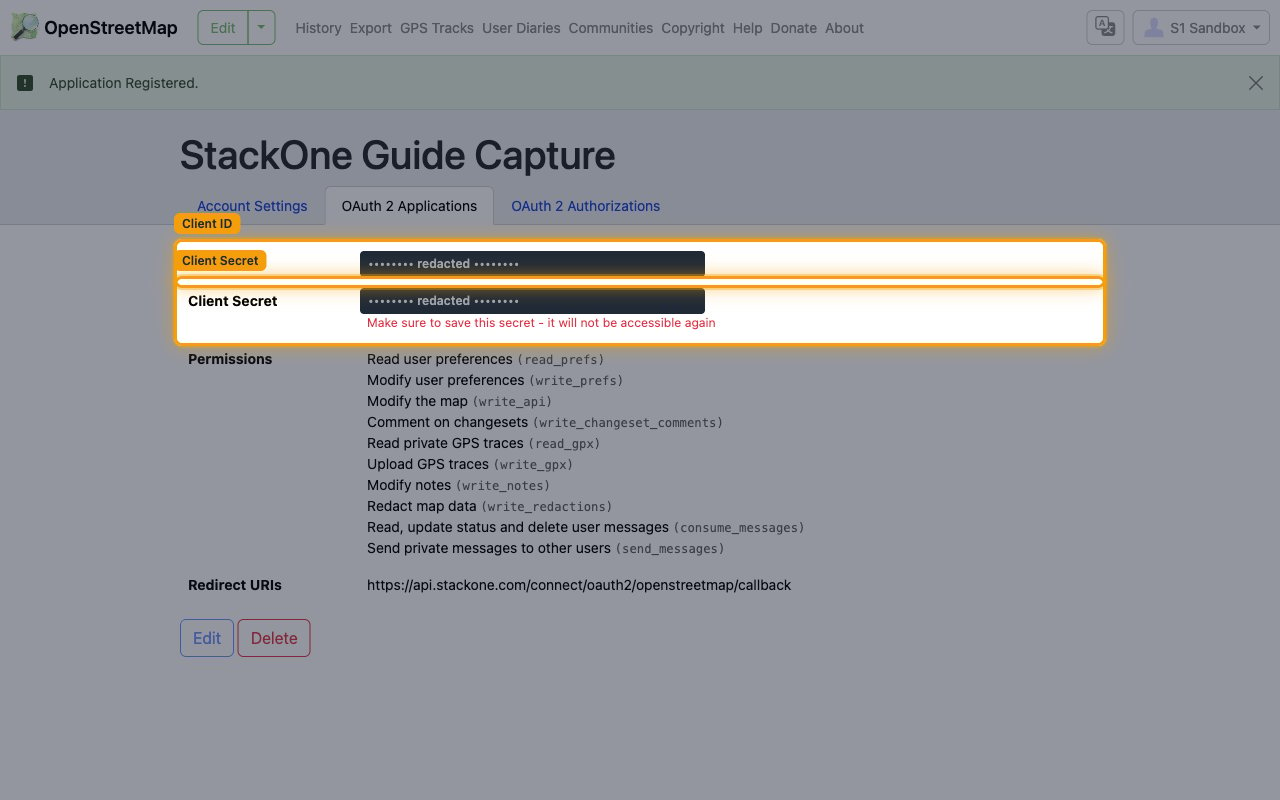
        <p>After you create the application, OpenStreetMap shows its <strong>Client ID</strong> and <strong>Client Secret</strong>. Copy both values into the StackOne Connector profile.</p>

        <ul>
          <li>Copy the <strong>Client ID</strong> value and paste it into the <strong>Client ID</strong> field in the StackOne Connector profile.</li>
          <li>Copy the <strong>Client Secret</strong> value and paste it into the <strong>Client Secret</strong> field in the StackOne Connector profile.</li>
          <li>The Client Secret is only displayed once — the page warns <strong>Make sure to save this secret - it will not be accessible again</strong>. Copy it before leaving the page.</li>
          <li>The <strong>Scopes</strong> field in the StackOne Connector profile is optional — leave it blank to request the full set of permissions, or enter a space-separated list to request only specific scopes.</li>
        </ul>

        <img src="https://mintcdn.com/stackone-60/0Z7twXoDaxQkZOhL/connectors/openstreetmap/images/oauth2-setup-credentials.png?fit=max&auto=format&n=0Z7twXoDaxQkZOhL&q=85&s=5f31b08d46465c474b3d7b874b7d4a6a" alt="Application registered page showing the Client ID and Client Secret rows (values redacted) and the save-this-secret warning." width="1280" height="800" data-path="connectors/openstreetmap/images/oauth2-setup-credentials.png" />
      </div>
    </Step>
  </Steps>
</section>

## Creating the StackOne Connector Profile

To create the Connector Profile in StackOne for <strong>OpenStreetMap</strong>:

<Steps>
  <Step title="Navigate to Connector Profiles">
    Login to StackOne and navigate to [Connector Profiles](https://app.stackone.com/connector_profiles)
  </Step>

  <Step title="Create New Connector Profile">
    <ul>
      <li>Click <strong>+ Connector Profile</strong></li>
      <li>Search for and select <strong>OpenStreetMap</strong></li>
      <li>Select <strong>Type</strong> as <strong>OAuth 2.0</strong></li>

      <li>
        Fill out the fields using details retrieved from your provider:

        <ul style={{ marginLeft: '20px' }}>
          <li><strong>Client ID</strong></li>
          <li><strong>Client Secret</strong></li>
          <li><strong>Scopes</strong> (Optional)</li>
        </ul>
      </li>

      <li>(Optional) Select <strong>Actions</strong> to be enabled for this Connector Profile</li>
      <li>Click <strong>Create profile</strong></li>
    </ul>
  </Step>
</Steps>

Congratulations! The new Connector Profile will now show up in your project ready to be used. You can now continue to <a href="/connect/managing-connectors/linking-accounts">Link Accounts</a> for <strong>OpenStreetMap</strong>.