> ## Documentation Index
> Fetch the complete documentation index at: https://docs.stackone.com/llms.txt
> Use this file to discover all available pages before exploring further.

# Connect NetSuite with OAuth 2.0 (Account-level) – StackOne Hub

> Link a NetSuite account in the StackOne Hub using OAuth 2.0 (Account-level). End-user guide to authorize the integration and start using NetSuite actions.

<Warning>A NetSuite Administrator role is required to complete this setup — it involves enabling account features, editing role permissions, and creating an integration record.</Warning>

<Panel>
  <div className="not-prose guides-scope-selector" data-guides-scope-selector data-guide-actions-json="[{&#x22;id&#x22;:&#x22;netsuite_list_accounts&#x22;,&#x22;label&#x22;:&#x22;List Accounts&#x22;,&#x22;scopes&#x22;:[&#x22;rest_webservices&#x22;]},{&#x22;id&#x22;:&#x22;netsuite_get_account&#x22;,&#x22;label&#x22;:&#x22;Get Account&#x22;,&#x22;scopes&#x22;:[&#x22;rest_webservices&#x22;]},{&#x22;id&#x22;:&#x22;netsuite_create_account&#x22;,&#x22;label&#x22;:&#x22;Create Account&#x22;,&#x22;scopes&#x22;:[&#x22;rest_webservices&#x22;]},{&#x22;id&#x22;:&#x22;netsuite_update_account&#x22;,&#x22;label&#x22;:&#x22;Update Account&#x22;,&#x22;scopes&#x22;:[&#x22;rest_webservices&#x22;]},{&#x22;id&#x22;:&#x22;netsuite_list_customers&#x22;,&#x22;label&#x22;:&#x22;List Customers&#x22;,&#x22;scopes&#x22;:[&#x22;rest_webservices&#x22;]},{&#x22;id&#x22;:&#x22;netsuite_get_customer&#x22;,&#x22;label&#x22;:&#x22;Get Customer&#x22;,&#x22;scopes&#x22;:[&#x22;rest_webservices&#x22;]},{&#x22;id&#x22;:&#x22;netsuite_create_customer&#x22;,&#x22;label&#x22;:&#x22;Create Customer&#x22;,&#x22;scopes&#x22;:[&#x22;rest_webservices&#x22;]},{&#x22;id&#x22;:&#x22;netsuite_update_customer&#x22;,&#x22;label&#x22;:&#x22;Update Customer&#x22;,&#x22;scopes&#x22;:[&#x22;rest_webservices&#x22;]},{&#x22;id&#x22;:&#x22;netsuite_delete_customer&#x22;,&#x22;label&#x22;:&#x22;Delete Customer&#x22;,&#x22;scopes&#x22;:[&#x22;rest_webservices&#x22;]},{&#x22;id&#x22;:&#x22;netsuite_list_vendors&#x22;,&#x22;label&#x22;:&#x22;List Vendors&#x22;,&#x22;scopes&#x22;:[&#x22;rest_webservices&#x22;]},{&#x22;id&#x22;:&#x22;netsuite_get_vendor&#x22;,&#x22;label&#x22;:&#x22;Get Vendor&#x22;,&#x22;scopes&#x22;:[&#x22;rest_webservices&#x22;]},{&#x22;id&#x22;:&#x22;netsuite_create_vendor&#x22;,&#x22;label&#x22;:&#x22;Create Vendor&#x22;,&#x22;scopes&#x22;:[&#x22;rest_webservices&#x22;]},{&#x22;id&#x22;:&#x22;netsuite_update_vendor&#x22;,&#x22;label&#x22;:&#x22;Update Vendor&#x22;,&#x22;scopes&#x22;:[&#x22;rest_webservices&#x22;]},{&#x22;id&#x22;:&#x22;netsuite_delete_vendor&#x22;,&#x22;label&#x22;:&#x22;Delete Vendor&#x22;,&#x22;scopes&#x22;:[&#x22;rest_webservices&#x22;]},{&#x22;id&#x22;:&#x22;netsuite_list_invoices&#x22;,&#x22;label&#x22;:&#x22;List Invoices&#x22;,&#x22;scopes&#x22;:[&#x22;rest_webservices&#x22;]},{&#x22;id&#x22;:&#x22;netsuite_get_invoice&#x22;,&#x22;label&#x22;:&#x22;Get Invoice&#x22;,&#x22;scopes&#x22;:[&#x22;rest_webservices&#x22;]},{&#x22;id&#x22;:&#x22;netsuite_create_invoice&#x22;,&#x22;label&#x22;:&#x22;Create Invoice&#x22;,&#x22;scopes&#x22;:[&#x22;rest_webservices&#x22;]},{&#x22;id&#x22;:&#x22;netsuite_update_invoice&#x22;,&#x22;label&#x22;:&#x22;Update Invoice&#x22;,&#x22;scopes&#x22;:[&#x22;rest_webservices&#x22;]},{&#x22;id&#x22;:&#x22;netsuite_delete_invoice&#x22;,&#x22;label&#x22;:&#x22;Delete Invoice&#x22;,&#x22;scopes&#x22;:[&#x22;rest_webservices&#x22;]},{&#x22;id&#x22;:&#x22;netsuite_list_vendor_bills&#x22;,&#x22;label&#x22;:&#x22;List Vendor Bills&#x22;,&#x22;scopes&#x22;:[&#x22;rest_webservices&#x22;]},{&#x22;id&#x22;:&#x22;netsuite_get_vendor_bill&#x22;,&#x22;label&#x22;:&#x22;Get Vendor Bill&#x22;,&#x22;scopes&#x22;:[&#x22;rest_webservices&#x22;]},{&#x22;id&#x22;:&#x22;netsuite_create_vendor_bill&#x22;,&#x22;label&#x22;:&#x22;Create Vendor Bill&#x22;,&#x22;scopes&#x22;:[&#x22;rest_webservices&#x22;]},{&#x22;id&#x22;:&#x22;netsuite_update_vendor_bill&#x22;,&#x22;label&#x22;:&#x22;Update Vendor Bill&#x22;,&#x22;scopes&#x22;:[&#x22;rest_webservices&#x22;]},{&#x22;id&#x22;:&#x22;netsuite_delete_vendor_bill&#x22;,&#x22;label&#x22;:&#x22;Delete Vendor Bill&#x22;,&#x22;scopes&#x22;:[&#x22;rest_webservices&#x22;]},{&#x22;id&#x22;:&#x22;netsuite_list_journal_entries&#x22;,&#x22;label&#x22;:&#x22;List Journal Entries&#x22;,&#x22;scopes&#x22;:[&#x22;rest_webservices&#x22;]},{&#x22;id&#x22;:&#x22;netsuite_get_journal_entry&#x22;,&#x22;label&#x22;:&#x22;Get Journal Entry&#x22;,&#x22;scopes&#x22;:[&#x22;rest_webservices&#x22;]},{&#x22;id&#x22;:&#x22;netsuite_create_journal_entry&#x22;,&#x22;label&#x22;:&#x22;Create Journal Entry&#x22;,&#x22;scopes&#x22;:[&#x22;rest_webservices&#x22;]},{&#x22;id&#x22;:&#x22;netsuite_update_journal_entry&#x22;,&#x22;label&#x22;:&#x22;Update Journal Entry&#x22;,&#x22;scopes&#x22;:[&#x22;rest_webservices&#x22;]},{&#x22;id&#x22;:&#x22;netsuite_delete_journal_entry&#x22;,&#x22;label&#x22;:&#x22;Delete Journal Entry&#x22;,&#x22;scopes&#x22;:[&#x22;rest_webservices&#x22;]},{&#x22;id&#x22;:&#x22;netsuite_list_purchase_orders&#x22;,&#x22;label&#x22;:&#x22;List Purchase Orders&#x22;,&#x22;scopes&#x22;:[&#x22;rest_webservices&#x22;]},{&#x22;id&#x22;:&#x22;netsuite_get_purchase_order&#x22;,&#x22;label&#x22;:&#x22;Get Purchase Order&#x22;,&#x22;scopes&#x22;:[&#x22;rest_webservices&#x22;]},{&#x22;id&#x22;:&#x22;netsuite_create_purchase_order&#x22;,&#x22;label&#x22;:&#x22;Create Purchase Order&#x22;,&#x22;scopes&#x22;:[&#x22;rest_webservices&#x22;]},{&#x22;id&#x22;:&#x22;netsuite_update_purchase_order&#x22;,&#x22;label&#x22;:&#x22;Update Purchase Order&#x22;,&#x22;scopes&#x22;:[&#x22;rest_webservices&#x22;]},{&#x22;id&#x22;:&#x22;netsuite_delete_purchase_order&#x22;,&#x22;label&#x22;:&#x22;Delete Purchase Order&#x22;,&#x22;scopes&#x22;:[&#x22;rest_webservices&#x22;]},{&#x22;id&#x22;:&#x22;netsuite_list_sales_orders&#x22;,&#x22;label&#x22;:&#x22;List Sales Orders&#x22;,&#x22;scopes&#x22;:[&#x22;rest_webservices&#x22;]},{&#x22;id&#x22;:&#x22;netsuite_get_sales_order&#x22;,&#x22;label&#x22;:&#x22;Get Sales Order&#x22;,&#x22;scopes&#x22;:[&#x22;rest_webservices&#x22;]},{&#x22;id&#x22;:&#x22;netsuite_create_sales_order&#x22;,&#x22;label&#x22;:&#x22;Create Sales Order&#x22;,&#x22;scopes&#x22;:[&#x22;rest_webservices&#x22;]},{&#x22;id&#x22;:&#x22;netsuite_update_sales_order&#x22;,&#x22;label&#x22;:&#x22;Update Sales Order&#x22;,&#x22;scopes&#x22;:[&#x22;rest_webservices&#x22;]},{&#x22;id&#x22;:&#x22;netsuite_delete_sales_order&#x22;,&#x22;label&#x22;:&#x22;Delete Sales Order&#x22;,&#x22;scopes&#x22;:[&#x22;rest_webservices&#x22;]},{&#x22;id&#x22;:&#x22;netsuite_list_customer_payments&#x22;,&#x22;label&#x22;:&#x22;List Customer Payments&#x22;,&#x22;scopes&#x22;:[&#x22;rest_webservices&#x22;]},{&#x22;id&#x22;:&#x22;netsuite_get_customer_payment&#x22;,&#x22;label&#x22;:&#x22;Get Customer Payment&#x22;,&#x22;scopes&#x22;:[&#x22;rest_webservices&#x22;]},{&#x22;id&#x22;:&#x22;netsuite_create_customer_payment&#x22;,&#x22;label&#x22;:&#x22;Create Customer Payment&#x22;,&#x22;scopes&#x22;:[&#x22;rest_webservices&#x22;]},{&#x22;id&#x22;:&#x22;netsuite_list_vendor_payments&#x22;,&#x22;label&#x22;:&#x22;List Vendor Payments&#x22;,&#x22;scopes&#x22;:[&#x22;rest_webservices&#x22;]},{&#x22;id&#x22;:&#x22;netsuite_get_vendor_payment&#x22;,&#x22;label&#x22;:&#x22;Get Vendor Payment&#x22;,&#x22;scopes&#x22;:[&#x22;rest_webservices&#x22;]},{&#x22;id&#x22;:&#x22;netsuite_create_vendor_payment&#x22;,&#x22;label&#x22;:&#x22;Create Vendor Payment&#x22;,&#x22;scopes&#x22;:[&#x22;rest_webservices&#x22;]},{&#x22;id&#x22;:&#x22;netsuite_list_credit_memos&#x22;,&#x22;label&#x22;:&#x22;List Credit Memos&#x22;,&#x22;scopes&#x22;:[&#x22;rest_webservices&#x22;]},{&#x22;id&#x22;:&#x22;netsuite_get_credit_memo&#x22;,&#x22;label&#x22;:&#x22;Get Credit Memo&#x22;,&#x22;scopes&#x22;:[&#x22;rest_webservices&#x22;]},{&#x22;id&#x22;:&#x22;netsuite_create_credit_memo&#x22;,&#x22;label&#x22;:&#x22;Create Credit Memo&#x22;,&#x22;scopes&#x22;:[&#x22;rest_webservices&#x22;]},{&#x22;id&#x22;:&#x22;netsuite_list_inventory_items&#x22;,&#x22;label&#x22;:&#x22;List Inventory Items&#x22;,&#x22;scopes&#x22;:[&#x22;rest_webservices&#x22;]},{&#x22;id&#x22;:&#x22;netsuite_get_inventory_item&#x22;,&#x22;label&#x22;:&#x22;Get Inventory Item&#x22;,&#x22;scopes&#x22;:[&#x22;rest_webservices&#x22;]},{&#x22;id&#x22;:&#x22;netsuite_list_non_inventory_sale_items&#x22;,&#x22;label&#x22;:&#x22;List Non-Inventory Sale Items&#x22;,&#x22;scopes&#x22;:[&#x22;rest_webservices&#x22;]},{&#x22;id&#x22;:&#x22;netsuite_list_service_sale_items&#x22;,&#x22;label&#x22;:&#x22;List Service Sale Items&#x22;,&#x22;scopes&#x22;:[&#x22;rest_webservices&#x22;]},{&#x22;id&#x22;:&#x22;netsuite_create_inventory_item&#x22;,&#x22;label&#x22;:&#x22;Create Inventory Item&#x22;,&#x22;scopes&#x22;:[&#x22;rest_webservices&#x22;]},{&#x22;id&#x22;:&#x22;netsuite_create_non_inventory_sale_item&#x22;,&#x22;label&#x22;:&#x22;Create Non-Inventory Sale Item&#x22;,&#x22;scopes&#x22;:[&#x22;rest_webservices&#x22;]},{&#x22;id&#x22;:&#x22;netsuite_create_service_sale_item&#x22;,&#x22;label&#x22;:&#x22;Create Service Sale Item&#x22;,&#x22;scopes&#x22;:[&#x22;rest_webservices&#x22;]},{&#x22;id&#x22;:&#x22;netsuite_list_employees&#x22;,&#x22;label&#x22;:&#x22;List Employees&#x22;,&#x22;scopes&#x22;:[&#x22;rest_webservices&#x22;]},{&#x22;id&#x22;:&#x22;netsuite_get_employee&#x22;,&#x22;label&#x22;:&#x22;Get Employee&#x22;,&#x22;scopes&#x22;:[&#x22;rest_webservices&#x22;]},{&#x22;id&#x22;:&#x22;netsuite_create_employee&#x22;,&#x22;label&#x22;:&#x22;Create Employee&#x22;,&#x22;scopes&#x22;:[&#x22;rest_webservices&#x22;]},{&#x22;id&#x22;:&#x22;netsuite_list_subsidiaries&#x22;,&#x22;label&#x22;:&#x22;List Subsidiaries&#x22;,&#x22;scopes&#x22;:[&#x22;rest_webservices&#x22;]},{&#x22;id&#x22;:&#x22;netsuite_get_subsidiary&#x22;,&#x22;label&#x22;:&#x22;Get Subsidiary&#x22;,&#x22;scopes&#x22;:[&#x22;rest_webservices&#x22;]},{&#x22;id&#x22;:&#x22;netsuite_list_departments&#x22;,&#x22;label&#x22;:&#x22;List Departments&#x22;,&#x22;scopes&#x22;:[&#x22;rest_webservices&#x22;]},{&#x22;id&#x22;:&#x22;netsuite_get_department&#x22;,&#x22;label&#x22;:&#x22;Get Department&#x22;,&#x22;scopes&#x22;:[&#x22;rest_webservices&#x22;]},{&#x22;id&#x22;:&#x22;netsuite_list_locations&#x22;,&#x22;label&#x22;:&#x22;List Locations&#x22;,&#x22;scopes&#x22;:[&#x22;rest_webservices&#x22;]},{&#x22;id&#x22;:&#x22;netsuite_get_location&#x22;,&#x22;label&#x22;:&#x22;Get Location&#x22;,&#x22;scopes&#x22;:[&#x22;rest_webservices&#x22;]},{&#x22;id&#x22;:&#x22;netsuite_list_currencies&#x22;,&#x22;label&#x22;:&#x22;List Currencies&#x22;,&#x22;scopes&#x22;:[&#x22;rest_webservices&#x22;]},{&#x22;id&#x22;:&#x22;netsuite_get_currency&#x22;,&#x22;label&#x22;:&#x22;Get Currency&#x22;,&#x22;scopes&#x22;:[&#x22;rest_webservices&#x22;]},{&#x22;id&#x22;:&#x22;netsuite_execute_suiteql_query&#x22;,&#x22;label&#x22;:&#x22;Execute SuiteQL Query&#x22;,&#x22;scopes&#x22;:[&#x22;rest_webservices&#x22;]},{&#x22;id&#x22;:&#x22;netsuite_list_expense_reports&#x22;,&#x22;label&#x22;:&#x22;List Expense Reports&#x22;,&#x22;scopes&#x22;:[&#x22;rest_webservices&#x22;]},{&#x22;id&#x22;:&#x22;netsuite_get_expense_report&#x22;,&#x22;label&#x22;:&#x22;Get Expense Report&#x22;,&#x22;scopes&#x22;:[&#x22;rest_webservices&#x22;]},{&#x22;id&#x22;:&#x22;netsuite_create_expense_report&#x22;,&#x22;label&#x22;:&#x22;Create Expense Report&#x22;,&#x22;scopes&#x22;:[&#x22;rest_webservices&#x22;]},{&#x22;id&#x22;:&#x22;netsuite_list_deposits&#x22;,&#x22;label&#x22;:&#x22;List Deposits&#x22;,&#x22;scopes&#x22;:[&#x22;rest_webservices&#x22;]},{&#x22;id&#x22;:&#x22;netsuite_get_deposit&#x22;,&#x22;label&#x22;:&#x22;Get Deposit&#x22;,&#x22;scopes&#x22;:[&#x22;rest_webservices&#x22;]},{&#x22;id&#x22;:&#x22;netsuite_create_deposit&#x22;,&#x22;label&#x22;:&#x22;Create Deposit&#x22;,&#x22;scopes&#x22;:[&#x22;rest_webservices&#x22;]}]">
    <div className="guides-scope-selector__title">Select Actions to adjust the guide</div>
    <div className="guides-scope-selector__muted guides-scope-selector__subtitle">Some actions may require additional configuration in the provider to be accessible. Choose the actions you need and the guide will be updated.</div>

    <div className="guides-scope-selector__toolbar">
      <input type="text" placeholder="Search actions..." className="guides-scope-selector__input guides-scope-selector__search" data-guide-action-search />

      <button type="button" className="guides-scope-selector__quick-btn" data-guide-select-all>Select all</button>
      <button type="button" className="guides-scope-selector__quick-btn" data-guide-clear>Clear</button>
    </div>

    <div className="guides-scope-selector__list">
      <div className="guides-scope-selector__list-header">
        <div className="guides-scope-selector__list-header-spacer" />

        <div className="guides-scope-selector__list-header-action">Action</div>
        <div className="guides-scope-selector__list-header-scopes">Scope(s)</div>
      </div>

      <div className="guides-scope-selector__muted guides-scope-selector__status" data-guide-loading>Loading actions...</div>
      <div className="guides-scope-selector__muted guides-scope-selector__status" data-guide-no-results hidden>No actions match your search.</div>
    </div>

    <div className="guides-scope-selector__url-section">
      <div className="guides-scope-selector__muted guides-scope-selector__label">Dynamic Guide URL</div>

      <div className="guides-scope-selector__url-row">
        <input type="text" readOnly className="guides-scope-selector__input guides-scope-selector__url-input" data-guide-url />

        <button type="button" className="guides-scope-selector__copy-btn guides-scope-selector__copy-btn--end" data-guide-copy-url>Copy URL</button>
      </div>

      <div className="guides-scope-selector__scopes-section">
        <div className="guides-scope-selector__muted guides-scope-selector__label">Scopes Selected</div>

        <div className="guides-scope-selector__scopes-row">
          <pre className="guides-scope-selector__input guides-scope-selector__scopes-output" role="textbox" aria-readonly="true" tabIndex={0} data-guide-scopes-output />

          <div className="guides-scope-selector__muted guides-scope-selector__side-controls">
            <div className="guides-scope-selector__side-label">Separator</div>

            <select className="guides-scope-selector__input guides-scope-selector__delimiter" data-guide-scope-delimiter>
              <option value="space">Space</option>
              <option value="comma">Comma</option>
              <option value="semicolon">Semicolon</option>
              <option value="pipe">Pipe</option>
              <option value="newline">Newline</option>
            </select>

            <button type="button" className="guides-scope-selector__copy-btn" data-guide-copy-scopes>Copy scopes</button>
          </div>
        </div>
      </div>
    </div>
  </div>
</Panel>

<section data-guide-section data-guide-scopes="">
  <h2>Sign in to NetSuite</h2>

  <p>Sign in to NetSuite as an administrator before starting — enabling features, editing role permissions, and creating the integration record all require administrator access.</p>

  <Steps>
    <Step title="Sign in to NetSuite">
      <div data-guide-step data-guide-scopes="" data-guide-display-scopes-list="">
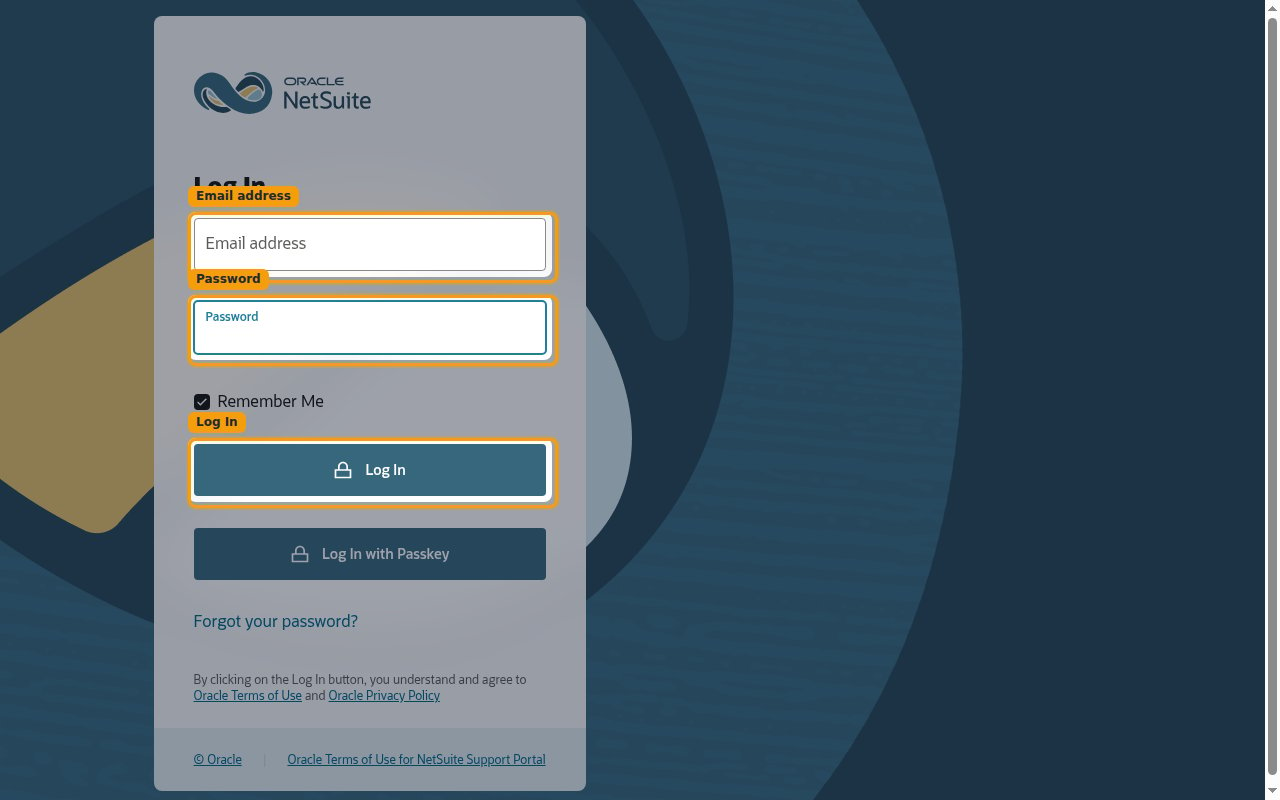
        <p>Open the <a href="https://system.netsuite.com" target="_blank" rel="noopener noreferrer">NetSuite login page</a> and sign in.</p>

        <ul>
          <li>Enter your <strong>Email address</strong> and <strong>Password</strong>, then click <strong>Log In</strong>.</li>
          <li>Sign in to the same account (production or sandbox) that you want to connect.</li>
        </ul>

        <img src="https://mintcdn.com/stackone-60/pEeIDEQ2JQ70QdEL/connectors/netsuite/images/oauth2-setup-sign-in.png?fit=max&auto=format&n=pEeIDEQ2JQ70QdEL&q=85&s=0de792320897e6049b5d2807781ee348" alt="NetSuite Log In screen with Email address and Password fields" width="1280" height="800" data-path="connectors/netsuite/images/oauth2-setup-sign-in.png" />
      </div>
    </Step>
  </Steps>
</section>

<section data-guide-section data-guide-scopes="">
  <h2>Enable required features and permissions</h2>

  <p>Before creating the integration, make sure the account has the SuiteTalk REST API features enabled and that the connecting role can authenticate with OAuth 2.0.</p>

  <Steps>
    <Step title="Enable REST Web Services">
      <div data-guide-step data-guide-scopes="" data-guide-display-scopes-list="">
        <p>In the <strong>top navigation bar</strong>, go to <strong>Setup</strong> > <strong>Company</strong> > <strong>Enable Features</strong> and open the <strong>SuiteCloud</strong> subtab. Under <strong>SuiteTalk (Web Services)</strong>, check <strong>REST WEB SERVICES</strong>.</p>

        <img src="https://mintcdn.com/stackone-60/nVxDMuf9I9iTyIA3/connectors/netsuite/images/oauth2-setup-enable-suitetalk.png?fit=max&auto=format&n=nVxDMuf9I9iTyIA3&q=85&s=54521214b2fc12873d6fcc40855d9c21" alt="Enable Features SuiteCloud subtab, SuiteTalk (Web Services) section with REST Web Services checked" width="1802" height="174" data-path="connectors/netsuite/images/oauth2-setup-enable-suitetalk.png" />
      </div>
    </Step>

    <Step title="Enable OAuth 2.0">
      <div data-guide-step data-guide-scopes="" data-guide-display-scopes-list="">
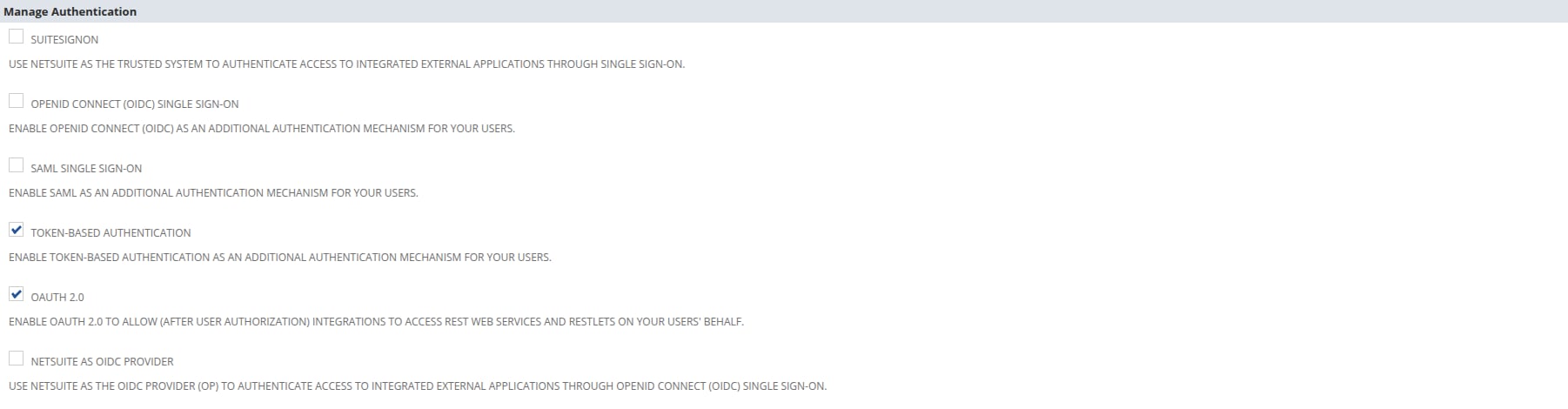
        <p>Still on the <strong>SuiteCloud</strong> subtab, scroll to <strong>Manage Authentication</strong> and check <strong>OAUTH 2.0</strong>. Click <strong>Save</strong> when done.</p>

        <img src="https://mintcdn.com/stackone-60/nVxDMuf9I9iTyIA3/connectors/netsuite/images/oauth2-setup-enable-oauth.png?fit=max&auto=format&n=nVxDMuf9I9iTyIA3&q=85&s=4b865ced3e84da0f17835a70f3facb0d" alt="Enable Features SuiteCloud subtab, Manage Authentication section with OAuth 2.0 checked" width="1802" height="470" data-path="connectors/netsuite/images/oauth2-setup-enable-oauth.png" />
      </div>
    </Step>

    <Step title="Grant the role permissions">
      <div data-guide-step data-guide-scopes="" data-guide-display-scopes-list="">
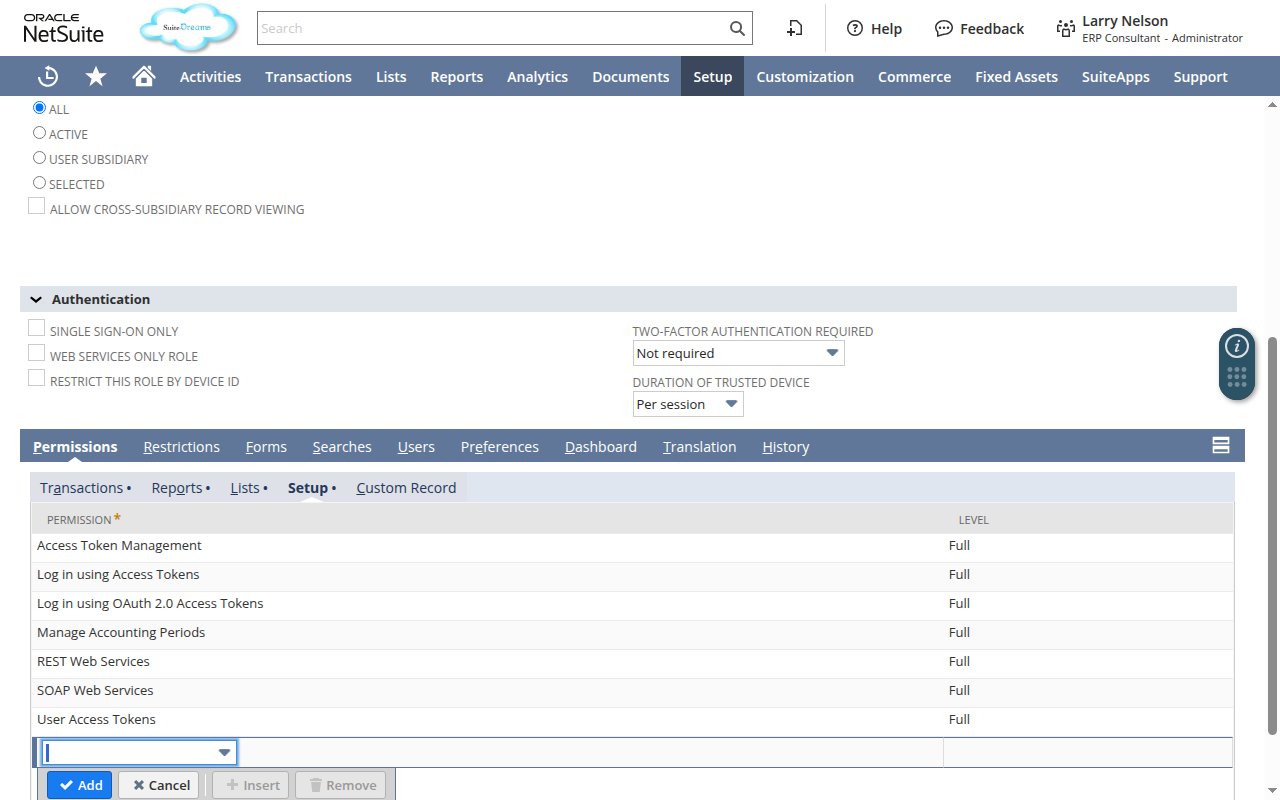
        <p>In the <strong>top navigation bar</strong>, go to <strong>Setup</strong> > <strong>Users/Roles</strong> > <strong>Manage Roles</strong>, then click <strong>Edit</strong> next to the role the connecting user will use. On the role page, open the <strong>Permissions</strong> subtab — it is split into sub-tabs by permission type (<strong>Transactions</strong>, <strong>Reports</strong>, <strong>Lists</strong>, <strong>Setup</strong>, etc.). Add the permissions below on the matching sub-tab, then click <strong>Save</strong>.</p>

        <ul>
          <li>On the <strong>Setup</strong> sub-tab, add <strong>REST Web Services</strong> with Level set to <strong>Full</strong>.</li>
          <li>On the <strong>Setup</strong> sub-tab, add <strong>Log in using OAuth 2.0 Access Tokens</strong> with Level set to <strong>Full</strong>.</li>
          <li>Add record-level permissions (Level <strong>Full</strong>) for the data StackOne will access. A recommended baseline: <strong>Customers</strong>, <strong>Vendors</strong>, <strong>Employees</strong>, <strong>Invoice</strong>, <strong>Bills</strong>, <strong>Sales Order</strong>, <strong>Purchase Order</strong>, <strong>Journal Entry</strong>, <strong>Credit Memo</strong>, <strong>Customer Payment</strong>, <strong>Deposit</strong>, <strong>Items</strong>, <strong>Accounts</strong>, <strong>Subsidiaries</strong>, <strong>Departments</strong>, <strong>Currency</strong> — plus <strong>SuiteScript</strong> if you also enabled RESTlets.</li>
        </ul>

        <img src="https://mintcdn.com/stackone-60/nVxDMuf9I9iTyIA3/connectors/netsuite/images/oauth2-setup-role-permissions.png?fit=max&auto=format&n=nVxDMuf9I9iTyIA3&q=85&s=5a81456f80899030034d51d4064c6b05" alt="Role Permissions subtab with the Setup sub-tab selected, showing REST Web Services and Log in using OAuth 2.0 Access Tokens set to Level Full" width="1280" height="800" data-path="connectors/netsuite/images/oauth2-setup-role-permissions.png" />
      </div>
    </Step>
  </Steps>
</section>

<section data-guide-section data-guide-scopes="">
  <h2>Create an integration record</h2>

  <p>Register StackOne as an OAuth 2.0 integration application in your own NetSuite account.</p>

  <Steps>
    <Step title="Open Manage Integrations">
      <div data-guide-step data-guide-scopes="" data-guide-display-scopes-list="">
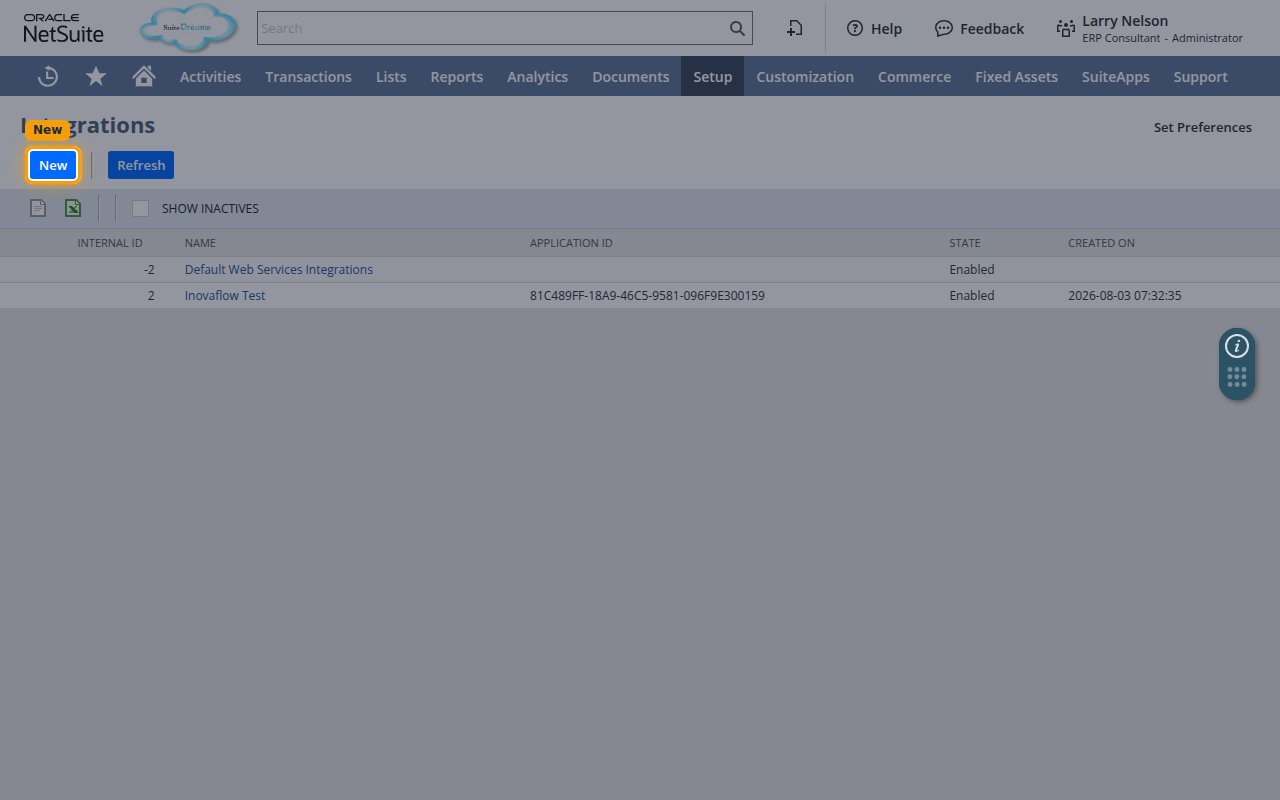
        <p>Go to <strong>Setup</strong> > <strong>Integration</strong> > <strong>Manage Integrations</strong> to open the <strong>Integrations</strong> list, then click <strong>New</strong>.</p>

        <img src="https://mintcdn.com/stackone-60/pEeIDEQ2JQ70QdEL/connectors/netsuite/images/oauth2-setup-manage-integrations.png?fit=max&auto=format&n=pEeIDEQ2JQ70QdEL&q=85&s=c2222cadc925aab91dd2e13d24c5c968" alt="Integrations list with the New button highlighted" width="1280" height="800" data-path="connectors/netsuite/images/oauth2-setup-manage-integrations.png" />
      </div>
    </Step>

    <Step title="Enter a name for the integration">
      <div data-guide-step data-guide-scopes="" data-guide-display-scopes-list="">
        <p>In the <strong>NAME</strong> field, enter a name to identify the integration (for example, StackOne Integration). Leave <strong>STATE</strong> set to <strong>Enabled</strong>.</p>

        <ul>
          <li>Leave <strong>REFRESH TOKEN VALIDITY (IN HOURS)</strong> at its default of <strong>168</strong> (7 days). This is the standard NetSuite refresh-token lifetime and is suitable for StackOne — StackOne refreshes the token automatically before it expires. Setting it lower forces more frequent reconnection.</li>
        </ul>
      </div>
    </Step>
  </Steps>
</section>

<section data-guide-section data-guide-scopes="">
  <h2>Configure OAuth 2.0</h2>

  <p>In the <strong>Authentication</strong> subtab, enable OAuth 2.0 with the Authorization Code Grant and register the StackOne redirect URI.</p>

  <Steps>
    <Step title="Enable Authorization Code Grant and set the Redirect URI">
      <div data-guide-step data-guide-scopes="" data-guide-display-scopes-list="">
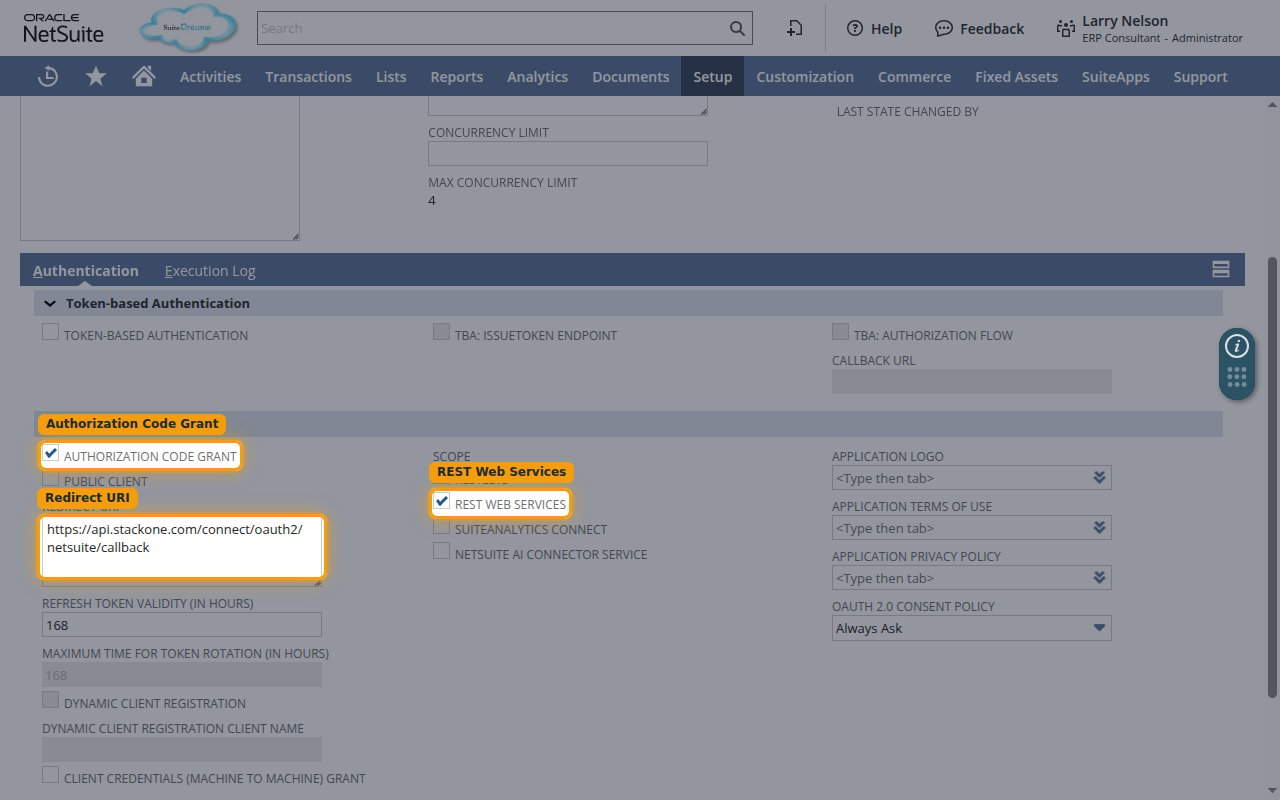
        <p>In the <strong>OAuth 2.0</strong> section, check <strong>AUTHORIZATION CODE GRANT</strong>. In the <strong>REDIRECT URI</strong> field, enter the StackOne callback URL exactly.</p>

        <ul>
          <li>Redirect URI: `https://api.stackone.com/connect/oauth2/netsuite/callback`</li>
          <li>Leave <strong>PUBLIC CLIENT</strong> unchecked.</li>
        </ul>

        <img src="https://mintcdn.com/stackone-60/pEeIDEQ2JQ70QdEL/connectors/netsuite/images/oauth2-setup-oauth-configuration.png?fit=max&auto=format&n=pEeIDEQ2JQ70QdEL&q=85&s=791c2811ab9f3fbb35b8ada3e19777e0" alt="Integration form showing Authorization Code Grant, Redirect URI, and the REST Web Services scope" width="1280" height="800" data-path="connectors/netsuite/images/oauth2-setup-oauth-configuration.png" />
      </div>
    </Step>

    <Step title="Select the REST WEB SERVICES scope">
      <div data-guide-step data-guide-scopes="rest_webservices" data-guide-display-scopes-list="rest_webservices">
        <div className="connector-guide-actions-badge" data-guide-actions-badge data-guide-actions-badge-scopes="rest_webservices">
          <span>Enables actions: </span><span data-guide-actions-badge-labels>Create Account, Create Credit Memo, Create Customer, Create Customer Payment, Create Deposit, Create Employee, Create Expense Report, Create Inventory Item, Create Invoice, Create Journal Entry, Create Non-Inventory Sale Item, Create Purchase Order, Create Sales Order, Create Service Sale Item, Create Vendor, Create Vendor Bill, Create Vendor Payment, Delete Customer, Delete Invoice, Delete Journal Entry, Delete Purchase Order, Delete Sales Order, Delete Vendor, Delete Vendor Bill, Execute SuiteQL Query, Get Account, Get Credit Memo, Get Currency, Get Customer, Get Customer Payment, Get Department, Get Deposit, Get Employee, Get Expense Report, Get Inventory Item, Get Invoice, Get Journal Entry, Get Location, Get Purchase Order, Get Sales Order, Get Subsidiary, Get Vendor, Get Vendor Bill, Get Vendor Payment, List Accounts, List Credit Memos, List Currencies, List Customer Payments, List Customers, List Departments, List Deposits, List Employees, List Expense Reports, List Inventory Items, List Invoices, List Journal Entries, List Locations, List Non-Inventory Sale Items, List Purchase Orders, List Sales Orders, List Service Sale Items, List Subsidiaries, List Vendor Bills, List Vendor Payments, List Vendors, Update Account, Update Customer, Update Invoice, Update Journal Entry, Update Purchase Order, Update Sales Order, Update Vendor, Update Vendor Bill</span>
        </div>

        <p>Under <strong>SCOPE</strong>, enable <strong>REST WEB SERVICES</strong> so the integration can access the SuiteTalk REST API.</p>

        <div className="connector-guide-display-scopes" data-guide-display-scopes>
          <div className="connector-guide-scopes-container">
            <ul className="not-prose connector-guide-scopes-list">
              <li data-guide-display-scope="rest_webservices">
                <button type="button" className="connector-guide-scope-copy" aria-label="Copy rest_webservices" title="Copy scope" data-copy="rest_webservices">
                  <span className="connector-guide-scope-copy__label">rest\_webservices</span>
                  <span className="connector-guide-scope-copy__icon" aria-hidden="true">⧉</span>
                </button>
              </li>
            </ul>
          </div>
        </div>
      </div>
    </Step>
  </Steps>
</section>

<section data-guide-section data-guide-scopes="">
  <h2>Save and copy your client credentials</h2>

  <p>Save the integration record and copy the generated client credentials — you'll enter them<br />below, along with your Account ID, when connecting this account in StackOne.</p>

  <Steps>
    <Step title="Save the integration">
      <div data-guide-step data-guide-scopes="" data-guide-display-scopes-list="">
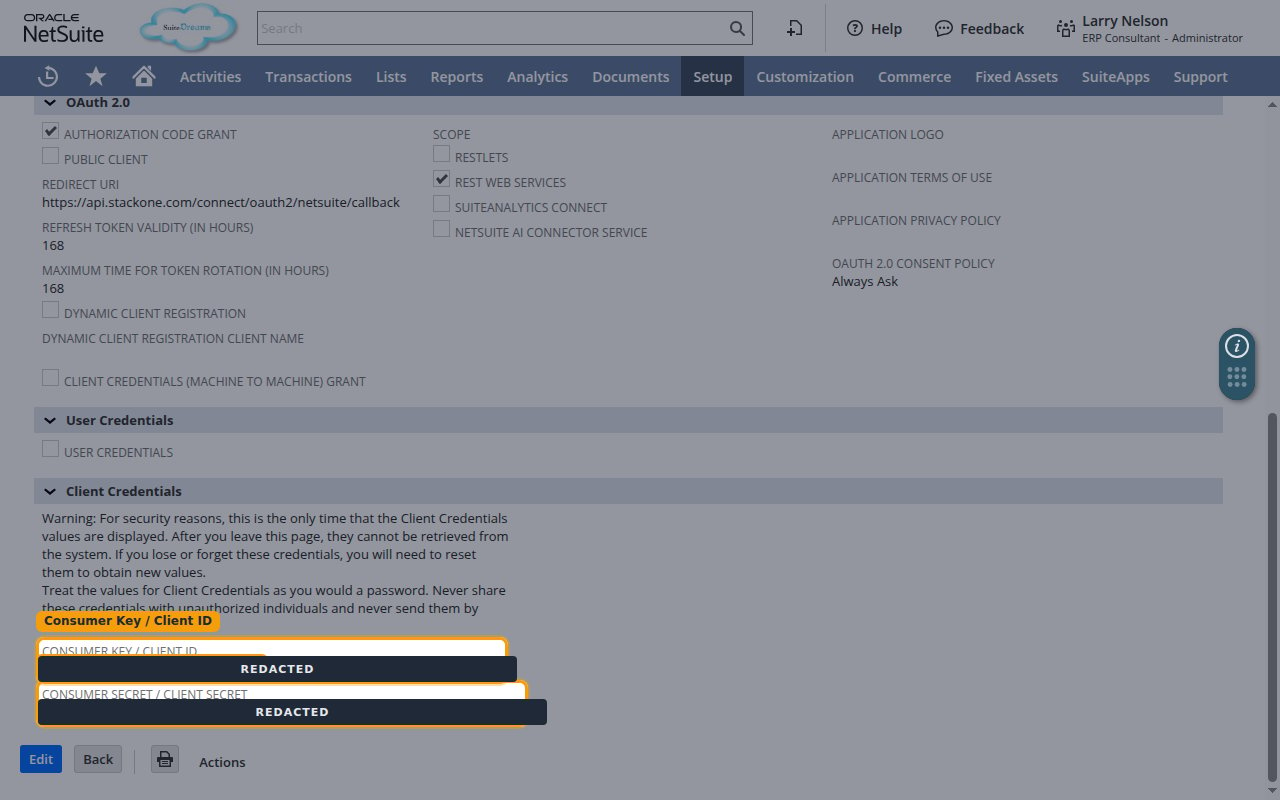
        <p>Click <strong>Save</strong>. NetSuite creates the integration and displays the <strong>Client Credentials</strong> on the confirmation page.</p>
      </div>
    </Step>

    <Step title="Copy the Client ID and Client Secret">
      <div data-guide-step data-guide-scopes="" data-guide-display-scopes-list="">
        <p>Copy the <strong>CONSUMER KEY / CLIENT ID</strong> and <strong>CONSUMER SECRET / CLIENT SECRET</strong> values — you'll enter them into the <strong>Client ID</strong> and <strong>Client Secret</strong> fields below.</p>

        <ul>
          <li>These values are displayed only once. After you leave this page they cannot be retrieved — if lost, reset the credentials to generate new values.</li>
          <li><strong>Scopes</strong> (optional): leave as the default `rest_webservices` unless you also enabled RESTlets, in which case enter `rest_webservices restlets`.</li>
        </ul>

        <img src="https://mintcdn.com/stackone-60/pEeIDEQ2JQ70QdEL/connectors/netsuite/images/oauth2-setup-client-credentials.png?fit=max&auto=format&n=pEeIDEQ2JQ70QdEL&q=85&s=9437ac859f32c17094d4d9e3c9a37ab9" alt="Client Credentials section showing the Consumer Key / Client ID and Consumer Secret / Client Secret with values redacted" width="1280" height="800" data-path="connectors/netsuite/images/oauth2-setup-client-credentials.png" />
      </div>
    </Step>
  </Steps>
</section>

<section data-guide-section data-guide-scopes="">
  <h2>Find your Account ID</h2>

  <p>StackOne needs your NetSuite Account ID to build the API URLs for your account.</p>

  <Steps>
    <Step title="Open your account settings">
      <div data-guide-step data-guide-scopes="" data-guide-display-scopes-list="">
        <p>Sign in to your <a href="https://system.netsuite.com" target="_blank" rel="noopener noreferrer">NetSuite account</a> (or your account-specific URL, e.g. `https://<account-id>.app.netsuite.com`).</p>

        <ul>
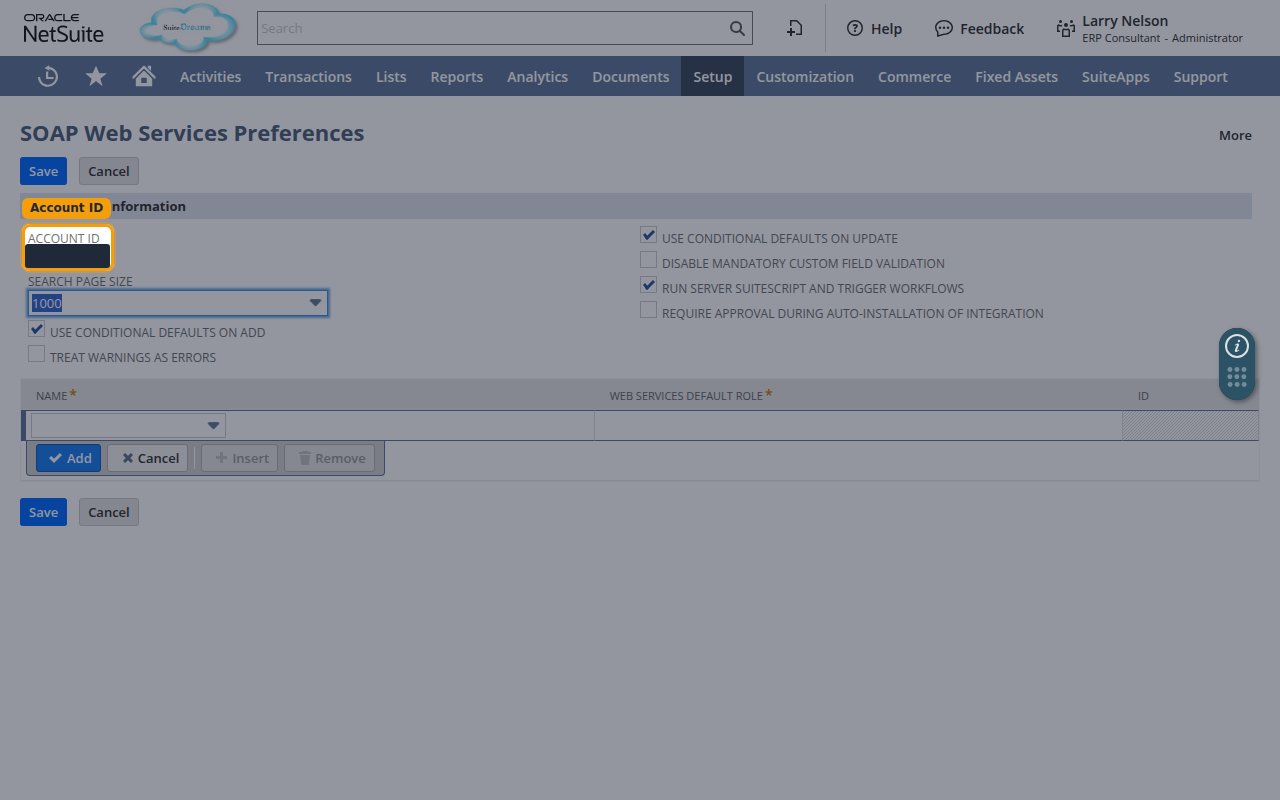
          <li>In the <strong>top navigation bar</strong>, go to <strong>Setup</strong> > <strong>Integration</strong> > <strong>SOAP Web Services Preferences</strong>.</li>
        </ul>
      </div>
    </Step>

    <Step title="Copy the Account ID">
      <div data-guide-step data-guide-scopes="" data-guide-display-scopes-list="">
        <p>In the <strong>Primary Information</strong> section, copy the value shown in the <strong>ACCOUNT ID</strong> field, then paste it into the <strong>Account ID</strong> field below.</p>

        <ul>
          <li>Format: `1234567` (production) or `1234567_SB1` (sandbox).</li>
          <li>Enter the value in lowercase and replace underscores with hyphens — for example, `1234567_SB1` becomes `1234567-sb1`.</li>
        </ul>

        <img src="https://mintcdn.com/stackone-60/pEeIDEQ2JQ70QdEL/connectors/netsuite/images/oauth2-config-account-id.png?fit=max&auto=format&n=pEeIDEQ2JQ70QdEL&q=85&s=f22adad6b873d2a8b3924158dc70e917" alt="SOAP Web Services Preferences page with the Account ID field highlighted and its value redacted" width="1280" height="800" data-path="connectors/netsuite/images/oauth2-config-account-id.png" />
      </div>
    </Step>
  </Steps>
</section>

<div data-whitelabel-hide>
  <h2>Linking the Account from the Hub</h2>

  <Steps>
    <Step title="Navigate to the Hub">
      Use one of the three <a href="/connect/managing-connectors/linking-accounts">Linking Account Methods</a> to access the Hub.
    </Step>

    <Step title="Fill out the fields">
      Fill out the following fields using details from your provider:

      <ul>
        <li><strong>Account ID</strong></li>
        <li><strong>Client ID</strong></li>
        <li><strong>Client Secret</strong></li>
        <li><strong>Scopes</strong> (Optional)</li>
      </ul>
    </Step>

    <Step title="Connect">
      <ul>
        <li>Click <strong>Connect</strong></li>
        <li>If applicable, the provider will redirect you to a sign-in or authorization page. Complete the provider's authorization flow.</li>
        <li>Once authorization is successful, you will see a confirmation popup</li>
      </ul>
    </Step>
  </Steps>

  <p>If the account linking is successful, you will see the newly linked account in your <a href="/gateway/concepts/linked-accounts">Accounts</a> page.</p>
</div>