> ## Documentation Index
> Fetch the complete documentation index at: https://docs.stackone.com/llms.txt
> Use this file to discover all available pages before exploring further.

# Hugging Face OAuth 2.0 connector profile – StackOne setup guide

> Set up the OAuth 2.0 connector profile for Hugging Face in StackOne. One-time admin setup required before your users can link Hugging Face accounts via Hub.

<Warning>A Hugging Face account is required to register the OAuth application. The application owner may be your personal account or an organization.</Warning>

<Panel>
  <div className="not-prose guides-scope-selector" data-guides-scope-selector data-guide-actions-json="[{&#x22;id&#x22;:&#x22;huggingface_list_collections&#x22;,&#x22;label&#x22;:&#x22;List Collections&#x22;,&#x22;scopes&#x22;:[&#x22;read-collections&#x22;]},{&#x22;id&#x22;:&#x22;huggingface_get_collection&#x22;,&#x22;label&#x22;:&#x22;Get Collection&#x22;,&#x22;scopes&#x22;:[&#x22;read-collections&#x22;]},{&#x22;id&#x22;:&#x22;huggingface_create_collection&#x22;,&#x22;label&#x22;:&#x22;Create Collection&#x22;,&#x22;scopes&#x22;:[&#x22;write-collections&#x22;]},{&#x22;id&#x22;:&#x22;huggingface_update_collection&#x22;,&#x22;label&#x22;:&#x22;Update Collection&#x22;,&#x22;scopes&#x22;:[&#x22;write-collections&#x22;]},{&#x22;id&#x22;:&#x22;huggingface_delete_collection&#x22;,&#x22;label&#x22;:&#x22;Delete Collection&#x22;,&#x22;scopes&#x22;:[&#x22;write-collections&#x22;]},{&#x22;id&#x22;:&#x22;huggingface_add_collection_item&#x22;,&#x22;label&#x22;:&#x22;Add Collection Item&#x22;,&#x22;scopes&#x22;:[&#x22;write-collections&#x22;]},{&#x22;id&#x22;:&#x22;huggingface_batch_update_collection_items&#x22;,&#x22;label&#x22;:&#x22;Batch Update Collection Items&#x22;,&#x22;scopes&#x22;:[&#x22;write-collections&#x22;]},{&#x22;id&#x22;:&#x22;huggingface_delete_collection_item&#x22;,&#x22;label&#x22;:&#x22;Delete Collection Item&#x22;,&#x22;scopes&#x22;:[&#x22;write-collections&#x22;]},{&#x22;id&#x22;:&#x22;huggingface_list_datasets&#x22;,&#x22;label&#x22;:&#x22;List Datasets&#x22;,&#x22;scopes&#x22;:[&#x22;read-repos&#x22;]},{&#x22;id&#x22;:&#x22;huggingface_get_dataset&#x22;,&#x22;label&#x22;:&#x22;Get Dataset&#x22;,&#x22;scopes&#x22;:[&#x22;read-repos&#x22;]},{&#x22;id&#x22;:&#x22;huggingface_create_dataset_branch&#x22;,&#x22;label&#x22;:&#x22;Create Dataset Branch&#x22;,&#x22;scopes&#x22;:[&#x22;write-repos&#x22;]},{&#x22;id&#x22;:&#x22;huggingface_delete_dataset_branch&#x22;,&#x22;label&#x22;:&#x22;Delete Dataset Branch&#x22;,&#x22;scopes&#x22;:[&#x22;write-repos&#x22;]},{&#x22;id&#x22;:&#x22;huggingface_list_dataset_commits&#x22;,&#x22;label&#x22;:&#x22;List Dataset Commits&#x22;,&#x22;scopes&#x22;:[&#x22;read-repos&#x22;]},{&#x22;id&#x22;:&#x22;huggingface_compare_dataset_revisions&#x22;,&#x22;label&#x22;:&#x22;Compare Dataset Revisions&#x22;,&#x22;scopes&#x22;:[&#x22;read-repos&#x22;]},{&#x22;id&#x22;:&#x22;huggingface_squash_dataset_history&#x22;,&#x22;label&#x22;:&#x22;Squash Dataset History&#x22;,&#x22;scopes&#x22;:[&#x22;write-repos&#x22;]},{&#x22;id&#x22;:&#x22;huggingface_commit_to_dataset&#x22;,&#x22;label&#x22;:&#x22;Commit To Dataset&#x22;,&#x22;scopes&#x22;:[&#x22;write-repos&#x22;]},{&#x22;id&#x22;:&#x22;huggingface_list_dataset_files&#x22;,&#x22;label&#x22;:&#x22;List Dataset Files&#x22;,&#x22;scopes&#x22;:[&#x22;read-repos&#x22;]},{&#x22;id&#x22;:&#x22;huggingface_list_dataset_parquet_files&#x22;,&#x22;label&#x22;:&#x22;List Dataset Parquet Files&#x22;,&#x22;scopes&#x22;:[&#x22;read-repos&#x22;]},{&#x22;id&#x22;:&#x22;huggingface_check_dataset_upload_method&#x22;,&#x22;label&#x22;:&#x22;Check Dataset Upload Method&#x22;,&#x22;scopes&#x22;:[&#x22;write-repos&#x22;]},{&#x22;id&#x22;:&#x22;huggingface_get_dataset_folder_size&#x22;,&#x22;label&#x22;:&#x22;Get Dataset Folder Size&#x22;,&#x22;scopes&#x22;:[&#x22;read-repos&#x22;]},{&#x22;id&#x22;:&#x22;huggingface_get_dataset_paths_info&#x22;,&#x22;label&#x22;:&#x22;Get Dataset Paths Info&#x22;,&#x22;scopes&#x22;:[&#x22;read-repos&#x22;]},{&#x22;id&#x22;:&#x22;huggingface_list_dataset_large_files&#x22;,&#x22;label&#x22;:&#x22;List Dataset Large Files&#x22;,&#x22;scopes&#x22;:[&#x22;read-repos&#x22;]},{&#x22;id&#x22;:&#x22;huggingface_delete_dataset_large_file&#x22;,&#x22;label&#x22;:&#x22;Delete Dataset Large File&#x22;,&#x22;scopes&#x22;:[&#x22;write-repos&#x22;]},{&#x22;id&#x22;:&#x22;huggingface_delete_dataset_large_files&#x22;,&#x22;label&#x22;:&#x22;Delete Dataset Large Files&#x22;,&#x22;scopes&#x22;:[&#x22;write-repos&#x22;]},{&#x22;id&#x22;:&#x22;huggingface_get_dataset_leaderboard&#x22;,&#x22;label&#x22;:&#x22;Get Dataset Leaderboard&#x22;,&#x22;scopes&#x22;:[&#x22;read-repos&#x22;]},{&#x22;id&#x22;:&#x22;huggingface_list_dataset_refs&#x22;,&#x22;label&#x22;:&#x22;List Dataset References&#x22;,&#x22;scopes&#x22;:[&#x22;read-repos&#x22;]},{&#x22;id&#x22;:&#x22;huggingface_get_dataset_revision&#x22;,&#x22;label&#x22;:&#x22;Get Dataset At Revision&#x22;,&#x22;scopes&#x22;:[&#x22;read-repos&#x22;]},{&#x22;id&#x22;:&#x22;huggingface_get_dataset_security_status&#x22;,&#x22;label&#x22;:&#x22;Get Dataset Security Status&#x22;,&#x22;scopes&#x22;:[&#x22;read-repos&#x22;]},{&#x22;id&#x22;:&#x22;huggingface_update_dataset_settings&#x22;,&#x22;label&#x22;:&#x22;Update Dataset Settings&#x22;,&#x22;scopes&#x22;:[&#x22;write-repos&#x22;]},{&#x22;id&#x22;:&#x22;huggingface_create_dataset_tag&#x22;,&#x22;label&#x22;:&#x22;Create Dataset Tag&#x22;,&#x22;scopes&#x22;:[&#x22;write-repos&#x22;]},{&#x22;id&#x22;:&#x22;huggingface_delete_dataset_tag&#x22;,&#x22;label&#x22;:&#x22;Delete Dataset Tag&#x22;,&#x22;scopes&#x22;:[&#x22;write-repos&#x22;]},{&#x22;id&#x22;:&#x22;huggingface_list_discussions&#x22;,&#x22;label&#x22;:&#x22;List Discussions&#x22;,&#x22;scopes&#x22;:[&#x22;read-repos&#x22;]},{&#x22;id&#x22;:&#x22;huggingface_get_discussion&#x22;,&#x22;label&#x22;:&#x22;Get Discussion&#x22;,&#x22;scopes&#x22;:[&#x22;read-repos&#x22;]},{&#x22;id&#x22;:&#x22;huggingface_create_discussion&#x22;,&#x22;label&#x22;:&#x22;Create Discussion&#x22;,&#x22;scopes&#x22;:[&#x22;write-discussions&#x22;]},{&#x22;id&#x22;:&#x22;huggingface_pin_discussion&#x22;,&#x22;label&#x22;:&#x22;Pin Discussion&#x22;,&#x22;scopes&#x22;:[&#x22;write-discussions&#x22;]},{&#x22;id&#x22;:&#x22;huggingface_update_discussion_status&#x22;,&#x22;label&#x22;:&#x22;Update Discussion Status&#x22;,&#x22;scopes&#x22;:[&#x22;write-discussions&#x22;]},{&#x22;id&#x22;:&#x22;huggingface_update_discussion_title&#x22;,&#x22;label&#x22;:&#x22;Update Discussion Title&#x22;,&#x22;scopes&#x22;:[&#x22;write-discussions&#x22;]},{&#x22;id&#x22;:&#x22;huggingface_delete_discussion&#x22;,&#x22;label&#x22;:&#x22;Delete Discussion&#x22;,&#x22;scopes&#x22;:[&#x22;write-discussions&#x22;]},{&#x22;id&#x22;:&#x22;huggingface_create_discussion_comment&#x22;,&#x22;label&#x22;:&#x22;Create Discussion Comment&#x22;,&#x22;scopes&#x22;:[&#x22;write-discussions&#x22;]},{&#x22;id&#x22;:&#x22;huggingface_get_pull_request_storage_estimate&#x22;,&#x22;label&#x22;:&#x22;Get Pull Request Storage Estimate&#x22;,&#x22;scopes&#x22;:[&#x22;read-repos&#x22;]},{&#x22;id&#x22;:&#x22;huggingface_merge_pull_request&#x22;,&#x22;label&#x22;:&#x22;Merge Pull Request&#x22;,&#x22;scopes&#x22;:[&#x22;write-repos&#x22;]},{&#x22;id&#x22;:&#x22;huggingface_delete_pull_request_ref&#x22;,&#x22;label&#x22;:&#x22;Delete Pull Request Ref&#x22;,&#x22;scopes&#x22;:[&#x22;write-repos&#x22;]},{&#x22;id&#x22;:&#x22;huggingface_list_models&#x22;,&#x22;label&#x22;:&#x22;List Models&#x22;,&#x22;scopes&#x22;:[&#x22;read-repos&#x22;]},{&#x22;id&#x22;:&#x22;huggingface_get_model&#x22;,&#x22;label&#x22;:&#x22;Get Model&#x22;,&#x22;scopes&#x22;:[&#x22;read-repos&#x22;]},{&#x22;id&#x22;:&#x22;huggingface_create_model_branch&#x22;,&#x22;label&#x22;:&#x22;Create Model Branch&#x22;,&#x22;scopes&#x22;:[&#x22;write-repos&#x22;]},{&#x22;id&#x22;:&#x22;huggingface_delete_model_branch&#x22;,&#x22;label&#x22;:&#x22;Delete Model Branch&#x22;,&#x22;scopes&#x22;:[&#x22;write-repos&#x22;]},{&#x22;id&#x22;:&#x22;huggingface_list_model_commits&#x22;,&#x22;label&#x22;:&#x22;List Model Commits&#x22;,&#x22;scopes&#x22;:[&#x22;read-repos&#x22;]},{&#x22;id&#x22;:&#x22;huggingface_compare_model_revisions&#x22;,&#x22;label&#x22;:&#x22;Compare Model Revisions&#x22;,&#x22;scopes&#x22;:[&#x22;read-repos&#x22;]},{&#x22;id&#x22;:&#x22;huggingface_squash_model_history&#x22;,&#x22;label&#x22;:&#x22;Squash Model History&#x22;,&#x22;scopes&#x22;:[&#x22;write-repos&#x22;]},{&#x22;id&#x22;:&#x22;huggingface_commit_to_model&#x22;,&#x22;label&#x22;:&#x22;Commit To Model&#x22;,&#x22;scopes&#x22;:[&#x22;write-repos&#x22;]},{&#x22;id&#x22;:&#x22;huggingface_list_model_files&#x22;,&#x22;label&#x22;:&#x22;List Model Files&#x22;,&#x22;scopes&#x22;:[&#x22;read-repos&#x22;]},{&#x22;id&#x22;:&#x22;huggingface_check_model_upload_method&#x22;,&#x22;label&#x22;:&#x22;Check Model Upload Method&#x22;,&#x22;scopes&#x22;:[&#x22;write-repos&#x22;]},{&#x22;id&#x22;:&#x22;huggingface_get_model_folder_size&#x22;,&#x22;label&#x22;:&#x22;Get Model Folder Size&#x22;,&#x22;scopes&#x22;:[&#x22;read-repos&#x22;]},{&#x22;id&#x22;:&#x22;huggingface_get_model_paths_info&#x22;,&#x22;label&#x22;:&#x22;Get Model Paths Info&#x22;,&#x22;scopes&#x22;:[&#x22;read-repos&#x22;]},{&#x22;id&#x22;:&#x22;huggingface_list_model_large_files&#x22;,&#x22;label&#x22;:&#x22;List Model Large Files&#x22;,&#x22;scopes&#x22;:[&#x22;read-repos&#x22;]},{&#x22;id&#x22;:&#x22;huggingface_delete_model_large_file&#x22;,&#x22;label&#x22;:&#x22;Delete Model Large File&#x22;,&#x22;scopes&#x22;:[&#x22;write-repos&#x22;]},{&#x22;id&#x22;:&#x22;huggingface_delete_model_large_files&#x22;,&#x22;label&#x22;:&#x22;Delete Model Large Files&#x22;,&#x22;scopes&#x22;:[&#x22;write-repos&#x22;]},{&#x22;id&#x22;:&#x22;huggingface_list_model_refs&#x22;,&#x22;label&#x22;:&#x22;List Model References&#x22;,&#x22;scopes&#x22;:[&#x22;read-repos&#x22;]},{&#x22;id&#x22;:&#x22;huggingface_get_model_revision&#x22;,&#x22;label&#x22;:&#x22;Get Model At Revision&#x22;,&#x22;scopes&#x22;:[&#x22;read-repos&#x22;]},{&#x22;id&#x22;:&#x22;huggingface_get_model_security_status&#x22;,&#x22;label&#x22;:&#x22;Get Model Security Status&#x22;,&#x22;scopes&#x22;:[&#x22;read-repos&#x22;]},{&#x22;id&#x22;:&#x22;huggingface_update_model_settings&#x22;,&#x22;label&#x22;:&#x22;Update Model Settings&#x22;,&#x22;scopes&#x22;:[&#x22;write-repos&#x22;]},{&#x22;id&#x22;:&#x22;huggingface_create_model_tag&#x22;,&#x22;label&#x22;:&#x22;Create Model Tag&#x22;,&#x22;scopes&#x22;:[&#x22;write-repos&#x22;]},{&#x22;id&#x22;:&#x22;huggingface_delete_model_tag&#x22;,&#x22;label&#x22;:&#x22;Delete Model Tag&#x22;,&#x22;scopes&#x22;:[&#x22;write-repos&#x22;]},{&#x22;id&#x22;:&#x22;huggingface_list_organization_members&#x22;,&#x22;label&#x22;:&#x22;List Organization Members&#x22;,&#x22;scopes&#x22;:[&#x22;read-memberships&#x22;]},{&#x22;id&#x22;:&#x22;huggingface_list_organization_repositories&#x22;,&#x22;label&#x22;:&#x22;List Organization Repositories&#x22;,&#x22;scopes&#x22;:[&#x22;read-repos&#x22;]},{&#x22;id&#x22;:&#x22;huggingface_get_organization_inference_session_usage&#x22;,&#x22;label&#x22;:&#x22;Get Organization Inference Session Usage&#x22;,&#x22;scopes&#x22;:[&#x22;read-billing&#x22;]},{&#x22;id&#x22;:&#x22;huggingface_get_organization_usage&#x22;,&#x22;label&#x22;:&#x22;Get Organization Usage&#x22;,&#x22;scopes&#x22;:[&#x22;read-billing&#x22;]},{&#x22;id&#x22;:&#x22;huggingface_get_organization_usage_by_resource_group&#x22;,&#x22;label&#x22;:&#x22;Get Organization Usage By Resource Group&#x22;,&#x22;scopes&#x22;:[&#x22;read-billing&#x22;]},{&#x22;id&#x22;:&#x22;huggingface_create_repository&#x22;,&#x22;label&#x22;:&#x22;Create Repository&#x22;,&#x22;scopes&#x22;:[&#x22;contribute-repos&#x22;]},{&#x22;id&#x22;:&#x22;huggingface_duplicate_repository&#x22;,&#x22;label&#x22;:&#x22;Duplicate Repository&#x22;,&#x22;scopes&#x22;:[&#x22;contribute-repos&#x22;]},{&#x22;id&#x22;:&#x22;huggingface_move_repository&#x22;,&#x22;label&#x22;:&#x22;Move Repository&#x22;,&#x22;scopes&#x22;:[&#x22;manage-repos&#x22;]},{&#x22;id&#x22;:&#x22;huggingface_delete_repository&#x22;,&#x22;label&#x22;:&#x22;Delete Repository&#x22;,&#x22;scopes&#x22;:[&#x22;manage-repos&#x22;]},{&#x22;id&#x22;:&#x22;huggingface_list_spaces&#x22;,&#x22;label&#x22;:&#x22;List Spaces&#x22;,&#x22;scopes&#x22;:[&#x22;read-repos&#x22;]},{&#x22;id&#x22;:&#x22;huggingface_get_space&#x22;,&#x22;label&#x22;:&#x22;Get Space&#x22;,&#x22;scopes&#x22;:[&#x22;read-repos&#x22;]},{&#x22;id&#x22;:&#x22;huggingface_create_space_branch&#x22;,&#x22;label&#x22;:&#x22;Create Space Branch&#x22;,&#x22;scopes&#x22;:[&#x22;write-repos&#x22;]},{&#x22;id&#x22;:&#x22;huggingface_delete_space_branch&#x22;,&#x22;label&#x22;:&#x22;Delete Space Branch&#x22;,&#x22;scopes&#x22;:[&#x22;write-repos&#x22;]},{&#x22;id&#x22;:&#x22;huggingface_list_space_commits&#x22;,&#x22;label&#x22;:&#x22;List Space Commits&#x22;,&#x22;scopes&#x22;:[&#x22;read-repos&#x22;]},{&#x22;id&#x22;:&#x22;huggingface_compare_space_revisions&#x22;,&#x22;label&#x22;:&#x22;Compare Space Revisions&#x22;,&#x22;scopes&#x22;:[&#x22;read-repos&#x22;]},{&#x22;id&#x22;:&#x22;huggingface_squash_space_history&#x22;,&#x22;label&#x22;:&#x22;Squash Space History&#x22;,&#x22;scopes&#x22;:[&#x22;write-repos&#x22;]},{&#x22;id&#x22;:&#x22;huggingface_commit_to_space&#x22;,&#x22;label&#x22;:&#x22;Commit To Space&#x22;,&#x22;scopes&#x22;:[&#x22;write-repos&#x22;]},{&#x22;id&#x22;:&#x22;huggingface_list_space_files&#x22;,&#x22;label&#x22;:&#x22;List Space Files&#x22;,&#x22;scopes&#x22;:[&#x22;read-repos&#x22;]},{&#x22;id&#x22;:&#x22;huggingface_check_space_upload_method&#x22;,&#x22;label&#x22;:&#x22;Check Space Upload Method&#x22;,&#x22;scopes&#x22;:[&#x22;write-repos&#x22;]},{&#x22;id&#x22;:&#x22;huggingface_get_space_folder_size&#x22;,&#x22;label&#x22;:&#x22;Get Space Folder Size&#x22;,&#x22;scopes&#x22;:[&#x22;read-repos&#x22;]},{&#x22;id&#x22;:&#x22;huggingface_get_space_paths_info&#x22;,&#x22;label&#x22;:&#x22;Get Space Paths Info&#x22;,&#x22;scopes&#x22;:[&#x22;read-repos&#x22;]},{&#x22;id&#x22;:&#x22;huggingface_list_space_large_files&#x22;,&#x22;label&#x22;:&#x22;List Space Large Files&#x22;,&#x22;scopes&#x22;:[&#x22;read-repos&#x22;]},{&#x22;id&#x22;:&#x22;huggingface_delete_space_large_file&#x22;,&#x22;label&#x22;:&#x22;Delete Space Large File&#x22;,&#x22;scopes&#x22;:[&#x22;write-repos&#x22;]},{&#x22;id&#x22;:&#x22;huggingface_delete_space_large_files&#x22;,&#x22;label&#x22;:&#x22;Delete Space Large Files&#x22;,&#x22;scopes&#x22;:[&#x22;write-repos&#x22;]},{&#x22;id&#x22;:&#x22;huggingface_list_space_refs&#x22;,&#x22;label&#x22;:&#x22;List Space References&#x22;,&#x22;scopes&#x22;:[&#x22;read-repos&#x22;]},{&#x22;id&#x22;:&#x22;huggingface_get_space_revision&#x22;,&#x22;label&#x22;:&#x22;Get Space At Revision&#x22;,&#x22;scopes&#x22;:[&#x22;read-repos&#x22;]},{&#x22;id&#x22;:&#x22;huggingface_list_space_secrets&#x22;,&#x22;label&#x22;:&#x22;List Space Secrets&#x22;,&#x22;scopes&#x22;:[&#x22;write-repos&#x22;]},{&#x22;id&#x22;:&#x22;huggingface_upsert_space_secret&#x22;,&#x22;label&#x22;:&#x22;Upsert Space Secret&#x22;,&#x22;scopes&#x22;:[&#x22;write-repos&#x22;]},{&#x22;id&#x22;:&#x22;huggingface_delete_space_secret&#x22;,&#x22;label&#x22;:&#x22;Delete Space Secret&#x22;,&#x22;scopes&#x22;:[&#x22;write-repos&#x22;]},{&#x22;id&#x22;:&#x22;huggingface_get_space_security_status&#x22;,&#x22;label&#x22;:&#x22;Get Space Security Status&#x22;,&#x22;scopes&#x22;:[&#x22;read-repos&#x22;]},{&#x22;id&#x22;:&#x22;huggingface_update_space_settings&#x22;,&#x22;label&#x22;:&#x22;Update Space Settings&#x22;,&#x22;scopes&#x22;:[&#x22;write-repos&#x22;]},{&#x22;id&#x22;:&#x22;huggingface_create_space_tag&#x22;,&#x22;label&#x22;:&#x22;Create Space Tag&#x22;,&#x22;scopes&#x22;:[&#x22;write-repos&#x22;]},{&#x22;id&#x22;:&#x22;huggingface_delete_space_tag&#x22;,&#x22;label&#x22;:&#x22;Delete Space Tag&#x22;,&#x22;scopes&#x22;:[&#x22;write-repos&#x22;]},{&#x22;id&#x22;:&#x22;huggingface_list_space_variables&#x22;,&#x22;label&#x22;:&#x22;List Space Variables&#x22;,&#x22;scopes&#x22;:[&#x22;write-repos&#x22;]},{&#x22;id&#x22;:&#x22;huggingface_upsert_space_variable&#x22;,&#x22;label&#x22;:&#x22;Upsert Space Variable&#x22;,&#x22;scopes&#x22;:[&#x22;write-repos&#x22;]},{&#x22;id&#x22;:&#x22;huggingface_delete_space_variable&#x22;,&#x22;label&#x22;:&#x22;Delete Space Variable&#x22;,&#x22;scopes&#x22;:[&#x22;write-repos&#x22;]},{&#x22;id&#x22;:&#x22;huggingface_set_space_volumes&#x22;,&#x22;label&#x22;:&#x22;Set Space Volumes&#x22;,&#x22;scopes&#x22;:[&#x22;write-repos&#x22;]},{&#x22;id&#x22;:&#x22;huggingface_delete_space_volumes&#x22;,&#x22;label&#x22;:&#x22;Delete Space Volumes&#x22;,&#x22;scopes&#x22;:[&#x22;write-repos&#x22;]},{&#x22;id&#x22;:&#x22;huggingface_get_current_user&#x22;,&#x22;label&#x22;:&#x22;Get Current User&#x22;,&#x22;scopes&#x22;:[&#x22;profile&#x22;]},{&#x22;id&#x22;:&#x22;huggingface_list_my_repositories&#x22;,&#x22;label&#x22;:&#x22;List My Repositories&#x22;,&#x22;scopes&#x22;:[&#x22;read-repos&#x22;]},{&#x22;id&#x22;:&#x22;huggingface_get_my_inference_session_usage&#x22;,&#x22;label&#x22;:&#x22;Get My Inference Session Usage&#x22;,&#x22;scopes&#x22;:[&#x22;read-billing&#x22;]},{&#x22;id&#x22;:&#x22;huggingface_get_my_jobs_usage&#x22;,&#x22;label&#x22;:&#x22;Get My Jobs Usage&#x22;,&#x22;scopes&#x22;:[&#x22;read-billing&#x22;]},{&#x22;id&#x22;:&#x22;huggingface_get_my_usage&#x22;,&#x22;label&#x22;:&#x22;Get My Usage&#x22;,&#x22;scopes&#x22;:[&#x22;read-billing&#x22;]}]">
    <div className="guides-scope-selector__title">Select Actions to adjust the guide</div>
    <div className="guides-scope-selector__muted guides-scope-selector__subtitle">Some actions may require additional configuration in the provider to be accessible. Choose the actions you need and the guide will be updated.</div>

    <div className="guides-scope-selector__toolbar">
      <input type="text" placeholder="Search actions..." className="guides-scope-selector__input guides-scope-selector__search" data-guide-action-search />

      <button type="button" className="guides-scope-selector__quick-btn" data-guide-select-all>Select all</button>
      <button type="button" className="guides-scope-selector__quick-btn" data-guide-clear>Clear</button>
    </div>

    <div className="guides-scope-selector__list">
      <div className="guides-scope-selector__list-header">
        <div className="guides-scope-selector__list-header-spacer" />

        <div className="guides-scope-selector__list-header-action">Action</div>
        <div className="guides-scope-selector__list-header-scopes">Scope(s)</div>
      </div>

      <div className="guides-scope-selector__muted guides-scope-selector__status" data-guide-loading>Loading actions...</div>
      <div className="guides-scope-selector__muted guides-scope-selector__status" data-guide-no-results hidden>No actions match your search.</div>
    </div>

    <div className="guides-scope-selector__url-section">
      <div className="guides-scope-selector__muted guides-scope-selector__label">Dynamic Guide URL</div>

      <div className="guides-scope-selector__url-row">
        <input type="text" readOnly className="guides-scope-selector__input guides-scope-selector__url-input" data-guide-url />

        <button type="button" className="guides-scope-selector__copy-btn guides-scope-selector__copy-btn--end" data-guide-copy-url>Copy URL</button>
      </div>

      <div className="guides-scope-selector__scopes-section">
        <div className="guides-scope-selector__muted guides-scope-selector__label">Scopes Selected</div>

        <div className="guides-scope-selector__scopes-row">
          <pre className="guides-scope-selector__input guides-scope-selector__scopes-output" role="textbox" aria-readonly="true" tabIndex={0} data-guide-scopes-output />

          <div className="guides-scope-selector__muted guides-scope-selector__side-controls">
            <div className="guides-scope-selector__side-label">Separator</div>

            <select className="guides-scope-selector__input guides-scope-selector__delimiter" data-guide-scope-delimiter>
              <option value="space">Space</option>
              <option value="comma">Comma</option>
              <option value="semicolon">Semicolon</option>
              <option value="pipe">Pipe</option>
              <option value="newline">Newline</option>
            </select>

            <button type="button" className="guides-scope-selector__copy-btn" data-guide-copy-scopes>Copy scopes</button>
          </div>
        </div>
      </div>
    </div>
  </div>
</Panel>

<section data-guide-section data-guide-scopes="">
  <h2>Register an OAuth application</h2>

  <p>Create an OAuth application on Hugging Face to obtain a Client ID and Client Secret.</p>

  <Steps>
    <Step title="Sign in to Hugging Face">
      <div data-guide-step data-guide-scopes="" data-guide-display-scopes-list="">
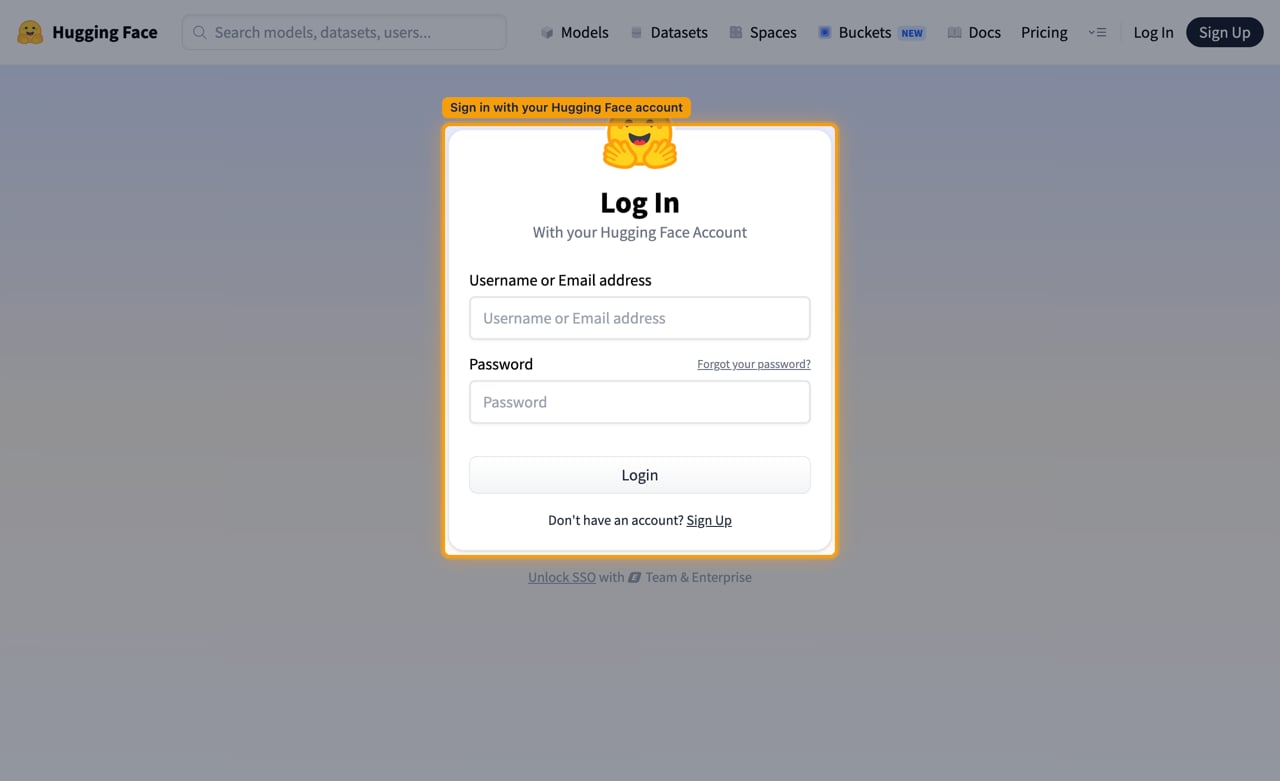
        <p>Sign in on the <a href="https://huggingface.co/login" target="_blank" rel="noopener noreferrer">Hugging Face log-in page</a> with your <strong>Username or Email address</strong> and <strong>Password</strong>, then click <strong>Login</strong>.</p>

        <img src="https://mintcdn.com/stackone-60/RT3ZGjUOVjGkKvM9/connectors/huggingface/images/oauth2-setup-sign-in.png?fit=max&auto=format&n=RT3ZGjUOVjGkKvM9&q=85&s=c6b5509c090f904940a1c5eb2c343224" alt="Hugging Face log in page with the sign-in card highlighted" width="1280" height="781" data-path="connectors/huggingface/images/oauth2-setup-sign-in.png" />
      </div>
    </Step>

    <Step title="Fill in the application details">
      <div data-guide-step data-guide-scopes="" data-guide-display-scopes-list="">
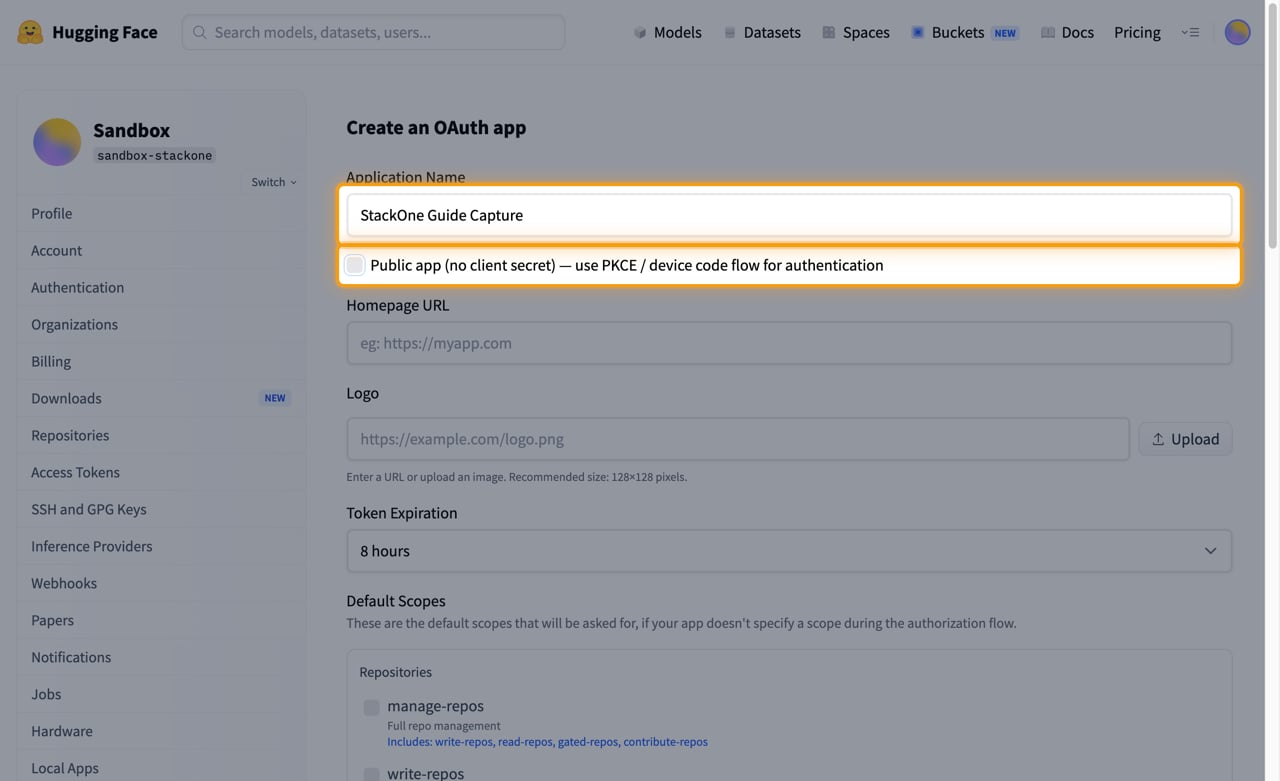
        <p>Open the <a href="https://huggingface.co/settings/applications/new" target="_blank" rel="noopener noreferrer">new OAuth application form</a>. On <strong>Create an OAuth app</strong>, type a name into <strong>Application Name</strong>, then untick <strong>Public app (no client secret) — use PKCE / device code flow for authentication</strong>.</p>

        <ul>
          <li><strong>Public app (no client secret)</strong> is ticked by default, and a public application issues no client secret, which this connector requires.</li>
          <li><strong>Homepage URL</strong>, <strong>Logo</strong> and <strong>Token Expiration</strong> are optional and can be left at their defaults.</li>
        </ul>

        <img src="https://mintcdn.com/stackone-60/RT3ZGjUOVjGkKvM9/connectors/huggingface/images/oauth2-setup-application-details.png?fit=max&auto=format&n=RT3ZGjUOVjGkKvM9&q=85&s=70187e4a8975450802c17c553088e343" alt="Create an OAuth app form with the Application Name field and the Public app checkbox highlighted" width="1280" height="781" data-path="connectors/huggingface/images/oauth2-setup-application-details.png" />
      </div>
    </Step>

    <Step title="Select the default scopes">
      <div data-guide-step data-guide-scopes="openid,profile,email,read-billing,read-memberships,read-repos,contribute-repos,write-repos,manage-repos,read-collections,write-collections,write-discussions" data-guide-display-scopes-list="openid,profile,email,read-billing,read-memberships,read-repos,contribute-repos,write-repos,manage-repos,read-collections,write-collections,write-discussions">
        <div className="connector-guide-actions-badge" data-guide-actions-badge data-guide-actions-badge-scopes="openid,profile,email,read-billing,read-memberships,read-repos,contribute-repos,write-repos,manage-repos,read-collections,write-collections,write-discussions">
          <span>Enables actions: </span><span data-guide-actions-badge-labels>Add Collection Item, Batch Update Collection Items, Check Dataset Upload Method, Check Model Upload Method, Check Space Upload Method, Commit To Dataset, Commit To Model, Commit To Space, Compare Dataset Revisions, Compare Model Revisions, Compare Space Revisions, Create Collection, Create Dataset Branch, Create Dataset Tag, Create Discussion, Create Discussion Comment, Create Model Branch, Create Model Tag, Create Repository, Create Space Branch, Create Space Tag, Delete Collection, Delete Collection Item, Delete Dataset Branch, Delete Dataset Large File, Delete Dataset Large Files, Delete Dataset Tag, Delete Discussion, Delete Model Branch, Delete Model Large File, Delete Model Large Files, Delete Model Tag, Delete Pull Request Ref, Delete Repository, Delete Space Branch, Delete Space Large File, Delete Space Large Files, Delete Space Secret, Delete Space Tag, Delete Space Variable, Delete Space Volumes, Duplicate Repository, Get Collection, Get Current User, Get Dataset, Get Dataset At Revision, Get Dataset Folder Size, Get Dataset Leaderboard, Get Dataset Paths Info, Get Dataset Security Status, Get Discussion, Get Model, Get Model At Revision, Get Model Folder Size, Get Model Paths Info, Get Model Security Status, Get My Inference Session Usage, Get My Jobs Usage, Get My Usage, Get Organization Inference Session Usage, Get Organization Usage, Get Organization Usage By Resource Group, Get Pull Request Storage Estimate, Get Space, Get Space At Revision, Get Space Folder Size, Get Space Paths Info, Get Space Security Status, List Collections, List Dataset Commits, List Dataset Files, List Dataset Large Files, List Dataset Parquet Files, List Dataset References, List Datasets, List Discussions, List Model Commits, List Model Files, List Model Large Files, List Model References, List Models, List My Repositories, List Organization Members, List Organization Repositories, List Space Commits, List Space Files, List Space Large Files, List Space References, List Space Secrets, List Space Variables, List Spaces, Merge Pull Request, Move Repository, Pin Discussion, Set Space Volumes, Squash Dataset History, Squash Model History, Squash Space History, Update Collection, Update Dataset Settings, Update Discussion Status, Update Discussion Title, Update Model Settings, Update Space Settings, Upsert Space Secret, Upsert Space Variable</span>
        </div>

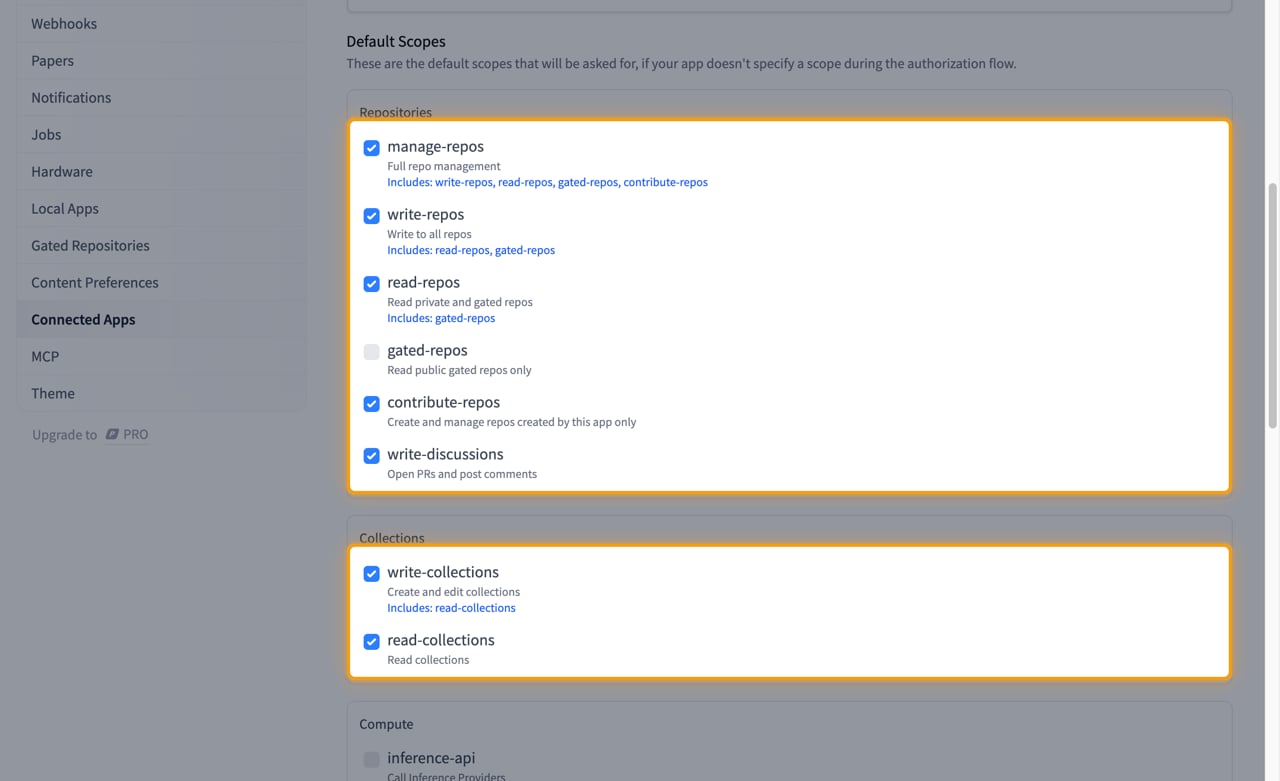
        <p>Under <strong>Default Scopes</strong>, tick the permissions this integration needs. Hugging Face applies them only when an authorization request does not name its own scopes, and StackOne always names them, so what you tick here does not cap or change what a connection receives. Tick them anyway so the application's own settings page reflects what it is used for. The scopes that take effect are the ones in the <strong>Scopes</strong> field in the StackOne Connector profile.</p>

        <img src="https://mintcdn.com/stackone-60/RT3ZGjUOVjGkKvM9/connectors/huggingface/images/oauth2-setup-default-scopes.png?fit=max&auto=format&n=RT3ZGjUOVjGkKvM9&q=85&s=5868e27742b39f55d179116166b4535d" alt="Default Scopes section with the Repositories and Collections scope groups ticked and highlighted" width="1280" height="781" data-path="connectors/huggingface/images/oauth2-setup-default-scopes.png" />

        <div className="connector-guide-display-scopes" data-guide-display-scopes>
          <div className="connector-guide-scopes-container connector-guide-scopes-container--scrollable">
            <ul className="not-prose connector-guide-scopes-list">
              <li data-guide-display-scope="openid">
                <button type="button" className="connector-guide-scope-copy" aria-label="Copy openid" title="Copy scope" data-copy="openid">
                  <span className="connector-guide-scope-copy__label">openid</span>
                  <span className="connector-guide-scope-copy__icon" aria-hidden="true">⧉</span>
                </button>
              </li>

              <li data-guide-display-scope="profile">
                <button type="button" className="connector-guide-scope-copy" aria-label="Copy profile" title="Copy scope" data-copy="profile">
                  <span className="connector-guide-scope-copy__label">profile</span>
                  <span className="connector-guide-scope-copy__icon" aria-hidden="true">⧉</span>
                </button>
              </li>

              <li data-guide-display-scope="email">
                <button type="button" className="connector-guide-scope-copy" aria-label="Copy email" title="Copy scope" data-copy="email">
                  <span className="connector-guide-scope-copy__label">email</span>
                  <span className="connector-guide-scope-copy__icon" aria-hidden="true">⧉</span>
                </button>
              </li>

              <li data-guide-display-scope="read-billing">
                <button type="button" className="connector-guide-scope-copy" aria-label="Copy read-billing" title="Copy scope" data-copy="read-billing">
                  <span className="connector-guide-scope-copy__label">read-billing</span>
                  <span className="connector-guide-scope-copy__icon" aria-hidden="true">⧉</span>
                </button>
              </li>

              <li data-guide-display-scope="read-memberships">
                <button type="button" className="connector-guide-scope-copy" aria-label="Copy read-memberships" title="Copy scope" data-copy="read-memberships">
                  <span className="connector-guide-scope-copy__label">read-memberships</span>
                  <span className="connector-guide-scope-copy__icon" aria-hidden="true">⧉</span>
                </button>
              </li>

              <li data-guide-display-scope="read-repos">
                <button type="button" className="connector-guide-scope-copy" aria-label="Copy read-repos" title="Copy scope" data-copy="read-repos">
                  <span className="connector-guide-scope-copy__label">read-repos</span>
                  <span className="connector-guide-scope-copy__icon" aria-hidden="true">⧉</span>
                </button>
              </li>

              <li data-guide-display-scope="contribute-repos">
                <button type="button" className="connector-guide-scope-copy" aria-label="Copy contribute-repos" title="Copy scope" data-copy="contribute-repos">
                  <span className="connector-guide-scope-copy__label">contribute-repos</span>
                  <span className="connector-guide-scope-copy__icon" aria-hidden="true">⧉</span>
                </button>
              </li>

              <li data-guide-display-scope="write-repos">
                <button type="button" className="connector-guide-scope-copy" aria-label="Copy write-repos" title="Copy scope" data-copy="write-repos">
                  <span className="connector-guide-scope-copy__label">write-repos</span>
                  <span className="connector-guide-scope-copy__icon" aria-hidden="true">⧉</span>
                </button>
              </li>

              <li data-guide-display-scope="manage-repos">
                <button type="button" className="connector-guide-scope-copy" aria-label="Copy manage-repos" title="Copy scope" data-copy="manage-repos">
                  <span className="connector-guide-scope-copy__label">manage-repos</span>
                  <span className="connector-guide-scope-copy__icon" aria-hidden="true">⧉</span>
                </button>
              </li>

              <li data-guide-display-scope="read-collections">
                <button type="button" className="connector-guide-scope-copy" aria-label="Copy read-collections" title="Copy scope" data-copy="read-collections">
                  <span className="connector-guide-scope-copy__label">read-collections</span>
                  <span className="connector-guide-scope-copy__icon" aria-hidden="true">⧉</span>
                </button>
              </li>

              <li data-guide-display-scope="write-collections">
                <button type="button" className="connector-guide-scope-copy" aria-label="Copy write-collections" title="Copy scope" data-copy="write-collections">
                  <span className="connector-guide-scope-copy__label">write-collections</span>
                  <span className="connector-guide-scope-copy__icon" aria-hidden="true">⧉</span>
                </button>
              </li>

              <li data-guide-display-scope="write-discussions">
                <button type="button" className="connector-guide-scope-copy" aria-label="Copy write-discussions" title="Copy scope" data-copy="write-discussions">
                  <span className="connector-guide-scope-copy__label">write-discussions</span>
                  <span className="connector-guide-scope-copy__icon" aria-hidden="true">⧉</span>
                </button>
              </li>
            </ul>
          </div>
        </div>
      </div>
    </Step>

    <Step title="Add the redirect URL and create the application">
      <div data-guide-step data-guide-scopes="" data-guide-display-scopes-list="">
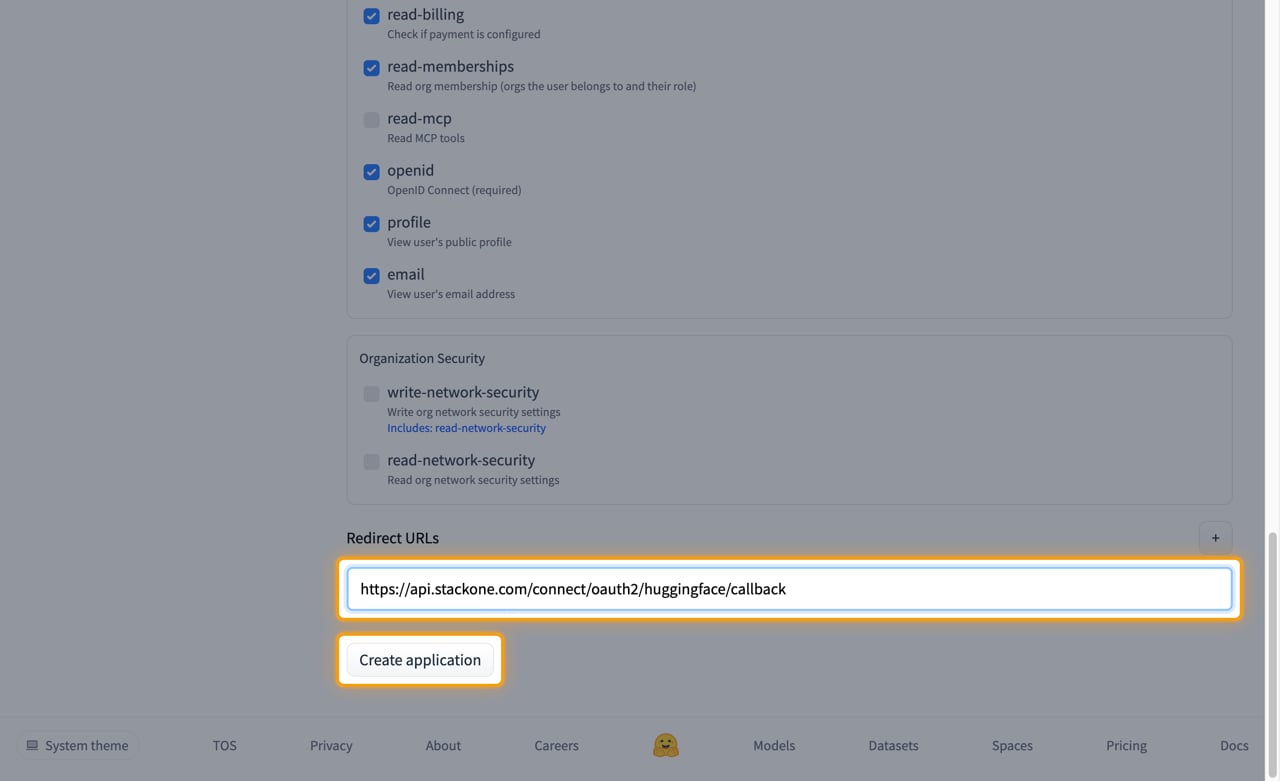
        <p>Under <strong>Redirect URLs</strong>, paste the StackOne callback URL exactly as shown, then click <strong>Create application</strong>.</p>

        <ul>
          <li>Callback URL: `https://api.stackone.com/connect/oauth2/huggingface/callback`</li>
          <li>The redirect URL must match exactly — Hugging Face rejects any mismatch.</li>
          <li>Use the <strong>+</strong> button beside <strong>Redirect URLs</strong> if you need to register more than one.</li>
        </ul>

        <img src="https://mintcdn.com/stackone-60/RT3ZGjUOVjGkKvM9/connectors/huggingface/images/oauth2-setup-redirect-url.png?fit=max&auto=format&n=RT3ZGjUOVjGkKvM9&q=85&s=4e5b3952db5058a052fcf99fd0cef2f7" alt="Redirect URLs field holding the StackOne callback URL, with the Create application button highlighted" width="1280" height="781" data-path="connectors/huggingface/images/oauth2-setup-redirect-url.png" />
      </div>
    </Step>

    <Step title="Copy the Client Secret">
      <div data-guide-step data-guide-scopes="" data-guide-display-scopes-list="">
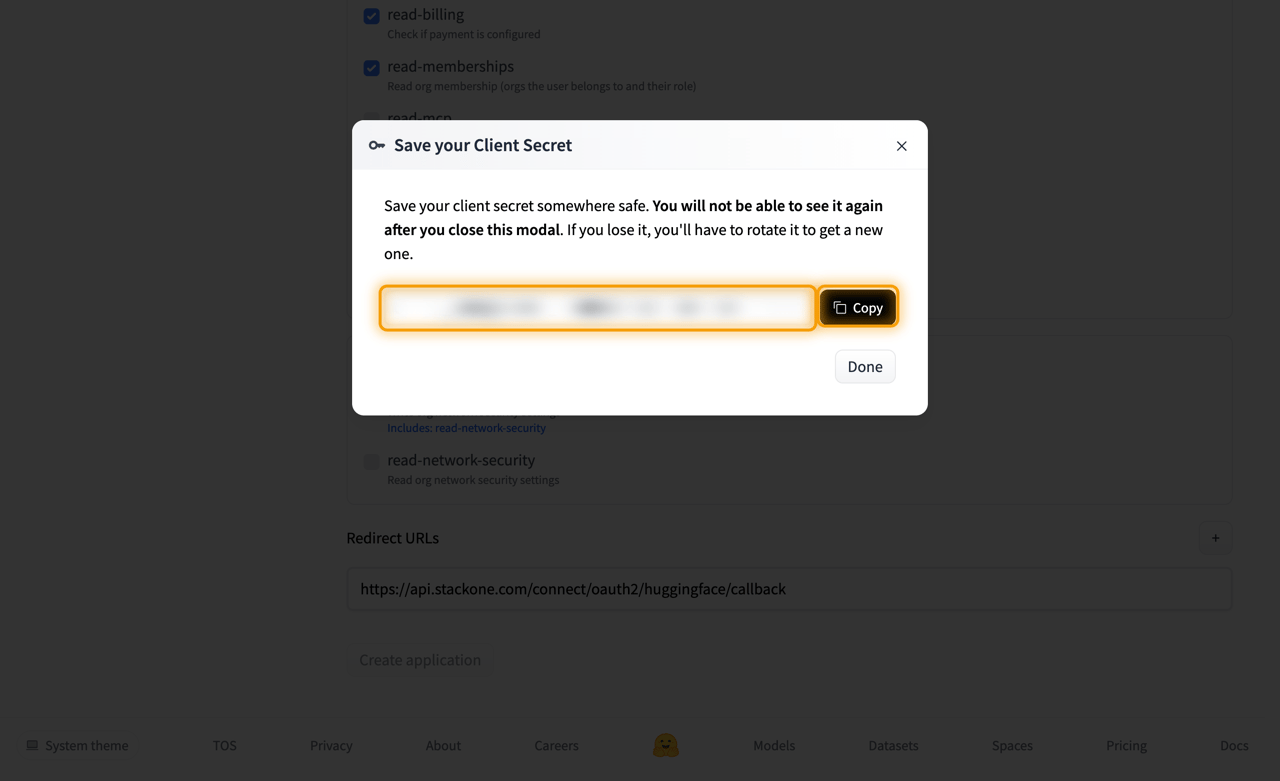
        <p>Hugging Face shows <strong>Save your Client Secret</strong> with the value and a <strong>Copy</strong> button. Copy it, then paste it into the <strong>Client Secret</strong> field in the StackOne Connector profile.</p>

        <ul>
          <li>The client secret is only displayed once and cannot be retrieved later — close the modal with <strong>Done</strong> only after you have copied it.</li>
          <li>If it is lost, use <strong>Rotate secret</strong> on the application's settings page to issue a new one.</li>
        </ul>

        <img src="https://mintcdn.com/stackone-60/RT3ZGjUOVjGkKvM9/connectors/huggingface/images/oauth2-setup-client-secret.png?fit=max&auto=format&n=RT3ZGjUOVjGkKvM9&q=85&s=2fcb643e69fc728775377ee5039d0e4a" alt="Save your Client Secret modal with the secret redacted and the Copy button highlighted" width="1280" height="781" data-path="connectors/huggingface/images/oauth2-setup-client-secret.png" />
      </div>
    </Step>

    <Step title="Copy the Client ID">
      <div data-guide-step data-guide-scopes="" data-guide-display-scopes-list="">
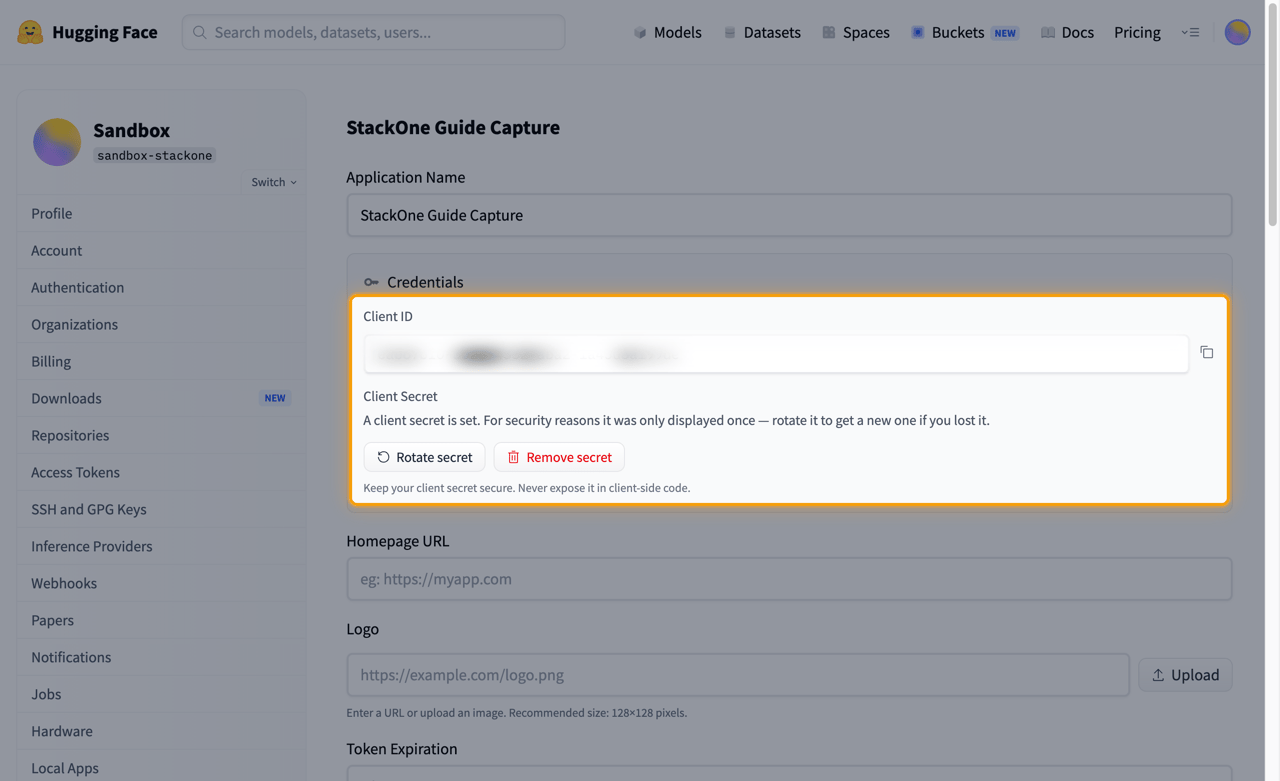
        <p>On the application's settings page, the <strong>Credentials</strong> panel shows <strong>Client ID</strong> with a copy button beside it. Copy it, then paste it into the <strong>Client ID</strong> field in the StackOne Connector profile.</p>

        <ul>
          <li>Under <strong>Client Secret</strong> the page states that a client secret is set and was only displayed once; <strong>Rotate secret</strong> issues a new one and <strong>Remove secret</strong> turns the application back into a public app.</li>
        </ul>

        <img src="https://mintcdn.com/stackone-60/RT3ZGjUOVjGkKvM9/connectors/huggingface/images/oauth2-setup-client-id.png?fit=max&auto=format&n=RT3ZGjUOVjGkKvM9&q=85&s=002cb753df888383cd1667b358565908" alt="Application settings Credentials panel with the Client ID redacted and the panel highlighted" width="1280" height="781" data-path="connectors/huggingface/images/oauth2-setup-client-id.png" />
      </div>
    </Step>
  </Steps>
</section>

<section data-guide-section data-guide-scopes="">
  <h2>Granting access to an organization</h2>

  <p>Scopes such as `read-repos` and `read-billing` also apply to organizations.</p>

  <ul>
    <li>The user chooses which of their organizations to grant access to during consent.</li>
    <li>Access to an organization's private repositories requires the user to select that organization at consent time.</li>
  </ul>
</section>

## Creating the StackOne Connector Profile

To create the Connector Profile in StackOne for <strong>Hugging Face</strong>:

<Steps>
  <Step title="Navigate to Connector Profiles">
    Login to StackOne and navigate to [Connector Profiles](https://app.stackone.com/connector_profiles)
  </Step>

  <Step title="Create New Connector Profile">
    <ul>
      <li>Click <strong>+ Connector Profile</strong></li>
      <li>Search for and select <strong>Hugging Face</strong></li>
      <li>Select <strong>Type</strong> as <strong>OAuth 2.0</strong></li>

      <li>
        Fill out the fields using details retrieved from your provider:

        <ul className="connector-guide-field-list">
          <li><strong>Client ID</strong></li>
          <li><strong>Client Secret</strong></li>
          <li><strong>Scopes</strong> (Optional)</li>
        </ul>
      </li>

      <li>(Optional) Select <strong>Actions</strong> to be enabled for this Connector Profile</li>
      <li>Click <strong>Create profile</strong></li>
    </ul>
  </Step>
</Steps>

Congratulations! The new Connector Profile will now show up in your project ready to be used. You can now continue to <a href="/connect/managing-connectors/linking-accounts">Link Accounts</a> for <strong>Hugging Face</strong>.