> ## Documentation Index
> Fetch the complete documentation index at: https://docs.stackone.com/llms.txt
> Use this file to discover all available pages before exploring further.

# GitLab Webhook Setup Guide

> Configure GitLab to deliver events to StackOne.

## Prerequisites

The connector should already be set up, with a Connector Profile and a Linked Account. See [Getting Started](/connectors/gitlab#getting-started) on the GitLab connector page.

<section data-guide-section data-guide-scopes="">
  <h2>Connect GitLab webhooks</h2>

  <p>GitLab sends events to StackOne through a webhook added in each project. Paste the StackOne Native Webhook URL into a new project webhook and select the triggers you want to receive.</p>

  <Steps>
    <Step title="Retrieve StackOne Native Webhook URL">
      <div data-guide-step data-guide-scopes="" data-guide-display-scopes-list="">
        <p>The <strong>Native Webhook URL</strong> is generated once an account has been linked.</p>

        <ul>
          <li>Open the linked account in StackOne.</li>
          <li>Copy the value from <strong>Native Webhook URL</strong>.</li>
        </ul>
      </div>
    </Step>

    <Step title="Open the project webhook settings">
      <div data-guide-step data-guide-scopes="" data-guide-display-scopes-list="">
        <p>Sign in to your <a href="https://gitlab.com/users/sign_in" target="_blank" rel="noopener noreferrer">GitLab account</a> and open the project you want to receive events from.</p>

        <ul>
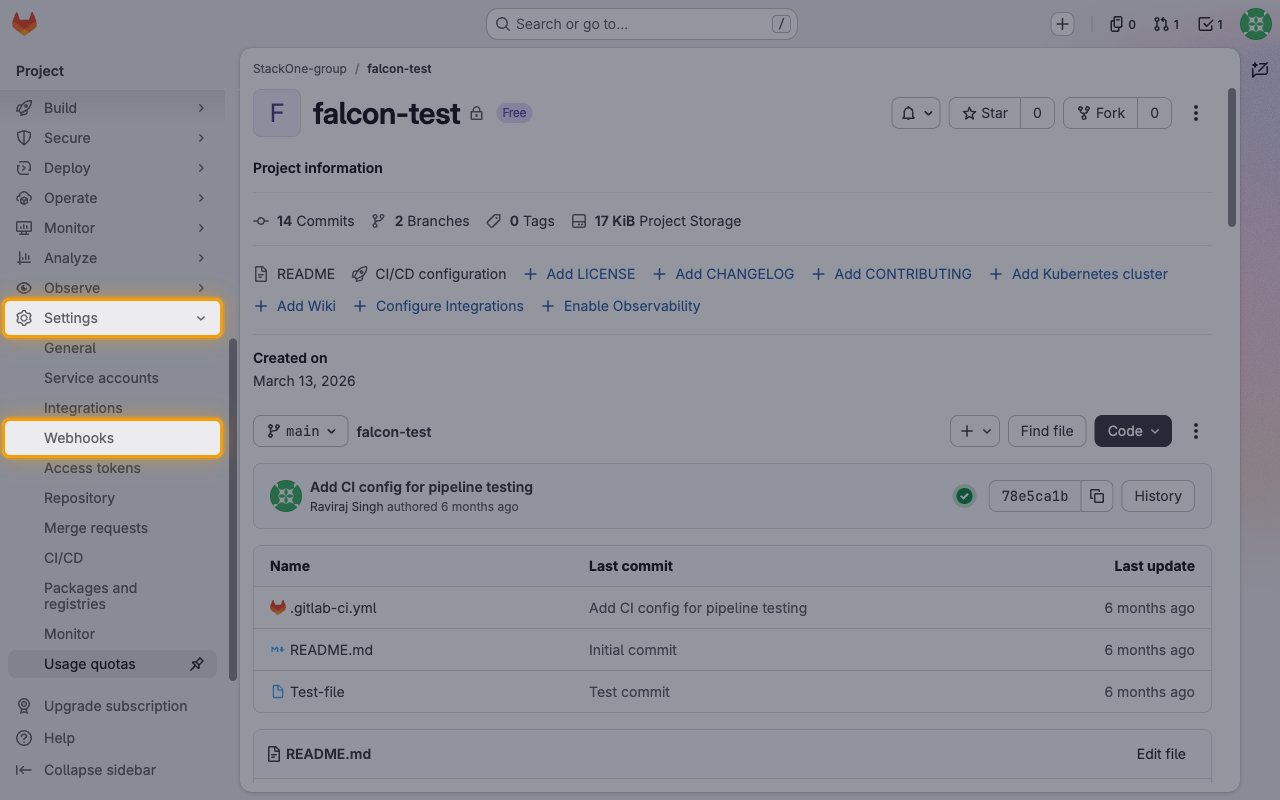
          <li>In the left sidebar, select <strong>Settings</strong> > <strong>Webhooks</strong>.</li>
        </ul>

        <img src="https://mintcdn.com/stackone-60/7ZQSeSQo1RxZCE9Q/connectors/gitlab/images/events-open-webhooks.png?fit=max&auto=format&n=7ZQSeSQo1RxZCE9Q&q=85&s=70eea34abd282ccb9201d1a7c3ebc44c" alt="The GitLab project sidebar with Settings expanded and Webhooks highlighted" width="1280" height="800" data-path="connectors/gitlab/images/events-open-webhooks.png" />
      </div>
    </Step>

    <Step title="Add a new webhook">
      <div data-guide-step data-guide-scopes="" data-guide-display-scopes-list="">
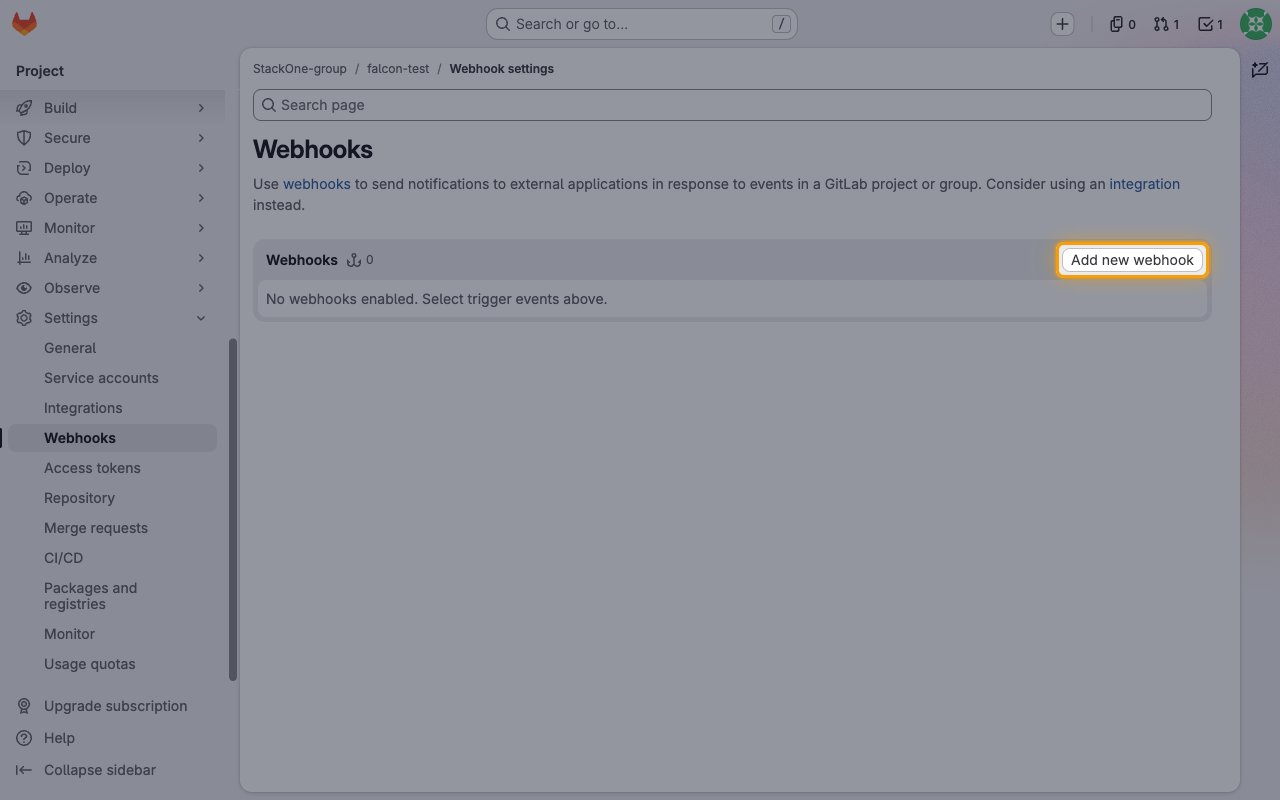
        <p>On the <strong>Webhooks</strong> page, click <strong>Add new webhook</strong>.</p>

        <img src="https://mintcdn.com/stackone-60/7ZQSeSQo1RxZCE9Q/connectors/gitlab/images/events-add-new-webhook.png?fit=max&auto=format&n=7ZQSeSQo1RxZCE9Q&q=85&s=191a2abc5463ec54d75fd3e6087faf15" alt="The GitLab Webhooks page with the Add new webhook button highlighted" width="1280" height="800" data-path="connectors/gitlab/images/events-add-new-webhook.png" />
      </div>
    </Step>

    <Step title="Paste the Native Webhook URL">
      <div data-guide-step data-guide-scopes="" data-guide-display-scopes-list="">
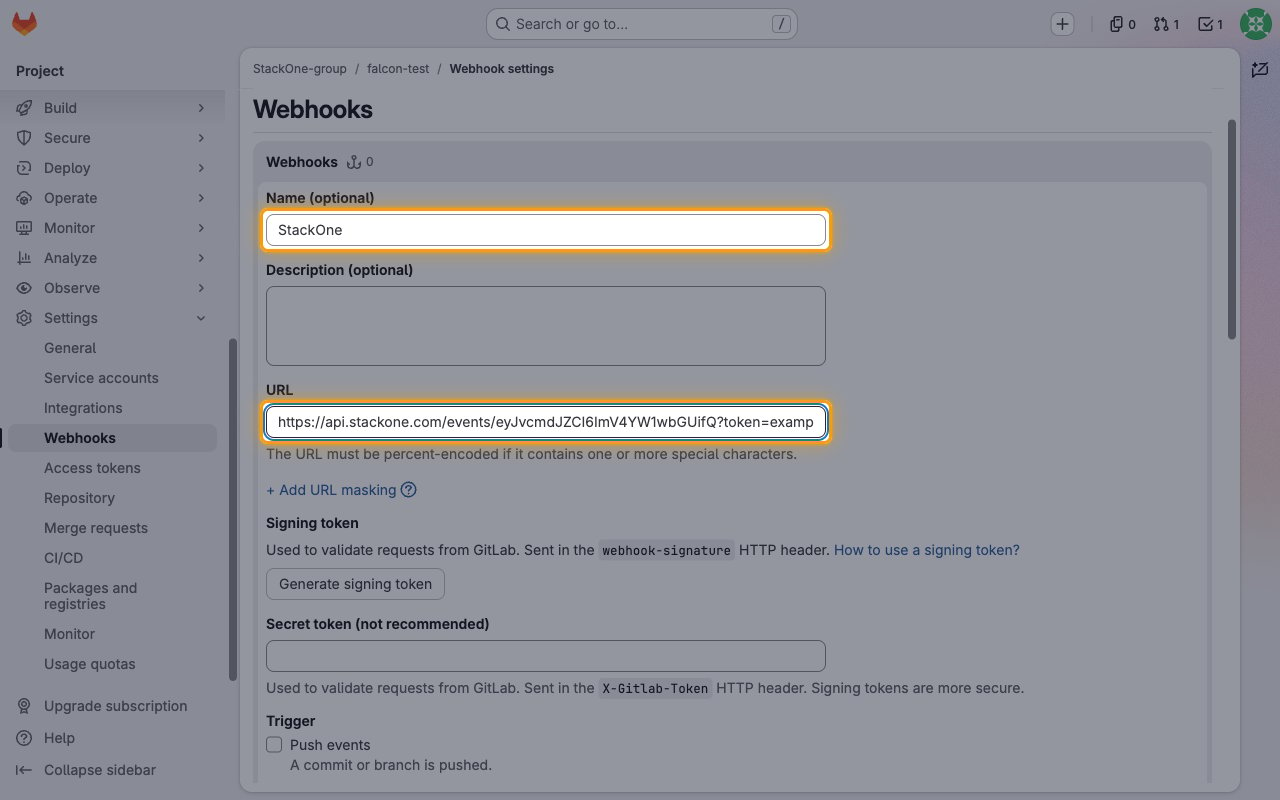
        <p>Fill in the webhook details.</p>

        <ul>
          <li><strong>Name (optional)</strong>: enter a name such as `StackOne`.</li>
          <li><strong>URL</strong>: paste the StackOne Native Webhook URL.</li>
          <li>Leave <strong>Signing token</strong> and <strong>Secret token (not recommended)</strong> empty. StackOne does not verify them.</li>
        </ul>

        <img src="https://mintcdn.com/stackone-60/7ZQSeSQo1RxZCE9Q/connectors/gitlab/images/events-webhook-url.png?fit=max&auto=format&n=7ZQSeSQo1RxZCE9Q&q=85&s=9d5bd0d8576a66046c3304a2d98c3b78" alt="The Add new webhook form with the Name and URL fields highlighted" width="1280" height="800" data-path="connectors/gitlab/images/events-webhook-url.png" />
      </div>
    </Step>

    <Step title="Select the triggers">
      <div data-guide-step data-guide-scopes="" data-guide-display-scopes-list="">
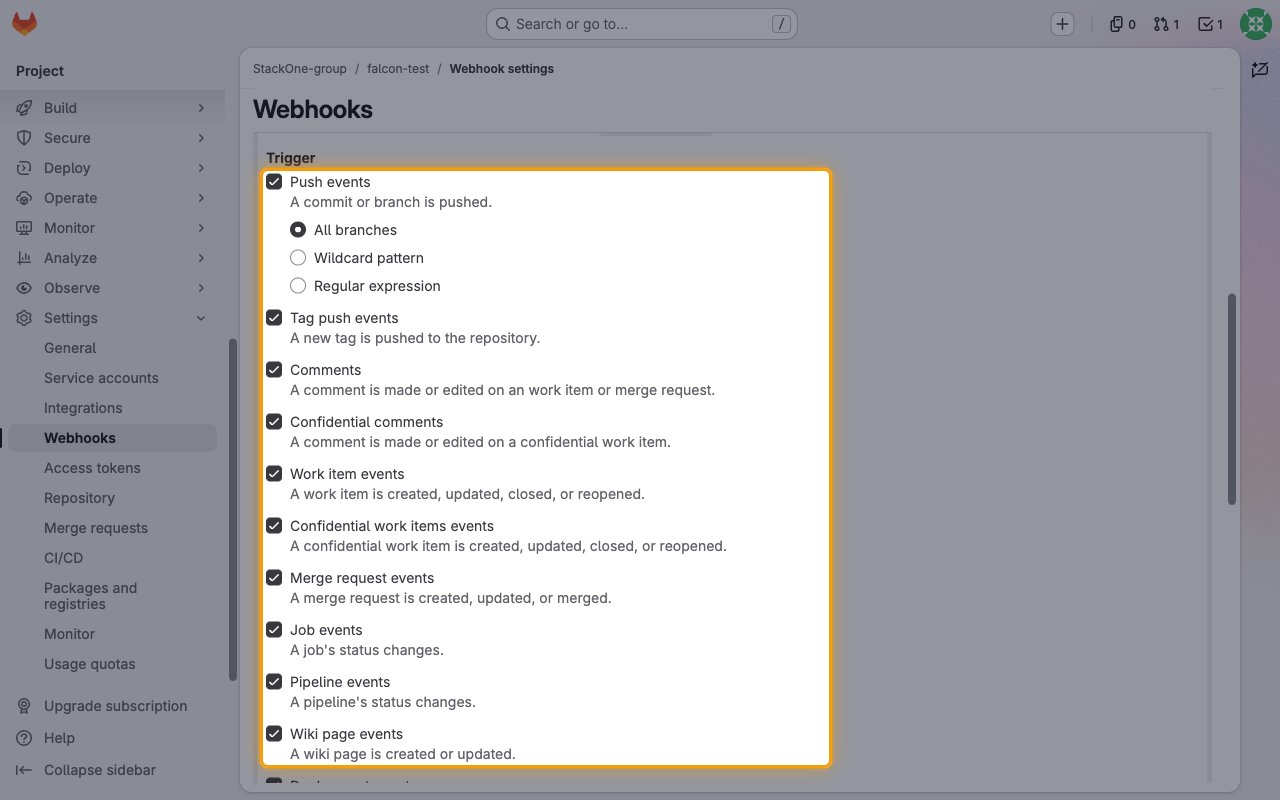
        <p>Under <strong>Trigger</strong>, tick the events you want StackOne to receive. See <strong>Available webhook events</strong> below for the events each trigger sends.</p>

        <ul>
          <li>For <strong>Push events</strong>, keep <strong>All branches</strong> selected to receive pushes to every branch.</li>
        </ul>

        <img src="https://mintcdn.com/stackone-60/7ZQSeSQo1RxZCE9Q/connectors/gitlab/images/events-select-triggers.png?fit=max&auto=format&n=7ZQSeSQo1RxZCE9Q&q=85&s=f133e2416a0779a2b247b49b082e2bce" alt="The Trigger checkboxes of the Add new webhook form, all ticked" width="1280" height="800" data-path="connectors/gitlab/images/events-select-triggers.png" />
      </div>
    </Step>

    <Step title="Save the webhook">
      <div data-guide-step data-guide-scopes="" data-guide-display-scopes-list="">
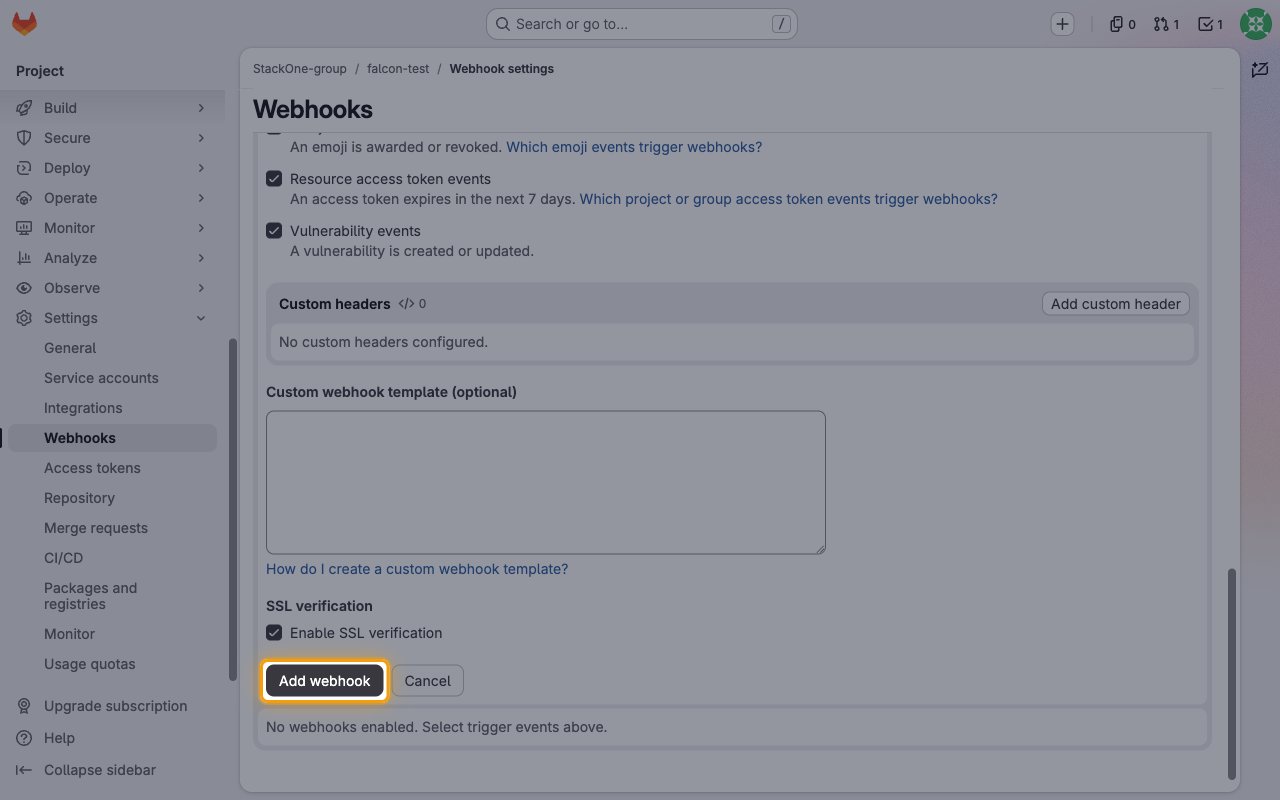
        <p>Keep <strong>Enable SSL verification</strong> ticked and click <strong>Add webhook</strong>.</p>

        <img src="https://mintcdn.com/stackone-60/7ZQSeSQo1RxZCE9Q/connectors/gitlab/images/events-add-webhook.png?fit=max&auto=format&n=7ZQSeSQo1RxZCE9Q&q=85&s=ce6ef813cf975afbef6aafcafedc61f8" alt="The bottom of the webhook form with the Add webhook button highlighted" width="1280" height="800" data-path="connectors/gitlab/images/events-add-webhook.png" />
      </div>
    </Step>

    <Step title="Test the webhook">
      <div data-guide-step data-guide-scopes="" data-guide-display-scopes-list="">
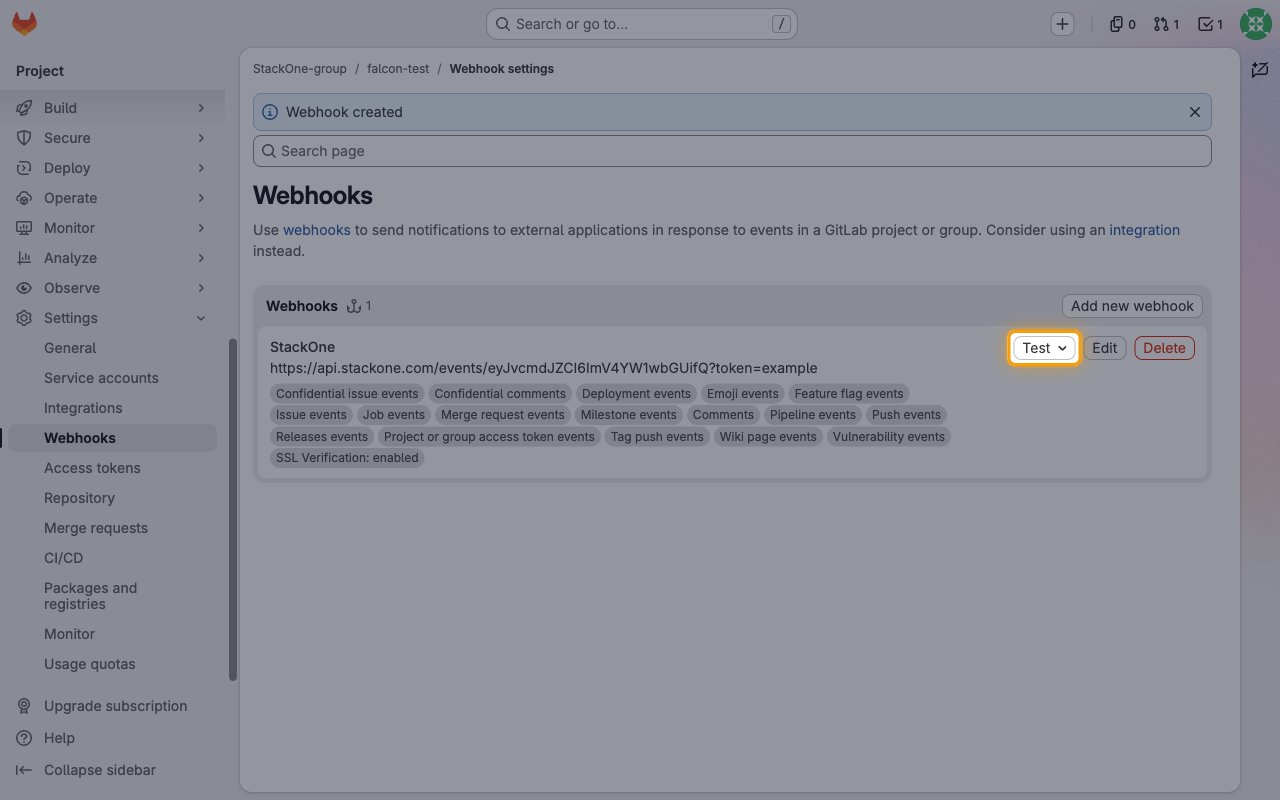
        <p>GitLab shows <strong>Webhook created</strong> and lists the new webhook. Use the <strong>Test</strong> menu on the webhook to send a sample event for a trigger and confirm that it reaches StackOne.</p>

        <img src="https://mintcdn.com/stackone-60/7ZQSeSQo1RxZCE9Q/connectors/gitlab/images/events-test-webhook.png?fit=max&auto=format&n=7ZQSeSQo1RxZCE9Q&q=85&s=ffa00697892ae5432d5da50ecc0ba95a" alt="The GitLab webhook list showing the new StackOne webhook with the Test menu highlighted" width="1280" height="800" data-path="connectors/gitlab/images/events-test-webhook.png" />
      </div>
    </Step>
  </Steps>
</section>

<section data-guide-section data-guide-scopes="">
  <h2>Available webhook events</h2>

  <p>The following GitLab events are supported. GitLab only sends the events whose trigger is ticked on the webhook, and StackOne only delivers the events you enable in StackOne.</p>

  <Steps>
    <Step title="Code events">
      <div data-guide-step data-guide-scopes="" data-guide-display-scopes-list="">
        <p>Events for pushes and tags. Enable <strong>Push events</strong> and <strong>Tag push events</strong>.</p>

        <ul>
          <li><strong>Push</strong> (`push`) — Fired when commits are pushed to a branch of a project</li>
          <li><strong>Tag Push</strong> (`tag_push`) — Fired when a tag is created or deleted in a project</li>
        </ul>
      </div>
    </Step>

    <Step title="Work item and issue events">
      <div data-guide-step data-guide-scopes="" data-guide-display-scopes-list="">
        <p>Events for issues and other work items. Enable <strong>Work item events</strong> (and <strong>Confidential work items events</strong> for confidential ones).</p>

        <ul>
          <li><strong>Issue Opened</strong> (`issue.open`) — Fired when an issue is opened in a project</li>
          <li><strong>Issue Closed</strong> (`issue.close`) — Fired when an issue is closed in a project</li>
          <li><strong>Issue Reopened</strong> (`issue.reopen`) — Fired when an issue is reopened in a project</li>
          <li><strong>Issue Updated</strong> (`issue.update`) — Fired when an issue is edited in a project</li>
          <li><strong>Work Item Opened</strong> (`work_item.open`) — Fired when a work item such as a task or epic is opened</li>
          <li><strong>Work Item Closed</strong> (`work_item.close`) — Fired when a work item such as a task or epic is closed</li>
          <li><strong>Work Item Reopened</strong> (`work_item.reopen`) — Fired when a work item such as a task or epic is reopened</li>
          <li><strong>Work Item Updated</strong> (`work_item.update`) — Fired when a work item such as a task or epic is edited</li>
        </ul>
      </div>
    </Step>

    <Step title="Merge request events">
      <div data-guide-step data-guide-scopes="" data-guide-display-scopes-list="">
        <p>Events for the merge request lifecycle and approvals. Enable <strong>Merge request events</strong>.</p>

        <ul>
          <li><strong>Merge Request Opened</strong> (`merge_request.open`) — Fired when a merge request is opened</li>
          <li><strong>Merge Request Closed</strong> (`merge_request.close`) — Fired when a merge request is closed without merging</li>
          <li><strong>Merge Request Reopened</strong> (`merge_request.reopen`) — Fired when a merge request is reopened</li>
          <li><strong>Merge Request Updated</strong> (`merge_request.update`) — Fired when a merge request is updated</li>
          <li><strong>Merge Request Merged</strong> (`merge_request.merge`) — Fired when a merge request is merged</li>
          <li><strong>Merge Request Approval Added</strong> (`merge_request.approval`) — Fired when a merge request is approved by one approver</li>
          <li><strong>Merge Request Approved</strong> (`merge_request.approved`) — Fired when a merge request is fully approved</li>
          <li><strong>Merge Request Approval Removed</strong> (`merge_request.unapproval`) — Fired when a merge request is unapproved by one approver</li>
          <li><strong>Merge Request Unapproved</strong> (`merge_request.unapproved`) — Fired when a merge request is no longer fully approved</li>
        </ul>
      </div>
    </Step>

    <Step title="Comment and reaction events">
      <div data-guide-step data-guide-scopes="" data-guide-display-scopes-list="">
        <p>Events for comments and emoji reactions. Enable <strong>Comments</strong>, <strong>Confidential comments</strong> and <strong>Emoji events</strong>.</p>

        <ul>
          <li><strong>Comment Created</strong> (`note.create`) — Fired when a comment is created on a commit, merge request, issue or snippet</li>
          <li><strong>Comment Updated</strong> (`note.update`) — Fired when a comment is updated on a commit, merge request, issue or snippet</li>
          <li><strong>Emoji Reaction Awarded</strong> (`emoji.award`) — Fired when an emoji reaction is added to an issue, merge request, snippet or comment</li>
          <li><strong>Emoji Reaction Revoked</strong> (`emoji.revoke`) — Fired when an emoji reaction is removed from an issue, merge request, snippet or comment</li>
        </ul>
      </div>
    </Step>

    <Step title="CI/CD and deployment events">
      <div data-guide-step data-guide-scopes="" data-guide-display-scopes-list="">
        <p>Events for pipelines, jobs, deployments and feature flags. Enable <strong>Pipeline events</strong>, <strong>Job events</strong>, <strong>Deployment events</strong> and <strong>Feature flag events</strong>.</p>

        <ul>
          <li><strong>Pipeline Status Changed</strong> (`pipeline`) — Fired when a pipeline is created or its status changes</li>
          <li><strong>Job Status Changed</strong> (`build`) — Fired when a CI/CD job is created or its status changes</li>
          <li><strong>Deployment Status Changed</strong> (`deployment`) — Fired when a deployment starts, succeeds, fails, is canceled or is approved or rejected</li>
          <li><strong>Feature Flag Toggled</strong> (`feature_flag`) — Fired when a feature flag is turned on or off</li>
        </ul>
      </div>
    </Step>

    <Step title="Release, milestone and wiki events">
      <div data-guide-step data-guide-scopes="" data-guide-display-scopes-list="">
        <p>Events for releases, milestones and wiki pages. Enable <strong>Releases events</strong>, <strong>Milestone events</strong> and <strong>Wiki page events</strong>.</p>

        <ul>
          <li><strong>Release Created</strong> (`release.create`) — Fired when a release is created in a project</li>
          <li><strong>Release Updated</strong> (`release.update`) — Fired when a release is updated in a project</li>
          <li><strong>Release Deleted</strong> (`release.delete`) — Fired when a release is deleted in a project</li>
          <li><strong>Milestone Created</strong> (`milestone.create`) — Fired when a project milestone is created</li>
          <li><strong>Milestone Closed</strong> (`milestone.close`) — Fired when a project milestone is closed</li>
          <li><strong>Milestone Reopened</strong> (`milestone.reopen`) — Fired when a project milestone is reopened</li>
          <li><strong>Milestone Deleted</strong> (`milestone.delete`) — Fired when a project milestone is deleted</li>
          <li><strong>Wiki Page Created</strong> (`wiki_page.create`) — Fired when a project wiki page is created</li>
          <li><strong>Wiki Page Updated</strong> (`wiki_page.update`) — Fired when a project wiki page is updated</li>
          <li><strong>Wiki Page Deleted</strong> (`wiki_page.delete`) — Fired when a project wiki page is deleted</li>
        </ul>
      </div>
    </Step>

    <Step title="Security events">
      <div data-guide-step data-guide-scopes="" data-guide-display-scopes-list="">
        <p>Events for expiring access tokens and vulnerabilities. Enable <strong>Resource access token events</strong> and <strong>Vulnerability events</strong> (Ultimate only).</p>

        <ul>
          <li><strong>Access Token Expiring</strong> (`access_token.expiring_access_token`) — Fired when a project or group access token is about to expire</li>
          <li><strong>Vulnerability Created or Updated</strong> (`vulnerability`) — Fired when a vulnerability is created or its state or details change</li>
        </ul>
      </div>
    </Step>

    <Step title="Group-only events">
      <div data-guide-step data-guide-scopes="" data-guide-display-scopes-list="">
        <p>Sent only by group webhooks (GitLab Premium or Ultimate), on the group's <strong>Settings</strong> > <strong>Webhooks</strong> page.</p>

        <ul>
          <li><strong>Group Member Added</strong> (`user_add_to_group`) — Fired when a user is added to the group</li>
          <li><strong>Group Member Updated</strong> (`user_update_for_group`) — Fired when a group member access level or expiry changes</li>
          <li><strong>Group Member Removed</strong> (`user_remove_from_group`) — Fired when a user is removed from the group</li>
          <li><strong>Group Access Requested</strong> (`user_access_request_to_group`) — Fired when a user requests access to the group</li>
          <li><strong>Group Access Request Denied</strong> (`user_access_request_denied_for_group`) — Fired when a group access request is denied</li>
          <li><strong>Group Project Created</strong> (`project_create`) — Fired when a project is created in the group</li>
          <li><strong>Group Project Deleted</strong> (`project_destroy`) — Fired when a project is deleted in the group</li>
          <li><strong>Subgroup Created</strong> (`subgroup_create`) — Fired when a subgroup is created in the group</li>
          <li><strong>Subgroup Deleted</strong> (`subgroup_destroy`) — Fired when a subgroup is deleted in the group</li>
        </ul>
      </div>
    </Step>
  </Steps>
</section>

<section data-guide-section data-guide-scopes="">
  <h2>Delivery format</h2>

  <p>Details of how GitLab delivers events to StackOne.</p>

  <Steps>
    <Step title="One event per request">
      <div data-guide-step data-guide-scopes="" data-guide-display-scopes-list="">
        <p>Each request carries a single JSON event. GitLab retries a delivery that times out, so the same event can arrive more than once. Each event carries the ID of the affected record (for example the issue IID or the pipeline ID).</p>
      </div>
    </Step>

    <Step title="Failing deliveries disable the webhook">
      <div data-guide-step data-guide-scopes="" data-guide-display-scopes-list="">
        <p>GitLab marks a webhook as temporarily disabled after 4 consecutive failed deliveries and disables it after 40. StackOne answers every delivery with 200, including event types it does not handle, so the webhook stays enabled.</p>
      </div>
    </Step>
  </Steps>
</section>

## Verify

Your Connector should now be able to receive and process events. Try triggering an event and you should see an Event appear in the Connector logs.


This documentation is built and hosted on [Mintlify](https://mintlify.com), a developer documentation platform.