> ## Documentation Index
> Fetch the complete documentation index at: https://docs.stackone.com/llms.txt
> Use this file to discover all available pages before exploring further.

# EasyLlama Webhook Setup Guide

> Configure EasyLlama to deliver events to StackOne.

## Prerequisites

The connector should already be set up, with a Connector Profile and a Linked Account. See [Getting Started](/connectors/easyllama#getting-started) on the EasyLlama connector page.

<section data-guide-section data-guide-scopes="">
  <h2>Copy your Native Webhook URL</h2>

  <p>Before configuring EasyLlama, copy the <strong>Native Webhook URL</strong> shown on this connection in StackOne Hub. This is the address EasyLlama will POST every event to. You will paste it into the <strong>Url</strong> field when you configure the Webhooks integration in the next steps.</p>
</section>

<section data-guide-section data-guide-scopes="">
  <h2>Open the Webhooks integration in EasyLlama</h2>

  <p>Sign in to the EasyLlama admin dashboard and open the Webhooks integration.</p>

  <Steps>
    <Step title="Sign in to EasyLlama">
      <div data-guide-step data-guide-scopes="" data-guide-display-scopes-list="">
        <p>Sign in to the <a href="https://dashboard.easyllama.com" target="_blank" rel="noopener noreferrer">EasyLlama admin dashboard</a> with a Dashboard Admin account, and select the account you want to connect.</p>
      </div>
    </Step>

    <Step title="Open Integrations">
      <div data-guide-step data-guide-scopes="" data-guide-display-scopes-list="">
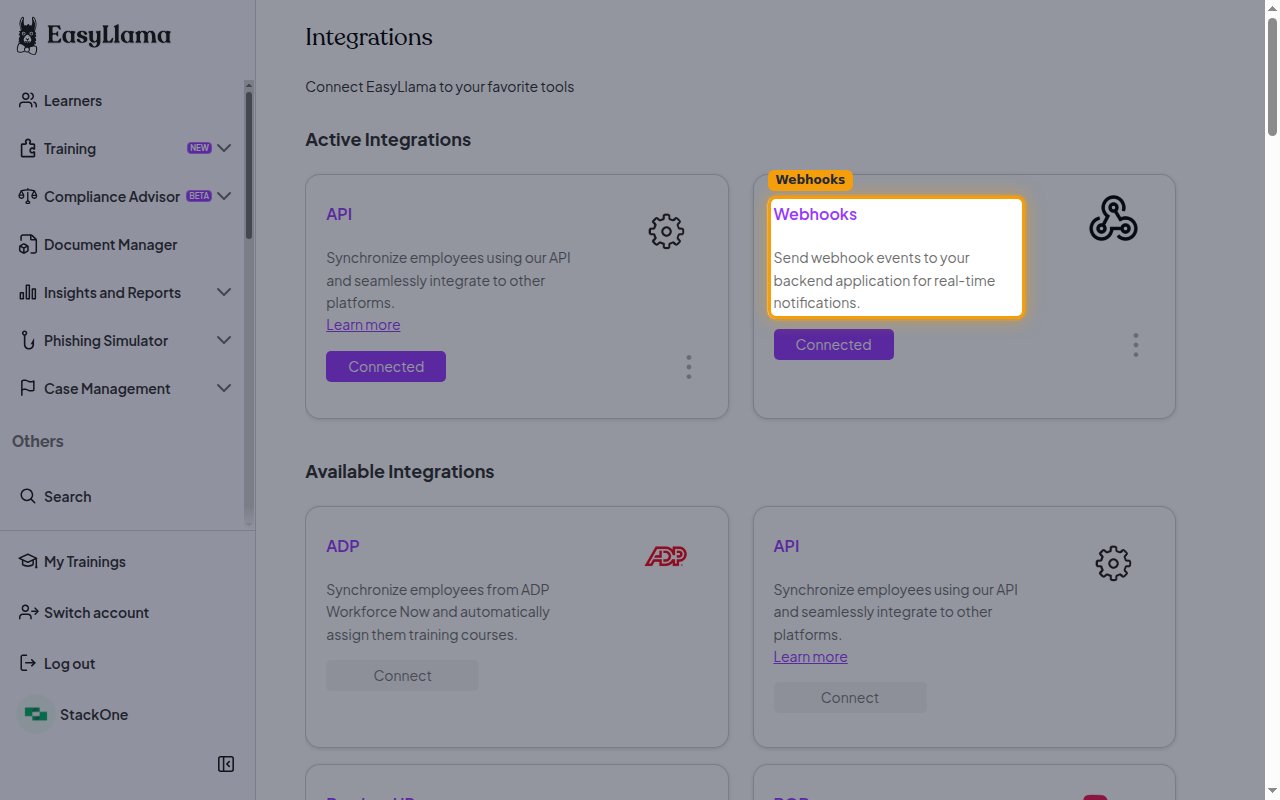
        <p>In the left navigation under <strong>Others</strong>, open <strong>Settings</strong>, then click <strong>Integrations</strong>. The Integrations page lists your active and available integrations.</p>
      </div>
    </Step>

    <Step title="Open the Webhooks tile">
      <div data-guide-step data-guide-scopes="" data-guide-display-scopes-list="">
        <p>Under <strong>Active Integrations</strong>, find the <strong>Webhooks</strong> tile. If it is not connected yet, click <strong>Connect</strong> on the tile; if it is already connected, open its menu and click <strong>Settings</strong>. Either opens the <strong>Webhooks Settings</strong> screen.</p>

        <img src="https://mintcdn.com/stackone-60/yXlVTLcD6Q2JasB6/connectors/easyllama/images/events-webhooks-tile.png?fit=max&auto=format&n=yXlVTLcD6Q2JasB6&q=85&s=90ebf7192d26e4452ceef17202d473b3" alt="The Integrations page with the Webhooks tile under Active Integrations." width="1280" height="800" data-path="connectors/easyllama/images/events-webhooks-tile.png" />
      </div>
    </Step>
  </Steps>
</section>

<section data-guide-section data-guide-scopes="">
  <h2>Configure the webhook</h2>

  <p>On the <strong>Webhooks Settings</strong> screen, enter the destination URL and choose the events to send.</p>

  <Steps>
    <Step title="Paste the Native Webhook URL">
      <div data-guide-step data-guide-scopes="" data-guide-display-scopes-list="">
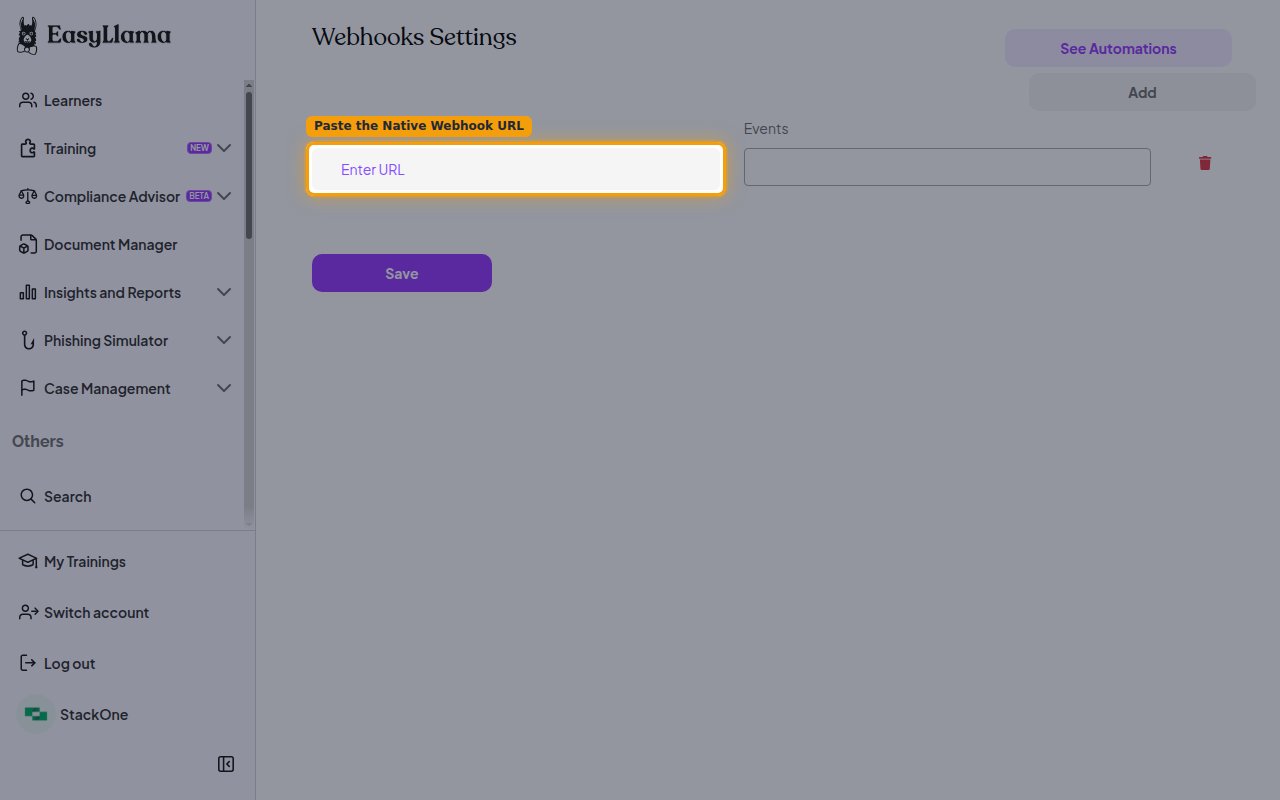
        <p>In the <strong>Url</strong> field, paste the <strong>Native Webhook URL</strong> you copied from StackOne Hub.</p>

        <img src="https://mintcdn.com/stackone-60/yXlVTLcD6Q2JasB6/connectors/easyllama/images/events-webhook-url.png?fit=max&auto=format&n=yXlVTLcD6Q2JasB6&q=85&s=29cc1491883711cd7d7569a1b13e065c" alt="The Webhooks Settings screen with the Url field where the Native Webhook URL is pasted." width="1280" height="800" data-path="connectors/easyllama/images/events-webhook-url.png" />
      </div>
    </Step>

    <Step title="Select the events">
      <div data-guide-step data-guide-scopes="" data-guide-display-scopes-list="">
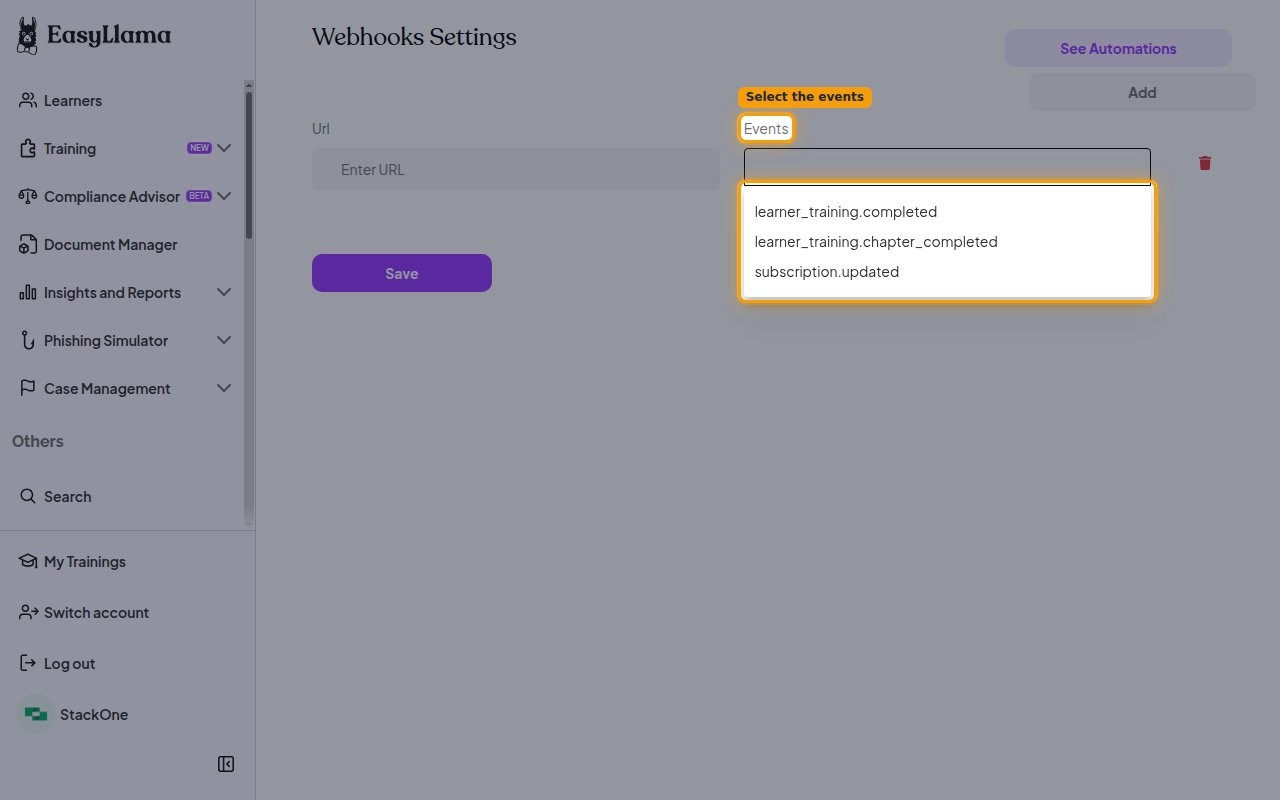
        <p>Click the <strong>Events</strong> field and select the events to subscribe to — <strong>learner\_training.completed</strong>, <strong>learner\_training.chapter\_completed</strong> and <strong>subscription.updated</strong>. Only the events you select here are delivered to StackOne.</p>

        <img src="https://mintcdn.com/stackone-60/yXlVTLcD6Q2JasB6/connectors/easyllama/images/events-webhook-events.png?fit=max&auto=format&n=yXlVTLcD6Q2JasB6&q=85&s=1bab533aea0b6920ded0fdaea3c354e2" alt="The Events picker on the Webhooks Settings screen showing the available events." width="1280" height="800" data-path="connectors/easyllama/images/events-webhook-events.png" />
      </div>
    </Step>

    <Step title="Save the webhook">
      <div data-guide-step data-guide-scopes="" data-guide-display-scopes-list="">
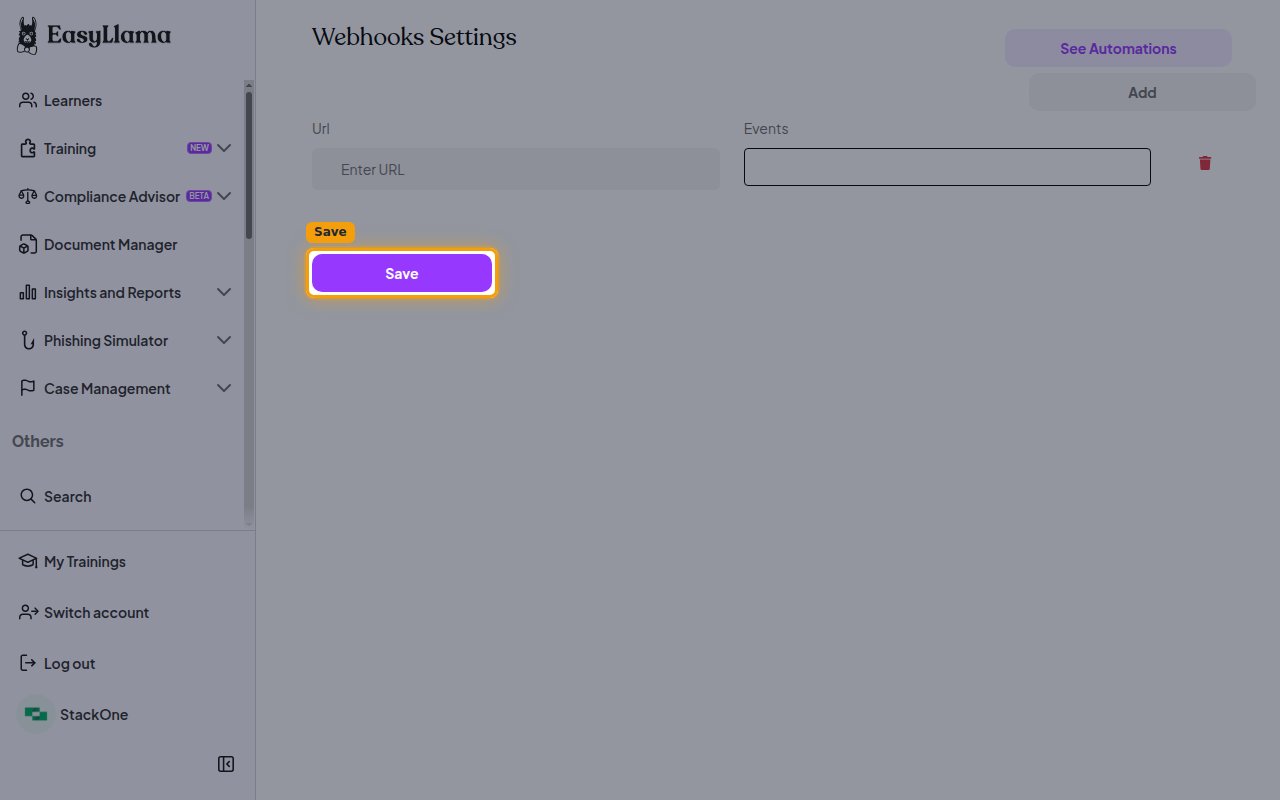
        <p>Click <strong>Save</strong> to store the webhook configuration. EasyLlama will begin sending the selected events to the Native Webhook URL.</p>

        <img src="https://mintcdn.com/stackone-60/yXlVTLcD6Q2JasB6/connectors/easyllama/images/events-webhook-save.png?fit=max&auto=format&n=yXlVTLcD6Q2JasB6&q=85&s=79940f16b355dfbc87e1db1210408cb2" alt="The Webhooks Settings screen with the Save button." width="1280" height="800" data-path="connectors/easyllama/images/events-webhook-save.png" />
      </div>
    </Step>
  </Steps>
</section>

<section data-guide-section data-guide-scopes="">
  <h2>Available webhook events</h2>

  <p>The following EasyLlama events can be enabled. Only events selected in the Webhooks Settings screen are delivered to StackOne.</p>

  <Steps>
    <Step title="Training events">
      <div data-guide-step data-guide-scopes="" data-guide-display-scopes-list="">
        <p>Events related to a learner's progress through a training course.</p>

        <ul>
          <li><strong>Chapter Completed</strong> (`learner_training.chapter_completed`) — Fired when a learner completes a chapter within a course</li>
          <li><strong>Training Completed</strong> (`learner_training.completed`) — Fired when a learner completes an entire course</li>
        </ul>
      </div>
    </Step>

    <Step title="Subscription events">
      <div data-guide-step data-guide-scopes="" data-guide-display-scopes-list="">
        <p>Events related to changes in your EasyLlama subscription.</p>

        <ul>
          <li><strong>Subscription Updated</strong> (`subscription.updated`) — Fired when your EasyLlama subscription changes</li>
        </ul>
      </div>
    </Step>
  </Steps>
</section>

<section data-guide-section data-guide-scopes="">
  <h2>Delivery format</h2>

  <p>Details of how EasyLlama delivers events to StackOne.</p>

  <Steps>
    <Step title="One event per request">
      <div data-guide-step data-guide-scopes="" data-guide-display-scopes-list="">
        <p>Each request carries a single event as a flat JSON payload containing the training record and an <strong>event</strong> field naming the event type. EasyLlama does not batch multiple events into one request and does not sign deliveries, so the unguessable Native Webhook URL is what keeps the endpoint secure.</p>
      </div>
    </Step>
  </Steps>
</section>

## Verify

Your Connector should now be able to receive and process events. Try triggering an event and you should see an Event appear in the Connector logs.


This documentation is built and hosted on [Mintlify](https://mintlify.com), a developer documentation platform.