> ## Documentation Index
> Fetch the complete documentation index at: https://docs.stackone.com/llms.txt
> Use this file to discover all available pages before exploring further.
# Chargebee Webhook Setup Guide
> Configure Chargebee to deliver events to StackOne.
## Prerequisites
The connector should already be set up, with a Connector Profile and a Linked Account. See [Getting Started](/connectors/chargebee#getting-started) on the Chargebee connector page.
Copy your Native Webhook URL
Before configuring Chargebee, copy the Native Webhook URL from this connection in StackOne. This is the address Chargebee will POST events to. You will paste it into the Webhook URL field when you add the webhook in the next steps.
The Native Webhook URL is a computed field on the linked account. It is generated once the account has been linked. Keep it private — the URL includes a delivery token.
- Open the linked account in StackOne.
- Copy the value from Native Webhook URL.
Add the webhook in Chargebee
Chargebee webhooks are configured per site under Configure Chargebee. Make sure you are on the correct site (a test site for testing, your live site for production) before you begin.
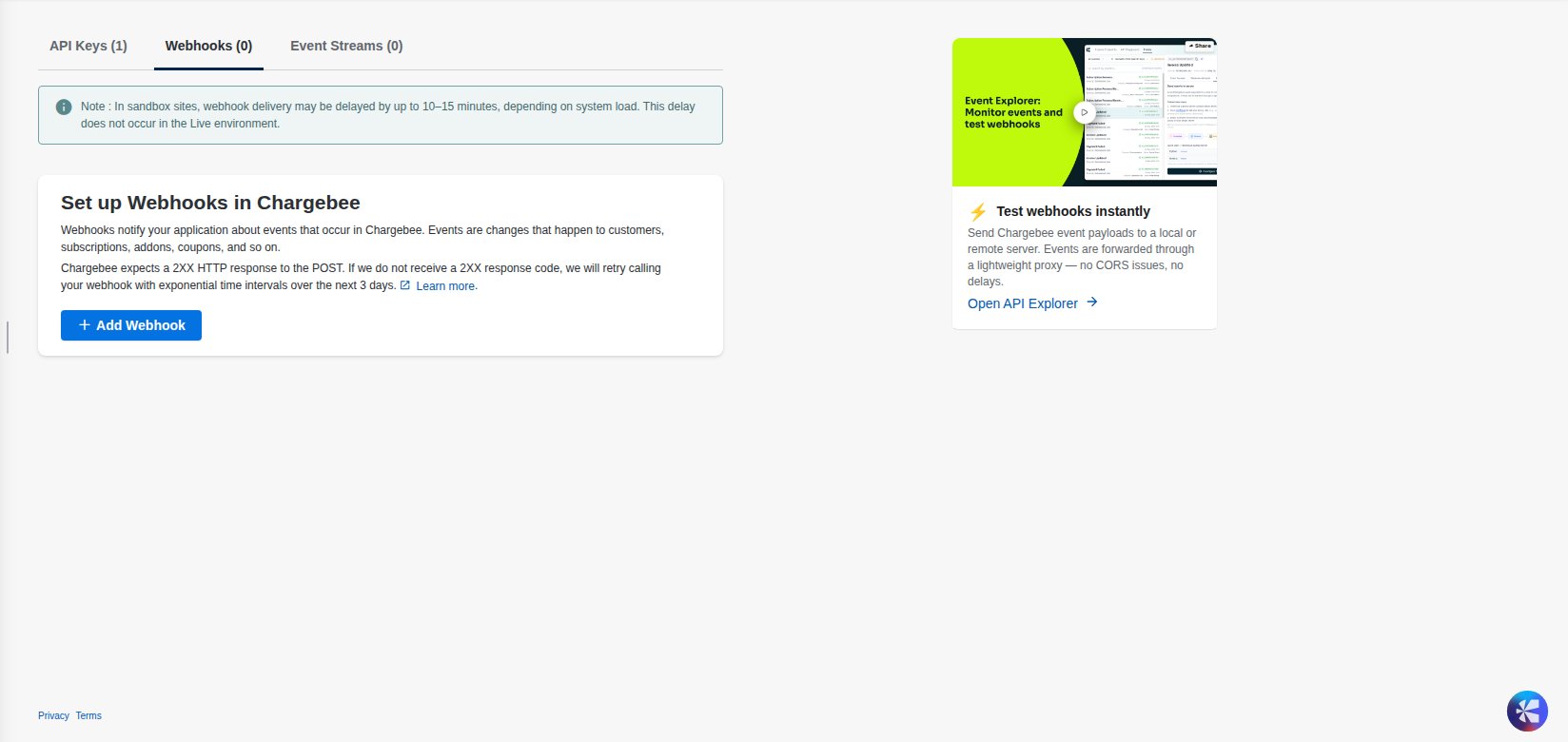
Sign in to your Chargebee site, then in the left sidebar open Settings and select Configure Chargebee. On the Configure Chargebee page open API Keys and Events, then select the Webhooks tab and click Add Webhook.
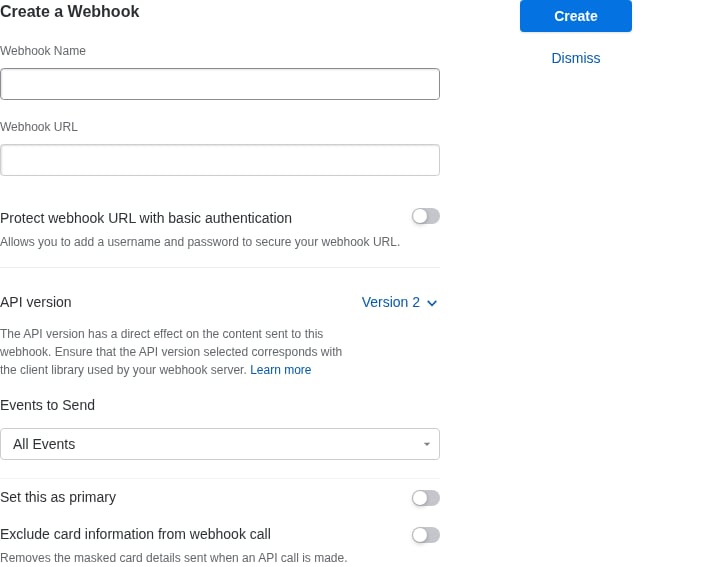
In the Create a Webhook panel, enter a Webhook Name (for example, StackOne Integration) and paste the Native Webhook URL you copied from StackOne into the Webhook URL field. Leave API version set to Version 2, and leave Events to Send as All Events (or select only the specific events you want). Leave Protect webhook URL with basic authentication off — the unguessable Native Webhook URL is the security boundary. Then click Create.
- Webhook Name — a descriptive name for internal reference (e.g. StackOne Integration).
- Webhook URL — paste the StackOne Native Webhook URL.
- API version — keep Version 2 (this connector expects the v2 payload shape).
- Events to Send — keep All Events, or pick a subset from the dropdown.
- Protect webhook URL with basic authentication — leave off.
Available webhook events
Chargebee delivers every change as a single generic event whose `event_type` names what happened, so StackOne exposes one event — Event (`chargebee_webhook_event`) — that carries every Chargebee event type. You choose which events are delivered with the Events to Send setting above (default All Events). The affected resource is included in the payload's `content` field.
Fired for every Chargebee event. Inspect the payload's `event_type` to decide how to react and read the affected resource from `content`.
- Event (`chargebee_webhook_event`) — Fired whenever any Chargebee event occurs, across subscriptions, customers, payments, invoices, credit notes, transactions, payment sources, cards, orders, quotes, product catalog (items, item prices, item families), and coupons.
The `event_type` field carries the specific Chargebee event. Common values include (see the Chargebee documentation for the full list of \~209 event types):
- Subscription — `subscription_created`, `subscription_activated`, `subscription_changed`, `subscription_cancelled`, `subscription_renewed`, `subscription_paused`, `subscription_resumed`, `subscription_deleted`.
- Customer — `customer_created`, `customer_changed`, `customer_deleted`.
- Payment — `payment_succeeded`, `payment_failed`, `payment_refunded`, `payment_initiated`.
- Invoice — `invoice_generated`, `invoice_updated`, `invoice_deleted`, `pending_invoice_created`.
- Credit note — `credit_note_created`, `credit_note_updated`, `credit_note_deleted`.
- Transaction — `transaction_created`, `transaction_updated`, `transaction_deleted`.
- Payment source / card — `payment_source_added`, `payment_source_updated`, `payment_source_deleted`, `card_expired`, `card_expiry_reminder`.
- Order — `order_created`, `order_updated`, `order_cancelled`, `order_delivered`.
- Product catalog — `item_created`, `item_price_created`, `item_family_created` (and their `_updated` / `_deleted` variants).
- Coupon — `coupon_created`, `coupon_updated`, `coupon_deleted`.
Delivery format
Details of how Chargebee delivers events to StackOne.
Chargebee sends a single JSON event object per HTTP POST (not a batched array). The payload's event\_type names the event (for example `subscription_created`), id (an `ev_…` value) is the event id, occurred\_at is the Unix timestamp, and content holds the affected resource(s). Chargebee does not sign webhook deliveries, so the unguessable Native Webhook URL is what keeps the endpoint secure. Events may arrive out of order or more than once — use the event id for deduplication.
- On sandbox (test) sites, Chargebee notes webhook delivery may be delayed by up to 10–15 minutes depending on system load. This delay does not occur on live sites.
- Chargebee expects a 2XX response and retries with exponential backoff for up to 3 days if it does not receive one.
## Verify
Your Connector should now be able to receive and process events. Try triggering an event and you should see an Event appear in the Connector logs.
This documentation is built and hosted on [Mintlify](https://mintlify.com), a developer documentation platform.